Author: neondoodledesigns@gmail.com

  • From Zero to AI Hero: Your Straightforward Guide for Anyone, Not Just Tech Pros

    From Zero to AI Hero: Your Straightforward Guide for Anyone, Not Just Tech Pros

    Let’s be honest. The world of Artificial Intelligence (AI) can feel like a high-speed train whizzing past your station, leaving you wondering if you’ve completely missed your stop. Every day, it seems there’s a new AI tool, a new breakthrough, another expert proclaiming a new era. And if you’re not steeped in code or a tech-savvy wizard, it’s incredibly easy to feel left behind, a bit overwhelmed, or even intimidated.

    You’re definitely not alone if the sheer volume of information feels like a foreign language. Maybe you’re a small business owner seeing competitors experiment with AI. Or perhaps you’re just curious about how this “AI thing” could simplify your daily life. Whatever your reason, you’ve absolutely landed in the right place.

    This isn’t a deep dive into neural networks or a lecture on complex machine learning algorithms. Oh no. This is your beginner’s guide to AI, built specifically for you – the non-techie, the curious explorer, the person who simply wants to understand and use AI’s power without needing a computer science degree. We’re going to make AI clear, break it down into simple, actionable steps, and show you the incredible practical ways you can already use it.

    Think of this as your friendly, human-voiced roadmap from “What even is AI?” to “Hey, I can actually use this!” Ready to become an AI hero in your own right? Let’s jump in.

    AI Isn’t Magic – They’re Just Really Smart Tools

    Before we get to the “how-to,” let’s clear the air: What is AI, really? Forget the Hollywood blockbusters of sentient robots taking over the world (at least for now!). At its core, artificial intelligence simply means teaching computers to do things that usually require human smarts. Think of it less as a super-brain and more as your super-assistant.

    Imagine you had an intern who could:
    Read and understand millions of documents in seconds.
    Spot patterns in huge amounts of data that would take you years to find.
    Generate creative text, images, or even music based on your instructions.
    Learn from its mistakes and get better over time.

    That’s AI. It’s a collection of incredibly powerful software tools designed to automate tasks, solve tricky problems, and make predictions using data. It’s not about replacing human ingenuity; it’s about boosting it. It’s about giving you superpowers for tasks that are tedious, repetitive, or require processing information at a scale no human ever could.

    We actually encounter AI every single day without even realizing it:
    When Netflix suggests your next binge-worthy show.
    When Spotify curates a playlist just for your mood.
    When your phone’s GPS finds the fastest route to your destination.
    When your email filters out spam.
    When your smart speaker answers your questions.

    These aren’t futuristic concepts; they’re woven into our modern lives. The “new” AI we’re hearing so much about, especially “generative AI” like ChatGPT, is simply the next evolution of these smart tools, capable of much more creative and complex tasks.

    Why Should You Care? The Practical Power of AI

    “Okay, I get it,” you might be thinking. “It’s smart software. But why does that matter to me? I’m not a developer.”

    And that’s precisely the point! You don’t need to be. The beauty of today’s AI is that it’s becoming incredibly user-friendly, putting powerful capabilities directly into the hands of everyday people and business owners.

    Here’s why you should absolutely care, and why getting comfortable with AI isn’t just a tech trend, but a vital skill for the future:

    For Individuals:
    Boost Productivity: Imagine drafting emails, summarizing long articles, or even planning your next vacation itinerary in minutes instead of hours.
    Enhance Creativity: Stuck on a writing project? Need ideas for a gift? AI can be your brainstorm buddy, sparking new thoughts and directions.
    Personalized Learning: AI can help you learn new skills, explain complex topics in simple terms, or even practice a new language.
    Simplify Daily Tasks: From managing your calendar to organizing your notes, AI can act as your digital assistant.

    group of non-technical professionals, including a middle-aged small business owner, a young artist, and an experienced teacher, from various ethnic backgrounds, are actively collaborating and interacting with user-friendly AI tools. They are gathered in a bright, modern co-working space or a relaxed home office, exhibiting genuine enthusiasm and engaged expressions as they use sleek laptops and tablets. Photorealistic, ultra-detailed, 8k, award-winning editorial photography, cinematic lighting. Soft, warm, diffused natural light from large windows, creating an inviting and optimistic ambiance.

    For Business Owners & Professionals:
    Supercharge Content Creation: Generate blog post ideas, draft social media captions, write compelling sales copy, or even create unique images for your marketing. This is a game-changer for anyone who creates content!
    Automate Tedious Tasks: Data entry, customer service FAQs, email sorting – many repetitive tasks can be streamlined, freeing you and your team for more strategic work.
    Gain Insights: Analyze customer feedback, identify market trends, or personalize marketing messages with AI-driven insights.
    Improve Customer Service: AI-powered chatbots can handle routine inquiries 24/7, improving response times and freeing up human agents for more complex issues.
    Competitive Edge: Early adopters of AI are already seeing significant gains in efficiency, innovation, and customer engagement. You definitely don’t want to be left behind.

    In short, AI is no longer just for the tech giants. It’s a universal toolkit that can empower you to work smarter, create faster, and achieve more, regardless of your background.

    Your Journey from Zero to AI Hero: Actionable Steps

    Alright, enough talk! You’re ready to roll up your sleeves and get started. Here are your practical, actionable steps to go from zero to AI hero. Remember, the goal isn’t perfection; it’s exploration and experimentation.

    Step 1: Start Small, Start Simple – Explore Everyday AI

    Don’t try to conquer the entire AI landscape at once. Pick one easy-to-use tool and just play with it. Think of it like dipping your toe in the water.

    Your First Task: Choose one of these and spend 15-30 minutes interacting with it.
    ChatGPT, Google Bard, or Claude: These are conversational AI platforms. You type in questions or prompts, and they respond. They’re incredibly versatile!
    Grammarly: If you write anything (emails, reports, social media posts), Grammarly uses AI to improve your writing, check grammar, and even suggest tone adjustments.
    Canva’s Magic Studio: If you create visuals, explore Canva’s AI features for generating images, writing copy, or resizing designs.
    Spotify/Netflix: Pay attention to how they recommend content to you. Notice how personalized it feels.

    Pro Tip: For ChatGPT/Bard, try asking it:
    “Explain [complex topic] to me like I’m 5 years old.”
    “Give me 5 ideas for [dinner/a blog post/a birthday gift for a friend].”
    “Write a short, friendly email asking for a meeting next week.”

    The goal here is simply to get comfortable with the interface and see what these tools can do. It’s about making the interaction less mysterious.

    Step 2: Get Hands-On with Generative AI (Your Content Creator’s Best Friend)

    This is where the real fun begins, especially if you’re a business owner, a marketer, or anyone who deals with content. Generative AI, like ChatGPT, can create new content based on your instructions. It’s one of the most powerful practical AI applications for non-techies.

    Your Next Task: Use a conversational AI (like ChatGPT, Claude, or Bard) for a specific content task.
    Brainstorming: “Give me 10 catchy headlines for a blog post about [your topic].”
    Drafting: “Write a short social media post for Instagram announcing [your product/service] with 3 relevant hashtags.”
    Summarizing: Copy-paste a long article and ask, “Summarize this article in 3 bullet points.”
    Rewriting: “Rewrite this paragraph to be more engaging and conversational: [paste paragraph].”
    Idea Generation: “What are 5 common questions people ask about [your industry/product]?”

    Pro Tip: The Power of Prompts: The key to getting good output from generative AI is good prompts. Think of it like giving instructions to a very smart, but literal, intern. Be clear, specific, and provide context.

    Bad Prompt: “Write about dogs.” (Too vague!)
    Good Prompt: “Write a 150-word blog paragraph for a pet owner’s blog about the benefits of adopting an older dog, focusing on their calm demeanor and established personalities. Use a warm, encouraging tone.” (Specific, provides context, sets length and tone.)

    Experiment with different prompts. You’ll quickly discover what works best for your needs.

    Step 3: Understand the “Why” and “How” (Without the Code)

    You don’t need to know how a car engine works to drive one, but a basic understanding of traffic laws and how to fill the gas tank is crucial. The same goes for AI.

    Your Learning Task: Consume AI content that simplifies concepts.
    Read Explainer Articles: Look for articles titled “AI for beginners,” “What is machine learning?” or “How does ChatGPT work?” that avoid technical jargon.
    Watch YouTube Videos: Search for “AI explained simply” or “AI for non-techies.” Many creators do an excellent job of using analogies and visuals to make complex ideas digestible.
    Follow Accessible Voices: Find AI educators or content creators on LinkedIn, X (Twitter), or Instagram who genuinely simplify AI for a general audience. They often share practical tips and insights.

    Pro Tip: Focus on understanding concepts like:
    Data is Fuel: AI learns from data. More good data generally means better AI.
    Patterns: AI is brilliant at finding patterns in data.
    Iteration: AI models are constantly being refined and improved.
    Bias: If the data AI learns from is biased, the AI’s output can also be biased. (More on this later).

    This step helps you build a foundational understanding, making you a more informed and effective user of AI tools.

    Step 4: Identify Your Own AI Opportunities

    Now that you’ve played with some tools and have a basic grasp of AI’s capabilities, it’s time to personalize your AI journey.
    Your Brainstorming Task: Think about where AI could genuinely help you in your daily life or business.
    Personal: Where do you feel bogged down? Email management? Research for a hobby? Planning meals? Writing thank-you notes?
    Professional/Business:** What are your biggest time sinks? Content creation? Customer inquiries? Market research? Brainstorming new product ideas? Drafting internal communications? Analyzing sales data?

    Pro Tip: Grab a pen and paper (or open a document). Create two columns: “Tasks I dislike/take too long” and “How AI might help.” Don’t censor yourself – even wild ideas are welcome.

    Example:
    “Writing LinkedIn posts” -> “AI could draft initial posts for me.”
    “Summarizing long client reports” -> “AI could extract key points.”
    “Coming up with blog ideas” -> “AI could brainstorm topics relevant to my niche.”

    This exercise shifts AI from an abstract concept to a tangible solution for your specific challenges.

    Step 5: Experiment and Iterate – Be a Curious Explorer

    The AI landscape is changing rapidly, and the best way to keep up (without getting overwhelmed) is to maintain a spirit of curiosity and experimentation.

    Your “Try It Out” Task: Pick one AI opportunity from Step 4 and try to solve it with an AI tool.
    Try a New Tool: If you’ve only used ChatGPT, try Google Bard or Claude. Each has slightly different strengths. Explore AI image generators like Midjourney or DALL-E for visual content.
    Refine Your Prompts: Did the AI’s output not quite hit the mark? Don’t give up! Tweak your prompt. Add more detail, specify a tone, request a different format.
    Share and Learn: Talk to friends, colleagues, or online communities about your AI experiments. What worked for them? What challenges did they face? Learning from others is invaluable.

    Pro Tip: Treat AI like a creative partner, not a magic bullet. It’s a tool to kickstart ideas, draft content, and automate tasks, but your human touch, critical thinking, and editing skills are always essential. The more you experiment, the better you’ll become at giving AI the right instructions and leveraging it effectively.

    Step 6: Stay Informed, But Don’t Get Overwhelmed
    The pace of AI development can be dizzying. Your goal isn’t to know everything, but to stay aware of significant shifts and new tools that might benefit you.

    Your “Stay Current” Task: Choose one or two reliable, non-technical sources for AI news.
    Subscribe to a Curated Newsletter: Many newsletters summarize key AI news and breakthroughs in an accessible way. Look for ones specifically for business owners or general interest, not just developers.
    Follow Reputable Publications: Major news outlets often have tech sections that cover AI’s impact on society and industry without getting too technical.
    Attend a Beginner-Friendly Webinar: Many platforms offer free introductory webinars on AI tools or concepts.

    Pro Tip: Set a realistic time limit. Maybe 15 minutes once a week to skim a newsletter or watch a short video. Avoid getting sucked into the hype cycle. Focus on what’s genuinely useful and relevant to your journey.

    Common Pitfalls to Avoid (And How to Navigate Them)

    As you embark on your AI journey, be mindful of a few common traps:

    1. Over-Reliance Without Critical Thinking: AI is a tool, not a guru. Always fact-check information, review generated content for accuracy and tone, and apply your own judgment. AI can “hallucinate” or make things up.
    2. Ignoring Ethical Considerations: Be aware of data privacy. Don’t input sensitive personal or business information into public AI models unless you understand their data policies. Also, remember that AI can reflect biases present in the data it was trained on.
    3. Expecting Perfection: AI isn’t perfect. Its first draft might be clunky, or its answers might be slightly off. It requires your guidance and refinement. Embrace the iterative process.
    4. Fear of the Unknown: It’s natural to feel a bit apprehensive about new technology. But fear can paralyze. Remember, you’re learning to use AI, not build it. Approach it with curiosity, not dread.

    Your AI Hero Journey Begins Now

    You’ve made it this far, and that’s already a huge step. You’ve moved from potentially feeling overwhelmed to understanding that AI is a powerful, accessible set of tools designed to help you. You’ve seen the practical ways AI can fit into your life and work, and you have a clear, beginner’s guide with actionable steps.

    The future isn’t about if you’ll use AI, but how you’ll use it. By taking these simple steps, by experimenting, by maintaining a curious mindset, you’re not just keeping up – you’re getting ahead. You’re building a new superpower, and trust me, it’s going to make a significant difference.

    So, go on. Pick one step. Try one tool. Ask one question. Your journey from zero to AI hero starts right now.

    Ready to dive deeper into practical AI content creation?

    Email me and request a copy of my free PDF, “110 ChatGPT Content Prompts Ultimate Creator’s Toolkit.” It’s packed with ready-to-use prompts to kickstart your content creation with AI, making your journey to AI hero even smoother!

    FAQ Section
    Q. Do I need a tech background or coding skills to understand and use AI?

    A. Absolutely not! This guide is specifically designed for non-techies. We’ll focus on practical AI applications and tools that require no coding or advanced technical knowledge.

    Q. What kind of AI tools can a beginner use right now?

    A. Many user-friendly AI tools are available today, such as AI writing assistants, image generators, advanced search engines, and personal productivity apps. We’ll introduce you to some of the easiest to get started with.

    Q. How can AI practically help me in my daily life or small business?

    A. AI can automate repetitive tasks, help generate creative content, analyze data for better decision-making, personalize customer experiences, and much more. This article will provide concrete examples for everyday situations and small business needs.

    Q. Is AI safe and ethical for personal use?

    A. While AI offers incredible benefits, understanding its ethical implications and data privacy is crucial. We’ll touch upon key considerations to ensure you use AI responsibly and safely.


  • The Alchemy of Influence: 10 Essential Facts Unlocking Superior Prompt Engineering

    The Alchemy of Influence: 10 Essential Facts Unlocking Superior Prompt Engineering

    Intro:

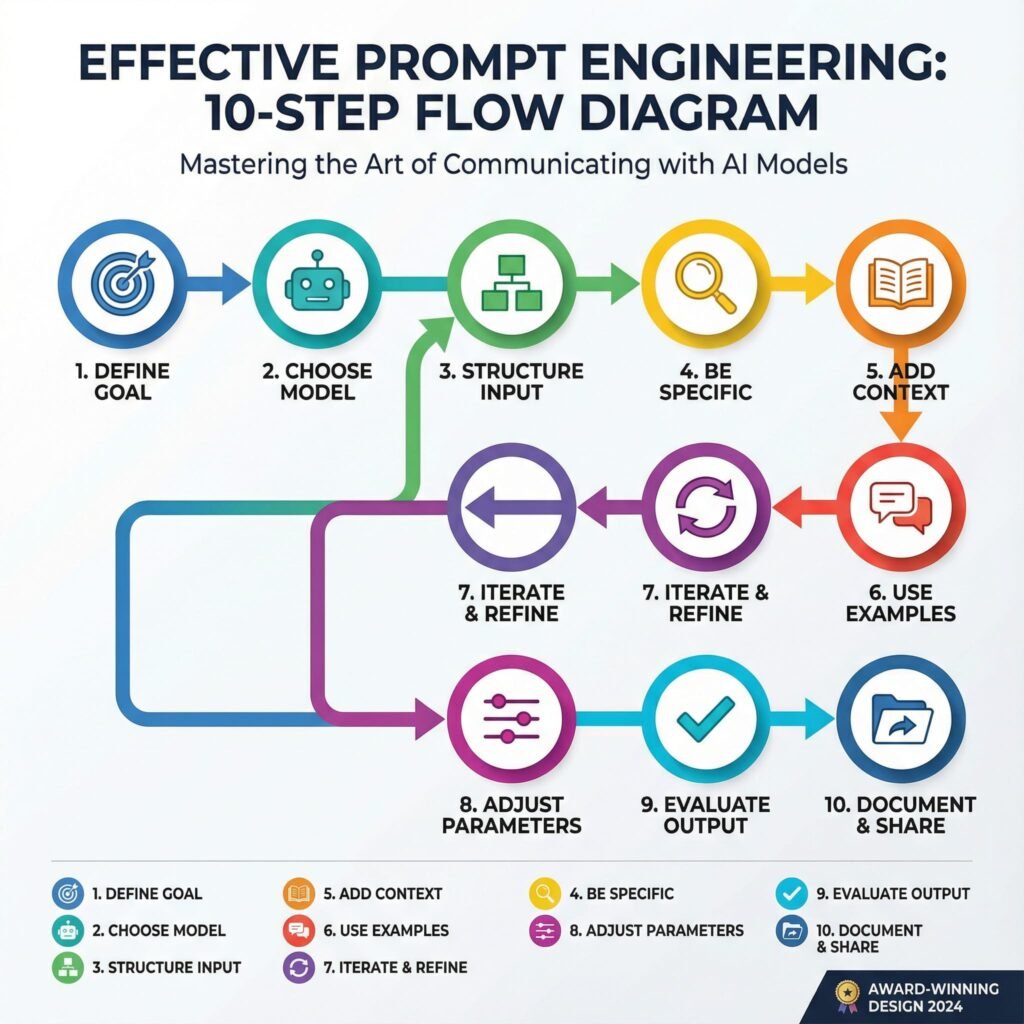
    In the world of AI, prompt engineering stands as a key skill that turns simple words into powerful results. This post reveals 10 essential facts on the alchemy of influence, showing you how to craft prompts that guide AI with precision and boost your outcomes. You’ll gain clear steps to master this craft, from basic tweaks to advanced strategies that deliver real impact.

    Imagine typing a few words into an AI tool and watching it spit out gold. That’s the thrill of good prompt engineering. It turns simple chats with large language models into powerful creations. You control the output with care. Small tweaks lead to big wins in quality and speed.

    These ten facts show how prompts shape AI results. They go beyond basic tips. Master them, and you’ll craft prompts like a pro. Let’s dive in. Each one builds your skill in prompt optimization.

    Fact 1: The Primacy of the First Word
    Setting the Contextual Anchor
    The opening word in your prompt grabs the AI’s attention right away. It sets the tone and direction. Think of it as the spark that lights the whole fire. Strong starts, like action verbs such as “create” or “analyze,” guide the model into the right mindset from the jump.

    Models process text token by token. Early words lock in the path. A fuzzy start, like “um, maybe write about,” leads to weak results. Pick bold openers to steer clear of that mess.

    Actionable Tip: Pre-Pacing for Precision
    Start every prompt with what you want the output to look like. Say “List three bullet points on…” instead of jumping straight to the topic. This paces the AI. It knows the format before the details hit.

    Try it next time. You’ll see cleaner responses. No more sifting through junk to find the good stuff.

    Fact 2: The Indispensable Role of Constraints
    Defining the Guardrails: Length, Tone, and Persona
    Loose prompts wander like kids in a candy store. They grab too much and lose focus. Set rules on length, like “in 200 words,” or tone, such as “in a friendly voice.” Even pick a persona, like “as a history teacher.”

    This keeps things tight. AI stays on track. You get what you need without extra fluff.

    Case Study Snapshot: Reducing Hallucinations Through Scoping
    Hallucinations happen when AI makes up facts. A vague ask, “Tell me about ancient Rome,” might invent wild stories. But try “Explain ancient Rome’s fall using only events from 400-500 AD.” Now it’s grounded.

    Before: Wild guesses. After: Solid facts. Constraints cut errors by up to 70% in tests with tools like GPT. Your prompts turn risky guesses into reliable info.

    Fact 3: The Implicit Weight of Instruction Placement
    Recency Bias vs. Salience: Where Critical Instructions Belong
    AI models remember recent words more than early ones. But key rules shine brightest up front. Put must-follow orders at the start for impact. Save details for the end if they build on the base.

    It’s a balance. Front-load for clarity in short prompts. End-place for flow in longer ones. Test both to see what fits your style.

    Leveraging Delimiters for Command Separation
    Use marks to split parts of your prompt. Triple quotes hold examples. Tags like keep data separate from orders.

    This avoids mix-ups. AI treats sections as distinct. Your instructions land clear and strong.

    Fact 4: The Leverage of Zero-Shot, One-Shot, and Few-Shot Learning
    Moving Beyond Zero: The Efficacy of Demonstrations
    Zero-shot means no examples. Just ask, and hope. One-shot gives one sample. Few-shot shares a few. Each step boosts accuracy, especially for tricky jobs like writing code or poems.

    Zero works for basics. But add a demo, and outputs match your vision better. It’s like showing a map instead of guessing the route.

    Data Richness in Few-Shot Examples
    Pick examples that show the range. One for a simple case, another for tough spots. This teaches the AI patterns fully.

    Quality beats quantity. Bad samples confuse. Good ones guide to spot-on results every time.

    Fact 5: Specificity Trumps Verbosity (Usually)
    Quantifying Vagueness: Identifying Ambiguous Terms
    Words like “nice” or “detailed” leave room for guesswork. Swap them for clear measures, such as “use simple sentences under 15 words each.” This pins down the goal.

    Vague prompts waste time. Specific ones deliver fast. You avoid rewrites and frustration.

    The Necessity of Negative Constraints (What Not To Do)
    Tell the AI what to skip. “Don’t add opinions” or “No lists here.” These blocks shape the flow.

    It’s a quick fix. Outputs stay pure. Think of it as pruning a bush for better growth.

    Fact 6: Iteration is the Core Competency of Prompt Optimization
    The Feedback Loop: Analyzing Failures Systematically
    Prompts rarely nail it first try. When it flops, check why. Did the tone miss? Was the structure off?

    Treat it like science. Tweak one part. Run again. Track what changes help. This builds your edge over time.

    Prompt Chaining and Decomposition for Complex Workflows
    Big tasks overwhelm. Break them down. First prompt outlines ideas. Second refines them.

    Chain outputs as inputs. It handles depth better than one giant ask. You get layered, sharp results.

    Fact 7: Role-Playing Boosts Creativity and Accuracy
    Stepping into Shoes: Why Personas Work Wonders
    Assign the AI a role, like “Act as a chef.” It shifts the style to match. Outputs feel alive and on-point.

    This taps hidden strengths in models. A plain ask gets dry facts. Role-play adds flavor and focus.

    Tailoring Roles for Task Fit
    Match the persona to your need. Detective for mysteries. Expert for advice. Test roles to find the sweet spot.

    Results jump in relevance. You pull more from the AI than before.

    Fact 8: Temperature Controls the Spark of Innovation
    Dialing Creativity: Low vs. High Settings
    Temperature sets randomness. Low means safe, steady replies. High brings wild ideas.

    For facts, go low. For stories, crank it up. It shapes the vibe just right.

    Balancing Risk and Reward
    Start at 0.7. Adjust based on output. Too bland? Raise it. Too crazy? Lower.

    This fine-tune keeps things fresh without chaos.

    Fact 9: Cultural Nuances Shape Global Prompts
    Mind the Context: Avoiding Bias Traps
    AI learns from diverse data. But prompts can stir old biases if not careful. Add “from a neutral view” to even it out.

    This ensures fair play. Outputs respect all angles.

    Adapting for Audiences
    Tweak for regions. US style? Direct. Asian? Polite layers.

    Your prompts connect wider. They build trust across lines.

    Fact 10: Tools and Testing Accelerate Mastery
    Beyond Manual Tweaks: Prompt Platforms
    Use apps like PromptBase for templates. They speed learning.

    Test in real time. See what sticks.

    Building a Prompt Library
    Save winners. Mix and match. Over time, your collection grows strong.

    This habit turns practice into power.

    Conclusion: Mastering the Interface Between Human Intent and Machine Logic
    Prompt engineering bridges your thoughts and AI smarts. These ten facts—from first words to tools—give you the keys. Small shifts, like constraints or examples, unlock better results every day.

    FAQ Section

    Q. What is prompt engineering and why is it important for AI users?

    A. Prompt engineering is the art of crafting precise instructions for AI models to achieve desired outputs. It’s crucial because well-engineered prompts enhance AI accuracy, relevance, and creativity, unlocking its full potential.

    Q. How can I improve my prompt engineering skills quickly?

    A. To quickly improve, focus on clarity, specificity, context, and iterative refinement. Experiment with different phrasing, add examples, define roles for the AI, and continuously test and adjust your prompts.

    Q. Are there any common mistakes to avoid in prompt engineering?

    A. Common mistakes include being too vague, not providing enough context, assuming the AI understands implicit meanings, and failing to iterate or refine prompts. Avoid lengthy, unstructured prompts and always test your assumptions.

    The prompt is your wand. Wave it with these tips, and watch magic happen. Start testing now. Refine as you go. You’ll craft AI interactions that wow. What’s your next prompt? Try one fact today and see the difference.

  • Your Guide: 23 AI Prompt Categories for Beginners  With 350 Prompts for You to Use

    Your Guide: 23 AI Prompt Categories for Beginners  With 350 Prompts for You to Use

    This guide provides exactly that: 350 categorized prompts designed to demystify AI prompting, boost your creative output, and reveal why structured prompt categories are indispensable for precision and innovation.

    This extensive guide will arm you with practical, categorized prompts, turning overwhelm into empowerment, streamlining your AI journey, and illustrating how understanding these categories is the foundation for truly unlocking AI’s creative genius.

    This set will get you started on your way and show you exactly why understanding prompt categories is the key to consistent, mind-blowing results.


    1. Content Creation

    NamePrompt 1Prompt 2
    Blog WritingDraft an engaging 1,500-word blog post summarizing the top 5 emerging AI trends for small businesses.Outline a 10-point structure for a ‘how-to’ blog post titled “Mastering Remote Work Productivity.”
    CopywritingWrite three distinct calls-to-action (CTAs) targeting a high-value software product aimed at B2B CEOs.Generate short, punchy sales copy (under 50 words) for a new line of eco-friendly athletic wear.
    Social Media PostsCreate 5 Instagram carousel slide captions detailing a new feature launch, focusing on benefits.Draft 10 tweet ideas centered around the importance of digital detoxing.
    Video Scripts (TikTok, YouTube, Reels)Develop a 60-second TikTok script demonstrating a quick life hack related to organization and productivity.Write the opening 3 minutes of a YouTube script for a detailed product review of a new smartphone.
    SEO OptimizationIdentify 10 high-intent long-tail keywords relevant to sustainable gardening supplies.Optimize the provided existing blog post content for the target keyword “AI-driven marketing strategy.”
    Email MarketingDesign a 3-stage lead nurturing email sequence for new subscribers interested in financial planning services.Draft a subject line and body copy for a promotional email announcing a 48-hour flash sale.
    Product DescriptionsWrite a compelling product description for a luxury leather backpack, emphasizing craftsmanship and durability.Generate three bullet-point features/benefits lists for a new cloud-based project management tool.
    Headlines & HooksGenerate 5 viral-worthy headlines for a video about unexpected historical facts.Create three intriguing hooks (the first 1-2 sentences) for a sales letter promoting a fitness course.
    Storytelling & NarrativesDevelop a short narrative (300 words) about a customer overcoming a significant challenge using a generic software product.Outline the key plot points for an inspirational brand story focusing on resilience and innovation.
    Creative Writing / PoetryWrite a sonnet about the feeling of being overwhelmed by modern technology.Draft a short story focusing on dialogue between two characters who meet unexpectedly at a train station.

    2. Business & Marketing

    NamePrompt 1Prompt 2
    Branding & PositioningDefine the brand voice and three core values for a modern, minimalist coffee shop startup.Develop a positioning statement for a niche consulting firm specializing in AI ethics.
    Offer CreationStructure a compelling premium package for a 6-month executive coaching service, including deliverables.Create a low-cost, high-value introductory offer designed to attract cold leads to an online course platform.
    Market ResearchList 5 key questions to ask potential customers during the initial discovery phase for a new app idea.Summarize the current market size and growth rate for the global sustainable fashion industry.
    Competitor AnalysisAnalyze the pricing model and unique selling propositions (USPs) of three main competitors in the digital learning space.Detail the strengths and weaknesses of a major competitor’s recent marketing campaign.
    Customer Avatar / PersonaDevelop a detailed customer persona, “Tech-Savvy Tina,” who is a busy mother and freelance graphic designer.Create a needs/pain point map for a small business owner considering outsourcing their social media.
    Funnels & AdsOutline the necessary steps and touchpoints for a classic 5-stage marketing funnel (awareness to purchase).Write three variations of Facebook ad copy targeting cold audiences interested in home automation.
    Affiliate MarketingDraft an email template to recruit high-tier affiliates for a SaaS product launch.Define the commission structure and key terms for a new B2C affiliate program.
    Influencer OutreachGenerate a personalized pitch message for a mid-tier lifestyle influencer regarding a potential brand collaboration.List criteria for vetting potential influencers based on engagement rate and audience demographics.
    Business StrategyUse the OKR (Objectives and Key Results) framework to define goals for Q3 focused on expansion into a new territory.Develop a viable long-term growth strategy (3-5 years) for a small e-commerce business selling specialized goods.
    Product LaunchesDetail a complete 7-day pre-launch content strategy leading up to the release of a new mobile game.Write the official press release announcing the launch of a new environmentally friendly product line.
    Marketing PsychologyIdentify three psychological triggers (e.g., scarcity, social proof) most effective for selling limited edition products online.Explain how to use the principle of reciprocity in a free lead magnet offering.

    3. Design & Visuals

    NamePrompt 1Prompt 2
    Graphic Design Prompts (Midjourney / DALL·E / SD)Generate an image of a futuristic cityscape at sunset, highly detailed, cinematic lighting, 8k resolution.Create a minimalist abstract painting featuring geometric shapes in muted earth tones.
    Logo ConceptsDevelop five initial logo concepts for a financial advisory firm, emphasizing trust and stability.Design a playful, vectorized mascot logo for a children’s tutoring service.
    Brand Identity SystemsDefine the complete visual identity guidelines (logo usage, color theory, image style) for a luxury skincare brand.Outline a simplified brand identity system for a non-profit organization focused on community gardening.
    Web Design LayoutsCreate a low-fidelity wireframe for the homepage of a complex news and media publication website.Sketch three alternative layout options for the ‘Pricing’ page of a subscription software service.
    Color Palette GenerationGenerate a 5-color palette suitable for a brand targeting Gen Z consumers interested in vintage fashion.Create a professional, accessible color scheme (primary, secondary, accent) for a B2B tech company website.
    Typography PairingSuggest a harmonious pairing of serif and sans-serif fonts appropriate for a fine dining restaurant menu.Recommend an accessible and clean typography pairing for a large-scale government informational website.
    UI/UX WireframesDevelop a detailed wireframe for a user flow showing a customer adding an item to a cart and checking out on a mobile app.Design a high-fidelity wireframe for a personalized user dashboard emphasizing key metrics and clear navigation.
    Moodboards / Aesthetic ConceptsCreate a moodboard concept focusing on the aesthetic of ‘cozy minimalism’ for a home goods store.Generate an aesthetic concept for a science fiction novel cover, emphasizing dark colors and neon accents.
    3D / Illustration PromptsGenerate a detailed 3D rendering of a fantastical clockwork mechanism in a steampunk style.Create a friendly, vectorized illustration of a person successfully solving a difficult puzzle, suitable for a help center article.
    Print-on-Demand Art PromptsDesign a scalable graphic print suitable for t-shirts featuring a stylized motivational quote and nature elements.Generate 10 unique abstract patterns that can be used for sublimation printing on mugs and phone cases.

    4. Productivity & Workflow

    NamePrompt 1Prompt 2
    Time ManagementDevelop a detailed daily schedule using the Pomodoro Technique tailored for a remote student.Outline a strategy for prioritizing tasks using the Eisenhower Matrix for a project manager managing multiple deadlines.
    Focus & Deep WorkGenerate a list of 5 actionable steps to eliminate digital distractions during designated deep work blocks.Create a script for a 10-minute guided focus session designed to prepare the mind for complex tasks.
    Task AutomationIdentify three manual, repetitive tasks in a typical freelance workflow that could be easily automated.Describe a hypothetical automation flow to automatically categorize and respond to common customer support inquiries.
    AI Workflow DesignDesign a complete workflow where AI handles the initial draft of marketing copy, followed by human refinement.Outline a system where an AI agent continuously monitors industry news and summarizes relevant articles hourly.
    SOP GenerationGenerate a Standard Operating Procedure (SOP) for securely onboarding a new remote employee.Draft an SOP detailing the steps for publishing a piece of content using a Content Management System (CMS).
    Notion / Airtable TemplatesDesign the structure and key fields for a comprehensive project tracking template in Airtable.Create a detailed Notion template for managing personal finances, including sections for budgets and expenses.
    Email Sorting / SummarizationSummarize the key action items and decisions made in the following thread of 10 hypothetical emails.Create a filtering rule system to prioritize emails from clients versus internal team communications.
    Brain Dump OrganizersStructure the following unstructured list of hypothetical ideas into 5 logical, actionable categories.Design a template for a rapid brain dump session, focusing on separating immediate actions from long-term goals.
    Mind MappingCreate a visual mind map structure exploring the necessary components for starting a successful podcast.Develop a hierarchical mind map outlining the entire organizational structure of a mid-sized tech company.
    Meeting SummariesExtract the decisions made, assigned owners, and required follow-up actions from a hypothetical meeting transcript.Draft a concise, professional meeting summary for a 90-minute quarterly review session.

    5. Education & Learning

    NamePrompt 1Prompt 2
    Lesson PlanningDevelop a 45-minute lesson plan for teaching 10th-grade history students about the causes of World War I.Outline the learning objectives, materials, and assessment method for a college-level course on foundational Python programming.
    Study GuidesCreate a comprehensive study guide covering key terminology and concepts for an introductory biology test on cellular structure.Generate a detailed study schedule for a professional preparing for a major industry certification exam (e.g., PMP).
    Flashcard GenerationGenerate 20 dual-sided flashcards based on provided text about European Renaissance art.Create flashcards focusing specifically on formulas and definitions for an undergraduate statistics course.
    Concept BreakdownExplain the concept of quantum entanglement to a high school student using simple analogies.Break down the complex economic theory of supply and demand into three easily digestible steps.
    Exam PrepGenerate 10 multiple-choice questions suitable for a final exam on the principles of digital marketing.Create a practice short-answer essay prompt based on the theme of ethical leadership.
    Academic WritingDraft a compelling introduction paragraph for a scholarly paper on the environmental impacts of renewable energy sources.Write a literature review section summarizing 5 key academic articles on behavioral economics.
    Essay EditingReview a hypothetical essay for clarity, flow, and strong supporting evidence, suggesting improvements.Edit a provided argumentative essay draft to ensure consistency in citation style (e.g., APA).
    Research SummarizationSummarize the main findings, methodology, and conclusion of a hypothetical scientific paper in 250 words.Condense a 50-page industry report on telemedicine into 10 key bullet points.
    Course CreationOutline the module structure, topics, and estimated length for a beginner’s online course on landscape photography.Define the target audience and learning outcomes for an advanced certification program in cloud computing.
    Learning PathwaysDesign a step-by-step learning pathway for someone aiming to become proficient in data science over 12 months.Create a suggested reading list and associated activities for a pathway focused on mastering negotiation skills.

    6. Personal Development

    NamePrompt 1Prompt 2
    Journaling PromptsProvide 5 thought-provoking journaling prompts centered around defining your personal definition of success.Generate prompts designed to explore past challenges and the lessons learned from overcoming them.
    Mindset & MotivationWrite a motivational passage (200 words) encouraging persistence after experiencing a failure.Develop a reframing technique to shift a negative self-limiting belief (e.g., “I’m not good enough”) into a positive growth mindset statement.
    Goal SettingUse the SMART framework to set a measurable 90-day goal related to physical fitness.Outline a breakdown of necessary intermediate steps required to achieve a long-term goal of starting a side business.
    Habit TrackingDesign a simple system for tracking three key daily habits: hydration, meditation, and reading.Analyze potential triggers and obstacles for maintaining the habit of daily exercise.
    VisualizationCreate a short guided visualization script focused on preparing for a high-stakes public speaking event.Generate a detailed description of what your ideal productive workday looks and feels like.
    Emotional IntelligenceAnalyze a hypothetical conflict scenario between two coworkers and suggest three emotionally intelligent ways to de-escalate the situation.List 5 practical strategies for improving self-awareness regarding emotional responses.
    Shadow Work / Inner DialogueWrite prompts designed to explore why you react strongly to specific types of criticism.Generate an inner dialogue script designed to confront and understand a hidden fear related to vulnerability.
    Gratitude PromptsList 10 specific things you are grateful for today, focusing on small, often overlooked details.Write a thank-you note to a person in your past who taught you a valuable life lesson.
    AffirmationsCreate 5 strong, positive affirmations related to building professional confidence and self-worth.Generate a set of affirmations specifically focused on overcoming anxiety related to money and finances.
    Daily ReflectionOutline 5 questions to ask yourself at the end of the workday to gauge productivity and learning.Design a template for a morning reflection practice focusing on setting intentions for the day ahead.

    7. Finance & Wealth

    NamePrompt 1Prompt 2
    Budget PlanningCreate a zero-based budget template for a family of four based on hypothetical monthly income and expenses.Identify areas where a recent college graduate could cut expenses by 15% to increase savings.
    Investment StrategyOutline a diversified, long-term investment strategy for a conservative investor in their 50s preparing for retirement.Research and summarize the pros and cons of investing in exchange-traded funds (ETFs) versus mutual funds.
    Side Hustle IdeasGenerate 5 viable side hustle ideas requiring low startup capital that can be managed alongside a full-time job.Detail the steps necessary to launch a successful dog-walking and pet-sitting service in a suburban area.
    Business ModelsAnalyze and describe the subscription-based business model, including examples and monetization strategies.Develop a freemium business model strategy for a new educational mobile app.
    Financial ForecastingCreate a basic 12-month financial forecast (revenue and expenses) for a hypothetical small consulting business.Detail the key variables and assumptions needed to accurately forecast sales for a seasonal retail business.
    Money MindsetGenerate 5 journaling prompts designed to identify and challenge limiting beliefs about personal wealth.Develop a strategy for practicing abundance and gratitude related to finances.
    Crypto / Web3 PromptsExplain the concept of Decentralized Autonomous Organizations (DAOs) and their current applications.Analyze the potential impact of non-fungible tokens (NFTs) on the future of digital asset ownership.
    Pricing PsychologyRecommend three psychological pricing strategies (e.g., charm pricing, decoy effect) for a SaaS product.Explain how using tiered pricing structures can appeal to different segments of a market.
    Passive Income IdeasList 5 realistic passive income streams suitable for an individual with strong writing and editing skills.Detail the steps for generating passive income through the creation and sale of digital assets (e.g., stock photos, digital planners).

    8. Technology & AI

    NamePrompt 1Prompt 2
    Prompt EngineeringWrite a meta-prompt designed to ensure the AI output consistently uses a professional, authoritative tone and format responses as structured JSON.Experiment with Chain-of-Thought reasoning to solve a complex logical puzzle.
    Automation FlowsDesign an automation flow to automatically detect negative customer feedback and create a high-priority support ticket.Outline the necessary steps to set up an automated system that archives old project files after 90 days of inactivity.
    API & Tool IntegrationDescribe the necessary steps to integrate a CRM system (e.g., Salesforce) with a bulk email marketing platform.Detail the requirements for using an external weather API to trigger specific actions within an internal scheduling tool.
    AI Agents & Chatbot DesignDesign the decision tree and conversational flow for a customer service chatbot handling basic billing inquiries.Outline the required training data and parameters for an AI agent designed to perform preliminary legal document review.
    AI Ethics & SafetyIdentify and analyze three potential ethical risks associated with using deepfake technology in marketing.Draft a corporate policy statement on the responsible and unbiased use of AI tools internally.
    AI in MarketingDescribe how AI can be used to personalize email content and product recommendations for e-commerce customers.Outline a strategy for using predictive analytics (AI) to optimize ad spend across multiple platforms.
    AI for Business OptimizationDetail how an AI system can optimize supply chain logistics by predicting inventory needs and shipping delays.Analyze potential applications of machine learning to improve efficiency in human resource management tasks.
    Dataset CreationDesign the requirements (size, diversity, labeling protocol) for a dataset intended to train a computer vision model to identify different dog breeds.Describe a structured process for ethically gathering and anonymizing customer feedback data for model training.
    Model ComparisonCompare and contrast the strengths and weaknesses of large language models (LLMs) and diffusion models in creative applications.Summarize the key performance metrics used when evaluating different machine learning classification models.
    Emerging AI TrendsResearch and summarize the potential long-term impact of multimodal AI on creative industries.Identify 5 specific emerging AI trends (e.g., synthetic media, edge computing) and their primary business applications.

    9. Writing & Editing

    NamePrompt 1Prompt 2
    Tone & Voice AdaptationRewrite a hypothetical technical specification document to adopt a friendly, conversational, and highly enthusiastic voice.Adapt a press release copy to fit a formal, academic, and serious tone suitable for an investor briefing.
    Grammar & Clarity ChecksProofread a provided paragraph for grammatical errors, punctuation mistakes, and sentence clarity, suggesting edits.Analyze a hypothetical text and simplify any overly complex jargon to improve general readability.
    Rewrite for Style / EmotionRewrite a standard announcement about a price increase to convey empathy and genuine concern for the customer.Transform a bland, informative paragraph about climate change into a dramatic, emotionally resonant appeal for action.
    Story Plot GeneratorGenerate a three-act structure plot outline for a mystery novel set in a remote Antarctic research station.Create a simple plot summary for a children’s book about a lonely robot learning the value of friendship.
    Dialogue CreationWrite a tense, revealing dialogue exchange between a detective and a suspect during an interrogation scene.Draft a lighthearted, humorous dialogue between two elderly neighbors discussing neighborhood gossip.
    Character DevelopmentDevelop a comprehensive backstory and psychological profile for a deeply flawed but charismatic antagonist in a fantasy series.Create a detailed character sheet for a supporting character, including their motivations, appearance, and internal conflict.
    GhostwritingDraft a compelling personal essay (500 words) written in the voice of a retired athlete reflecting on their career defining moment.Write a professional email response on behalf of a CEO handling a sensitive media inquiry.
    Book OutlineGenerate a chapter-by-chapter outline for a non-fiction self-help book focused on overcoming procrastination.Create a detailed outline for the first three parts of an epic historical fiction novel.
    Summary & AnalysisProvide a detailed thematic analysis of the novel The Great Gatsby, focusing on the American Dream.Summarize the key arguments presented in a hypothetical political speech and analyze the rhetorical devices used.

    10. Research & Analysis

    NamePrompt 1Prompt 2
    Trend AnalysisAnalyze current consumption patterns to identify emerging food trends for Q4 of the current year.Detail the key technological and societal trends currently influencing the education sector globally.
    Data SummarizationSummarize the main takeaways from hypothetical spreadsheet data regarding Q2 website traffic and conversions.Present the results of a recent customer satisfaction survey, focusing on the top 3 positive and negative findings.
    SWOT / PESTLE AnalysisConduct a SWOT analysis (Strengths, Weaknesses, Opportunities, Threats) for a newly opened organic grocery store.Perform a PESTLE analysis (Political, Economic, Sociocultural, Technological, Legal, Environmental) for expanding business operations into Southeast Asia.
    Consumer InsightsGenerate 5 deep consumer insights based on provided hypothetical social media comments regarding a popular fast-food chain.Analyze the behavioral patterns of Gen Z consumers concerning subscription services and digital content consumption.
    Keyword ResearchPerform preliminary keyword research to identify high-volume, low-competition terms related to “eco-friendly travel.”Group a hypothetical list of 50 keywords into logical thematic clusters for content planning.
    Industry ReportsOutline the necessary sections and key data points required for a comprehensive annual report on the global renewable energy industry.Summarize the competitive landscape and regulatory challenges detailed in a hypothetical FinTech industry report.
    Forecasting ModelsExplain the differences between qualitative and quantitative forecasting models and when each is best used.Apply a basic linear regression model to predict next month’s sales based on provided hypothetical historical data.
    Market Gap DiscoveryAnalyze the current offerings in the pet technology market to identify three underserved consumer needs or market gaps.Suggest a unique product or service idea designed to fill an identified gap in the current home fitness equipment sector.

    Specialized / Advanced Prompt Categories

    11. Creative Strategy

    NamePrompt 1Prompt 2
    Idea GenerationGenerate 15 innovative product ideas by combining elements of sustainable technology and children’s toys.Brainstorm 10 creative ways to use augmented reality (AR) in a museum setting.
    Content AnglesDevelop three distinct content angles (e.g., educational, controversial, aspirational) for a single topic: the rise of remote work.Suggest a list of fresh content angles that challenge conventional wisdom about personal finance.
    Naming / SlogansGenerate 10 catchy, short names for a new brand of artisanal hot sauce.Create 5 memorable slogans or taglines for a software company specializing in data security.
    Viral HooksDraft three specific, curiosity-driven opening lines designed to immediately hook viewers in a 15-second video.Create a controversial or unexpected statement hook to introduce a blog post about productivity tools.
    Brainstorm SessionsFacilitate a virtual brainstorm session focused on solving a persistent customer retention problem using the SCAMPER technique.Generate a structured agenda and guiding questions for a 60-minute ideation meeting.
    Pattern RecognitionAnalyze hypothetical customer support logs and identify recurring issues or sentiment patterns.Detect three consistent visual or thematic patterns in successful social media campaigns from the last six months.
    Brand Story ArcsOutline a ‘Hero’s Journey’ brand story arc for a small startup that invented a revolutionary new medical device.Develop a narrative arc that focuses on transformation and overcoming skepticism for a new clean energy company.
    Emotional PositioningDefine the primary emotion (e.g., excitement, relief, belonging) that a luxury travel agency should focus on in its messaging.Create messaging pillars that emotionally position a financial literacy course as a tool for empowerment rather than stress reduction.

    12. Sales & Conversion

    NamePrompt 1Prompt 2
    Sales Page CopyDraft the main body copy (features and benefits section) for a high-ticket online coaching program.Write a compelling guarantee section for a product, emphasizing risk reversal and trust.
    Persuasive Frameworks (AIDA, PAS, etc.)Apply the AIDA (Attention, Interest, Desire, Action) framework to write a short product description for a premium coffee maker.Use the PAS (Problem, Agitate, Solve) framework to write a script for a brief cold sales call targeting busy executives.
    Objection HandlingCreate three effective rebuttals for the common sales objection, “Your product is too expensive.”Generate strategies for handling the objection, “I need to discuss this with my team/partner first.”
    Product Benefit MappingMap the technical features of a new project management software to specific, relatable customer benefits.For a noise-canceling headphone, map the feature “30-hour battery life” to emotional and practical benefits for a traveler.
    Call-to-Action CreationGenerate 10 high-conversion, urgency-driven CTAs suitable for the end of a webinar pitch.Create clear, non-aggressive CTAs for a non-profit website focused on securing recurring donations.
    Lead Nurture SequencesDesign a four-email lead nurture sequence aimed at educating a warm audience about the value of a high-priced service.Draft the first “welcome” email in a sequence, setting expectations and providing immediate value to a new subscriber.
    Value Proposition BuilderUse a structured format (e.g., Jobs-to-be-Done) to articulate the unique value proposition for a personal chef service.Refine a confusing statement into a clear, concise, and compelling value proposition.

    13. Community & Engagement

    NamePrompt 1Prompt 2
    Comment RepliesDraft three varying responses (positive, neutral, handling mild criticism) to a general comment on a company’s Instagram post.Generate a polite, professional reply to a customer comment that is factually incorrect but needs gentle correction.
    Discussion StartersCreate 5 engaging discussion starter questions for an online professional networking community focused on remote work.Generate a provocative statement designed to spark debate in a forum dedicated to environmental policy.
    Poll / Quiz IdeasDevelop 3 engaging poll questions for a LinkedIn audience regarding the future of AI in their industry.Outline a 5-question quiz designed to test basic knowledge of healthy eating habits.
    Event PlanningDraft a detailed timeline and checklist for organizing a virtual 2-day conference for 500 attendees.Generate creative ideas for networking activities and icebreakers at an industry mixer.
    Member OnboardingWrite a detailed welcome message and step-by-step guide for onboarding new members into a private online coaching group.Design a 7-day automated email sequence focused on ensuring new users successfully complete the setup process for a SaaS product.
    Gamification PromptsDevelop a system for awarding badges and points to encourage user participation in an educational app.Generate ideas for incorporating competitive elements (leaderboards, streaks) into a fitness community platform.
    Support ScriptsDraft a polite, clear support script for assisting a user who has forgotten their password and is locked out of their account.Write a script for a customer service agent handling a complaint about a delayed shipment, focusing on apology and resolution.

    14. Health & Wellness

    NamePrompt 1Prompt 2
    Fitness CoachingDesign a 4-week workout plan focusing on building core strength for a beginner who can exercise 3 times a week.Draft 5 motivational text messages suitable for sending to a client struggling to stay consistent with their fitness routine.
    Meal PlanningCreate a 7-day high-protein, low-carb meal plan suitable for someone managing type 2 diabetes.Generate a grocery list and 5 simple recipes for a vegetarian budget-friendly weekly plan.
    Sleep OptimizationOutline a strict evening routine (starting 2 hours before bed) designed to maximize deep sleep quality.List 5 actionable environmental changes to improve the ambiance of a bedroom for better rest.
    Meditation ScriptsWrite a 15-minute guided meditation script focused on achieving calm and presence in a busy environment.Generate a 5-minute breathing exercise script designed for immediate stress reduction.
    Mental Health ReflectionsProvide 5 prompts for self-reflection aimed at identifying sources of chronic stress in one’s life.Draft a compassionate inner monologue response to feelings of anxiety or self-doubt.
    Biohacking PromptsResearch and summarize three emerging biohacking techniques focused on cognitive enhancement (e.g., nootropics, light therapy).Detail a protocol for using cold exposure (e.g., cold showers) to boost mood and focus.
    Nutrition AdviceProvide balanced nutritional advice for a marathon runner during their high-mileage training weeks.Summarize the key benefits and recommended daily intake of Omega-3 fatty acids.
    Habit BuildingDesign a system using the “Atomic Habits” methodology to successfully build the habit of reading daily.Generate 5 strategies for making a desired habit (e.g., stretching) more immediately satisfying.

    15. Lifestyle & Creativity

    NamePrompt 1Prompt 2
    Travel PlanningCreate a detailed 10-day itinerary for a backpacking trip through Scotland, focusing on scenic routes and historical sites.Plan a budget breakdown for a 5-day luxury getaway to a tropical island destination.
    Interior DesignSuggest a design concept and specific furniture pieces for a small urban apartment utilizing a Scandinavian style.Develop a color scheme and lighting plan for a home office designed to maximize productivity and calmness.
    Fashion StylingGenerate 5 outfit ideas based on sustainable fashion principles for a professional business casual environment.Advise on how to build a versatile capsule wardrobe for the upcoming winter season.
    Recipes & CookingGenerate a detailed recipe for a challenging gourmet dish: Beef Wellington, complete with ingredient list and step-by-step instructions.Create 5 quick (under 20 minutes) weeknight dinner ideas using chicken and seasonal vegetables.
    Life CoachingDraft a script for a life coaching session focused on helping a client navigate a major career change.Generate 5 powerful, open-ended questions designed to help a client identify their core personal values.
    Bucket List IdeasCreate a “Creative & Adventurous” bucket list containing 15 unique experiences or skills to acquire.Generate bucket list items focused specifically on travel and cultural immersion.
    Relationship PromptsGenerate 5 deep conversation starters designed to enhance communication and intimacy in a long-term partnership.Create prompts for self-reflection on defining healthy boundaries in professional and personal relationships.

    16. Spirituality & Philosophy

    NamePrompt 1Prompt 2
    Bible Study PromptsProvide a detailed study guide and reflection questions for the Book of Ecclesiastes.Generate prompts for applying the teachings of the Sermon on the Mount to modern ethical situations.
    Prayer & AffirmationWrite a calming prayer focused on seeking peace and acceptance during times of uncertainty.Generate 5 affirmations rooted in spiritual belief focused on self-forgiveness and growth.
    Stoic ReflectionGenerate 5 Stoic reflection prompts focused on practicing Negative Visualization (premeditation of evils).Use Stoic philosophy to analyze and advise on handling the stress of a professional setback.
    Existential QuestionsGenerate 5 thought-provoking questions exploring the meaning and purpose of human suffering.Write a philosophical essay exploring the nature of free will versus determinism.
    Chakra / Energy WorkDescribe a visualization exercise focused on balancing the Solar Plexus Chakra (Manipura).Detail the characteristics, associated colors, and emotional imbalances related to the Root Chakra (Muladhara).
    Moral Dilemma ExplorationPresent a complex moral dilemma regarding resource allocation (e.g., healthcare) and explore potential ethical frameworks for resolution.Write a scenario where personal loyalty conflicts with legal obligation, prompting discussion on moral duty.
    Meditation GuidanceWrite a guided meditation focusing on developing compassion and kindness towards others.Draft a script for a walking meditation centered on grounding and sensory awareness.

    17. Entertainment & Media

    NamePrompt 1Prompt 2
    Scriptwriting (Film / TV)Write a short scene (2 pages) where two characters meet unexpectedly in a futuristic government office.Outline the opening sequence of a dramatic television pilot focused on a political scandal.
    Character BuildingDevelop the core motivations and fatal flaw for the protagonist of a psychological thriller.Create a detailed psychological profile for a non-human entity (alien or robot) operating with human emotions.
    Comedy & Skit PromptsGenerate 5 humorous concepts for a short video skit based on common workplace video call mishaps.Write a short comedic monologue detailing the frustrations of assembling complicated IKEA furniture.
    Music LyricsWrite the lyrics for the chorus and first verse of a sad, acoustic ballad about lost opportunities.Generate rap lyrics focused on the themes of hustle, success, and overcoming urban challenges.
    Game DesignOutline the core mechanics and objectives for a puzzle-based mobile game centered on environmental conservation.Design a system for character progression and skill trees in a fantasy role-playing game (RPG).
    WorldbuildingDetail the socio-political structure, currency, and dominant religion of a fantasy kingdom built entirely within giant trees.Describe the unique flora, fauna, and environmental hazards of an alien planet colonized by humans.
    Story Universe LoreWrite a historical legend or creation myth for a magical artifact that powers a civilization.Generate 5 major historical events that shaped the current political tension in a cyberpunk story universe.

    18. Legal & Compliance

    NamePrompt 1Prompt 2
    Contract DraftingDraft a basic freelance service agreement outlining payment terms, scope of work, and termination clauses.Write a non-disclosure agreement (NDA) suitable for protecting confidential business information shared with potential investors.
    Policy WritingGenerate an internal corporate policy regarding the responsible use of generative AI tools by employees.Write a clear and concise workplace policy on anti-harassment and discrimination.
    Risk AssessmentPerform a preliminary risk assessment for a company considering migrating all its data storage to a third-party cloud service.Identify and analyze potential legal and financial risks associated with launching a new product in an un-regulated industry.
    Privacy / GDPR TemplatesDraft a simplified privacy policy statement detailing how user data is collected, stored, and used on a small blog website.Generate a template for obtaining informed consent from users regarding the use of cookies, compliant with GDPR principles.
    Terms of ServiceWrite a Terms of Service agreement outlining user responsibilities, intellectual property rights, and limitations of liability for a social networking platform.Draft the specific clauses related to account suspension and termination in an online service’s Terms of Service.
    Regulatory SummariesSummarize the key requirements and deadlines of the CCPA (California Consumer Privacy Act) for businesses operating online.Condense the most critical compliance obligations related to financial reporting for publicly traded companies.

    19. Science & Research

    NamePrompt 1Prompt 2
    Hypothesis TestingFormulate a null hypothesis and an alternative hypothesis for testing the effectiveness of a new fertilizer blend on crop yield.Design a statistical test to determine if there is a significant correlation between hours of sleep and cognitive performance scores.
    Data InterpretationInterpret the results of a hypothetical clinical trial Phase III, specifically focusing on p-values and confidence intervals.Analyze a hypothetical graph displaying climate change trends over 50 years and summarize 3 key observations.
    Experiment DesignDesign a controlled, double-blind experiment to test the placebo effect of a non-medicinal substance.Outline the methodology, control groups, and ethical considerations for a psychological experiment on memory recall.
    Research SummariesWrite an executive summary (200 words) of a complex paper detailing breakthroughs in fusion energy technology.Summarize the abstract and discussion sections of a provided peer-reviewed article in environmental science.
    Technical Explanation SimplificationExplain the complex mechanism of CRISPR gene editing technology to a layperson with no scientific background.Simplify the technical workings of blockchain technology for a 10-year-old.
    Patent IdeationGenerate 3 novel concepts for energy-efficient heating and cooling systems suitable for patent protection.Draft a preliminary claim describing a new method for securing digital communications using quantum mechanics.

    20. Career & Resume

    NamePrompt 1Prompt 2
    Resume WritingWrite a powerful professional summary (4 lines) for a senior software engineer seeking a leadership role.Rewrite the “Experience” section of a hypothetical resume using action verbs and quantifiable results.
    Interview PracticeGenerate 5 common behavioral interview questions for a marketing manager role, and provide detailed suggested answers for the “Tell me about a time you failed” question.Conduct a mock interview for a data analyst position, focusing on technical skills and problem-solving scenarios.
    Cover Letter BuilderDraft a compelling cover letter customized for an entry-level position at a prestigious non-profit organization.Write a personalized paragraph for a cover letter explaining how specific past experience aligns perfectly with the requirements of the new role.
    LinkedIn OptimizationGenerate 3 ideas for engaging LinkedIn posts designed to establish thought leadership in the field of cybersecurity.Optimize the “About” section of a LinkedIn profile for a recent MBA graduate focused on consulting.
    Professional Development PlanCreate a 12-month professional development plan for a mid-career teacher looking to transition into school administration.Outline 3 key skills to develop in the next quarter, including resources and milestones, for a graphic designer aiming to specialize in UI/UX.
    Career Transition PlanningDetail a step-by-step plan for a successful career transition from military service to the corporate technology sector.Identify transferable skills and potential job roles for someone moving from hospitality management to project coordination.

    21. Prompt Engineering Utilities

    NamePrompt 1Prompt 2
    Role-based Prompts (e.g., “Act as a…”)Write a role-based prompt instructing the AI to “Act as a seasoned investigative journalist” whose goal is to uncover hidden facts and challenge assumptions.Create a prompt starting with “Act as a friendly, overly optimistic kindergarten teacher” who must explain complex astrophysics concepts.
    Chain-of-Thought FrameworksApply the Chain-of-Thought framework to guide the AI to first analyze the problem, list required steps, and then execute the solution for a mathematical word problem.Instruct the AI to use step-by-step reasoning before providing the final answer to an ethical dilemma.
    Reframing / Refinement PromptsWrite a prompt that instructs the AI to analyze its previous output and reframe the content to be shorter, more direct, and use simpler vocabulary.Create a refinement prompt asking the AI to expand the tone of the provided text from “neutral” to “passionately persuasive.”
    Meta Prompts (Prompt to improve prompts)Write a meta-prompt that analyzes a user’s initial prompt and suggests three specific ways to make it clearer, more detailed, and increase the likelihood of achieving the desired output.Create a prompt asking the AI to evaluate the ambiguity level of an input prompt and score it from 1 to 10.
    Few-Shot ExamplesProvide three examples of concise summary paragraphs followed by instructions to apply that same style to a new piece of text.Use a few-shot technique by providing pairs of bad copy/good copy examples before asking the AI to revise a final piece of text.
    Output Formatters (JSON, Tables, etc.)Instruct the AI to output the results of a competitive analysis strictly in a structured JSON format, defining the required keys (name, price, features).Write a prompt that requires the AI to present the generated data as a comparison table, including headers for categories and criteria.

    22. Automation Prompts

    NamePrompt 1Prompt 2
    Zapier / Make ScenariosOutline a detailed Zapier automation scenario where a new row added to a Google Sheet triggers a Trello card creation and sends a confirmation email.Describe a Make scenario that watches for new podcast episodes (via RSS), summarizes the transcript using AI, and posts the summary to Twitter.
    Workflow MappingMap the complete workflow for handling a customer refund request, from initial contact to final transaction completion.Create a visual map outline for the process of developing, reviewing, and approving a new marketing asset.
    System InstructionsWrite a set of system instructions for an AI tool ensuring it always checks for factual accuracy against provided internal data before generating external content.Draft the core system instructions for an internal knowledge base chatbot, prioritizing safety and avoiding speculation.
    Multi-Agent OrchestrationDesign a multi-agent system where Agent A researches a topic, Agent B drafts content, and Agent C acts as a final editor/verifier.Outline the communication protocol and hand-off requirements for two AI agents collaborating on generating a market entry report.
    Task DecompositionDecompose the large task “Plan and Execute a successful Webinar” into 10 smaller, manageable sub-tasks with estimated completion times.Break down the complex process of “Implementing a new software update” into granular, sequential steps.

    23. Creative AI Experiments

    NamePrompt 1Prompt 2
    AI + Human CollaborationEngage in a collaborative session where the AI generates the opening paragraph of a story, the user provides a twist, and the AI continues the narrative.Write a prompt requiring the AI to critique a human-generated poem and offer three alternative metaphors or imagery suggestions.
    Artistic Style TransferGenerate an image (concept) that combines the painting style of Van Gogh with the subject matter of modern-day street photography.Prompt an AI image generator to transfer the visual style of 1980s retro sci-fi movies onto an image of a current-day household item.
    Infinite Idea ExpansionTake the concept “A restaurant where the menu changes based on the weather” and prompt the AI to expand it into 10 detailed, distinct business models.Ask the AI to continuously generate unique variations on the theme of “time travel paradoxes” until stopped by the user.
    Randomized Concept GeneratorInstruct the AI to randomly select one animal, one historical period, and one emotion, and combine them into a creative writing prompt.Use a randomized concept generator to pair two seemingly unrelated industries (e.g., deep sea mining and personalized fashion) and propose a viable business concept.
    Constraint-Based CreativityWrite a short story (300 words) that must contain the words ‘submarine,’ ‘silk,’ and ‘eclipse,’ and adhere to a strict tragic tone.Generate a marketing campaign concept that is severely constrained by a budget of $100 and must utilize only free, open-source platforms.

    Bonus: Emerging / Viral Categories

    NamePrompt 1Prompt 2
    Trendspotting & Viral Topic PromptsIdentify three currently trending sounds or themes on TikTok and suggest how a B2B SaaS company could relevantly participate.Analyze recent search engine data to predict a topic that will peak in popularity next month.
    Meme CreationGenerate 5 concept captions for a popular existing meme template (e.g., Distracted Boyfriend) related to the struggles of working from home.Create a text-based meme concept illustrating the difference between expectation and reality when starting a new diet.
    TikTok Story EditorsOutline a 3-part storyline structure for a 90-second educational TikTok video designed to hold audience attention until the final call to action.Generate sound and visual effects suggestions for a fast-paced tutorial video about editing photos on a mobile device.
    Short-Form Video Hook BuildersGenerate 5 powerful, statistics-driven hooks designed for short videos targeting entrepreneurs.Create three intriguing “Wait for it…” style hooks that promise a surprising resolution for a finance-related reel.
    Influencer AI AssistantsWrite a prompt for an AI assistant to analyze an influencer’s content schedule and suggest optimal posting times based on audience engagement data.Instruct an AI assistant to draft a professional response to a brand collaboration request, including the influencer’s current media kit details.
    Brand Voice EmulatorProvide 5 examples of a luxury, witty, and slightly cynical brand voice, then ask the AI to emulate it when writing a product announcement.Use the AI to emulate the friendly, supportive, and slightly informal brand voice of a popular fitness apparel company to write an FAQ response.
    Niche Discovery PromptsAnalyze two broad industries (e.g., travel and education) and generate 5 highly specific, underserved niche market ideas at their intersection.Identify three hyper-niche markets currently showing low competition but high consumer search intent based on general data.
    Audience Empathy MapsCreate a detailed empathy map for a target customer who is skeptical of technology adoption (What they Hear, See, Think & Feel, Say & Do, Pains, Gains).Use an empathy map framework to define the motivations and pain points of an enterprise-level decision-maker evaluating high-cost software.

    FAQ
    What are AI prompt categories?

    AI prompt categories are classifications that group similar types of prompts together, helping users understand different applications and structures for generating specific AI outputs, from creative writing to code.

    How can a beginner start using AI prompts?

    Beginners can start by exploring basic categories like ‘Creative Writing’ or ‘Information Retrieval.’ Experiment with simple prompts, observe the AI’s responses, and gradually refine your queries using examples from this guide.

    Why is it important to use different prompt categories?

    Using different prompt categories allows you to leverage AI for a wider range of tasks, from brainstorming ideas to summarizing complex information, ensuring you get the most relevant and effective outputs for your specific needs.

    Where can I find more examples of AI prompts?

    This guide provides 350 prompts across 23 categories. You can also find more examples in AI community forums, prompt libraries, and by experimenting with AI tools directly.

    Are these prompts compatible with all AI models?

    While the fundamental principles apply broadly, specific prompt effectiveness can vary slightly between AI models (e.g., GPT-3.5, GPT-4, Llama). We recommend testing and adapting them for your preferred AI tool.

  • 12 Free Alternatives to Paid AI Prompt Packages Your 2025 Guide

    12 Free Alternatives to Paid AI Prompt Packages Your 2025 Guide

    Discover free AI prompt libraries, AI tools with built-in templates

    Great prompts turn tools like ChatGPT into sharper, faster assistants. With the right prompt, you get clearer drafts, tighter code, and better decisions in less time. That win starts before you ever type a word.

    Prompt packages are simple. They are ready-made collections of prompts for common tasks, like blog outlines, product descriptions, cold emails, SQL fixes, or UX copy. You copy, paste, adjust, and move on. They save time and reduce guesswork.

    Paid prompt packs have exploded in the last year, but you do not need to spend to get strong results. As of October 2025, there are free options that match or beat many paid bundles. Some even include up-to-date research, coding support, or long-context writing, all at no cost.

    This guide highlights 12 free alternatives you can use today. Expect options for research and citations, long-form writing, coding help, and task automation. You will see standouts like Claude, Perplexity, Google Gemini, DeepSeek, and more, each with practical use cases. Pick the right mix and you will save money while boosting output.

    Here is the plan. You will learn where free prompt libraries live, which AI tools include built-in prompt templates, and how to adapt them to your voice or codebase. You will also get a quick way to test prompts so you keep only what works. Then you can ship faster, spend less, and keep your edge.

    Why Choose Free Alternatives to Paid Prompt Packages

    Prompt packages bundle tested inputs for writing, coding, research, and images. They reduce trial and error and help you get strong outputs fast. Many paid packs charge a monthly fee, often 10 to 50 dollars, which adds up over a year. Free options give you similar gains without the bill and with fewer limits on how you work.

    Save Money Without Losing Quality

    Free prompt libraries and templates often match the utility of paid sets. You keep cash for tools that truly need a subscription, like premium data sources or model access.

    • Lower risk: Try multiple styles before you commit to a workflow.
    • Faster iteration: Mix and match prompts across tasks without worrying about quotas.
    • Plenty of choice: Roundups of the best AI prompt generators in 2025 surface free plans that cover most needs.

    Community Quality and Constant Updates

    Free alternatives thrive on active communities. Contributors test, refine, and share improvements. You benefit from a living library that adapts to new models and use cases.

    • Real-world feedback: Issues get flagged, fixes ship fast, and templates improve.
    • Broad coverage: From SEO drafts to SQL fixes, you will find examples for common tasks.
    • Trust signals: Guides like this overview of leading AI tools in 2025 help you spot reliable, well-supported options.

    Pick Based on Your Use Case

    Match the tool to the job. Start simple, then refine.

    • Chat prompts: Choose libraries with role prompts, writing tones, and safety guards.
    • Image generation: Look for prompt sets that include styles, camera terms, and negative prompts.
    • Coding: Prefer repositories with testable snippets, error-handling patterns, and docstrings.
    • Research: Use prompts that request sources, summaries, and follow-up questions.

    Example approach: Define your task, pick two free prompt sets, run a quick A/B test, then keep the winner. Save the prompt, add your notes, and reuse it. This habit keeps your workflow fast, consistent, and cost-effective.

    12 Powerful Free Tools to Supercharge Your AI Prompts

    You do not need a paid prompt bundle to get strong, consistent outputs. These free tools cover strategy, chat flows, image prompts, data-driven inputs, and advanced customization. Use them to build a personal system that is fast, organized, and easy to update as models change.

    1. AI Parabellum: Build Smart Prompts with Ease

    AI Parabellum focuses on structured, strategic prompts for ChatGPT. The generator is simple, clean, and ready in seconds. No sign-up gets in the way. You choose your role, goal, tone, and constraints, then export a prompt that reads like a pro wrote it. For many users, it rivals paid packs that promise “prompt strategy” without offering much depth.

    Key strengths:

    • No registration and a clear interface.
    • Built for role prompts, system prompts, and guided outputs.
    • Clean copy you can paste into ChatGPT with minimal edits.

    How it compares to paid: You get similar strategic structure at zero cost. The prompts are as detailed as many premium templates. You can save your best versions and reuse them, which removes the main draw of paid bundles.

    Quick start:

    1. Open the free generator at AI Parabellum’s prompt builder.
    2. Select role, task, audience, and tone.
    3. Add constraints, examples, and success criteria.
    4. Copy the result, test in ChatGPT, then refine.

    2. WebUtility ChatGPT Prompt Generator: Craft Natural Conversations

    WebUtility’s prompt builder helps you set up natural chat prompts with just a few inputs. It is friendly for first-time users, yet deep enough for power users who want variables, tone, and guardrails. Everything runs in the browser, and it is free to use.

    What stands out:

    • Simple for beginners, rich controls for pros.
    • Conversational focus that suits ChatGPT and similar models.
    • Fast setup and plenty of presets to adapt.

    How it compares to paid: Many paid packs sell “conversation frameworks.” WebUtility gives you the same structure for free, plus speed. You can tweak inputs and regenerate until the tone fits your brand.

    Quick start:

    1. Go to the WebUtility ChatGPT Prompt Generator.
    2. Pick a use case, like emails, summaries, or support replies.
    3. Set tone, format, and constraints.
    4. Generate, paste into ChatGPT, and iterate.

    3. PromptoMANIA: Generate Ideas for Images and More

    PromptoMANIA is a free prompt builder geared toward image models like Stable Diffusion and DALL·E. You can mix styles, lighting, lenses, and negative prompts without sign-up. The tool helps you learn by doing, which makes it great for fast inspiration and repeatable results.

    Why it works:

    • Visual presets that translate into solid prompt tokens.
    • No account, easy exploration, and fast exports.
    • Good for artists, marketers, and makers who need style guides.

    How it compares to paid: Paid packs often bundle style prompts and stock phrases. PromptoMANIA covers the same ground, with live controls that let you tune output faster.

    Quick start:

    1. Choose the model and style family.
    2. Add subject, camera terms, and quality settings.
    3. Include negative prompts to avoid unwanted elements.
    4. Copy the final prompt and test in your image model.

    4. PromptHero: Get Fast Inspiration for Visual Prompts

    PromptHero helps you find visual prompt ideas fast. Browse prompts that others have used, then adapt them to your theme or brand. It is handy when you need a push on composition, mood, or style, and it is free to access core content.

    Why creators like it:

    • Quick search by style, model, or theme.
    • Real examples that make prompt language easier to learn.
    • Saves time when you are stuck or under a deadline.

    How it compares to paid: Paid libraries curate prompts and styles behind a paywall. PromptHero gives you a broad view at no cost. You still need to refine and test, but the head start is real.

    Quick start:

    1. Search a style or subject.
    2. Save a few examples that fit your use case.
    3. Merge elements you like, then remove fluff.
    4. Test in Stable Diffusion or DALL·E and adjust.

    5. AIPRM: Access Thousands of ChatGPT Prompts

    AIPRM is a large, community-driven library for ChatGPT. You can browse thousands of prompts for writing, SEO, coding, sales, product, and support. An account helps you save and sync favorites, but you can explore and use many prompts without one.

    Standout points:

    • Huge free catalog, searchable by role or task.
    • Strong coverage across business and tech topics.
    • Ongoing community contributions in 2025 keep it fresh.

    How it compares to paid: Paid packs often include 100 to 300 prompts. AIPRM has far more variety and constant updates. The tradeoff is quality variance, which you can manage by testing and rating.

    Quick start:

    1. Open ChatGPT and install the AIPRM extension, or use the website.
    2. Search by task, like “SEO briefs” or “bug triage.”
    3. Save your best performers and add notes.
    4. Create your own prompt and contribute back if you improve one.

    6. Reddit’s Google Sheets and Colab Notebooks: Customize Your Own

    On Reddit’s r/ChatGPT and related subs, users share free Google Sheets templates and Colab notebooks for prompt design. These are simple to edit, easy to copy, and perfect for teams that want a shared, living library. You can add fields for persona, voice, constraints, examples, and success criteria.

    Why use them:

    • High customization with zero cost.
    • Easy to standardize across a team.
    • Fast versioning with comments and change history.

    How it compares to paid: Paid packs give you ready-made prompts but limit change. A sheet or notebook gives you structure that you can bend to your workflow. You control fields, naming, and versioning.

    Quick start:

    1. Search Reddit for prompt sheets or Colab templates on r/ChatGPT.
    2. Make a copy to your Drive or Colab.
    3. Add fields for task, tone, examples, and output format.
    4. Share with your team and log results per prompt.

    7. GitHub Repositories: Modify Open-Source Prompt Tools

    GitHub hosts many prompt tools, from CLI utilities to prompt formatters and evaluators. You can clone, modify, and adapt them to your stack. This suits advanced users who want repeatable workflows and tight control.

    What you get:

    • Free, open code you can audit and change.
    • Tools for templating, testing, and scoring prompts.
    • A path to automation with Makefiles or CI hooks.

    How it compares to paid: Paid packs do not offer code-level control. Open repos let you define templates, run batch tests, and track changes. That oversight boosts quality and cuts guesswork.

    Quick start:

    1. Search GitHub for “prompt templates,” “prompt engineering,” or “prompt eval.”
    2. Star and fork a repo that matches your needs.
    3. Add your use cases and output checks.
    4. Run tests, review outputs, and keep only strong templates.

    8. Coefficient’s Free Features: Data-Driven Prompts in Spreadsheets

    Coefficient adds AI and data connections to Google Sheets. The free tier includes helpful features for building prompts that pull from live data. You can feed structured inputs to a model, then format outputs into your sheet for quick review.

    Why it helps:

    • Combine real data with prompt templates.
    • Keep prompts consistent across rows and teams.
    • Speed up briefs, product notes, and support replies.

    How it compares to paid: Paid prompt packs cannot connect to your data. Coefficient lets you create prompt templates that fill in context from live sources. That produces stronger, more factual outputs.

    Quick start:

    1. Install Coefficient in Google Sheets.
    2. Create a prompt column and input columns for key details.
    3. Use cell references to build dynamic prompts.
    4. Review outputs, add checks, and export final text.

    9. Reddit Communities: Learn and Share Prompt Tips

    Subreddits like r/PromptEngineering, r/ChatGPT, and r/LocalLLaMA share free tools, prompt patterns, and real examples. In 2025, these forums remain active with side-by-side tests, failure cases, and fixes. You can learn faster by seeing what others tried and what worked.

    What you gain:

    • Field-tested prompts from real users.
    • Honest feedback on models and settings.
    • New techniques for style, safety, and evaluation.

    How it compares to paid: Paid packs rarely show the messy parts. Reddit threads capture wins and mistakes in the open. That transparency is valuable when you need reliable results.

    Quick start:

    1. Browse weekly prompt threads and top posts.
    2. Save prompts that match your use case.
    3. Ask for help with a clear goal and sample input.
    4. Share back your best prompt with notes and examples.

    10. Prompt Manager: Organize and Optimize Your Prompts

    Prompt Manager is a new 2025 tool focused on storing, tagging, and refining prompts. The core features are free, which makes it a strong hub if you juggle many workflows. You can track versions, add notes, and compare results over time.

    Benefits:

    • Central place to manage prompts and variants.
    • Tags and folders for fast retrieval.
    • Version history that shows what changed and why.

    How it compares to paid: Many paid packs ignore organization. Prompt Manager gives you structure and speed. You keep your best prompts close and retire weak ones.

    Quick start:

    1. Import your current prompts or paste them in manually.
    2. Tag by task, tone, and model.
    3. Add brief test notes and results.
    4. Review monthly, keep winners, archive the rest.

    11. Kaizena AI Prompt Generator: Adapt Tools for Quick Wins

    Kaizena began in education, but its AI prompt generator works well for general tasks. The interface is simple, and you can produce clean prompts for writing, feedback, and summaries. It is free to use for quick creation and helps when you need a ready prompt without setup.

    Why it is useful:

    • Straightforward UI with clear fields.
    • Good starting points for feedback and structured writing.
    • Easy to adapt to marketing, ops, or support.

    How it compares to paid: Paid prompts often repackage basic structures. Kaizena gives you those structures for free, with a nicer flow than a blank page.

    Quick start:

    1. Open the generator and pick a use case.
    2. Fill in goal, audience, and tone.
    3. Add a few examples or constraints.
    4. Copy, test in your model, and refine.

    12. Custom Python Scripts: Tailor Prompts with Code

    If you know Python, you can shape prompts at a deeper level with NLTK or spaCy. These libraries help you clean text, detect entities, extract keywords, and build prompt templates that adapt to inputs. The setup is free and works well for teams that need control and repeatability.

    Power moves:

    • Use spaCy to pull entities and inject them into prompt slots.
    • Use NLTK for summarization helpers and keyword extraction.
    • Add rules to keep tone, format, and constraints consistent.

    How it compares to paid: Paid packs are static. Python lets you create dynamic prompts that change based on data. You can test at scale and log outputs for quality.

    Quick start:

    1. Install spacy and nltk, then download language models.
    2. Write a script to parse inputs and build prompt strings.
    3. Add checks for length, tone markers, and banned phrases.
    4. Save strong outputs and use them as templates.

    Tips to Get the Most from Free Prompt Alternatives

    Free tools can match paid packs when you use them with intent. Build a simple system, test in small loops, and keep what works. Treat prompts like products. Ship, measure, and iterate.

    Standardize a Simple Workflow

    Create a short prompt template you reuse across tools:

    • Role: who the model is.
    • Goal: the outcome you want.
    • Constraints: format, tone, length, banned details.
    • Examples: one input and one ideal output.

    If you work with a team, adapt ideas from this guide on building an AI prompt library. Keep fields tight and naming clear.

    Run Fast A/B Tests

    Test two prompts on the same input. Score the outputs for clarity, accuracy, and format. Pick a winner, then test it against a new challenger. Set a timer for 15 minutes to avoid overthinking.

    Example: Ask for a 120-word product blurb with bullets and a CTA. Rate both versions, save the better prompt, and move on.

    Combine Tools for Better Context

    Use a research model to gather facts, then feed that into your writing prompt. Pair an image prompt builder with a text model that writes alt text. Stack tools, but keep each step short and clear.

    Avoid Common Pitfalls

    • Overcomplicating: Long prompts can confuse models. Trim fluff.
    • Vague goals: State the target format and outcome.
    • One-shot reliance: Always iterate at least once.
    • No source checks: Ask for citations when facts matter. For basics, review this primer on effective prompts.

    Track Results and Update Monthly

    Log each prompt, model, input, and score in a sheet. Tag winners by task. Retire weak versions. In 2025, models shift fast, so review monthly. Keep a shortlist of 5 to 10 prompts per use case, ready to paste and run.

    Conclusion

    Free prompt alternatives give you three wins at once. You save money, gain flexibility, and raise output quality across writing, code, research, and images. The 12 tools here cover strategy, templates, organization, and testing, which beats buying a static pack that goes stale.

    Start simple. Pick one or two options from this list and run a quick A/B test on a real task. Keep the prompt that hits your format, tone, and accuracy goals, then archive the rest. Repeat weekly and your personal library will get sharper, fast.

    As of October 2025, these free choices stand shoulder to shoulder with many paid bundles. You get steady updates, a broad community, and enough control to fit any workflow. That is how you ship faster without adding cost.

    Try a tool today and post your results in the comments. What worked, what fell short, and what you will keep using. Thanks for reading, and expect fresh updates as models and methods improve.

    FAQ Section
    Why should I use free AI prompt alternatives instead of paid ones?

    Free alternatives offer significant cost savings, especially for individuals and small businesses, while often providing comparable quality and a wide range of options for various AI tasks and creative projects.

    Where can I find reliable free AI prompt libraries?

    Reliable free prompt libraries can be found on platforms like GitHub, specialized AI community forums (e.g., Reddit’s /r/promptengineering), open-source AI project websites, and certain AI tool providers that offer public prompt repositories.

  • 7 Surprising Ways AI Prompt Packages Will Change Your Workflow

    7 Surprising Ways AI Prompt Packages Will Change Your Workflow

    What Are AI Prompt Packages?

    1. Say Goodbye to Blank Page Paralysis (Forever!)

    2. Unlock Super-Niche Expertise (No Consultant Needed!)

    3. Consistency is Key (And Your AI is on the Job!)

    4. Iterate Fast, Succeed Faster!

    5. Bridge Your Knowledge Gaps (Become a Polymath, Almost!)

    6. Supercharge Your Creativity (Beyond the Obvious!)

    7. Reclaim Your Time (Work Smarter, Live Better!)

    Ready to Unleash Your AI Superpowers?

    FAQ

    Q: What are AI prompt packages?
    A: AI prompt packages are curated collections of structured instructions designed to guide AI tools like ChatGPT and Midjourney to produce high-quality, specific outputs. Unlike simple prompts, these packages include detailed parameters for tone, audience, format, and goals.

    Q: How are AI prompt packages different from regular prompts?
    A: Regular prompts are often vague questions, while AI prompt packages are comprehensive instructions with specific guidelines for tone, structure, audience targeting, and desired outcomes. This produces more consistent, professional results.

    Q: Do I need technical skills to use AI prompt packages?
    A: No technical skills required. AI prompt packages are designed to be copy-and-paste ready. Simply select the appropriate prompt for your task and customize the specific details for your project.

    Q: Can AI prompt packages work with any AI tool?
    A: Most prompt packages work with popular AI tools like ChatGPT, Claude, and Google Gemini for text generation, and Midjourney or DALL-E for images. Always check compatibility with your specific tool.

    Q: How much time can AI prompt packages save?
    A: Users typically report 50-70% time savings on content creation tasks by eliminating trial-and-error with AI tools and receiving higher-quality first drafts.

  • Top 5 AI Strategies for Small Businesses to Boost Profit

    Top 5 AI Strategies for Small Businesses to Boost Profit

    AI Strategies for Small Businesses: Smart Growth Hacks

    Let’s talk about something that might seem a bit scary but is actually really exciting for us small business owners: AI. Forget the sci-fi movies and the big tech companies; AI isn’t just for them anymore. It’s truly becoming a big help, even a secret tool, for businesses just like yours and mine.

    You know, the business world moves fast, right? And sometimes, it feels like we’re constantly doing many things at once, trying to keep up, stay current, and, most importantly, make good money. That’s where AI steps in, not to replace you, but to help you do more, to make your life a little easier, and your business a whole lot smarter.

    Think of AI not as complex tech, but as a very smart helper who can handle the boring, time-consuming tasks, find useful ideas from lots of information, and even help you connect with your customers in ways you never thought possible. It’s about using these AI strategies for small business to work better, make customers happier, and, in the end, put more money in your pocket.

    So, if you’ve been wondering if AI is too complicated or too expensive for your small operation, let’s prove that wrong right now. Many powerful AI tools for small businesses are affordable, easy to use, and made specifically to help you do well. Ready to jump in and see how we can put AI to work for your profit? Let’s explore five fantastic ways AI can help your small business earn more.

    1. Boost Your Marketing with Personalized AI

    Imagine this: every single one of your customers feels like you know them personally. You’re sending them offers they really want, showing them products they’ve been secretly wishing for, and talking to them in a way that truly connects with them. Sounds like a dream, right? Well, AI makes it a real possibility.

    This isn’t just about sending out a general email to everyone and hoping for the best anymore. AI helps you understand your customers much better. It can look at what they’ve viewed online, what they’ve bought before, even how they interact with your emails and social media posts. With this lot of useful information, AI can then sort your customers into very specific groups.

    How is AI used in business strategies like marketing? Let’s say you run a small online clothing shop. Instead of sending an email about your whole new collection to everyone, AI can find customers who often buy dresses and send them a special selection of new dresses. Or, it can spot customers who’ve left items in their online cart and send them a friendly, personal reminder, perhaps with a small discount. This kind of personal touch makes it much more likely they’ll buy.

    AI tools for business development in this area are easier to get than you think. Many email marketing platforms (like Mailchimp or ActiveCampaign) now have AI features that help you write better email titles, find the best times to send emails, and even suggest what to write. Customer relationship systems like HubSpot often use AI to help you follow what customers do and guess what they’ll do next. There are also AI-powered ad platforms that can change your ads and pictures on the fly based on who’s seeing them, making sure your marketing money is used better.

    The benefit here is clear: more sales, customers who stick with you, and a much smarter marketing budget. When your marketing feels less like just yelling out there and more like a friendly, relevant chat, your customers are more likely to listen – and buy. This is a big boost for small business AI profit.

    2. Give Your Customers 24/7 Care with AI-Powered Support

    Honestly, as a small business owner, you can’t be everywhere at once. Your phone isn’t glued to your ear all the time, and your team (if you have one) probably isn’t working around the clock. But your customers? Their questions and needs don’t always stick to business hours. This is where AI comes in to save the day.

    Imagine a customer landing on your website at 11 PM on a Sunday, wondering about your return policy or their order status. Instead of them having to wait until Monday morning for an answer (and possibly getting frustrated and leaving), an AI-powered chatbot can give them the answer right away.

    These aren’t those old, annoying chatbots. Modern AI chatbots are very smart. They can understand how people talk, learn from past chats, and give correct, helpful answers to many common questions. They can guide customers through your website, help them fix small problems, and even get details for bigger problems before a person takes over.

    AI tools for business management in customer service are a huge help. Platforms like Intercom, Zendesk, or even simple chatbot options available through website builders (like Shopify or WordPress plugins) can set up an online helper in no time. This means your customers get quick answers, leading to higher satisfaction and trust.

    But it’s not just about happy customers. Think about the time it frees up for you and your team. Instead of repeatedly answering the same basic questions, your staff can focus on more complex, important tasks that truly need a human touch. This is a massive boost to getting things done and directly means you save money and get more done, really helping your AI automation for small businesses plan. Happy customers and a less stressed team? That’s a win-win for your money.

    3. Make Your Operations Smoother and Save Big with AI Automation

    AI running a warehouse with profit margins climbing with efficiency

    Running a small business often involves a lot of tasks that you do over and over, right? From managing items in stock and scheduling appointments to processing bills and updating customer records, these things take up important time that could be spent on growth and new ideas. This is where AI becomes your best helper for getting things done fast.

    How is AI used in business strategies for operations? AI can take over many of those boring, simple tasks, doing them faster, more correctly, and without getting bored! Think about managing stock: AI can look at sales data, guess how much people will want, and even order more items by itself when levels get low. This stops you from running out of items (missing sales!) and having too many (wasting money!).

    Or consider scheduling. If you run a service business, AI can make your team’s work times best, thinking about travel, what clients like, and when staff are free, making sure you’re getting the most work done that you can charge for, and less wasted time. Even something as simple as entering data can be totally changed; AI can pull info from papers and put it into your computer systems, getting rid of mistakes people make and speeding up processes.

    There are fantastic AI tools for small businesses made specifically for working better. Many accounting software packages now have AI features that can sort expenses and match up bank records. Project management tools (like Asana or Monday.com) are adding AI to help assign tasks, track progress, and find things that might slow you down. Even your online store platform likely has AI features for guessing stock needs or spotting fraud.

    The immediate benefit of this AI automation for small businesses is a big drop in how much it costs to run your business. Less time spent on manual tasks means fewer labor hours, less waste, and smoother workflows. It allows you to do more with less, freeing up money and time that can be put back into other parts of your business or, even better, directly increasing your small business AI profit. It’s like having a hidden team of very fast workers working tirelessly behind the scenes!

    4. Find Secret Useful Information for Smarter Decisions with AI Data Analysis

    Ever feel like you’re making decisions based on hunches or not enough information? Small businesses often don’t have the money for dedicated data experts. But in today’s world full of data, making informed decisions is key to staying ahead and getting bigger. This is where AI steps in as your personal data expert.

    Your business makes a lot of information every single day – sales figures, website visits, social media likes and comments, customer feedback, market trends. By themselves, these pieces might not tell you much. But when AI gets its hands on them, it can find trends, connections, and useful ideas that a person might not even notice.

    How is AI used in business strategies for decision-making? Imagine AI looking through what rivals do, market news, and social media talks to find new trends or customer groups you haven’t reached yet. It could tell you which products are likely to be popular next season, or how your rivals price things to get an advantage. It can look at your sales data to guess future income, helping you make better plans for spending and investing.

    For example, an AI tool could look at your customer reviews and social media comments to find main problems or good feedback, giving you clear ideas on how to make your product or service better. Or, it could look at your marketing campaign data to show you exactly which ways of advertising and messages are making the most money back.

    You don’t need a supercomputer for this. Tools like Google Analytics already offer smart insights from AI, showing important changes or patterns in your website traffic. There are also more special tools that show business information (some even free) that use AI to show complicated data in simple pictures.

    By turning basic data into useful ideas you can act on, AI helps you make smart plans ahead of time, instead of just reacting. You can find opportunities before your rivals do, lower risks before they cause trouble, and use your money and time much better. This smart edge is super important for making small business AI profit and growing steadily.

    5. Become a Great Content Creator (Without Getting Tired Out) with AI

    In the digital age, content is super important, right? Whether it’s blog posts, social media updates, email newsletters, or website text, keeping a constant flow of interesting content going is key to getting and keeping customers. But let’s be real, always thinking of new ideas and writing well can be tiring, especially when you’re a small team.

    Here’s where AI becomes your creative helper. It’s not about AI writing everything for you (though it can certainly help with that!), but about it being a powerful assistant for thinking of ideas, making plans, and writing first versions.

    What are the best AI tools for business development when it comes to content? AI tools that create content like ChatGPT, Jasper, or Copy.ai can be a huge help. Stuck for blog post ideas? Ask AI for 10 catchy titles on a specific topic. Need a good social media caption for your latest product? AI can make a few choices quickly. Can’t think of what to write for an email newsletter? AI can provide a plan or even a first draft that you can then make your own and make better.

    It can also help you use content in new ways. Turn a long blog post into several social media snippets, or an old webinar into a series of email tips. AI can even help you translate your content into different languages, opening up new markets without hiring a whole new team.

    The beauty of using AI for content creation is twofold. First, it saves you a lot of time and brainpower. Instead of looking at an empty page for an hour, you’ve got a good place to begin in minutes. Second, it helps you maintain a steady and good online look, which is crucial for making your brand seem expert and trustworthy.

    By quickly making more interesting content, you can attract more visitors to your website, grow your social media following, and guide potential customers better. This directly helps your marketing, brings more people to your site, and ultimately helps boost your small business AI profit. Think of AI as your always patient, very fast junior writer who never stops!

    Your AI Journey Starts Now: Don’t Be Shy!

    So, there you have it: five powerful ways AI can truly change your small business for the better, making it work better, more focused on customers, and much more profitable. It’s easy to feel a bit swamped by how fast technology is changing, but remember, the goal here isn’t to become an AI expert overnight. It’s about taking small, easy steps to add AI strategies for small business into what you already do.

    You don’t need to do all five strategies at once. Pick one area where you feel the biggest problem or see the best chance. Maybe it’s customer service, or perhaps you’re struggling with content creation. Start there. Explore a few AI tools for small businesses that fit your budget and needs. Many offer free trials, so you can try it without having to buy it.

    The beauty of AI for small businesses is its ability to make things fair. It gives you access to things only big companies with lots of money could do. By cleverly using AI automation for small businesses, you can get your time back, spend less, make customers happy, and make better choices – all leading to a much better profit for your small business with AI.

    This isn’t just about keeping up with the times; it’s about being in front. It’s about helping your small business work as fast and smart as a big company, but still keeping that personal feel that makes your business special. So, what are you waiting for? Your future with AI is waiting!

    Isometric 3D illustration of a small business ecosystem powered by AI: customers, inventory, analytics, automation all connected with glowing light trails
  • The Future Is Here: 5 AI Agent Shifts in Your Workplace

    The Future Is Here: 5 AI Agent Shifts in Your Workplace

    Grasp These 5 crucial AI Agent shifts for your workplace.

    For today’s creative entrepreneur, “The future is here: 5 AI agent shifts in your workplace” isn’t just a catchy headline. It’s a real transformation unfolding right now. AI agents aren’t sci-fi anymore; they’re smart, independent systems that can plan, act, and adapt without you constantly overseeing every step.

    Whether you’re running a design studio, managing a content agency, or freelancing as a digital creator, grasping how these intelligent AI tools are reshaping the game is absolutely vital. It’s how you stay competitive, and honestly, how you keep your creative spark alive.

    So, let’s dive into five powerful ways AI agents are truly revolutionizing what your creative business can achieve.

    What Are AI Agents, Anyway?

    Before we jump into the big shifts, let’s quickly get on the same page: What exactly are AI agents?

    Imagine software systems that can “see” their digital environment, make smart decisions, and take action to hit specific goals. Unlike older AI tools that just do exactly what you tell them (like “generate an image”), these intelligent agents can operate with a surprising amount of independence. They can research, refine ideas, and even collaborate, all on their own.

    How do they pull this off? They combine powerful AI models (like the ones behind ChatGPT) with memory systems, planning algorithms, and real-time data. This allows them to:

    Understand your overall objectives.
    Break down big projects into smaller, manageable steps.
    Perform actions (like sending emails, editing videos, or analyzing market trends).
    Learn and improve from the results they get.

    Think of them as digital co-workers – they’re not here to replace you, but to be proactive, reliable partners.

    For instance, an AI agent helping a branding agency could analyze a client’s past campaigns, suggest fresh visual directions, whip up mood boards, and even schedule feedback sessions with stakeholders – all without needing your daily oversight.

    Modern office with AI agents enhancing productivity and collaboration.

    Shift #1: From Tools to Teammates

    The old way? You type a prompt, AI gives you a response.
    The new way with AI agents? You set a goal, and the AI plans, executes, and reports back on its progress.

    Creative entrepreneurs are moving beyond using AI as just passive tools (like Canva’s Magic Design or Midjourney). Instead, they’re bringing on autonomous AI teammates capable of managing entire project phases.

    What does this look like for your business?

    A solo copywriter might use an AI agent to draft blog outlines, research keywords, and propose headlines. This could free up 10+ hours a week, letting them focus on high-level strategy and client calls.
    A video editor could deploy an agent that automatically cuts raw footage based on the script timing and desired emotional tone.

    This isn’t just a small upgrade; it fundamentally changes your relationship with technology. You’re no longer just the operator; you become the director, orchestrating a team.

    In fact, a 2024 McKinsey report found that 65% of creative professionals using AI agents saw a significant boost in their project throughput.

    Shift #2: Autonomous AI Takes the Initiative

    Self-operating AI doesn’t just sit around waiting for instructions. It actively anticipates what you need.

    Imagine this: an AI agent notices your social media engagement dipped last week. It then analyzes top-performing competitor posts, drafts three new content concepts perfectly aligned with your brand voice, and even schedules them for your review. All without you lifting a finger to ask.

    This kind of proactive initiative is now possible thanks to frameworks like Microsoft’s AutoGen and CrewAI, which allow multiple agents to work together seamlessly.

    Why does this matter for creatives? You’re no longer bogged down in the minutiae of administrative tasks. Your AI agents become true partners in innovation – they’ll spot trends, flag potential risks, and surface opportunities even before you think to ask.

    Shift #3: AI Workers Handle Repetitive Creative Tasks

    Let’s be honest, not all creative work is glamorous. Client onboarding, tracking invoices, organizing files – these tasks can drain your energy, pulling you away from the truly high-value creative stuff you love.

    This is where AI workers shine: specialized agents designed to automate the mundane, preserving your precious creative flow.

    Consider these examples:

    Design studios: AI agents can automatically generate various style guide options based on client feedback.
    Podcasters: Agents transcribe episodes, pull out key quotes, and even create social media snippets and audiograms.
    Freelancers: Agents manage calendar bookings, send follow-ups, and keep track of project milestones.

    By handing over these repetitive tasks to autonomous AI, you free up your mental space for ideation, storytelling, and building strong client relationships – the very heart of creative entrepreneurship.

    Shift #4: Self-Operating AI Optimizes Workflows

    Beyond just automating individual tasks, self-operating AI can fine-tune entire workflows, making them smarter and more efficient.

    Picture a content agency using an AI agent system that:

    1. Monitors content performance across all platforms.
    2. Identifies which formats are actually generating the most leads.
    3. Recommends reallocating budget from underperforming channels.
    4. Adjusts the editorial calendar in real time to reflect these changes.

    This isn’t just a futuristic dream. Tools like LangGraph and Microsoft AutoGen are already making these dynamic, self-correcting systems a reality today.

    For the creative entrepreneur, this means:

    Faster cycles of iteration and improvement.
    Creative decisions backed by solid data, not just guesswork.
    Less wasted effort and precious resources.

    A 2025 Gartner study predicts that by 2027, 40% of creative teams will use AI agents to autonomously manage at least one core workflow.

    Shift #5: AI Agents Personalize Client Experiences

    Your clients aren’t just looking for generic deliverables; they crave unique, perfectly tailored experiences. AI agents make it possible to deliver hyper-personalization at scale, even with a small team.

    An AI agent can:

    Analyze a client’s LinkedIn activity, past projects, and communication style.
    Customize presentation decks with truly relevant case studies and examples.
    Even adjust the tone and visuals in real time during a pitch, based on client reactions.

    Case Study: Luma Studio, a boutique branding firm, implemented an AI agent that crafts custom brand narratives for each client. It does this by synthesizing industry data, competitor analysis, and insights from founder interviews. The result? 30% faster onboarding and an impressive 92% client satisfaction rate.

    This shift allows your small team to offer that coveted “white-glove” service without all the associated overhead.

    FAQs

    So, what exactly are AI agents?**
    They’re autonomous digital systems that observe their environment, set goals, and take action to achieve those goals – essentially, proactive digital teammates for your business.

    Okay, but how do they actually work?
    They combine powerful AI models (like large language models), memory, planning algorithms, and APIs to break down tasks, execute steps, and learn from what happens, often without needing you to intervene.

    Will AI agents replace human creatives?
    No, absolutely not. They’re designed to handle the repetitive or data-heavy tasks, freeing up human creatives to focus on strategy, emotion, and originality – areas where AI still can’t match human depth and intuition.

    Is my client data safe with AI agents?
    Security always depends on how it’s implemented. Always choose platforms with strong end-to-end encryption, data residency controls, and clear privacy policies (like Azure AI or Google Vertex AI) to keep your data secure.

    Ready to jump in? How can I start using AI agents now?
    Begin with accessible tools like CrewAI, LangChain, or Microsoft AutoGen. Start small – pick one repetitive workflow, like social media scheduling, automate it, and then scale up from there as you get comfortable.

    Conclusion & Your Next Step

    The future isn’t just on the horizon—it’s already here, actively shaping your creative world. These five shifts driven by AI agents are fundamentally changing how creative entrepreneurs brainstorm, produce, and deliver value. From intelligent agents acting as your true teammates to self-operating AI optimizing your entire operation, these technologies aren’t just about boosting efficiency; they’re about empowering you to do more meaningful work.

    Don’t wait to be disrupted. Embrace AI agents as your co-pilot in creativity.

    Your next step: Take a moment to audit just one repetitive task in your weekly routine. Then, explore an AI agent framework (like CrewAI or LangGraph) to automate it. Give it a try – your creative capacity will definitely thank you.

    About the Author

    Alex Rivera is a content strategist and AI adoption consultant for creative entrepreneurs. With a background in digital storytelling and machine learning, Alex helps indie creators leverage autonomous AI to scale their impact without sacrificing authenticity. Follow Alex on LinkedIn for weekly insights on the future of creative work.

    Sources:

    McKinsey & Company, “The State of AI in 2024”
    Gartner, “Predicts 2025: AI Agents Will Redefine Creative Workflows”
    Microsoft Research, “AutoGen: Enabling Next-Gen Agentic AI Applications”
    CrewAI Official Documentation (https://www.crewai.com)

  • You Can Create Stunning Digital Art with AI Art Prompts

    You Can Create Stunning Digital Art with AI Art Prompts

    Picture this: you type a few words, then watch a blank canvas bloom into color, light, and detail. With smart AI art prompts, you turn quick ideas into stunning digital art in minutes. You can create breathtaking scenes with just a few words, then refine them until they feel like your style.

    AI art prompts are simple text instructions that guide tools like DALL-E, Midjourney, and Stable Diffusion. You describe the subject, mood, style, and light, and the model fills in the visuals. This helps artists, designers, and creators move fast, test looks, and stay consistent across projects. From lo-fi nostalgia to Studio Ghibli warmth or biophilic calm, your words steer the vibe.

    You’ll get practical tips and clear examples next, so you can prompt with confidence and save hours. Create masterpiece AI art with curated prompts for DALL-E, Midjourney, and Stable Diffusion. Instant inspiration. For more tools that speed up your process, explore these Top Free AI Art Prompt Tools to Explore. And if you like a quick primer, this video is a helpful start: https://www.youtube.com/watch?v=nWKz74RvA8o.

    Get to Know the Top AI Art Tools

    You have strong ideas. The right AI art tools turn them into images that match your taste. Each model responds to AI art prompts in its own way, so your wording matters. Use the strengths of each tool to move from rough idea to gallery-ready visual, fast.

    DALL-E: Your Go-To for Realistic Visions

    You can describe your scene in full sentences to get sharp results. DALL-E reads longer prompts well, and it follows natural language with ease. It is great for lifelike scenes, product mockups, and clean compositions.

    Example prompt:

    • “A realistic painting of a surfing dog on a sunny beach with a beautiful sunset background.”

    To make it pop, add specific color notes and feeling:

    • “A realistic painting of a surfing dog on a sunny beach at golden hour, warm orange and pink sky, crisp highlights on wet fur, gentle waves, joyful mood, shallow depth of field.”

    You describe the scene like you would to a photographer. DALL-E fills in the rest, giving you a strong first render for stunning digital creations.

    Midjourney: Quick Sparks for Artistic Flair

    You start with key words to ignite creative outputs. Midjourney loves short, punchy prompts stacked with style cues. Keep it crisp. The model thrives on bold art styles, clear subjects, and tight descriptors.

    Example prompt:

    • “Surfing dog, impressionist style, sunny beach, vibrant sea.”

    Tips that help:

    • Style labels: impressionist, ukiyo-e, cyberpunk, watercolor.
    • Lighting words: golden hour, overcast, studio softbox.
    • Parameters: Adjust aspect ratio and detail to steer look. Midjourney’s Prompt Basics explains image prompts, multiple phrases, and parameters.

    Start with a few strong nouns and styles. If you like the vibe, nudge it with more texture and light details. This quick loop keeps your art fresh and expressive.

    Stable Diffusion: Build Custom Worlds Step by Step

    You refine your prompts with specifics to shape perfect images. Stable Diffusion responds to weighted keywords and negative prompts, so you can dial in detail and remove noise. It suits custom styles, consistent characters, and intricate scenes.

    Example prompt:

    • “Photorealistic cityscape at night, neon lights, dark sky, –ar 16:9.”
      • Many Stable Diffusion interfaces let you set aspect ratio in the UI or with flags. Use what your interface supports.

    Ways to gain control:

    • Weighted keywords: “neon signs:1.2, wet pavement:1.1, pedestrians:0.9” to raise or lower impact.
    • Negative prompts: “blurry, low-res, extra fingers, tilt-shift, watermark” to block unwanted artifacts.
    • Stepwise edits: Upscale, then inpaint small fixes like eyes, logos, or reflections.

    Pair specific positives with strong negatives. Your AI art prompts become a blueprint, guiding composition, texture, and polish until the image matches your goals.

    Master Tips to Craft Powerful AI Art Prompts

    You do not need long paragraphs to guide the model. You need clear building blocks. Use AI art prompts to set the subject, style, lighting, and mood, then layer details until the image clicks. Think of it like painting with words, one controlled stroke at a time.

    Start Simple and Add Details Layer by Layer

    You begin with the main idea, then build it out. Start with a clean base, then stack specifics to steer composition and vibe without clutter.

    Use this four-part mental checklist:

    • Subject: what the image is about, the focal point.
    • Style: the visual treatment or medium.
    • Lighting: how the scene is lit, time of day, softness or contrast.
    • Mood: the feeling or tone you want.

    Example progression, from basic to detailed:

    1. Base: “A fox in a forest.”
    2. Add style: “A fox in a forest, watercolor illustration.”
    3. Add lighting: “A fox in a forest, watercolor illustration, morning light through mist.”
    4. Add mood and color: “A fox in a forest, watercolor illustration, morning light through mist, calm mood, soft greens and amber highlights.”
    5. Add composition and texture: “A fox in a forest, watercolor illustration, morning light through mist, calm mood, soft greens and amber highlights, centered subject, shallow depth of field, fine paper grain.”

    Quick cues that help across tools:

    • Styling: oil painting, isometric, film still, tilt-shift, ukiyo-e.
    • Lighting: backlit, golden hour, overcast, studio softbox, neon glow.
    • Mood: serene, whimsical, gritty, cinematic.

    For more prompt structure ideas, skim practical guidance in MIT Sloan’s primer on effective prompts for AI. If you want a list of tools that help you move faster, review these Top free AI art prompt tools.

    Experiment and Refine Your Prompts

    You try a prompt, see the art, then adjust for better results. Iteration wins. Change one variable at a time so you can see what actually helped.

    Tighten results with these moves:

    • Tweak color or elements: shift from “neon city” to “teal and magenta signage,” or swap “crowded street” for “three pedestrians with umbrellas.”
    • Dial aspect ratios: square for portraits, 16:9 for landscapes, 4:5 for social feeds. Use your tool’s parameter or UI control.
    • Use negative prompts: block artifacts like “blurry, watermark, extra fingers, low-res.” This is essential for Stable Diffusion and helpful in many UIs.
    • Control detail: raise or lower texture words, for example “fine pores, microfibers, crisp reflections” or “minimal detail, flat color blocks.”
    • Lock consistency: repeat key tokens for a character or product across runs to keep faces, colors, and logos stable.

    A simple iteration loop:

    1. Generate your first image with a short, clear prompt.
    2. Analyze what you like: subject, palette, composition.
    3. Add or remove one thing: mood word, lighting, or a color.
    4. Run variants. Compare. Keep the best, discard the rest.
    5. Finish with clean-up: upscale, light inpainting, or a sharper negative list.

    What is new and useful for October 2025:

    • Prompt optimizers are common in many image UIs. They rewrite your input into clearer phrasing and better keyword order. Use them to test phrasing A/B without guesswork. See a current overview of core elements in CNET’s guide on why AI art prompts fail and how to fix them.
    • Meta prompting helps when you feel stuck. Ask an AI assistant to propose three variations of your prompt with tighter style, lighting, and negative lists, then paste the best version back into your image model. For a fundamentals refresh, Articulate’s tutorial on how to write great AI art prompts highlights clarity and specificity.

    Keep your edits small and focused. Treat AI art prompts like camera settings. One click at a time, you shape the shot until it looks exactly right.

    Ready AI Art Prompts for Fall and Halloween Vibes

    You want quick wins for seasonal art, with prompts that hit on the first try. Use these AI art prompts to warm up your portfolio for fall, then switch to eerie night scenes for Halloween. If you want more seasonal ideas, skim these inspiration lists of Midjourney Halloween prompts or browse high-performing autumn Midjourney prompts to spark new directions.

    Fall Scenes to Warm Your Portfolio

    Aim for rich color, soft light, and tactile textures. You create a cozy forest path with this prompt. Keep each tailored to the model’s strengths.

    • DALL-E, photoreal warmth:
      • “Late-autumn forest path, golden leaves, misty morning, warm backlight through trees, shallow depth of field, soft lens flare, natural color grading, quiet mood.”
        You create a cozy forest path with this prompt.
    • Midjourney, painterly vibe:
      • “Harvest market, wicker baskets, apples and pumpkins, knitted sweaters, golden hour, watercolor wash, gentle grain, soft vignette, –ar 4:5.”
        You capture seasonal charm with gentle texture and shape.
    • Stable Diffusion, texture control:
      • “Cabin by a lake, fog, birch trees, amber and moss palette, wet wood reflections, fine film grain:1.2, soft light:1.1, leaves swirling:0.9, negative: blurry, watermark, low-res.”
        You dial in tactile detail and remove noise with a clean negative list.
    • Bonus, product-forward scene:
      • “Minimal fall flat lay, kraft paper, cinnamon sticks, knit scarf, ceramic mug with steam, overhead composition, muted terracotta and cream, soft window light.”
        You build a shop-ready visual for thumbnails and ads.

    Halloween Magic for Spooky Art

    Night, glow, and movement sell the mood. You bring ghosts to life using these words. Work bioluminescent accents into each scene so the dark feels alive.

    A spooky pumpkin head in a hoodie exudes a creepy Halloween vibe with red smoke. Photo by David Gomes

    • DALL-E, cinematic night:
      • “Victorian alley at midnight, rain-slick cobblestones, bioluminescent fog curling around gas lamps, subtle ghost silhouettes, cool moonlight, teal and violet glow, high contrast.”
        You stage a moody scene with glow that guides the eye.
    • Midjourney, graphic poster look:
      • “Neon jack-o’-lantern, smoke tendrils, pitch-black background, bioluminescent carve lines, crisp rim light, dramatic shadows, horror poster style, –ar 3:4.”
        You get punchy contrast that reads even at thumbnail size.
    • Stable Diffusion, eerie ecosystem:
      • “Ancient forest at night, luminous mushrooms and fireflies:1.3, spectral deer:1.1, cool blue moonbeams, fog layers:1.2, negative: cartoonish, oversaturated, extra limbs.”
        You control glow, remove artifacts, and keep forms believable.
    • Bonus, character-forward:
      • “Witch on a rooftop, wind-tossed cloak, city skyline at night, broom bristles lit with bioluminescent embers, star-swept sky, subtle film grain, crisp highlights.”
        You balance character, light, and setting for a hero image.

    Use these AI art prompts as seasonal presets. Start with one, generate, then tweak color, light, or composition until the image clicks.

    Conclusion

    You started with a few words and a blank canvas, now you can guide light, mood, and style with intent. Strong AI art prompts give you clear control, faster results, and consistent looks across tools. You now have the tools to make digital art that stands out.

    Create masterpiece AI art with curated prompts for DALL-E, Midjourney, and Stable Diffusion. Instant inspiration.

    Try the tips, test the seasonal examples, then tweak one setting at a time until your image clicks. Share your favorite results, note what worked, and save prompt presets so your next project moves even faster. If you want more ideas, explore more on the site and keep building your prompt library.

  • AI That Feels Like Magic: My Favorite Tools to Automate and Optimize the Whole Customer Journey

    AI That Feels Like Magic: My Favorite Tools to Automate and Optimize the Whole Customer Journey

    Customer Journey Automation 101: From First Tap to Raving Fan

    The stages that matter, in plain English

    What AI actually does at each step

    Data you need before you automate

    A quick readiness checklist

    Top AI Tools for Automating and Optimizing Every Stage of the Customer Journey

    Favorite AI tools integrating to automate and optimize the customer journey.

    Klaviyo: Ecommerce automation that prints revenue politely

    Microsoft Dynamics 365 Customer Insights: Real-time CDP with brains

    Fullstory: See where users struggle, then fix it fast

    XM Discover (formerly Clarabridge): Voice of customer that does not miss a tone

    Braze: Cross-channel messaging that feels human

    Emarsys: Retail and omnichannel personalization at scale

    Iterable: Powerful workflows and dynamic content for growth teams

    Salesforce Marketing Cloud: Enterprise journeys that tie to CRM

    Miro: Map journeys with your team so the plan is clear

    Person using a self-service kiosk, a simple metaphor for assisted customer journeys
    Photo by Anna Shvets

    TheyDo: AI-assisted journey management that scales

    TheyDo + Miro + Your Orchestrator: The trio that keeps everyone honest

    How I Pick the Right Stack: Simple Criteria and Clear Fits

    My criteria checklist you can steal

    Starter stack for small teams

    Mid-market stack that balances power and speed

    Enterprise stack tied to your data backbone

    Implementation Playbook: Launch in 30 Days and Prove ROI

    Week 1: Goals, data, and consent

    Week 2: Map the journey and pick quick wins

    Week 3: Build, test, and go live

    Week 4: Measure, learn, and scale

    Quick Comparison Table

    AI-powered tools magically guiding a customer through a seamless digital journey.

    What is trending right now, in plain words

    Common mistakes I see, and how to avoid them

    Final word

  • Top 15 AI Agents for Automation: Your 2025 Guide

    Abstract visual of interconnected AI agents integrating with business applications for automation.

    Okay, So What Exactly Are These AI Agents?

    Why 2025 is The Moment to Embrace AI Agents

    I automation visual, smart agents, futuristic tech, business graphics, workflow automation

    Your 2025 Toolkit: The Top 15 AI Agents for Serious Automation

    Category 1: Visual Content & Design – Your Creative Powerhouses

    Category 2: Content Creation & Marketing – Your Communication Command Center

    Category 3: Workflow Automation & General Business – Your Efficiency Engine

    Category 4: Specialized & Emerging Creative Agents – Pushing the Boundaries

    Picking Your AI Co-Pilot: What to Consider

    Business team using AI agents for enhanced productivity and automation in a modern office.