
Tag: AIforBusiness

  • I Ranked Top AI Prompt Generators for Instant Results

    I Ranked Top AI Prompt Generators for Instant Results

    The right prompt can make or break your AI results. A single unclear line can waste time, budget, and ideas. A clear prompt, tuned to your goal, can unlock sharp answers, strong images, and clean code on the first try.

    That is why I use AI prompt generators. These are simple tools that help you write clear, effective prompts for models like ChatGPT, Claude, Midjourney, and Stable Diffusion. They guide tone, context, and structure, then suggest improvements so you get instant, consistent output. You save time, avoid trial and error, and hit publish faster.

    This review focuses on tools that work today, at scale. PromptPerfect stands out for fast, multi‑model optimization and batch prompts. Originality.ai offers a quick prompt builder that sparks ideas and clears writer’s block. Both align with October 2025 trends: cross‑platform support, strong defaults, and smart guardrails that reduce rewrites.

    I wrote this to help busy teams, solo creators, and product folks who want reliable results without fiddling with prompt syntax. I will show where each tool shines, where it falls short, and how to get a strong first draft in seconds. I will also point to safe starter picks, including a resource on top beginner-friendly AI prompt generators, so you can move quickly with confidence.

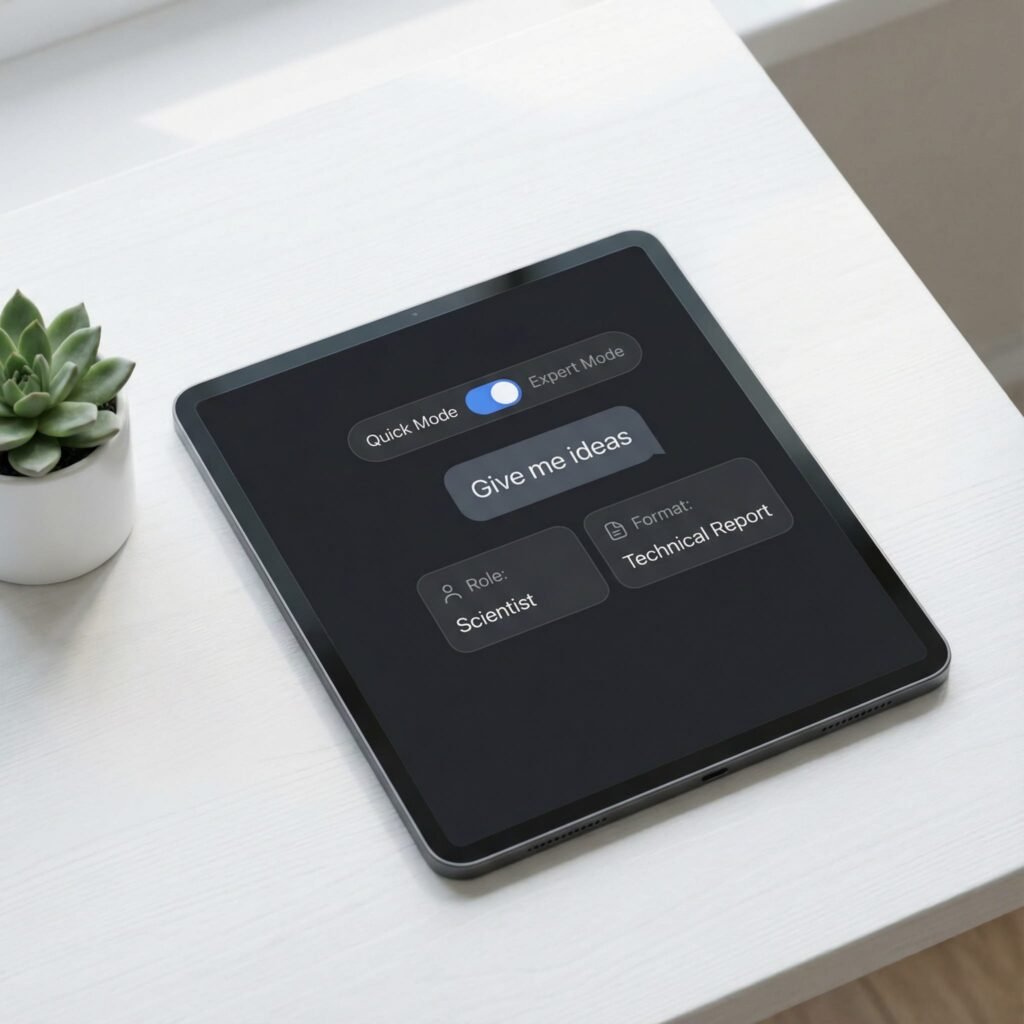
    You will see how AI prompt generators shape context, add role hints, and lock in style. You will get quick templates for product copy, blog outlines, UX flows, and image prompts. You will learn when to use short prompts, when to use structured formats, and how to test fast.

    If you want my free PDF, email me and I will send “110 ChatGPT productivity pack for content.” I will send it asap, no obligation.

    Key Benefits of Using AI Prompt Generators

    AI prompt generators help me move from vague ideas to clear instructions that models can follow. The payoff shows up in faster drafts, tighter structure, and consistent tone across tasks. Below, I break down the benefits I see every day when I use these tools for content, product, and design work.

    Faster Output With Fewer Rewrites

    Speed matters when I need a strong first draft. AI prompt generators structure intent, audience, tone, and constraints upfront, so I avoid guesswork.

    • Time saved: I cut ideation and setup by minutes per prompt, hours per project.
    • Tighter loops: I get usable output in 1 to 2 iterations instead of 5.

    Example:

    • Input: “Write a product update email.”
    • Optimized prompt: “You are an email copywriter for a B2B SaaS. Write a 150-word product update email for existing customers. Tone is confident and friendly. Include a headline, 3 bullet benefits, and a one-line CTA. Avoid hype. Mention the new analytics dashboard for SMB users.”

    Consistent Voice and Brand Control

    Consistency builds trust. Good generators lock in role, tone, length, and banned phrases, then reuse those patterns.

    • Reusable templates: I save prompts for blog intros, case studies, and release notes.
    • Guardrails: I set must-include details, compliance notes, and style rules.

    If you want more structure for creative work, these top free AI art prompt tools show how prompt patterns shape visual style and quality.

    Higher Quality Responses and Less Noise

    Clear prompts reduce vague output. They also cut hallucinations by forcing sources, scope, and format.

    • Evidence prompts: Ask for citations, quotes, or data ranges.
    • Scope prompts: Define what to ignore and what to prioritize.
    • Format prompts: Require tables, bullets, or sections.

    For a brief overview of benefits like accuracy, relevance, and efficiency, see this summary of features and benefits for 2025.

    Creativity on Demand

    When I feel stuck, prompt generators spark angles I would not try on my own.

    • Pattern prompts: “X but for Y,” “contrarian take,” “5 audience lenses.”
    • Style prompts: “Explain like a PM,” “technical explainer,” “product teardown.”

    For more ideas, this guide covers overcoming writer’s block and creative use cases in an AI Prompt Generator breakdown. I also keep a personal library. If you want it, email me for my free PDF “110 ChatGPT productivity pack for content.”

    You can also explore broader tools and examples in this roundup of 10 AI prompt tools for boosting creativity.

    Cross-Model Results Without Rework

    AI prompt generators adapt structure for different models and media. I can take one prompt and tune it for ChatGPT, Claude, Midjourney, or Stable Diffusion.

    • Structured fields: Audience, goal, constraints, format, tone.
    • Model tags: Add negative prompts for images or function calls for code.
    • Batch prompts: Scale one pattern across dozens of inputs.

    This reduces context loss when switching tools and keeps results aligned.

    Better Collaboration and Handoff

    Clear prompts turn into a shared spec. Teams can review, edit, and reuse them.

    • Traceability: Why the prompt works, what inputs it needs, what to avoid.
    • Versioning: Keep a changelog and note which version delivered the best result.
    • Training: New contributors get consistent outputs on day one.

    Cost Control and Measurable ROI

    Stronger prompts use fewer tokens and fewer model calls. That drops cost over time.

    • Fewer retries: Precise instructions reduce long, drifting chats.
    • Shorter outputs: Set word counts and only request useful sections.
    • Repeatable wins: Templates cut project setup and QA time.

    Quick audit checklist:

    1. Is the goal explicit and measurable?
    2. Does the prompt define audience and tone?
    3. Are must-include details listed?
    4. Is the output format specified?
    5. Are limits set for scope, sources, and length?

    Where This Helps Most

    I get the biggest gains in these workflows:

    • Content: briefs, outlines, headlines, meta descriptions, summaries.
    • Product: release notes, UX microcopy, onboarding flows, FAQs.
    • Research: synthesis, pro and con tables, source questions.
    • Images: style references, negative prompts, variant instructions.

    AI prompt generators make these steps faster, clearer, and more repeatable. When I add simple guardrails and reuse proven patterns, my first draft is often my final draft.

    Best AI Prompt Generators for Instant Prompt Creation in 2025

    When I need results on the first try, I reach for AI prompt generators that turn rough ideas into tight, model-ready instructions. The tools below focus on speed, structure, and cross-model support. They help me ship clean drafts, image prompts, and technical instructions with less trial and error.

    PromptPerfect: Fast Optimization for Multiple AI Tools

    PromptPerfect excels when I need strong prompts in seconds. I can paste a short idea, choose a model, and get a refined prompt that locks in role, tone, and format. The output is clear and ready for ChatGPT, Claude, Midjourney, or Stable Diffusion. For official details and current features, see the product page for PromptPerfect – AI Prompt Generator and Optimizer.

    What stands out:

    • Rapid refinement: It expands vague inputs into complete, structured prompts with constraints.
    • Batch processing: I feed a list of topics or keywords, then export a set of optimized prompts at once.
    • Model-aware tuning: It adds model-specific tags, image negatives, or format rules based on target output.

    Benefits for multi-model work:

    • One pattern, many variants: I set a prompt template once, then generate versions for text, image, or code tools.
    • Lower rework: Fewer rounds with each model since the prompt is tailored upfront.
    • Team speed: Stakeholders can review the optimized prompt text before any model call.

    Example workflow:

    1. Input a short brief, like “Write a 120-word product update for SMB customers.”
    2. Select the target model and tone.
    3. Generate a structured prompt with goals, key points, and a clear format.
    4. Batch apply the same structure to multiple features or audiences.

    If you want a neutral roundup for comparison, this summary of the 10 Best AI Prompt Generators In 2025 offers feature notes across tools.

    Originality.ai: Free Creative Boost for Writers

    Originality.ai offers a simple prompt builder that works without sign-up. I use it when I am stuck and need fresh angles, hooks, or outlines fast. It focuses on unique prompts that reduce repetition, which is ideal for blogs, emails, and social posts. For a helpful overview, see the guide on AI Prompt Generator.

    Why it helps:

    • No account needed: I test ideas instantly and keep moving.
    • Idea variety: It proposes multiple prompt angles to break writer’s block.
    • Clean defaults: The outputs are easy to copy into ChatGPT, Claude, or Gemini.

    Use cases I like:

    • Blog intros with a clear voice and structure.
    • Alternative headlines across tones, such as direct, witty, or analytical.
    • Short social posts that keep brand voice consistent.

    Compatibility:

    • Works well with most text LLMs, and I have used its prompts across ChatGPT and Claude with strong results.

    Taskade: Prompts Tailored for Productivity Tasks

    Taskade connects prompt creation to project structure. I build prompts inside tasks, documents, or workflows, then reuse them where work actually happens. That keeps briefs, context, and outputs in one place. It suits teams that want prompts tied to checklists, due dates, and docs.

    What I like in daily work:

    • Project-specific prompts: Prompts live next to tasks, notes, and status updates, so context never gets lost.
    • Reusable blocks: I save prompt templates for standups, meeting summaries, and sprint reviews.
    • Linked outcomes: Outputs sit in the same workspace, which makes review and revisions fast.

    Practical examples:

    • Meeting summary prompt inside each calendar-linked task.
    • Product requirements prompt template stored in the project wiki.
    • QA checklist prompts that generate test cases from user stories.

    Result:

    • Less copy and paste across tools, fewer missed details, and faster handoffs.

    HIX AI: Precision for Technical and Workflow Needs

    HIX AI shines when I need exact, task-specific instructions, especially for code, data, or structured outputs. I use it to write API call prompts, test case formats, or step-by-step procedures that require strict rules. It reduces ambiguity and keeps model responses inside the lines.

    Strengths I notice:

    • Instruction clarity: It produces prompts with clear roles, inputs, and acceptance criteria.
    • Format control: It standardizes output into JSON, tables, or numbered steps with minimal drift.
    • Developer focus: Great for error messages, log analysis, and code comments that explain tradeoffs.

    Sample patterns:

    • “You are a senior backend engineer. Return a JSON object with fields and validation notes. No extra text.”
    • “Write unit tests for this function with edge cases. Include setup, mocks, and expected outputs.”

    When the work is technical, precision saves tokens and time. Prompts that specify constraints and formats keep LLMs accurate and reduce review cycles.

    Tip: If you want my free PDF “110 ChatGPT productivity pack for content,” email me and I will send it right away.

    Tips to Maximize Your AI Prompt Generator Experience
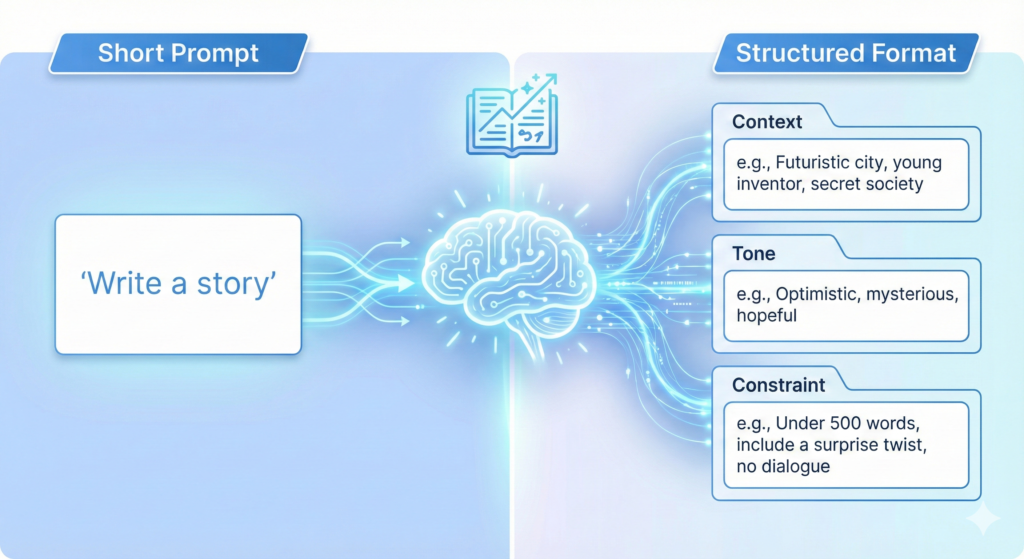
    Strong prompts save time and reduce rework. I treat AI prompt generators like a spec builder for my tasks. With a few simple habits, I get faster drafts, cleaner structure, and fewer surprises across ChatGPT, Claude, Midjourney, and Stable Diffusion.

    Start With a Clear Intent and Constraints

    Define the job before you hit generate. State the goal, audience, and required sections. Then lock scope and length to cut fluff.

    • Goal: What must the output achieve in one sentence.
    • Audience and tone: Who it is for, plus tone hints like authoritative, friendly, or technical.
    • Format: Bullets, table, JSON, or sections.
    • Limits: Word count, what to exclude, banned phrases.

    Example intent block:

    • Goal: “Summarize a product launch for existing SMB users.”
    • Audience and tone: “Current customers, direct and confident.”
    • Format: “Headline, 3 bullets, 1 CTA line.”
    • Limits: “150 words, avoid buzzwords, no emojis.”

    For a solid primer on prompt structure, I recommend MIT’s guide on Effective Prompts for AI.

    Use Roles, Inputs, and Evidence

    Give the model a role that fits the task. Feed it the right inputs. Ask for source-backed claims when needed.

    • Role: “You are a senior technical writer,” or “You are a product marketer.”
    • Inputs: Paste snippets, user quotes, or feature notes.
    • Evidence: Ask for citations, data ranges, or quotes if accuracy matters.

    Quick template:

    • Role: “You are a B2B copywriter.”
    • Inputs: “Use these 3 features and this customer quote.”
    • Output rules: “Return 2 versions, each under 120 words, with a CTA.”

    Add Few-Shot Examples for Style and Structure

    Examples teach pattern and reduce drift. Include one strong example, then a short instruction to replicate style, not content.

    • One well-formed sample beats five weak ones.
    • Keep examples short to control tokens and cost.
    • Mark variable fields with brackets to encourage reuse.

    Example pattern:

    • “Headline: [Benefit-focused line]
    • Bullets: [3 scannable points]
    • CTA: [One action]”

    A power user tip I like is to build a simple framework first, then generate content from it. This matches ideas in this thread: AI Prompting Tips from a Power User.

    Iterate With Tight Feedback Loops

    Treat each run like a controlled experiment. Change one variable at a time so you can trace the lift.

    • Give direct feedback: “Shorten by 30 percent,” or “Add one proof point.”
    • Freeze the winning parts: “Keep the intro as-is, rework the examples.”
    • Version your prompts: V1, V2, V3 with short notes.

    I keep a simple changelog inside my docs. It makes handoff and review faster.

    Control Format for Reliable Outputs

    AI prompt generators excel when the format is explicit. Use firm output rules so results are easy to scan and compare.

    • Specify structure: “Return a table with columns: Feature, Benefit, Proof.”
    • Use clear markers: “Start with ‘Summary:’ then ‘Action Items:’”
    • For images, include subject, style, camera details, and negative prompts.

    If you focus on visuals, browse these references on Top free AI art prompt tools to sharpen style control.

    Reduce Hallucinations With Scope and Sources

    Narrow the task and ask for boundaries. This reduces fluff and factual errors.

    • Set guardrails: “If unsure, say ‘insufficient data’.”
    • Restrict scope: “Limit answers to the inputs and date range provided.”
    • Require sources for claims and stats.

    When accuracy matters, I paste source snippets and ask for a line-cited summary.

    Use Variables and Templates for Scale

    Turn winning prompts into reusable templates. Add fields for inputs so you can run them in batches.

    • Variables: {{audience}}, {{product}}, {{tone}}, {{word_count}}.
    • Library: Store prompts by task type, like intros, updates, FAQs, or release notes.
    • Batch runs: Feed a CSV or list of inputs and export results.

    I standardize naming so teams can find and reuse the best patterns.

    Match the Model and Modality

    Tune prompts to fit the target model or media. Do not copy the same prompt across text and image without adjustments.

    • Text models: Clarity, role, and stepwise instructions.
    • Image models: Detailed descriptors, lighting, lens, style tags, and negatives.
    • Code tasks: Inputs, acceptance criteria, and output format rules.

    When switching models, keep the intent and structure, then rephrase the tags and constraints.

    Measure Quality and Cost

    Track output quality and token use. Small tweaks pay off at scale.

    • Quality checklist: Goal met, structure followed, tone consistent, no banned phrases.
    • Token aware: Shorten context and examples when possible.
    • Cost control: Set word ceilings, limit variants to two or three, and stop early if output is ready.

    Simple scorecards help compare variants and lock the winner.

    Keep a Personal Style Guide

    Document your voice, format rules, and banned words. Feed it to your generator as a short, reusable block.

    Include:

    • Tone sliders, like concise, confident, and friendly.
    • Must-include brand phrases or disclaimers.
    • Format rules for headings, bullets, and tables.

    As models update, refresh the guide and archive old versions. If you want my free PDF “110 ChatGPT productivity pack for content,” email me and I will send it right away.

    For a broader view on structured prompting in 2025, this overview on prompt engineering essentials is useful for planning advanced workflows.
    Screenshot of Originality.ai's prompt builder generating creative ideas for content.

    Conclusion

    AI prompt generators turn rough ideas into clear, repeatable instructions, which lifts quality and cuts waste. In minutes, I can move from a blank page to structured prompts that fit the task, the model, and the format. The result is faster drafts, fewer rewrites, and more consistent voice across teams.

    PromptPerfect gives me refined prompts tailored for text, image, or code, with batch options that save hours. Originality.ai sparks strong angles on demand, ideal for quick hooks, headlines, and outlines. Taskade keeps prompts tied to work, so briefs, tasks, and outputs stay in one place. HIX AI locks down structure and format for technical work, which reduces drift and speeds reviews. Together, these tools deliver instant gains in clarity and speed.

    Pick one tool and run a simple test today. Take a current task, add intent, audience, and format, then generate a prompt and ship the result. Small wins compound when you reuse the best patterns.

    I am confident you will see better AI interactions once you standardize on a prompt generator. If you want extra momentum, email me and I will send my free PDF “110 ChatGPT productivity pack for content.” I will send it asap, no obligation.

    FAQ Section
    What is an AI prompt generator and why do I need one?

    An AI prompt generator is a tool that helps you write clear, effective prompts for AI models like ChatGPT or Midjourney, saving time and improving output quality by guiding tone, context, and structure. They ensure instant, consistent results and reduce trial and error.

    Which AI prompt generators are best for beginners?

    For beginners, tools like Originality.ai offer quick prompt builders to spark ideas and clear writer’s block. The article also points to safe starter picks and a resource on top beginner-friendly AI prompt generators, making it easy to move quickly with confidence.

    How do AI prompt generators help with different AI models?

    These tools offer cross-platform support, guiding you to create effective prompts tuned for specific models like ChatGPT (text), Midjourney (images), or Stable Diffusion (images). They help shape context, add role hints, and lock in style, ensuring optimal results across various AI applications.

  • Your AI Prompt Package Creation Guide to Better Prompts

    Your AI Prompt Package Creation Guide to Better Prompts

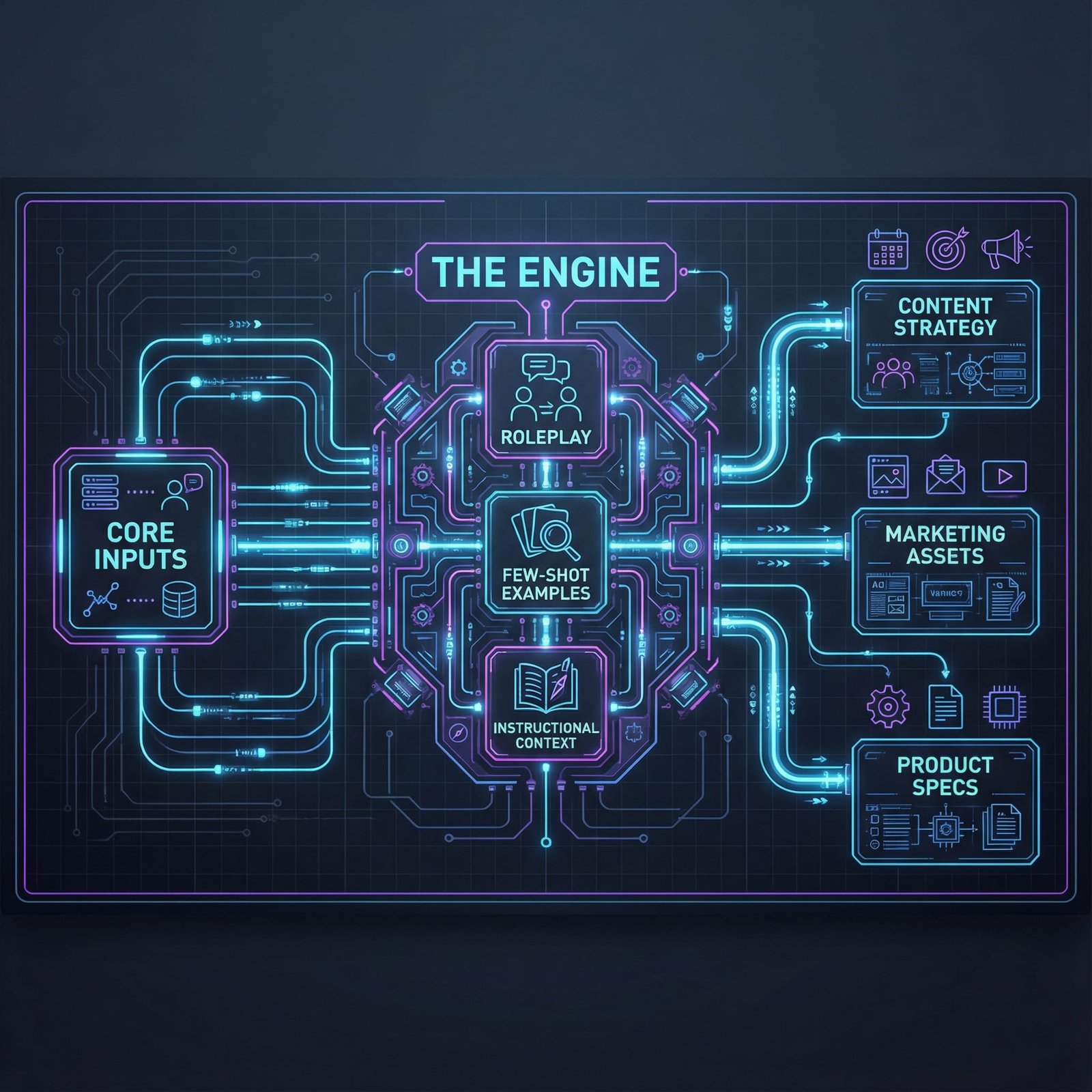
    What if your everyday AI chats could power your next product, campaign, or course? With the right system, they can. You will turn scattered prompts into a repeatable engine that saves time and grows ideas on command.

    Think of AI prompt packages as bundled scripts for common tasks. Each bundle covers one goal, like blog briefs, ad angles, email sequences, or product research. You plug them in, follow simple steps, and get consistent results, even on a busy day.

    If you are new to prompts or run a small business, this is your cheat code. No more guessing what to type or fixing messy outputs. AI Prompt Package Creation gives you structure, guardrails, and quality control you can count on.

    You will learn how to build clear roles, inputs, and examples, plus when to use mega-prompts, prompt chaining, and simple multimodal cues for better context. We will also touch on safe prompting habits that cut errors and bias. By the end, you will have a starter set you can use across content, marketing, and ops.

    Want a head start on tools to test your package ideas? Check out these beginner-friendly picks in the guide to best free AI prompt tools for beginners. And if you like to see it in action, this video is a helpful primer: https://www.youtube.com/watch?v=P08jrZhyNxw

    Get ready to map your core tasks, wire in smart prompts, and run them like templates. Our comprehensive guide walks you through the entire process. You will learn how to create prompts that save time and boost your ideas, starting today.

    Understand AI Prompt Packages and Why You Need Them

    Think of an AI prompt package as a ready-to-run system for a task. You get structured prompts, roles, inputs, examples, and QA checklists, all built to work together. Instead of guessing what to type, you follow a simple flow and get reliable results.

    This is the core of AI Prompt Package Creation. You build once, then reuse daily. It saves time, locks in voice and style, and reduces rework across your content, marketing, and ops.

    What an AI Prompt Package Includes

    A strong package has a few core parts that keep outputs consistent and on-brand:

    • Role setup: Clear model identity and constraints, like “You are an SEO editor.”
    • Inputs: What you supply each time, such as audience, topic, brief, and data.
    • Steps or chains: Small prompts that run in a set order for quality control.
    • Examples: Short input and output pairs to show the model what “good” looks like.
    • Style guardrails: Tone, banned phrases, formatting, and reading level targets.
    • QA checks: A checklist the model follows to catch errors before final output.
    • Variants: Optional prompts for short, long, or platform-specific versions.

    If you want a quick primer on prompt quality and structure, review Google’s overview of prompt engineering for AI or AWS’s breakdown of what prompt engineering is and why it matters.

    Why You Need Them

    You need packages when speed and consistency matter. Single prompts help, but they rarely scale. Packages do.

    • Faster work: You cut trial and error from hours to minutes.
    • Consistency: Same tone, structure, and depth across writers and projects.
    • Onboarding: New team members produce strong work on day one.
    • Accuracy: Built-in checks reduce factual drift and formatting errors.
    • Reuse: One package fuels many tasks, like briefs, outlines, and drafts.
    • Measurable wins: You can test, compare, and improve each step.

    If you prefer ready-made sets before building your own, browse the Top AI Prompt Package Providers for 2025.

    How AI Prompt Package Creation Works

    You can build a package in a simple five-step loop:

    1. Define the job to be done, like “publish a blog brief in 20 minutes.”
    2. Write the role, inputs, and constraints in plain language.
    3. Split the workflow into 3 to 5 steps with short prompts.
    4. Add examples and a QA checklist to lock in quality.
    5. Test with 5 real tasks, then refine weak steps and freeze a v1.

    Keep prompts short. Use the same variable names. Store examples beside the prompts. That small discipline makes updates painless.

    When a Package Beats Single Prompts

    Single prompts work for one-off tasks. Packages shine when you need repeatable outcomes.

    • Multiple deliverables from one input, like brief, outline, and draft.
    • Hand-offs between people or tools, such as writer to editor.
    • Compliance needs, where tone and claims must be precise.
    • Multi-channel content, where you need consistent variants.

    Example: A “Blog Content Package”

    • Role: You are a senior SEO editor. Follow AP style.
    • Inputs: Topic, target keyword, audience, angle, internal links.
    • Steps: Brief, title ideas, outline, draft, meta data, QA.
    • QA: Check reading level, link placement, claims, and duplicates.

    Run this flow and you get tight, on-brand content, every time. That is the promise of AI Prompt Package Creation.

    Grab the Latest Tips to Build Even Better Prompts in 2025

    You can get sharper outputs with less effort this year. Models handle more context, more modes, and tighter instructions. Pair that power with smart structure and you will ship stronger work with your AI Prompt Package Creation system.

    Treat Every Prompt Like a Mini Spec

    Loose prompts create loose results. Write prompts as if you are handing a clear brief to a junior teammate.

    • Role: Define who the model is and the limits of its job.
    • Goal: State the output format and success criteria.
    • Inputs: List the variables you will supply each run.
    • Rules: Include tone, banned phrases, and must-have checkpoints.

    Example you can adapt: You are a senior SEO editor. Goal: produce a 600-word blog outline with H2s and H3s. Inputs: topic, audience, primary keyword, internal links. Rules: active voice, 8th grade reading level, no hype words, include 2 internal links, return JSON with fields: title, outline, notes.

    Why this works: you reduce guesswork, prompt length, and rework. The model fills a form, not a blank page.

    Chain Short Steps, Not One Giant Ask

    Short, focused steps beat one mega prompt. Split your package into a small chain, then review each step.

    • Step 1, clarify inputs and edge cases.
    • Step 2, produce outline options.
    • Step 3, draft with constraints.
    • Step 4, run QA and fix gaps.

    Multi-agent flows can help for complex work, like one agent for research and another for editing. 2025 tools make this easier, and the pattern is backed by current best practices on multi-step prompting and structure seen in resources like Lakera’s prompt engineering guide for 2025.

    Use Few-Shot Micro Examples for Style and Format

    One or two small examples steer tone and structure better than long lectures.

    • Show a good outline and a weak outline, then explain why the good one wins.
    • Include one labeled example of the JSON or table format you want.
    • Keep examples short, so they do not bloat context.

    Quick comparison:

    • Bad: “Write a great outline.”
    • Better: “Write 5 H2s with 2 H3s each. Use 8 to 12 words per heading. Match this sample style: H2: Problem, H3: Symptom, H3: Fix.”

    For more nuance on what works and what does not across modern models, see Lenny’s breakdown in AI prompt engineering in 2025: What works and what doesn’t.

    Add Multimodal Cues for Clarity

    Models now accept text plus images or audio in many tools. Use that to add context, not clutter.

    • Paste a product screenshot, then ask for a 70-word feature summary.
    • Attach a chart image and ask for three key takeaways in bullets.
    • Provide a brand voice audio clip, then request copy in that tone.

    Tip: always restate the objective and constraints in text, even when you add images. Visuals guide context, text locks precision.

    Control Cost and Speed Without Sacrificing Quality

    Token waste adds up. Trim, structure, and reuse.

    • Store your role and rules as a reusable system prompt.
    • Keep variables short and clear. Use the same names every time.
    • Ask for compact outputs where possible, like bullet summaries before drafts.
    • Prefer JSON or simple tables for intermediate steps. They are easy to review and refeed.

    A quick tactic:

    • First prompt: “Draft 6 title ideas with a 60-character limit.” Choose one.
    • Second prompt: “Write the outline using the selected title.” This saves tokens and time.

    Build Safety and QA Into the Flow

    Quality checks should not be an afterthought. Bake them in.

    • Add a short QA checklist at the end of each step.
    • Require sources for claims and reject vague language.
    • Flag risky phrasing and verify numbers before finalizing.
    • For public content, include a bias and risk pass.

    Simple end-of-step QA example: Before returning the final draft, confirm reading level is grade 8 to 9, confirm two internal links are present, verify all data points with sources, and remove filler phrases.

    If you want tools to help explore, test, and improve prompts faster, scan this curated roundup of Top 10 AI Prompt Tools for Boosting Creativity in 2025. It is a practical add-on to your AI Prompt Package Creation workflow.

    FAQ Section
    What is an AI prompt package?

    An AI prompt package is a curated bundle of structured prompts designed for a specific goal, allowing users to achieve consistent, high-quality AI outputs for tasks like blog briefs, ad copy, or product research, making AI interactions more efficient and reliable.

    Why should I use AI prompt packages?

    They save time by reducing guesswork, ensure consistency in AI outputs, provide built-in quality control, and allow for repeatable workflows. This makes AI more predictable and effective for everything from content creation to marketing campaigns and operational tasks.

    What are mega-prompts and prompt chaining?

    Mega-prompts are comprehensive, single prompts designed to handle complex tasks with extensive context and instructions. Prompt chaining involves a series of interconnected prompts, where the output of one prompt feeds as input into the next, breaking down complex tasks into manageable, sequential steps.

    How do prompt packages help small businesses?

    For small businesses, prompt packages act as a ‘cheat code’ by providing ready-to-use, effective AI workflows without needing extensive prompt engineering knowledge. They enable consistent, high-quality support across content, marketing, and operational needs, saving time and resources.

    What are safe prompting habits?

    Safe prompting involves creating prompts with clear boundaries, specifying ethical guidelines, and regularly reviewing AI outputs for potential biases or inaccuracies. It also includes protecting sensitive information and refining prompts to reduce errors and undesirable responses, ensuring responsible AI use.

    Conclusion

    You started with casual chats, now you have a repeatable system that turns ideas into outputs on command. Build small, clear steps, add micro examples, and run tight QA to keep quality high. The payoff is speed, consistency, and results you can trust across content, marketing, and ops, powered by AI Prompt Package Creation.

    You have the tools, so create your first package today. Take one task you do every week, write the role, inputs, and rules, then ship a simple v1. Our comprehensive guide walks you through the entire process. Start creating.

    Want a next move that builds momentum fast? Explore proven prompts and sellable templates with this roundup of Top AI Prompt Marketplaces for Buying and Selling Quality Prompts.

    Try one prompt right now, record your result, then share what worked. Keep refining, keep shipping, and keep your system simple. This is how you turn everyday AI into output you can count on.

  • Get More Clicks with Better AI Prompt Tricks

    AI generated content attracting users with high engagement visualizing click-through rate improvement with AI tools

    Headlines, Hooks, and CTAs That Test Well

    You’re putting in the work. You publish solid posts, record useful videos, ship new landing pages, send emails on schedule, then the clicks don’t match the effort.

    That gap usually isn’t your topic or your writing. It’s the first 2 seconds: the headline, the opening hook, and the call to action. If those three lines are average, your best ideas stay unseen.

    You can get more clicks AI tools can help with, but only if you stop asking for “catchy” and start giving instructions that produce test-ready options. In the next few minutes, you’ll learn prompt patterns (plus copy-paste templates) and a fast testing loop you can run in under 30 minutes.

    Why most AI-written headlines don’t get clicks

    Most AI outputs look the same for one reason: you gave the model the same inputs everyone else does.

    When you prompt “write 10 catchy headlines about X,” the model has to guess:

    • Who it’s for
    • What they already know
    • What they want right now
    • Where the headline will appear (Google, email, YouTube, X, a landing page)
    • What a “click” means for you (open, tap, watch, scroll, sign up)

    So it plays it safe. Safe headlines don’t earn attention.

    A clickable headline usually makes one clear promise. It points to a specific benefit, for a specific reader, in a specific situation. It also matches intent. A person searching “AI prompts for blog headlines” wants something practical and quick, not a theory lesson.

    If you want a good mental model, treat a headline like a movie trailer. It doesn’t summarize everything. It sells one reason to watch.

    The common prompt mistakes that kill CTR

    These are the mistakes that quietly flatten click-through rates:

    1) You ask for “catchy” with no context. “Catchy” is not a spec. It’s a vibe. AI can’t hit a vibe without details.

    2) You mix multiple promises in one line. When a headline tries to offer speed, depth, templates, tools, case studies, and “everything you need,” it feels fuzzy. Readers skip fuzzy.

    3) You don’t set length limits. A strong Google title and a strong email subject line are not the same length. Without constraints, you get headlines that don’t fit the placement.

    4) You skip the reader’s pain point or goal. If you don’t name the problem, the AI writes generic benefits that could fit any blog.

    5) You don’t ask for a format. A “how-to” headline, a curiosity headline, and a proof-based headline have different shapes. If you don’t pick the shape, you get a bland mix.

    6) You generate too few options to test. One headline is a guess. Twelve headlines is a starting set. A couple winners often hide in the middle.

    If you want more examples of prompt structures focused on performance copy, this prompt collection on ad creative is a useful reference: 18 ChatGPT Prompts for Ad Creative and Copywriting.

    The click formula your prompts should feed the model

    Better outputs come from better instructions. Better AI prompts aren’t magic words, they’re clearer specs.

    Use this simple formula:

    Role + Audience + Pain/Goal + Single Benefit + Proof or specificity + Format constraints

    Here’s what that sounds like in plain English:

    • Role: “You are a conversion copywriter.”
    • Audience: “Busy solo founders who write their own marketing.”
    • Pain/Goal: “They publish weekly but CTR is flat.”
    • Single benefit: “Write headlines that earn more clicks.”
    • Proof or specificity: “Use numbers, time bounds, or a defined outcome.”
    • Constraints: “Max 60 characters, 8th-grade reading level, 12 options grouped by intent.”

    That’s the difference between “write catchy headlines” and “write headlines I can test today.”

    Better AI prompts that generate click-worthy headlines, hooks, and CTAs

    If your goal is clicks, you want outputs built for testing. That means sets of options, clear differences between variants, and quick scoring.

    You’ll see these prompt tricks in many places, including headline-focused workflows like My Secret ChatGPT Headline Formula for 10x Clicks. The key is turning them into a repeatable system you actually run.

    Use role and audience framing to stop bland outputs

    Role and audience are your fastest upgrade. They force tone, vocabulary, and angle.

    Try one of these templates:

    You are a conversion copywriter for SaaS. Audience: busy founders who skim. Topic: [your topic]. Goal: increase clicks from [channel]. Write 10 headline options with one clear promise each. Keep language simple and direct.

    You are a tech blogger writing for AI beginners. Audience fears: wasting time, sounding dumb, picking the wrong tool. Topic: [your topic]. Write 8 headlines that match search intent and don’t overpromise.

    Why it works: the model stops writing for “everyone,” and starts writing for a person with a real reason to click.

    Add constraints that make ideas test-ready (length, intent, grouping)

    Constraints do two things: they reduce fluff, and they make your options easy to compare.

    Use this prompt to get a clean set you can actually test:

    Write 12 headlines for: [topic]. Audience: [who]. Channel: [Google title / email subject / YouTube title / landing page]. Constraints: max [60] characters, 8th-grade reading level, no hype. Group them into 3 buckets (label each): Curiosity, Urgency, Benefit. Add a 5 to 8 word “meta-style” blurb for each headline.

    Also ask for placement variants when you need them. A YouTube title can be longer than a SERP title. An email subject line can be punchier than an H1.

    If you want to see how prompt libraries structure CTR-focused headline requests, this one is a good example to compare against: ChatGPT Prompt to Boost CTR with Compelling Ad Headlines.

    Teach the model with few-shot examples (good vs bad)

    If you’ve published for a while, you already have training data. Your past winners are your best prompt fuel.

    Use this template and paste real lines:

    Here are 3 past winners (high CTR):

    1. [headline]
    2. [headline]
    3. [headline] Why they worked (short notes): [clear benefit, time bound, specific audience]

    Here are 2 losers (low CTR):

    1. [headline]
    2. [headline] Why they failed (short notes): [too vague, mixed promise, too long]

    Now write 12 new headlines for: [new topic]. Match the winners’ style, avoid the losers’ patterns. Keep each to max [60] characters.

    This is one of the most reliable ways to get more clicks AI tools can support, because you’re no longer hoping the model guesses your voice.

    You can also feed competitor examples if you don’t have your own data yet, but add your notes about why they work. The “why” steers the output.

    Run self-critique prompts to score and rewrite weak options

    AI is good at generating, then improving, as long as you force a clear two-step process. You want scores and short reasons, not a long essay.

    Use a self-critique prompt like this:

    Step 1: Generate 15 headline options for: [topic]. Audience: [who]. Channel: [where]. Max [60] characters. One promise each. Step 2: Rate each headline 1 to 10 for clickability. Give a one-line reason using these factors only: clarity, curiosity gap, specificity, intent match. Step 3: Rewrite the bottom 5 into stronger versions without changing the topic.

    Recent prompt guidance in 2025 also trends toward short, simple headlines, one clear hook sentence, and one direct CTA, then quick variant tests. That matches what you’ll see in practice: fewer words, clearer promise, faster testing.

    If you want more writing-side “heavy lifting” prompts (beyond headlines) to plug into your workflow, this set is useful: 7 ChatGPT Prompts That Do the Heavy Lifting Writers Hate.

    Generate clean A/B variants by changing one thing at a time

    Testing fails when your variants change everything. Keep tests clean by changing one element per version.

    Use this micro-variant prompt:

    Base headline: “[your best headline]” Create 10 A/B variants. Each variant must change only one element, then label the change in (parentheses). Allowed changes: number, verb, time frame, audience callout, proof point, specificity level. Keep the rest the same. Max [60] characters.

    Example labels you want:

    • (Change: number)
    • (Change: time frame)
    • (Change: audience callout)

    This makes it obvious what caused the lift when you find a winner.

    A simple workflow to get more clicks with AI, without guessing

    Prompt tricks are useful, but the real win is turning them into a loop you repeat. You’re building a small system that compounds because you keep your winners and re-use what worked.

    The 30-minute click loop you can repeat for every post

    Run this once per post, or once per week for your next batch.

    1. Pick one core angle. Write one sentence: “This content helps [audience] get [result] without [pain].”
    2. Generate 12 to 20 headlines with constraints. Use role, audience, channel, max length, and grouping by intent.
    3. Run self-critique and pick the top 3. Keep the reasons short. You’re deciding fast, not debating.
    4. Create 6 to 10 micro-variants for each top pick. Change one thing at a time and label the change.
    5. Test where you can get signal quickly. Email subject lines, social posts, ad headlines, and title experiments on a landing page can give you early feedback. If your platform supports title tests, use it.
    6. Ship, then record what won. Save the winning headline, the runner-up, and the prompt that produced them.

    That’s how better AI prompts turn into repeatable gains, not random spikes.

    What to measure, and how to feed winners back into your prompts

    Clicks are the start, not the finish. Track what’s closest to your real goal.

    Focus on:

    • CTR by channel (search, social, email, ads)
    • Open rate for email (subject line test signal)
    • Impressions vs clicks (helps you see if the issue is reach or offer)
    • Scroll depth or time on page (helps catch “clickbait” problems)

    Then feed winners back into your prompt as examples. Your prompt becomes a living playbook.

    If you want more headline prompt patterns to compare against, this paid headline-focused post shows the same idea of structured prompts and output sets: 7 Copy-Paste AI Prompts That Transform Headlines Into Audience Magnets.

    Prompt examples you can copy-paste today (headline, hook, CTA packs)

    Use these as-is, swap the bracket fields, and generate enough options to test. Don’t stop at one output.

    12-headline pack prompt (grouped by curiosity, urgency, benefit)

    Role: You are a conversion copywriter for [type of business]. Audience: [who], they struggle with [pain], they want [goal]. Topic: [topic]. Click goal: increase clicks from [channel] to [destination]. Constraints: 8th-grade reading level, no hype, one promise per headline, max [60] characters. Output: 12 headlines grouped under 3 labels: Curiosity, Urgency, Benefit (4 each). After the list, pick your top 3 and give one-line reasons for each.

    Hook and first-paragraph prompt that keeps readers from bouncing

    Your headline got the click. The hook earns the read.

    Audience: [who]. Topic: [topic]. Write 5 hook options (1 to 2 sentences each). Each hook must: name the pain, hint at the fix, and set a clear promise. Then write a first paragraph (60 to 90 words) that:

    1. matches the headline promise,
    2. says what they’ll learn,
    3. keeps it practical. Create 3 tone versions: direct, short story, contrarian (no cheesy lines).

    CTA prompt for buttons and inline links (short, clear, action-first)

    CTAs fail when they’re vague. Make the action and benefit obvious.

    Context: Page type [blog post / landing page / email]. Offer: [lead magnet / trial / demo / checklist]. Audience: [who]. Main benefit: [benefit]. Write 10 button CTAs (2 to 4 words each). Write 5 inline link CTAs (6 to 10 words each). Label each CTA with one trigger: utility, social proof, urgency. Constraints: plain language, no hype, avoid “Submit.”

    Conclusion

    If you want more clicks, you need more testable options, not more guessing. Better AI prompts give you cleaner headline sets, sharper hooks, and CTAs that say what happens next. Then the testing loop does the real work.

    Use the formula (role, audience, single benefit, constraints, critique, variants), pick one post, run the 30-minute loop, and test six headline variants this week. Your next winner is usually one rewrite away.

  • Free vs. Paid AI Image Generators: Choosing the Right Tool for Your Needs

    Free vs. Paid AI Image Generators: Choosing the Right Tool for Your Needs

    "Split-screen comparison of a free AI-generated image (simple) vs. a premium AI-generated image (hyper-detailed)."

    The world of AI image generation is growing fast. These tools make amazing visuals, changing how we design, market, and create content. With just a few steps, anyone can bring their ideas to life. Choosing between free and paid AI image generators can be tough.

    Each has its good and bad sides. This article will help you understand the differences. We’ll guide you in picking the best tool for your needs.

    Understanding Free AI Image Generators

    Free AI image generators are a good starting point. But, they have some limits:

    1. Limited daily usage: Many platforms limit how many images you can make each day. Some allow only 20-25 images daily
    2. Inconsistent quality: The quality of images can vary. Some may lack detail or realism
    3. Lack of advanced features: Free versions often have fewer customization options and no advanced editing tools
    4. Inaccuracies and biases: AI images might have historical errors or show biases from their training data.
    5. Difficulty with text and symbols: Many AI generators struggle to show letters, words, and symbols right. They often produce gibberish or distorted text
    6. Ethical and legal concerns: There are debates about who owns and can use AI-generated images.
    7. Longer rendering times: Some free platforms, like Craiyon, take longer to make images than paid ones
    8. Ad-supported interfaces: Free versions often have ads, which can be distracting
    9. Limited control: Users might find it hard to get the exact image they want, even with detailed prompts
    10. Potential threat to human artists: AI image generation could hurt the jobs of professional artists

    Popular Free AI Image Generators:

    1. Craiyon (formerly DALL·E Mini)

    DeepAI Image Generator

    NightCafe

    StarryAI

    • Website: https://starryai.com
    • Free tier: Free credits daily, but premium plans unlock more features.

    Artbreeder

    Runway ML (Free Tier)

    Dream by Wombo

    • Website: https://dream.ai
    • Free tier: Completely free, but outputs may have watermarks.

    Lexica

    • Website: https://lexica.art
    • Free tier: Free to generate and browse images, but limited to Stable Diffusion outputs.

    Playground AI

    Deep Dream Generator

    Best Use Cases for Free Image Generators

    Free image generators are great for many creative and business needs. Here are some top uses:

    Content Creation & Marketing

    1. Social Media Graphics – Make posts, stories, and banners for Instagram, Facebook, Twitter, and Pinterest.
    2. Blog & Website Images – Get custom images for blog headers, thumbnails, and article illustrations.
    3. YouTube Thumbnails – Design engaging video thumbnails to boost click-through rates.
    4. Email Marketing Graphics – Add visually appealing elements to newsletters and email campaigns.
    5. Ad Creatives – Create unique visuals for paid ads without using stock photos.

    Design & Print-on-Demand

    1. T-Shirt & Merch Designs – Make trendy or niche-themed designs for POD platforms like Etsy, Redbubble, and Teespring.
    2. Stickers & Posters – Create unique art for print products.
    3. Book Covers & eBook Art – Design covers for self-published books and digital downloads.
    4. Logo & Branding Elements – Develop AI-assisted logos or brand visuals.
    5. Mockups & Product Previews – Use AI-generated images to create mockups without expensive templates.

    AI Art & Creativity

    1. Concept Art & Inspiration – Generate character designs, landscapes, or futuristic cityscapes for inspiration.
    2. NFT Art Creation – Develop AI-generated digital art for NFT collections.
    3. Fantasy & Sci-Fi Illustrations – Create AI-assisted artwork for personal or commercial use.
    4. Storytelling & Comics – Generate visual story elements or background art.
    5. AI-Powered Remixes – Blend different styles and elements for unique artistic effects.

    Business & Productivity

    1. Presentation Slides & Infographics – Enhance slides with unique AI-generated visuals.
    2. Custom Icons & UI Design – Generate unique icons for apps or web design.
    3. Product Visualization – Prototype product designs without hiring a designer.
    4. Virtual Backgrounds – Create personalized Zoom or streaming backgrounds.
    5. AI-Generated Headshots & Avatars – Create digital avatars for branding, gaming, or profile pictures.

    Education & Learning

    1. Illustrations for Courses – Create visuals for online courses and educational materials.
    2. AI-Assisted Diagram & Mind Maps – Make visual aids for complex concepts.
    3. Interactive Learning Materials – Use AI-generated images for educational worksheets and games.
    4. Custom Flashcards – Make visually engaging flashcards for studying.
    5. Storybook & Children’s Book Art – Generate illustrations for personal or commercial book projects.

    Would you like recommendations for specific free AI image generators that fit your needs? 🚀

    Exploring the Advantages of Paid AI Image Generators

    Advantages of Paid AI Image Generators

    Paid AI image generators offer better quality and customization. They are more professional than free versions. Here’s why you might want to pay for one:

    1. Higher Image Quality & Resolution

    HD & 4K Resolution – Get high-resolution images for printing, digital art, and design.

    Sharper Details & Better Textures – Say goodbye to pixelation and blurry edges. Get more accurate images.

    2. More Customization & Control

    Advanced Prompt Controls – Fine-tune image styles and details with more control.

    Inpainting & Editing Features – Modify images directly, adding or removing elements.

    Style Consistency – Keep a consistent look in all your images, important for branding.

    3. Access to Premium AI Models & Features

    More AI Styles & Models – Unlock exclusive styles like hyper-realistic and anime.

    Text-to-Image + Image-to-Image – Use reference images for better results or tweak existing ones.

    Fine-tuned AI Training – Some platforms let you train models based on your art preferences.

    4. Faster Generation & Bulk Processing

    Priority Processing – Get images faster without waiting in long queues.

    Bulk Generation – Create many images at once for projects needing bulk designs.

    Cloud Storage & History – Save and access your images anytime.

    5. Commercial Usage & Licensing

    Royalty-Free & Commercial Rights – Use AI images in your business legally.

    Extended Licensing Options – Own the rights to sell or modify images without copyright worries.

    Exclusive & Unique Outputs – Avoid duplicated images used by others.

    6. Better Integration & Export Options

    Multiple File Formats – Export in PNG, JPG, SVG, and PSD for editing.

    API Access & Automation – Integrate AI image generation into apps, websites, or design workflows.

    Seamless Integration with Design Tools – Some platforms allow direct import/export to Photoshop, Canva, or Figma.

    Is It Worth Paying for AI Image Generators?

    If you’re serious about print-on-demand, content creation, branding, or professional design, paid AI image tools are worth it. They save time, increase quality, and offer full commercial rights.

    Would you like recommendations on the best paid AI image generators based on your specific use case?

    Cost Comparison: Analyzing Pricing Models of Different AI Image Generators

    Understanding pricing helps you choose the best option:

    When looking at paid AI image generators, consider their pricing models, features, and if they fit your needs. Here’s a comparison of some leading platforms:

    1. Midjourney

    • Pricing:
      • Basic Plan: $10/month or $96/year, includes 3.3 hours of GPU time per month (approximately 200 images).
      • Standard Plan: $30/month.
      • Pro Plan: $60/month.
      • Mega Plan: $120/month.
    • Features:
      • High-resolution image generation.
      • Advanced prompt controls.
      • Community showcase.
    • Considerations:
      • Operates via Discord, which may have a learning curve.
      • Images are public by default; private generations require higher-tier plans. citeturn0search3

    2. Adobe Firefly

    • Pricing:
      • Free Plan: Includes 100 monthly generative credits.
      • Paid Plans: Start at $4.99/month.
    • Features:
      • Integration with Adobe Creative Suite.
      • Advanced editing tools.
      • Unique features like camera angle adjustments.
    • Considerations:
      • Ideal for users already within the Adobe ecosystem.
      • Offers a user-friendly interface with a variety of styles. citeturn0search0

    3. DreamStudio (Stable Diffusion)

    • Pricing:
      • Free Credits: 100 credits upon signup (sufficient for approximately 500 images).
      • Additional Credits: Purchase as needed.
    • Features:
      • Multiple image generation per prompt.
      • Style customization.
      • High-resolution outputs.
    • Considerations:
      • Requires account creation.
      • Offers flexibility with pay-as-you-go credits. citeturn0search0

    4. Ideogram

    • Pricing:
      • Free Plan: Limited to 10 daily credits.
      • Plus Plan: $20/month, includes priority generation and up to 4,000 images monthly.
    • Features:
      • Specializes in text manipulation within images.
      • Offers various image styles.
    • Considerations:
      • Free plan has longer loading times.
      • Paid plan provides enhanced features and faster processing. citeturn0search4

    5. Canva

    • Pricing:
      • Free Plan: Includes 50 AI image generation credits and 5GB of cloud storage.
      • Pro Plan: $12.99/month or $119.99/year, offers unlimited access to premium features.
    • Features:
      • User-friendly design platform with integrated AI image generation.
      • Extensive template library.
      • Collaboration tools.
    • Considerations:
      • Ideal for social media graphics and marketing materials.
      • AI-generated images may have limitations in realism. citeturn0search6

    6. DeepSeek’s Janus Pro

    • Pricing:
      • Competitive Pricing: Aims to offer access at significantly lower costs than competitors.
    • Features:
      • Advanced multimodal AI capabilities.
      • Claims superior performance to OpenAI’s DALL-E 3.
    • Considerations:
      • Emerging platform with growing recognition.
      • May offer cost-effective solutions for high-quality image generation. citeturn0news9

    When picking an AI image generator, think about what you need. Consider your budget, desired features, and how often you’ll use it. Many offer free trials or credits to test before you buy.

    A futuristic studio where an artist and AI collaborate on a holographic canvas, blending human creativity with artificial intelligence.

    Tips for Finding the Best Value in Paid AI Image Generators

    Finding the best value in an AI image generator is about matching your needs and budget. Here are some tips to help you spend wisely:

    1. Define Your Needs First

    Before you pay, ask yourself a few questions:
    What kind of images do you need? (e.g., photorealistic, artistic, anime, concept art, logos)
    How often will you use it? (Daily, weekly, occasionally?)
    What’s your main purpose? (Print-on-demand, marketing, content creation, social media, etc.)
    Do you need commercial rights? (Some free tools limit how images can be used.)

    2. Compare Pricing Plans Carefully

    Look for “freemium” models – Many platforms offer free trials or limited free credits. Test them first!
    Check for bulk discounts – Some services offer better pricing if you pay annually instead of monthly.
    Watch for hidden costs – Some platforms charge extra for HD images, private generations, or API access.

    Best budget-friendly plans:

    • Canva Pro ($12.99/month) – Great for social media & marketing.
    • DreamStudio (Stable Diffusion Pay-as-You-Go) – Flexible pricing based on use.

    Best for frequent users:

    • Midjourney Standard Plan ($30/month) – Ideal for content creators & designers.
    • Adobe Firefly ($4.99/month) – Good for integration with Photoshop & Illustrator.

    3. Prioritize Image Quality & Customization

    Not all AI generators are the same! Some offer better detail, textures, and lighting effects than others.
    Look for tools with advanced prompt customization.
    Test resolution limits – Some platforms cap image size unless you upgrade.
    Check consistency in multi-image generations – Essential for branding & storytelling.

    Best for High-Quality Images:

    • Midjourney (Best for artistic realism & high detail)
    • Stable Diffusion (Customizable with fine-tuning & ControlNet options)

    Best for Editing & Customization:

    • Adobe Firefly (Advanced editing tools & Photoshop integration)
    • DALL·E 3 (Inpainting & high-resolution enhancements)

    4. Check Speed & Processing Time

    Some AI image generators slow down when demand is high, or they queue free users behind premium ones.
    Look for “priority generation” in premium plans if speed matters to you.
    Test batch processing if you need multiple images at once.

    Fastest AI Image Generators:

    • DreamStudio (Stable Diffusion) – Generates images quickly with paid credits.
    • DALL·E 3 via ChatGPT Plus – Faster than free versions, but output may be limited.

    5. Make Sure It Includes Commercial & Licensing Rights

    If you sell AI designs, like for print-on-demand or branding, you need full rights.
    Always check the Terms of Service (TOS) before using AI art for business.
    Stay away from platforms that keep part of your work.

    Best for Commercial Use:

    • Midjourney Pro Plan ($60/month) – Private generations + full commercial rights.
    • Adobe Firefly ($4.99/month) – Royalty-free images for business.
    • Canva Pro ($12.99/month) – Unlimited AI image use for marketing & branding.

    6. Consider Integration & Export Options

    If you use Photoshop or Canva, find an AI generator that works well with them.
    Make sure it supports file formats like JPG, PNG, and PSD.
    Look for API access for automating your workflow.

    Best for Integration:

    • Adobe Firefly – Direct integration with Photoshop & Illustrator.
    • Canva AI Image Generator – Works within Canva’s design suite.
    • DALL·E 3 – Can be used via ChatGPT for quick integrations.

    7. Look for Community & Support

    Join Discord servers or forums, like Midjourney’s community, to learn from others.
    Make sure customer support is quick to help if you need it.

    Best AI Communities for Learning & Support:

    • Midjourney Discord – Active, with tons of prompt ideas.
    • Stable Diffusion Reddit & GitHub – Great for tech enthusiasts.
    • Canva Help Center – Strong customer support for designers.

    Final Verdict: How to Get the Best Bang for Your Buck

    For casual users – Try free plans first (DreamStudio, Canva AI, or Firefly).
    For designers & business owners – Midjourney ($30/month) or Adobe Firefly ($4.99/month) are the best options.
    For AI enthusiasts & power users – Use Stable Diffusion (pay-per-use) or Midjourney Pro ($60/month) for unlimited private generations.

    Would you like recommendations based on your specific budget or use case?

    Key Features to Consider When Choosing an AI Image Generator

    Choosing the right AI image generator depends on your specific needs, whether you’re creating art, enhancing photos, or generating visuals for professional projects. Here are the **key features to consider** when evaluating AI image generators:

    1. Output Quality

    Resolution: Can the tool generate high-resolution images suitable for printing or professional use?

    Detail and Realism: Does the output look realistic or artistic, depending on your needs?

    Consistency: Are the results consistent with your input prompts or edits?

    2. Ease of Use

    User Interface: Is the platform intuitive and easy to navigate?

    Prompt Understanding: How well does the AI interpret text prompts or editing instructions?

    Customization Options: Can you adjust settings like style, color, or composition?

    3. Speed and Performance

    Processing Time: How quickly does the tool generate images?

    Scalability: Can it handle multiple requests or large-scale projects efficiently?

    4. Cost and Pricing Model

    Free Tier: Does the platform offer a free version or trial?

    Subscription Plans: Are there affordable plans for regular users?

    Pay-Per-Use: Does the platform charge per image or credit?

    5. Supported Styles and Use Cases

    Artistic Styles: Can it create images in various styles (e.g., photorealistic, abstract, anime)?

    Niche Applications: Does it support specific use cases like portraits, landscapes, or logos?

    Editing Features: Can you refine or edit generated images within the platform?

    6. Integration and Compatibility

    APIs**: Does the platform offer APIs for integration into other tools or workflows?

    File Formats**: Does it support common formats like JPEG, PNG, or SVG?

    Cross-Platform Use**: Is it accessible on desktop, mobile, or both?

    7. Licensing and Ownership

    Commercial Use: Are generated images free for commercial use, or do they require additional licensing?

    Watermarks: Does the free version include watermarks on outputs?

    Ownership Rights: Who owns the rights to the generated images?

    8. Community and Support

    Tutorials and Documentation: Are there guides or resources to help you get started?

    Community Forums: Does the platform have an active user community for tips and troubleshooting?

    Customer Support: Is there reliable support for technical issues?

    9. Ethical and Safety Considerations

    Bias and Fairness**: Does the AI produce diverse and unbiased outputs?

    Content Moderation**: Are there safeguards against generating harmful or inappropriate content?

    Transparency**: Does the platform disclose how it uses your data or prompts?

    10. Innovation and Updates

    Cutting-Edge Models: Does the platform use the latest AI models (e.g., DALL·E 3, Stable Diffusion)?

    Regular Updates: Is the tool frequently updated with new features or improvements?

    By evaluating these features, you can choose the AI image generator that best aligns with your goals. Whether you’re a hobbyist, professional, or business user. Let me know if you’d like recommendations based on specific use cases!

    Conclusion: Making an Informed Decision

    Understanding the differences between free and paid AI image generators is key. Think about your needs, budget, and what features are most important to you. Try out trials or free versions to see how they work. The future of AI image generation is exciting, and picking the right tool can help you lead in your creative projects.