Tag: AIStrategy

  • Must-Try AI Prompts for Business Success in 2026

    Must-Try AI Prompts for Business Success in 2026

    Must-Try AI Productivity Prompts for Business Success (2026)

    In 2026, the biggest productivity boost often comes from how you talk to an LLM, not which app you buy. The difference is simple: vague inputs create vague outputs, then you spend your day correcting, re-prompting, and pasting things together like a tired editor.

    The right AI productivity prompts cut the back-and-forth. They protect your calendar and give you outputs you can actually use: a plan you can present, a draft you can ship, a process you can assign.

    Below are ready-to-copy prompts for strategic planning, marketing, and operations. Customize the bracketed parts like [industry], [goal], [customer], and [constraints] so the model has something real to work with. I am including 15 additional Highly Optimized Business productivity prompts at the end of this article…enjoy!

    Strategic planning and market analysis prompts that save hours

    Most “business prompts” fail because they don’t ask for decisions. They ask for ideas. Leaders don’t need more ideas, they need a clear path, trade-offs, and what to do next Monday.

    A solid strategy prompt has three parts:

    • Context: where the business is right now (and what’s broken).
    • Constraints: budget, headcount, timeline, compliance, tools.
    • Output format: tables, bullets, KPIs, and explicit next actions.

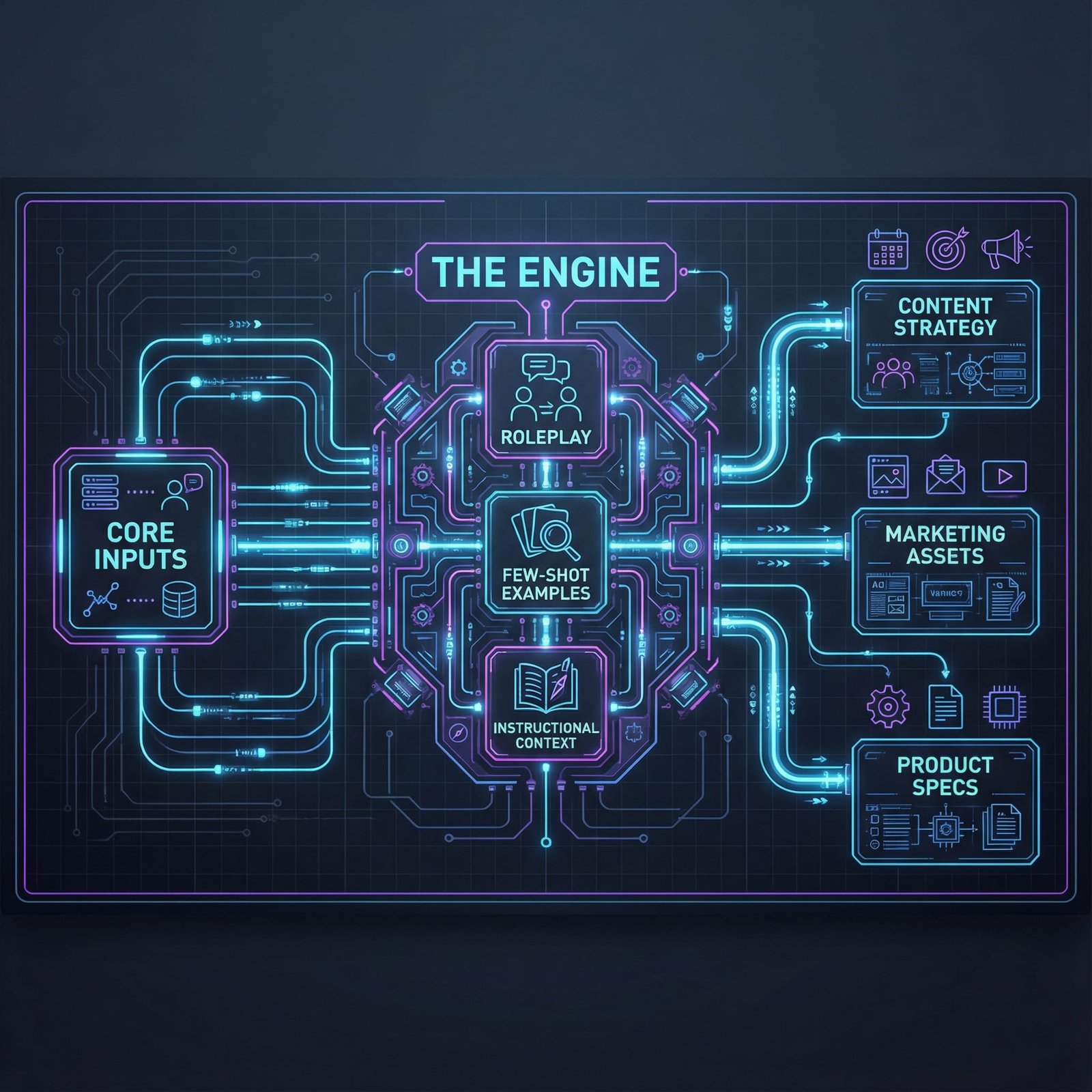
    If your team is experimenting with AI agents and automation, bake that into the prompt. You want the model to assume a 2026 pace: faster testing cycles, more automation options, and competitors who can change direction quickly. If you want more examples of 2026-oriented business prompt sets, skim a 2026 business prompt collection and notice how the best ones force structured outputs.

    One prompt to build a 12-month strategy, goals, risks, and KPIs

    Use this when you’re planning a new year, a new quarter, or a reset after a messy period. It’s designed to produce a plan you can paste into a memo or a deck with minimal edits.

    Copy-ready master prompt (CEO advisor mode):

    Act as my CEO advisor and operator. Build a 12-month strategy for a business in [industry].

    Context: We sell [product/service] to [customer type]. Our team size is [team size]. Our budget for growth is [budget]. Our current bottleneck is [current bottleneck]. Our biggest constraint is [constraint: time, compliance, cash, hiring, etc.].

    Assumptions: If you must assume anything, label it clearly as an assumption.

    Output format (plain language, bullets):

    1. 3 to 5 strategic priorities for the next 12 months (each with a one-sentence “why now”).
    2. A roadmap by quarter (Q1 to Q4) with the main initiatives and dependencies.
    3. A KPI list with targets (include leading and lagging indicators).
    4. The top 8 risks (market, execution, legal, tech, brand) and mitigation steps.
    5. A next 7 days action plan with owners (use roles, not names), time estimates, and what “done” looks like.

    Keep it realistic for 2026. Include where AI automation or agents could reduce manual work, but don’t propose anything that requires a full rebuild.

    One-line tip: Use it after you’ve written a messy brainstorm, it’s great at turning chaos into a clean plan.

    Market and competitor intel prompts that turn research into decisions

    Research is expensive because it’s sticky. Notes end up scattered across tabs, and nobody turns them into a move. These prompts force the model to summarize, label uncertainty, and recommend action.

    If you want inspiration for marketing and sales prompt structures that include test plans, the 2026 sales and marketing prompt guide is a good reference point for how prompts can demand usable outputs, not fluff.

    Prompt 1: Competitor deep dive (top 5)

    You are my competitive analyst. For [market], analyze the top 5 competitors to [our company] (include direct and “good enough” substitutes).

    For each competitor, provide:

    • Positioning in one sentence
    • Core offers and pricing model (flag unknowns)
    • Strengths and weaknesses
    • Distribution channels (where they win attention)
    • Recent news and likely strategic direction (label assumptions)

    End with:

    • A “sources to verify” list (what I should check manually)
    • 3 recommended moves we can make in the next 30 days
    • A one-paragraph summary I can send to my exec team

    One-line tip: Use it before budgeting, it helps you spend where the market is actually pulling.

    Prompt 2: 2026 customer trends and buyer personas

    Act as a customer insights lead for [industry]. Based on 2026 buyer behavior, generate 3 buyer personas for [product/service].

    For each persona include: job-to-be-done, triggers, objections, success metrics, buying committee (if any), and what makes them trust a vendor.

    Label assumptions, list “unknowns,” and give 3 messaging angles we should test first.

    One-line tip: Use it when your content sounds generic, it forces real-world objections.

    Prompt 3 (optional): Market alert for policy changes or seasonal shifts

    Monitor [topic: regulation, platform policy, supply chain, seasonal demand] that could impact [industry] in the next 90 days.

    Provide:

    • What might change (and why it matters)
    • Which parts of our funnel or ops are exposed
    • A “prepare vs panic” recommendation

    Label assumptions and end with 3 actions we should take now.

    One-line tip: Use it at the start of each month, it keeps surprises smaller.

    High-impact content and marketing prompts you can use every week

    Most AI-written marketing fails for the same reason bad meetings fail: nobody sets an agenda. If you don’t define audience, proof points, and tone, the model fills the space with shiny words that don’t convert.

    The fix is simple. Make the prompt carry your brand’s spine:

    • Who it’s for (one segment, not “everyone”)
    • What you can prove (results, data, demos, reviews)
    • What you want them to do next (one clear step)

    If you want a quick view of how marketers are structuring prompt packs this year, see Knack’s 2026 marketing prompt guide for examples of prompts that ask for multiple variants and specific formats.

    Content generator prompts for blogs, LinkedIn posts, and case studies

    Prompt 1: Blog outline plus first draft (ready to edit)

    You are a senior content strategist and editor. Write a blog post for [audience] promoting [offer] without hype.

    Topic: [topic]
    Goal: [lead gen, demo requests, newsletter sign-ups, product adoption]
    Brand voice: [direct, helpful, a bit casual, no buzzwords]
    Proof points to include: [2 to 5 facts, outcomes, customer quotes, data points]
    Constraints: short paragraphs (1 to 3 sentences), no fluff, avoid clichés, avoid exaggerated claims.

    Deliverables:

    1. A tight outline with H2 and H3 headings
    2. A first draft with a strong hook in the first 3 lines
    3. A short checklist at the end (5 bullets max)
    4. A CTA that fits [offer] and feels natural

    Write in plain US English, keep sentences short, and keep the tone practical.

    One-line tip: Use it when you have a topic but no time, it gets you to “editable draft” fast.

    Prompt 2: LinkedIn post pack (angles that don’t sound the same)

    Create 8 LinkedIn posts for [audience] about [topic] connected to [offer].

    Requirements:

    • Each post uses a different angle: story, data, lesson, mistake, checklist, myth-bust, behind-the-scenes, simple how-to
    • 120 to 220 words each
    • Short sentences, no hype, no generic “AI will change everything” claims
    • Include a soft CTA at the end (comment, DM, or read)

    Provide 3 alternate opening lines for the best 2 posts.

    One-line tip: Use it weekly, then save the strongest openings as your personal swipe file.

    Sales and campaign prompts for emails, landing pages, and A/B tests

    If your sales emails feel “AI-ish,” it’s usually missing two things: real context and a real next step. Your prompt should include the ICP, the offer, the proof, and what to cut.

    Prompt 1: 5-email sequence with follow-ups

    You are my outbound copywriter for [audience/ICP]. Create a 5-email sequence to promote [offer].

    Inputs:

    • Persona: [job title, industry, company size]
    • Pain: [top pain]
    • Proof: [case study, metric, review, credential]
    • Personalization fields: [first_name], [company], [relevant_trigger]
    • CTA: [book a 15-min call, reply with yes/no, start trial]

    Deliverables: subject line options (3 each), email copy, and follow-up logic if they don’t reply. Keep it human, short, and direct. End each email with one clear next step.

    One-line tip: Use it after you’ve defined proof, otherwise it will sound like a brochure.

    Prompt 2: Landing page draft with objections and FAQ

    Draft a landing page for [offer] aimed at [audience].

    Include:

    • 5 headline options
    • A simple “who it’s for, who it’s not” section
    • Benefits tied to outcomes (not features)
    • 6 common objections with answers
    • FAQ (6 questions)
    • A short section called “What we removed” where you cut fluff and explain why

    Keep the copy grounded, avoid buzzwords, and make the CTA obvious.

    One-line tip: Use it when your current landing page is long but still unclear.

    Prompt 3: A/B testing plan that prioritizes what matters

    You are my growth analyst. For [page/email/ad], generate 10 A/B test variations.

    Provide: emphasizes, audience fit, risk level, and estimated effort. Then recommend what to test first based on impact and speed.

    End with a one-week testing plan and what success metrics to watch.

    One-line tip: Use it when you’re stuck debating wording, it forces prioritization.
    Operational efficiency and internal docs hacks with AI productivity prompts

    Ops work expands to fill the week. Emails multiply, meetings sprawl, and “quick questions” turn into slow leaks.

    The best ops prompts do three things: they name owners, they set deadlines, and they produce a format you can paste into tools like Notion or Google Docs. They also acknowledge a 2026 reality: you can automate a lot without writing code, as long as you map the process cleanly first.

    For examples of prompt starter packs built for regulated work, see Thomson Reuters’ AI prompt starter pack. The most useful part is the structure: clear scope, clear outputs, and a “client-ready” bar.

    Ops automation prompts that map tasks, tools, and time saved

    Use this when your team keeps saying “we should automate that” but nothing happens.

    Copy-ready prompt: Weekly process audit and automation plan

    Act as my operations analyst. Audit our weekly processes for [team/department].

    Inputs:

    • Tools we use: [Google Workspace, Notion, Slack, HubSpot, Airtable, Zapier, Motion, etc.]
    • Work types: [sales ops, support, onboarding, billing, reporting]
    • Constraints: [security/compliance rules, approvals, budget]

    Output:

    1. List the top 10 repeat tasks (with frequency and who does them)
    2. An impact vs effort table (impact, effort, risk, time saved per week)
    3. Recommend what to automate first (top 3) and explain why
    4. A simple build plan using our tools (step-by-step, no code)
    5. Risk checks: data access, permissions, audit trail, approvals
    6. A 2-week rollout plan with owners, deadlines, and a rollback plan if it breaks

    One-line tip: Use it after you’ve tracked work for a week, even messy notes help.

    Documentation prompts for meetings, SOPs, and a searchable knowledge base

    Docs are boring until you need them. Then they’re gold.

    Prompt 1: Meeting transcript summary that people will read

    Summarize this meeting transcript for a busy team.

    Output format:

    • Decisions made (bullets)
    • Action items (owner, deadline, next step)
    • Open questions (who will answer, by when)
    • Risks or dependencies

    Keep terms consistent, use short paragraphs, and end with a “new hire version” summary in 5 bullets.

    One-line tip: Use it right after meetings, speed beats perfection.

    Prompt 2: SOP creation from messy notes

    Turn these notes into a clear SOP for [process].

    Requirements:

    • Step-by-step instructions with numbered steps
    • Screenshot placeholders like [Screenshot: …]
    • Edge cases and what to do
    • QA checklist (what to verify before marking done)
    • Owner and review cycle (monthly/quarterly)

    Use simple words, no long paragraphs, consistent terms.

    One-line tip: Use it when only one person “knows how it works.”

    Prompt 3: Clean, tagged knowledge base page

    Convert these messy notes into a knowledge base page for [team].

    Include: title, summary, tags, related pages (placeholders), and a quick “if you only read one thing” section. Keep it scannable and consistent with our terms.

    One-line tip: Use it before onboarding a new hire, it reduces repeat questions.

    Here are your bonus productivity prompts to copy and paste as needed!

    Productivity Prompts:
    1. Draft a comprehensive daily agenda for a project manager, prioritizing tasks based on urgency and impact, and allocating time blocks for meetings, deep work, and team check-ins.

    2. Generate a detailed outline for a business proposal aimed at securing funding for a new software product, including sections for executive summary, market analysis, financial projections, and team structure.

    3. Analyze the key takeaways from the provided transcript of a 30-minute team meeting, identifying action items, responsible parties, and deadlines for each.

    4. Compose a professional email to a prospective client introducing our services, highlighting three key benefits relevant to their industry, and suggesting a follow-up call.

    5. Brainstorm five innovative strategies for improving customer retention in a SaaS business, detailing the implementation steps and expected outcomes for each.

    6. Summarize a lengthy industry report (provided separately) into a concise executive brief, focusing on emerging trends, competitive landscape, and strategic recommendations.

    7. Create a project plan timeline for launching a new marketing campaign, breaking down tasks into phases, assigning estimated durations, and identifying potential dependencies.

    8. Develop a script for a 5-minute internal presentation explaining the benefits of adopting a new CRM system, targeting employees with varying technical proficiencies.

    9. Refine the tone and clarity of the attached draft press release to ensure it is professional, engaging, and effectively conveys our company’s recent achievement to a broad audience.

    10. Generate a list of 10 potential interview questions for a Senior Software Engineer role, focusing on technical skills, problem-solving abilities, and team collaboration experience.

    11. Outline a learning path for an employee looking to master data analytics, suggesting online courses, practical projects, and relevant certifications.

    12. Identify and categorize the common objections a sales team might encounter when selling a premium subscription service, and suggest effective rebuttals for each.

    13. Craft a compelling social media post (LinkedIn format) announcing a new product feature, emphasizing its value proposition and including a clear call to action.

    14. Provide a structured framework for conducting a SWOT analysis for a small e-commerce business, including specific questions to consider for each category.

    15. Develop a set of standardized responses for frequently asked customer support questions regarding product setup and troubleshooting.

    16. Analyze the attached competitor analysis report and identify three distinct competitive advantages our company can leverage in its next marketing campaign.

    17. Generate a checklist for onboarding new remote employees, covering essential tasks from IT setup to team introductions and initial project assignments.

    18. Explain the core concepts of ‘Agile methodology’ in project management to someone with no prior knowledge, using simple language and relatable examples.

    19. Formulate three different subject line options for an email announcing a company-wide policy change, ensuring they are clear, professional, and encourage opening.

    20. Propose a structured approach for conducting a quarterly business review (QBR), outlining key metrics to discuss, stakeholders to involve, and agenda items.

    Conclusion: a prompt checklist you’ll reuse all year

    Good prompts feel like handing someone a clear brief, not tossing them a vague task. Before you hit enter, run this quick checklist: role, goal, context, constraints, format, examples, and a clear quality bar.

    Start with one prompt per category, then improve it after each use. Save your best versions as shared templates so the whole team writes, plans, and documents the same way.

    Pick one prompt today, paste it into your LLM, and customize the brackets. You’ll feel the time come back fast.

    FAQ:


    What is the difference between generic and expert-level AI prompts?

    Generic prompts offer broad, often unusable advice, while expert-level instruction sets provide specific context, roles, and constraints to generate actionable business assets.

    How do AI prompts improve business productivity in 2026?

    By acting as shortcuts to complex tasks like strategic planning and marketing analysis, precision prompts allow leaders to focus on high-level decision-making rather than manual execution.

  • Unlock AI Profit With Nano-Banana Pro Prompts (25 High-Yield Themes)

    Unlock AI Profit With Nano-Banana Pro Prompts (25 High-Yield Themes)

    Top Prompts for Creators…

    Most people don’t need “better AI.” They need outputs they can ship: a landing page that converts, an email sequence that sells, a product image set that looks consistent, a proposal that wins the deal.

    That’s what Nano-Banana Pro Prompts are for. “Nano” is the mindset of small, efficient prompting, fewer tokens, more signal. “Banana” is a creative persona mode that pushes specificity, style, and bold choices, without slipping into sloppy or risky claims. Put them together and you get fast, repeatable work you can sell.

    If you want AI profit, these AI prompt themes are built for conversion-focused assets, not random idea dumps. Pick a theme, produce one deliverable, package it, repeat.

    The Nano-Banana method: small prompts, big signal, less fluff

    Nano-Banana works because it forces clarity. Instead of asking for “copy for my offer,” you define role, constraints, and the exact deliverable. You also stop the model from filling space with vague advice.

    Here are the core rules that keep outputs sharp:

    • Define the role (copy chief, performance marketer, e-commerce merchandiser, creative director).
    • Set constraints (length, reading level, tone, banned claims, required sections).
    • Provide inputs (offer, audience, price, proof, objections, brand voice).
    • Specify the output format (a wireframe, an email series, a checklist, a table).
    • Add acceptance criteria (must include one primary CTA, must include FAQs, must include 3 objections plus rebuttals).

    This is the main idea: your prompt should read like a mini-brief, not a chat message.

    “Done” is not “good ideas.” Done is a deliverable you can sell or ship today, like a 7-email welcome series, a landing page draft with FAQ, or a set of 12 ad variants.

    If you’re using Nano-Banana for visuals, the same rules apply. Visual work sells when it’s consistent. That’s why features like reliable text rendering and character consistency matter for business assets. Tools and guides in the Nano Banana ecosystem have put a lot of focus on brand-ready outputs such as consistent characters and readable text inside images, which is a big reason creators are selling visual packs and product images faster (see examples in Nano Banana Pro marketing prompts).

    A simple structure that keeps results consistent

    You don’t need a long prompt. You need a repeatable shape. Use labeled sections so you can swap inputs without rewriting everything.

    A clean structure looks like this:

    FieldWhat to includeExample detail
    ContextWhat you’re selling and why now“New bundle, limited-time bonus”
    TaskThe deliverable“Write a landing page wireframe + copy”
    InputsAudience, offer, proof, price“Freelance designers, $49”
    RulesConstraints and must-haves“No made-up stats, 8th-grade reading level”
    Output formatHow to present it“Headlines, sections, FAQs, CTA button text”
    Quality checksAcceptance criteria“Include 3 objections with rebuttals”

    One small trick: write your acceptance criteria like a checklist. It keeps the model from wandering, and it makes it easier to review work quickly.

    Safety, brand, and client-ready rules that prevent mistakes

    If you want approvals fast (and fewer revisions), add guardrails that match real client expectations:

    No made-up facts: If you didn’t provide numbers, require “proof placeholders” instead of invented stats.
    Flag uncertainty: If something is unknown, the output should say “needs confirmation” and list what to verify.
    Avoid trademark misuse: Ask for “inspired-by” language when needed, and avoid logos unless you have rights.
    Add disclaimers for finance and health: Simple, clear disclaimers reduce risk and back-and-forth.
    Keep one voice: Define tone and banned phrases, then require consistency across every asset.

    This isn’t about being cautious for its own sake. It’s about protecting your time. Fewer fixes equals more deliverables per week, which is how AI profit becomes real.

    For more inspiration on prompt patterns people share and reuse, scan a practical breakdown like viral Nano Banana prompt structures, then adapt those ideas into client-safe workflows.

    25 Nano-Banana prompt themes you can monetize this week

    Below are 25 AI prompt themes grouped by intent. Each one includes what it produces, who buys it, and how to package it so it feels like a product, not a random file.

    Offer and funnel builders (themes 1 to 9)

    1. Irresistible offer generator: Produces offer stack, bonuses, guarantee, urgency. Buyers: coaches, course creators. Package: “10 offer angles” bundle.
    2. Landing page wireframe plus copy: Produces section order, headlines, body copy, FAQ, CTA. Buyers: founders, agencies. Package: funnel-in-a-box draft.
    3. Upsell and order bump mapper: Produces order bump ideas, upsell sequence, price ladder. Buyers: e-commerce, info products. Package: “cart value booster” kit.
    4. Webinar or VSL script builder: Produces hook, big promise, story, proof, CTA loops. Buyers: educators, high-ticket sellers. Package: 20-minute VSL script plus outline.
    5. Lead magnet outline creator: Produces checklist, mini-guide, or email course outline. Buyers: newsletter operators. Package: 3 lead magnets, pick one.
    6. Email welcome sequence (5 to 7 emails): Produces subject lines, CTAs, segmentation tags. Buyers: SaaS, creators. Package: “Welcome Series + 2 resend variants.”
    7. Abandoned cart recovery set: Produces 3 emails plus 2 SMS drafts. Buyers: Shopify brands. Package: plug-and-play flows for one product line.
    8. Objection crusher pack: Produces top objections, rebuttals, proof ideas, risk-reversal lines. Buyers: anyone selling. Package: “10 objections, 3 rebuttals each.”
    9. Conversion audit checklist: Produces prioritized fixes for a page, with impact and effort notes. Buyers: agencies, solopreneurs. Package: monthly retainer audit.

    A lot of creators monetize this by being the “implementation specialist,” not the idea person. Real buyers pay for finished assets. For examples of monetizable Nano Banana business paths, see AI business models built around Nano Banana.

    Content that sells (themes 10 to 17)

    1. Short-form video script factory: Produces 15 to 45-second scripts with 5 hooks. Buyers: creators, local businesses. Package: 30 scripts per month.
    2. Carousel and thread builder: Produces swipeable structure, punchy lines, CTA slide. Buyers: LinkedIn and X creators. Package: “12 carousels, 4 threads.”
    3. SEO blog brief plus outline: Produces search intent, headings, FAQs, internal link ideas. Buyers: SaaS and affiliates. Package: content calendar + 4 briefs.
    4. Product-led storytelling posts: Produces case-study style posts with before/after and proof placeholders. Buyers: apps, service providers. Package: weekly story series.
    5. Authority positioning kit: Produces bio, founder story, talking points, podcast pitch angles. Buyers: consultants. Package: one-page brand doc + 10 talking points.
    6. Swipe file remixer (ethical): Produces original angles based on patterns, not copying. Buyers: marketers. Package: “20 fresh hooks from 5 reference ads.”
    7. Comment-to-DM conversion scripts: Produces polite, non-spammy replies that move to DM with consent. Buyers: social sellers. Package: script library by scenario.
    8. Repurposing map: Produces a plan to turn one video into 10 assets across platforms. Buyers: busy founders. Package: Notion board plus weekly map.

    This category is where bursty output pays off. You can generate variety fast, but still keep one voice by locking rules and acceptance criteria.

    Products, creative assets, and visuals (themes 18 to 25)

    1. E-commerce product listing pack: Produces title, bullets, description, FAQ, review response templates. Buyers: Amazon and Shopify sellers. Package: 10 listings, one niche.
    2. Product photography prompt blueprint: Produces consistent lighting, angles, backgrounds, and “do-not-change” rules. Buyers: e-commerce brands. Package: 20-shot list per product.
    3. Mockup and prototype visual prompts: Produces prompt sets for device mockups, packaging mockups, logo placement rules. Buyers: designers, agencies. Package: brand-ready mockup bundle.
    4. Ad creative variants: Produces 5 angles, 5 headlines, 5 visual directions, plus CTAs. Buyers: performance teams. Package: monthly ad refresh pack.
    5. Course slide deck outline: Produces lesson flow, slide-by-slide outline, quiz questions, workbook prompts. Buyers: educators. Package: “Module 1 complete” deliverable.
    6. Brand voice and style guide generator: Produces do and don’t list, words to use, words to avoid, sample paragraphs. Buyers: small brands. Package: voice guide + 10 examples.
    7. Localization and cultural rewrite kit: Produces US-to-UK or US-to-AU versions, simpler reading level, local terms. Buyers: SaaS, e-commerce. Package: 5 key pages localized.
    8. Client proposal and scope builder: Produces scope, timeline, deliverables, revision limits, and assumptions. Buyers: freelancers. Package: proposal template plus 3 scope tiers.

    If you want a deeper library of visual styles you can adapt into client-safe prompt packs, browse a catalog like Nano Banana image prompt styles and translate style names into brand guidelines your clients can approve.

    Turn prompt themes into paid “prompt packs” and services

    The biggest shift is mental: stop selling prompts as “cool tricks.” Sell them as repeatable production systems. Your buyer doesn’t want a prompt, they want a result with less time and fewer edits.

    Practical monetization paths that work without hype:

    Freelancing (asset delivery): You deliver the landing page, emails, ad set, or product visuals. Prompting stays behind the scenes.
    Productized services (fixed scope): “7-email welcome sequence in 72 hours” or “20 product images in 48 hours.”
    Template packs (DIY): Sell Nano-Banana Pro Prompts as a kit with brief forms, examples, and usage notes.
    Retainers: Monthly content packs, ad variants, or conversion audits.
    Bundles: Combine themes, like “Offer + Landing Page + Welcome Emails,” so the value feels obvious.

    Pricing gets easier when you anchor it to outcomes and time saved. A $300 prompt pack feels expensive. A $300 “Funnel Copy Starter Kit” that replaces a week of work feels cheap.

    If you need prompt inspiration for visual and marketing use cases, a curated collection like Nano Banana Pro prompt examples can help you see how others package consistent outputs, then you can write your own prompts in your own voice.

    Three easy packaging plays: done-for-you, done-with-you, DIY

    Done-for-you: You deliver final assets. Include an intake form, one round of revisions, and “proof placeholders” the client can fill.
    Done-with-you: A live session plus templates. Include a workshop agenda, the prompt set, and a shared doc where you run prompts together.
    DIY: Sell prompt packs. Include brief prompts, main prompts, QA checks, and example outputs so buyers don’t get stuck.

    The best part: you can build one theme once, then sell it in three formats.

    Quality checks that protect results and your reputation

    A simple QA checklist catches most problems before a client sees them:

    • Clear goal and one target audience
    • One primary CTA (not five)
    • Consistent voice across every asset
    • No false claims, no invented numbers
    • Proof placeholders where evidence is needed
    • Compliance notes for sensitive topics
    • Final formatting exactly as requested (headings, bullets, length)

    Keep a reusable “client intake” prompt too. Better inputs mean fewer reruns, which is the quiet engine behind steady AI profit.

    Conclusion

    Pick one of the 25 AI prompt themes and create one deliverable in the next 60 minutes. Keep it small, keep it structured, and make “done” look like something a buyer can use today.

    That’s the point of Nano-Banana Pro Prompts: small prompts, strong constraints, client-ready outputs. Start with one theme, package it, sell it, then expand into a full prompt pack that fits your niche.

    FAQ:


    What are “Nano-Banana” pro prompts?

    Nano-Banana prompts refer to highly efficient, low-token prompt engineering techniques (‘Nano’) combined with methods to achieve creative, unrestricted, or distinct AI outputs (‘Banana’), often bypassing generic responses and limitations.

    How do these prompts help unlock AI profit?

    By generating highly specific, conversion-focused, and unique content, these prompts enable users to create valuable AI-powered assets for marketing, sales, content creation, and more, leading to tangible business outcomes and increased profit margins.

    Are these high-yield prompts suitable for beginners in AI?

    While the article focuses on advanced, high-yield themes, many concepts can be adapted for beginners. However, professionals with some foundational prompt engineering experience will likely gain the most immediate and profound benefits.

    Where can I apply these Nano-Banana prompt themes?

    These themes can be applied across various AI models and platforms for diverse tasks such as copywriting, social media content, product descriptions, market research analysis, content outlines, generating unique creative narratives, and developing distinct AI personas.

  • Your AI Prompt Package Creation Guide to Better Prompts

    Your AI Prompt Package Creation Guide to Better Prompts

    What if your everyday AI chats could power your next product, campaign, or course? With the right system, they can. You will turn scattered prompts into a repeatable engine that saves time and grows ideas on command.

    Think of AI prompt packages as bundled scripts for common tasks. Each bundle covers one goal, like blog briefs, ad angles, email sequences, or product research. You plug them in, follow simple steps, and get consistent results, even on a busy day.

    If you are new to prompts or run a small business, this is your cheat code. No more guessing what to type or fixing messy outputs. AI Prompt Package Creation gives you structure, guardrails, and quality control you can count on.

    You will learn how to build clear roles, inputs, and examples, plus when to use mega-prompts, prompt chaining, and simple multimodal cues for better context. We will also touch on safe prompting habits that cut errors and bias. By the end, you will have a starter set you can use across content, marketing, and ops.

    Want a head start on tools to test your package ideas? Check out these beginner-friendly picks in the guide to best free AI prompt tools for beginners. And if you like to see it in action, this video is a helpful primer: https://www.youtube.com/watch?v=P08jrZhyNxw

    Get ready to map your core tasks, wire in smart prompts, and run them like templates. Our comprehensive guide walks you through the entire process. You will learn how to create prompts that save time and boost your ideas, starting today.

    Understand AI Prompt Packages and Why You Need Them

    Think of an AI prompt package as a ready-to-run system for a task. You get structured prompts, roles, inputs, examples, and QA checklists, all built to work together. Instead of guessing what to type, you follow a simple flow and get reliable results.

    This is the core of AI Prompt Package Creation. You build once, then reuse daily. It saves time, locks in voice and style, and reduces rework across your content, marketing, and ops.

    What an AI Prompt Package Includes

    A strong package has a few core parts that keep outputs consistent and on-brand:

    • Role setup: Clear model identity and constraints, like “You are an SEO editor.”
    • Inputs: What you supply each time, such as audience, topic, brief, and data.
    • Steps or chains: Small prompts that run in a set order for quality control.
    • Examples: Short input and output pairs to show the model what “good” looks like.
    • Style guardrails: Tone, banned phrases, formatting, and reading level targets.
    • QA checks: A checklist the model follows to catch errors before final output.
    • Variants: Optional prompts for short, long, or platform-specific versions.

    If you want a quick primer on prompt quality and structure, review Google’s overview of prompt engineering for AI or AWS’s breakdown of what prompt engineering is and why it matters.

    Why You Need Them

    You need packages when speed and consistency matter. Single prompts help, but they rarely scale. Packages do.

    • Faster work: You cut trial and error from hours to minutes.
    • Consistency: Same tone, structure, and depth across writers and projects.
    • Onboarding: New team members produce strong work on day one.
    • Accuracy: Built-in checks reduce factual drift and formatting errors.
    • Reuse: One package fuels many tasks, like briefs, outlines, and drafts.
    • Measurable wins: You can test, compare, and improve each step.

    If you prefer ready-made sets before building your own, browse the Top AI Prompt Package Providers for 2025.

    How AI Prompt Package Creation Works

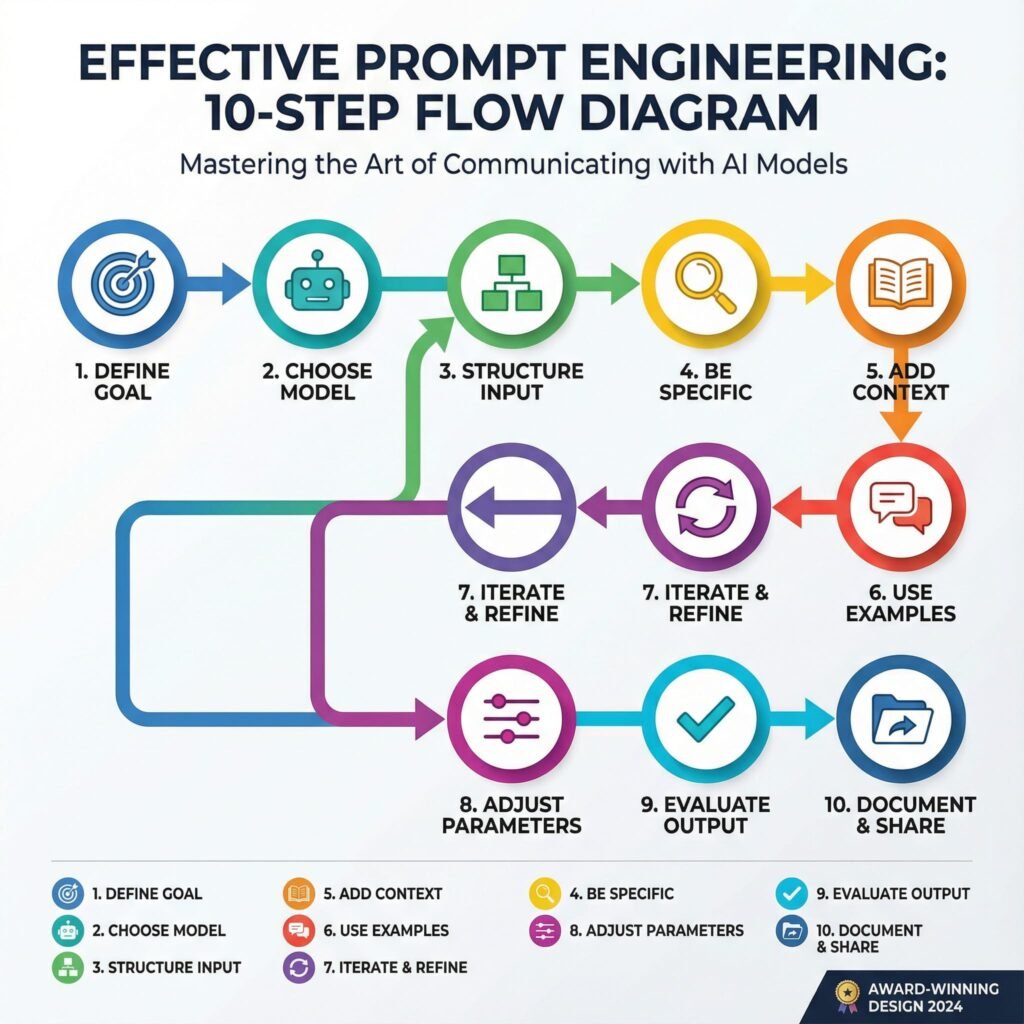
    You can build a package in a simple five-step loop:

    1. Define the job to be done, like “publish a blog brief in 20 minutes.”
    2. Write the role, inputs, and constraints in plain language.
    3. Split the workflow into 3 to 5 steps with short prompts.
    4. Add examples and a QA checklist to lock in quality.
    5. Test with 5 real tasks, then refine weak steps and freeze a v1.

    Keep prompts short. Use the same variable names. Store examples beside the prompts. That small discipline makes updates painless.

    When a Package Beats Single Prompts

    Single prompts work for one-off tasks. Packages shine when you need repeatable outcomes.

    • Multiple deliverables from one input, like brief, outline, and draft.
    • Hand-offs between people or tools, such as writer to editor.
    • Compliance needs, where tone and claims must be precise.
    • Multi-channel content, where you need consistent variants.

    Example: A “Blog Content Package”

    • Role: You are a senior SEO editor. Follow AP style.
    • Inputs: Topic, target keyword, audience, angle, internal links.
    • Steps: Brief, title ideas, outline, draft, meta data, QA.
    • QA: Check reading level, link placement, claims, and duplicates.

    Run this flow and you get tight, on-brand content, every time. That is the promise of AI Prompt Package Creation.

    Grab the Latest Tips to Build Even Better Prompts in 2025

    You can get sharper outputs with less effort this year. Models handle more context, more modes, and tighter instructions. Pair that power with smart structure and you will ship stronger work with your AI Prompt Package Creation system.

    Treat Every Prompt Like a Mini Spec

    Loose prompts create loose results. Write prompts as if you are handing a clear brief to a junior teammate.

    • Role: Define who the model is and the limits of its job.
    • Goal: State the output format and success criteria.
    • Inputs: List the variables you will supply each run.
    • Rules: Include tone, banned phrases, and must-have checkpoints.

    Example you can adapt: You are a senior SEO editor. Goal: produce a 600-word blog outline with H2s and H3s. Inputs: topic, audience, primary keyword, internal links. Rules: active voice, 8th grade reading level, no hype words, include 2 internal links, return JSON with fields: title, outline, notes.

    Why this works: you reduce guesswork, prompt length, and rework. The model fills a form, not a blank page.

    Chain Short Steps, Not One Giant Ask

    Short, focused steps beat one mega prompt. Split your package into a small chain, then review each step.

    • Step 1, clarify inputs and edge cases.
    • Step 2, produce outline options.
    • Step 3, draft with constraints.
    • Step 4, run QA and fix gaps.

    Multi-agent flows can help for complex work, like one agent for research and another for editing. 2025 tools make this easier, and the pattern is backed by current best practices on multi-step prompting and structure seen in resources like Lakera’s prompt engineering guide for 2025.

    Use Few-Shot Micro Examples for Style and Format

    One or two small examples steer tone and structure better than long lectures.

    • Show a good outline and a weak outline, then explain why the good one wins.
    • Include one labeled example of the JSON or table format you want.
    • Keep examples short, so they do not bloat context.

    Quick comparison:

    • Bad: “Write a great outline.”
    • Better: “Write 5 H2s with 2 H3s each. Use 8 to 12 words per heading. Match this sample style: H2: Problem, H3: Symptom, H3: Fix.”

    For more nuance on what works and what does not across modern models, see Lenny’s breakdown in AI prompt engineering in 2025: What works and what doesn’t.

    Add Multimodal Cues for Clarity

    Models now accept text plus images or audio in many tools. Use that to add context, not clutter.

    • Paste a product screenshot, then ask for a 70-word feature summary.
    • Attach a chart image and ask for three key takeaways in bullets.
    • Provide a brand voice audio clip, then request copy in that tone.

    Tip: always restate the objective and constraints in text, even when you add images. Visuals guide context, text locks precision.

    Control Cost and Speed Without Sacrificing Quality

    Token waste adds up. Trim, structure, and reuse.

    • Store your role and rules as a reusable system prompt.
    • Keep variables short and clear. Use the same names every time.
    • Ask for compact outputs where possible, like bullet summaries before drafts.
    • Prefer JSON or simple tables for intermediate steps. They are easy to review and refeed.

    A quick tactic:

    • First prompt: “Draft 6 title ideas with a 60-character limit.” Choose one.
    • Second prompt: “Write the outline using the selected title.” This saves tokens and time.

    Build Safety and QA Into the Flow

    Quality checks should not be an afterthought. Bake them in.

    • Add a short QA checklist at the end of each step.
    • Require sources for claims and reject vague language.
    • Flag risky phrasing and verify numbers before finalizing.
    • For public content, include a bias and risk pass.

    Simple end-of-step QA example: Before returning the final draft, confirm reading level is grade 8 to 9, confirm two internal links are present, verify all data points with sources, and remove filler phrases.

    If you want tools to help explore, test, and improve prompts faster, scan this curated roundup of Top 10 AI Prompt Tools for Boosting Creativity in 2025. It is a practical add-on to your AI Prompt Package Creation workflow.

    FAQ Section
    What is an AI prompt package?

    An AI prompt package is a curated bundle of structured prompts designed for a specific goal, allowing users to achieve consistent, high-quality AI outputs for tasks like blog briefs, ad copy, or product research, making AI interactions more efficient and reliable.

    Why should I use AI prompt packages?

    They save time by reducing guesswork, ensure consistency in AI outputs, provide built-in quality control, and allow for repeatable workflows. This makes AI more predictable and effective for everything from content creation to marketing campaigns and operational tasks.

    What are mega-prompts and prompt chaining?

    Mega-prompts are comprehensive, single prompts designed to handle complex tasks with extensive context and instructions. Prompt chaining involves a series of interconnected prompts, where the output of one prompt feeds as input into the next, breaking down complex tasks into manageable, sequential steps.

    How do prompt packages help small businesses?

    For small businesses, prompt packages act as a ‘cheat code’ by providing ready-to-use, effective AI workflows without needing extensive prompt engineering knowledge. They enable consistent, high-quality support across content, marketing, and operational needs, saving time and resources.

    What are safe prompting habits?

    Safe prompting involves creating prompts with clear boundaries, specifying ethical guidelines, and regularly reviewing AI outputs for potential biases or inaccuracies. It also includes protecting sensitive information and refining prompts to reduce errors and undesirable responses, ensuring responsible AI use.

    Conclusion

    You started with casual chats, now you have a repeatable system that turns ideas into outputs on command. Build small, clear steps, add micro examples, and run tight QA to keep quality high. The payoff is speed, consistency, and results you can trust across content, marketing, and ops, powered by AI Prompt Package Creation.

    You have the tools, so create your first package today. Take one task you do every week, write the role, inputs, and rules, then ship a simple v1. Our comprehensive guide walks you through the entire process. Start creating.

    Want a next move that builds momentum fast? Explore proven prompts and sellable templates with this roundup of Top AI Prompt Marketplaces for Buying and Selling Quality Prompts.

    Try one prompt right now, record your result, then share what worked. Keep refining, keep shipping, and keep your system simple. This is how you turn everyday AI into output you can count on.

  • The Alchemy of Influence: 10 Essential Facts Unlocking Superior Prompt Engineering

    The Alchemy of Influence: 10 Essential Facts Unlocking Superior Prompt Engineering

    Intro:

    In the world of AI, prompt engineering stands as a key skill that turns simple words into powerful results. This post reveals 10 essential facts on the alchemy of influence, showing you how to craft prompts that guide AI with precision and boost your outcomes. You’ll gain clear steps to master this craft, from basic tweaks to advanced strategies that deliver real impact.

    Imagine typing a few words into an AI tool and watching it spit out gold. That’s the thrill of good prompt engineering. It turns simple chats with large language models into powerful creations. You control the output with care. Small tweaks lead to big wins in quality and speed.

    These ten facts show how prompts shape AI results. They go beyond basic tips. Master them, and you’ll craft prompts like a pro. Let’s dive in. Each one builds your skill in prompt optimization.

    Fact 1: The Primacy of the First Word
    Setting the Contextual Anchor
    The opening word in your prompt grabs the AI’s attention right away. It sets the tone and direction. Think of it as the spark that lights the whole fire. Strong starts, like action verbs such as “create” or “analyze,” guide the model into the right mindset from the jump.

    Models process text token by token. Early words lock in the path. A fuzzy start, like “um, maybe write about,” leads to weak results. Pick bold openers to steer clear of that mess.

    Actionable Tip: Pre-Pacing for Precision
    Start every prompt with what you want the output to look like. Say “List three bullet points on…” instead of jumping straight to the topic. This paces the AI. It knows the format before the details hit.

    Try it next time. You’ll see cleaner responses. No more sifting through junk to find the good stuff.

    Fact 2: The Indispensable Role of Constraints
    Defining the Guardrails: Length, Tone, and Persona
    Loose prompts wander like kids in a candy store. They grab too much and lose focus. Set rules on length, like “in 200 words,” or tone, such as “in a friendly voice.” Even pick a persona, like “as a history teacher.”

    This keeps things tight. AI stays on track. You get what you need without extra fluff.

    Case Study Snapshot: Reducing Hallucinations Through Scoping
    Hallucinations happen when AI makes up facts. A vague ask, “Tell me about ancient Rome,” might invent wild stories. But try “Explain ancient Rome’s fall using only events from 400-500 AD.” Now it’s grounded.

    Before: Wild guesses. After: Solid facts. Constraints cut errors by up to 70% in tests with tools like GPT. Your prompts turn risky guesses into reliable info.

    Fact 3: The Implicit Weight of Instruction Placement
    Recency Bias vs. Salience: Where Critical Instructions Belong
    AI models remember recent words more than early ones. But key rules shine brightest up front. Put must-follow orders at the start for impact. Save details for the end if they build on the base.

    It’s a balance. Front-load for clarity in short prompts. End-place for flow in longer ones. Test both to see what fits your style.

    Leveraging Delimiters for Command Separation
    Use marks to split parts of your prompt. Triple quotes hold examples. Tags like keep data separate from orders.

    This avoids mix-ups. AI treats sections as distinct. Your instructions land clear and strong.

    Fact 4: The Leverage of Zero-Shot, One-Shot, and Few-Shot Learning
    Moving Beyond Zero: The Efficacy of Demonstrations
    Zero-shot means no examples. Just ask, and hope. One-shot gives one sample. Few-shot shares a few. Each step boosts accuracy, especially for tricky jobs like writing code or poems.

    Zero works for basics. But add a demo, and outputs match your vision better. It’s like showing a map instead of guessing the route.

    Data Richness in Few-Shot Examples
    Pick examples that show the range. One for a simple case, another for tough spots. This teaches the AI patterns fully.

    Quality beats quantity. Bad samples confuse. Good ones guide to spot-on results every time.

    Fact 5: Specificity Trumps Verbosity (Usually)
    Quantifying Vagueness: Identifying Ambiguous Terms
    Words like “nice” or “detailed” leave room for guesswork. Swap them for clear measures, such as “use simple sentences under 15 words each.” This pins down the goal.

    Vague prompts waste time. Specific ones deliver fast. You avoid rewrites and frustration.

    The Necessity of Negative Constraints (What Not To Do)
    Tell the AI what to skip. “Don’t add opinions” or “No lists here.” These blocks shape the flow.

    It’s a quick fix. Outputs stay pure. Think of it as pruning a bush for better growth.

    Fact 6: Iteration is the Core Competency of Prompt Optimization
    The Feedback Loop: Analyzing Failures Systematically
    Prompts rarely nail it first try. When it flops, check why. Did the tone miss? Was the structure off?

    Treat it like science. Tweak one part. Run again. Track what changes help. This builds your edge over time.

    Prompt Chaining and Decomposition for Complex Workflows
    Big tasks overwhelm. Break them down. First prompt outlines ideas. Second refines them.

    Chain outputs as inputs. It handles depth better than one giant ask. You get layered, sharp results.

    Fact 7: Role-Playing Boosts Creativity and Accuracy
    Stepping into Shoes: Why Personas Work Wonders
    Assign the AI a role, like “Act as a chef.” It shifts the style to match. Outputs feel alive and on-point.

    This taps hidden strengths in models. A plain ask gets dry facts. Role-play adds flavor and focus.

    Tailoring Roles for Task Fit
    Match the persona to your need. Detective for mysteries. Expert for advice. Test roles to find the sweet spot.

    Results jump in relevance. You pull more from the AI than before.

    Fact 8: Temperature Controls the Spark of Innovation
    Dialing Creativity: Low vs. High Settings
    Temperature sets randomness. Low means safe, steady replies. High brings wild ideas.

    For facts, go low. For stories, crank it up. It shapes the vibe just right.

    Balancing Risk and Reward
    Start at 0.7. Adjust based on output. Too bland? Raise it. Too crazy? Lower.

    This fine-tune keeps things fresh without chaos.

    Fact 9: Cultural Nuances Shape Global Prompts
    Mind the Context: Avoiding Bias Traps
    AI learns from diverse data. But prompts can stir old biases if not careful. Add “from a neutral view” to even it out.

    This ensures fair play. Outputs respect all angles.

    Adapting for Audiences
    Tweak for regions. US style? Direct. Asian? Polite layers.

    Your prompts connect wider. They build trust across lines.

    Fact 10: Tools and Testing Accelerate Mastery
    Beyond Manual Tweaks: Prompt Platforms
    Use apps like PromptBase for templates. They speed learning.

    Test in real time. See what sticks.

    Building a Prompt Library
    Save winners. Mix and match. Over time, your collection grows strong.

    This habit turns practice into power.

    Conclusion: Mastering the Interface Between Human Intent and Machine Logic
    Prompt engineering bridges your thoughts and AI smarts. These ten facts—from first words to tools—give you the keys. Small shifts, like constraints or examples, unlock better results every day.

    FAQ Section

    Q. What is prompt engineering and why is it important for AI users?

    A. Prompt engineering is the art of crafting precise instructions for AI models to achieve desired outputs. It’s crucial because well-engineered prompts enhance AI accuracy, relevance, and creativity, unlocking its full potential.

    Q. How can I improve my prompt engineering skills quickly?

    A. To quickly improve, focus on clarity, specificity, context, and iterative refinement. Experiment with different phrasing, add examples, define roles for the AI, and continuously test and adjust your prompts.

    Q. Are there any common mistakes to avoid in prompt engineering?

    A. Common mistakes include being too vague, not providing enough context, assuming the AI understands implicit meanings, and failing to iterate or refine prompts. Avoid lengthy, unstructured prompts and always test your assumptions.

    The prompt is your wand. Wave it with these tips, and watch magic happen. Start testing now. Refine as you go. You’ll craft AI interactions that wow. What’s your next prompt? Try one fact today and see the difference.