Tag: AItools

  • Unlock AI Profit With Nano-Banana Pro Prompts (25 High-Yield Themes)

    Unlock AI Profit With Nano-Banana Pro Prompts (25 High-Yield Themes)

    Top Prompts for Creators…

    Most people don’t need “better AI.” They need outputs they can ship: a landing page that converts, an email sequence that sells, a product image set that looks consistent, a proposal that wins the deal.

    That’s what Nano-Banana Pro Prompts are for. “Nano” is the mindset of small, efficient prompting, fewer tokens, more signal. “Banana” is a creative persona mode that pushes specificity, style, and bold choices, without slipping into sloppy or risky claims. Put them together and you get fast, repeatable work you can sell.

    If you want AI profit, these AI prompt themes are built for conversion-focused assets, not random idea dumps. Pick a theme, produce one deliverable, package it, repeat.

    The Nano-Banana method: small prompts, big signal, less fluff

    Nano-Banana works because it forces clarity. Instead of asking for “copy for my offer,” you define role, constraints, and the exact deliverable. You also stop the model from filling space with vague advice.

    Here are the core rules that keep outputs sharp:

    • Define the role (copy chief, performance marketer, e-commerce merchandiser, creative director).
    • Set constraints (length, reading level, tone, banned claims, required sections).
    • Provide inputs (offer, audience, price, proof, objections, brand voice).
    • Specify the output format (a wireframe, an email series, a checklist, a table).
    • Add acceptance criteria (must include one primary CTA, must include FAQs, must include 3 objections plus rebuttals).

    This is the main idea: your prompt should read like a mini-brief, not a chat message.

    “Done” is not “good ideas.” Done is a deliverable you can sell or ship today, like a 7-email welcome series, a landing page draft with FAQ, or a set of 12 ad variants.

    If you’re using Nano-Banana for visuals, the same rules apply. Visual work sells when it’s consistent. That’s why features like reliable text rendering and character consistency matter for business assets. Tools and guides in the Nano Banana ecosystem have put a lot of focus on brand-ready outputs such as consistent characters and readable text inside images, which is a big reason creators are selling visual packs and product images faster (see examples in Nano Banana Pro marketing prompts).

    A simple structure that keeps results consistent

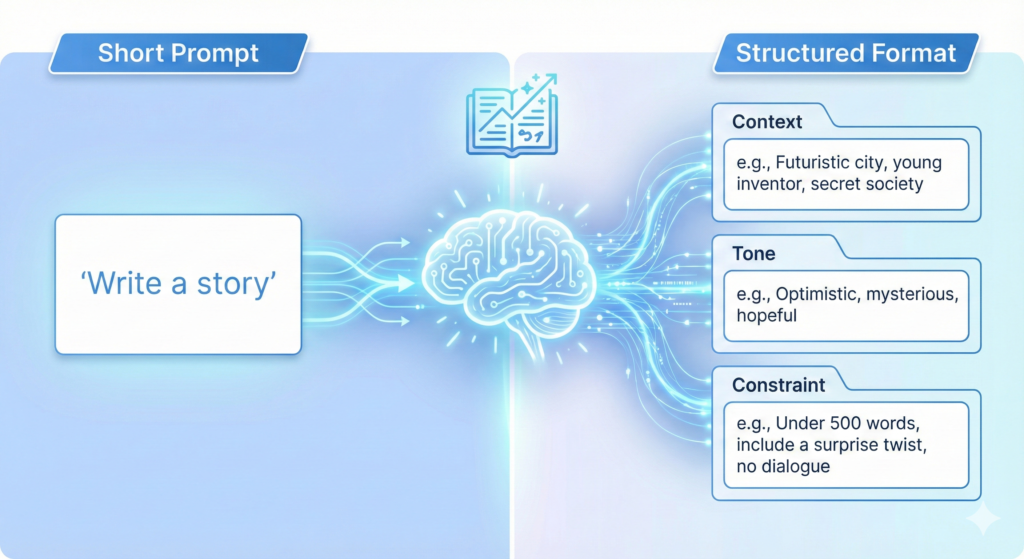
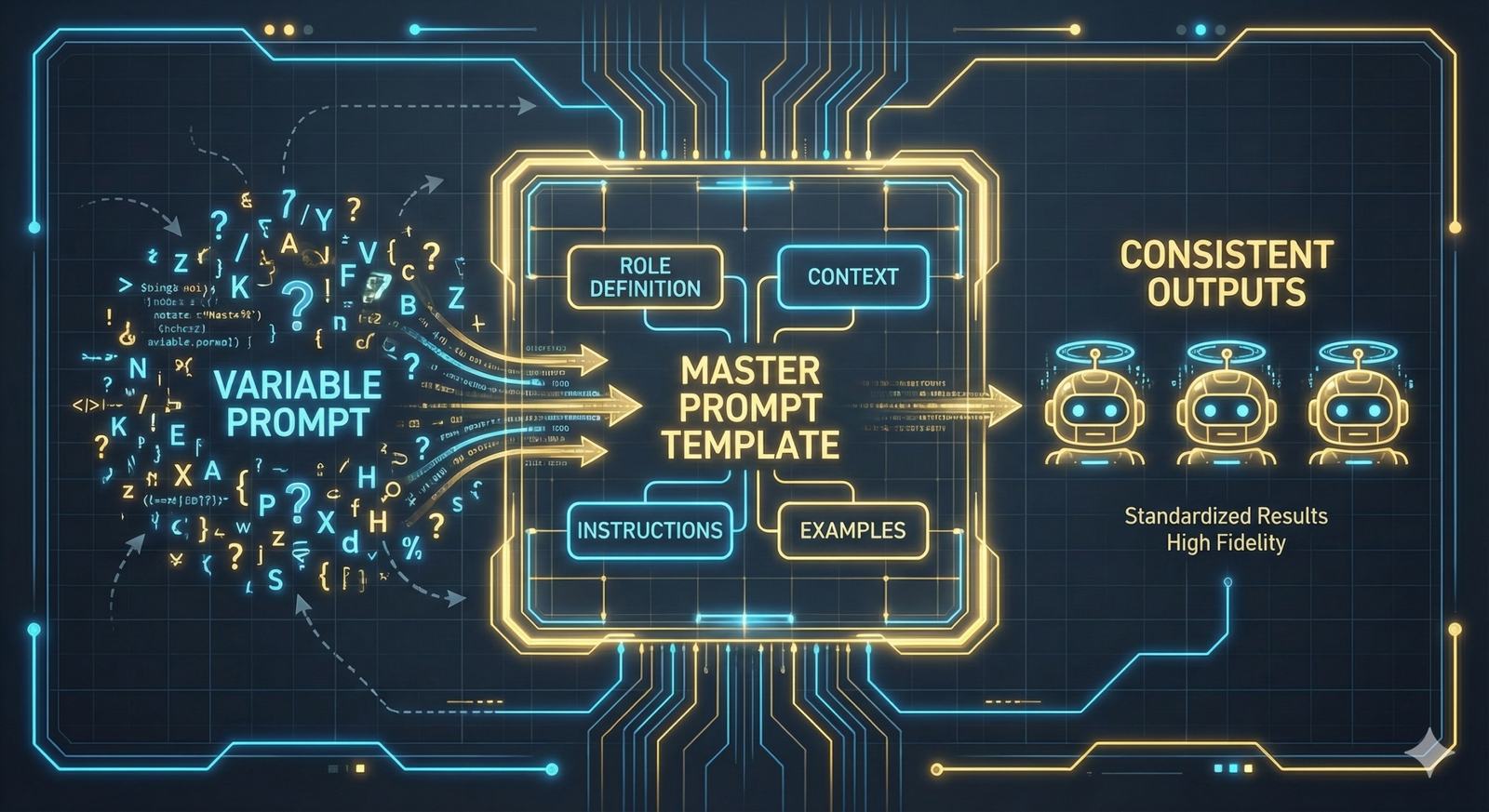
    You don’t need a long prompt. You need a repeatable shape. Use labeled sections so you can swap inputs without rewriting everything.

    A clean structure looks like this:

    FieldWhat to includeExample detail
    ContextWhat you’re selling and why now“New bundle, limited-time bonus”
    TaskThe deliverable“Write a landing page wireframe + copy”
    InputsAudience, offer, proof, price“Freelance designers, $49”
    RulesConstraints and must-haves“No made-up stats, 8th-grade reading level”
    Output formatHow to present it“Headlines, sections, FAQs, CTA button text”
    Quality checksAcceptance criteria“Include 3 objections with rebuttals”

    One small trick: write your acceptance criteria like a checklist. It keeps the model from wandering, and it makes it easier to review work quickly.

    Safety, brand, and client-ready rules that prevent mistakes

    If you want approvals fast (and fewer revisions), add guardrails that match real client expectations:

    No made-up facts: If you didn’t provide numbers, require “proof placeholders” instead of invented stats.
    Flag uncertainty: If something is unknown, the output should say “needs confirmation” and list what to verify.
    Avoid trademark misuse: Ask for “inspired-by” language when needed, and avoid logos unless you have rights.
    Add disclaimers for finance and health: Simple, clear disclaimers reduce risk and back-and-forth.
    Keep one voice: Define tone and banned phrases, then require consistency across every asset.

    This isn’t about being cautious for its own sake. It’s about protecting your time. Fewer fixes equals more deliverables per week, which is how AI profit becomes real.

    For more inspiration on prompt patterns people share and reuse, scan a practical breakdown like viral Nano Banana prompt structures, then adapt those ideas into client-safe workflows.

    25 Nano-Banana prompt themes you can monetize this week

    Below are 25 AI prompt themes grouped by intent. Each one includes what it produces, who buys it, and how to package it so it feels like a product, not a random file.

    Offer and funnel builders (themes 1 to 9)

    1. Irresistible offer generator: Produces offer stack, bonuses, guarantee, urgency. Buyers: coaches, course creators. Package: “10 offer angles” bundle.
    2. Landing page wireframe plus copy: Produces section order, headlines, body copy, FAQ, CTA. Buyers: founders, agencies. Package: funnel-in-a-box draft.
    3. Upsell and order bump mapper: Produces order bump ideas, upsell sequence, price ladder. Buyers: e-commerce, info products. Package: “cart value booster” kit.
    4. Webinar or VSL script builder: Produces hook, big promise, story, proof, CTA loops. Buyers: educators, high-ticket sellers. Package: 20-minute VSL script plus outline.
    5. Lead magnet outline creator: Produces checklist, mini-guide, or email course outline. Buyers: newsletter operators. Package: 3 lead magnets, pick one.
    6. Email welcome sequence (5 to 7 emails): Produces subject lines, CTAs, segmentation tags. Buyers: SaaS, creators. Package: “Welcome Series + 2 resend variants.”
    7. Abandoned cart recovery set: Produces 3 emails plus 2 SMS drafts. Buyers: Shopify brands. Package: plug-and-play flows for one product line.
    8. Objection crusher pack: Produces top objections, rebuttals, proof ideas, risk-reversal lines. Buyers: anyone selling. Package: “10 objections, 3 rebuttals each.”
    9. Conversion audit checklist: Produces prioritized fixes for a page, with impact and effort notes. Buyers: agencies, solopreneurs. Package: monthly retainer audit.

    A lot of creators monetize this by being the “implementation specialist,” not the idea person. Real buyers pay for finished assets. For examples of monetizable Nano Banana business paths, see AI business models built around Nano Banana.

    Content that sells (themes 10 to 17)

    1. Short-form video script factory: Produces 15 to 45-second scripts with 5 hooks. Buyers: creators, local businesses. Package: 30 scripts per month.
    2. Carousel and thread builder: Produces swipeable structure, punchy lines, CTA slide. Buyers: LinkedIn and X creators. Package: “12 carousels, 4 threads.”
    3. SEO blog brief plus outline: Produces search intent, headings, FAQs, internal link ideas. Buyers: SaaS and affiliates. Package: content calendar + 4 briefs.
    4. Product-led storytelling posts: Produces case-study style posts with before/after and proof placeholders. Buyers: apps, service providers. Package: weekly story series.
    5. Authority positioning kit: Produces bio, founder story, talking points, podcast pitch angles. Buyers: consultants. Package: one-page brand doc + 10 talking points.
    6. Swipe file remixer (ethical): Produces original angles based on patterns, not copying. Buyers: marketers. Package: “20 fresh hooks from 5 reference ads.”
    7. Comment-to-DM conversion scripts: Produces polite, non-spammy replies that move to DM with consent. Buyers: social sellers. Package: script library by scenario.
    8. Repurposing map: Produces a plan to turn one video into 10 assets across platforms. Buyers: busy founders. Package: Notion board plus weekly map.

    This category is where bursty output pays off. You can generate variety fast, but still keep one voice by locking rules and acceptance criteria.

    Products, creative assets, and visuals (themes 18 to 25)

    1. E-commerce product listing pack: Produces title, bullets, description, FAQ, review response templates. Buyers: Amazon and Shopify sellers. Package: 10 listings, one niche.
    2. Product photography prompt blueprint: Produces consistent lighting, angles, backgrounds, and “do-not-change” rules. Buyers: e-commerce brands. Package: 20-shot list per product.
    3. Mockup and prototype visual prompts: Produces prompt sets for device mockups, packaging mockups, logo placement rules. Buyers: designers, agencies. Package: brand-ready mockup bundle.
    4. Ad creative variants: Produces 5 angles, 5 headlines, 5 visual directions, plus CTAs. Buyers: performance teams. Package: monthly ad refresh pack.
    5. Course slide deck outline: Produces lesson flow, slide-by-slide outline, quiz questions, workbook prompts. Buyers: educators. Package: “Module 1 complete” deliverable.
    6. Brand voice and style guide generator: Produces do and don’t list, words to use, words to avoid, sample paragraphs. Buyers: small brands. Package: voice guide + 10 examples.
    7. Localization and cultural rewrite kit: Produces US-to-UK or US-to-AU versions, simpler reading level, local terms. Buyers: SaaS, e-commerce. Package: 5 key pages localized.
    8. Client proposal and scope builder: Produces scope, timeline, deliverables, revision limits, and assumptions. Buyers: freelancers. Package: proposal template plus 3 scope tiers.

    If you want a deeper library of visual styles you can adapt into client-safe prompt packs, browse a catalog like Nano Banana image prompt styles and translate style names into brand guidelines your clients can approve.

    Turn prompt themes into paid “prompt packs” and services

    The biggest shift is mental: stop selling prompts as “cool tricks.” Sell them as repeatable production systems. Your buyer doesn’t want a prompt, they want a result with less time and fewer edits.

    Practical monetization paths that work without hype:

    Freelancing (asset delivery): You deliver the landing page, emails, ad set, or product visuals. Prompting stays behind the scenes.
    Productized services (fixed scope): “7-email welcome sequence in 72 hours” or “20 product images in 48 hours.”
    Template packs (DIY): Sell Nano-Banana Pro Prompts as a kit with brief forms, examples, and usage notes.
    Retainers: Monthly content packs, ad variants, or conversion audits.
    Bundles: Combine themes, like “Offer + Landing Page + Welcome Emails,” so the value feels obvious.

    Pricing gets easier when you anchor it to outcomes and time saved. A $300 prompt pack feels expensive. A $300 “Funnel Copy Starter Kit” that replaces a week of work feels cheap.

    If you need prompt inspiration for visual and marketing use cases, a curated collection like Nano Banana Pro prompt examples can help you see how others package consistent outputs, then you can write your own prompts in your own voice.

    Three easy packaging plays: done-for-you, done-with-you, DIY

    Done-for-you: You deliver final assets. Include an intake form, one round of revisions, and “proof placeholders” the client can fill.
    Done-with-you: A live session plus templates. Include a workshop agenda, the prompt set, and a shared doc where you run prompts together.
    DIY: Sell prompt packs. Include brief prompts, main prompts, QA checks, and example outputs so buyers don’t get stuck.

    The best part: you can build one theme once, then sell it in three formats.

    Quality checks that protect results and your reputation

    A simple QA checklist catches most problems before a client sees them:

    • Clear goal and one target audience
    • One primary CTA (not five)
    • Consistent voice across every asset
    • No false claims, no invented numbers
    • Proof placeholders where evidence is needed
    • Compliance notes for sensitive topics
    • Final formatting exactly as requested (headings, bullets, length)

    Keep a reusable “client intake” prompt too. Better inputs mean fewer reruns, which is the quiet engine behind steady AI profit.

    Conclusion

    Pick one of the 25 AI prompt themes and create one deliverable in the next 60 minutes. Keep it small, keep it structured, and make “done” look like something a buyer can use today.

    That’s the point of Nano-Banana Pro Prompts: small prompts, strong constraints, client-ready outputs. Start with one theme, package it, sell it, then expand into a full prompt pack that fits your niche.

    FAQ:


    What are “Nano-Banana” pro prompts?

    Nano-Banana prompts refer to highly efficient, low-token prompt engineering techniques (‘Nano’) combined with methods to achieve creative, unrestricted, or distinct AI outputs (‘Banana’), often bypassing generic responses and limitations.

    How do these prompts help unlock AI profit?

    By generating highly specific, conversion-focused, and unique content, these prompts enable users to create valuable AI-powered assets for marketing, sales, content creation, and more, leading to tangible business outcomes and increased profit margins.

    Are these high-yield prompts suitable for beginners in AI?

    While the article focuses on advanced, high-yield themes, many concepts can be adapted for beginners. However, professionals with some foundational prompt engineering experience will likely gain the most immediate and profound benefits.

    Where can I apply these Nano-Banana prompt themes?

    These themes can be applied across various AI models and platforms for diverse tasks such as copywriting, social media content, product descriptions, market research analysis, content outlines, generating unique creative narratives, and developing distinct AI personas.


  • Create Viral Videos with AI: Prompt Hacks That Actually Work

    Create Viral Videos with AI: Prompt Hacks That Actually Work

    What if anyone could make fun, shareable videos that blow up online, using simple AI tools? You can. Today’s apps can write the script, build the visuals, add a voice, and slap on captions in minutes. No studio, no fancy gear, just your idea and a smart prompt.

    AI makes video creation fast because it handles the heavy lifting. Type what you want, pick a style, and get a ready-to-post clip. New tools even offer hooks, pacing, and subtitles by default, so beginners can move from idea to upload in one session.

    The real cheat code is in your prompts. Think of prompt hacks as secret instructions that tell the AI exactly what vibe, timing, and visuals to produce. Ask for a strong hook, keep it short, set a clear mood, and call out the format for TikTok, Reels, or Shorts.

    In this post, you’ll get the exact prompts and tweaks that boost watch time and shares. You’ll see which tools are fastest for quick wins, which give you the best look, and how to guide them with simple, repeatable scripts. By the end, you’ll have plug-and-play prompts, time-saving tips, and a posting plan that helps your next video hit. Ready to try one today?

    Pick the Best AI Tools to Build Your Videos Quickly

    You do not need a studio to post scroll-stopping clips. These AI tools speed up scripting, visuals, voice, and edits, so you can publish more often with a tighter look. Use them to test hooks fast, keep your style consistent, and stack more wins per week.

    InVideo AI: Turn Ideas into Full Videos in Minutes

    InVideo AI turns a prompt into a ready-to-share video with script, stock shots, captions, and music. You also get huge stock media, team comments, and simple customization for colors, fonts, and layouts. It shines for social clips that hit hard in the first three seconds.

    • Quick win: paste your hook, set length to 20–30 seconds, and pick vertical.
    • Try the AI generator to auto build shorts from text with subtitles and B-roll. See the tool here: InVideo AI video generator.
    • For more formats and presets, check the InVideo video maker page.

    Canva: Easy Edits for Eye-Catching Social Posts

    Canva is ideal for mixing video with bold graphics, captions, and stickers. The template library is huge, and the AI tools can resize, remove backgrounds, and suggest layouts that fit TikTok, Reels, and Shorts. That polish earns more saves and shares.

    • Quick win: start with a trending Reels template, swap in your clips, then add punchy text on beat.
    • Use the Canva AI Video Editor to auto-cut dead space and add music that matches the pace.

    AI Studios: Add Human-Like Avatars to Your Clips

    AI Studios by DeepBrain AI gives you human-like avatars with natural text-to-speech in many languages. Pick a template for a product pitch, quick ad, or explainer, then type your script. Personal touches like names, on-screen captions, and brand colors make it feel real.

    • Quick win: open with an avatar greeting, then cut to product shots with captions and a call to action in the last five seconds.

    Google Veo and Runway: Pro Videos from Simple Prompts

    Use Google Veo for crisp, cinematic clips from text prompts, then polish inside Runway. Veo helps with motion, lighting, and style. Runway adds timeline edits, inpainting, upscaling, and text-to-video that is great for variations.

    • Quick win: prompt Veo for a 5-second hook shot, then finish the 20-second piece in Runway.
    • Fast viral ideas: before-and-after reveals, listicles with B-roll, meme remixes with bold captions, or quick duets that stitch a reaction.

    Use These Prompt Hacks to Make AI Videos Pop

    You do not need long scripts to keep people watching. Strong prompts set the tone, pick the best shots, and time the beats. Short-form viewers stick around when the opening hits, the story flows, and the visuals feel tight. Data backs it up. Nearly 6 in 10 short videos get watched for 41 to 80 percent of their length, so your first seconds and pacing matter a lot. See more in these short-form video statistics. Also, TikTok’s monthly time spent is massive, which means a great hook can spread fast. Check the latest attention span stats across platforms.

    Hook Viewers Right Away with Strong Openings

    Smartphone displaying a captivating short-form video generated by artificial intelligence, with social media engagement icons

    Your opening should do one of three things: share a surprising stat, crack a quick joke, or ask a simple question. That primes the viewer to wait for the payoff.

    • Keep it to one sentence.
    • Add a visual cue in the first second.
    • Promise a result the viewer wants.

    Example prompt for InVideo AI: Produce a high-impact, 20-second vertical video specifically for Instagram Reels, designed to educate quickly. Opening Hook: Immediately display on-screen text: "You’re losing 70% of views in 3 seconds." Visual Transition: Instantly cut to rapid B-roll footage of individuals scrolling on mobile devices. Narrative & Solution: Feature a witty narrator introducing the solution: "Let’s fix that in 3 steps." Audio & Visual Style: Employ bold, highly legible captions, sharp, punchy sound effects, and an energetic pop music track at 120 BPM to maintain engagement. Concluding Message: End with a prominent title card clearly stating the key takeaway: "Hook, Pace, Payoff." Mandatory: Enable auto-captions.

    Tell Stories That Keep People Watching

    Viewers stay for tension and payoff. Ask the AI for a simple arc: setup, problem, solution, result. Add emotion words to guide tone.

    • Use time boxes: 5s setup, 10s middle, 5s payoff.
    • Call out the feeling for each beat, like surprise, relief, or pride.

    Example prompt for Runway: Craft a high-impact 25-second social media video concept, designed with a bright and modern aesthetic, showcasing a creator's journey from a common trend mishap to mastery. Opening (0-5s, Engage Curiosity): The creator attempts a popular, visually appealing trend but encounters an immediate, relatable setback or humorous blunder. Mid-Section (5-15s, Build Tension/Solution): Present three distinct, rapid-fire visual demonstrations of corrective actions or expert tips, utilizing quick cuts and informative on-screen graphics/overlays to highlight the solutions. Climax (15-25s, Deliver Relief/Impact): A compelling before-and-after split-screen reveals the significant, polished transformation, emphasizing the successful outcome. Production Style: Maintain subtle, organic camera motion. Utilize warm, inviting lighting throughout. Feature a confident, instructional voiceover. Implement dynamic, verb-triggered kinetic typography for captions.

    Boost Appeal with Smart Visuals and Sounds

    Write what you want to see and hear. Name colors, angles, textures, and music mood. Ask for seamless stock, not random clips.

    • Use 1 color family and 1 font for brand recall.
    • Call out sound hits that match on-screen actions.

    Example prompt for Canva: Produce a dynamic 30-second vertical video designed for social media Reels, showcasing hands-on professional work. Integrate your logo prominently. Feature three distinct stock clips depicting detailed, hands-on work, complemented by concise, bold text overlays that highlight key messages. Adhere to an electric blue and white color palette, using Montserrat font for all text. Implement energetic swipe transitions synchronized precisely with the beat of a modern hip-hop track featuring light bass. Position captions mid-screen, utilizing white text with a black shadow for optimal readability. Conclude the video with your custom voiceover delivering the tagline. Ensure the final export includes burned-in captions and is formatted with safe margins suitable for Instagram Reels.

    Turn Your AI Videos into Viral Hits with Smart Strategies

    Close-up view of a robotic arm equipped with a video camera, showcasing modern technology. Photo by Pavel Danilyuk

    You do not need luck to go viral. You need smart timing, clear prompts, and a push for comments and shares. Post short tests first, follow trends with your twist, and keep a steady schedule. Then use AI to read the room fast and adjust.

    • Stand out with a fresh angle: remix a trend with your brand voice or a quick demo.
    • Post at peak times: reach more people when your audience is active.
    • Spark comments: end with a question or a tag prompt.
    • Stay consistent: train the algorithm with steady, quality posts.

    Time Your Posts for Maximum Reach

    Timing is a multiplier. Aim for when your viewers are scrolling, not when you have free time. Use your analytics to spot spikes. If you are new, start with industry ranges, then tune by audience data. See broad posting windows in this guide on the best times to post by platform.

    Use AI to scan trends and plan fast:

    • Ask a chatbot to summarize top sounds and topics in your niche today.
    • Pull your last 10 posts, then have AI flag the top hour blocks and common traits.
    • Draft a weekly posting plan with 2 to 3 time slots per platform.

    Try: Review my last 20 Shorts. List the top 3 days and top 3 posting hours that drove the most watch time and new viewers. Suggest a 2-week schedule with A/B times.

    Post short clips first, like 8 to 15 seconds, to test your hook and topic before you build a longer cut.

    Get Shares by Encouraging Interaction

    Views spread when people respond. Tell them what to do, in a way that fits your story. Add the nudge in the last 3 to 5 seconds while the payoff is fresh. For more ideas on CTAs that get replies, check this guide to creating engaging social content.

    Ways to prompt action:

    • Ask a choice: “Team A or B?”
    • Invite tags: “Tag a friend who needs this.”
    • Prompt saves: “Save this for your next shoot.”
    • Open a loop: “Part 2 tomorrow, comment ‘Part 2’ if you want it.”

    AI prompt examples to add CTAs naturally:

    • Craft a friendly outro (max 12 words) including one question and one clear call-to-action.
    • Generate two distinct, non-salesy concluding lines for a piece of informational content, each designed to genuinely invite reader comments and foster thoughtful discussion. Focus on open-ended questions or invitations that encourage personal reflection or sharing of experiences.
    • Craft a concise and impactful social media caption for a [TYPE OF POST, e.g., 'new product launch', 'event announcement', 'blog promotion']. The caption should feature an attention-grabbing opening line, a single, unambiguous call-to-action (e.g., 'Shop Now', 'Learn More', 'Register Today'), and exactly three specific, low-competition hashtags relevant to [INDUSTRY/THEME]. Ensure the output clearly delineates the hook, CTA, and hashtags.

    These steps, plus strong prompts, help your clips earn watch time, spark comments, and grow fast.

    An abstract representation of an AI brain, with data streams flowing into a visual representation of a short, engaging video clip

    Conclusion

    You have the pieces you need. Tools like InVideo AI, Canva, AI Studios, Google Veo, and Runway make the build simple, prompts shape the hook and pacing, and smart timing and CTAs push shares. Short, clear, and punchy wins more watch time, then your posting plan compounds results.

    Pick one tool and one prompt hack, and try it today. Start with a 15 to 30 second test, add bold captions, and close with a clean ask. Post, review the numbers, then tweak the hook or beat timing on the next cut.

    There is real joy in watching a clip take off, comment by comment, share by share. That rush is closer than you think.

    Drop your first AI video in the comments. Tell us the prompt you used and what you would change next time.

    FAQ:
    What kind of AI tools can help me make viral videos?

    AI tools range from script generators (like ChatGPT), video creators (like InVideo, Descript, RunwayML), voiceover artists, and subtitle generators. Many platforms now integrate these features for an all-in-one solution, simplifying the video creation process.

    How do AI prompts make my videos go viral?

    Smart AI prompts act as blueprints, guiding the AI to generate content with specific viral elements: strong hooks, fast pacing, trending styles, and optimized formats for platforms like TikTok or Reels. They ensure consistency and relevance to current trends.

    Do I need technical skills to create AI-powered viral videos?

    No, that’s the beauty of it! Modern AI video tools are designed for ease of use, often with intuitive interfaces. If you can type a clear, descriptive prompt, you can create a video. The focus is on your idea and the prompt, not complex editing software.

    What’s the ‘real cheat code’ mentioned for AI video creation?

    The ‘real cheat code’ lies in mastering your prompts. By using specific instructions for vibe, timing, visuals, hooks, and desired platform formats (TikTok, Reels, Shorts), you can direct the AI to produce content highly optimized for virality.

  • Free ChatGPT Prompt Packs: Templates for Success (2026)

    Free ChatGPT Prompt Packs: Templates for Success (2026)

    ChatGPT can speed up almost any daily task, from drafting emails to planning campaigns, but it needs clear prompts to shine. When you start with a blank box, results vary. With the right template, you get focused, repeatable output that saves real time.

    That is where free prompt packs help. They are ready-made templates for writing, marketing, and business that tell ChatGPT what role to take, what data to use, and what format to return. You fill in a few details, then get consistent results without guesswork.

    Think of them like checklists for AI. A blog outline becomes a clean structure with headings. A product launch turns into emails, social posts, and ad copy that align.

    Here is a quick story. Mia, a solo marketer, used a free launch pack to map a 7-day email series, a social calendar, and a landing page brief. She finished in one afternoon, and said it saved her three hours she used to spend rewriting and fixing tone.

    In 2025, these packs matter for both beginners and pros. Starters get a clear path to ask better questions. Power users get role-specific templates for sales, SEO, customer support, and planning that they can tweak and stack.

    You will see prompts that handle outlines, briefs, reports, and scripts, plus checklists for research and QA. Many include fields for audience, brand voice, and goal, so you keep control of the output. Use them as is, or adjust and save your own set.

    Up next, the top free prompt packs for writing, marketing, and business, plus simple tips to customize them for your workflow.

    Why Free ChatGPT Prompt Packs Boost Your Success

    Free prompt packs take the guesswork out of AI. You get proven templates that guide ChatGPT to produce consistent, on-brand output without endless trial and error. In 2025, when your calendar is packed, that means faster drafts, fewer rewrites, and more time for real work. Bloggers lock in SEO structure. Marketers spin up campaigns. Founders get plans and summaries that read clean and clear.

    Save Time and Cut Frustration

    You no longer start from scratch. Prompt packs ship with tested templates, so you skip the messy part of figuring out what to ask. Vague prompts lead to vague results. Clear templates produce clear output.

    Try this simple shift:

    • Instead of: “Write emails for my product launch.”
    • Use a pack’s sequence prompt: Act as a lifecycle email strategist. Create a 5-part launch sequence for [product], targeting [audience]. Use [brand voice], include subject lines and preview text, and add one CTA per email.

    Result, you get a tight series with structure, tone, and calls to action, ready to paste into your ESP. Busy week? You can go from idea to draft in minutes. That means your Monday planning block now fits emails, a landing page outline, and a social caption set without stress.

    If you want real-world inspiration for campaign prompts, check a curated list like Best 25 ChatGPT Prompts for Marketing in 2025.

    Get Tailored Results for Your Goals

    Good packs cover niches, from writing and marketing to sales, self-improvement, and operations. They help you match outputs to your audience, product, and tone.

    • Role-play prompts: Make ChatGPT act like an SEO strategist, email copywriter, or project manager. You get expert-level structure with your inputs layered in.
    • Audience alignment: Set persona, pain points, and benefits, then keep that thread across blogs, emails, and ads.
    • Customization: Swap in your brand voice, format, and length. Save a “house style” version with your rules for readability, grade level, and banned phrases.

    Example wins:

    • A blogger uses an SEO brief prompt to map keywords, headings, FAQs, and internal links, then drafts faster with fewer edits. For more prompt ideas to adapt, see this large reference list: 500+ Best Prompts for ChatGPT (Ultimate List for 2025).
    • A marketer plugs in an email sequence prompt to generate hooks, angles, and subject line tests that match the brand and campaign goal.

    You get consistent output, faster iterations, and templates you can refine over time. That is how small daily wins stack into big results.

    Top Free Prompt Packs to Grab in 2025

    If you want quick wins, start with proven packs and tweak them to fit your style. Most of these are free, updated often, and easy to remix. I also like LivePlan’s business starters for planning and TechPoint’s 300 for productivity, both handy for day-to-day work.

    GitHub’s Awesome Collection for All Users

    The classic GitHub list is open source, broad, and battle tested. You get prompts for many AI models, not just ChatGPT, and the community ships edits often. Beginners can fork it, add their own prompts, and build a personal library over time. Check the main repo here: f/awesome-chatgpt-prompts.

    What you will find:

    • Roles and formats for writing, coding, research, and study
    • Community contributions, so fresh ideas show up weekly
    • Easy customization, just copy, adapt, and save

    RightBlogger’s Prompts for Creative Writing

    RightBlogger shares 25 free prompts built for writers who want clean drafts fast. You get blogging, copy, and fiction templates with SEO intent baked in. The set helps you nail topic focus, headings, and search-friendly language that ranks.

    Highlights:

    • Blog outlines and briefs that map headers, FAQs, and internal links
    • Copy prompts for hooks, intros, CTAs, and edits
    • Fiction starters to spark plots, scenes, and dialogue

    Grab them here: 25 Best ChatGPT Prompts for Writing.

    GodOfPrompt’s Massive Library of 500+

    This giant pack covers almost every topic you can name. It shines with expert simulations, like acting as a senior copywriter, interviewer, strategist, or editor. Use it to draft faster, pressure test ideas, or prepare interviews and surveys.

    Why it works:

    • Huge variety, easy to scan
    • Role prompts that structure output like a pro
    • Strong starting points for repeatable workflows

    Team-GPT’s Marketing Essentials

    Marketers get 25 prompts ready for SEO, social, and email. Use them to plan content, build calendars, and ship campaigns with less back-and-forth. The set fits daily tasks, from keyword maps to subject line tests.

    What you get:

    • SEO prompts for briefs, outlines, and on-page fixes
    • Social prompts for hooks, formats, and captions
    • Email prompts for sequences, angles, and A/B tests

    Pick one today, run it with your brand voice, and save your best version.

    Simple Steps to Use Prompt Packs Effectively

    Prompt packs work best when you treat them like starting points, not final scripts. Pick a pack that fits your task, add the right context, then test and tweak until the output matches your brand. In 2025, clear inputs, examples, and guardrails produce stronger results with fewer edits.

    Here is a simple flow that keeps you fast and accurate:

    1. Choose a pack aligned to your goal.
    2. Add details about audience, tone, and format.
    3. Include examples and rules that show what good looks like.
    4. Run a draft, then refine with follow-ups.
    5. Combine prompts when the task has multiple parts.

    You can skim official advice on clarity and iteration here: Prompt engineering best practices for ChatGPT.

    Customize Prompts to Fit Your Style

    Generic prompts give generic results. Add your voice, audience, and formatting rules so the model writes like you.

    • Audience: Who is this for, and what do they care about?
    • Tone: Friendly, concise, confident, witty, or serious.
    • Format: Word count, headings, bullets, CTA, and any banned phrases.
    • Context: Product, goal, source notes, or key facts.
    • Example: Paste a short sample that shows the style you want.

    Try this structure:

    • Role: Act as a [role].
    • Task: Create [deliverable] for [audience] to [goal].
    • Voice: [tone], avoid [banned items].
    • Format: [length], [sections], [CTA].
    • Example: “Here is a sample paragraph I like: […]”

    For deeper control, set standing rules in your chat settings. See this guide on making instructions stick: Best Custom Instructions for ChatGPT.

    Review and Refine Every Output

    Never publish a first pass. Check facts, tone, and structure. AI can sound smooth yet miss details.

    • Scan for errors: Names, dates, data, claims, and links.
    • Fix bland spots: Ask for stronger verbs, sharper hooks, or tighter focus.
    • Iterate: Use follow-ups like, “Tighten to 120 words,” or “Add two examples.”
    • Combine prompts: Brief, outline, draft, then edit. One step per prompt keeps quality high.

    Quick example, blog idea to draft:

    1. Use an “idea generator” prompt for 10 topic ideas.
    2. Pick one and run an “SEO outline” prompt with H2s and FAQs.
    3. Feed the outline into a “draft” prompt with your voice and length.
    4. Edit for accuracy and clarity. Add sources where needed.

    Keep a small library of your best versions. Use them daily, and your output gets faster, cleaner, and more on-brand.

    Conclusion

    Free prompt packs turn a blank chat into a working system. You get proven templates, clear roles, and repeatable formats that cut draft time, reduce rewrites, and keep your voice steady across blogs, emails, and briefs. That is the simple edge in 2025, speed with quality you can trust.

    Start small today. Pick one pack from the list above, drop in your audience, voice, and goal, then run a single task like an SEO outline or a 5-part email sequence. Save the best version, test it on your next task, and build a tiny library you reuse every week.

    If you want momentum, stack two prompts for multi-step work. Outline, then draft. Brief, then edit. The gains add up fast, and you keep control of tone and structure at every step.

    Grab one free pack now and experiment for 15 minutes. Share your first win in the comments, or subscribe for more practical AI tips and new prompt packs as they drop. Your next draft can be faster, cleaner, and on-brand, and you can get there today.

    FAQ Section
    What are free ChatGPT prompt packs?

    Free ChatGPT prompt packs are collections of pre-written templates designed to guide ChatGPT, ensuring specific, consistent, and high-quality outputs for various tasks like writing, marketing, and business operations.

    How do prompt packs save time?

    By providing ready-made structures and instructions, they eliminate the guesswork of starting with a blank prompt, leading to focused results faster and reducing the need for extensive rewriting or editing.

    Can I customize these free prompt templates?

    Yes, most free prompt packs are designed to be highly customizable. You can adjust fields for audience, brand voice, and specific goals, or even create and save your own modified versions for future use.

    Who benefits most from using ChatGPT prompt packs?

    Both beginners and experienced users benefit significantly. Beginners get a clear path to better AI interaction and consistent results, while pros can streamline role-specific tasks, enhance output consistency, and scale their AI usage efficiently.

  • Best AI Prompt Sharing Platforms for Team Learning

    Best AI Prompt Sharing Platforms for Team Learning

    What changed when tools like ChatGPT moved into daily work? Teams now learn, test, and improve ideas together, faster than before.

    AI prompt sharing platforms make that possible. They are simple online spaces where people post prompts, remix them, and record what works. Think shared libraries, with versions, notes, and examples that anyone on the team can use.

    These platforms matter for collaborative learning. They help teams build shared skills, spark new angles, and keep a steady quality bar. They cut repeat work, speed up onboarding, and make results easier to reproduce. The best ones support comments, ratings, and quick reuse across tools.

    In 2025, more teams use AI every day, so prompt sharing is rising fast. You will see tighter team features, better search, and clearer guidance built in. The goal is simple, capture what works and spread it across the group.

    This guide shows you where to start and what to pick. We will cover FlowGPT and PromptHero for open libraries and community learning, Team-GPT and PromptDrive for structured team workflows, and AI Parabellum for skill building. We will also note when PromptBase makes sense if you need ready-made prompts.

    Why AI Prompt Sharing Platforms Boost Team Learning

    Teams grow faster when they can see how others think. Prompt sharing platforms turn individual experiments into a shared playbook. Beginners learn by reusing proven prompts, while experts refine and annotate them for the next person. The result is less guesswork, more repeatable wins, and a shared language for working with AI.

    Team collaborating on robotics prompts and testing outputs
    Photo by Pavel Danilyuk

    A design team can post an image-generation prompt, track versions, and explain why a small change improved lighting or style. Others apply it to different tools and models, compare results, and post feedback. Over time, the library becomes a shared R&D lab. Teams that invest in this habit cut duplicate work and lift quality together. Early data supports the trend, as shared prompt libraries reduce rework and speed onboarding, according to this overview on why every team needs shared prompt libraries.

    Key Features to Look for in Prompt Sharing Tools

    Look for features that turn one-off ideas into steady team practices:

    • Community forums: Open threads for clarifying intent, sharing edge cases, and posting examples. This creates context, not just text.
    • Shared workspaces: Real-time edits, comments, and approvals keep prompts clean and current for the whole team.
    • Version control: Track what changed, why it changed, and who changed it. Roll back when needed.
    • Model integrations: One-click runs with ChatGPT or Claude lower friction and improve adoption.
    • Free tiers: Let small teams test the workflow before scaling.
    • Tags and search: Make it easy to find prompts by task, audience, tone, or model.
    • Guardrails: Templates, prompt checklists, and usage notes reduce risky outputs.

    Teams benefit most when these features align with daily workflows. For broader collaboration context, see this guide to AI collaboration tools that scale with workflows.

    How These Platforms Save Time and Reduce Errors

    Reusing tested prompts cuts setup time and reduces guesswork. Group reviews catch weak instructions and risky phrasing before they spread. That means better outputs with fewer rewrites.

    Example: a marketing team needs product launch copy. A shared prompt includes audience, tone, claims to avoid, and a CTA checklist. A teammate flags vague legal language, adds a disclaimer rule, and links approved brand terms. The team runs the latest version and gets clean, on-brand drafts in minutes instead of hours. No messy rewrites, no off-voice copy.

    This cycle turns every project into a lesson. People see what worked, why it worked, and how to apply it. Over time, teams build shared standards, learn faster, and produce consistent AI results.

    Top AI Prompt Sharing Platforms for Teams in 2025

    The right prompt sharing platform helps teams learn faster, align on standards, and reuse what works. Here are five strong picks for 2025, each with a different focus, from open community libraries to enterprise-grade testing.

    Young woman presenting on digital evolution concepts like AI and big data in a seminar.
    Photo by Mikael Blomkvist

    PromptHero: Build Connections and Share Prompts Easily

    PromptHero feels like a social network for prompt engineers. It hosts millions of prompts across text and image models, with profiles, comments, and saved collections. A built-in job board helps specialists find work, and pro tools offer analytics and profile boosts for creators. Explore the library and community on the PromptHero official site.

    • Pros: Strong community focus, rich discovery, career support through jobs and profiles.
    • Cons: Advanced analytics and pro perks cost extra.
    • Collaboration: Teams benefit from open discussions, ratings, and easy sharing of tested prompts.

    How it helps teams in 2025: new hires can browse high-quality prompts by model and task, then adapt them with comments from peers. Analytics help track what gets traction inside your org. It is a simple way to build a shared language, learn from experts, and keep morale high through visible wins.

    FlowGPT: Free Access to a Huge Prompt Library

    FlowGPT is a community-driven repository with real-time updates and no fees. It is ideal for rapid discovery across use cases like writing, coding, search, and agents. The feed moves fast, so you can spot new patterns and test them the same day. Start browsing on the FlowGPT official site.

    • Pros: Free access, large and diverse prompt collection, fast updates.
    • Cons: Fewer advanced team tools, lighter governance.
    • Collaboration: Open sharing and quick contributions make it easy to swap ideas and examples.

    Fit for small teams: the zero-cost model supports group learning sprints, hack days, and weekly prompt swaps. Teams can favorite prompts, track what works, and spin up a shared doc to collect tweaks. You get speed and variety without budget friction.

    PromptDrive: Organize and Iterate Prompts in One Workspace

    PromptDrive centralizes prompts for multi-model work. Teams connect prompts to ChatGPT, Claude, and Gemini, then organize them by project, tag, or workflow. Versioning keeps a clean history of what changed and why. Sharing is simple, so people can test and refine prompts inside the same space.

    • Pros: Multi-model support, structured organization, quick sharing and reuse.
    • Cons: Some limits by model or provider tier may apply.
    • Collaboration: Shared spaces let teammates comment, propose edits, and record outcomes.

    The value is in iteration. Teams can run A/B tests, log results, and standardize best prompts across models. This reduces drift, keeps your library current, and helps people learn from small changes. It is a strong fit for groups that care about repeatable results and fast feedback loops.

    Team-GPT: Create Consistent Prompts for Group Use

    Team-GPT focuses on structure and consistency. A shared workspace and prompt builder help teams define clear patterns, with fields for goals, constraints, tone, and examples. Templates reduce guesswork, so outputs look and feel the same across projects.

    • Pros: Saves time with templates, produces uniform results across the team.
    • Cons: Ties your workflow to the platform’s builder and rules.
    • Collaboration: Centralized knowledge sharing keeps prompts aligned with standards.

    This is ideal for teams that need consistency at scale. Product, marketing, and support can pull from a single, approved library. The prompt builder reduces errors and keeps quality steady. Teams learn by refining templates and documenting why changes improve outputs.

    Humanloop: Secure Testing for Enterprise Teams

    Humanloop supports privacy-first workflows with live testing and evaluation. It is built for teams that need to manage risk while improving prompts. Access controls, audit trails, and dataset management support sensitive work and regulated use cases.

    • Pros: Strong privacy and control, safe for large groups and regulated teams.
    • Cons: Custom pricing can be a barrier for small budgets.
    • Collaboration: Teams test prompts together, share findings, and protect data in the process.

    This is a good fit for professional learning environments. You can compare prompts across models, measure quality, and roll out updates with confidence. The focus on testing builds trust in your library, which makes training and onboarding smoother for new team members.

    Pick the Best Platform to Fit Your Learning Needs

    Your choice should match how your team learns and ships work. Start with team size, the models you use, and your privacy bar. Small groups often favor open libraries for speed. Larger or regulated teams need controls, testing, and audit trails. Free tiers help you try workflows without risk, then you can upgrade when collaboration scales.

    Think in layers. Discovery tools help you find ideas fast. Workspace tools standardize prompts and track changes. Enterprise tools protect data and measure quality. If you want more detail on categories and use cases, skim this overview of prompt platforms used by product teams on DesignWhine.

    Match Platforms to Your Team’s Goals and Budget

    Set a clear goal first. Pick for skill-building, project speed, or strict governance.

    • Small teams: choose FlowGPT for free access and variety. It is ideal for weekly prompt swaps, hack days, and quick wins.
    • Mid-size teams: use Team-GPT or PromptDrive to standardize templates, version prompts, and keep results consistent. For a feature snapshot of builders that support collaboration, see this guide by Team-GPT on AI prompt builders.
    • Enterprises or regulated teams: select Humanloop for privacy, access controls, testing, and audit logs.

    Budget ranges from free community use to pro seats and custom contracts. Free tiers suit early learning sprints and pilots. Pro plans add storage, roles, and integrations. Custom plans add SSO, audit, and support.

    Match tools to your stack. If you use ChatGPT, Claude, and Gemini, favor platforms that support multi-model prompts. If you handle sensitive data, require SOC 2, SSO, and role-based access.

    Start with a 2-week pilot. Run the same prompts in two tools, compare setup time, reuse, and output quality. Pick the one that shortens reviews and cuts rework.

    Tips for smooth collaboration:

    • Write a shared prompt template with goals, tone, and guardrails.
    • Use tags and owners for every prompt.
    • Review monthly, retire stale versions, and document why updates improved results.
    • Track wins in a simple log so new teammates learn fast.

    Conclusion

    Teams learn faster when good prompts are easy to find, reuse, and improve. The picks here cover that range well, from open discovery in FlowGPT and PromptHero to structured work in Team-GPT and PromptDrive, and secure testing in Humanloop. Together, they reduce rework, raise consistency, and turn trial-and-error into a shared playbook.

    Take a simple next step. Sign up for a free account on one platform, run a two-week pilot, and log wins and fixes. Standardize what works, retire what does not, and move it into your team’s workflow.

    Your turn. Share which platform you tried, what improved, and what you will test next in the comments.

    FAQ Section

    Why do teams need AI prompt sharing platforms?

    These platforms enable collaborative learning, standardize prompt quality, reduce redundant work, speed up onboarding for new team members, and improve the reproducibility of AI-generated results across the team.

    What key features should I look for in an AI prompt sharing platform?

    Look for features such as shared libraries, robust version control, rich note-taking capabilities, example usage, commenting and rating systems, quick reuse across different AI tools, and dedicated team-specific workflows.

    Are there free AI prompt sharing platforms suitable for teams?

    Some platforms offer free tiers or community versions with basic functionalities. However, dedicated team-focused solutions with advanced features like private sharing, granular access control, and extensive integrations usually come with a subscription.

    How do AI prompt sharing platforms differ from general file sharing services?

    Unlike general file sharing, these platforms are purpose-built for AI prompts. They offer specialized features like prompt versioning, testing environments, metadata tagging for easy discovery, prompt-specific templates, and direct integrations with popular AI models, which significantly streamline prompt management and iteration.

  • I Ranked Top AI Prompt Generators for Instant Results

    I Ranked Top AI Prompt Generators for Instant Results

    The right prompt can make or break your AI results. A single unclear line can waste time, budget, and ideas. A clear prompt, tuned to your goal, can unlock sharp answers, strong images, and clean code on the first try.

    That is why I use AI prompt generators. These are simple tools that help you write clear, effective prompts for models like ChatGPT, Claude, Midjourney, and Stable Diffusion. They guide tone, context, and structure, then suggest improvements so you get instant, consistent output. You save time, avoid trial and error, and hit publish faster.

    This review focuses on tools that work today, at scale. PromptPerfect stands out for fast, multi‑model optimization and batch prompts. Originality.ai offers a quick prompt builder that sparks ideas and clears writer’s block. Both align with October 2025 trends: cross‑platform support, strong defaults, and smart guardrails that reduce rewrites.

    I wrote this to help busy teams, solo creators, and product folks who want reliable results without fiddling with prompt syntax. I will show where each tool shines, where it falls short, and how to get a strong first draft in seconds. I will also point to safe starter picks, including a resource on top beginner-friendly AI prompt generators, so you can move quickly with confidence.

    You will see how AI prompt generators shape context, add role hints, and lock in style. You will get quick templates for product copy, blog outlines, UX flows, and image prompts. You will learn when to use short prompts, when to use structured formats, and how to test fast.

    If you want my free PDF, email me and I will send “110 ChatGPT productivity pack for content.” I will send it asap, no obligation.

    Key Benefits of Using AI Prompt Generators

    AI prompt generators help me move from vague ideas to clear instructions that models can follow. The payoff shows up in faster drafts, tighter structure, and consistent tone across tasks. Below, I break down the benefits I see every day when I use these tools for content, product, and design work.

    Faster Output With Fewer Rewrites

    Speed matters when I need a strong first draft. AI prompt generators structure intent, audience, tone, and constraints upfront, so I avoid guesswork.

    • Time saved: I cut ideation and setup by minutes per prompt, hours per project.
    • Tighter loops: I get usable output in 1 to 2 iterations instead of 5.

    Example:

    • Input: “Write a product update email.”
    • Optimized prompt: “You are an email copywriter for a B2B SaaS. Write a 150-word product update email for existing customers. Tone is confident and friendly. Include a headline, 3 bullet benefits, and a one-line CTA. Avoid hype. Mention the new analytics dashboard for SMB users.”

    Consistent Voice and Brand Control

    Consistency builds trust. Good generators lock in role, tone, length, and banned phrases, then reuse those patterns.

    • Reusable templates: I save prompts for blog intros, case studies, and release notes.
    • Guardrails: I set must-include details, compliance notes, and style rules.

    If you want more structure for creative work, these top free AI art prompt tools show how prompt patterns shape visual style and quality.

    Higher Quality Responses and Less Noise

    Clear prompts reduce vague output. They also cut hallucinations by forcing sources, scope, and format.

    • Evidence prompts: Ask for citations, quotes, or data ranges.
    • Scope prompts: Define what to ignore and what to prioritize.
    • Format prompts: Require tables, bullets, or sections.

    For a brief overview of benefits like accuracy, relevance, and efficiency, see this summary of features and benefits for 2025.

    Creativity on Demand

    When I feel stuck, prompt generators spark angles I would not try on my own.

    • Pattern prompts: “X but for Y,” “contrarian take,” “5 audience lenses.”
    • Style prompts: “Explain like a PM,” “technical explainer,” “product teardown.”

    For more ideas, this guide covers overcoming writer’s block and creative use cases in an AI Prompt Generator breakdown. I also keep a personal library. If you want it, email me for my free PDF “110 ChatGPT productivity pack for content.”

    You can also explore broader tools and examples in this roundup of 10 AI prompt tools for boosting creativity.

    Cross-Model Results Without Rework

    AI prompt generators adapt structure for different models and media. I can take one prompt and tune it for ChatGPT, Claude, Midjourney, or Stable Diffusion.

    • Structured fields: Audience, goal, constraints, format, tone.
    • Model tags: Add negative prompts for images or function calls for code.
    • Batch prompts: Scale one pattern across dozens of inputs.

    This reduces context loss when switching tools and keeps results aligned.

    Better Collaboration and Handoff

    Clear prompts turn into a shared spec. Teams can review, edit, and reuse them.

    • Traceability: Why the prompt works, what inputs it needs, what to avoid.
    • Versioning: Keep a changelog and note which version delivered the best result.
    • Training: New contributors get consistent outputs on day one.

    Cost Control and Measurable ROI

    Stronger prompts use fewer tokens and fewer model calls. That drops cost over time.

    • Fewer retries: Precise instructions reduce long, drifting chats.
    • Shorter outputs: Set word counts and only request useful sections.
    • Repeatable wins: Templates cut project setup and QA time.

    Quick audit checklist:

    1. Is the goal explicit and measurable?
    2. Does the prompt define audience and tone?
    3. Are must-include details listed?
    4. Is the output format specified?
    5. Are limits set for scope, sources, and length?

    Where This Helps Most

    I get the biggest gains in these workflows:

    • Content: briefs, outlines, headlines, meta descriptions, summaries.
    • Product: release notes, UX microcopy, onboarding flows, FAQs.
    • Research: synthesis, pro and con tables, source questions.
    • Images: style references, negative prompts, variant instructions.

    AI prompt generators make these steps faster, clearer, and more repeatable. When I add simple guardrails and reuse proven patterns, my first draft is often my final draft.

    Best AI Prompt Generators for Instant Prompt Creation in 2025

    When I need results on the first try, I reach for AI prompt generators that turn rough ideas into tight, model-ready instructions. The tools below focus on speed, structure, and cross-model support. They help me ship clean drafts, image prompts, and technical instructions with less trial and error.

    PromptPerfect: Fast Optimization for Multiple AI Tools

    PromptPerfect excels when I need strong prompts in seconds. I can paste a short idea, choose a model, and get a refined prompt that locks in role, tone, and format. The output is clear and ready for ChatGPT, Claude, Midjourney, or Stable Diffusion. For official details and current features, see the product page for PromptPerfect – AI Prompt Generator and Optimizer.

    What stands out:

    • Rapid refinement: It expands vague inputs into complete, structured prompts with constraints.
    • Batch processing: I feed a list of topics or keywords, then export a set of optimized prompts at once.
    • Model-aware tuning: It adds model-specific tags, image negatives, or format rules based on target output.

    Benefits for multi-model work:

    • One pattern, many variants: I set a prompt template once, then generate versions for text, image, or code tools.
    • Lower rework: Fewer rounds with each model since the prompt is tailored upfront.
    • Team speed: Stakeholders can review the optimized prompt text before any model call.

    Example workflow:

    1. Input a short brief, like “Write a 120-word product update for SMB customers.”
    2. Select the target model and tone.
    3. Generate a structured prompt with goals, key points, and a clear format.
    4. Batch apply the same structure to multiple features or audiences.

    If you want a neutral roundup for comparison, this summary of the 10 Best AI Prompt Generators In 2025 offers feature notes across tools.

    Originality.ai: Free Creative Boost for Writers

    Originality.ai offers a simple prompt builder that works without sign-up. I use it when I am stuck and need fresh angles, hooks, or outlines fast. It focuses on unique prompts that reduce repetition, which is ideal for blogs, emails, and social posts. For a helpful overview, see the guide on AI Prompt Generator.

    Why it helps:

    • No account needed: I test ideas instantly and keep moving.
    • Idea variety: It proposes multiple prompt angles to break writer’s block.
    • Clean defaults: The outputs are easy to copy into ChatGPT, Claude, or Gemini.

    Use cases I like:

    • Blog intros with a clear voice and structure.
    • Alternative headlines across tones, such as direct, witty, or analytical.
    • Short social posts that keep brand voice consistent.

    Compatibility:

    • Works well with most text LLMs, and I have used its prompts across ChatGPT and Claude with strong results.

    Taskade: Prompts Tailored for Productivity Tasks

    Taskade connects prompt creation to project structure. I build prompts inside tasks, documents, or workflows, then reuse them where work actually happens. That keeps briefs, context, and outputs in one place. It suits teams that want prompts tied to checklists, due dates, and docs.

    What I like in daily work:

    • Project-specific prompts: Prompts live next to tasks, notes, and status updates, so context never gets lost.
    • Reusable blocks: I save prompt templates for standups, meeting summaries, and sprint reviews.
    • Linked outcomes: Outputs sit in the same workspace, which makes review and revisions fast.

    Practical examples:

    • Meeting summary prompt inside each calendar-linked task.
    • Product requirements prompt template stored in the project wiki.
    • QA checklist prompts that generate test cases from user stories.

    Result:

    • Less copy and paste across tools, fewer missed details, and faster handoffs.

    HIX AI: Precision for Technical and Workflow Needs

    HIX AI shines when I need exact, task-specific instructions, especially for code, data, or structured outputs. I use it to write API call prompts, test case formats, or step-by-step procedures that require strict rules. It reduces ambiguity and keeps model responses inside the lines.

    Strengths I notice:

    • Instruction clarity: It produces prompts with clear roles, inputs, and acceptance criteria.
    • Format control: It standardizes output into JSON, tables, or numbered steps with minimal drift.
    • Developer focus: Great for error messages, log analysis, and code comments that explain tradeoffs.

    Sample patterns:

    • “You are a senior backend engineer. Return a JSON object with fields and validation notes. No extra text.”
    • “Write unit tests for this function with edge cases. Include setup, mocks, and expected outputs.”

    When the work is technical, precision saves tokens and time. Prompts that specify constraints and formats keep LLMs accurate and reduce review cycles.

    Tip: If you want my free PDF “110 ChatGPT productivity pack for content,” email me and I will send it right away.

    Tips to Maximize Your AI Prompt Generator Experience

    Strong prompts save time and reduce rework. I treat AI prompt generators like a spec builder for my tasks. With a few simple habits, I get faster drafts, cleaner structure, and fewer surprises across ChatGPT, Claude, Midjourney, and Stable Diffusion.

    Start With a Clear Intent and Constraints

    Define the job before you hit generate. State the goal, audience, and required sections. Then lock scope and length to cut fluff.

    • Goal: What must the output achieve in one sentence.
    • Audience and tone: Who it is for, plus tone hints like authoritative, friendly, or technical.
    • Format: Bullets, table, JSON, or sections.
    • Limits: Word count, what to exclude, banned phrases.

    Example intent block:

    • Goal: “Summarize a product launch for existing SMB users.”
    • Audience and tone: “Current customers, direct and confident.”
    • Format: “Headline, 3 bullets, 1 CTA line.”
    • Limits: “150 words, avoid buzzwords, no emojis.”

    For a solid primer on prompt structure, I recommend MIT’s guide on Effective Prompts for AI.

    Use Roles, Inputs, and Evidence

    Give the model a role that fits the task. Feed it the right inputs. Ask for source-backed claims when needed.

    • Role: “You are a senior technical writer,” or “You are a product marketer.”
    • Inputs: Paste snippets, user quotes, or feature notes.
    • Evidence: Ask for citations, data ranges, or quotes if accuracy matters.

    Quick template:

    • Role: “You are a B2B copywriter.”
    • Inputs: “Use these 3 features and this customer quote.”
    • Output rules: “Return 2 versions, each under 120 words, with a CTA.”

    Add Few-Shot Examples for Style and Structure

    Examples teach pattern and reduce drift. Include one strong example, then a short instruction to replicate style, not content.

    • One well-formed sample beats five weak ones.
    • Keep examples short to control tokens and cost.
    • Mark variable fields with brackets to encourage reuse.

    Example pattern:

    • “Headline: [Benefit-focused line]
    • Bullets: [3 scannable points]
    • CTA: [One action]”

    A power user tip I like is to build a simple framework first, then generate content from it. This matches ideas in this thread: AI Prompting Tips from a Power User.

    Iterate With Tight Feedback Loops

    Treat each run like a controlled experiment. Change one variable at a time so you can trace the lift.

    • Give direct feedback: “Shorten by 30 percent,” or “Add one proof point.”
    • Freeze the winning parts: “Keep the intro as-is, rework the examples.”
    • Version your prompts: V1, V2, V3 with short notes.

    I keep a simple changelog inside my docs. It makes handoff and review faster.

    Control Format for Reliable Outputs

    AI prompt generators excel when the format is explicit. Use firm output rules so results are easy to scan and compare.

    • Specify structure: “Return a table with columns: Feature, Benefit, Proof.”
    • Use clear markers: “Start with ‘Summary:’ then ‘Action Items:’”
    • For images, include subject, style, camera details, and negative prompts.

    If you focus on visuals, browse these references on Top free AI art prompt tools to sharpen style control.

    Reduce Hallucinations With Scope and Sources

    Narrow the task and ask for boundaries. This reduces fluff and factual errors.

    • Set guardrails: “If unsure, say ‘insufficient data’.”
    • Restrict scope: “Limit answers to the inputs and date range provided.”
    • Require sources for claims and stats.

    When accuracy matters, I paste source snippets and ask for a line-cited summary.

    Use Variables and Templates for Scale

    Turn winning prompts into reusable templates. Add fields for inputs so you can run them in batches.

    • Variables: {{audience}}, {{product}}, {{tone}}, {{word_count}}.
    • Library: Store prompts by task type, like intros, updates, FAQs, or release notes.
    • Batch runs: Feed a CSV or list of inputs and export results.

    I standardize naming so teams can find and reuse the best patterns.

    Match the Model and Modality

    Tune prompts to fit the target model or media. Do not copy the same prompt across text and image without adjustments.

    • Text models: Clarity, role, and stepwise instructions.
    • Image models: Detailed descriptors, lighting, lens, style tags, and negatives.
    • Code tasks: Inputs, acceptance criteria, and output format rules.

    When switching models, keep the intent and structure, then rephrase the tags and constraints.

    Measure Quality and Cost

    Track output quality and token use. Small tweaks pay off at scale.

    • Quality checklist: Goal met, structure followed, tone consistent, no banned phrases.
    • Token aware: Shorten context and examples when possible.
    • Cost control: Set word ceilings, limit variants to two or three, and stop early if output is ready.

    Simple scorecards help compare variants and lock the winner.

    Keep a Personal Style Guide

    Document your voice, format rules, and banned words. Feed it to your generator as a short, reusable block.

    Include:

    • Tone sliders, like concise, confident, and friendly.
    • Must-include brand phrases or disclaimers.
    • Format rules for headings, bullets, and tables.

    As models update, refresh the guide and archive old versions. If you want my free PDF “110 ChatGPT productivity pack for content,” email me and I will send it right away.

    For a broader view on structured prompting in 2025, this overview on prompt engineering essentials is useful for planning advanced workflows.

    Screenshot of Originality.ai's prompt builder generating creative ideas for content.

    Conclusion

    AI prompt generators turn rough ideas into clear, repeatable instructions, which lifts quality and cuts waste. In minutes, I can move from a blank page to structured prompts that fit the task, the model, and the format. The result is faster drafts, fewer rewrites, and more consistent voice across teams.

    PromptPerfect gives me refined prompts tailored for text, image, or code, with batch options that save hours. Originality.ai sparks strong angles on demand, ideal for quick hooks, headlines, and outlines. Taskade keeps prompts tied to work, so briefs, tasks, and outputs stay in one place. HIX AI locks down structure and format for technical work, which reduces drift and speeds reviews. Together, these tools deliver instant gains in clarity and speed.

    Pick one tool and run a simple test today. Take a current task, add intent, audience, and format, then generate a prompt and ship the result. Small wins compound when you reuse the best patterns.

    I am confident you will see better AI interactions once you standardize on a prompt generator. If you want extra momentum, email me and I will send my free PDF “110 ChatGPT productivity pack for content.” I will send it asap, no obligation.

    FAQ Section
    What is an AI prompt generator and why do I need one?

    An AI prompt generator is a tool that helps you write clear, effective prompts for AI models like ChatGPT or Midjourney, saving time and improving output quality by guiding tone, context, and structure. They ensure instant, consistent results and reduce trial and error.

    Which AI prompt generators are best for beginners?

    For beginners, tools like Originality.ai offer quick prompt builders to spark ideas and clear writer’s block. The article also points to safe starter picks and a resource on top beginner-friendly AI prompt generators, making it easy to move quickly with confidence.

    How do AI prompt generators help with different AI models?

    These tools offer cross-platform support, guiding you to create effective prompts tuned for specific models like ChatGPT (text), Midjourney (images), or Stable Diffusion (images). They help shape context, add role hints, and lock in style, ensuring optimal results across various AI applications.

  • AI Prompting Templates: Create Better Prompts Now

    AI Prompting Templates: Create Better Prompts Now

    I used to burn an hour shaping each outline. Then a tiny tweak changed everything. I added two lines to my prompt, asked for bullet points with word counts, and my content creation speed jumped 50 percent. That small win sent me down the path to AI Prompting Templates.

    Here is the simple idea. AI Prompting Templates are pre-made instructions that guide your AI to return useful, consistent outputs. You plug in your details, the template handles structure, tone, and format. Less guesswork, fewer edits, faster results.

    In this post, I will show you how templates work, when to use them, and how to adapt them to your workflows. You will see the core parts that make a prompt template reliable, plus quick upgrade tips for quality and speed. I will point you to smart tools and trusted sources so you can get moving today.

    If you are new, start with the basics and a few safe wins. I recommend this roundup of the Best free AI prompt tools for beginners, it gives you ready-to-use starters that are easy to test: https://aipromptprophet.com/best-free-ai-prompt-tools-for-beginners/. If you are experienced, you will get patterns for chaining prompts, setting roles, and defining strict output formats.

    By the end, you will have plug-and-play templates for digital creators, small businesses, tech pros, and AI prompt engineers. You will know how to tune them for brand voice, data inputs, and results you can trust. Get instant access to powerful AI prompting templates, and start creating better prompts. Let’s get practical and save real time.

    Why AI Prompting Templates Save You Time and Effort

    I treat AI Prompting Templates like checklists for my brain. They cut setup time, reduce errors, and give me a head start on hard tasks. Instead of rewriting instructions for each request, I slot in variables and hit go. The result is consistent output that I can trust, with fewer rewrites and less context switching. For a practical foundation on structure and clarity, I like how MIT breaks down effective prompt basics.

    Key Benefits for Beginners and Experts Alike

    Templates pay off for every skill level. Here is where they shine and how I use them.

    • Saves time
      • Why it matters: You skip setup and reuse proven patterns. Fewer keystrokes, faster results.
      • Quick example: I use a summary template to turn a 2,000-word article into a 120-word brief with bullets in seconds.
      • For tech pros: A bug triage template captures error logs, expected behavior, and steps to reproduce. That trims the back-and-forth and speeds up fixes.
    • Improves accuracy
      • Why it matters: Clear constraints and examples reduce drift and vague answers.
      • Quick example: A product description template enforces length, tone, features, and a CTA, which keeps copy on-brand.
      • For tech pros: A code review template asks for complexity notes, edge cases, and test stubs, which cuts miss rates and rework. If you prefer a primer on structure and variables, this guide to AI prompt templates explains the common building blocks.
    • Sparks creativity
      • Why it matters: Guardrails free you to explore more ideas, not fewer.
      • Quick example: A content idea generator template outputs 10 hooks with angles, audiences, and proof points, which beats staring at a blank page.
      • For tech pros: A refactor template proposes alternative patterns, trade-offs, and before-after snippets, which speeds up better designs. For more hands-on tools and examples, try these AI prompt tools to boost creativity.

    If you want to scale quickly, compare providers that package ready-to-use templates and workflows in this roundup of Top AI prompt package providers for 2025. Get instant access to powerful AI prompting templates, and start creating better prompts today.

    Explore Top Categories of AI Prompting Templates

    I group AI Prompting Templates by the output I need. That keeps my process clean and repeatable. Below are the categories I use most, with plug-and-play templates you can drop into your workflow. Each one sets role, structure, and constraints, so you get clear, usable results. If you want a broader menu of working patterns, this guide on prompt engineering templates that work offers proven recipes you can adapt.

    Creative Writing and Content Generation Templates

    I build content templates to produce publishable drafts with the right tone, structure, and engagement cues. Use these as-is, or swap variables to fit your brand.

    • 500-word blog post with structure
      Template: “Write a 500-word blog post about {TOPIC} for {AUDIENCE}. Use an intro (2-3 sentences), 3 subheadings, short paragraphs, and a conclusion with a single CTA. Tone: {TONE}. Include one statistic with a source, and 3 SEO keywords: {KEYWORDS}. Return a meta title (60 chars) and meta description (155 chars).”
      Why it works: You get a draft with on-page SEO, scannable sections, and a clear CTA.
    • Video script with timestamps
      Template: “Create a 90-second video script for {PLATFORM}. Topic: {TOPIC}. Audience: {AUDIENCE}. Format: Hook (0:00-0:05), Problem (0:05-0:20), Solution (0:20-0:60), Proof (0:60-1:20), CTA (1:20-1:30). Provide on-screen text and voiceover lines. Add 3 B-roll suggestions.”
      Why it works: Timestamps force pacing, which improves retention and watch time.
    • Social caption with hooks and CTAs
      Template: “Write 5 social captions for {PLATFORM} about {TOPIC}. Tone: {TONE}. Each caption includes a 6-word hook, 1 value statement, 1 action step, 2 relevant hashtags, and 1 CTA that drives {DESIRED_ACTION}.”
      Why it works: You get testable variants and consistent engagement prompts.
    • Outline to draft in one pass
      Template: “Create a detailed outline for a {FORMAT} titled ‘{WORKING_TITLE}’ for {AUDIENCE}. Include H2s, H3s, and bullet points. Then produce a 700-word first draft based on the outline. Keep paragraphs under 3 sentences. Add 3 pull quotes.”
      Why it works: You move from structure to draft without breaking flow.
    • Thought leadership angle finder
      Template: “Generate 10 content angles for {TOPIC}. For each, include a one-sentence thesis, counterpoint, data source idea, and a proposed headline under 60 characters.”
      Why it works: Angles prevent generic content and spark stronger hooks. For more starter ideas, this list of AI content prompts and templates can help you test formats across blogs and social.

    Pro tip: Save variables like {AUDIENCE} and {TONE} as presets. That keeps brand voice consistent across channels. Get instant access to powerful AI prompting templates. Start creating better prompts.

    Technical and Code Templates for Tech Pros

    For engineering tasks, I lock in structure, constraints, and tests. That makes outputs easier to verify and ship. These AI Prompting Templates are designed for code generation, translation, and debugging.

    • Translate code safely
      Template: “Translate this {LANGUAGE1} code to {LANGUAGE2}. Preserve logic and comments. Match idiomatic patterns in {LANGUAGE2}. Add unit tests with {TEST_FRAMEWORK}. Include a brief note on time and space trade-offs.”
      Use case: Port legacy modules without losing behavior.
    • Bug reproduction and fix plan
      Template: “You are a senior engineer. Given the error log and steps to reproduce, identify root cause, list 3 likely failure points, propose a minimal fix, and provide a patch. Then write a test that fails before the fix and passes after. Inputs: {ERROR_LOG}, {STEPS}, {EXPECTED_BEHAVIOR}.”
      Use case: Faster triage with clear next steps.
    • Refactor with constraints
      Template: “Refactor the following {LANGUAGE} function to improve readability and performance. Limit cyclomatic complexity to under 10. Keep the public API stable. Add docstrings and examples. Provide before and after snippets, and explain performance changes.”
      Use case: Cleaner code with measured gains.
    • Generate API client with tests
      Template: “Create a typed {LANGUAGE} client for this REST API. Include methods for {ENDPOINTS}. Handle rate limits, retries, and errors. Add unit tests with mocks, plus a quick start README with examples.”
      Use case: Ship a usable client with docs and tests in one pass.
    • “Translate this {LANGUAGE1} code to {LANGUAGE2}” with context
      Template: “Translate the following code. Preserve algorithmic complexity. Replace libraries with closest standard equivalents. If a feature lacks parity, suggest a shim with code.”
      Use case: Keeps conversions practical when ecosystems differ.

    Prompt engineers can turn these into testable workflows: run the same input across models, compare outputs with acceptance criteria, and log diffs. For more structured recipes you can copy, review these programming prompt templates and adapt them to your stack.

    Ready-to-Use Templates Tailored to Your Role

    I built these AI Prompting Templates to remove guesswork and speed up results. Each one sets clear inputs, structure, and success criteria. Plug in your variables, then test two or three variants to find winners fast.

    Templates for Digital Creators

    When reach, saves, and watch time matter, templates that control hooks, pacing, and CTAs help you post with confidence.

    • Short-form video scripts that boost retention
      Prompt: “Write a 45-second TikTok script on {TOPIC} for {AUDIENCE}. Include: Hook (7 words), Problem (1 line), Solution (3 steps), Proof (1 stat with source), CTA (1 action). Add on-screen text and 2 B-roll cues.”
      Why it works: Tight pacing increases watch time and completion rate.
    • Instagram captions that drive comments
      Prompt: “Create 5 Instagram captions about {TOPIC}. Each includes a 5-word hook, 1 value statement, 1 save-worthy tip, 2 hashtags, and a CTA that asks a question about {ANGLE}.”
      Why it works: Clear hooks and questions spark replies and saves.
    • Blog outlines that convert into drafts
      Prompt: “Outline a blog titled ‘{WORKING_TITLE}’ for {AUDIENCE}. Include H2s and H3s, bullet points per section, and 3 FAQs. Then write a 700-word draft with short paragraphs and 1 CTA to {GOAL}.”
      Why it works: You move from plan to draft in one pass.

    Pro tips:

    • Use brand presets for tone, voice, and banned words.
    • Track outputs by metric, for example, hook CTR or average view duration, to keep improving.

    Templates for Small Businesses

    Use AI Prompting Templates to write ads faster, mine customer feedback, and spot trends before your competitors.

    • High-ROI ad testing
      Prompt: “Write three ad headlines for {PRODUCT} targeting {AUDIENCE}. Tone: {TONE}. Include one benefit, one pain, and one proof-based headline. Keep to 30 characters.”
      Follow-up: “Now write 3 descriptions, each under 90 characters, with 1 feature and 1 outcome.”
      Why it works: You get testable pairs that align to platform limits.
    • Review analysis that fuels product updates
      Prompt: “Analyze these {PLATFORM} reviews. Summarize top 5 themes, recurring pains, desired features, and language customers use. Create a table with theme, example quote, and suggested fix or message.”
      Why it works: Clear themes shape product copy and roadmap.
    • Trend scouting you can act on
      Prompt: “From these sources {LINKS}, identify 5 trends in {INDUSTRY}. For each, add a one-sentence opportunity, a low-cost test, and one KPI to monitor.”
      Why it works: You move straight from insight to action.
    • Local SEO booster
      Prompt: “Write a Google Business Profile post for {BUSINESS} promoting {OFFER}. Include a hook, 2 benefits, a location cue, and a CTA to call or visit. 150 words.”
      Why it works: Fresh posts lift visibility and calls.

    Templates for Tech Professionals and Prompt Engineers

    Speed up debugging, produce clean docs, and harden prompts with precise structure and constraints.

    • Debugging with clear triage
      Prompt: “Given {ERROR_LOG}, {STEPS_TO_REPRO}, and {EXPECTED_BEHAVIOR}, identify root cause, list 3 likely failure points, propose a minimal patch, and supply a test that fails before and passes after. Include time and space impact.”
      Why it works: You get a fix plan and a safety net.
    • Documentation that developers will read
      Prompt: “Document the {MODULE} API. Include purpose, inputs and types, outputs and types, side effects, edge cases, examples, and a quick start. Keep each section under 5 lines.”
      Why it works: Short, scannable docs reduce support time.
    • Prompt rewriting for higher fidelity
      Prompt: “Rewrite this prompt for more detail: {ORIGINAL_PROMPT}. Add role, inputs, constraints, steps, acceptance criteria, and output format. Include 2 negative instructions to avoid unwanted behavior.”
      Why it works: Structure reduces drift and improves reproducibility.
    • Evaluation harness for prompts
      Prompt: “Create an evaluation checklist for {TASK}. Include must-have criteria, scoring from 1-5, failure modes, and 3 example test cases with expected outputs.”
      Why it works: You can compare models and track gains over time.

    If you need ready-made sources and places to publish or buy tested patterns, review this guide to Top AI Prompt Marketplaces for Buying and Selling. Use these AI Prompting Templates as a base, then iterate with your own data and metrics. Get instant access to powerful AI prompting templates. Start creating better prompts.

    Tips to Customize and Get the Most from AI Prompting Templates

    AI Prompting Templates only pay off when they fit your goals, voice, and constraints. I treat each template like a living asset. I tune variables, shorten steps, and keep outputs strict. Use these tips to turn generic templates into reliable systems that save time and improve quality.

    Create a single source of truth for variables

    I keep reusable variables in one place so every template stays consistent.

    • Define AUDIENCE, TONE, BRAND_RULES, and BANNED_WORDS.
    • Store product names, value props, and CTAs as presets.
    • Use short, clear variable names, and document one example for each.

    Example: Audience: SaaS founders. Tone: direct, friendly, no fluff. Banned words: innovative, robust, scalable.

    Set roles and constraints that prevent drift

    Role prompts shape behavior. Constraints shape output. I combine both.

    • Role: “You are a senior tech writer” or “You are a growth marketer.”
    • Constraints: length, structure, voice, and must-have elements.
    • Add two negative rules to block unwanted behavior.

    Example: Include 3 bullets with benefits. Exclude emojis and clichés.

    Force outputs into a format you can use

    If I need clean handoff to a CMS or a script, I require structure.

    • Ask for JSON, a bullet list, or a table with fixed fields.
    • Provide a short schema. Keep keys simple and stable.
    • Include acceptance criteria so the model checks its own work.

    Example: Return JSON with keys: title, intro, sections[], cta.

    Seed with examples and counter-examples

    Few-shot samples cut ambiguity. Bad examples teach what to avoid.

    • Show one strong example with notes on why it works.
    • Show one weak example with what to fix.
    • Keep examples short so they fit within context.

    Example: Good hook: “Stop losing users at signup.” Bad hook: “In today’s digital world…”

    Calibrate parameters for your task

    I tune settings to balance creativity and control.

    SettingUseEffect
    Temperature 0.2 to 0.4Accuracy, factual tasksTighter, safer outputs
    Temperature 0.6 to 0.8Ideation, hooksMore variety, more risk
    Max tokensLonger drafts or short blurbsControls depth and length
    Frequency penalty 0.5Avoid repetitionReduces repeated phrases

    Start low temperature for instructions, higher for ideas.

    Layer prompts into a simple workflow

    I break big tasks into small, testable steps.

    1. Outline template sets structure and key points.
    2. Draft template expands sections with tone controls.
    3. Edit template tightens copy, adds examples, and checks length.
    4. QA template verifies format, facts, and banned words.

    This chain reduces errors and speeds up revisions.

    Add guardrails and failure checks

    I ask the model to check its own output before returning it.

    • “Validate length and format. If missing, fix before final.”
    • “Flag any claim without a source as ‘needs citation’.”
    • “Compare output to acceptance criteria. Score each item 1-5.”

    I also include a recovery step: “If you cannot meet constraints, return a short note and the closest valid draft.”

    Measure what matters and iterate

    I track outcomes tied to the goal, not just vibes.

    • For content: CTR, scroll depth, time on page.
    • For ads: CPC, conversion rate, ROAS.
    • For code: test pass rate, complexity, runtime.

    Run small A/B tests: one variable change per run. Keep a changelog with prompt version, settings, and results.

    Personalize tone and brand voice

    Voice makes templates feel native to your brand.

    • Provide 3 short voice samples with do and don’t notes.
    • Include sentence length, reading level, and pacing rules.
    • Use a mini style guide: contractions, point of view, banned phrases.

    Example: Use short sentences, active voice, and direct claims. No hype words.

    Attach real context and data

    Models do better with context. I feed them what they need.

    • Paste key product facts, pricing, and constraints.
    • Add short customer quotes for language and proof.
    • Supply links or snippets of source data when allowed.

    Keep context concise, and label each block for clarity.

    Maintain a versioned prompt library

    I treat AI Prompting Templates like code.

    • Store prompts with versions and clear names.
    • Add notes on use cases, settings, and win rates.
    • Retire prompts that no longer meet standards.

    A clean library removes guesswork and speeds onboarding.

    Quick template you can adapt today

    Use this structure to harden any template: Role: You are a senior {DISCIPLINE}.
    Task: Produce {OUTPUT} for {AUDIENCE}.
    Context: {FACTS}, {CONSTRAINTS}, {GOAL}.
    Format: Return {FORMAT} with fields {FIELDS}.
    Rules: Length {LIMITS}. Tone {TONE}. Include {MUST-HAVES}. Avoid {BANNED}.
    Checks: Validate against {CRITERIA}. If missing, correct before final.
    Settings: Temperature {VALUE}. Max tokens {VALUE}.

    AI Prompting Templates work best when they are specific, short, and tested. Start with one workflow, log results, and refine. Get instant access to powerful AI prompting templates. Start creating better prompts.

    Conclusion

    Here is the payoff. AI Prompting Templates make AI work for you, across roles and tasks, with less trial and error. You get repeatable structure, cleaner outputs, and faster drafts you can trust. That means more time for real work, like editing, testing, and shipping.

    I recommend one simple next step. Pick a single template from this post, swap in your variables, and run a quick test today. Track one metric that matters, like time saved or revision count. Then post your results in the comments so we can compare notes and improve together.

    This skill compounds. The more you use AI Prompting Templates, the sharper your prompts become, and the more your workflows click. Start with one win, then version your prompts, add guardrails, and build a small library that fits your team. I will share future posts on advanced prompting, including chaining prompts, evaluation checklists, and strict output formats.

    You already have what you need to move. Keep it simple, keep it structured, and keep it measurable. Get instant access to powerful AI prompting templates. Start creating better prompts.

    Thanks for reading and testing with me. I appreciate your time and ideas. Let me know what you try, what worked, and what broke so we can refine the next set.

    FAQ Section
    What are AI prompting templates and how do they work?

    AI prompting templates are pre-structured sets of instructions designed to guide AI models to produce consistent, high-quality, and relevant outputs. You simply plug in your specific details, and the template handles the underlying structure, tone, and format, reducing guesswork and speeding up content creation.

    How can AI prompting templates save me time in content creation?

    Templates drastically cut down the time spent shaping individual prompts. By providing a ready-made framework, they eliminate the need to repeatedly craft structure, tone, and specific requirements, leading to up to 50% faster content generation and fewer edits.

    Who can benefit most from using AI prompting templates?

    Templates are beneficial for a wide range of users, including digital creators, small business owners, tech professionals, and experienced AI prompt engineers. Beginners get easy-to-use starters, while experienced users can leverage them for complex tasks like chaining prompts or defining strict output formats.

    Where can I find reliable free AI prompt templates for beginners?

    You can find a great roundup of ready-to-use starters at aipromptprophet.com/best-free-ai-prompt-tools-for-beginners/. These tools offer easy-to-test templates that help new users get started quickly and achieve safe wins with AI.

    Can I adapt AI prompting templates to my specific brand voice and data inputs?

    Absolutely. The article will show you how to tune templates for your brand voice, integrate specific data inputs, and ensure the results you get are trustworthy and aligned with your unique needs. This includes patterns for setting roles and defining strict output formats.

  • From Zero to AI Hero: Your Straightforward Guide for Anyone, Not Just Tech Pros

    From Zero to AI Hero: Your Straightforward Guide for Anyone, Not Just Tech Pros

    Let’s be honest. The world of Artificial Intelligence (AI) can feel like a high-speed train whizzing past your station, leaving you wondering if you’ve completely missed your stop. Every day, it seems there’s a new AI tool, a new breakthrough, another expert proclaiming a new era. And if you’re not steeped in code or a tech-savvy wizard, it’s incredibly easy to feel left behind, a bit overwhelmed, or even intimidated.

    You’re definitely not alone if the sheer volume of information feels like a foreign language. Maybe you’re a small business owner seeing competitors experiment with AI. Or perhaps you’re just curious about how this “AI thing” could simplify your daily life. Whatever your reason, you’ve absolutely landed in the right place.

    This isn’t a deep dive into neural networks or a lecture on complex machine learning algorithms. Oh no. This is your beginner’s guide to AI, built specifically for you – the non-techie, the curious explorer, the person who simply wants to understand and use AI’s power without needing a computer science degree. We’re going to make AI clear, break it down into simple, actionable steps, and show you the incredible practical ways you can already use it.

    Think of this as your friendly, human-voiced roadmap from “What even is AI?” to “Hey, I can actually use this!” Ready to become an AI hero in your own right? Let’s jump in.

    AI Isn’t Magic – They’re Just Really Smart Tools

    Before we get to the “how-to,” let’s clear the air: What is AI, really? Forget the Hollywood blockbusters of sentient robots taking over the world (at least for now!). At its core, artificial intelligence simply means teaching computers to do things that usually require human smarts. Think of it less as a super-brain and more as your super-assistant.

    Imagine you had an intern who could:
    Read and understand millions of documents in seconds.
    Spot patterns in huge amounts of data that would take you years to find.
    Generate creative text, images, or even music based on your instructions.
    Learn from its mistakes and get better over time.

    That’s AI. It’s a collection of incredibly powerful software tools designed to automate tasks, solve tricky problems, and make predictions using data. It’s not about replacing human ingenuity; it’s about boosting it. It’s about giving you superpowers for tasks that are tedious, repetitive, or require processing information at a scale no human ever could.

    We actually encounter AI every single day without even realizing it:
    When Netflix suggests your next binge-worthy show.
    When Spotify curates a playlist just for your mood.
    When your phone’s GPS finds the fastest route to your destination.
    When your email filters out spam.
    When your smart speaker answers your questions.

    These aren’t futuristic concepts; they’re woven into our modern lives. The “new” AI we’re hearing so much about, especially “generative AI” like ChatGPT, is simply the next evolution of these smart tools, capable of much more creative and complex tasks.

    Why Should You Care? The Practical Power of AI

    “Okay, I get it,” you might be thinking. “It’s smart software. But why does that matter to me? I’m not a developer.”

    And that’s precisely the point! You don’t need to be. The beauty of today’s AI is that it’s becoming incredibly user-friendly, putting powerful capabilities directly into the hands of everyday people and business owners.

    Here’s why you should absolutely care, and why getting comfortable with AI isn’t just a tech trend, but a vital skill for the future:

    For Individuals:
    Boost Productivity: Imagine drafting emails, summarizing long articles, or even planning your next vacation itinerary in minutes instead of hours.
    Enhance Creativity: Stuck on a writing project? Need ideas for a gift? AI can be your brainstorm buddy, sparking new thoughts and directions.
    Personalized Learning: AI can help you learn new skills, explain complex topics in simple terms, or even practice a new language.
    Simplify Daily Tasks: From managing your calendar to organizing your notes, AI can act as your digital assistant.

    group of non-technical professionals, including a middle-aged small business owner, a young artist, and an experienced teacher, from various ethnic backgrounds, are actively collaborating and interacting with user-friendly AI tools. They are gathered in a bright, modern co-working space or a relaxed home office, exhibiting genuine enthusiasm and engaged expressions as they use sleek laptops and tablets. Photorealistic, ultra-detailed, 8k, award-winning editorial photography, cinematic lighting. Soft, warm, diffused natural light from large windows, creating an inviting and optimistic ambiance.

    For Business Owners & Professionals:
    Supercharge Content Creation: Generate blog post ideas, draft social media captions, write compelling sales copy, or even create unique images for your marketing. This is a game-changer for anyone who creates content!
    Automate Tedious Tasks: Data entry, customer service FAQs, email sorting – many repetitive tasks can be streamlined, freeing you and your team for more strategic work.
    Gain Insights: Analyze customer feedback, identify market trends, or personalize marketing messages with AI-driven insights.
    Improve Customer Service: AI-powered chatbots can handle routine inquiries 24/7, improving response times and freeing up human agents for more complex issues.
    Competitive Edge: Early adopters of AI are already seeing significant gains in efficiency, innovation, and customer engagement. You definitely don’t want to be left behind.

    In short, AI is no longer just for the tech giants. It’s a universal toolkit that can empower you to work smarter, create faster, and achieve more, regardless of your background.

    Your Journey from Zero to AI Hero: Actionable Steps

    Alright, enough talk! You’re ready to roll up your sleeves and get started. Here are your practical, actionable steps to go from zero to AI hero. Remember, the goal isn’t perfection; it’s exploration and experimentation.

    Step 1: Start Small, Start Simple – Explore Everyday AI

    Don’t try to conquer the entire AI landscape at once. Pick one easy-to-use tool and just play with it. Think of it like dipping your toe in the water.

    Your First Task: Choose one of these and spend 15-30 minutes interacting with it.
    ChatGPT, Google Bard, or Claude: These are conversational AI platforms. You type in questions or prompts, and they respond. They’re incredibly versatile!
    Grammarly: If you write anything (emails, reports, social media posts), Grammarly uses AI to improve your writing, check grammar, and even suggest tone adjustments.
    Canva’s Magic Studio: If you create visuals, explore Canva’s AI features for generating images, writing copy, or resizing designs.
    Spotify/Netflix: Pay attention to how they recommend content to you. Notice how personalized it feels.

    Pro Tip: For ChatGPT/Bard, try asking it:
    “Explain [complex topic] to me like I’m 5 years old.”
    “Give me 5 ideas for [dinner/a blog post/a birthday gift for a friend].”
    “Write a short, friendly email asking for a meeting next week.”

    The goal here is simply to get comfortable with the interface and see what these tools can do. It’s about making the interaction less mysterious.

    Step 2: Get Hands-On with Generative AI (Your Content Creator’s Best Friend)

    This is where the real fun begins, especially if you’re a business owner, a marketer, or anyone who deals with content. Generative AI, like ChatGPT, can create new content based on your instructions. It’s one of the most powerful practical AI applications for non-techies.

    Your Next Task: Use a conversational AI (like ChatGPT, Claude, or Bard) for a specific content task.
    Brainstorming: “Give me 10 catchy headlines for a blog post about [your topic].”
    Drafting: “Write a short social media post for Instagram announcing [your product/service] with 3 relevant hashtags.”
    Summarizing: Copy-paste a long article and ask, “Summarize this article in 3 bullet points.”
    Rewriting: “Rewrite this paragraph to be more engaging and conversational: [paste paragraph].”
    Idea Generation: “What are 5 common questions people ask about [your industry/product]?”

    Pro Tip: The Power of Prompts: The key to getting good output from generative AI is good prompts. Think of it like giving instructions to a very smart, but literal, intern. Be clear, specific, and provide context.

    Bad Prompt: “Write about dogs.” (Too vague!)
    Good Prompt: “Write a 150-word blog paragraph for a pet owner’s blog about the benefits of adopting an older dog, focusing on their calm demeanor and established personalities. Use a warm, encouraging tone.” (Specific, provides context, sets length and tone.)

    Experiment with different prompts. You’ll quickly discover what works best for your needs.

    Step 3: Understand the “Why” and “How” (Without the Code)

    You don’t need to know how a car engine works to drive one, but a basic understanding of traffic laws and how to fill the gas tank is crucial. The same goes for AI.

    Your Learning Task: Consume AI content that simplifies concepts.
    Read Explainer Articles: Look for articles titled “AI for beginners,” “What is machine learning?” or “How does ChatGPT work?” that avoid technical jargon.
    Watch YouTube Videos: Search for “AI explained simply” or “AI for non-techies.” Many creators do an excellent job of using analogies and visuals to make complex ideas digestible.
    Follow Accessible Voices: Find AI educators or content creators on LinkedIn, X (Twitter), or Instagram who genuinely simplify AI for a general audience. They often share practical tips and insights.

    Pro Tip: Focus on understanding concepts like:
    Data is Fuel: AI learns from data. More good data generally means better AI.
    Patterns: AI is brilliant at finding patterns in data.
    Iteration: AI models are constantly being refined and improved.
    Bias: If the data AI learns from is biased, the AI’s output can also be biased. (More on this later).

    This step helps you build a foundational understanding, making you a more informed and effective user of AI tools.

    Step 4: Identify Your Own AI Opportunities

    Now that you’ve played with some tools and have a basic grasp of AI’s capabilities, it’s time to personalize your AI journey.
    Your Brainstorming Task: Think about where AI could genuinely help you in your daily life or business.
    Personal: Where do you feel bogged down? Email management? Research for a hobby? Planning meals? Writing thank-you notes?
    Professional/Business:** What are your biggest time sinks? Content creation? Customer inquiries? Market research? Brainstorming new product ideas? Drafting internal communications? Analyzing sales data?

    Pro Tip: Grab a pen and paper (or open a document). Create two columns: “Tasks I dislike/take too long” and “How AI might help.” Don’t censor yourself – even wild ideas are welcome.

    Example:
    “Writing LinkedIn posts” -> “AI could draft initial posts for me.”
    “Summarizing long client reports” -> “AI could extract key points.”
    “Coming up with blog ideas” -> “AI could brainstorm topics relevant to my niche.”

    This exercise shifts AI from an abstract concept to a tangible solution for your specific challenges.

    Step 5: Experiment and Iterate – Be a Curious Explorer

    The AI landscape is changing rapidly, and the best way to keep up (without getting overwhelmed) is to maintain a spirit of curiosity and experimentation.

    Your “Try It Out” Task: Pick one AI opportunity from Step 4 and try to solve it with an AI tool.
    Try a New Tool: If you’ve only used ChatGPT, try Google Bard or Claude. Each has slightly different strengths. Explore AI image generators like Midjourney or DALL-E for visual content.
    Refine Your Prompts: Did the AI’s output not quite hit the mark? Don’t give up! Tweak your prompt. Add more detail, specify a tone, request a different format.
    Share and Learn: Talk to friends, colleagues, or online communities about your AI experiments. What worked for them? What challenges did they face? Learning from others is invaluable.

    Pro Tip: Treat AI like a creative partner, not a magic bullet. It’s a tool to kickstart ideas, draft content, and automate tasks, but your human touch, critical thinking, and editing skills are always essential. The more you experiment, the better you’ll become at giving AI the right instructions and leveraging it effectively.

    Step 6: Stay Informed, But Don’t Get Overwhelmed

    The pace of AI development can be dizzying. Your goal isn’t to know everything, but to stay aware of significant shifts and new tools that might benefit you.

    Your “Stay Current” Task: Choose one or two reliable, non-technical sources for AI news.
    Subscribe to a Curated Newsletter: Many newsletters summarize key AI news and breakthroughs in an accessible way. Look for ones specifically for business owners or general interest, not just developers.
    Follow Reputable Publications: Major news outlets often have tech sections that cover AI’s impact on society and industry without getting too technical.
    Attend a Beginner-Friendly Webinar: Many platforms offer free introductory webinars on AI tools or concepts.

    Pro Tip: Set a realistic time limit. Maybe 15 minutes once a week to skim a newsletter or watch a short video. Avoid getting sucked into the hype cycle. Focus on what’s genuinely useful and relevant to your journey.

    Common Pitfalls to Avoid (And How to Navigate Them)

    As you embark on your AI journey, be mindful of a few common traps:

    1. Over-Reliance Without Critical Thinking: AI is a tool, not a guru. Always fact-check information, review generated content for accuracy and tone, and apply your own judgment. AI can “hallucinate” or make things up.
    2. Ignoring Ethical Considerations: Be aware of data privacy. Don’t input sensitive personal or business information into public AI models unless you understand their data policies. Also, remember that AI can reflect biases present in the data it was trained on.
    3. Expecting Perfection: AI isn’t perfect. Its first draft might be clunky, or its answers might be slightly off. It requires your guidance and refinement. Embrace the iterative process.
    4. Fear of the Unknown: It’s natural to feel a bit apprehensive about new technology. But fear can paralyze. Remember, you’re learning to use AI, not build it. Approach it with curiosity, not dread.

    Your AI Hero Journey Begins Now

    You’ve made it this far, and that’s already a huge step. You’ve moved from potentially feeling overwhelmed to understanding that AI is a powerful, accessible set of tools designed to help you. You’ve seen the practical ways AI can fit into your life and work, and you have a clear, beginner’s guide with actionable steps.

    The future isn’t about if you’ll use AI, but how you’ll use it. By taking these simple steps, by experimenting, by maintaining a curious mindset, you’re not just keeping up – you’re getting ahead. You’re building a new superpower, and trust me, it’s going to make a significant difference.

    So, go on. Pick one step. Try one tool. Ask one question. Your journey from zero to AI hero starts right now.

    Ready to dive deeper into practical AI content creation?

    Email me and request a copy of my free PDF, “110 ChatGPT Content Prompts Ultimate Creator’s Toolkit.” It’s packed with ready-to-use prompts to kickstart your content creation with AI, making your journey to AI hero even smoother!

    FAQ Section
    Q. Do I need a tech background or coding skills to understand and use AI?

    A. Absolutely not! This guide is specifically designed for non-techies. We’ll focus on practical AI applications and tools that require no coding or advanced technical knowledge.

    Q. What kind of AI tools can a beginner use right now?

    A. Many user-friendly AI tools are available today, such as AI writing assistants, image generators, advanced search engines, and personal productivity apps. We’ll introduce you to some of the easiest to get started with.

    Q. How can AI practically help me in my daily life or small business?

    A. AI can automate repetitive tasks, help generate creative content, analyze data for better decision-making, personalize customer experiences, and much more. This article will provide concrete examples for everyday situations and small business needs.

    Q. Is AI safe and ethical for personal use?

    A. While AI offers incredible benefits, understanding its ethical implications and data privacy is crucial. We’ll touch upon key considerations to ensure you use AI responsibly and safely.

  • 12 Free Alternatives to Paid AI Prompt Packages Your 2025 Guide

    12 Free Alternatives to Paid AI Prompt Packages Your 2025 Guide

    Discover free AI prompt libraries, AI tools with built-in templates

    Great prompts turn tools like ChatGPT into sharper, faster assistants. With the right prompt, you get clearer drafts, tighter code, and better decisions in less time. That win starts before you ever type a word.

    Prompt packages are simple. They are ready-made collections of prompts for common tasks, like blog outlines, product descriptions, cold emails, SQL fixes, or UX copy. You copy, paste, adjust, and move on. They save time and reduce guesswork.

    Paid prompt packs have exploded in the last year, but you do not need to spend to get strong results. As of October 2025, there are free options that match or beat many paid bundles. Some even include up-to-date research, coding support, or long-context writing, all at no cost.

    This guide highlights 12 free alternatives you can use today. Expect options for research and citations, long-form writing, coding help, and task automation. You will see standouts like Claude, Perplexity, Google Gemini, DeepSeek, and more, each with practical use cases. Pick the right mix and you will save money while boosting output.

    Here is the plan. You will learn where free prompt libraries live, which AI tools include built-in prompt templates, and how to adapt them to your voice or codebase. You will also get a quick way to test prompts so you keep only what works. Then you can ship faster, spend less, and keep your edge.

    Why Choose Free Alternatives to Paid Prompt Packages

    Prompt packages bundle tested inputs for writing, coding, research, and images. They reduce trial and error and help you get strong outputs fast. Many paid packs charge a monthly fee, often 10 to 50 dollars, which adds up over a year. Free options give you similar gains without the bill and with fewer limits on how you work.

    Save Money Without Losing Quality

    Free prompt libraries and templates often match the utility of paid sets. You keep cash for tools that truly need a subscription, like premium data sources or model access.

    • Lower risk: Try multiple styles before you commit to a workflow.
    • Faster iteration: Mix and match prompts across tasks without worrying about quotas.
    • Plenty of choice: Roundups of the best AI prompt generators in 2025 surface free plans that cover most needs.

    Community Quality and Constant Updates

    Free alternatives thrive on active communities. Contributors test, refine, and share improvements. You benefit from a living library that adapts to new models and use cases.

    • Real-world feedback: Issues get flagged, fixes ship fast, and templates improve.
    • Broad coverage: From SEO drafts to SQL fixes, you will find examples for common tasks.
    • Trust signals: Guides like this overview of leading AI tools in 2025 help you spot reliable, well-supported options.

    Pick Based on Your Use Case

    Match the tool to the job. Start simple, then refine.

    • Chat prompts: Choose libraries with role prompts, writing tones, and safety guards.
    • Image generation: Look for prompt sets that include styles, camera terms, and negative prompts.
    • Coding: Prefer repositories with testable snippets, error-handling patterns, and docstrings.
    • Research: Use prompts that request sources, summaries, and follow-up questions.

    Example approach: Define your task, pick two free prompt sets, run a quick A/B test, then keep the winner. Save the prompt, add your notes, and reuse it. This habit keeps your workflow fast, consistent, and cost-effective.

    12 Powerful Free Tools to Supercharge Your AI Prompts

    You do not need a paid prompt bundle to get strong, consistent outputs. These free tools cover strategy, chat flows, image prompts, data-driven inputs, and advanced customization. Use them to build a personal system that is fast, organized, and easy to update as models change.

    1. AI Parabellum: Build Smart Prompts with Ease

    AI Parabellum focuses on structured, strategic prompts for ChatGPT. The generator is simple, clean, and ready in seconds. No sign-up gets in the way. You choose your role, goal, tone, and constraints, then export a prompt that reads like a pro wrote it. For many users, it rivals paid packs that promise “prompt strategy” without offering much depth.

    Key strengths:

    • No registration and a clear interface.
    • Built for role prompts, system prompts, and guided outputs.
    • Clean copy you can paste into ChatGPT with minimal edits.

    How it compares to paid: You get similar strategic structure at zero cost. The prompts are as detailed as many premium templates. You can save your best versions and reuse them, which removes the main draw of paid bundles.

    Quick start:

    1. Open the free generator at AI Parabellum’s prompt builder.
    2. Select role, task, audience, and tone.
    3. Add constraints, examples, and success criteria.
    4. Copy the result, test in ChatGPT, then refine.

    2. WebUtility ChatGPT Prompt Generator: Craft Natural Conversations

    WebUtility’s prompt builder helps you set up natural chat prompts with just a few inputs. It is friendly for first-time users, yet deep enough for power users who want variables, tone, and guardrails. Everything runs in the browser, and it is free to use.

    What stands out:

    • Simple for beginners, rich controls for pros.
    • Conversational focus that suits ChatGPT and similar models.
    • Fast setup and plenty of presets to adapt.

    How it compares to paid: Many paid packs sell “conversation frameworks.” WebUtility gives you the same structure for free, plus speed. You can tweak inputs and regenerate until the tone fits your brand.

    Quick start:

    1. Go to the WebUtility ChatGPT Prompt Generator.
    2. Pick a use case, like emails, summaries, or support replies.
    3. Set tone, format, and constraints.
    4. Generate, paste into ChatGPT, and iterate.

    3. PromptoMANIA: Generate Ideas for Images and More

    PromptoMANIA is a free prompt builder geared toward image models like Stable Diffusion and DALL·E. You can mix styles, lighting, lenses, and negative prompts without sign-up. The tool helps you learn by doing, which makes it great for fast inspiration and repeatable results.

    Why it works:

    • Visual presets that translate into solid prompt tokens.
    • No account, easy exploration, and fast exports.
    • Good for artists, marketers, and makers who need style guides.

    How it compares to paid: Paid packs often bundle style prompts and stock phrases. PromptoMANIA covers the same ground, with live controls that let you tune output faster.

    Quick start:

    1. Choose the model and style family.
    2. Add subject, camera terms, and quality settings.
    3. Include negative prompts to avoid unwanted elements.
    4. Copy the final prompt and test in your image model.

    4. PromptHero: Get Fast Inspiration for Visual Prompts

    PromptHero helps you find visual prompt ideas fast. Browse prompts that others have used, then adapt them to your theme or brand. It is handy when you need a push on composition, mood, or style, and it is free to access core content.

    Why creators like it:

    • Quick search by style, model, or theme.
    • Real examples that make prompt language easier to learn.
    • Saves time when you are stuck or under a deadline.

    How it compares to paid: Paid libraries curate prompts and styles behind a paywall. PromptHero gives you a broad view at no cost. You still need to refine and test, but the head start is real.

    Quick start:

    1. Search a style or subject.
    2. Save a few examples that fit your use case.
    3. Merge elements you like, then remove fluff.
    4. Test in Stable Diffusion or DALL·E and adjust.

    5. AIPRM: Access Thousands of ChatGPT Prompts

    AIPRM is a large, community-driven library for ChatGPT. You can browse thousands of prompts for writing, SEO, coding, sales, product, and support. An account helps you save and sync favorites, but you can explore and use many prompts without one.

    Standout points:

    • Huge free catalog, searchable by role or task.
    • Strong coverage across business and tech topics.
    • Ongoing community contributions in 2025 keep it fresh.

    How it compares to paid: Paid packs often include 100 to 300 prompts. AIPRM has far more variety and constant updates. The tradeoff is quality variance, which you can manage by testing and rating.

    Quick start:

    1. Open ChatGPT and install the AIPRM extension, or use the website.
    2. Search by task, like “SEO briefs” or “bug triage.”
    3. Save your best performers and add notes.
    4. Create your own prompt and contribute back if you improve one.

    6. Reddit’s Google Sheets and Colab Notebooks: Customize Your Own

    On Reddit’s r/ChatGPT and related subs, users share free Google Sheets templates and Colab notebooks for prompt design. These are simple to edit, easy to copy, and perfect for teams that want a shared, living library. You can add fields for persona, voice, constraints, examples, and success criteria.

    Why use them:

    • High customization with zero cost.
    • Easy to standardize across a team.
    • Fast versioning with comments and change history.

    How it compares to paid: Paid packs give you ready-made prompts but limit change. A sheet or notebook gives you structure that you can bend to your workflow. You control fields, naming, and versioning.

    Quick start:

    1. Search Reddit for prompt sheets or Colab templates on r/ChatGPT.
    2. Make a copy to your Drive or Colab.
    3. Add fields for task, tone, examples, and output format.
    4. Share with your team and log results per prompt.

    7. GitHub Repositories: Modify Open-Source Prompt Tools

    GitHub hosts many prompt tools, from CLI utilities to prompt formatters and evaluators. You can clone, modify, and adapt them to your stack. This suits advanced users who want repeatable workflows and tight control.

    What you get:

    • Free, open code you can audit and change.
    • Tools for templating, testing, and scoring prompts.
    • A path to automation with Makefiles or CI hooks.

    How it compares to paid: Paid packs do not offer code-level control. Open repos let you define templates, run batch tests, and track changes. That oversight boosts quality and cuts guesswork.

    Quick start:

    1. Search GitHub for “prompt templates,” “prompt engineering,” or “prompt eval.”
    2. Star and fork a repo that matches your needs.
    3. Add your use cases and output checks.
    4. Run tests, review outputs, and keep only strong templates.

    8. Coefficient’s Free Features: Data-Driven Prompts in Spreadsheets

    Coefficient adds AI and data connections to Google Sheets. The free tier includes helpful features for building prompts that pull from live data. You can feed structured inputs to a model, then format outputs into your sheet for quick review.

    Why it helps:

    • Combine real data with prompt templates.
    • Keep prompts consistent across rows and teams.
    • Speed up briefs, product notes, and support replies.

    How it compares to paid: Paid prompt packs cannot connect to your data. Coefficient lets you create prompt templates that fill in context from live sources. That produces stronger, more factual outputs.

    Quick start:

    1. Install Coefficient in Google Sheets.
    2. Create a prompt column and input columns for key details.
    3. Use cell references to build dynamic prompts.
    4. Review outputs, add checks, and export final text.

    9. Reddit Communities: Learn and Share Prompt Tips

    Subreddits like r/PromptEngineering, r/ChatGPT, and r/LocalLLaMA share free tools, prompt patterns, and real examples. In 2025, these forums remain active with side-by-side tests, failure cases, and fixes. You can learn faster by seeing what others tried and what worked.

    What you gain:

    • Field-tested prompts from real users.
    • Honest feedback on models and settings.
    • New techniques for style, safety, and evaluation.

    How it compares to paid: Paid packs rarely show the messy parts. Reddit threads capture wins and mistakes in the open. That transparency is valuable when you need reliable results.

    Quick start:

    1. Browse weekly prompt threads and top posts.
    2. Save prompts that match your use case.
    3. Ask for help with a clear goal and sample input.
    4. Share back your best prompt with notes and examples.

    10. Prompt Manager: Organize and Optimize Your Prompts

    Prompt Manager is a new 2025 tool focused on storing, tagging, and refining prompts. The core features are free, which makes it a strong hub if you juggle many workflows. You can track versions, add notes, and compare results over time.

    Benefits:

    • Central place to manage prompts and variants.
    • Tags and folders for fast retrieval.
    • Version history that shows what changed and why.

    How it compares to paid: Many paid packs ignore organization. Prompt Manager gives you structure and speed. You keep your best prompts close and retire weak ones.

    Quick start:

    1. Import your current prompts or paste them in manually.
    2. Tag by task, tone, and model.
    3. Add brief test notes and results.
    4. Review monthly, keep winners, archive the rest.

    11. Kaizena AI Prompt Generator: Adapt Tools for Quick Wins

    Kaizena began in education, but its AI prompt generator works well for general tasks. The interface is simple, and you can produce clean prompts for writing, feedback, and summaries. It is free to use for quick creation and helps when you need a ready prompt without setup.

    Why it is useful:

    • Straightforward UI with clear fields.
    • Good starting points for feedback and structured writing.
    • Easy to adapt to marketing, ops, or support.

    How it compares to paid: Paid prompts often repackage basic structures. Kaizena gives you those structures for free, with a nicer flow than a blank page.

    Quick start:

    1. Open the generator and pick a use case.
    2. Fill in goal, audience, and tone.
    3. Add a few examples or constraints.
    4. Copy, test in your model, and refine.

    12. Custom Python Scripts: Tailor Prompts with Code

    If you know Python, you can shape prompts at a deeper level with NLTK or spaCy. These libraries help you clean text, detect entities, extract keywords, and build prompt templates that adapt to inputs. The setup is free and works well for teams that need control and repeatability.

    Power moves:

    • Use spaCy to pull entities and inject them into prompt slots.
    • Use NLTK for summarization helpers and keyword extraction.
    • Add rules to keep tone, format, and constraints consistent.

    How it compares to paid: Paid packs are static. Python lets you create dynamic prompts that change based on data. You can test at scale and log outputs for quality.

    Quick start:

    1. Install spacy and nltk, then download language models.
    2. Write a script to parse inputs and build prompt strings.
    3. Add checks for length, tone markers, and banned phrases.
    4. Save strong outputs and use them as templates.

    Tips to Get the Most from Free Prompt Alternatives

    Free tools can match paid packs when you use them with intent. Build a simple system, test in small loops, and keep what works. Treat prompts like products. Ship, measure, and iterate.

    Standardize a Simple Workflow

    Create a short prompt template you reuse across tools:

    • Role: who the model is.
    • Goal: the outcome you want.
    • Constraints: format, tone, length, banned details.
    • Examples: one input and one ideal output.

    If you work with a team, adapt ideas from this guide on building an AI prompt library. Keep fields tight and naming clear.

    Run Fast A/B Tests

    Test two prompts on the same input. Score the outputs for clarity, accuracy, and format. Pick a winner, then test it against a new challenger. Set a timer for 15 minutes to avoid overthinking.

    Example: Ask for a 120-word product blurb with bullets and a CTA. Rate both versions, save the better prompt, and move on.

    Combine Tools for Better Context

    Use a research model to gather facts, then feed that into your writing prompt. Pair an image prompt builder with a text model that writes alt text. Stack tools, but keep each step short and clear.

    Avoid Common Pitfalls

    • Overcomplicating: Long prompts can confuse models. Trim fluff.
    • Vague goals: State the target format and outcome.
    • One-shot reliance: Always iterate at least once.
    • No source checks: Ask for citations when facts matter. For basics, review this primer on effective prompts.

    Track Results and Update Monthly

    Log each prompt, model, input, and score in a sheet. Tag winners by task. Retire weak versions. In 2025, models shift fast, so review monthly. Keep a shortlist of 5 to 10 prompts per use case, ready to paste and run.

    Conclusion

    Free prompt alternatives give you three wins at once. You save money, gain flexibility, and raise output quality across writing, code, research, and images. The 12 tools here cover strategy, templates, organization, and testing, which beats buying a static pack that goes stale.

    Start simple. Pick one or two options from this list and run a quick A/B test on a real task. Keep the prompt that hits your format, tone, and accuracy goals, then archive the rest. Repeat weekly and your personal library will get sharper, fast.

    As of October 2025, these free choices stand shoulder to shoulder with many paid bundles. You get steady updates, a broad community, and enough control to fit any workflow. That is how you ship faster without adding cost.

    Try a tool today and post your results in the comments. What worked, what fell short, and what you will keep using. Thanks for reading, and expect fresh updates as models and methods improve.

    FAQ Section
    Why should I use free AI prompt alternatives instead of paid ones?

    Free alternatives offer significant cost savings, especially for individuals and small businesses, while often providing comparable quality and a wide range of options for various AI tasks and creative projects.

    Where can I find reliable free AI prompt libraries?

    Reliable free prompt libraries can be found on platforms like GitHub, specialized AI community forums (e.g., Reddit’s /r/promptengineering), open-source AI project websites, and certain AI tool providers that offer public prompt repositories.

  • Download Perplexity DeepSeek R1: Your Guide to Enhanced Search

    Download Perplexity DeepSeek R1: Your Guide to Enhanced Search

    Introduction: Unveiling the Power of DeepSeek R1

    The Search for Superior Search: Why DeepSeek R1 Matters

    In a sea of information, finding what you need can be overwhelming. Perplexity DeepSeek R1 presents a solution. This advanced search tool harnesses the power of artificial intelligence, elevating the way you retrieve information. With its enhanced capabilities, users can pinpoint relevant data faster and more effectively.

    Perplexity AI and its Revolutionary Approach to Information Retrieval

    Perplexity AI is at the forefront of search technology. It transforms traditional search methods through deep learning techniques. By understanding language and context better, it provides tailored search results that often surpass those of mainstream engines. This innovative approach shifts the paradigm of how we access and engage with information.

    What to Expect from this DeepSeek R1 Download Guide

    This guide aims to simplify the process of downloading and using DeepSeek R1. Whether you want to explore its features or enhance your productivity, this article covers it all. Discover how to efficiently install and customize DeepSeek R1, and learn the best practices for maximizing its potential.

    Understanding Perplexity DeepSeek R1’s Capabilities

    Deep Learning and Natural Language Processing: The Technology Behind DeepSeek R1

    DeepSeek R1 utilizes cutting-edge technology, relying on deep learning and natural language processing (NLP). These advanced methods allow the tool to comprehend queries more thoroughly. By analyzing context and semantics, it offers results that align closely with user intentions.

    Enhanced Search Precision and Efficiency: How DeepSeek R1 Improves Results

    One of the key advantages of DeepSeek R1 is its precision. Traditional search engines often yield irrelevant results, wasting valuable time. DeepSeek R1 narrows down searches sharply, increasing the likelihood of finding what you need on the first attempt.

    Key Features and Benefits: A Comprehensive Overview

    • Natural Language Understanding: Interact in plain language.
    • Contextual Relevance: Results based on context rather than keywords alone.
    • User-Friendly Interface: Navigate easily, even for beginners.
    • Rapid Information Retrieval: Access information in seconds, not minutes.

    Step-by-Step DeepSeek R1 Download and Installation Guide

    System Requirements and Compatibility: Ensuring a Smooth Download

    To install DeepSeek R1, make sure your system meets these requirements:

    • Operating System: Windows 10 or later, macOS, or Linux.
    • RAM: 4GB minimum recommended.
    • Internet Connection: Required for activation and updates.

    Downloading DeepSeek R1: A Simple, Step-by-Step Process

    1. Visit the official Perplexity website.
    2. Find the DeepSeek R1 download link.
    3. Click on the link to begin downloading.
    4. Save the file to your preferred location.

    Installation and Setup: A Quick Guide to Getting Started

    1. Locate the downloaded file and double-click to open.
    2. Follow the on-screen instructions.
    3. Once installed, launch the application.
    4. Complete the setup wizard to personalize your experience.

    Mastering DeepSeek R1: Tips and Tricks for Optimal Performance

    Advanced Search Techniques: Unlocking DeepSeek R1’s Full Potential

    Maximize your search results by using phrases instead of single words. For example, instead of “cats,” try “best cat care tips.” This helps the engine understand your intent better.

    Customizing Your DeepSeek R1 Experience: Personalized Settings

    DeepSeek R1 allows you to tweak settings based on your preferences. Adjust filters, save favorite searches, or set criteria to receive alerts on specific topics of interest.

    Troubleshooting Common Issues: Resolving Download and Usage Problems

    Having issues? Here are a few quick fixes:

    • Download Problems: Check your internet connection and try again.
    • Installation Errors: Ensure system requirements are met. Restart your computer if needed.
    • Search Result Questions: Rephrase your query for better accuracy.

    DeepSeek R1 vs. Other Search Engines: A Comparative Analysis

    Direct attention to Comparative analysis of two search engines

    Comparing Search Accuracy and Speed: DeepSeek R1 Benchmarks

    In tests comparing search accuracy, DeepSeek R1 consistently outperformed competitors in retrieving relevant information quickly. Users benefit from less time sifting through irrelevant results.

    Feature Comparison: DeepSeek R1 vs. Google, Bing, and Others

    • DeepSeek R1: Contextual results with deeper understanding.
    • Google: Robust network but often overwhelmed by ads.
    • Bing: Good for image searches but lacks nuance in language understanding.

    User Experience and Interface: A Comparative Look

    DeepSeek R1’s interface is clean and intuitive. Users find their desired information without getting lost in complicated menus. This ease of use sets it apart from more congested alternatives.

    Real-World Applications and Use Cases of DeepSeek R1

    Academic Research and Information Gathering: DeepSeek R1’s Role

    Students and researchers can utilize DeepSeek R1 to find relevant academic papers and publications quickly. It streamlines the research process, saving you valuable time.

    Professional Use Cases: Enhancing Productivity and Efficiency

    In a work environment, DeepSeek R1 can assist with project-based inquiries. Whether it’s gathering data or compiling reports, its efficiency helps professionals stay focused and productive.

    Personal Use: DeepSeek R1 for Everyday Information Needs

    From recipe searches to DIY projects, DeepSeek R1 caters to everyday users. Its ability to understand conversational queries makes it perfect for casual searches.

    Key Takeaways: Maximizing Your DeepSeek R1 Experience

    Utilize advanced techniques like natural language queries. Personalize settings to fit your needs and troubleshoot common issues quickly for an optimal experience.

    Future of Perplexity AI and DeepSeek: What’s Next?

    As technology evolves, expect frequent updates enhancing DeepSeek R1’s capabilities. Future versions may include even more advanced features, reinforcing its position as a top search tool.

    Call to Action: Download DeepSeek R1 Today

    Ready to enhance your search experience? Download DeepSeek R1 today and discover the potential of a smarter search tool. Don’t miss out on the benefits that Perplexity AI has to offer!