Mara schedules posts at midnight, chases trends at dawn, and still sees crickets. The captions feel fine, the visuals look sharp, but comments stay quiet. The clock keeps ticking, and ideas run thin.
ChatGPT prompt packs fix that. They are ready sets of instructions that guide the AI to write posts, captions, hooks, and content plans fast. You plug in your brand, goals, and audience, then get fresh ideas on demand.
For Instagram and TikTok, this means scroll-stopping hooks, clean captions, and punchy scripts. You save hours, keep your voice, and spark new angles you would not try alone. Results improve when content stays consistent and on-brand.
This post breaks down how prompt packs work, what to include, and when to use them. You will see 2025 trends like smart content calendars that pick the best times to post, and AI-generated ad ideas that fit your niche. We will share examples, setup steps, prompts to copy, and a simple plan you can use today.
What Are ChatGPT Prompt Packs and How Do They Help Your Social Media Game?
Prompt packs are collections of clear instructions you feed into ChatGPT to get fast, on-brand content ideas. Think of them as recipe cards for captions, hooks, stories, carousels, and even weekly plans. In 2025, they shine when text meets visuals, since you can plan captions, story frames, and image ideas in one go. A small shop owner can line up a week of posts in an hour, then tweak tone and timing to fit the audience.
Start simple. You do not need a giant library to see results. Build a small set that fits one goal and one audience.
Pick your goal. Examples: more story views, more saves, or sales from DMs.
Define your audience. Say who they are and what they care about.
List 5 to 7 prompts for posts you use often, like Reels, carousels, and stories.
Add voice rules. Mention tone, banned words, and brand phrases.
Plan visuals. Pair each prompt with a simple image or video note.
Simple example prompt for an Instagram Story:
“Write 3 IG Story frames for swap in your business name, teasing a 20% weekend offer. Use one poll sticker, one tip, and one DM nudge. Keep lines under 12 words. Audience: young shoppers in your city. Goal: clicks to bio link.”
Customize every line. Swap in your niche, city, and product terms. If you sell sneakers, mention drop dates. If you run local events, add timing and location. Start with one goal for one week to build confidence, then expand.
For extra ideas, scan these prompt libraries and tailor them to your brand: the concise list of social prompts from Digital First AI and the broad 2025 prompt roundup at God Of Prompt.
Top Benefits for Busy Content Creators
Prompt packs keep your flow tight and your feed alive. You post more, stress less, and stay on voice.
Faster schedules: Batch a week of captions in 30 minutes. Example: a café doubles posting days without overtime.
Trend-ready ideas: Add a “trend check” line in your prompts. ChatGPT suggests hooks that fit current sounds or topics.
Clear funnel fit: Map prompts to awareness, consideration, and buy. Teaser reel, FAQ carousel, then DM-ready offer.
Better audience fit: Use audience notes, like slang and pain points. A student brand cut bounce and grew saves by 2x.
Consistent tone: Lock style rules right in the pack. Every post sounds like you, not a template.
Less decision fatigue: Open the pack, pick a prompt, post. You feel calm, not rushed, and you enjoy creating again.
In 2025, packs guide both words and visuals, so your captions, story frames, and image ideas match. That unity lifts reach and makes each post easier to ship.
Fresh 2025 Trends to Supercharge Your Prompt Packs
Your prompt packs can do more in 2025. Think longer plans, sharper platform fits, and ads that stop the scroll. Blend evergreen tips with timely moments. Pair text with quick visuals for speed and impact. Want proof it works? See holiday prompts that map to real dates in guides like January 2025 social media holidays.
Smart Content Calendars for Non-Stop Posting
Prompts now build 30-day maps that match your products, audience pain points, and sales windows. You save time, post steady, and avoid burnout.
Why it works: Fewer daily decisions, more consistent reach, cleaner story arcs.
Mix formats: Tips, behind-the-scenes, UGC, promos, FAQs, and live reminders.
Try: Create a 30-day calendar for a DTC skincare brand targeting acne-prone Gen Z. Include 3 reels per week, 2 carousels, 1 live Q&A, and 2 UGC reposts. Mark soft sells vs hard sells. Align with a mid-month bundle promo. Add alt-text suggestions and best posting times.
For more templates, explore this prompt list from SocialPilot.
Platform-Tailored Prompts for Instagram, TikTok, and More
Right tone, right format, right length. That combo boosts saves, shares, and watch time.
TikTok sample: Write a 15-second script with a bold hook and 3 quick cuts for a local coffee shop. Trendy sound, on-screen captions, CTA: “Comment your go-to order.”
Instagram sample: Write a carousel caption with a 2-line hook, 3 value tips, and a save-worthy summary for a fitness coach. Include 3 hashtag clusters.
Facebook sample: Write a friendly question-led post for a neighborhood bakery. Invite comments, include an event link, and end with a simple poll idea.
Test, track, and double down on what gets replies and shares.
Ad Ideas and Visual Boosts That Drive Results
Use prompts that shape tight hooks, crisp benefits, and clear CTAs. Link them to image tools or avatars for fast visuals.
2025 example: Generate 5 ad variations for a 48-hour spring sale on eco sneakers. Each needs a punchy hook, 2 benefits, social proof, and a “Shop Now” CTA. Suggest a product photo plus a lifestyle shot with alt-text.
Pair with quick visuals from your editor or stock. Expect higher clicks and leaner cost per sale when the hook and image align.
Real Examples and Smart Tips to Get Started Today
You do not need a massive library to see traction. Start with a few high-yield prompts, tuned to your niche, and ship posts that spark replies, saves, and clicks. Use the examples below, then tailor the voice and details to sound like you.
Prompt Examples That Spark Ideas Fast
Copy these and post faster. Each shows a raw prompt and a polished output you could use today.
Full 14-Day Calendar, filled for Sunny Sips Coffee
Raw prompt: Create a 14-day content calendar for Sunny Sips Coffee in Austin. Goals: more comments and 50 email signups. Mix: 4 Reels, 4 carousels, 4 stories, 2 live reminders. Include hooks, CTAs, and basic alt text.
Polished post: Day 3 Reel hook: “This latte art almost failed. Here is how we saved it.” CTA: Comment your go-to order. Alt text: Barista pours heart latte art. Story idea: 2-frame poll, “Cold brew or flat white?” Live reminder: “Friday 5 PM, free tasting. Tap to get a seat.”
Witty Captions for GlowNest Skincare
Raw prompt: Write 5 cheeky IG captions for GlowNest Skincare’s acne line. Keep under 120 words. Goal: more saves and replies.
Polished post: “Breakouts happen. Panic does not. Save this 3-step fix for your next flare.” CTA: Comment your skin type. Hashtags: #acnesupport #skincaretips
Ad Variations for TrailLite Running Shoes
Raw prompt: Write 3 paid social ad captions for TrailLite. Include one pain, two benefits, one proof line, and a clear CTA.
Raw prompt: Plan a 5-day UGC drive for CozyCrate. Goal: 60 tagged photos. Add daily prompts, an incentive, and comment-focused CTAs.
Polished post: Day 1 caption: “Show us your coziest corner. Tag #CozyCrateHome. We pick 5 winners for a $25 gift card.” CTA: Comment your favorite candle scent.
Swap details for relevance: location, product names, slang, and buyer pains.
Test voice: short lines, clear verbs, and your brand phrases. No corporate fluff.
Blend text with visuals: pair captions with Canva templates, simple color rules, and alt text for clarity.
Brand check: tone, banned words, and CTAs that match your funnel.
Refine in four steps:
Generate: run 3 prompt variations per post.
Edit: trim 20 percent, add one clear hook, one CTA.
Post: schedule at peak times, pin comments when helpful.
Track: watch comments, saves, and link clicks; keep winners, cut duds.
Tie posts to goals like lead growth or UGC, not vanity metrics. Update prompts when platforms tweak features or caption length. Keep it human. Share small stories, admit lessons, and talk like a person.
Want a head start? Grab a free starter pack idea: one calendar prompt, one caption prompt, one ad prompt, and one campaign prompt. Mix, post, and measure this week.
Conclusion
Mara is not chasing trends anymore. Her prompt pack runs the plan, her feed hums, and comments keep rolling.
That is the power here. Prompt packs save hours, lock voice, and ride 2025 moves like smart calendars, platform-fit scripts, and lean ad ideas. You get steady posts, sharper hooks, and real results you can track.
Start now. Take one prompt from this guide, plug in your brand, and publish today. Share a win in your next post, or invite replies and learn in public.
Keep it simple, keep it human, keep it consistent. Ready to fill your feed with great posts?
Thanks for reading. Drop your first prompt idea below, and tell us what happens. Easy mastery is closer than it looks.
You remember the late nights. Blank doc, blinking cursor, zero clicks. Then you tried SEO AI prompts, and everything clicked. Clear, smart instructions in, stronger rankings out.
Here’s the simple truth. SEO AI prompts are just smart instructions you give AI tools, so they create content search engines love. In 2025, you win with conversational keywords, clean answers, and content that sounds human. You get speed, relevance, and less guesswork.
You’ll see faster briefs, sharper outlines, and on-brand drafts that match search intent. Great for businesses, marketers, and creators who want results, not fluff. If you need a jump-start, try these best free AI prompt tools for beginners. Then build your own SEO AI Prompts Collection for Higher Rankings.
Craft Prompts That Create SEO-Friendly Content Fast
You do not need magic, you need clarity. When you feed clear SEO AI prompts into your tool, you get outlines and audits that save hours and rank faster. Good prompts are like GPS directions. Bad prompts are the “turn left at the duck” kind. Let’s write the good kind.
Prompts for Keyword-Rich Article Outlines
Outlines set the tone for ranking. You want structure, target keywords, search intent, and a logical flow. Tell the AI exactly what to include, where to place keywords, and how deep to go.
Try these prompt starters and adjust the variables in brackets:
Act as a Senior SEO Content Strategist. Your task is to produce a comprehensive, high-ranking blog post outline for the topic: [primary topic]. The target audience is [target audience], and the tone should be [desired tone, e.g., authoritative yet accessible]. Structure Requirements: 1. Provide a logical hierarchy using H2 and H3 tags. 2. For every heading, include a ‘Search Intent Note’ (one sentence) explaining what the reader is looking for in that section. 3. Identify 8 long-tail keywords that align with [search intent, e.g., informational]. 4. Explicitly map each of the 8 keywords to the most relevant H2 or H3 heading to ensure natural integration. 5. Include a brief summary of the ‘Hook’ for the introduction and a ‘Call to Action’ (CTA) for the conclusion. Constraint: Ensure zero content overlap between sections and prioritize semantic richness to improve E-E-A-T (Experience, Expertise, Authoritativeness, and Trustworthiness).
Act as an expert SEO Content Strategist. Your task is to create a comprehensive, high-ranking content outline for the topic ‘[topic]’ centered around the primary keyword ‘[primary keyword]’. Please provide the following components: 1. SEO Meta Description: A compelling 140–160 character description that includes the primary keyword and a clear call-to-action. 2. Engagement Hook: A captivating opening hook for the introduction (approx. 2-3 sentences) designed to reduce bounce rate and pique reader interest. 3. Skimmable Content Outline: A detailed structure using H2 and H3 headings. Ensure the flow is logical, addresses the user’s search intent, and provides comprehensive coverage of the topic. 4. FAQ Section: 5 frequently asked questions using exact-match phrasing for common search queries related to ‘[primary keyword]’. Provide a brief 1-sentence answer for each. 5. Internal Linking Strategy: Suggest 3-5 specific anchor text ideas for internal links pointing to pages about [related topics], explaining where they should ideally be placed within the outline. The tone should be authoritative yet accessible, and the content should be optimized for both readability and search engine crawlers.
Act as an expert SEO content strategist and copywriter. Create a detailed blog post outline for a head-to-head comparison between [Product A] and [Product B]. The goal is to help [Target Audience, e.g., tech enthusiasts or small business owners] decide which tool fits their specific needs. The tone should be objective, authoritative, and highly analytical. Your outline must follow this structure:
Introduction: Hook the reader, provide a high-level overview of both products, and state the primary use case for each.
Comparison Table/Summary: A placeholder for a quick-glance comparison of core specs. Deep Dive Decision Criteria: Detailed sections for [Criteria 1, e.g., Features], [Criteria 2, e.g., Pricing], and [Criteria 3, e.g., Ease of Use]. Pros and Cons: A balanced bulleted list for both products.
The ‘Best For’ Breakdown: Explicitly state which product is better for specific user personas or scenarios.
Final Verdict: A definitive conclusion with a clear recommendation based on different budget or performance requirements.
Act as an expert SEO Strategist. Your task is to generate a comprehensive appendix of 10 secondary keywords for the primary topic: ‘[INSERT PRIMARY TOPIC/KEYWORD HERE]’. For each secondary keyword, you must: 1. Identify the Search Intent using exactly one of these labels: [Transactional], [Commercial], or [Informational]. 2. Provide a brief ‘Strategic Rationale’ explaining why this keyword is relevant to the primary topic and how it helps capture a specific segment of the audience. Present your findings in a clean Markdown table with the following columns: Keyword, Search Intent, and Strategic Rationale. The tone should be professional and analytical, suitable for a digital marketing strategy document.
Ensure the outline uses clear H2 and H3 headings and provides brief descriptions of what should be covered in each section.
“Create an outline with topic clusters for [core topic]. Provide one pillar page and 6 supporting posts. For each, list title, angle, target keyword, and two semantically related terms sourced from user questions.”
How to specify structure and intent:
Tell the AI the format, like “H2/H3 only,” “list first,” or “story lead.”
State the audience level, like “beginner-friendly for busy marketers.”
Set constraints, like “no fluff,” “no vague advice,” or “data-backed claims only.”
Ask for keyword placement by section to guide on-page optimization.
Benefits for digital creators:
Faster briefs, fewer rewrites, and stronger topical coverage.
Clear section aims, so writing stays tight and useful.
Better drafts on the first pass, because the map is solid.
Fun observation: bad prompts get you filler, hedging, and reworded facts. Good ones hand you SEO gold, complete with intent labels and keyword-to-heading mapping. For more prompt inspiration, scan these expert lists of 36 ChatGPT prompts for SEO in 2025 and this practical rundown of 22 simple AI prompts for SEO. If you want ready-made options, browse a curated list of best AI prompt marketplaces.
Example prompt you can paste: “Plan a 1,600-word article targeting the keyword ‘SEO AI prompts.’ Provide H2s and H3s with intent notes, suggested internal link anchors, and a FAQ section. Include 10 long-tail keyword ideas with intent labels, and map each long-tail to a section. Keep the outline scannable and non-repetitive.”
Optimize Existing Content with AI Audits
Your old posts can still win. Treat them like they are heading to the gym for a fresh workout. Use AI to run audits for gaps, readability, and on-page tweaks. You do not need a complex stack to start. A smart audit prompt covers the basics that most content editors and scoring tools look at.
Prompt ideas to analyze gaps:
Act as a senior SEO Content Strategist. Conduct a comprehensive topical gap analysis for the provided article regarding the core topic: [Insert Topic]. Your goal is to identify opportunities to improve topical authority and search engine rankings. Please provide the audit in the following format: 1. Topical Gaps: Identify at least 4-5 high-value subtopics or keywords that are missing compared to top-ranking competitors. 2. Content Depth Evaluation: Identify specific sections that are ‘thin’ or lack sufficient detail, explaining why they need expansion. 3. Unaddressed Reader Questions: List 5 specific questions a reader might have that this article fails to answer (focus on ‘People Also Ask’ style queries). 4. Internal Linking Strategy: Suggest 5 strategic internal links to other related content on the site. For each, provide: a) The suggested anchor text. b) The specific section/paragraph where it should be inserted. c) A brief justification of how it helps the user journey. Maintain a professional, data-driven, and actionable tone.
You are an expert SEO Content Strategist. Your task is to perform a comprehensive content gap analysis for the provided draft against the top three ranking results for the keyword: “[Insert Keyword]”.
Context:
Target Keyword: [Insert Keyword]
Current Draft: [Insert Draft Content Here]
Target Audience: [e.g., Beginners, Industry Professionals]
Competitor Benchmarking: Analyze the top three search results for the keyword. Identify recurring themes, specific sub-topics, and semantic entities they cover that are missing or under-represented in the provided draft.
Search Intent Alignment: Evaluate if the draft currently meets the user’s search intent (Informational, Transactional, etc.) compared to the top results.
Expansion Strategy: Propose exactly two new H2 headings designed to close the identified content gaps. For each H2, provide 3-5 supporting bullet points detailing the specific data, arguments, or information that should be included to make the content more competitive.
Output Format:
Gap Summary: A concise list of missing sections or concepts.
New H2 #1: [Heading Title] followed by supporting points.
New H2 #2: [Heading Title] followed by supporting points.
Strategic Value: A brief explanation of how these additions improve the draft’s SEO performance and user value.
Prompt ideas to fix readability:
Rewrite the provided text to make it accessible for a 9th-grade student (approximately 14-15 years old). Follow these specific constraints: 1. Sentence Structure: Use short, punchy sentences and convert all passive voice to active voice. 2. Vocabulary: Retain all essential technical terms but simplify the surrounding context. 3. Conciseness: Strip away all filler words, redundant adjectives, and unnecessary jargon. 4. Illustration: Include exactly one concrete, real-world example that clarifies the main concept. The tone should be professional yet engaging. Please rewrite the following section: [INSERT TEXT HERE]
Review the text provided below and perform two main actions. First, identify every sentence that exceeds 20 words in length; for these sentences, provide a tighter version that conveys the exact same information using fewer words. Second, identify any industry-specific jargon or overly complex terminology; flag these terms and suggest plain-language alternatives that a general audience would understand. Present your results in a structured format: list the original sentence, its word count, the rewritten version, and any jargon replacements made. Ensure the original meaning, tone, and nuance remain completely intact.
Prompt ideas for SEO tweaks:
Act as an expert SEO Content Strategist and Editor. Your task is to perform a comprehensive keyword optimization audit on the text provided below. Use the primary keyword: ‘[INSERT PRIMARY KEYWORD]’.
Keyword Placement Audit: Check for the presence and natural integration of the primary keyword in the following locations:
The Title/H1
The first 100 words of the introduction
At least one H2 subheader
The concluding paragraph
Synonym & Variation Engine: Suggest 5-7 natural synonyms or long-tail variations of the primary keyword to prevent keyword stuffing and improve the flow of the writing.
Semantic Coverage Analysis: Identify 4-6 Latent Semantic Indexing (LSI) keywords or related topical concepts that would enhance the article’s authority and help it rank for broader search intent.
Actionable Recommendations: Provide a brief summary of necessary changes to improve the overall SEO health of the piece without compromising readability.
[INSERT TEXT TO BE AUDITED HERE]
Develop a high-performance linking strategy for a blog post or article focused on [Insert Primary Topic]. Please provide the following: 1. Three Internal Link Recommendations: For each, specify the target sub-topic, the exact SEO-optimized anchor text to use based on [Related Topics], and a brief justification for how this link improves the site’s topical authority. 2. Two External Link Recommendations: Identify two high-authority, reputable, and non-competing external sources (e.g., industry whitepapers, academic journals, or news outlets) that support the article’s core arguments. Provide the suggested anchor text and the rationale for the link’s credibility. 3. Placement and Context Guide: For all five links, describe the ideal placement within the article structure (e.g., ‘within the introductory hook’ or ‘under the first H2 subheader’) and the surrounding sentence context to ensure the links feel organic and encourage a high click-through rate (CTR). Ensure the strategy balances search engine visibility with a seamless user experience.
Act as an expert SEO Copywriter specializing in search engine marketing. Your task is to craft a high-converting meta title and meta description for the following content: [Insert Topic/URL/Summary].
Guidelines:
Meta Title: Must be under 60 characters. Place the primary keyword ‘[Insert Keyword]’ at the beginning if possible. Use an active voice and include a unique selling point or benefit.
Meta Description: Must be between 130 and 160 characters. Include the primary keyword exactly once. The copy should address the user’s search intent ([Select: Informational/Transactional/Commercial]) and conclude with a compelling Call to Action (e.g., ‘Discover how,’ ‘Shop the collection,’ or ‘Read our expert guide’).
Tone: [Select: Professional/Witty/Educational].
Format the output as follows:
Final Meta Title: [Text]
Title Character Count: [Count]
Final Meta Description: [Text]
Description Character Count: [Count]
Workflow you can use today:
Paste your URL or draft into your AI tool with the audit prompt.
Accept the gap fixes that add depth, not fluff.
Update headings, tighten paragraphs, and add internal links.
Refresh the intro and meta. Publish. Reindex.
Pro tip: mirror how popular content editors grade content without naming them. Ask the AI to flag keyword density issues, missing headers, thin sections, and weak CTAs. It is the same checklist, just faster. If you want an extra set of ideas before editing, peek at a curated take on 8 favorite ChatGPT prompts for SEO.
Key takeaway: your SEO AI prompts should be bossy, not vague. The more precise you are about intent, structure, and links, the better your content performs.
Put SEO AI Prompts to Work and Watch Rankings Climb
You do not need luck, you need a system. With SEO AI prompts, you can spot keyword shifts, update pages fast, and turn slow movers into steady winners. Treat your AI like a real-time research assistant that never blinks and never gets tired.
One smart move: keep a short list of prompts that track trends, refresh content, and flag quick wins. Use them weekly. Your rankings will thank you.
Track Trends and Update Content on the Fly
Trends move fast, so your content should move too. Use SEO AI prompts to watch search shifts in real time, then push targeted updates that keep pages relevant, useful, and clickable.
Try prompt formats like these to find what is rising now:
Conduct a deep-dive research analysis on the topic: [topic]. Simulate an exhaustive scan of Google Trends, high-engagement subreddits, and niche-specific industry forums to identify rising trends, underserved questions, and pain points. Provide a list of 10 high-potential long-tail queries that are currently gaining traction. For each query, include the following: 1) The exact long-tail query, 2) The primary search intent (Informational, Transactional, Commercial, or Navigational), 3) A brief rationale for why this query is trending based on current user behavior, and 4) A content angle or headline suggestion to address the query. Format the final output as a clear, professional table for easy review.
“Perform a comprehensive content gap analysis for the keyword: ‘[Insert Keyword]’. First, analyze the top 5 ranking results on Google for this specific keyword, identifying recurring themes, unique value propositions, and the primary user intent they satisfy. Second, compare these findings against my existing content or outline provided here: [Insert Content/Link]. Highlight 3-5 specific subtopics, niche angles, or frequently asked questions that are present in the top-ranking results but missing from my content. Finally, propose two new, high-impact H2 headings to integrate into my article. For each H2, provide a brief explanation of why it is necessary for SEO and a bulleted list of the key points that should be covered within that section to improve search relevance and depth.
Generate 15 conversational keyword variations for the topic: [topic]. These keywords should reflect natural language patterns, long-tail queries, and voice search phrasing (e.g., ‘How do I…’, ‘Where can I find…’, ‘What is the best way to…’). Organize the keywords into a clear table with the following categories: 1. Informational Intent (users seeking knowledge or answers), 2. Commercial Intent (users researching products or comparing options), and 3. Transactional Intent (users ready to make a purchase or complete a specific action). For each keyword, provide a brief explanation of the specific user need it addresses. Ensure the tone is professional yet focused on human-centric search behavior.
Analyze the seasonality and upcoming trends for the topic: ‘[topic]’. Provide a comprehensive strategy for the next 30 days to maximize engagement and search visibility. Your response must include: 1. Seasonality Analysis: Identify current trends, search intent shifts, and why this topic is gaining or losing traction in the upcoming month. 2. Title Optimization: Provide 5 high-CTR, SEO-friendly headline variations for existing or new content, incorporating seasonal hooks and power words. 3. FAQ Generation: List 5 frequently asked questions (FAQs) that users are likely searching for right now based on ‘People Also Ask’ patterns, along with concise, authoritative answers. 4. 30-Day Action Plan: A week-by-week breakdown of content updates or promotional steps. Tone: Professional and data-driven. Target Audience: Digital marketers and content creators.
Once you have the insights, point AI at your page and ask for targeted edits:
Rewrite the introduction of the provided text to align perfectly with the following intent: [Insert Intent, e.g., ‘educating marketers on automation’]. The revised introduction should target [Insert Target Audience, e.g., ‘digital marketing managers’] and maintain a [Insert Tone, e.g., ‘authoritative yet conversational’] tone throughout. Ensure you hook the reader immediately by highlighting a specific value proposition or addressing a common industry challenge. You must include the exact phrase ‘SEO AI prompts’ exactly once within the first 100 words. The final output should be approximately 150-200 words and flow seamlessly into the main body of the article. Original Introduction: [Insert Original Intro Text]
Based on the provided context regarding [Insert Subject/Product/Service Here], generate 5 new frequently asked questions (FAQs). Each answer should be written in a natural, conversational style that feels human and helpful. Constraints: 1. Keep each answer under 120 words. 2. Use a numbered list format with the question in bold. 3. Avoid technical jargon; explain concepts simply for a general audience. 4. Ensure each question addresses a distinct and high-value topic for the user.
Based on the following article content [INSERT TEXT OR TOPIC HERE], develop a strategic linking plan to improve search engine rankings and user engagement. Your plan must include: 1. Three (3) Internal Links: Suggest relevant topics or pages from our existing site architecture that provide deeper context or related value to the reader. 2. Two (2) Reputable External Sources: Identify high-authority, non-competing websites (such as .gov, .edu, or industry-leading publications) that validate the claims made in the text. For each link, provide: – Optimized Anchor Text: Suggest descriptive, keyword-rich phrases that flow naturally within the sentence. – Strategic Placement Notes: Define exactly where in the article the link should be inserted (e.g., ‘In the section regarding X, after the sentence Y’) and explain the logic for why this link improves the reader’s experience or the page’s authority. Present your response in a structured list format.
Why this works for your business:
You stay current, not reactive. AI picks up new questions before they peak.
You reduce guesswork and update faster, which boosts topical relevance.
You protect winners. Light edits keep stable pages fresh without breaking them.
You make smarter resource calls. Update what moves the needle, skip what does not.
Helpful resources if you want outside proof and ideas:
Pull trend data and rising questions for your niche.
Update your priority pages with one new H2, one fresh example, and an FAQ.
Refresh meta title and description to match new queries.
Reindex and monitor clicks, time on page, and conversions.
Do this on a loop, and you keep your site fresh and rank higher.
Conclusion
You started with a blinking cursor, now you have a clear playbook. With SEO AI prompts, you give smart instructions, match intent, update fast, and protect winners.
Try one prompt today. Add a fresh H2, tighten your intro, and reindex. Share what moved the needle and build your SEO AI Prompts Collection for Higher Rankings.
Simple inputs, stronger rankings, repeatable wins. You got this, go conquer those search results.
FAQ:
Why are my AI-generated SEO articles getting impressions but not clicks?
The core problem is often generic AI prompts that lead to surface-level, ‘low-value’ content. This content, lacking true E-E-A-T, fails to stand out to users or satisfy Google’s quality signals, resulting in impressions without engagement.
What is a hierarchical AI prompt framework for SEO?
A hierarchical AI prompt framework involves layering instructions for the AI, guiding it to explicitly incorporate expertise, experience, authoritativeness, and trustworthiness (E-E-A-T) into its output. It moves beyond simple commands to create deeply valuable and credible content.
How can I ensure my AI-generated content meets Google’s E-E-A-T standards?
By using a hierarchical prompt framework that explicitly requests the AI to demonstrate E-E-A-T. This involves prompting for specific examples of expertise, sharing relevant experiences, citing authoritative sources, and building trust through factual accuracy and clear explanations.
Can advanced AI prompts truly help my content dominate search results?
Absolutely. When properly implemented, an advanced, E-E-A-T-focused AI prompt framework can transform your AI content from generic to foundational. This high-quality, relevant content is precisely what Google seeks to rank, leading to increased visibility, clicks, and domain authority.
You know how tough it is to write copy that converts. Meet Maya, a marketer who spent weeks tweaking headlines and emails with little to show for it. Then she tried copywriting AI prompts, and her next campaign doubled clicks and cut her writing time in half.
Copywriting AI prompts are short instructions you give tools like ChatGPT to produce clear, persuasive text. You tell the AI who the audience is, what the offer is, and the tone you want. It returns options for headlines, emails, pages, and ads you can test fast.
This helps you if you write for a living, run online campaigns, sell homes, or are just starting with AI. Writers get fresh angles on demand. Online marketers can personalize messages and spin up A/B tests in minutes. Real estate agents can turn listings into friendly, local stories. Beginners and online entrepreneurs get a simple workflow that saves time and money.
If you want more practical tools, check out Enhance Your Copywriting with These AI Prompting Resources for a list of prompt tools and 50 free prompts you can try today. And if you like learning by watching, here’s a quick primer: https://www.youtube.com/watch?v=P08jrZhyNxw
Up next, you’ll get a set of high-converting copywriting AI prompts you can plug in and use right away.
Why Copywriting AI Prompts Boost Your Sales
You can generate high-converting copy in minutes. With copywriting AI prompts, you move faster, keep quality steady, and use tested structures that sell. In 2025, most marketers use AI daily, and teams that pair AI with human editing see better results. You get speed without giving up control.
Prompts let you focus on strategy, not wording. You decide the offer, audience, and goal. The AI drafts the first pass, and you refine. That cuts hours of typing into minutes of smart editing.
Faster creation: Spin up 5 headline options in seconds, not hours.
Consistent quality: Keep tone and brand voice steady across pages and emails.
More testing: Try multiple angles and pick winners with data.
A quick prompt you can use today: Write three benefit-focused headlines for a home staging service targeting first-time sellers in Austin. Tone: friendly, confident. Include a clear call to action.
Teams that combine AI with your review process see stronger outcomes. Recent 2025 data shows marketers using AI for brainstorming and drafts while humans fine-tune messaging see clear lifts in performance. Want more prompt ideas? Explore Enhance Your Copywriting with These AI Prompting Resources.
Tap Into Proven Sales Formulas
AI pulls from patterns that work, such as AIDA (Attention, Interest, Desire, Action), PAS (Problem, Agitate, Solution), and 4Ps (Promise, Picture, Proof, Push). You get structures that guide readers to act.
For writers and marketers: Generate AIDA variants for ads and landing pages, then A/B test.
For real estate agents: Turn a plain listing into a story that sells the lifestyle, not just the square footage.
For entrepreneurs: Scale offers across channels with the same proven skeleton.
Example prompt: Using AIDA, write a 120-word Facebook ad for a 3-bed family home near parks and schools in Denver. Emphasize safety, convenience, and a weekend open house.
If you need ad-specific ideas, this guide on AI copywriting prompts for attention-grabbing ads can spark new angles. With copywriting AI prompts, you plug into tested frameworks, keep voice on brand, and ship persuasive copy, fast.
Top High-Converting Copywriting AI Prompts for Different Needs
Use these copywriting AI prompts to move fast, keep your message sharp, and convert more readers into buyers. Each template includes when to use it and a quick way to tailor it. Try one, test it, then tweak based on data. If you want more prompt ideas later, explore these examples of advanced copywriting prompts and a guide to high-converting ad copy prompts.
Prompt template: Create a landing page copy that focuses on benefits over features for [Product Name]. Highlight how it solves [specific customer pain points] and include a clear call-to-action to drive sales.
When to use it: Ideal for launches, new funnels, or when a page underperforms. You want clear benefits, fast scanning, and one action.
Customization tip:
For marketers: Add sections for proof, objections, and FAQs. Include bullets like “perfect for busy parents” or “built for solo founders.”
For entrepreneurs: Set one goal per page. Make the CTA specific, like “Start your free 14-day trial.”
Pro move: Map copy to AIDA. Use a bold hook, then brief proof. Keep paragraphs short.
Quick example: “Stop losing hours to scheduling. [Product Name] books meetings for you, sends reminders, and fills your calendar.”
Email Sales Sequence Prompts for Repeat Engagement
Prompt template: Generate a series of email sales copy for [Product Name], each focusing on a different benefit. Ensure each email includes a persuasive call-to-action linking to [landing page or checkout].
When to use it: Great for online entrepreneurs building trust over a week. Works for SaaS trials, courses, services, and launches.
Customization tip:
Plan a 5-email flow:
Problem + promise: State the main pain and your fix.
Benefit deep dive: Focus on speed, savings, or ease.
Social proof: Add a customer quote and result.
Objections: Tackle price, time, or risk with a guarantee.
Urgency: End with a deadline or bonus.
Keep CTAs clear: “Book your demo,” “Start your trial,” “Grab your spot.”
Prompt template: Write a product description for [Product Name] that highlights its unique features and benefits. Make sure it's concise, persuasive, and includes a clear call-to-action.
When to use it: Best for store pages, Amazon listings, and proposal pages. Also useful for service packages.
Customization tip:
Lead with a benefit in the first sentence. Then a short feature-to-benefit bullet set.
For real estate agents: Treat the home as the product. Translate features to lifestyle:
“South-facing windows” becomes “sunny mornings and warm afternoons.”
“Near schools” becomes “5-minute school runs.”
End with “Schedule a tour” or “Visit the open house.”
For writers: Match client voice, then add a standout detail that answers “Why this, not that?”
Format idea:
1 line hook
3 bullets that turn features into outcomes
CTA that frames the next step
Video Sales Letter Script Prompts That Convert Viewers
Prompt template: Create a script for a VSL that showcases [Product Name] as the solution to [customer problem]. Include testimonials and a strong call-to-action at the end.
When to use it: You run ads to a VSL, host a webinar replay, or add a video to your landing page. Works well when your offer needs visuals or demos.
Customization tip:
Structure your VSL:
Hook in 8 seconds. Name the core pain.
Story that shows empathy and a turning point.
Solution demo that highlights one key win.
Proof: 2 quick testimonials, 1 case result.
Offer: What they get, price, bonus.
CTA: One action with a deadline or incentive.
Add captions and big on-screen CTAs. Many viewers watch on mute.
Preempt the top objection in the middle. It raises watch time and trust.
Social Media Ad Copy Prompts to Grab Attention
Prompt template: Develop ad copy for [Product Name] that targets [specific audience] on [platform]. Emphasize the value proposition, include eye-catching visuals, and drive traffic to [landing page].
When to use it: For Instagram, Facebook, TikTok, or LinkedIn ads. You need short, punchy text that stops scrolls.
Customization tip:
Keep the first line under 80 characters. Lead with a benefit or number.
Match platform norms:
Instagram: short copy plus a clear image or Reels clip.
LinkedIn: a crisp hook and a one-line insight.
TikTok: problem-solution on-screen text and a fast cut.
Add 2 versions: one with social proof, one with a bold claim. Test both. For more ad angles, browse these AI ad copy prompt ideas.
Sample hook ideas:
“Double your bookings without more ad spend.”
“Cut editing time by 50 percent with one tool.”
“Stop losing leads at checkout.”
General Sales Copy Prompt for Quick Starts
Prompt template: As a seasoned copywriter, create an engaging sales copy for [Product Name]. Focus on highlighting its unique benefits, features, and value, tailored to [target audience]. Ensure it includes a clear and compelling call-to-action.
When to use it: You need flexible copy for pages, ads, or proposals. Great for quick drafts you can refine.
Customization tip:
Add constraints to guide quality:
Word count range, headline length, tone, and voice notes.
Audience segment, use case, and one key objection to overcome.
Ask for 3 angles: results-driven, story-driven, and proof-heavy. Pick the winner.
Keep one promise per piece. Too many ideas slow the reader.
Pro tip: Combine with AIDA or PAS to keep flow tight. You can also prompt for two CTAs, a primary and a soft secondary, to catch hesitant buyers. If you need more inspiration, scan these curated copywriting prompt workflows.
Ready to use these copywriting AI prompts in your next campaign? Start with one template, measure clicks and replies, then refine. Small tweaks stack up to big wins.
Tips to Make Your Copywriting AI Prompts Work Even Better
Strong prompts give you clearer drafts, faster edits, and higher conversions. With copywriting AI prompts, you set the stage, then guide the output with details that match your audience, product, and goal.
Be Specific and Add Context
You get better results when the AI knows who you are talking to and what you are selling. Define the product, the reader, and the action you want. You refine prompts by adding details about your audience, such as pains, habits, and tone.
Include these in your prompt:
Product: What it is, the top benefit, and one proof point.
Audience: Role, stage, key objection, and desired outcome.
Goal: Click, book a tour, request a quote, or buy now.
Tone: Friendly, expert, bold, or warm.
Constraints: Word count, format, and primary keyword.
Example: Write 3 PAS-style headlines for a family-friendly real estate listing in Denver. Audience: first-time buyers with busy schedules. Tone: friendly and confident. Include the keyword "copywriting AI prompts" once.
You now have simple, proven ways to turn ideas into sales. With copywriting AI prompts, you write faster, keep your message clear, and stay on brand. You guide the AI with audience, offer, and goal, then shape strong drafts with AIDA or PAS. Testing a few angles, tracking clicks, and iterating gives you steady gains without guesswork. Like Maya, you can move from slow edits to consistent wins in days, not weeks.
Try one prompt right now for your next email, ad, or listing. Keep it specific, request two versions, and pick the one that speaks to your reader best. Stay honest, add proof, and make the next step obvious.
Grab your AI tool and craft copy that sells.
FAQ:
How do AI copywriting prompts boost sales?
AI prompts help generate high-converting copy faster, ensure brand consistency, and enable rapid A/B testing of different messaging angles, directly leading to increased sales efficiency and conversion rates.
What are the best AI copywriting frameworks?
Popular frameworks include AIDA (Attention, Interest, Desire, Action) and PAS (Problem, Agitate, Solution). These provide structured guidance for AI to produce effective sales copy.
Can AI copywriting really understand my audience?
Yes, when you guide the AI with specific details about your target audience’s demographics, psychographics, pain points, and desires, it can generate highly relevant and resonant copy.
How often should I test AI-generated copy?
Consistent testing is crucial. Start with testing different angles for key sales messages and iterate based on performance metrics like click-through rates and conversion rates.
Master Email Marketing with AI Prompts & Templates (AI prompts for marketing, 2025)
You’re about to build a complete 5‑email sequence in one hour, start to finish. This guide is for AI enthusiasts, creators, marketers, and developers who want to move from casual to expert. Your goal is clear, Master Email Marketing with AI Prompts & Templates, using proven AI prompts for marketing that anyone can run.
Here’s the plan you’ll follow: choose a single campaign goal, set up your stack, run proven prompts, paste in clean templates, then ship. You’ll see how to go from blank page to a working sequence without getting stuck.
What works in 2025: AI helps write stronger subject lines, picks send times, personalizes content, and tightens segmentation. Tools like ActiveCampaign, Klaviyo, Encharge, Brevo, and Seventh Sense make this practical, not theory.
By the end, you’ll have more opens, more clicks, more replies, and better deliverability. Want a quick warm‑up on prompts before you start? Watch this: https://www.youtube.com/watch?v=P08jrZhyNxw
What You Will Build: A 5-Email AI Sequence for a Tech-Savvy Audience
You will ship a tight, 5-email sequence built with AI prompts for marketing that fits SaaS, dev tools, and digital products. Each email has one job, one metric, and one clear call to action. You will write fast, keep messages short, and guide readers toward a single outcome.
Use this plan as your blueprint. It pairs well with Master Email Marketing with AI Prompts & Templates and helps you move from idea to live campaign without busywork.
Email
Job
Primary metric
Timing
1
Welcome and quick win
Open rate
Day 0
2
Problem and insight
Click rate
Day 2
3
Solution and demo
Click to page or video
Day 4
4
Proof and social proof
Reply or conversion micro-yes
Day 7
5
Close and offer
Trial start or purchase
Day 10
Choose Your Goal, Offer, and Audience Segment
Start with focus. Pick one goal for this sequence:
Start a free trial
Book a demo
Complete checkout
Choose one main offer and one backup offer. For example, main offer: 14-day free trial; backup offer: a 15-minute migration assist. The backup gives you room to save a lead if they stall.
Select one audience segment to start:
Developers who want speed and clean APIs
Founders who want revenue and time savings
Marketers who want higher conversions and proof
Lock your message with three fast prompts:
What pain do they feel today?
What promise can you make in one line?
What proof do you already have?
Set your guardrails so the sequence stays sharp:
One CTA per email
120 to 180 words per email
Subject lines under 45 characters
Example flow: Developers face flaky integrations and slow onboarding, you promise a 10-minute setup, and you back it up with a case stat or a GitHub star count. Keep the story tight across all five touches.
Pick Your Tool Stack: Model, ESP, and Data
You only need a simple, modern stack to run this in 2025.
Model: ChatGPT, Claude, or Gemini for first drafts, variants, and subject lines. If you want prompt ideas to speed up strategy and testing, scan this guide on ChatGPT prompts for email marketing.
Send-time optimization: Use your ESP’s predictive send, or add a tool like Seventh Sense if supported.
Data sources: Events (signup, trial start, cart), product analytics (activation steps, feature use), and tags from behavior or firmographics.
Tracking: UTM links on every CTA, plus reply tracking on key emails.
Deliverability basics: Set SPF, DKIM, and DMARC on your sending domain, warm up new domains, and keep lists clean.
Keep it simple on day one. Wire the core events, ship the sequence, then add complexity only if it moves your key metric.
Gather Inputs: Facts, Voice, and Constraints
Feed the AI real inputs so it writes on-brand and accurate. Collect these once, paste into your master prompt, and reuse across variants.
One-line value statement: the shortest answer to “why you.”
Three features: name, what it does, where it lives in the product.
Three benefits: the user outcome, not the feature.
Two common objections: price, effort, integration risk, data privacy.
Two short proof points: a review quote or a case stat.
Pricing or plan names: Free, Pro, Team, Enterprise, or your own.
One main CTA link: the page you want every email to support.
Tone notes: confident, helpful, plain language.
Legal or safety notes: compliance, disclaimers, or data claims to avoid.
Example inputs to paste into your prompt: “Value: Ship reports in 5 minutes without SQL. Features: API, templates, webhook. Benefits: faster launch, fewer bugs, cleaner handoffs. Objections: setup time, vendor lock-in. Proof: ‘Cut build time by 40%’, G2 4.8 rating. CTA: /trial. Tone: confident and helpful.”
This prep unlocks speed. When you run AI prompts for marketing, your drafts will sound like you, match product truth, and line up with the sequence goals.
Step-by-Step: AI Prompts for Marketing That Build Your Sequence
You do not need magic. You need a simple prompt workflow that builds your five-email sequence, then tightens subject lines, preheaders, body copy, and segment tweaks. Use the master prompt below, then run the follow-up prompts to refine each layer. Keep claims honest. If a detail cannot be verified, ask the model to soften or remove it.
This approach fits Master Email Marketing with AI Prompts & Templates, and it works across SaaS, dev tools, and digital products. If you want extra ideas for testing and structure, see this practical roundup of AI prompts for marketing in 2025.
Paste this master prompt into your model to create the first draft of the entire five-email sequence. It sets the role, goal, inputs, constraints, and output format so you get clean results you can ship.
Master prompt to paste:
Role and audience
You are an email strategist for a SaaS company. Write for a tech-savvy audience that includes developers, founders, and marketers.
Goal and offer
Goal: drive one primary action for this sequence.
Offer: state the main offer and a backup offer that saves stalled leads.
Inputs (fill these before running)
Value statement: [insert]
Features (3): [insert]
Benefits (3): [insert]
Objections (2): [insert]
Proof points (2) with source or quote: [insert]
Plans or pricing: [insert]
Main CTA link: [insert]
Tone notes: confident, helpful, plain language
Legal or safety notes: [insert]
Constraints
Five emails total, 120 to 180 words per email.
Short sentences, active voice, no fluff.
No hype, no fake scarcity, no false claims.
Respect compliance notes and avoid unverifiable claims.
Subject lines under 45 characters, preheaders under 70 characters.
Output format
Create five numbered emails: 1 to 5.
For each email, include:
Subject
Preheader
Body (single idea per paragraph)
Main CTA button text and the exact CTA link
Soft inline CTA link
Preview text
Make formatting bullet-friendly, with clear labels.
Rewrite rule
If any claim cannot be verified from the inputs, either remove it or rewrite it as a conservative benefit. Add a short note in brackets when you adjust a claim.
Notes for the model
Keep one clear job for each email in the sequence.
Align copy to the audience segment, but keep it accessible.
Use AI prompts for marketing best practices and avoid clickbait.
Tip: Save this as your base. Reuse it for every campaign. For more structure inspiration, you can scan these tested email marketing prompt examples and adapt lines that fit your voice.
Prompt for Subject Lines and Preheaders
Once the five emails are drafted, run this prompt to improve opens. You will create 10 subject lines and matching preheaders in three styles, trimmed for mobile, with honest framing.
Prompt to paste:
You are optimizing subject lines and preheaders for the five-email sequence we just created.
Create 10 subject lines under 45 characters and 10 matching preheaders under 70 characters.
Use three styles and label them: Curiosity, Clarity, Outcome.
Avoid clickbait, no fake scarcity, no empty hype.
Match each subject line with its preheader on the same line.
Mark your top pick for developers with [DEV TOP PICK] and your top pick for founders with [FOUNDER TOP PICK].
Return results as a numbered list, 1 to 10, with pairs like: Subject: [text] | Preheader: [text].
Add a one-line suggestion at the end advising me to A/B test two options against my baseline.
Instruction for you: pick two options and A/B test them. Keep a control subject line for each email, then test one variant at a time. Track opens and preheader influence across mobile and desktop.
Prompt for Body Copy and CTAs
Now tighten clarity and flow. This prompt keeps the copy tight, adds proof, and standardizes CTAs. You will get skimmable emails that match your main goal.
Prompt to paste:
Rewrite each of the five emails with 120 to 180 words per email.
Use short sentences and active voice. Remove filler and buzzwords.
Structure each email using four parts with labels:
Hook
Value
Proof
CTA
Include one main CTA button text plus the exact CTA link.
Include a soft inline CTA link in the body that points to the same page.
Keep language accessible for developers, founders, and marketers.
Use only proof I provided or reframe unverifiable claims as possibilities.
End each email with a one-line TL;DR that states the outcome and action.
Return results as five numbered emails. Keep formatting bullet-friendly.
Example structure cue you can include in the prompt:
Hook: name the pain or goal in one line.
Value: state how the product helps in simple terms.
Proof: add a quote or metric with a source if available.
CTA: one action, one link, one benefit-oriented button.
Prompt for Segment Variations and Replies
You will make the sequence feel personal without heavy dynamic content. Ask the model for two audience versions per email and a plain-text reply template for Email 4 that invites real conversation.
Prompt to paste:
Create two versions for each of the five emails.
Version A: Developers, feature-first with a quick demo angle.
Version B: Founders, outcome-first with ROI and time savings.
Keep message parity. Only adjust emphasis and examples.
Include merge tags for personalization: {first_name}, {company}, {plan_name}.
Add simple condition notes I can map in my ESP, like:
If trial_days_left < 3, show: “You have under 3 days left on your trial. Want help?”
Else, show: “You have {trial_days_left} days to test the core features.”
For Email 4, add a plain-text reply version that invites a real conversation.
Make it three sentences max.
Ask one specific question that makes it easy to reply, like “What would make this a clear yes for you?”
Include my reply-to address placeholder.
Return the output as:
Email 1: Dev version, Founder version
Email 2: Dev version, Founder version
Email 3: Dev version, Founder version
Email 4: Dev version, Founder version, Plain-text reply version
Email 5: Dev version, Founder version
Keep features accurate. If a claim is uncertain, rewrite it conservatively and note the change in brackets.
Pro tip: keep segment rules simple at first. Use clear merge tags and straightforward conditions that your ESP supports. If you want more prompts that improve clarity and performance, this list of email-focused AI prompt ideas is a solid reference.
Key reminders you should follow as you run these AI prompts for marketing:
Always paste real inputs, including proof and links.
Fact check before you publish. Remove anything you cannot back up.
Track one primary metric per email. Test one variable at a time.
Keep tone helpful and confident. Avoid hype and fake urgency.
Drop these into any ESP, add your links with UTM tags, and hit send. Each sequence is short, focused, and tuned for clean metrics. Use them with your prompts workflow from Master Email Marketing with AI Prompts & Templates so you can move fast without guesswork. If you want visual inspiration for design and layout, browse proven examples in the welcome category on Really Good Emails.
Template: 5-Email Welcome and Onboarding Sequence
Goal: activate new signups, get a first success, set expectations. Timing: Day 0, 2, 4, 7, 10.
Email 1 (day 0): quick win setup and one action
Subject options:
“Welcome, your setup takes 2 minutes”
“Start here: one task, big win”
Body:
Thanks for joining, {first_name}. Your first win is simple.
Step 1: connect your account at https://yourapp.com/setup?utm_source=email&utm_medium=welcome&utm_campaign=onboarding_day0.
We pre-filled defaults, so you can see value right away.
If you get stuck, reply to this email and I’ll help you fix it.
After Email 3, remove hard bounces and anyone who has not opened in 180 days. This protects your sender score and keeps your inbox placement healthy.
Implementation notes
Keep copy under 140 words and avoid hype.
If open rates fall below 10 percent on Email 1, pause the sequence and suppress non-openers before sending Email 2.
These flows pair well with AI prompts for marketing. Use your prompt set to produce variants fast, then paste into your ESP. This keeps you aligned with Master Email Marketing with AI Prompts & Templates and lets you test one element at a time.
Optimize and Scale With AI: Testing, Personalization, Timing
You will grow faster when you test small changes, send at the right hour, and personalize only where it counts. Use AI prompts for marketing to suggest sharp variants, then lock in winners. Keep your process simple so you can run it every week without slowing down. This fits neatly with Master Email Marketing with AI Prompts & Templates and gives you a repeatable path to steady gains.
Run Simple Tests: What to Test and How Long
Start with the highest-leverage variables. Subject lines and preheaders move opens, so test those first.
Week 1: test subject lines and preheaders. Run for 7 days so you cover weekday and weekend behavior.
Week 2: test opening hooks in the body copy.
Week 3: test CTA button text.
Keep one change per test. Use a 70/30 split so most of your list sees the control, and 30 percent goes to the challenger. If one version is clearly worse, stop early and send the winner to the remaining 30 percent.
Practical rules that keep you honest:
Use a baseline control for each email in the sequence.
Stop a test if the challenger trails by a wide gap after a meaningful slice of sends.
Reuse what works. Ask AI to ideate five new variants based on the last winner, not random themes.
Quick prompt to speed variants:
“Based on this winning subject line and preheader, propose 5 tight options that keep the same promise and tone. Keep subjects under 45 characters, preheaders under 70.”
Personalize with purpose. Segment by stage, role, and engagement level. Then add light dynamic fields to make each message feel relevant, not intrusive.
Segments to set up:
Stage: new, trial, paid, churned.
Role: developer, founder, marketer.
Engagement: high, medium, low.
Smart merge fields:
{first_name} for greeting or sign-off.
Product used, plan, or last action for context.
Days in trial or trial_days_left for timing cues.
Tone and safety:
Avoid sensitive or creepy data. No hidden tracking callouts or niche behavioral facts in the copy.
Keep tone helpful, plain, and human.
Simple examples you can paste into your ESP:
“Welcome back, {first_name}. You used {feature_name} last week, so here is a faster way to get results today.”
“You have {trial_days_left} days left on your trial. Want a 5-minute setup guide?”
Use send-time AI so each person gets your email when they tend to open. ActiveCampaign and Klaviyo offer predictive send features, and tools like Seventh Sense can optimize timing inside supported ESPs.
Baseline cadence:
Campaigns: start with 2 emails per week.
Automations: ship the 5-email sequence outlined earlier.
Guardrails against fatigue:
Watch engagement. If someone stops opening for 30 to 45 days, move them to a lighter track or pause promotions.
Suppress low engagers during big pushes so you do not hurt deliverability.
Practical set-and-check:
Turn on predictive send for each campaign or flow.
Respect quiet hours for your main regions if your ESP supports it.
Review lift
Deliverability, Compliance, and Human Review
You can write the best copy on the planet and still miss if your emails never reach the inbox. Treat deliverability, compliance, and human review as the guardrails that keep your campaigns safe and trusted. This section gives you a clear checklist you can run before every send, so your work from Master Email Marketing with AI Prompts & Templates and your AI prompts for marketing actually pay off.
Make It to the Inbox
Inbox placement starts with identity and list health. Do the basics right, then keep them tight.
Set SPF, DKIM, and DMARC on your sending domain. These records prove your mail is real and reduce spoofing. If you need a quick refresher, this walkthrough on SPF, DKIM, and DMARC best practices is a solid companion.
Warm new domains slowly. Start with smaller sends to your most engaged segment, then scale volume over a few weeks. Aim for steady positive signals, not spikes.
Remove hard bounces and long-term non-openers. Bounces hurt your sender score, and dead weight drags down open rates. A practical rule, suppress anyone who has not opened in 90 to 180 days after a re-engagement attempt.
Keep creative light. Use live text for key points, compress images, and avoid image-only emails. Make the copy clear and scannable.
Avoid spam words and false claims. Do not promise what you cannot back up. Skip tricks like deceptive “Re:” subject lines or fake countdowns.
Always include a plain-text part. This improves accessibility, helps spam filters read your message, and gives a safety net if HTML fails.
Quick gut check before you send:
Authentication passes.
Healthy list after cleaning.
Mobile-friendly layout with live text.
One clear CTA, honest subject, and a valid plain-text version.
Consent, Privacy, and Unsubscribe
Good email starts with permission. Keep it clean, simple, and fast for the user.
Use clear opt-in. Tell people what they will get, how often, and from whom. Double opt-in helps protect deliverability at scale.
Add a visible unsubscribe link in every message. Do not hide it. Make the process one click if possible.
Honor opt-outs fast. Most laws require prompt action. As a rule, process unsubscribes immediately.
Follow CAN-SPAM and GDPR rules. The FTC’s guide covers CAN-SPAM requirements like header accuracy, truthful subjects, a physical address, and opt-out handling. Keep it handy, the CAN-SPAM compliance guide is short and clear. For a plain-language overview of how GDPR differs and what rights it grants, this summary on email marketing laws and GDPR basics is useful context.
State how you use data in plain terms. Link to your privacy policy and avoid vague language.
Do not buy lists. You risk spam traps, complaints, and domain damage. Build with opt-ins, content, partnerships, and product-triggered signup points.
Keep your reputation clean. Monitor spam complaints, blocklist status, and domain health. Slow down or pause sends if signals turn negative.
Simple consent copy you can use:
“You are getting this because you asked for product tips and updates. Unsubscribe anytime.”
Quality Check: Brand Voice and Fact Safety
AI helps you move fast, but you are still responsible for what ships. Run a tight human review before every send.
Review every AI draft. Fix tone, remove fluff, and keep it on-brand. If your brand is plain and helpful, make sure every line matches that.
Verify prices, numbers, and claims. Cross-check against your site, docs, or CRM. If you cannot confirm it, do not ship it.
Replace vague lines with real facts. Swap “industry-leading performance” with a specific outcome or metric. If you do not have a metric, use a clear, conservative benefit.
Keep promises small and honest. Offer a short demo, a quick guide, or a trial. Avoid bold guarantees unless legal and verified.
If a claim is not confirmed, cut it. You protect trust and reduce compliance risk.
A fast human review workflow:
Skim for risky words or hype. Remove them.
Check numbers, screenshots, and links. Confirm accuracy.
Read aloud for tone and clarity. Trim long sentences.
Confirm footer details. Company address, unsubscribe, and preference links.
Send a test to your seed inboxes. Check how it renders on mobile and desktop.
Helpful prompts to keep your AI grounded:
“Rewrite this email in our brand voice: clear, helpful, and honest. Remove any claim that is not verifiable from the inputs.”
“List any lines that might trigger spam filters. Suggest a safer alternative for each.”
“Check the copy for compliance red flags based on CAN-SPAM and GDPR. Suggest edits in plain language.”
When you combine strong deliverability hygiene, clean consent, and tight human review, your AI prompts for marketing do the job you want, and your work in Master Email Marketing with AI Prompts & Templates converts without risking your sender reputation.
Conclusion
You now have the workflow to turn ideas into performance: use AI prompts for marketing to draft fast, then apply human judgment to keep it tight and honest. Keep your focus on one goal, one audience, and clean proof, while AI speeds writing, personalization, and timing.
Next step, paste the master prompt, generate your 5 emails, pick two subject lines, and send the first test today. AI reduces busywork, it does not replace a solid strategy or clear positioning. Save these templates, then build a second sequence for another segment next week.
Master Email Marketing with AI Prompts & Templates, and you will ship more campaigns with less friction. What will you test first, a hook, a CTA, or timing?
FAQ:
What are AI prompts for email marketing?
AI prompts are specific instructions given to an AI model (like ChatGPT) to generate various types of email content, such as subject lines, body copy, calls-to-action, or even full email sequences, tailored to specific marketing goals and audience segments.
How can AI templates enhance my email campaigns?
AI templates provide pre-structured email formats that can be quickly customized with AI-generated content. They save significant time, ensure consistency in branding and messaging, and help optimize for conversion by incorporating proven design and copy principles, allowing marketers to scale their efforts efficiently.
Is AI email marketing suitable for beginners?
Absolutely! This guide is designed for everyone from AI enthusiasts to seasoned marketers. We provide easy-to-follow prompts and templates that simplify the process, helping beginners achieve expert-level results and quickly understand how to leverage AI effectively in their email strategies.
What kind of results can I expect from using AI in email marketing?
By leveraging AI, you can expect improved open rates through better subject lines, higher engagement with personalized content, increased conversion rates via optimized calls-to-action, and significant time savings in content creation and campaign management. AI helps in data-driven decision making, leading to more effective campaigns.
You’re putting in the work. You publish solid posts, record useful videos, ship new landing pages, send emails on schedule, then the clicks don’t match the effort.
That gap usually isn’t your topic or your writing. It’s the first 2 seconds: the headline, the opening hook, and the call to action. If those three lines are average, your best ideas stay unseen.
You can get more clicks AI tools can help with, but only if you stop asking for “catchy” and start giving instructions that produce test-ready options. In the next few minutes, you’ll learn prompt patterns (plus copy-paste templates) and a fast testing loop you can run in under 30 minutes.
Why most AI-written headlines don’t get clicks
Most AI outputs look the same for one reason: you gave the model the same inputs everyone else does.
When you prompt “write 10 catchy headlines about X,” the model has to guess:
Who it’s for
What they already know
What they want right now
Where the headline will appear (Google, email, YouTube, X, a landing page)
What a “click” means for you (open, tap, watch, scroll, sign up)
So it plays it safe. Safe headlines don’t earn attention.
A clickable headline usually makes one clear promise. It points to a specific benefit, for a specific reader, in a specific situation. It also matches intent. A person searching “AI prompts for blog headlines” wants something practical and quick, not a theory lesson.
If you want a good mental model, treat a headline like a movie trailer. It doesn’t summarize everything. It sells one reason to watch.
The common prompt mistakes that kill CTR
These are the mistakes that quietly flatten click-through rates:
1) You ask for “catchy” with no context. “Catchy” is not a spec. It’s a vibe. AI can’t hit a vibe without details.
2) You mix multiple promises in one line. When a headline tries to offer speed, depth, templates, tools, case studies, and “everything you need,” it feels fuzzy. Readers skip fuzzy.
3) You don’t set length limits. A strong Google title and a strong email subject line are not the same length. Without constraints, you get headlines that don’t fit the placement.
4) You skip the reader’s pain point or goal. If you don’t name the problem, the AI writes generic benefits that could fit any blog.
5) You don’t ask for a format. A “how-to” headline, a curiosity headline, and a proof-based headline have different shapes. If you don’t pick the shape, you get a bland mix.
6) You generate too few options to test. One headline is a guess. Twelve headlines is a starting set. A couple winners often hide in the middle.
That’s the difference between “write catchy headlines” and “write headlines I can test today.”
Better AI prompts that generate click-worthy headlines, hooks, and CTAs
If your goal is clicks, you want outputs built for testing. That means sets of options, clear differences between variants, and quick scoring.
You’ll see these prompt tricks in many places, including headline-focused workflows like My Secret ChatGPT Headline Formula for 10x Clicks. The key is turning them into a repeatable system you actually run.
Use role and audience framing to stop bland outputs
Role and audience are your fastest upgrade. They force tone, vocabulary, and angle.
Try one of these templates:
You are a conversion copywriter for SaaS. Audience: busy founders who skim. Topic: [your topic]. Goal: increase clicks from [channel]. Write 10 headline options with one clear promise each. Keep language simple and direct.
You are a tech blogger writing for AI beginners. Audience fears: wasting time, sounding dumb, picking the wrong tool. Topic: [your topic]. Write 8 headlines that match search intent and don’t overpromise.
Why it works: the model stops writing for “everyone,” and starts writing for a person with a real reason to click.
Add constraints that make ideas test-ready (length, intent, grouping)
Constraints do two things: they reduce fluff, and they make your options easy to compare.
Use this prompt to get a clean set you can actually test:
Write 12 headlines for: [topic]. Audience: [who]. Channel: [Google title / email subject / YouTube title / landing page]. Constraints: max [60] characters, 8th-grade reading level, no hype. Group them into 3 buckets (label each): Curiosity, Urgency, Benefit. Add a 5 to 8 word “meta-style” blurb for each headline.
Also ask for placement variants when you need them. A YouTube title can be longer than a SERP title. An email subject line can be punchier than an H1.
Teach the model with few-shot examples (good vs bad)
If you’ve published for a while, you already have training data. Your past winners are your best prompt fuel.
Use this template and paste real lines:
Here are 3 past winners (high CTR):
[headline]
[headline]
[headline] Why they worked (short notes): [clear benefit, time bound, specific audience]
Here are 2 losers (low CTR):
[headline]
[headline] Why they failed (short notes): [too vague, mixed promise, too long]
Now write 12 new headlines for: [new topic]. Match the winners’ style, avoid the losers’ patterns. Keep each to max [60] characters.
This is one of the most reliable ways to get more clicks AI tools can support, because you’re no longer hoping the model guesses your voice.
You can also feed competitor examples if you don’t have your own data yet, but add your notes about why they work. The “why” steers the output.
Run self-critique prompts to score and rewrite weak options
AI is good at generating, then improving, as long as you force a clear two-step process. You want scores and short reasons, not a long essay.
Use a self-critique prompt like this:
Step 1: Generate 15 headline options for: [topic]. Audience: [who]. Channel: [where]. Max [60] characters. One promise each. Step 2: Rate each headline 1 to 10 for clickability. Give a one-line reason using these factors only: clarity, curiosity gap, specificity, intent match. Step 3: Rewrite the bottom 5 into stronger versions without changing the topic.
Recent prompt guidance in 2025 also trends toward short, simple headlines, one clear hook sentence, and one direct CTA, then quick variant tests. That matches what you’ll see in practice: fewer words, clearer promise, faster testing.
Generate clean A/B variants by changing one thing at a time
Testing fails when your variants change everything. Keep tests clean by changing one element per version.
Use this micro-variant prompt:
Base headline: “[your best headline]” Create 10 A/B variants. Each variant must change only one element, then label the change in (parentheses). Allowed changes: number, verb, time frame, audience callout, proof point, specificity level. Keep the rest the same. Max [60] characters.
Example labels you want:
(Change: number)
(Change: time frame)
(Change: audience callout)
This makes it obvious what caused the lift when you find a winner.
A simple workflow to get more clicks with AI, without guessing
Prompt tricks are useful, but the real win is turning them into a loop you repeat. You’re building a small system that compounds because you keep your winners and re-use what worked.
The 30-minute click loop you can repeat for every post
Run this once per post, or once per week for your next batch.
Pick one core angle. Write one sentence: “This content helps [audience] get [result] without [pain].”
Generate 12 to 20 headlines with constraints. Use role, audience, channel, max length, and grouping by intent.
Run self-critique and pick the top 3. Keep the reasons short. You’re deciding fast, not debating.
Create 6 to 10 micro-variants for each top pick. Change one thing at a time and label the change.
Test where you can get signal quickly. Email subject lines, social posts, ad headlines, and title experiments on a landing page can give you early feedback. If your platform supports title tests, use it.
Ship, then record what won. Save the winning headline, the runner-up, and the prompt that produced them.
That’s how better AI prompts turn into repeatable gains, not random spikes.
What to measure, and how to feed winners back into your prompts
Clicks are the start, not the finish. Track what’s closest to your real goal.
Focus on:
CTR by channel (search, social, email, ads)
Open rate for email (subject line test signal)
Impressions vs clicks (helps you see if the issue is reach or offer)
Scroll depth or time on page (helps catch “clickbait” problems)
Then feed winners back into your prompt as examples. Your prompt becomes a living playbook.
Prompt examples you can copy-paste today (headline, hook, CTA packs)
Use these as-is, swap the bracket fields, and generate enough options to test. Don’t stop at one output.
12-headline pack prompt (grouped by curiosity, urgency, benefit)
Role: You are a conversion copywriter for [type of business]. Audience: [who], they struggle with [pain], they want [goal]. Topic: [topic]. Click goal: increase clicks from [channel] to [destination]. Constraints: 8th-grade reading level, no hype, one promise per headline, max [60] characters. Output: 12 headlines grouped under 3 labels: Curiosity, Urgency, Benefit (4 each). After the list, pick your top 3 and give one-line reasons for each.
Hook and first-paragraph prompt that keeps readers from bouncing
Your headline got the click. The hook earns the read.
Audience: [who]. Topic: [topic]. Write 5 hook options (1 to 2 sentences each). Each hook must: name the pain, hint at the fix, and set a clear promise. Then write a first paragraph (60 to 90 words) that:
matches the headline promise,
says what they’ll learn,
keeps it practical. Create 3 tone versions: direct, short story, contrarian (no cheesy lines).
CTA prompt for buttons and inline links (short, clear, action-first)
CTAs fail when they’re vague. Make the action and benefit obvious.
Context: Page type [blog post / landing page / email]. Offer: [lead magnet / trial / demo / checklist]. Audience: [who]. Main benefit: [benefit]. Write 10 button CTAs (2 to 4 words each). Write 5 inline link CTAs (6 to 10 words each). Label each CTA with one trigger: utility, social proof, urgency. Constraints: plain language, no hype, avoid “Submit.”
Conclusion
If you want more clicks, you need more testable options, not more guessing. Better AI prompts give you cleaner headline sets, sharper hooks, and CTAs that say what happens next. Then the testing loop does the real work.
Use the formula (role, audience, single benefit, constraints, critique, variants), pick one post, run the 30-minute loop, and test six headline variants this week. Your next winner is usually one rewrite away.


 Photo by Sanket Mishra
 Photo by Mikael Blomkvist
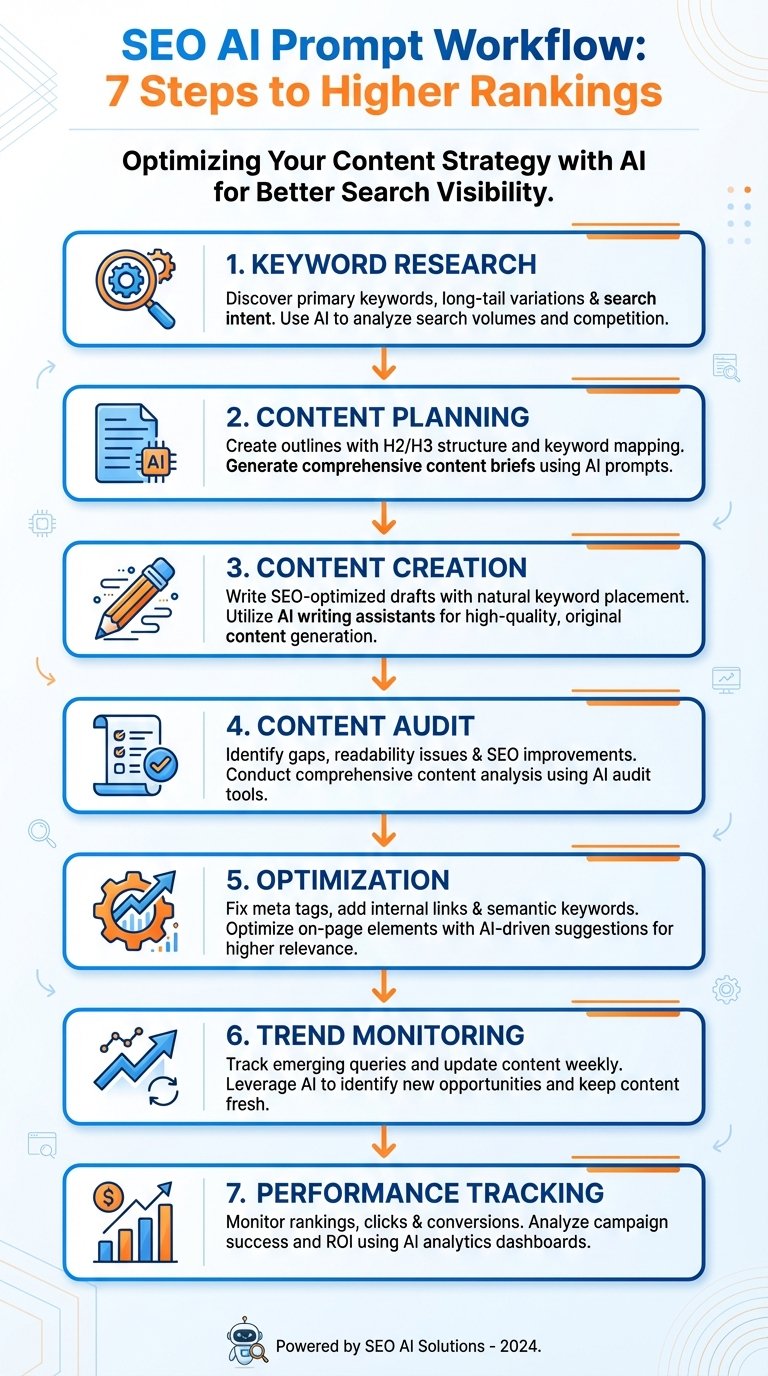
 Photo by
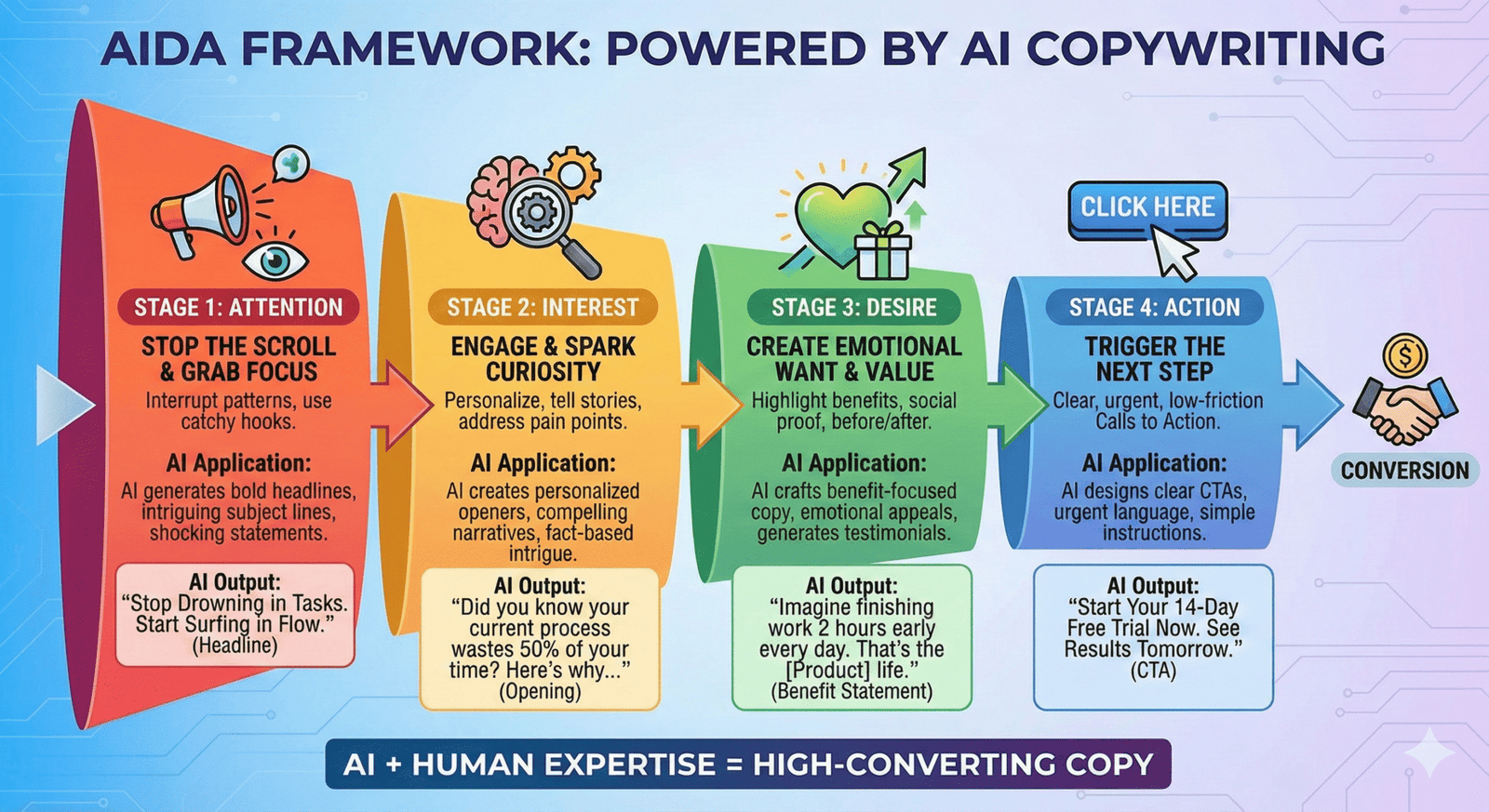
 Photo by
  Photo by
 Photo by