Tag: Emerging AI technologies

  • How SaaS APIs Power the New AI Agent Revolution

    How SaaS APIs Power the New AI Agent Revolution

    SaaS API Infrastructure Is Rising as AI Agents Replace the Dashboard

    Traditional SaaS screens are no longer the main place where work gets done. More teams now ask an AI agent to pull a report, update a record, send a message, or start a workflow, and the agent handles the clicks.

    That shift changes what software companies are building. SaaS API infrastructure is becoming the durable layer, while the agent becomes the part users notice. For CTOs and product leaders, this is no longer a side bet. If your product still assumes a human will drive every task through a dashboard, you’re designing for less of the actual work.

    Why the classic SaaS interface is fading fast

    Dashboards still matter, but they matter less than they used to. Most business users already juggle too many tabs, too many alerts, and too many admin chores. As a result, software that waits for manual input loses ground to software that can act.

    Classic SaaS dashboards fade into background API networks with central foreground AI agent and glowing neural core.

    ### Why users are tired of managing software by hand

    Dashboard fatigue is easy to spot. Teams bounce between CRM, support, billing, analytics, and project tools just to finish one job. Each hop costs time because people must re-orient, remember context, and repeat actions.

    That friction feels small in isolation. Across a week, it becomes expensive. A sales ops lead doesn’t want to open four tools to approve a territory change. A support manager doesn’t want to build reports one filter at a time. They want the result.

    What headless SaaS looks like in practice

    Headless SaaS shifts value away from the screen and into the system. Data, actions, permissions, and workflow triggers move behind stable endpoints. The front end can still exist, but it no longer defines the product.

    This is why the new integration race matters. In this look at the changing integration model for B2B SaaS, the core argument is simple: if agents can connect outward and act across tools, the product with the best connectivity gains the advantage.

    Why AI agents are taking over simple operator tasks

    Routine operator work fits agents well because the work is repetitive and rules-based. Agents can create accounts, move data, trigger alerts, update fields, and draft responses without waiting for a human to open a portal.

    As of May 2026, that pattern is already visible across enterprise software. Vendors such as Salesforce, Cloudflare, and Stripe are exposing more agent-ready capabilities through APIs, so agents can perform work directly. The human stays in the loop for approval, exceptions, and judgment.

    What SaaS API infrastructure really means

    An API alone doesn’t make a SaaS product infrastructure. Real infrastructure is stable under load, predictable over time, secure by default, and clear enough for machines to use without guesswork.

    Transparent glass display shows modular API platforms and endpoints above blurred server stacks.

    ### From monolithic apps to modular, API-first platforms

    Older SaaS products often bundled everything into one app and one experience. Modern products are more decoupled. Identity, billing, records, search, notifications, and workflow logic can now operate as separate services.

    That modular setup works better for agentic workflows. An agent doesn’t need your whole app. It needs reliable actions it can call, chain, and verify. In practice, decoupled software is easier to orchestrate because each endpoint has a narrow job and a clear response.

    The difference between having an API and becoming infrastructure

    Many companies say they are API-first because they publish a developer page. That isn’t enough. Agents need endpoints that are consistent, versioned, well-scoped, and easy to discover. They also need clean error handling and predictable response formats.

    That is why agent-friendly API design has become a product issue, not only a developer issue. If an agent can’t trust your API, it won’t build a workflow on top of it.

    If agents are becoming active users, your API is now part product and part control plane.

    Security, limits, and control in machine-to-machine systems

    Machine-to-machine security gets more important as agents move from reading data to taking action. Permissions must narrow what an agent can do. OAuth flows need to support agent access. Rate limits need to prevent abuse without breaking normal automation.

    Audit trails matter too. When a non-human identity creates a user, changes a policy, or sends a message, teams need logs that explain what happened. Agent permissions, scoped tokens, and action history are no longer edge concerns. They are standard product requirements.

    How AI agents become the real product layer

    The user experience is shifting toward a language user interface, or LUI. Instead of learning a product’s menus, the user states intent. The agent maps that intent to software actions.

    Glowing neural core in foreground turns intent into chained API calls across backend tools on dark grid.

    ### How agents turn intent into API calls

    The flow is simple on the surface. A user says, “Create a new customer, send the contract, and notify finance.” The agent breaks that into steps, checks permissions, selects the right tools, and calls the needed APIs in sequence.

    Under the hood, this is orchestration. One request can touch identity, CRM, e-signature, billing, and messaging systems. The user sees one interaction. The system handles the choreography.

    Why LUI is replacing GUI for many workflows

    GUI is still better for deep analysis, setup, and edge-case review. However, LUI is better for repeatable work because it cuts navigation time. Voice and text also fit moments when a screen is slow, crowded, or unnecessary.

    For many operator tasks, the interface is becoming a thin approval layer. IBM’s view of APIs in an agentic era captures this change well: the API is no longer just data access, it is the means through which agents complete work.

    Real examples of agents bypassing the interface entirely

    The clearest examples are not flashy. An agent can open a support case, enrich the account record, draft a reply, and route the issue for approval without loading a dashboard. Another can launch cloud resources, buy a domain, or reconcile subscription data through API calls.

    The screen still has a place. It is where people inspect, override, and investigate. But it is no longer the primary product layer for routine work.

    How SaaS companies should adapt before the interface becomes obsolete

    If the dashboard stops being your main differentiator, product strategy has to shift. Teams need to treat the API, the workflow graph, and the trust model as first-class product surfaces.

    Professional workspace displays SaaS shift from traditional seats to usage-based pricing, agent workflows, and machine docs with charts and API documents.

    ### Rethink pricing around usage, credits, and outcomes

    Per-seat pricing breaks when one agent can do the work of several operators. In that model, more automation can reduce seat count even while customer value rises. That is a bad incentive.

    This comparison shows where pricing is moving.

    ModelWorks best forMain weakness
    Per-seatHuman-driven workflowsPenalizes automation
    Usage-basedAPI calls, compute, data volumeCan feel noisy
    Outcome-basedCompleted tasks or business resultsHarder to define cleanly

    Recent Deloitte analysis on SaaS and AI agents points to hybrid models, where subscriptions, credits, and outcome pricing coexist. That fits agent-heavy products better because value comes from work completed, not seats occupied.

    Build documentation and workflows for machines, not just humans

    Docs used to teach developers. Now they also shape how models understand your product. That means better examples, tighter schemas, predictable naming, and fewer ambiguous actions.

    In practice, good documentation lowers support load and raises adoption. It also improves agent reliability because the model has less room to guess. If your docs read like marketing copy, they won’t help developers or machines.

    Defend your moat when the UI is no longer special

    A polished interface is easier to copy than trusted infrastructure. The moat now sits in workflow depth, proprietary data, compliance, uptime, integration quality, and control. Customers will favor the system that agents can use safely at scale.

    That shifts the product question. Instead of asking, “Is our UI nicer?” ask, “Are we the most dependable system for this job?” In an API economy, dependable wins more often than pretty.

    FAQ

    Will dashboards disappear?

    No. They will shrink in importance for repeatable work. People still need screens for setup, audit, exception handling, and analysis.

    What makes an API ready for AI agents?

    It needs stable endpoints, clear permissions, structured responses, version control, rate limits, and strong logs. Public access alone doesn’t make it agent-ready.

    Should every SaaS company build its own agent?

    Not always. Some should expose clean infrastructure first and let third-party agents do the orchestration. Others should build a native agent because the workflow is core to the product.

    How should leaders measure success in this shift?

    Track task completion, API consumption, error rates, recovery time, and outcome value. Seat growth alone will miss what agents are doing.

    Conclusion

    The center of gravity is moving. SaaS is becoming API infrastructure, and AI agents are becoming the layer where users express intent and get work done.

    That doesn’t kill the interface. It changes its role. The companies that win next won’t build only for human clicks. They’ll build systems that humans can trust and agents can use.

  • Stop Writing Syntax: The Founder’s Blueprint for 10x Vibe Coding

    Stop Writing Syntax: The Founder’s Blueprint for 10x Vibe Coding

    The Founder’s Guide to Vibe Coding: Building Full-Stack Apps with Natural Language

    For a couple of decades, the barrier to entry for building software was steep. If you had a million-dollar idea but couldn’t write code, you faced a dilemma: spend months learning Python or JavaScript, or spend tens of thousands of dollars hiring a development agency. That bottleneck is finally breaking with the new AI Vibe Coding trend.

    Welcome to the era of Vibe Coding.

    Vibe Coding isn’t about sloppy work; it’s about shifting your focus from syntax (the grammar of code) to intent (the goal of the software). It means describing what you want in natural language and letting AI handle the translation into functional applications. For lean startups and non-technical founders, this is a paradigm shift. It allows you to validate ideas in days rather than months. You don’t need to know how the engine works to drive the car, but you do need to know how to steer. This guide will teach you how to hold the wheel.

    What Is Vibe Coding? The Rise of AI-Assisted Development Definition and Origin

    Vibe Coding is a newer approach to software development that goes past basic autocomplete. Instead of only suggesting code line by line, it uses AI to turn a developer’s intent into working code.

    At its core, Vibe Coding shifts programming away from strict syntax and toward intent. In other words, the focus moves from writing every command by hand to describing what the software should do. This is why the idea is closely tied to Natural Language Programming.

    The term gained wide attention through Andrej Karpathy, who described a style of building software where developers guide AI with plain-language prompts and high-level direction. That idea spread quickly because it matched what many programmers were already starting to experience with modern AI tools.

    1. Step 1: Formulating the ‘Vibe’

    The biggest mistake founders make when using AI is being vague. If you tell an AI builder to “make a clone of Uber,” you will get a generic, broken shell. To succeed, you must act as a Product Manager, not just a dreamer. You need to translate your vision into a structured narrative that the AI can execute.

    Start by defining the User Flow. Describe the journey step-by-step. For example: “A user lands on the homepage, clicks ‘Sign Up,’ enters their email, and is immediately taken to a dashboard where they can upload a PDF.” Be specific about what happens next.

    Next, outline your Data Needs. Even without knowing database schema, you can describe relationships. Tell the AI: “Users need to have profiles. Each profile should store a history of their uploads and their subscription status.” This helps the AI structure the backend logic correctly.

    Finally, set the UI/UX Tone. Don’t just say “make it look nice.” Say, “Use a minimalist design with a dark mode option. The primary action buttons should be bright green, and the font should be modern sans-serif.” The more sensory details you provide, the closer the initial output will match your vision. Treat the AI like a brilliant junior developer who knows every coding language but knows nothing about your specific business logic.

    Inside the Process: How Natural Language Turns Into Running Code A technical guide for non-technical founders

    Large language models (AI Platforms) are the new compilers. They convert plain English into usable code, which is a core idea behind Vibe Coding. Context windows and ongoing prompt loops matter because they keep the model grounded in the task, the codebase, and the goal. Autonomous AI coding agents add another layer. They don’t just suggest code, they can plan steps, write files, test outputs, and keep moving through a build process with limited supervision.

    2. Step 2: Choosing Your AI Arsenal

    Not all tools are created equal. Some are designed for pure speed, while others offer more control. Here is how to choose the right platform for your vibe coding journey.

    • Replit Agent: This is arguably the most powerful all-in-one solution for beginners. It runs in your browser and handles everything from setting up the server to deploying the app. It’s ideal if you want a hands-off experience where the AI manages the environment for you.
    • Bolt.new & Lovable: These tools specialize in generating full-stack web applications instantly in the browser. They are fantastic for prototyping marketing sites or simple SaaS (Software as a Service) tools. They excel at creating beautiful frontends quickly.
    • Cursor with Vercel: If you want slightly more control and plan to eventually hand the code off to a human developer, use Cursor. It is an AI-powered code editor. You can write prompts to generate features, then deploy the result to Vercel (a hosting platform). This workflow creates standard code files that are easier to migrate later.

    The Strategy: Absolute beginners start with Replit or Bolt for your initial prototype to validate the idea quickly. If the product gains traction and you need complex custom logic, migrate to Cursor so you own the codebase directly. Don’t get bogged down choosing the perfect tool; pick one and start building. Many AI platforms such as, Claude, Open AI and Gemini and others offer vibe coding options that are competing but to really vibe-code with ultimate control is with a paid platform as above. Prices vary between each company.

    3. Step 3: The Reality Check (QA & Debugging)

    AI is incredibly capable, but it is not infallible. It can hallucinate features that don’t work or create security gaps. Once your app is generated, you must enter the Quality Assurance (QA) phase. Do not assume the first build is production-ready.

    Your job is to try to break the app. Click every button. Submit empty forms. Try to log in with incorrect passwords. When you find a bug, don’t try to fix the code yourself. Instead, describe the error to the AI in plain English.

    For example, instead of saying “Fix the null pointer exception,” say, “When I click submit without entering a name, the app crashes instead of showing an error message.” The AI can usually identify the logic error and patch it instantly.

    Keep a log of issues. If the AI fixes one thing but breaks another, revert to the previous version. Most of these platforms have version history. Remember, you are the gatekeeper of quality. The AI builds the house, but you must inspect the foundation before inviting guests over.

    4. Step 4: Beyond the MVP

    There comes a point where “vibe coding” hits a ceiling. This usually happens when you need complex integrations, high-scale performance, or strict security compliance. AI-generated code is often functional but not always optimized for scale. It might be messy or redundant under the hood.

    Once you have validated your MVP (Minimum Viable Product) and have paying customers, you need to plan for sustainability. This is the time to consider refactoring. You might keep using AI to add small features, but you should begin documenting how the system works.

    Crucially, know when to bring in a technical lead. If your user base grows to thousands, or if you are handling sensitive financial data, you need a human expert to audit the architecture. A technical lead can take your vibe-coded prototype and rebuild the core infrastructure to be robust and secure. There is no shame in this; you used AI to save money and time on validation, which allows you to invest wisely in engineering later. Use vibe coding to get to the starting line, not to win the marathon alone.

    Why Vibe Coding Matters for Solo Founders and Startups Business

    Vibe coding helps solo founders and startups build and launch an MVP in far less time. As a result, teams can test ideas sooner, gather feedback earlier, and move toward product-market fit without long development cycles.

    It also lowers the barrier for non-technical founders and domain experts. With tools powered by natural language processing, people can turn ideas into working products with simple prompts and clear direction, even without deep coding experience.

    Cost matters at the early stage, too. Instead of spending large agency budgets on initial builds, founders can shift that money toward validation, customer research, and growth. That makes Vibe coding a practical choice for startups that need speed, flexibility, and tighter control over early spending.

    The Founder’s Glossary

    To help you communicate effectively with your AI tools and future hires, here are five essential terms decoded.

    • Frontend vs. Backend: Think of a restaurant. The Frontend is the dining area—the menus, the decor, and where the customer sits (what users see in their browser). The Backend is the kitchen—where the food is cooked, ingredients are stored, and orders are managed (the server and database logic users don’t see).
    • API Integration: An API (Application Programming Interface) is like a waiter. It takes a request from the frontend (the customer) to the backend (the kitchen) and brings the response back. API Integration means connecting your app to external services, like telling your app to talk to Stripe for payments or Google Maps for location.
    • Deployment: This is the process of making your software available to the public. While you build on your local computer or a sandbox, Deployment pushes your code to a live server so anyone with an internet link can use it.
    • State Management: This refers to how your app remembers things. If a user adds an item to a cart, State Management ensures the cart icon updates to show ‘1 item’ even if the user navigates to a different page. It keeps the data consistent across the user’s session.
    • Environment Variables: These are secret settings kept separate from your main code. Think of them as the keys to your safe. You wouldn’t write your password on a sticky note on your monitor; similarly, Environment Variables store API keys and passwords securely so they aren’t exposed if your code is shared.

    The power to build is now in your hands. You no longer need permission to create. With the right vibe, the right tools, and a pragmatic approach to testing, you can turn abstract ideas into tangible products. Start small, test often, and let the AI handle the syntax while you focus on the vision. Your product awaits. To get you started, here is a few prompts to try:

    1. The DX-First Developer Experience Cheat Sheet
      Act as a senior developer advocate specializing in modern web ecosystems. Create a ‘Vibe Coding Tech Stack Cheat Sheet’ that focuses exclusively on Developer Experience (DX) and achieving ‘flow state.’ For each category (Frontend, Backend, Database, Auth, Deployment), select one ‘high-vibe’ tool known for low friction (e.g., Next.js, Supabase, Vercel, Tailwind). For each selection, provide: 1) The ‘Vibe’ (a 1-sentence aesthetic description), 2) Why it is ‘Vibe-heavy’ (focus on speed and lack of boilerplate), and 3) A ‘Pro-Tip’ for maximizing productivity. Tone: Professional, modern, and high-energy. Format: Markdown table followed by detailed bullet points. Audience: Full-stack developers who value rapid shipping.
    2. Minimalist Aesthetic Founder’s Stack Guide
      Create a curated ‘Vibe Coding’ cheat sheet tailored for a solo founder building a sleek, minimalist SaaS. The tone should be aspirational, concise, and sophisticated. Structure the guide into three tiers: ‘The Core’ (The essential language and framework), ‘The Polish’ (UI/UX and animation libraries like Framer Motion), and ‘The Infrastructure’ (Serverless and Edge computing). Limit descriptions to 20 words per tool. Emphasize tools that support ‘coding by intuition’ and ‘aesthetic-driven development.’ Target audience: Design-engineers and creative technologists. Total word count: Under 500 words.
    3. Viral Tech-Twitter Vibe Stack ThreadGenerate a witty and high-energy Twitter thread script (10-12 tweets) titled ‘The 2024 Vibe Coding Tech Stack Cheat Sheet.’ Use a mix of industry jargon and contemporary tech-culture slang (e.g., ‘shipping,’ ‘zero-config,’ ‘aura’). Each tweet should highlight a specific tool or workflow hack that defines the ‘vibe coding’ movement. Include a ‘hot take’ on why traditional enterprise stacks are ‘vibe killers.’ Use emojis strategically to enhance the visual appeal. Target audience: The Tech Twitter/X community and early-stage startup builders. Ensure the final tweet includes a call to action for users to share their own ‘vibe-heavy’ tools.

    Minimalist Aesthetic Founder’s Stack

    Curated for Vibe Coding

    For the design-engineer who sculpts digital experiences through intuition and taste. This is your stack.


    The Core

    Essential language, framework, and tools for coding by feeling.

    • Next.js — The edge-ready React framework with file-based routing that mirrors your mental model of the page.
    • TypeScript — Type safety that sharpens intent, embedding design constraints directly in the code.
    • Tailwind CSS — Utility classes that enable constraint-driven design, composing style at the speed of thought.
    • tRPC — End-to-end typesafe APIs that vanish glue code, letting you shape the experience unimpeded.
    • Cursor — The AI-native editor where you converse with your codebase, turning intuition into implementation.

    The Polish

    UI/UX and motion libraries for that signature feel.

    • shadcn/ui — Beautifully crafted, copy-paste components that give full control over the aesthetic.
    • Framer Motion — Declarative animations that turn intention into fluid motion with minimal code.
    • Lucide Icons — Crisp, consistent iconography that scales from outline to solid, always refined.
    • Vaul — A drawer component so smooth it feels native; perfect for mobile-first gestures.
    • Lenis — Buttery smooth scrolling with easing that makes every scroll a tactile delight.

    The Infrastructure

    Serverless and edge, so you can ship like a studio.

    • Vercel — Deploy with edge functions and analytics; the platform co-created by the Next.js team.
    • Neon — Serverless Postgres that branches like Git, empowering fearless experimentation.
    • Clerk — Authentication components so polished they feel like a design system, not a box-ticking exercise.
    • Stripe — Payments infrastructure that handles the complexity, leaving you with a clean checkout.
    • Resend — Transactional email that renders beautifully, matching your app’s minimalist soul.

    FAQ

    What is “Stop Writing Syntax: The Founder’s Blueprint for 10x Vibe Coding”?

    It’s a 2026 guide, presented as a developer-focused video blueprint, built around a simple shift: founders should stop writing code line by line and start directing AI with plain-language intent. The core promise is speed, because AI agents handle much of the syntax, scaffolding, and iteration. Based on the available source material, it’s positioned more as a practical method than a formal book release.

    What does “vibe coding” actually mean?

    Vibe coding means describing what you want software to do, then letting AI tools generate and revise the code. Instead of focusing on syntax first, you work at the level of product goals, flows, and constraints. In practice, that makes the founder or developer more of a decision-maker and editor, while AI handles much of the implementation.

    Who created it?

    The current source material doesn’t clearly name a single author. The concept appears in a 2026 developer guide video, and the framing draws on broader AI-assisted coding ideas, including what the source calls the “Karpathy Paradigm of Abductive Programming.” So, if you’re looking for a confirmed byline, there isn’t one in the cited material.

    Is vibe coding only for non-technical founders?

    No, although it’s especially appealing to founders who want to move fast without deep expertise in syntax. Technical builders can use the same approach to prototype, debug, refactor, and ship faster. The difference is that experienced developers are usually better at setting guardrails, reviewing outputs, and catching weak code early.

    Does vibe coding replace software engineering basics?

    It doesn’t remove the need for judgment. The current advice tied to this approach still includes planning before you build, using version control, writing tests, fixing errors methodically, documenting changes, and refactoring often. AI can speed up delivery, but product clarity, architecture choices, and code review still matter if you want reliable software.


  • The 48-Hour AI Portfolio: A Rapid Deployment Framework for SaaS Founders

    The 48-Hour AI Portfolio for SaaS Founders

    In SaaS, AI claims don’t carry much weight anymore. Investors and enterprise buyers want proof of AI maturity, and they want it fast.

    That puts founders in a tight spot. You need something more convincing than a chatbot tab, but you also can’t disappear into a six-week build cycle. A tight SaaS deployment framework solves that problem by turning AI into a visible, testable portfolio in two days.

    FAQ

    Why does every SaaS founder need an AI portfolio fast?

    A single AI feature rarely changes how people judge your company. It may look clever, but it doesn’t show depth. A real AI portfolio shows range, product judgment, and the ability to deploy safely.

    That matters more in April 2026 than it did a year ago. Trend data now points to vertical AI companies taking more than 40% of startup funding, while 75% of SaaS firms are expected to ship AI automation this year. Buyers have moved from “Do you have AI?” to “How mature is your AI layer?”

    Investors rarely reward one flashy AI trick. They reward evidence that your product can apply AI across a real workflow.

    For a founder, an AI portfolio means three connected proofs. First, AI can reduce user effort. Second, it can work with your product’s own data. Third, it can fit inside a sensible delivery process. That’s why a one-off feature often fails. It looks isolated, and isolated features are easy to copy.

    This is also where valuation changes. If your product shows a believable path to AI-assisted retention, expansion, or lower service cost, the story gets stronger for Series A and B conversations. You don’t need a giant platform in week one. You need a compact portfolio that signals you know where AI belongs in your product.

    Focused SaaS founder in home office at night views dual monitors with valuation charts and trend graphs, coffee mug and notebook nearby.

    Fast matters because deep engineering comes later. The first 48 hours are for validation, narrative, and proof. That’s why AI-native founders keep gravitating toward starter systems like VelocityKit, which help them reach a first deploy without rebuilding the same plumbing every time.

    What should happen in hours 0-12 of this SaaS deployment framework?

    The first block is about selection, not speed for its own sake. If you pick the wrong use case, you can move fast and still waste two days.

    Start with your existing data moat. Look for customer tickets, call notes, CRM records, usage logs, docs, contracts, or internal templates. Proprietary context is what makes your AI portfolio hard to imitate. Then map that data against the friction your users already feel. Good targets include slow setup, unclear reporting, repetitive support work, or messy handoffs.

    This quick table keeps the sprint grounded:

    Time blockFocusOutput
    0-4 hoursAudit data and workflowsShort list of usable data sources
    4-8 hoursMatch friction to LLM tasks5 to 7 candidate features
    8-12 hoursNarrow and scope3 demo-ready AI features

    The best three-feature mix usually shows breadth. Pick one assistant feature, one generation feature, and one analysis feature. For example, a sales SaaS might build call-summary drafting, proposal generation, and churn-risk analysis. Together, they tell a stronger story than three similar helpers.

    SaaS founder at desk with laptop showing mind map, arms crossed in thought, sticky notes and coffee nearby.

    Keep scope tight. Each feature should have one trigger, one output, and one clear win for the user. If the flow needs three integrations and a permissions rewrite, cut it.

    A lot of founders now follow a hybrid path, which means using AI tools to validate first and hardening the product later. That pattern is laid out well in this 2026 guide to building an MVP with AI agents, and it fits this 48-hour sprint.

    What stack works best in hours 12-24 for rapid AI prototyping?

    Now you build the fastest believable version.

    For many founders, the stack is simple. Use OpenAI API for model calls, LangChain for prompt flows or tool routing, and Vercel for fast deployment. If the main goal is a live demo, Streamlit or Gradio can give you an interactive frontend in hours, not days. That mix is practical because it cuts setup work while keeping enough control for real testing.

    Mock your data pipeline if needed. Pull a scrubbed export, synthetic sample, or read-only replica into a separate environment. Don’t connect a rough prompt chain to your production database on day one. Speed is good, but speed with a rollback plan is better.

    High-angle view of modern executive desk with laptop showing node-based AI diagram and nearby iPad with prototype interface in morning sunlight.

    This is where a good SaaS deployment framework pays off. The build path should be modular enough that each demo feature can stand alone, but close enough that the portfolio still feels like one product. Shared auth, shared layout, shared prompt logging, and one analytics view go a long way.

    If you’re tired of spending a week on setup before the first user flow exists, an AI SaaS boilerplate for Next.js can remove that drag.

    Before you write more code, map your use cases, data sources, prompt flows, and guardrails in a free 48-Hour AI Architecture Template in Figma or Miro.

    How do you turn raw prototypes into one strong AI story in hours 24-36?

    A portfolio fails when it feels like a stack of unrelated demos. It works when each feature feels like part of one user journey.

    So this block is less about code and more about product framing. Put your three AI features behind one dashboard. Use the same input pattern, status feedback, and result view across each module. That gives stakeholders a sense of system design, not just prompt experiments.

    Then focus on “magic moments,” the few seconds when the user sees real value. Maybe the app turns a 30-minute onboarding task into a 2-minute draft. Maybe it flags risk in a customer account before the manager spots it. That moment should be easy to trigger during a live demo and easy to explain in plain English.

    Documentation matters here too. Write one page per feature with five items: problem, input, output, source data, and known limits. That makes the portfolio legible to buyers, investors, and your own team. If you want a practical example of how teams package a fast build for demo and handoff, this write-up on a custom AI MVP in 48 hours is worth scanning.

    What has to happen in hours 36-48 before you show it to investors or buyers?

    The last block is where speed can hurt you if you get careless. A working prototype still needs a clean deploy, basic guardrails, and a demo that doesn’t wander.

    Put each service in a container or use a platform that abstracts that step cleanly. Host it in an isolated environment with locked-down secrets and test accounts. You don’t need enterprise-grade infrastructure for a sprint build, but you do need basic security hygiene.

    Then stress-test your prompts. Feed them bad inputs, empty fields, long text, odd formatting, and edge cases from real customer data. Add simple guardrails for refusal behavior, PII handling, source references, and fallback responses. If the model fails, the product should fail politely.

    Finally, record a hero demo. Keep it under three minutes. Show the problem first, then the trigger, then the result, then the business impact. Founders often ramble here because they know the build too well. A script keeps the story sharp.

    If you want more speed at this stage, tools like DeployFrame can help you get a polished AI app live without rebuilding every deployment step.

    Conclusion

    The fastest founders aren’t winning because they build more AI. They win because they can package proof faster than everyone else.

    A solid SaaS deployment framework gives you that proof in 48 hours: three useful features, one product story, one safe demo environment, and one narrative that holds up in a pitch. That is enough to validate interest before you commit months of engineering time.

    If your next board meeting, customer pitch, or fundraise is close, book a strategic AI integration consultation or subscribe to advanced SaaS AI blueprints before you add another random feature.

  • PromptBase Alternatives for Buying AI Prompts in 2025

    You know that feeling, right? You’re pouring your heart into a prompt, dreaming of digital masterpieces or prose so good it’d make Shakespeare shed a tear. But what do you get back? Something that looks like it was generated by a toaster oven on a Tuesday morning. If that rings a bell, then welcome aboard, fellow AI adventurer! You’ve just stumbled upon the single most important skill in this wild new world: prompting.

    Prompting is both an art and a science – it’s about learning how to talk to your AI models to get truly mind-blowing results. Think of it as the secret handshake, the magic spell, the key that unlocks the difference between asking for “a cat” and getting “a fluffy ginger cat wearing a tiny pirate hat, gazing wistfully at a galaxy made of yarn, rendered in the style of Van Gogh.” Quite a jump, isn’t it?

    But here’s the thing: mastering this skill takes time, practice, and a good dose of mad scientist experimentation. And honestly, who has endless hours for trial and error when you’ve got content to create, art to generate, and a digital empire to build?

    That’s where AI prompt marketplaces come in! Picture them as your personal cheat sheet, a fast track to becoming an AI wizard. These platforms are packed with expertly designed prompts, ready to plug in and use. They’ll save you countless hours of head-scratching and help bring your AI dreams to life. PromptBase has been a big name in this area for a while – sort of the original prompt supplier. But just like there’s more than one flavor of ice cream (thank goodness!), there’s a whole universe of fantastic alternatives out there, just waiting for you to discover.

    So, let’s take a look into the best PromptBase alternatives, looking at what makes each one special, how they’re priced, and the quality of their offerings. The goal? To help you find your perfect prompt paradise. Say goodbye to the frustrating prompt struggle; your AI journey is about to get a whole lot smoother, and more productive!

    Why Explore Beyond PromptBase? (It’s Not You, It’s The Ever-Changing AI World!)

    Look, PromptBase has been great; it really helped introduce prompt engineering to a wider audience. But the AI world moves at lightning speed! Different platforms are built for different AI models (think ChatGPT, Midjourney, Stable Diffusion, DALL-E), they offer unique community perks, or they specialize in specific kinds of prompts. So, checking out alternatives can mean:

    More Variety: You’ll discover a wider array of styles, specific niches, and fresh creative approaches.
    Better Value: You might find more competitive pricing or subscription plans that genuinely fit how you work.
    Niche Focus: Some platforms are absolute pros in specific areas, whether that’s dazzling image generation or super-smart text content.
    Innovative Features: Expect cool new tools for building prompts, interacting with others, or even testing your prompts before you commit.

    Ultimately, it’s about finding the perfect fit for your AI journey. Let’s jump into some of the best options out there!

    Ready for the Grand Tour? Here are the PromptBase Alternatives You Should Know!

    We’re about to explore a few key players in the prompt marketplace game. Each one brings something special to the table, so keep an eye out for what aligns best with your personal AI goals.

    1. PromptHero: Your Go-To for Stunning AI Art

    If you’re all about creating breathtaking visuals with AI – think Midjourney, Stable Diffusion, or DALL-E – then PromptHero is likely to become your new favorite spot. It’s like a massive online art gallery filled with incredible AI-generated images, and the best part? Every single one comes with the prompt that made it happen.

    What’s so great about it?

    Purely Visual: PromptHero lives and breathes image generation prompts. You’ll discover an astonishing variety of styles, subjects, and artistic directions.
    A Creative Community: It’s more than just a marketplace; it’s a bustling hub where artists show off their creations and the prompts they used. Think of it as a giant, interactive inspiration board.
    Explore and Create: You can browse trending prompts, easily filter by your preferred AI model, or even use their built-in builder to start crafting your own unique masterpieces.
    Mix of Free and Premium: Loads of prompts are shared freely by the community, which is fantastic for learning and experimenting without spending a dime. Plus, there’s a marketplace for those premium, perfectly tuned prompts.
    Model-Specific: Everything is clearly organized by AI model (Midjourney, Stable Diffusion, DALL-E 2, etc.), so finding exactly what you need is a breeze.

    Pricing: You can explore a huge library of community-shared prompts for free. If you want premium, curated prompts, prices usually range from a few dollars for simpler ones to a bit more for highly complex or specialized creations. They also offer a Pro subscription if you’re looking for advanced features like prompt history or private prompts.

    Quality: Generally, the quality is excellent, especially for the paid options. The community plays a big role here, with users rating and commenting on prompts, which acts as a helpful peer review system. And since it’s so visual, you can actually see the results before you commit, which is a massive advantage.

    The Good Stuff:

    Absolutely unbeatable for image generation prompts.
    A vibrant community and an endless gallery of inspiration.
    Fantastic filtering and search tools.
    You get both free and paid options.
    You can preview the output before you buy!

    The Not-So-Good Stuff:

    Not really built for text-based LLM prompts (like ChatGPT).
    The sheer volume of choices can feel a bit overwhelming at first.

    Who’s it for? Artists, designers, content creators who depend on AI for visual content, or anyone eager to push the limits of AI image generation. If your AI-generated cat absolutely needs a tiny pirate hat and a galaxy made of yarn, this is where you’ll find the magic.

    1. FlowGPT: The Word Wizard’s Secret Weapon for LLMs

    If your AI goals lean more towards crafting amazing stories, churning out marketing copy, brainstorming fresh ideas, or simply having a super-smart conversation, then FlowGPT is a name you absolutely need to put on your radar. This platform is perfectly designed for Large Language Models (LLMs) like ChatGPT, putting the incredible power of words right at your fingertips.

    What makes it stand out?

    Purely Text-Based: Forget images – FlowGPT is all about text. You’ll discover prompts for just about anything: writing blog posts, social media updates, coding help, academic research, and even creative storytelling.
    Super Organized: Prompts are neatly tucked into clear categories like “Marketing,” “Writing,” “Coding,” “Education,” and “Fun,” so finding your way around is a breeze.
    Community-Powered: This platform thrives on its community, with users sharing their best prompts. There’s also a careful curation process to showcase the highest quality and most popular ones.
    Test Before You Use: Many prompts let you “try” them right on the platform, so you can get a feel for the output before you commit.
    Handy Collections: Users can put together and share collections of related prompts, giving you comprehensive solutions for specific projects or tasks.

    Pricing: FlowGPT uses a freemium model. You’ll find a huge number of excellent prompts available for free, all shared by the community. For more advanced features, private prompts, or access to special collections, they offer subscription plans. The vibe here is definitely about sharing and learning together.

    Quality: Since it’s user-contributed, quality can sometimes vary. However, the rating and review systems are really helpful for finding the best prompts. The popular, highly-rated ones are almost always fantastic, and being able to “try” prompts beforehand lets you check the quality for yourself.

    The Good Stuff:

    Absolutely brilliant for ChatGPT and other LLM prompts.
    An enormous, diverse library of text-based prompts.
    A strong, active community with helpful ratings and comments.
    You can test prompts directly on the platform.
    A fantastic resource for anyone learning text-based prompt engineering.

    The Not-So-Good Stuff:

    Zero focus on image generation prompts.
    Quality can be a bit hit-or-miss with less popular prompts.

    Who’s it for? Writers, marketers, content creators, students, developers, customer service pros – basically, anyone who regularly uses LLMs for text. If you need your AI to whip up a witty limerick or a killer sales email, FlowGPT is your new best friend.

    1. PromptVine: The “Something for Everyone” Marketplace

    Picture a busy digital general store, but for prompts. You can find a little bit of everything here – from stunning image generation prompts to powerful text commands. That’s the feeling you get with PromptVine, a growing platform that aims to be your one-stop shop for all things AI prompts.

    What makes it special?

    Covers All Bases: PromptVine isn’t picky. You’ll discover prompts for Midjourney, Stable Diffusion, DALL-E, ChatGPT, and many other popular AI models, all neatly gathered in one place.
    Easy to Use: Its clean, intuitive design means even new users can browse, search, and buy prompts without getting tangled in confusing tech jargon.
    Curated Bundles: They often highlight curated collections or bundles of prompts, which offer excellent value if you’re working on specific projects (like a “Fantasy Art Pack” or a “Social Media Content Bundle”).
    Empowering Sellers: PromptVine really supports prompt engineers who want to sell their creations, providing them with tools and analytics. This focus often leads to a wonderfully diverse and constantly updated catalog.
    Ratings and Reviews: Just like other marketplaces, user feedback is key here, helping you quickly spot the high-quality prompts from the less effective ones.

    Pricing: Similar to PromptBase, PromptVine usually works on a per-prompt purchase model. Prices will depend on how complex or valuable a prompt is, typically ranging from a few dollars to more for premium, multi-part prompt bundles. Keep an eye out for occasional discounts or special promotional bundles too!

    Quality: You’ll generally find good quality here, as sellers are motivated to create effective prompts to get sales and positive reviews. The platform’s curation also helps ensure a solid standard. My advice? Always double-check those reviews before you buy!

    The Good Stuff:

    Perfect if you switch between different AI models (for both text and images).
    A clean, straightforward interface that’s a joy to navigate.
    Does a great job supporting prompt sellers, which means a wider, more varied selection for you.
    Always getting fresh prompts and new collections.

    The Not-So-Good Stuff:

    Won’t have the intense specialization you’d find in PromptHero for images or FlowGPT for text.
    It’s mainly a paid marketplace, so fewer free options compared to community-focused sites.

    Who’s it for? Generalists, freelancers, small businesses, or anyone who juggles various AI tools for different tasks. If your afternoon involves needing a Midjourney logo prompt and a ChatGPT marketing slogan, PromptVine offers a super convenient, all-in-one solution.

    How to Pick Your Perfect Prompt Paradise: A Quick Guide

    Okay, you’ve seen the delicious buffet of options! Now, how do you choose the perfect plate for you? Don’t just pick the first one you see. Take a moment to think about these key questions:

    1. Which AI tool do you use most often? Are you a Midjourney maestro or a ChatGPT wizard? Your main AI companion should definitely guide your choice of prompt marketplace.
    2. What’s your budget like? Are you hunting for freebies to get started, or are you ready to invest in premium prompts that save you serious time? Remember, some platforms thrive on free community contributions, while others are mainly paid.
    3. What kind of prompts do you need? Get specific! Are we talking niche, general, images, text, coding, marketing?
    4. How important are community features to you? Do you love connecting with other prompt engineers, sharing your creations, and learning from their experiences? Some platforms have a much stronger community vibe than others.
    5. What’s your learning style? Do you prefer seeing visual examples, reading detailed explanations, or getting hands-on and testing prompts interactively?

    By thinking through these points, you’ll easily narrow down your options and discover a marketplace that genuinely levels up your AI game.

    Maximizing Your Prompt Marketplace Experience: Pro Tips!

    Buying prompts is just the beginning. To truly get ahead, here’s how to squeeze every last drop of value from your chosen prompt haven:

    Don’t Just Buy – Learn! Take purchased prompts apart. Figure out what makes them tick. How are parameters used effectively? Try to reverse-engineer the magic behind them!
    Experiment and Iterate: Think of bought prompts as a launchpad, not the finish line. Tweak them, mash them up, and see what happens when you make small changes.
    Read Reviews (and Write Them!): User reviews are incredibly valuable. They tell you if a prompt actually delivers on its promise. And once you’ve tried one, do others a favor and share your honest feedback.
    Think About Selling Your Own: Once you get really good at prompt engineering, you might start creating prompts so brilliant that others would gladly pay for them! Many of these platforms make it easy to become a seller yourself.
    Stay Curious: The AI world is constantly evolving. Keep an eye out for new platforms, features, and fresh prompt engineering techniques.

    Discover the best PromptBase alternatives in 2025. Compare PromptHero, FlowGPT, and PromptVine to find your perfect AI prompt marketplace for ChatGPT and Midjourney.

    The Final Prompt: Your AI Journey Starts Now!

    The world of AI prompting is truly your oyster, and these marketplaces are here to help you find the pearls. While PromptBase has been a great starting point for many, the innovative alternatives we’ve explored offer specialized tools, thriving communities, and fresh ideas to truly elevate your AI creations.

    No more frustrated conversations with that smart, but sometimes stubborn, AI. With the perfect prompt marketplace by your side, you’re not just using AI; you’re mastering it. So, go forth, explore, create, and let your AI handle the heavy lifting, all guided by the best prompts you can find!

    Want to dive even deeper into AI content creation?
    Grab my free PDF, “ChatGPT Prompts Bundle for Content Creators!” Just send me an email.

  • Vibe-Coding: Unlocking AI’s Reasoning Juice with GPT-5 and

    Vibe-Coding: Unlocking AI’s Reasoning Juice with GPT-5 and

    GPT-5 & AI: Vibe-Coding Unleashed

    The world of AI is changing fast. We’re moving away from rigid rules and stiff commands. Instead, we are finding a more natural way to tell machines what we want. This exciting shift is all about “vibe-coding.”

    So, what is vibe-coding? It means you speak to AI in plain language. You tell it your goals and what you want to achieve. The AI then figures out the complex code needed. Think about it: you describe the feeling or “vibe” of what you need. Then the AI makes it real. This is very different from old coding, which used strict rules. New AI models like a rumored GPT-5 will truly understand these broad instructions. They will bring out their amazing “reasoning juice,” leading to breakthroughs we’ve only dreamed of.

    The Evolution of Code Generation

    From Syntax to Semantics

    Early computer programs were tough. Developers had to use very specific commands. These rules were for the machine, not for humans. Every tiny mistake would break the code. It was like speaking a secret language with no room for error.

    Over time, programming languages got easier. We moved to “high-level” languages. These let us write code that looked more like English. Developers could focus on bigger ideas. They didn’t have to worry about every small machine step.

    Then, AI stepped in. At first, AI helped with small tasks. It would finish a line of code or suggest a basic snippet. But a human was always in charge. The AI still needed a lot of guidance.

    The “Vibe-Coding” Paradigm Shift

    Vibe-coding is a big leap forward. It focuses on the behavior you want. It’s about the final outcome of the code. You don’t tell the AI how to build it piece by piece. You describe the vision.

    Natural language is the new code. Smart AI can now understand our normal speech. This lets developers explain their wishes more clearly. It’s like talking to a very smart assistant.

    Imagine you want to sort a list. With vibe-coding, you might say, “Make a function that sorts this list from biggest to smallest. Make sure it doesn’t crash if the list is empty.” You don’t have to name the exact sorting method. The AI figures it out. This makes coding feel more like a conversation.

    Unlocking AI’s Reasoning Juice

    Beyond Pattern Matching

    Today’s AI models are very powerful. They can spot patterns in huge amounts of data. This helps them write text or create images. But they often struggle with new problems. They might not truly understand what they are doing. They are great at repeating what they’ve learned. They aren’t always great at deep thinking.

    “Reasoning juice” is the AI’s ability to think. It’s their power to solve problems and use what they know in new ways. This is more than just repeating facts. It’s about deep logic and smart choices.

    Vibe-coding helps unlock this reasoning. When you give AI a high-level goal, you challenge it. The AI must use its smarts to fill in the gaps. It needs to connect your broad idea to real code steps. This forces the AI to truly reason.

    The Role of GPT-5 and Future Models

    Reports suggest GPT-5 will be a game-changer. It may have much better logical thinking. Its memory for context could grow. This would help it understand subtle commands. Such power would make vibe-coding incredibly effective.

    Future models might even understand more than just words. Imagine showing an AI a drawing. Or you could speak your ideas aloud. The AI could use these hints as part of the “vibe.” This is called multimodal understanding.

    These advanced AI tools won’t just write code. They will be like smart partners. They can help design your project. They can solve tough problems with you. It’s a true team effort between humans and AI.

    Practical Applications and Benefits

    Increased Developer Productivity

    Vibe-coding can speed up your work. You can create early code quickly. This helps you test ideas faster. It’s great for making quick prototypes.

    AI can handle the boring parts of coding. It writes the standard setup for many tasks. This frees up developers. They can focus on the unique, important parts of their projects.

    This new way of coding also opens doors. People with great ideas but less coding practice can now build things. It makes coding more open to everyone. This lowers the barrier for creative minds.

    Enhanced Code Quality and Innovation

    AI might find better ways to write code. With a clear “vibe,” it can suggest smart or new solutions. This can lead to more efficient programs.

    Models that understand the whole project are even better. They can make code that fits perfectly. This leads to cleaner, more integrated systems.

    Picture this: A designer explains an animation’s flow. “I want this menu to slide out smoothly, with a slight bounce at the end.” The AI could then write the exact code for that animation. It translates feeling into function.

    Challenges and Considerations

    The Nuance of “Vibe”

    Natural language can be tricky. Words have many meanings. What one person means by “fast” might differ for another. This can cause misunderstandings.

    Vibe-coding still needs clear prompts. You must clearly state your goal. The more precise your description, the better the AI’s results. It’s about clear thinking, even in plain words.

    Sometimes, AI can make up answers. This is called “hallucinations.” The AI might give code that looks right but doesn’t work. Or it might be very inefficient. Always check the AI’s work.

    Ethical and Security Implications

    AI learns from data. If the data has biases, the code it makes might have them too. This could lead to unfair or unhelpful results. We must be careful about AI’s training.

    AI-generated code needs strong security checks. Bad code could create weaknesses. Rigorous testing is always key, no matter who or what writes the code.

    Who owns the code an AI writes? These questions are new. Laws and rules are still catching up. It’s important to think about who gets credit and responsibility.

    The Future of Coding: A Human-AI Symphony

    Actionable Tips for Embracing Vibe-Coding

    To get the most from vibe-coding, start smart. First, know exactly what you want the code to do. Define your outcome clearly before you ask the AI.

    Treat AI-generated code as a first draft. It’s a starting point. Give the AI feedback. Make changes yourself. This back-and-forth makes the final product better.

    Don’t just run the code. Try to understand why the AI wrote it that way. Learn the logic behind its choices. This will make you a better problem-solver.

    Experiment with your words. Try different ways to describe your idea. You’ll find which phrases work best for different tasks. It’s a skill you develop over time.

    Expert Quotes/References

    Leading AI researchers and software developers are eagerly watching this shift. They believe these advanced models will redefine how we build technology. Discussions often center on the potential for more creative problem-solving and greater access to powerful tools. Many see this as a pivotal moment for innovation in software.

    The Road Ahead

    AI models will keep getting better. They will understand more complex tasks. Their code generation will become even more precise.

    Expect new tools to pop up. These will make vibe-coding even easier. They will help developers work seamlessly with AI. This new era will bring new frameworks and platforms.

    The skills needed for developers will change. Less time on basic syntax means more time on big ideas. Focus will shift to designing systems. Talking effectively with AI will become a core skill.

    Conclusion

    Vibe-coding is changing how we create software. It moves us toward a more intuitive way of building. You tell the AI your desired outcome. It then writes the underlying code. This approach unlocks new levels of productivity. It also boosts creativity. And it makes software development open to more people. Dive in and start experimenting. The future of AI-powered coding is here.

  • Unlock the Secrets: What Your Pet is Really Saying with AI!

    Unlock the Secrets: What Your Pet is Really Saying with AI!

    Intro: Exploring how AI technology is revolutionizing pet communication by translating animal behaviors and vocalizations into human-understandable insights. It covers the science behind pet communication, current AI tools available, practical implementation tips, and future possibilities while addressing ethical considerations.

    Ever curious about what your pet thinks? Wonder if a wag means happiness or a bark danger? Pets communicate well, but we often miss their signals. AI technology now makes understanding them easier.
    These tools translate animal behaviors into words we get. They’re changing how we care for and connect with our pets. This makes our bonds stronger and more meaningful.

    The Science Behind Pet Communication and AI


    How Pets Express Themselves Through Behavior and Vocalizations
    Animals don’t speak our language, but they send clear signals. A wagging tail shows joy, a growl means threat, and hiding shows fear. Body language, sounds, and scent cues tell us what’s happening inside their minds.
    For example, a stretching cat feels relaxed, while a hunched dog is scared. These signs can be subtle. If you’re not paying attention, you might miss what they’re trying to say.
    The Role of AI in Decoding Animal Signals
    AI brings new magic to animal communication. It uses machine learning and pattern recognition to analyze behaviors and sounds. By studying thousands of pet recordings and actions, AI systems learn to spot patterns.
    Recent research shows AI can identify specific emotional states with surprising accuracy. This technology gives pet owners a new way to understand their animals better. It’s like having a translator for your pet’s thoughts.

    Limitations and Challenges of Current Technology

    But it’s not perfect. AI can get confused by context or unusual behaviors. It might misinterpret a yawn or a specific bark if it’s not trained well.
    Animal behavior experts say AI is still evolving. It needs more data and refinement. We shouldn’t think of it as a crystal ball, but as a helpful tool. Its future is bright, and as it improves, so will its ability to read pets’ minds more accurately.
    Leading AI Tools for Understanding Your Pet
    Popular Devices and Apps in the Market
    Many companies now offer AI-powered pet translation tools. Notables include Furbo, PetPiper, and NoMoreWoofs. These devices serve different needs — some focus on real-time translation, others on analyzing behavior over time.
    Features often include automatic alerts for distress, health issues, or unusual activity. These tools make understanding pets easier and more reliable than ever before.
    How These Tools Work: From Data Collection to Interpretation
    Here’s how it all works: You set up a device near your pet. It captures sounds like barking, meowing, or whining, and monitors body language. The system uses voice recognition and cameras to analyze behavior.
    After processing, it translates signals into simple insights, delivered straight to your phone. Think of it as a digital interpreter that turns a bark into “I’m excited” or a swipe into “I’m nervous.”

    Advantages of Using AI-Powered Pet Communication Tools

    The benefits are clear. You gain a deeper understanding of your pet’s needs. This means better care, happier pets, and fewer surprises.
    These tools can also alert you if your pet shows signs of stress, illness, or discomfort. Plus, they strengthen your bond because you connect on a new level. Knowing what your pet really feels makes caring more personal.
    Practical Tips for Pet Owners Using AI to Decode Pet Talk
    Setting Up the Technology Correctly
    Proper setup is key. Place devices in quiet spots, away from distractions. Calibrate sensors according to instructions for the best results.
    Keep your pet comfortable — no one wants a stranger’s device staring at them all day. Also, check privacy settings to protect your data from outsiders.
    Interpreting the Data Accurately
    AI provides clues, but it’s up to you to interpret them. Use traditional pet knowledge — like habits and mood — combined with AI insights.
    If your pet’s behaviors seem unusual and AI warns you, consider seeing a vet. No device can replace professional advice.
    Using AI Insights for Better Pet Care
    Take AI feedback seriously. Adjust your training routines or home environment based on what you learn. If your pet shows signs of anxiety or pain, address it early.
    These tools can even help create more fun and engaging daily routines. This improves your pet’s overall well-being.
    Ethical Considerations and Future Outlook
    Animal Welfare and Privacy Concerns
    More monitoring means more data on your pet. Some worry about privacy or over-surveillance. It’s key to use these tools wisely — keep data safe and avoid being too invasive. It’s about respecting your pet’s dignity while learning more about them.

    The Future of AI in Pet Communication

    The future is bright. New AI features will detect emotions better and offer personalized care plans. Imagine a smart home that changes to match your pet’s mood or health. These advancements could strengthen our bond with pets and make caring for them more thoughtful and caring.
    Conclusion
    AI is opening new ways to understand your pet’s world. It’s like finding a secret language that brings us closer. These tools help us care better, respond quicker, and love more deeply. Whether you’re new to pet ownership or have been caring for animals for years, AI can be a game-changer.
    By embracing technology, we can build stronger, more caring relationships with our pets. When we truly understand each other, we all benefit.

  • Gemini vs ChatGPT: Which Does a Better Job With Images?

    Gemini vs ChatGPT: Which Does a Better Job With Images?

    Introduction

    AI tools that can understand and create images have grown a lot in recent years. They turn simple prompts into stunning visuals and help analyze pictures for many uses. Whether you’re in marketing, design, education, or healthcare, picking the right AI platform matters. But how do Gemini and ChatGPT compare in handling images? Are they equally good at generating, recognizing, or explaining pictures? In this article, we’ll examine their features, performance, and real-life uses. By the end, you’ll see which one fits your needs best.

    Understanding Gemini and ChatGPT: An Overview


    What is Gemini?

    Google’s Gemini is a new AI platform focused on multi-use tasks. It combines different AI models to handle images, text, and more, all in one system. Gemini was built to be a versatile tool for creative projects and accurate recognition tasks. Recent updates have added powerful image recognition and generation features. With its deep ties to Google’s cloud and data tools, Gemini aims to be a top choice for businesses needing sharp, reliable image AI.

    What is ChatGPT?

    OpenAI’s ChatGPT is best known for conversation. It started as a text-based chatbot with impressive language skills. Recently, OpenAI added vision features so ChatGPT can now interpret images. This makes it a true multimodal tool, not just a chat robot. Unlike Gemini, which is geared towards image creation and recognition, ChatGPT uses images mainly to support dialogue and analysis. It’s designed for users who want simple, integrated AI for talking about pictures, not just creating them.

    Core Image Capabilities and Feature


    Gemini: Uses advanced diffusion models and other architectures to turn text prompts into images. It excels at producing high-quality visuals, capturing style and detail well. It can generate images from simple phrases or complex scenes with good accuracy.
    ChatGPT: Has recently started creating images, but it’s still limited compared to Gemini. Its focus is more on improving understanding and discussion of visuals rather than generating complex art. When it does create images, they are basic but improve with updates.
    Image Recognition and Analysis
    Gemini: Recognizes objects and scenes with high precision. It can classify and detect elements in photos for uses like medical imaging or surveillance. Its recognition features are fast and accurate, making it ideal for professional needs.
    ChatGPT: Can analyze images embedded in conversations. It recognizes objects and can describe what it sees, helping users troubleshoot problems or understand content. Its analysis is good for general use but less precise than Gemini for detailed tasks.
    User Interface and Accessibility
    Gemini: Offers a user-friendly interface for creators and developers. Integrated into Google’s ecosystem, it works smoothly within cloud platforms. While powerful, it’s best suited for professional or enterprise users.
    ChatGPT: Known for ease of use by both casual and professional users. Its platform is simple, with API options for integration. People familiar with ChatGPT enjoy talking about images without complex tools.
    Performance and Accuracy Comparison
    Quality of Image Outputs

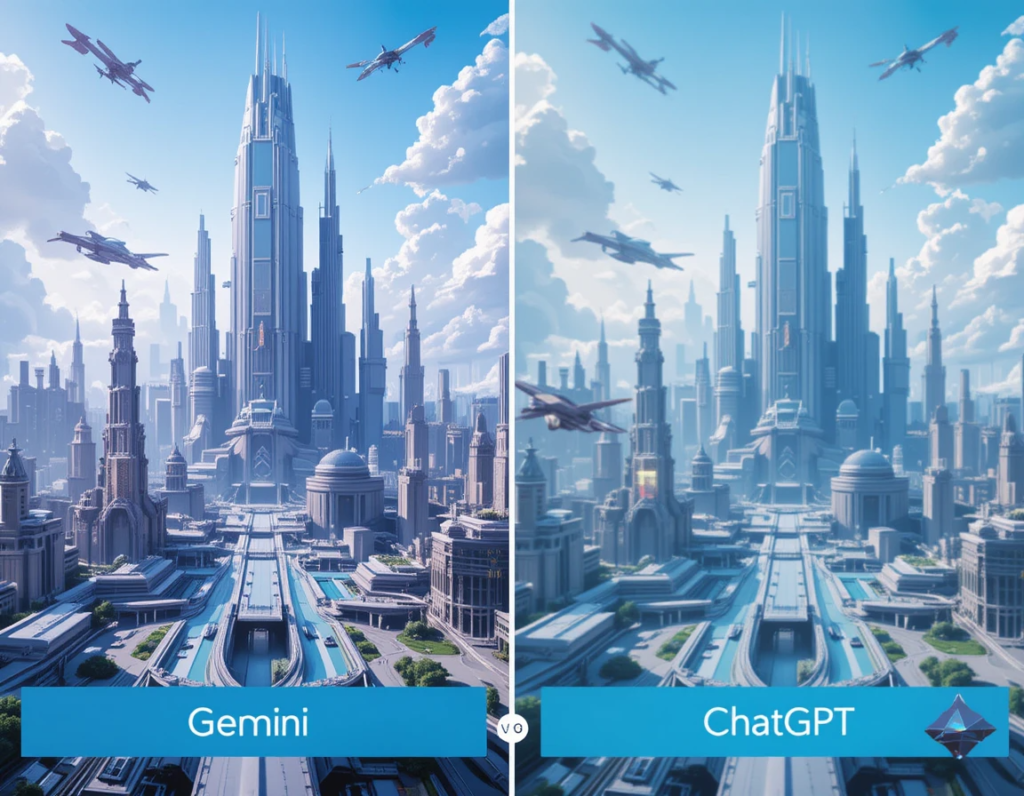
    Gemini produces images that often look like professional art. Their clarity, style, and relevance are top-tier. In test cases, Gemini images show high detail and creative flair. ChatGPT’s image outputs are more basic, focusing on simple scenes or icons. They work well for quick tasks but lack the polish of Gemini.

    Recognition and Analysis Precision

    Gemini’s object detection and classification are highly accurate. It can tell apart different objects and understand complex scenes. ChatGPT’s image analysis is useful in conversations. It describes images well enough but sometimes misses subtle details. Industry experts say Gemini is better for precision work, while ChatGPT is perfect for casual insights.

    Speed and Efficiency

    Both platforms handle requests quickly; Gemini can generate detailed images fast, especially in batch. ChatGPT processes images and provides explanations almost instantly. For high-volume tasks, Gemini’s specialization means faster results when creating or analyzing high-res visuals.

    Real-World Applications and Use Cases

    Marketing and Content Creation

    Gemini helps craft visuals for ads, websites, and branding. Its ability to create tailored images makes it a favorite among designers. ChatGPT excels at describing or tagging visual content, making it useful for content management and social media.

    Education and Training

    In schools, Gemini can assist in generating educational images or visual aids. It’s also used in teaching medical imaging or technical illustrations. ChatGPT helps explain images during lessons and supports learning through dialogue.

    Healthcare and Medical Imaging

    Images from Gemini and ChatGPT of the brain and who's is the best generated image from AI

    Gemini’s advanced recognition powers can aid in diagnostics and analysis of medical scans. It’s suitable for detecting anomalies or features in complex images. ChatGPT supports medical professionals by analyzing images during consultations or for quick explanations.

    Strengths and Limitations

    Gemini
    Strengths: Creates high-quality images, detects objects accurately, works well with Google’s tools.
    Limitations: Not always accessible for casual users, can be costly, and needs technical skill for advanced features.
    ChatGPT
    Strengths: Easy to use, integrates well with conversations, can analyze images within chats.
    Limitations: Still building image creation features; sometimes less accurate for complex tasks. Its recognition is simpler compared to Gemini.
    Expert Insights and Industry Perspectives

    Many AI research leaders believe multimodal AI will grow closer to human reasoning. Recent progress shows platforms like Gemini and ChatGPT are just starting to unlock their full potential. Challenges include making image recognition more precise and improving image generation quality. Experts suggest that combining both platforms’ strengths will shape future tools.

    Actionable Tips for Choosing Between Gemini and ChatGPT
    Pick Gemini if you need high-quality images, precise recognition, or professional-grade tools.
    Choose ChatGPT for easier, conversational tasks involving images, like explanations or simple analysis.
    Think about your technical skills and whether you need deep integration or just quick insights.
    Watch for upcoming updates to get even better features from both platforms.
    Conclusion

    Gemini and ChatGPT each have their strengths in handling images. Gemini shines at creating and analyzing high-quality visuals, perfect for professional tasks. ChatGPT offers a simple, conversational way to understand and work with images, great for more casual needs. To pick the best tool, consider what you need most—top-notch image quality or easy analysis. As AI advances, both systems will get even smarter. Keep an eye on their updates, and always choose the right platform for your specific tasks. With the right AI, your work with images will become faster, easier, and more creative.

  • Why AI Pet Trackers Are a Must in 2025

    Why AI Pet Trackers Are a Must in 2025

    Introduction

    Pets are no longer just animals; they are family members. Pet owners want the best for their furry friends, including advanced ways to keep them safe. Technology is changing fast, and AI is now part of daily life. From smart homes to health apps, AI is making pet care smarter and easier. In 2025, AI pet trackers become essentials that help owners stay connected and protect their pets like never before.

    The Rise of AI Pet Trackers: A Game-Changer in Pet Care

    Explosion in Pet Tech Market

    The pet tech market is booming. More pet owners are buying smart devices every year. This growth is driven by the desire for better safety, health, and peace of mind. Among these devices, AI pet trackers lead the way. They attract consumers because they offer more than basic GPS — they provide insights and alerts that can save lives.

    How AI Enhances Pet Monitoring

    Traditional GPS and activity trackers only show location or activity level. AI-powered pet trackers do much more. They analyze data in real time using machine learning algorithms. These devices can identify patterns, predict issues, and send alerts instantly. This makes monitoring pets easier and more accurate. For example, if your dog starts acting strange, the tracker might flag this early, prompting you to see a vet.

    Real-World Examples of AI Tracker Adoption

    Companies like Whistle Health and FitBark are now working with veterinary clinics. Their data shows positive results. Pets using these trackers often show improved health and faster diagnosis of illnesses. The integration of AI helps veterinarians understand pet behavior and health trends over time, leading to better treatment plans.

    Benefits of AI Pet Trackers for Pet Owners

    Improved Safety and Security

    AI trackers keep pets safe with GPS location and fences. If your pet leaves a designated area, you get an instant alert. Some trackers detect falls or unusual movements too. This can be a lifesaver if your pet gets off the leash or wanders into danger.

    Enhanced Health Monitoring

    These trackers aren’t just for safety. They continuously check vital signs and activity levels. If something changes—like a drop in activity or abnormal heart rate—they can warn you early. This helps catch health issues before they become serious.

    Peace of Mind and Convenience

    Access everything from your phone. You can see your pet’s location, activity, and health stats at any time. Managing multiple pets? No problem. Share access with family or pet sitters easily and stay updated no matter where you are.

    Actionable Tips

    • Check tracker data often and set custom alerts for your pet.
    • Use insights from the tracker to discuss health concerns with your vet.
    • Complement tech with regular vet visits for total pet health.

    Technological Advancements Making AI Pet Trackers Essential

    Integration of IoT and AI

    A modern, high-tech AI pet tracker device attached to a dog's collar, glowing softly with digital readouts displaying vital signs and location data. The dog is exploring a park while its owner checks a smartphone showing an advanced interface with health

    The Internet of Things (IoT) connects your pet’s tracker with other smart devices. For instance, it can work with smart feeders, cameras, or home assistants. Cloud computing stores and processes pet data, making information available anytime and anywhere.

    Features Expected in 2025

    Upcoming trackers will come with biometric sensors to monitor heart rate, body temperature, and sleep. AI will analyze this data to reveal health risks early. They might even suggest behavioral changes or automatically alert you to safety concerns.

    Data Privacy and Security

    As these devices get smarter, guarding pet data becomes critical. Pet owners should look for trackers with encrypted data and secure cloud storage. Always verify how a company manages privacy and considers data security a top priority.

    Challenges and Considerations

    Cost and Accessibility

    High-end AI pet trackers often cost between $150 and $300. For many, this can be a big investment. However, there are options for different budgets. Basic models might lack some features but still provide valuable safety.

    Dependence on Connectivity

    Poor internet can interfere with the performance of AI trackers. Offline data storage can help, but real-time alerts may wait until the connection improves. Always check the connectivity dependency before buying.

    Ethical Concerns

    Constant monitoring raises privacy issues. Some might see it as invasive. It’s important for pet owners to use these tools responsibly. Respect your pet’s privacy and avoid over-surveillance.

    Future Trends in AI Pet Tracking

    Personalization and Predictive Analytics

    Future AI devices will learn your pet’s habits and predict problems before they happen. For example, if your cat shows signs of arthritis, the tracker might flag this early.

    Integration with Smart Home Ecosystems

    AI trackers will sync with other smart home devices. Think of a system that adjusts the thermostat based on your pet’s activity or notifies you if your pet is near the smart camera.

    Regulatory and Industry Developments

    Expect new standards, certifications, and best practices for AI pet trackers. As technology spreads, industry leaders will push for ethical and privacy-friendly products.

    Conclusion

    AI pet trackers in 2025 aren’t just gadgets; they’re vital tools for pet owners. They combine safety, health monitoring, and technology to protect and care for your furry friends. Whether you’re worried about safety or health, these devices have you covered. Think about your pet’s needs today and consider adopting AI-powered solutions. Your pet’s well-being and your peace of mind may depend on it.

  • 5 Tiniest AI Pet Robots in the World: Big Tech in Small Packages

    5 Tiniest AI Pet Robots in the World: Big Tech in Small Packages

    "Five tiny AI pet robots sitting on an open palm, showcasing their pocket-sized dimensions and unique designs."

    Imagine a world where companionship fits right in your hand! Picture a tech gadget that’s also your friend. AI pet robots are here, and they’re changing how we think about personal tech.

    AI pet robots are like interactive toys with brains. They use artificial intelligence to act like real pets. They can play, learn, and even show affection. Now, let’s explore five of the tiniest AI pet robots. We’ll see what makes them special and how small they can really get.

    What Defines a “Tiny” AI Pet Robot?

    What does “tiny” really mean when we’re talking about robots? It’s all about size and weight. But it’s also about what these little guys can do despite their size.

    Size and Weight Considerations

    For our list, “tiny” means they can fit in your palm. These robots usually weigh less than a pound. They are made to be super easy to carry.

    Functional Capabilities vs. Size

    Making robots small comes with challenges. Smaller size can mean fewer features. But clever engineering can pack a lot into a little package. We want to see how well these robots balance size with skills.

    Top 5 Tiniest AI Pet Robots

    Here are five amazing AI pet robots that prove great things come in small packages.

    Aibo Pup

    Size and Dimensions: About 4 inches tall, 6 inches long, weighing around 0.6 pounds.

    Key Features: This miniature version of the famous Aibo robot dog can respond to touch and voice commands. It has a camera for face recognition and can learn tricks. Its small size makes it ideal for desks.

    Vector by Anki

    Size and Dimensions: Measures just 4 inches tall and weighs about 0.4 pounds.

    Key Features: Vector is a smart robot that loves to explore. It can recognize faces, navigate spaces, and even react to your emotions. Its tiny size belies its impressive AI.

    Eilik

    Size and Dimensions: Stands at 3.5 inches and weighs approximately 0.3 pounds.

    Key Features: Eilik is all about personality. This emotional robot reacts to touch, shakes, and even gets scared. Its small size adds to its charm.

    Zoomer Zupps Tiny Pups

    Size and Dimensions: These pups are around 2.5 inches tall, weighing only 0.2 pounds.

    Key Features: Zoomer Zupps are pocket-sized interactive pets. They respond to touch with cute sounds and actions. Collect them all for a tiny robot family.

    WowWee Chippies

    Size and Dimensions: Each Chippie measures about 3 inches and weighs around 0.25 pounds.

    Key Features: Chippies are small but full of energy. They explore their surroundings and react to your touch with different moods. Their compact size makes them great companions.

    The Tech Behind the Tiny: How is it Possible?

    Making these robots so small is no easy task. It takes some seriously cool technology.

    Advancements in Micro-Robotics

    Micro-robotics is about building tiny machines. This includes making smaller motors and moving parts. These parts let the robots move and interact with the world.

    AI and Machine Learning Optimization

    AI helps these robots “think”. Clever programming lets them learn and react, even with limited computer power. This means they can do a lot with very little.

    Sensor Technology Breakthroughs

    Tiny cameras and microphones act as the robot’s eyes and ears. These sensors let them see, hear, and respond to their surroundings. The smaller the sensors, the better.

    Benefits and Drawbacks of Miniature AI Pets

    "Person engaging with a small AI pet robot on their desk, demonstrating the emotional connection between humans and miniature robotic companions."

    Like any tech, tiny AI pets have their good and bad sides.

    Portability and Convenience

    These little robots are easy to take anywhere. They don’t need much space. This makes them perfect for small apartments or travel.

    Cost and Accessibility

    Smaller robots can sometimes be cheaper. But advanced features can still drive up the cost. It depends on what you’re looking for.

    Limited Functionality and Durability

    Tiny robots might not do as much as bigger ones. They can also be more fragile. But technology is always improving.

    The Future of Pocket-Sized Companions

    What’s next for these tiny tech pals? The future looks bright!

    Enhanced AI and Emotional Connection

    Expect smarter robots that understand you better. They might even show more realistic emotions. This could make them even better companions.

    Integration with Smart Home Ecosystems

    Imagine your robot pet controlling your lights or playing music. They could become a key part of your smart home.

    Ethical Considerations and Responsible Development

    As AI gets smarter, we need to think about privacy and safety. It’s important to develop these robots responsibly.

    Conclusion

    The five tiniest AI pet robots show how far technology has come. These little companions offer fun and connection in a small package. As technology advances, expect even more amazing things from these pocket-sized pals.

    Which of these tiny robots would you want as a pet? Share your thoughts in the comments below!