

Tag: GeminiAI

  • Why Did They Name It “Nano-Banana Pro”?

    Why Did They Name It “Nano-Banana Pro”?

    Most tech names sound like license plates. A few letters, a number, maybe “v2,” and everyone moves on. That’s why “Nano-Banana Pro” sticks out. It sounds like a snack, not software, and yet it became a real label people use when talking about a serious image model.

    In simple terms, Nano-Banana Pro is tied to the image model many people first met as “Nano Banana,” a nickname that circulated more widely than the technical name (often referenced as Gemini 2.5 Flash Image in developer conversations). This post explains the Nano Banana meaning, why is Nano Banana called that, and why the name later picked up a “Pro” tag.

    What “Nano-Banana Pro” refers to in plain English

    “Nano Banana” started as a human-friendly name for something that, on paper, reads like a spec sheet. In many technical references, the underlying model is associated with Gemini and its “Flash” family, which is meant to be quick and practical for day-to-day use. For background on the broader Gemini model family, see Gemini’s model overview [https://en.wikipedia.org/wiki/Gemini_(language_model)].

    So where does “Nano-Banana Pro” fit?

    • “Nano Banana” is the sticky nickname, the one people remember and repeat.
    • “Pro” usually signals a higher-tier option, like a more capable version, a premium mode inside an app, or a label that helps separate “the one everyone memes” from “the one teams build on.”

    The label also matches how people actually use these tools. The popular use cases are not abstract. They are practical, visual tasks that are easy to show in a screenshot:

    Image edits that don’t fall apart: Small changes like swapping a background, adjusting lighting, or changing an outfit without rewriting the whole scene.

    Consistent characters: Keeping the same person or mascot recognizable across multiple images, instead of getting a “new face” every time.

    Remixing photos: Turning a real photo into a poster, a comic style frame, or a cleaner restoration-like look.

    Readable text in images: Adding signs, labels, and short headlines that look intentional, not like scrambled letters.

    “Pro” fits because it signals expectation. People read it as “the version meant for heavier use,” even if the exact feature list depends on where it’s offered.

    Nano Banana meaning, “nano” plus “banana,” and why it sounds memorable

    At face value, the Nano Banana meaning is almost comically simple: nano suggests something tiny, lightweight, or fast, and banana is… a banana. It is silly on purpose.

    That silliness is the whole point. A name like “Gemini 2.5 Flash Image” is accurate, but it’s hard to repeat in a group chat. “Nano Banana” is short, rhythmic, and weird enough to stand out. It also avoids a common problem in AI naming: confusion. Many models sound the same, but nobody mixes up “Nano Banana” with anything else.

    It functions like a bright sticker on a plain box. The sticker does not explain everything inside, but people remember it.

    Why is Nano Banana called that, the short answer before the deeper story

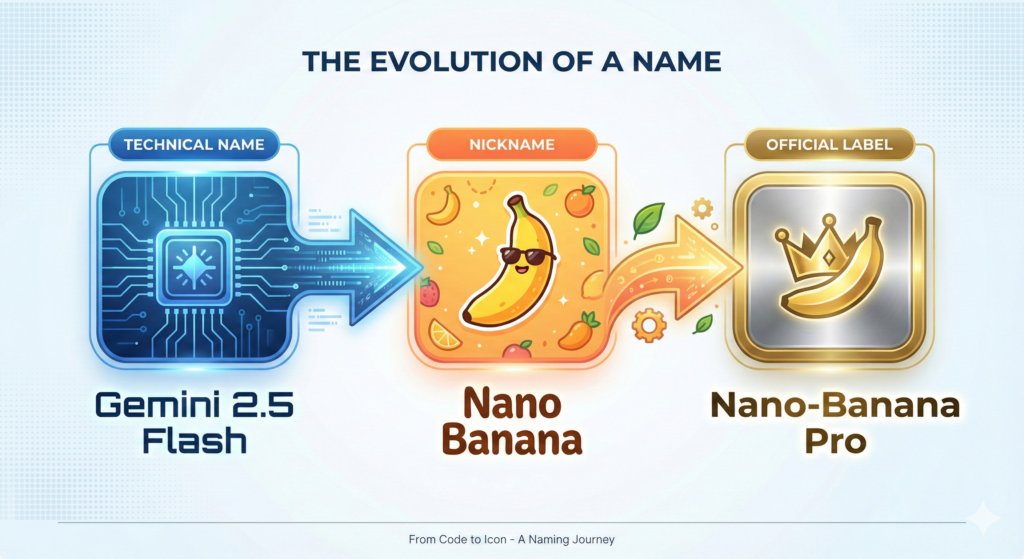
    The short version is that “Nano Banana” began as a rushed codename used for blind testing, then it escaped into public talk because people liked both the results and the name. It wasn’t designed as a polished marketing brand first. The full story is more personal than most folks expect.
    The real origin story, a 2:30 a.m. codename made for LMArena

    The clearest explanation comes from Google itself. In Google’s account of the name’s origin, the codename was picked under pressure, late at night, because the team needed something to label a model for a public evaluation setting. That setting is often described as side-by-side testing, where models appear under hidden identities so users judge outputs without bias. In that kind of environment, a codename is a practical necessity, not a branding exercise.

    Google tells the story in How Nano Banana got its name [https://blog.google/products-and-platforms/products/gemini/how-nano-banana-got-its-name/]. The key point is simple: the name was born from the need to move fast, not from a long naming workshop.

    That timing mattered. The model’s performance started getting attention, and the name acted like a handle people could grab. When a model shows up in a testing arena and produces surprisingly good images, the community needs a quick label to compare notes. A catchy codename makes that easy.

    This is also where the “Pro” add-on makes sense later. Once a nickname becomes the common word people use, it’s hard to replace it with something bland. Over time, product naming tends to bend toward what users already say out loud.

    A mashup of personal nicknames, “Nano” plus “Naina Banana”

    The most human part of the story is that “Nano Banana” was not pulled from a random-word generator. It grew out of personal nicknames connected to Product Manager Naina Raisinghani, as Google describes in its write-up.

    Friends called her “Naina Banana,” and “Nano” was used as shorthand tied to her height and her love of computers. Put those together in a late-night sprint, and “Nano Banana” appears. It sounds like a joke because, in a way, it was. It just happened to be a joke that shipped.

    That’s also why the name feels oddly warm compared to standard AI labels. It has an inside-story vibe, like a scribble on a whiteboard that never got erased.

    Why “Nano” didn’t feel totally random for a “Flash” style model

    Even with the personal origin, “nano” also reads like it belongs in a technical family. “Nano” has long been used in tech to suggest smaller scale or lighter footprint, whether or not the model is literally tiny. For a “Flash” style model, which is framed around speed and practicality, “Nano” feels like a natural fit. It hints at quickness and efficiency, even if it started as a nickname first.

    So the name worked on two levels at once: personal and plausible. That combination is rare, and it helps explain why it stuck.

    How a placeholder name turned into the brand people actually use

    Viral names usually need two ingredients: something worth sharing, and a label that makes sharing effortless. “Nano Banana” had both.

    First, people were impressed by the outputs they could show immediately. Image models spread through examples, not through spec sheets. A single before-and-after edit or a consistent character across scenes tells the story faster than paragraphs ever could.

    Second, the name did the marketing work by itself. “Nano Banana” is easy to type, easy to remember, and funny without trying too hard. That makes it travel. A long technical name tends to get shortened anyway, and this one arrived pre-shortened.

    Coverage from January 2026 continued to amplify the story, including a recap of how the name was chosen and how widely it circulated after launch. PCMag’s reporting is one example, in here’s how the Nano Banana AI model got its name [https://au.pcmag.com/ai/115383/heres-how-googles-nano-banana-ai-model-got-its-name].

    Once a nickname becomes the default term, teams face a choice: fight it, or adopt it. Adoption often wins.

    The model’s edits got attention, the name made it easy to spread

    There is a simple pattern behind many tech nicknames. If the thing works, people talk about it. If the name is fun, more people join the conversation.

    In this case, users needed a quick label for comparisons, prompts, and shared results. “Nano Banana” became the shorthand for a specific “look” and behavior people recognized, even when the official references used more formal model names.

    That’s why the question “Why is Nano Banana called that” keeps coming up. The name sounds like a meme, but it points to a real tool people were actively using and discussing.

    “Pro” is the signal that it’s not just a meme anymore

    Adding “Pro” changes the tone. It tells users and buyers that this is meant to be taken seriously, even if the core name is playful.

    In product naming, “Pro” usually communicates one or more of these ideas:

    A higher tier: More capability, more control, or fewer limits than a base mode.

    A clearer lane: A way to separate casual use from creator or developer use.

    A stable label: Something that can become a line of products over time, not a one-off nickname.

    So “Nano-Banana Pro” reads like a bridge between two worlds: the internet’s favorite nickname, and a naming system that can live on pricing pages and in app menus.
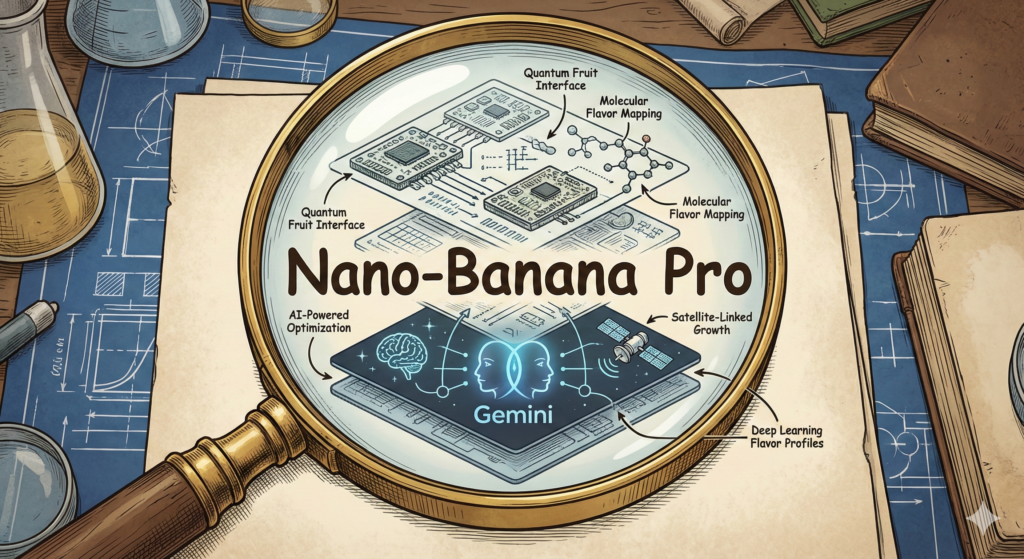
    An infographic showing a clear flow from 'Technical Name (Gemini 2.5 Flash)' to 'Nano Banana (Nickname)' to 'Nano-Banana Pro (Official Label)', using playful yet professional graphics.

    Conclusion

    Nano-Banana Pro has a strange name for a straightforward reason. It started as a rushed codename for public testing, it came from personal nicknames, and it also happened to match the “fast and practical” feel people associate with Flash-style models. Once the model impressed users, the name spread because it was easy to repeat.

    The Nano Banana meaning is simple: small, fast energy plus a silly banana hook. And that answers the main question of why it’s called that. In AI, a name people remember can matter almost as much as the benchmarks, because memory is what turns a tool into a habit.

    FAQ:


    What exactly does “Nano-Banana Pro” refer to?

    Nano-Banana Pro is the human-friendly and widely recognized nickname for a specific, serious image model, technically associated with the Gemini 2.5 Flash family. It’s designed for quick and practical day-to-day use in image generation.

    Why was the name “Nano Banana” chosen initially?

    The name ‘Nano Banana’ emerged as a more accessible and memorable alternative to the complex technical specifications of the underlying AI model. It helped make the model relatable and easier to discuss among a broader audience.

    What does the ‘Pro’ addition signify in ‘Nano-Banana Pro’?

    The ‘Pro’ tag typically indicates an enhanced, professional, or more advanced version of the original ‘Nano Banana’ concept. It denotes improvements, specific features, or a refined iteration within the model’s development.

    Is Nano-Banana Pro related to Google’s Gemini AI?

    Yes, Nano-Banana Pro is directly tied to the Gemini model family, specifically within its ‘Flash’ series. This series is characterized by its efficiency and practicality for various image-related tasks.


  • 10 Gemini AI Prompts to Help You Crush Your ‘New Year’!

    10 Gemini AI Prompts to Help You Crush Your ‘New Year’!

    Most New Years’ resolutions fail for a boring reason: people bet on motivation, then life shows up. A stressful week hits, the plan slips, and the goal becomes a guilt souvenir by mid-January.

    A better approach is systems, small steps you can repeat, track, and adjust. That’s where Gemini can act like a practical coach, especially if you like clear plans, data, and automation. With the right AI Prompts, you can turn fuzzy goals into weekly checklists, simple rules, and tight feedback loops.

    Below are 10 copy-and-paste prompts you can tweak for fitness, money, focus, learning, and boundaries. They work best when you add constraints like time, budget, schedule, gear, and the tools you already use.

    Before you paste these AI Prompts, set your inputs (so Gemini gives better answers)

    Gemini isn’t magic, it’s a fast pattern matcher. If your prompt is vague, you’ll get a vague plan back. If you feed it the same inputs you’d give a good personal trainer or financial coach, the answers get way more useful.

    At minimum, give Gemini:

    • Goal: What you want, in plain words.
    • Deadline: A date (or at least a month).
    • Baseline: What you’re doing right now (steps per day, current savings, screen time, hours of sleep).
    • Weekly time: How many minutes or hours you can actually spend.
    • Constraints: Budget, injuries, food preferences, travel, family schedule, work hours.
    • Success: One or two numbers that prove it’s working.

    A weak prompt looks like: “Help me get healthier.” A strong prompt sounds like: “I want to exercise 3 days a week by March 1, I currently do 0 days, I have adjustable dumbbells and 30 minutes per session, build a plan with a fallback for busy weeks.”

    Common 2026 themes line up with recent survey trends: exercising more, eating healthier, saving money, and spending less time on social media. (Those show up often in the year’s “top resolutions” lists.) Save Gemini’s outputs in a single doc, then update it weekly with what worked and what didn’t. You’re building a system you can maintain, not a perfect plan you can’t.

    For more ideas on how Google frames Gemini for this exact use case, see Google’s own post, 10 Gemini prompts to help you keep your New Years’ resolutions.

    Use this quick template, goal, baseline, constraints, schedule, and how you want Gemini to respond

    Use this fill-in template and paste it before any of the prompts below:

    My goal is: [what you want]. Deadline: [date]. My baseline today: [current numbers and habits]. Time I can spend per week: [minutes or hours]. Budget: [$]. Constraints: [injury, diet, work schedule, travel, tools]. Success looks like: [1 to 2 metrics]. Build me a plan that includes: [weekly steps, reminders, tracking]. Respond in bullets, include dates, keep steps small (15 minutes or less), and include a simple tracking method (one checkbox list or one metric).

    Make it realistic, add a “minimum version” for busy weeks

    Ask for two tracks: a normal plan and a minimum plan. The minimum plan is what you do when energy is low, travel happens, or work explodes. It keeps your streak alive and protects your identity as “someone who follows through.”

    In prompts below, you’ll see lines like: “Also give me a minimum version that takes 10 minutes or costs $20.” That single sentence stops the all-or-nothing spiral that kills most resolutions.

    10 Gemini AI Prompts to help you keep your New Years’ resolutions

    Each prompt has a quick “when to use it” line, then the copy-and-paste text. Keep your inputs at the top, then paste one prompt at a time.

    Prompt to turn your resolution into SMART goals and milestones

    When to use it: you have a vague goal and need a concrete plan.

    Prompt: You are an expert productivity coach and project manager. Your task is to transform a general resolution or personal objective into a highly structured, actionable 8-week execution plan. Please follow these instructions: 1. Convert the input resolution into 3 to 5 specific SMART (Specific, Measurable, Achievable, Relevant, Time-bound) goals. 2. For each goal, provide a high-level roadmap with weekly milestones for the next 8 weeks. 3. Develop a detailed, day-by-day action plan for ‘Week 1’ that begins this coming Monday, focusing on building immediate momentum. 4. Conduct a risk assessment for the entire plan, identifying specific Risks (potential obstacles), Assumptions (factors taken for granted), and Dependencies (e.g., budget, schedule, physical recovery, external tools). 5. Provide a simple tracking system for each goal consisting of one primary quantitative metric and a weekly qualitative checkbox list to monitor progress. Resolution to process: [INSERT RESOLUTION HERE]

    Prompt for a progressive workout plan that fits your gear, schedule, and recovery

    When to use it: you want a safe ramp-up without overdoing it.

    Prompt: Act as a certified personal trainer and fitness strategist. Your goal is to design a highly personalized 4-week workout program based on the user’s specific constraints.

    Context Gathering

    First, evaluate the following user constraints: [INSERT GEAR AVAILABLE, e.g., dumbbells, bands, or bodyweight] and [INSERT SCHEDULE, e.g., 4 days/week, 45 mins per session].

    Deliverables

    1. Comparative Analysis: Provide three distinct 4-week options: (A) Full Gym, (B) Home-based, and (C) Outdoor/Bodyweight. Explicitly state which of these three best aligns with the provided constraints and why.
    2. The 4-Week Plan: For the recommended option, provide a detailed weekly schedule including:
    • Session length per day.
    • Specific warm-up routines (dynamic stretching).
    • Structured rest days and active recovery notes.
    • Exercise selection with sets and reps.
    1. Flexibility Protocols:
    • The ‘Minimum Effective Dose’: A high-intensity 10-minute workout for days with zero time.
    • The ‘Travel Fallback’: A zero-equipment routine for hotel rooms or small spaces.
    1. Tracking & Accountability:
    • A weekly checklist format for progress monitoring.
    • Define one primary ‘North Star’ metric to track (e.g., volume load, heart rate recovery, or consistency score).

    Style & Tone

    Use a professional, encouraging, and science-based tone. Ensure the structure is clear with headers and bullet points for readability.

    For basic exercise guidelines and safety tips, cross-check with CDC physical activity guidelines.

    Prompt for a simple meal plan plus grocery list that matches macros and cook time

    When to use it: you’re tired of deciding what to eat at 6 p.m.

    Prompt: Act as a professional nutritionist and culinary efficiency expert. Create a detailed 7-day meal plan tailored to the following constraints:

    1. Time: Every dinner must be prepared in under [X] minutes.
    2. Nutrition: Aim for [protein/carbs/fat or calorie target] per meal.
    3. Diet: Adhere to [vegetarian-friendly/high-protein/allergies].
    4. Budget: The total grocery cost for the week must not exceed [$].
    5. Leftovers: Plan for [number] lunches to be provided by previous night’s dinners.

    Structure your response as follows:

    • Weekly Overview: A summary of the week’s nutritional goals.
    • Daily Meal Schedule: List Breakfast (simple/quick), Lunch (leftovers or quick assembly), and Dinner.
    • Recipe Cards: For each dinner, provide a title, prep time, and concise step-by-step instructions (max 5 steps).
    • Grouped Grocery List: Categorize items by aisle (Produce, Pantry/Dry Goods, Dairy, Frozen, etc.) with estimated costs.
    • Progress Tracker: Provide a checklist for daily completion and a weekly ‘Success Metric’ (e.g., ‘Home-Cooked Dinners: 0/7’).

    Ensure the tone is encouraging and the instructions are pragmatic for a busy lifestyle.

    Prompt to build a budget, stop overspending, and set weekly money rules

    When to use it: you know money leaks are happening, you just can’t see them.

    Prompt: Act as a supportive, practical financial coach specializing in ‘no-shame’ budgeting and sustainable habit formation. I will provide my last month’s spending totals by category below.

    Your task is to:

    1. Analyze and Categorize: Review the spending data and group items into logical categories (Needs, Wants, Savings/Debt).
    2. Identify Friction Points: Spot the top 3 ‘problem areas’ where spending is highest relative to value or necessity.
    3. Suggest Lifestyle-Friendly Cuts: Recommend 3 realistic, low-friction adjustments to reduce spending in those areas without causing significant lifestyle deprivation.
    4. Calculate Weekly Target: Based on my savings goal of [Insert Goal Amount] and my deadline of [Insert Date], calculate a specific weekly savings target.
    5. Establish Behavioral Rules: Create 2 to 3 ‘money rules’ (e.g., a 24-hour cooling-off period for non-essential purchases over $50) to guide weekly behavior.

    Output Format:

    • The Weekly Spending Plan: A simplified breakdown of how much to allocate per week to different categories to meet the goal.
    • The One-Page Checklist: A concise, printable-style checklist of daily/weekly actions and the money rules to keep me on track.

    Tone: Use an encouraging, non-judgmental, and highly practical tone. Avoid financial jargon where possible.

    Spending Data: [Paste Totals Here]

    Prompt to pay down debt faster using avalanche or snowball, with a payoff timeline

    When to use it: you want the fastest path and fewer mental calories.

    Prompt: Act as an expert personal finance advisor specializing in debt management. I will provide a list of my debts including Balance, APR, Minimum Payment, and Due Date. I have an additional [$] available each month to put toward debt repayment. Your task is to perform a comprehensive comparison between the Debt Avalanche (paying highest interest first) and Debt Snowball (paying lowest balance first) methods. For both methods, please provide: 1. The total interest I will pay over the lifetime of the debt. 2. My estimated ‘Debt-Free Date’. 3. A detailed month-by-month payment schedule for the next 12 months, specifying exactly how much to pay toward each creditor. Additionally, include a ‘Financial Safeguard’ section with advice on setting up autopay, reminders for due dates, and a contingency plan for what to do if a payment is missed. Finally, provide a ‘Debt Freedom Progress Tracker’—a specific metric (like ‘Percentage of Debt Principal Remaining’) that I can update monthly to stay motivated. Please format the comparison and the 12-month plan in clear tables for easy readability.

    Prompt to reduce screen time with app rules, replacement activities, and friction

    When to use it: you want less doomscrolling without white-knuckling it.

    Prompt: Act as an expert productivity and behavioral coach specializing in digital well-being. My current average screen time is [X] hours/day. My most problematic apps are [list]. My high-risk ‘danger times’ are [bedtime, lunch, commute, mornings]. My goal is to reduce my daily screen time by [target] over the next 4 weeks. My personal interests include [list interests]. Please generate a structured, progressive 4-week reduction plan including: 1. Specific App Limits & Rules: Provide weekly incremental restrictions for my worst apps to avoid burnout. 2. Day-One Optimization Checklist: Immediate phone settings (e.g., grayscale, notification audits, Focus modes) to reduce friction. 3. Tailored Replacement Activities: Suggest three activities that specifically align with my interests to fill the void during my ‘danger times’. 4. The ‘Minimum Viable Plan’ for Bad Days: A low-friction fallback strategy for when willpower is low or stress is high. 5. Accountability: One primary metric to track daily and one deep-reflection question for a weekly review. Format the output using clear headings and bullet points for ease of implementation.

    Prompt to set work life boundaries using scripts you can actually say

    When to use it: you’re available by default and it’s burning you out.

    Prompt: Act as a Professional Communication Coach and Productivity Expert. Your goal is to help a professional establish and maintain healthy work boundaries. Based on the following profile: Job Role: [Insert Job], Time Zone: [Insert Time Zone], Meeting Load: [Insert X], and Primary Boundary Problem: [Select: after-hours pings / too many meetings / last-minute requests]. Generate a comprehensive Boundary Management Kit containing three components: 1. Communication Scripts: Provide 3 short scripts for Slack and 3 for Email tailored to the specific boundary problem. The tone must be ‘Friendly yet Firm’—professional, direct, and avoiding passive-aggressive language or over-explaining. 2. Weekly Boundary Plan: Define a structured schedule including ‘Office Hours’ for deep work, a set of ‘Meeting Rules’ (e.g., mandatory agendas, 5-minute transition buffers), and a clear ‘Escalation Path’ for when a boundary truly needs to be bypassed for emergencies. 3. Success Tracking System: Propose one primary quantitative metric to measure progress and a 5-item weekly checkbox list to audit boundary health. Ensure the output is formatted in clean Markdown for easy copying.

    Prompt for habit stacking and a daily routine that fits your real day

    When to use it: you want habits that stick because they attach to existing ones.

    Prompt: Act as an expert productivity coach and behavioral psychologist specializing in habit formation. Based on the schedule and current habits provided below, design a highly realistic morning and evening routine using the ‘Habit Stacking’ method (pairing a new habit with an existing one).

    Input Data:

    • Wake Time: [Insert Time]
    • Work/Productive Hours: [Insert Time Range]
    • Commute/Transition Time: [Insert Duration and Mode]
    • Bedtime: [Insert Time]
    • Current Habits: [List current habits, e.g., making coffee, checking phone, brushing teeth]

    Requirements for the Routine:

    1. The Stack: For every new habit, explicitly state the formula: ‘After [Current Habit], I will [New Habit].’
    2. Triggers & Environment: Identify specific environmental cues to trigger each stack.
    3. Small Rewards: Suggest immediate, low-effort rewards for completing a sequence to reinforce the dopamine loop.
    4. The ‘Minimum Version’: Create a 5-minute ‘Emergency Version’ of the routine for high-stress or low-energy days to maintain consistency.
    5. Recovery Plan: Provide a ‘Never Miss Twice’ protocol explaining how to mentally and practically reset after a missed day.

    Tone and Format:

    Format: Use clear headings and a table for the routine schedules.

    Tone: Encouraging, practical, and evidence-based.

    Prompt for an accountability system, check-ins, scoreboards, and rewards

    When to use it: you do better when someone is watching (or when points are on the line).

    Prompt: Act as a productivity coach and behavioral scientist. Your goal is to design a robust, sustainable accountability system based on these parameters: [Partner/Community], [Cadence: Daily/Weekly], [Habits/Metrics to Track], and [Budget for Rewards]. 1. Scorecard: Create a structured weekly scorecard using a point-based system. Assign specific point values to ‘Habit Completion’ versus ‘Stretch Goals’ to quantify performance. 2. Communication: Provide three distinct templates for check-in messages (one for a high-performance week, one for a mediocre week, and one for a missed week) that I can send to my partner to maintain transparency. 3. Rewards: Suggest a tiered list of rewards (Low-cost, Mid-range, and ‘Big Win’) that fit the specified budget. 4. Resilience Protocol: Detail a specific ‘Fail-Fast’ recovery plan. This should include a ‘minimum viable day’ strategy and a mindset shift exercise to ensure I restart immediately after a lapse. Tone: Professional, encouraging, and highly practical.

    Prompt for a weekly review that learns from your data and adjusts the plan

    When to use it: you want results, not just effort.

    Prompt: Act as a high-performance executive coach. I will provide a weekly log covering workouts, spending, sleep, wins, and blockers. Analyze this data to: 1) Summarize cross-category patterns (e.g., how sleep impacts spending or energy). 2) Identify the single highest-impact bottleneck. 3) Select one high-leverage improvement. 4) Create a 7-day action plan with specific dates, breaking the improvement into micro-steps for each day. 5) Conclude with a deep reflection question, a ‘two-minute win’ task I can do immediately, and one specific metric to track. Tone: Professional, insightful, and action-oriented.

    How to keep the momentum past January

    Think of resolutions like a codebase. If you don’t maintain it, it rots. The fix is a simple workflow you repeat.

    • Sunday: ask Gemini to generate your week plan from your dashboard doc.
    • Daily: do a 2-minute check-in (one metric, one checkbox list).
    • Monthly: do a reset, update constraints, remove steps you keep skipping.

    If you like voice coaching, Gemini Live can be handy for quick “talk it out” moments when you’re about to quit. If you already live in Google apps, you can keep everything in Docs or Sheets and ask Gemini to summarize your week and propose the next plan. Google’s broader prompt ideas for planning and routines can also help when you’re setting up your system, see 48 tips and prompts for holiday planning, travel and more.

    Use a “systems first” loop: plan, do, track, review, adjust

    Plan a week you can actually execute, do the actions, track one metric, review what happened, then adjust. Consistency beats hero weeks. To avoid overtracking, pick one metric per resolution, like workouts completed, dollars saved, or average screen time.

    Conclusion

    If motivation is a spark, AI Prompts are the wiring. The right prompts turn “I should” into steps you can do on a normal Tuesday. Pick one or two prompts from the list and run them today, then use the weekly review prompt every week to keep adapting. Copy the prompts, fill in your real constraints, and commit to the minimum version on busy days. In a few weeks, your system will feel boring, and that’s the point.