ChatGPT can speed up almost any daily task, from drafting emails to planning campaigns, but it needs clear prompts to shine. When you start with a blank box, results vary. With the right template, you get focused, repeatable output that saves real time.
That is where free prompt packs help. They are ready-made templates for writing, marketing, and business that tell ChatGPT what role to take, what data to use, and what format to return. You fill in a few details, then get consistent results without guesswork.
Think of them like checklists for AI. A blog outline becomes a clean structure with headings. A product launch turns into emails, social posts, and ad copy that align.
Here is a quick story. Mia, a solo marketer, used a free launch pack to map a 7-day email series, a social calendar, and a landing page brief. She finished in one afternoon, and said it saved her three hours she used to spend rewriting and fixing tone.
In 2025, these packs matter for both beginners and pros. Starters get a clear path to ask better questions. Power users get role-specific templates for sales, SEO, customer support, and planning that they can tweak and stack.
You will see prompts that handle outlines, briefs, reports, and scripts, plus checklists for research and QA. Many include fields for audience, brand voice, and goal, so you keep control of the output. Use them as is, or adjust and save your own set.
Up next, the top free prompt packs for writing, marketing, and business, plus simple tips to customize them for your workflow.
Why Free ChatGPT Prompt Packs Boost Your Success
Free prompt packs take the guesswork out of AI. You get proven templates that guide ChatGPT to produce consistent, on-brand output without endless trial and error. In 2025, when your calendar is packed, that means faster drafts, fewer rewrites, and more time for real work. Bloggers lock in SEO structure. Marketers spin up campaigns. Founders get plans and summaries that read clean and clear.
Save Time and Cut Frustration
You no longer start from scratch. Prompt packs ship with tested templates, so you skip the messy part of figuring out what to ask. Vague prompts lead to vague results. Clear templates produce clear output.
Try this simple shift:
Instead of: “Write emails for my product launch.”
Use a pack’s sequence prompt: Act as a lifecycle email strategist. Create a 5-part launch sequence for [product], targeting [audience]. Use [brand voice], include subject lines and preview text, and add one CTA per email.
Result, you get a tight series with structure, tone, and calls to action, ready to paste into your ESP. Busy week? You can go from idea to draft in minutes. That means your Monday planning block now fits emails, a landing page outline, and a social caption set without stress.
Good packs cover niches, from writing and marketing to sales, self-improvement, and operations. They help you match outputs to your audience, product, and tone.
Role-play prompts: Make ChatGPT act like an SEO strategist, email copywriter, or project manager. You get expert-level structure with your inputs layered in.
Audience alignment: Set persona, pain points, and benefits, then keep that thread across blogs, emails, and ads.
Customization: Swap in your brand voice, format, and length. Save a “house style” version with your rules for readability, grade level, and banned phrases.
Example wins:
A blogger uses an SEO brief prompt to map keywords, headings, FAQs, and internal links, then drafts faster with fewer edits. For more prompt ideas to adapt, see this large reference list: 500+ Best Prompts for ChatGPT (Ultimate List for 2025).
A marketer plugs in an email sequence prompt to generate hooks, angles, and subject line tests that match the brand and campaign goal.
You get consistent output, faster iterations, and templates you can refine over time. That is how small daily wins stack into big results.
Top Free Prompt Packs to Grab in 2025
If you want quick wins, start with proven packs and tweak them to fit your style. Most of these are free, updated often, and easy to remix. I also like LivePlan’s business starters for planning and TechPoint’s 300 for productivity, both handy for day-to-day work.
GitHub’s Awesome Collection for All Users
The classic GitHub list is open source, broad, and battle tested. You get prompts for many AI models, not just ChatGPT, and the community ships edits often. Beginners can fork it, add their own prompts, and build a personal library over time. Check the main repo here: f/awesome-chatgpt-prompts.
What you will find:
Roles and formats for writing, coding, research, and study
Community contributions, so fresh ideas show up weekly
Easy customization, just copy, adapt, and save
RightBlogger’s Prompts for Creative Writing
RightBlogger shares 25 free prompts built for writers who want clean drafts fast. You get blogging, copy, and fiction templates with SEO intent baked in. The set helps you nail topic focus, headings, and search-friendly language that ranks.
Highlights:
Blog outlines and briefs that map headers, FAQs, and internal links
Copy prompts for hooks, intros, CTAs, and edits
Fiction starters to spark plots, scenes, and dialogue
This giant pack covers almost every topic you can name. It shines with expert simulations, like acting as a senior copywriter, interviewer, strategist, or editor. Use it to draft faster, pressure test ideas, or prepare interviews and surveys.
Why it works:
Huge variety, easy to scan
Role prompts that structure output like a pro
Strong starting points for repeatable workflows
Team-GPT’s Marketing Essentials
Marketers get 25 prompts ready for SEO, social, and email. Use them to plan content, build calendars, and ship campaigns with less back-and-forth. The set fits daily tasks, from keyword maps to subject line tests.
What you get:
SEO prompts for briefs, outlines, and on-page fixes
Social prompts for hooks, formats, and captions
Email prompts for sequences, angles, and A/B tests
Pick one today, run it with your brand voice, and save your best version.
Simple Steps to Use Prompt Packs Effectively
Prompt packs work best when you treat them like starting points, not final scripts. Pick a pack that fits your task, add the right context, then test and tweak until the output matches your brand. In 2025, clear inputs, examples, and guardrails produce stronger results with fewer edits.
Here is a simple flow that keeps you fast and accurate:
Choose a pack aligned to your goal.
Add details about audience, tone, and format.
Include examples and rules that show what good looks like.
Generic prompts give generic results. Add your voice, audience, and formatting rules so the model writes like you.
Audience: Who is this for, and what do they care about?
Tone: Friendly, concise, confident, witty, or serious.
Format: Word count, headings, bullets, CTA, and any banned phrases.
Context: Product, goal, source notes, or key facts.
Example: Paste a short sample that shows the style you want.
Try this structure:
Role: Act as a [role].
Task: Create [deliverable] for [audience] to [goal].
Voice: [tone], avoid [banned items].
Format: [length], [sections], [CTA].
Example: “Here is a sample paragraph I like: […]”
For deeper control, set standing rules in your chat settings. See this guide on making instructions stick: Best Custom Instructions for ChatGPT.
Review and Refine Every Output
Never publish a first pass. Check facts, tone, and structure. AI can sound smooth yet miss details.
Scan for errors: Names, dates, data, claims, and links.
Fix bland spots: Ask for stronger verbs, sharper hooks, or tighter focus.
Iterate: Use follow-ups like, “Tighten to 120 words,” or “Add two examples.”
Combine prompts: Brief, outline, draft, then edit. One step per prompt keeps quality high.
Quick example, blog idea to draft:
Use an “idea generator” prompt for 10 topic ideas.
Pick one and run an “SEO outline” prompt with H2s and FAQs.
Feed the outline into a “draft” prompt with your voice and length.
Edit for accuracy and clarity. Add sources where needed.
Keep a small library of your best versions. Use them daily, and your output gets faster, cleaner, and more on-brand.
Conclusion
Free prompt packs turn a blank chat into a working system. You get proven templates, clear roles, and repeatable formats that cut draft time, reduce rewrites, and keep your voice steady across blogs, emails, and briefs. That is the simple edge in 2025, speed with quality you can trust.
Start small today. Pick one pack from the list above, drop in your audience, voice, and goal, then run a single task like an SEO outline or a 5-part email sequence. Save the best version, test it on your next task, and build a tiny library you reuse every week.
If you want momentum, stack two prompts for multi-step work. Outline, then draft. Brief, then edit. The gains add up fast, and you keep control of tone and structure at every step.
Grab one free pack now and experiment for 15 minutes. Share your first win in the comments, or subscribe for more practical AI tips and new prompt packs as they drop. Your next draft can be faster, cleaner, and on-brand, and you can get there today.
FAQ Section What are free ChatGPT prompt packs?
Free ChatGPT prompt packs are collections of pre-written templates designed to guide ChatGPT, ensuring specific, consistent, and high-quality outputs for various tasks like writing, marketing, and business operations.
How do prompt packs save time?
By providing ready-made structures and instructions, they eliminate the guesswork of starting with a blank prompt, leading to focused results faster and reducing the need for extensive rewriting or editing.
Can I customize these free prompt templates?
Yes, most free prompt packs are designed to be highly customizable. You can adjust fields for audience, brand voice, and specific goals, or even create and save your own modified versions for future use.
Who benefits most from using ChatGPT prompt packs?
Both beginners and experienced users benefit significantly. Beginners get a clear path to better AI interaction and consistent results, while pros can streamline role-specific tasks, enhance output consistency, and scale their AI usage efficiently.
You know how tough it is to write copy that converts. Meet Maya, a marketer who spent weeks tweaking headlines and emails with little to show for it. Then she tried copywriting AI prompts, and her next campaign doubled clicks and cut her writing time in half.
Copywriting AI prompts are short instructions you give tools like ChatGPT to produce clear, persuasive text. You tell the AI who the audience is, what the offer is, and the tone you want. It returns options for headlines, emails, pages, and ads you can test fast.
This helps you if you write for a living, run online campaigns, sell homes, or are just starting with AI. Writers get fresh angles on demand. Online marketers can personalize messages and spin up A/B tests in minutes. Real estate agents can turn listings into friendly, local stories. Beginners and online entrepreneurs get a simple workflow that saves time and money.
If you want more practical tools, check out Enhance Your Copywriting with These AI Prompting Resources for a list of prompt tools and 50 free prompts you can try today. And if you like learning by watching, here’s a quick primer: https://www.youtube.com/watch?v=P08jrZhyNxw
Up next, you’ll get a set of high-converting copywriting AI prompts you can plug in and use right away.
Why Copywriting AI Prompts Boost Your Sales
You can generate high-converting copy in minutes. With copywriting AI prompts, you move faster, keep quality steady, and use tested structures that sell. In 2025, most marketers use AI daily, and teams that pair AI with human editing see better results. You get speed without giving up control.
Prompts let you focus on strategy, not wording. You decide the offer, audience, and goal. The AI drafts the first pass, and you refine. That cuts hours of typing into minutes of smart editing.
Faster creation: Spin up 5 headline options in seconds, not hours.
Consistent quality: Keep tone and brand voice steady across pages and emails.
More testing: Try multiple angles and pick winners with data.
A quick prompt you can use today: Write three benefit-focused headlines for a home staging service targeting first-time sellers in Austin. Tone: friendly, confident. Include a clear call to action.
Teams that combine AI with your review process see stronger outcomes. Recent 2025 data shows marketers using AI for brainstorming and drafts while humans fine-tune messaging see clear lifts in performance. Want more prompt ideas? Explore Enhance Your Copywriting with These AI Prompting Resources.
Tap Into Proven Sales Formulas
AI pulls from patterns that work, such as AIDA (Attention, Interest, Desire, Action), PAS (Problem, Agitate, Solution), and 4Ps (Promise, Picture, Proof, Push). You get structures that guide readers to act.
For writers and marketers: Generate AIDA variants for ads and landing pages, then A/B test.
For real estate agents: Turn a plain listing into a story that sells the lifestyle, not just the square footage.
For entrepreneurs: Scale offers across channels with the same proven skeleton.
Example prompt: Using AIDA, write a 120-word Facebook ad for a 3-bed family home near parks and schools in Denver. Emphasize safety, convenience, and a weekend open house.
If you need ad-specific ideas, this guide on AI copywriting prompts for attention-grabbing ads can spark new angles. With copywriting AI prompts, you plug into tested frameworks, keep voice on brand, and ship persuasive copy, fast.
Top High-Converting Copywriting AI Prompts for Different Needs
Use these copywriting AI prompts to move fast, keep your message sharp, and convert more readers into buyers. Each template includes when to use it and a quick way to tailor it. Try one, test it, then tweak based on data. If you want more prompt ideas later, explore these examples of advanced copywriting prompts and a guide to high-converting ad copy prompts.
Prompt template: Create a landing page copy that focuses on benefits over features for [Product Name]. Highlight how it solves [specific customer pain points] and include a clear call-to-action to drive sales.
When to use it: Ideal for launches, new funnels, or when a page underperforms. You want clear benefits, fast scanning, and one action.
Customization tip:
For marketers: Add sections for proof, objections, and FAQs. Include bullets like “perfect for busy parents” or “built for solo founders.”
For entrepreneurs: Set one goal per page. Make the CTA specific, like “Start your free 14-day trial.”
Pro move: Map copy to AIDA. Use a bold hook, then brief proof. Keep paragraphs short.
Quick example: “Stop losing hours to scheduling. [Product Name] books meetings for you, sends reminders, and fills your calendar.”
Email Sales Sequence Prompts for Repeat Engagement
Prompt template: Generate a series of email sales copy for [Product Name], each focusing on a different benefit. Ensure each email includes a persuasive call-to-action linking to [landing page or checkout].
When to use it: Great for online entrepreneurs building trust over a week. Works for SaaS trials, courses, services, and launches.
Customization tip:
Plan a 5-email flow:
Problem + promise: State the main pain and your fix.
Benefit deep dive: Focus on speed, savings, or ease.
Social proof: Add a customer quote and result.
Objections: Tackle price, time, or risk with a guarantee.
Urgency: End with a deadline or bonus.
Keep CTAs clear: “Book your demo,” “Start your trial,” “Grab your spot.”
Prompt template: Write a product description for [Product Name] that highlights its unique features and benefits. Make sure it's concise, persuasive, and includes a clear call-to-action.
When to use it: Best for store pages, Amazon listings, and proposal pages. Also useful for service packages.
Customization tip:
Lead with a benefit in the first sentence. Then a short feature-to-benefit bullet set.
For real estate agents: Treat the home as the product. Translate features to lifestyle:
“South-facing windows” becomes “sunny mornings and warm afternoons.”
“Near schools” becomes “5-minute school runs.”
End with “Schedule a tour” or “Visit the open house.”
For writers: Match client voice, then add a standout detail that answers “Why this, not that?”
Format idea:
1 line hook
3 bullets that turn features into outcomes
CTA that frames the next step
Video Sales Letter Script Prompts That Convert Viewers
Prompt template: Create a script for a VSL that showcases [Product Name] as the solution to [customer problem]. Include testimonials and a strong call-to-action at the end.
When to use it: You run ads to a VSL, host a webinar replay, or add a video to your landing page. Works well when your offer needs visuals or demos.
Customization tip:
Structure your VSL:
Hook in 8 seconds. Name the core pain.
Story that shows empathy and a turning point.
Solution demo that highlights one key win.
Proof: 2 quick testimonials, 1 case result.
Offer: What they get, price, bonus.
CTA: One action with a deadline or incentive.
Add captions and big on-screen CTAs. Many viewers watch on mute.
Preempt the top objection in the middle. It raises watch time and trust.
Social Media Ad Copy Prompts to Grab Attention
Prompt template: Develop ad copy for [Product Name] that targets [specific audience] on [platform]. Emphasize the value proposition, include eye-catching visuals, and drive traffic to [landing page].
When to use it: For Instagram, Facebook, TikTok, or LinkedIn ads. You need short, punchy text that stops scrolls.
Customization tip:
Keep the first line under 80 characters. Lead with a benefit or number.
Match platform norms:
Instagram: short copy plus a clear image or Reels clip.
LinkedIn: a crisp hook and a one-line insight.
TikTok: problem-solution on-screen text and a fast cut.
Add 2 versions: one with social proof, one with a bold claim. Test both. For more ad angles, browse these AI ad copy prompt ideas.
Sample hook ideas:
“Double your bookings without more ad spend.”
“Cut editing time by 50 percent with one tool.”
“Stop losing leads at checkout.”
General Sales Copy Prompt for Quick Starts
Prompt template: As a seasoned copywriter, create an engaging sales copy for [Product Name]. Focus on highlighting its unique benefits, features, and value, tailored to [target audience]. Ensure it includes a clear and compelling call-to-action.
When to use it: You need flexible copy for pages, ads, or proposals. Great for quick drafts you can refine.
Customization tip:
Add constraints to guide quality:
Word count range, headline length, tone, and voice notes.
Audience segment, use case, and one key objection to overcome.
Ask for 3 angles: results-driven, story-driven, and proof-heavy. Pick the winner.
Keep one promise per piece. Too many ideas slow the reader.
Pro tip: Combine with AIDA or PAS to keep flow tight. You can also prompt for two CTAs, a primary and a soft secondary, to catch hesitant buyers. If you need more inspiration, scan these curated copywriting prompt workflows.
Ready to use these copywriting AI prompts in your next campaign? Start with one template, measure clicks and replies, then refine. Small tweaks stack up to big wins.
Tips to Make Your Copywriting AI Prompts Work Even Better
Strong prompts give you clearer drafts, faster edits, and higher conversions. With copywriting AI prompts, you set the stage, then guide the output with details that match your audience, product, and goal.
Be Specific and Add Context
You get better results when the AI knows who you are talking to and what you are selling. Define the product, the reader, and the action you want. You refine prompts by adding details about your audience, such as pains, habits, and tone.
Include these in your prompt:
Product: What it is, the top benefit, and one proof point.
Audience: Role, stage, key objection, and desired outcome.
Goal: Click, book a tour, request a quote, or buy now.
Tone: Friendly, expert, bold, or warm.
Constraints: Word count, format, and primary keyword.
Example: Write 3 PAS-style headlines for a family-friendly real estate listing in Denver. Audience: first-time buyers with busy schedules. Tone: friendly and confident. Include the keyword "copywriting AI prompts" once.
You now have simple, proven ways to turn ideas into sales. With copywriting AI prompts, you write faster, keep your message clear, and stay on brand. You guide the AI with audience, offer, and goal, then shape strong drafts with AIDA or PAS. Testing a few angles, tracking clicks, and iterating gives you steady gains without guesswork. Like Maya, you can move from slow edits to consistent wins in days, not weeks.
Try one prompt right now for your next email, ad, or listing. Keep it specific, request two versions, and pick the one that speaks to your reader best. Stay honest, add proof, and make the next step obvious.
Grab your AI tool and craft copy that sells.
FAQ:
How do AI copywriting prompts boost sales?
AI prompts help generate high-converting copy faster, ensure brand consistency, and enable rapid A/B testing of different messaging angles, directly leading to increased sales efficiency and conversion rates.
What are the best AI copywriting frameworks?
Popular frameworks include AIDA (Attention, Interest, Desire, Action) and PAS (Problem, Agitate, Solution). These provide structured guidance for AI to produce effective sales copy.
Can AI copywriting really understand my audience?
Yes, when you guide the AI with specific details about your target audience’s demographics, psychographics, pain points, and desires, it can generate highly relevant and resonant copy.
How often should I test AI-generated copy?
Consistent testing is crucial. Start with testing different angles for key sales messages and iterate based on performance metrics like click-through rates and conversion rates.
Master Email Marketing with AI Prompts & Templates (AI prompts for marketing, 2025)
You’re about to build a complete 5‑email sequence in one hour, start to finish. This guide is for AI enthusiasts, creators, marketers, and developers who want to move from casual to expert. Your goal is clear, Master Email Marketing with AI Prompts & Templates, using proven AI prompts for marketing that anyone can run.
Here’s the plan you’ll follow: choose a single campaign goal, set up your stack, run proven prompts, paste in clean templates, then ship. You’ll see how to go from blank page to a working sequence without getting stuck.
What works in 2025: AI helps write stronger subject lines, picks send times, personalizes content, and tightens segmentation. Tools like ActiveCampaign, Klaviyo, Encharge, Brevo, and Seventh Sense make this practical, not theory.
By the end, you’ll have more opens, more clicks, more replies, and better deliverability. Want a quick warm‑up on prompts before you start? Watch this: https://www.youtube.com/watch?v=P08jrZhyNxw
What You Will Build: A 5-Email AI Sequence for a Tech-Savvy Audience
You will ship a tight, 5-email sequence built with AI prompts for marketing that fits SaaS, dev tools, and digital products. Each email has one job, one metric, and one clear call to action. You will write fast, keep messages short, and guide readers toward a single outcome.
Use this plan as your blueprint. It pairs well with Master Email Marketing with AI Prompts & Templates and helps you move from idea to live campaign without busywork.
Email
Job
Primary metric
Timing
1
Welcome and quick win
Open rate
Day 0
2
Problem and insight
Click rate
Day 2
3
Solution and demo
Click to page or video
Day 4
4
Proof and social proof
Reply or conversion micro-yes
Day 7
5
Close and offer
Trial start or purchase
Day 10
Choose Your Goal, Offer, and Audience Segment
Start with focus. Pick one goal for this sequence:
Start a free trial
Book a demo
Complete checkout
Choose one main offer and one backup offer. For example, main offer: 14-day free trial; backup offer: a 15-minute migration assist. The backup gives you room to save a lead if they stall.
Select one audience segment to start:
Developers who want speed and clean APIs
Founders who want revenue and time savings
Marketers who want higher conversions and proof
Lock your message with three fast prompts:
What pain do they feel today?
What promise can you make in one line?
What proof do you already have?
Set your guardrails so the sequence stays sharp:
One CTA per email
120 to 180 words per email
Subject lines under 45 characters
Example flow: Developers face flaky integrations and slow onboarding, you promise a 10-minute setup, and you back it up with a case stat or a GitHub star count. Keep the story tight across all five touches.
Pick Your Tool Stack: Model, ESP, and Data
You only need a simple, modern stack to run this in 2025.
Model: ChatGPT, Claude, or Gemini for first drafts, variants, and subject lines. If you want prompt ideas to speed up strategy and testing, scan this guide on ChatGPT prompts for email marketing.
Send-time optimization: Use your ESP’s predictive send, or add a tool like Seventh Sense if supported.
Data sources: Events (signup, trial start, cart), product analytics (activation steps, feature use), and tags from behavior or firmographics.
Tracking: UTM links on every CTA, plus reply tracking on key emails.
Deliverability basics: Set SPF, DKIM, and DMARC on your sending domain, warm up new domains, and keep lists clean.
Keep it simple on day one. Wire the core events, ship the sequence, then add complexity only if it moves your key metric.
Gather Inputs: Facts, Voice, and Constraints
Feed the AI real inputs so it writes on-brand and accurate. Collect these once, paste into your master prompt, and reuse across variants.
One-line value statement: the shortest answer to “why you.”
Three features: name, what it does, where it lives in the product.
Three benefits: the user outcome, not the feature.
Two common objections: price, effort, integration risk, data privacy.
Two short proof points: a review quote or a case stat.
Pricing or plan names: Free, Pro, Team, Enterprise, or your own.
One main CTA link: the page you want every email to support.
Tone notes: confident, helpful, plain language.
Legal or safety notes: compliance, disclaimers, or data claims to avoid.
Example inputs to paste into your prompt: “Value: Ship reports in 5 minutes without SQL. Features: API, templates, webhook. Benefits: faster launch, fewer bugs, cleaner handoffs. Objections: setup time, vendor lock-in. Proof: ‘Cut build time by 40%’, G2 4.8 rating. CTA: /trial. Tone: confident and helpful.”
This prep unlocks speed. When you run AI prompts for marketing, your drafts will sound like you, match product truth, and line up with the sequence goals.
Step-by-Step: AI Prompts for Marketing That Build Your Sequence
You do not need magic. You need a simple prompt workflow that builds your five-email sequence, then tightens subject lines, preheaders, body copy, and segment tweaks. Use the master prompt below, then run the follow-up prompts to refine each layer. Keep claims honest. If a detail cannot be verified, ask the model to soften or remove it.
This approach fits Master Email Marketing with AI Prompts & Templates, and it works across SaaS, dev tools, and digital products. If you want extra ideas for testing and structure, see this practical roundup of AI prompts for marketing in 2025.
Paste this master prompt into your model to create the first draft of the entire five-email sequence. It sets the role, goal, inputs, constraints, and output format so you get clean results you can ship.
Master prompt to paste:
Role and audience
You are an email strategist for a SaaS company. Write for a tech-savvy audience that includes developers, founders, and marketers.
Goal and offer
Goal: drive one primary action for this sequence.
Offer: state the main offer and a backup offer that saves stalled leads.
Inputs (fill these before running)
Value statement: [insert]
Features (3): [insert]
Benefits (3): [insert]
Objections (2): [insert]
Proof points (2) with source or quote: [insert]
Plans or pricing: [insert]
Main CTA link: [insert]
Tone notes: confident, helpful, plain language
Legal or safety notes: [insert]
Constraints
Five emails total, 120 to 180 words per email.
Short sentences, active voice, no fluff.
No hype, no fake scarcity, no false claims.
Respect compliance notes and avoid unverifiable claims.
Subject lines under 45 characters, preheaders under 70 characters.
Output format
Create five numbered emails: 1 to 5.
For each email, include:
Subject
Preheader
Body (single idea per paragraph)
Main CTA button text and the exact CTA link
Soft inline CTA link
Preview text
Make formatting bullet-friendly, with clear labels.
Rewrite rule
If any claim cannot be verified from the inputs, either remove it or rewrite it as a conservative benefit. Add a short note in brackets when you adjust a claim.
Notes for the model
Keep one clear job for each email in the sequence.
Align copy to the audience segment, but keep it accessible.
Use AI prompts for marketing best practices and avoid clickbait.
Tip: Save this as your base. Reuse it for every campaign. For more structure inspiration, you can scan these tested email marketing prompt examples and adapt lines that fit your voice.
Prompt for Subject Lines and Preheaders
Once the five emails are drafted, run this prompt to improve opens. You will create 10 subject lines and matching preheaders in three styles, trimmed for mobile, with honest framing.
Prompt to paste:
You are optimizing subject lines and preheaders for the five-email sequence we just created.
Create 10 subject lines under 45 characters and 10 matching preheaders under 70 characters.
Use three styles and label them: Curiosity, Clarity, Outcome.
Avoid clickbait, no fake scarcity, no empty hype.
Match each subject line with its preheader on the same line.
Mark your top pick for developers with [DEV TOP PICK] and your top pick for founders with [FOUNDER TOP PICK].
Return results as a numbered list, 1 to 10, with pairs like: Subject: [text] | Preheader: [text].
Add a one-line suggestion at the end advising me to A/B test two options against my baseline.
Instruction for you: pick two options and A/B test them. Keep a control subject line for each email, then test one variant at a time. Track opens and preheader influence across mobile and desktop.
Prompt for Body Copy and CTAs
Now tighten clarity and flow. This prompt keeps the copy tight, adds proof, and standardizes CTAs. You will get skimmable emails that match your main goal.
Prompt to paste:
Rewrite each of the five emails with 120 to 180 words per email.
Use short sentences and active voice. Remove filler and buzzwords.
Structure each email using four parts with labels:
Hook
Value
Proof
CTA
Include one main CTA button text plus the exact CTA link.
Include a soft inline CTA link in the body that points to the same page.
Keep language accessible for developers, founders, and marketers.
Use only proof I provided or reframe unverifiable claims as possibilities.
End each email with a one-line TL;DR that states the outcome and action.
Return results as five numbered emails. Keep formatting bullet-friendly.
Example structure cue you can include in the prompt:
Hook: name the pain or goal in one line.
Value: state how the product helps in simple terms.
Proof: add a quote or metric with a source if available.
CTA: one action, one link, one benefit-oriented button.
Prompt for Segment Variations and Replies
You will make the sequence feel personal without heavy dynamic content. Ask the model for two audience versions per email and a plain-text reply template for Email 4 that invites real conversation.
Prompt to paste:
Create two versions for each of the five emails.
Version A: Developers, feature-first with a quick demo angle.
Version B: Founders, outcome-first with ROI and time savings.
Keep message parity. Only adjust emphasis and examples.
Include merge tags for personalization: {first_name}, {company}, {plan_name}.
Add simple condition notes I can map in my ESP, like:
If trial_days_left < 3, show: “You have under 3 days left on your trial. Want help?”
Else, show: “You have {trial_days_left} days to test the core features.”
For Email 4, add a plain-text reply version that invites a real conversation.
Make it three sentences max.
Ask one specific question that makes it easy to reply, like “What would make this a clear yes for you?”
Include my reply-to address placeholder.
Return the output as:
Email 1: Dev version, Founder version
Email 2: Dev version, Founder version
Email 3: Dev version, Founder version
Email 4: Dev version, Founder version, Plain-text reply version
Email 5: Dev version, Founder version
Keep features accurate. If a claim is uncertain, rewrite it conservatively and note the change in brackets.
Pro tip: keep segment rules simple at first. Use clear merge tags and straightforward conditions that your ESP supports. If you want more prompts that improve clarity and performance, this list of email-focused AI prompt ideas is a solid reference.
Key reminders you should follow as you run these AI prompts for marketing:
Always paste real inputs, including proof and links.
Fact check before you publish. Remove anything you cannot back up.
Track one primary metric per email. Test one variable at a time.
Keep tone helpful and confident. Avoid hype and fake urgency.
Drop these into any ESP, add your links with UTM tags, and hit send. Each sequence is short, focused, and tuned for clean metrics. Use them with your prompts workflow from Master Email Marketing with AI Prompts & Templates so you can move fast without guesswork. If you want visual inspiration for design and layout, browse proven examples in the welcome category on Really Good Emails.
Template: 5-Email Welcome and Onboarding Sequence
Goal: activate new signups, get a first success, set expectations. Timing: Day 0, 2, 4, 7, 10.
Email 1 (day 0): quick win setup and one action
Subject options:
“Welcome, your setup takes 2 minutes”
“Start here: one task, big win”
Body:
Thanks for joining, {first_name}. Your first win is simple.
Step 1: connect your account at https://yourapp.com/setup?utm_source=email&utm_medium=welcome&utm_campaign=onboarding_day0.
We pre-filled defaults, so you can see value right away.
If you get stuck, reply to this email and I’ll help you fix it.
After Email 3, remove hard bounces and anyone who has not opened in 180 days. This protects your sender score and keeps your inbox placement healthy.
Implementation notes
Keep copy under 140 words and avoid hype.
If open rates fall below 10 percent on Email 1, pause the sequence and suppress non-openers before sending Email 2.
These flows pair well with AI prompts for marketing. Use your prompt set to produce variants fast, then paste into your ESP. This keeps you aligned with Master Email Marketing with AI Prompts & Templates and lets you test one element at a time.
Optimize and Scale With AI: Testing, Personalization, Timing
You will grow faster when you test small changes, send at the right hour, and personalize only where it counts. Use AI prompts for marketing to suggest sharp variants, then lock in winners. Keep your process simple so you can run it every week without slowing down. This fits neatly with Master Email Marketing with AI Prompts & Templates and gives you a repeatable path to steady gains.
Run Simple Tests: What to Test and How Long
Start with the highest-leverage variables. Subject lines and preheaders move opens, so test those first.
Week 1: test subject lines and preheaders. Run for 7 days so you cover weekday and weekend behavior.
Week 2: test opening hooks in the body copy.
Week 3: test CTA button text.
Keep one change per test. Use a 70/30 split so most of your list sees the control, and 30 percent goes to the challenger. If one version is clearly worse, stop early and send the winner to the remaining 30 percent.
Practical rules that keep you honest:
Use a baseline control for each email in the sequence.
Stop a test if the challenger trails by a wide gap after a meaningful slice of sends.
Reuse what works. Ask AI to ideate five new variants based on the last winner, not random themes.
Quick prompt to speed variants:
“Based on this winning subject line and preheader, propose 5 tight options that keep the same promise and tone. Keep subjects under 45 characters, preheaders under 70.”
Personalize with purpose. Segment by stage, role, and engagement level. Then add light dynamic fields to make each message feel relevant, not intrusive.
Segments to set up:
Stage: new, trial, paid, churned.
Role: developer, founder, marketer.
Engagement: high, medium, low.
Smart merge fields:
{first_name} for greeting or sign-off.
Product used, plan, or last action for context.
Days in trial or trial_days_left for timing cues.
Tone and safety:
Avoid sensitive or creepy data. No hidden tracking callouts or niche behavioral facts in the copy.
Keep tone helpful, plain, and human.
Simple examples you can paste into your ESP:
“Welcome back, {first_name}. You used {feature_name} last week, so here is a faster way to get results today.”
“You have {trial_days_left} days left on your trial. Want a 5-minute setup guide?”
Use send-time AI so each person gets your email when they tend to open. ActiveCampaign and Klaviyo offer predictive send features, and tools like Seventh Sense can optimize timing inside supported ESPs.
Baseline cadence:
Campaigns: start with 2 emails per week.
Automations: ship the 5-email sequence outlined earlier.
Guardrails against fatigue:
Watch engagement. If someone stops opening for 30 to 45 days, move them to a lighter track or pause promotions.
Suppress low engagers during big pushes so you do not hurt deliverability.
Practical set-and-check:
Turn on predictive send for each campaign or flow.
Respect quiet hours for your main regions if your ESP supports it.
Review lift
Deliverability, Compliance, and Human Review
You can write the best copy on the planet and still miss if your emails never reach the inbox. Treat deliverability, compliance, and human review as the guardrails that keep your campaigns safe and trusted. This section gives you a clear checklist you can run before every send, so your work from Master Email Marketing with AI Prompts & Templates and your AI prompts for marketing actually pay off.
Make It to the Inbox
Inbox placement starts with identity and list health. Do the basics right, then keep them tight.
Set SPF, DKIM, and DMARC on your sending domain. These records prove your mail is real and reduce spoofing. If you need a quick refresher, this walkthrough on SPF, DKIM, and DMARC best practices is a solid companion.
Warm new domains slowly. Start with smaller sends to your most engaged segment, then scale volume over a few weeks. Aim for steady positive signals, not spikes.
Remove hard bounces and long-term non-openers. Bounces hurt your sender score, and dead weight drags down open rates. A practical rule, suppress anyone who has not opened in 90 to 180 days after a re-engagement attempt.
Keep creative light. Use live text for key points, compress images, and avoid image-only emails. Make the copy clear and scannable.
Avoid spam words and false claims. Do not promise what you cannot back up. Skip tricks like deceptive “Re:” subject lines or fake countdowns.
Always include a plain-text part. This improves accessibility, helps spam filters read your message, and gives a safety net if HTML fails.
Quick gut check before you send:
Authentication passes.
Healthy list after cleaning.
Mobile-friendly layout with live text.
One clear CTA, honest subject, and a valid plain-text version.
Consent, Privacy, and Unsubscribe
Good email starts with permission. Keep it clean, simple, and fast for the user.
Use clear opt-in. Tell people what they will get, how often, and from whom. Double opt-in helps protect deliverability at scale.
Add a visible unsubscribe link in every message. Do not hide it. Make the process one click if possible.
Honor opt-outs fast. Most laws require prompt action. As a rule, process unsubscribes immediately.
Follow CAN-SPAM and GDPR rules. The FTC’s guide covers CAN-SPAM requirements like header accuracy, truthful subjects, a physical address, and opt-out handling. Keep it handy, the CAN-SPAM compliance guide is short and clear. For a plain-language overview of how GDPR differs and what rights it grants, this summary on email marketing laws and GDPR basics is useful context.
State how you use data in plain terms. Link to your privacy policy and avoid vague language.
Do not buy lists. You risk spam traps, complaints, and domain damage. Build with opt-ins, content, partnerships, and product-triggered signup points.
Keep your reputation clean. Monitor spam complaints, blocklist status, and domain health. Slow down or pause sends if signals turn negative.
Simple consent copy you can use:
“You are getting this because you asked for product tips and updates. Unsubscribe anytime.”
Quality Check: Brand Voice and Fact Safety
AI helps you move fast, but you are still responsible for what ships. Run a tight human review before every send.
Review every AI draft. Fix tone, remove fluff, and keep it on-brand. If your brand is plain and helpful, make sure every line matches that.
Verify prices, numbers, and claims. Cross-check against your site, docs, or CRM. If you cannot confirm it, do not ship it.
Replace vague lines with real facts. Swap “industry-leading performance” with a specific outcome or metric. If you do not have a metric, use a clear, conservative benefit.
Keep promises small and honest. Offer a short demo, a quick guide, or a trial. Avoid bold guarantees unless legal and verified.
If a claim is not confirmed, cut it. You protect trust and reduce compliance risk.
A fast human review workflow:
Skim for risky words or hype. Remove them.
Check numbers, screenshots, and links. Confirm accuracy.
Read aloud for tone and clarity. Trim long sentences.
Confirm footer details. Company address, unsubscribe, and preference links.
Send a test to your seed inboxes. Check how it renders on mobile and desktop.
Helpful prompts to keep your AI grounded:
“Rewrite this email in our brand voice: clear, helpful, and honest. Remove any claim that is not verifiable from the inputs.”
“List any lines that might trigger spam filters. Suggest a safer alternative for each.”
“Check the copy for compliance red flags based on CAN-SPAM and GDPR. Suggest edits in plain language.”
When you combine strong deliverability hygiene, clean consent, and tight human review, your AI prompts for marketing do the job you want, and your work in Master Email Marketing with AI Prompts & Templates converts without risking your sender reputation.
Conclusion
You now have the workflow to turn ideas into performance: use AI prompts for marketing to draft fast, then apply human judgment to keep it tight and honest. Keep your focus on one goal, one audience, and clean proof, while AI speeds writing, personalization, and timing.
Next step, paste the master prompt, generate your 5 emails, pick two subject lines, and send the first test today. AI reduces busywork, it does not replace a solid strategy or clear positioning. Save these templates, then build a second sequence for another segment next week.
Master Email Marketing with AI Prompts & Templates, and you will ship more campaigns with less friction. What will you test first, a hook, a CTA, or timing?
FAQ:
What are AI prompts for email marketing?
AI prompts are specific instructions given to an AI model (like ChatGPT) to generate various types of email content, such as subject lines, body copy, calls-to-action, or even full email sequences, tailored to specific marketing goals and audience segments.
How can AI templates enhance my email campaigns?
AI templates provide pre-structured email formats that can be quickly customized with AI-generated content. They save significant time, ensure consistency in branding and messaging, and help optimize for conversion by incorporating proven design and copy principles, allowing marketers to scale their efforts efficiently.
Is AI email marketing suitable for beginners?
Absolutely! This guide is designed for everyone from AI enthusiasts to seasoned marketers. We provide easy-to-follow prompts and templates that simplify the process, helping beginners achieve expert-level results and quickly understand how to leverage AI effectively in their email strategies.
What kind of results can I expect from using AI in email marketing?
By leveraging AI, you can expect improved open rates through better subject lines, higher engagement with personalized content, increased conversion rates via optimized calls-to-action, and significant time savings in content creation and campaign management. AI helps in data-driven decision making, leading to more effective campaigns.



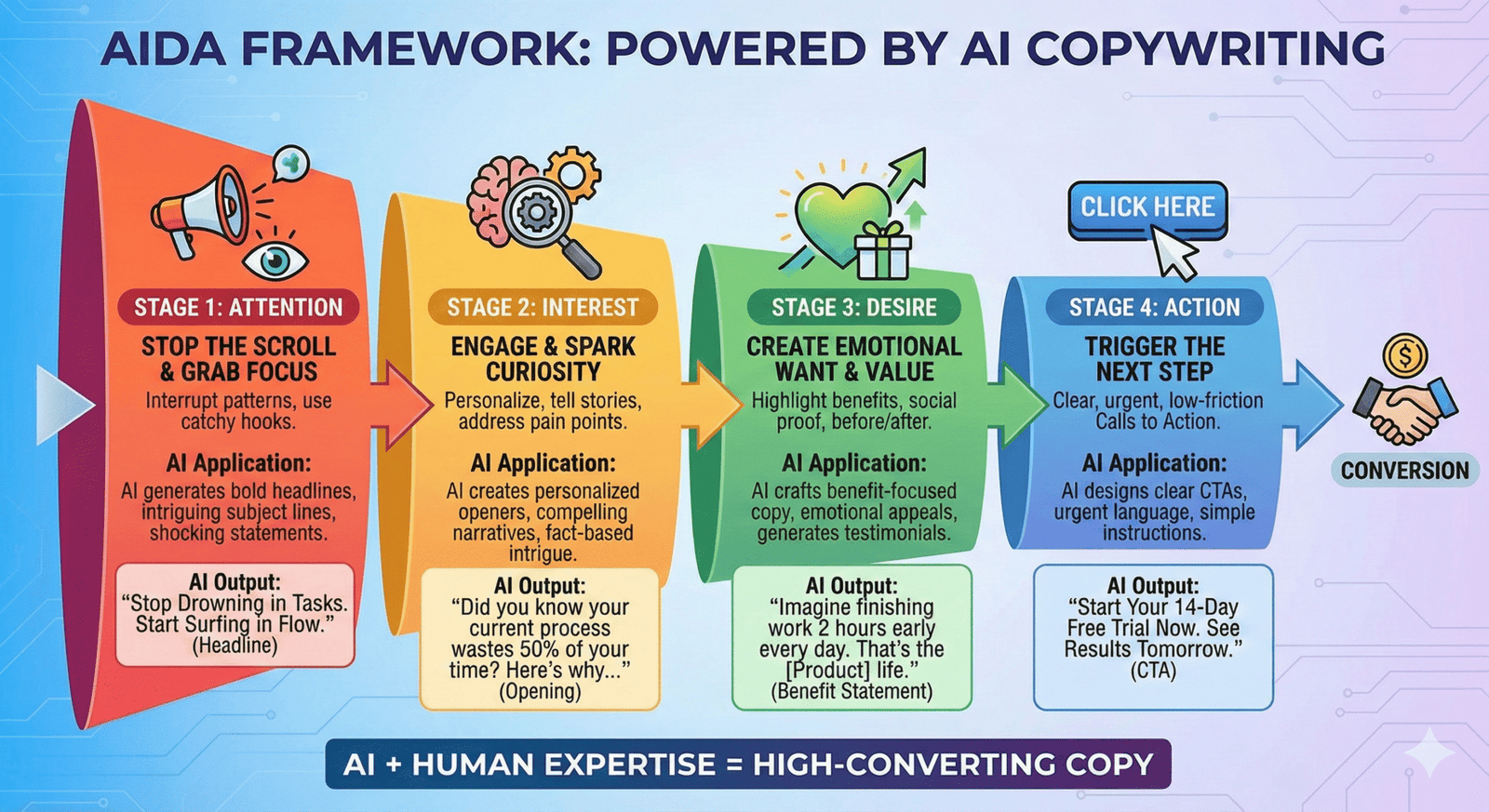
 Photo by
  Photo by
 Photo by