Tag: passiveincome

  • 10 Trending Etsy Product Lines (Dark Academia to Cozy Ghibli-Core) for 2026

    Etsy AI Prompt Packs: 10 Trending Product Lines (Dark Academia to Cozy Ghibli-Core) for 2026

    Introduction

    I sell Etsy AI prompt packs, so I watch what people actually search for, what aesthetics keep showing up in listings, and which creative niches buyers keep building businesses around. The strongest product lines on Etsy right now sit at the overlap of mood, story, and output, meaning buyers don’t just want “image prompts,” they want a repeatable style system that produces consistent sets for prints, clipart, book art, thumbnails, social posts, and digital downloads.

    The niches below map cleanly to popular aesthetics, and they’re practical for prompt packs because each one can be turned into structured prompt formulas, scene libraries, and variation sets (lighting, lens, palette, texture, era, props, environments). I’m keeping this list focused on the exact niches you named, while shaping each into a product line that makes sense for an Etsy shop.


    1. Dark Academia Prompt Packs (Moody Study Rooms, Gothic Libraries, Vintage Ink)

    Dark academia works because it’s instantly readable, even in a thumbnail, and it gives buyers a stable set of visual rules (low light, deep shadows, textured paper, wood and brass props, rainy windows, candle smoke). My best dark academia prompt packs are built as “scene kits” that buyers can reuse across posters, journals, book covers, and branding.

    I structure this product line around repeatable compositions: desk flat lays, portrait studies, library aisles, courtyard fog, handwritten marginalia, antique maps, and still-life stacks. I also include prompt variants for “clean print-ready” outputs (less noise, sharper edges) and “aged archive” outputs (grain, foxing, ink bleed, vignette). If I want a market sanity check, Etsy’s own results pages make it obvious the aesthetic stays popular and productized, even outside prompts, which is why it converts well when I package it as a style system, not random prompts (see Etsy’s Gothic AI prompts market page and a representative dark academia decor listing).

    Prompt:

    An ancient, melancholic vampire lord gazing out a grand stained-glass window of a dark academia university, a storm brewing outside, oil painting with subtle engraving textures, fantasy, mysterious, rich jewel tones, epic lighting, intricate architecture, 8k

    Prompt:

    A carriage speeding through a moonlit, foggy forest towards a distant, foreboding gothic castle, ‘Bridgerton dark’ romance, vampire aesthetic, hyper-detailed oil painting, moody engraving effects, mysterious, atmospheric, intricate, 8k, fantasy.

    Prompt:

    A scene of a midnight feast, elegant vampires and their guests dining in a ‘Bridgerton dark’ banqueting hall, candlelight, ornate silver, mysterious shadows, hyper-detailed oil painting, detailed engraving on tableware and decor, intricate, 8k, fantasy.


    2. Analog Horror Prompt Packs (Found Footage, VHS Noise, Broadcast Emergency Screens)

    Analog horror is a niche where buyers want texture and unease more than “beautiful art,” which makes it perfect for prompt engineering. The pack needs strong controls: era cues (80s to early 2000s), lens and camera artifacts, scanlines, chromatic bleed, tracking errors, timecode overlays, and imperfect lighting.

    I build this product line in modules so buyers can mix and match: “broadcast interruption,” “public access studio,” “school training tape,” “mall security cam,” “weather alert crawl,” and “creepy PSA.” The prompt formulas matter here because consistency is everything. If the results don’t share the same VHS grammar (washed blacks, crushed highlights, warped edges), the buyer can’t assemble a cohesive set.

    This line also sells well as “episode packs,” meaning each pack contains a tight set of scenes that imply a story arc, like title card, establishing shot, warning screen, creature glimpse, aftermath frame, and end slate.

    Prompt:

    Handheld 1993 camcorder footage, POV shot inside an abandoned basement archive, rotting cardboard boxes on metal shelves, a single flashlight beam cutting through thick dust motes, a tall indistinct humanoid figure with elongated multiple limbs standing in the deep shadows, heavy VHS tracking static, color bleeding, screen tearing, red REC text and timestamp DEC 04 1993 11:45 PM in the corner –ar 4:3 –v 6.0 –style raw

    Prompt:

    Emergency Broadcast Intrusion

    Analog horror broadcast emergency screen, distorted CRT monitor display, heavy scanlines and chromatic aberration, cryptic government warning text overlapping a blurry image of a multi-limbed entity, magnetic tape interference, static noise, eerie lo-fi aesthetic, signal decay, high contrast shadows –ar 4:3 –v 6.0 –chaos 20

    Prompt:

    The Stalker in the Stacks

    First-person perspective found footage, deep perspective of dark library archive stacks, moldy boxes, flickering flashlight illumination revealing a monstrous shadow with too many arms, grainy 16mm film texture, heavy tape hiss, visual artifacts, low-resolution 480p aesthetic, unsettling atmosphere, cinematic horror lighting –ar 16:9 –v 6.0 –stylize 250


    3. Ghibli Style Prompts (Whimsical Worlds, Gentle Lighting, Cozy Motion)

    Ghibli-style prompts remain a high-intent search pattern because the aesthetic is shorthand for soft color, lived-in environments, and emotional warmth. I treat this as a “cozy cinematic animation” product line, with prompts that emphasize environment storytelling (kitchen clutter, wind in grass, train stations at dusk, small towns) and camera language (wide establishing shots, close-up prop studies, mid shots with environmental context).

    I also include character-safe options focused on non-specific features and original designs (travelers, bakers, forest caretakers) so buyers can use the prompts to create unique outputs rather than copies. When I’m designing prompt packs, I reference common prompt structures and the typical visual ingredients people associate with the style, then translate them into parameterized templates buyers can adapt. For broader context on what people mean when they search this, I point buyers to resources like this Ghibli-style prompt guide and Etsy’s visible demand on the Ghibli AI market page.

    Prompt:

    cinematic photo of a young girl gazing out a window at a fantastical, photorealistic airship gracefully floating above a pastoral valley, gentle evening glow painting the sky, a warm, cozy room interior reflected in the glass, radiating emotional depth, detailed, intricate, epic lighting, 8k, photorealistic –ar 16:9

    Prompt:

    cinematic photo of a bustling Ghibli-style market street in a photorealistic medieval-inspired town, soft, diffused daylight, vendors with unique, fantastical wares, a deep sense of lived-in history, intricate details of architecture and clothing, an epic wide shot, detailed, 8k, photorealistic –ar 16:9

    Prompt:

    cinematic photo of a cozy reading nook filled with stacks of old books, a warm knitted blanket, and a ginger cat sleeping peacefully, soft lamplight casting long, comforting shadows, rain visible through a large window, a mid shot exuding emotional warmth, detailed, intricate, epic, 8k, photorealistic –ar 16:9


    4. Liminal Space Prompt Packs (Empty Hallways, Backrooms Energy, Quiet Dread)

    Liminal space is one of the most “promptable” aesthetics because it relies on environment design, lighting temperature, and absence. Buyers usually want outputs that feel familiar but wrong, like fluorescent-lit corridors, empty malls, silent pools, office carpets, foggy parking lots, and waiting rooms with too many chairs.

    I build this product line around scene categories and camera rules: wide angle, centered symmetry, long hall vanishing points, soft grain, slightly underexposed corners, and muted palettes. I also add “era filters” so buyers can choose late-90s consumer spaces, 70s institutional spaces, or modern sterile minimalism.

    For Etsy AI prompt packs, liminal space works well as a high-volume pack because variation is the point. I’ll include dozens of environment nouns and prop sets that can be swapped while keeping the same uneasy tone, which helps buyers generate sets for albums, YouTube thumbnails, short-form horror edits, and print bundles.

    Prompt:

    cinematic photo of a vast, ancient fantasy temple partially submerged in crystal-clear, still water, reflecting an eerie, otherworldly sky, empty, silent, epic, detailed, mystical, intricate, epic lighting, 8k, photorealistic –ar 16:9

    Prompt:

    cinematic photo of a monumental staircase ascending into a swirling nebula of stars and cosmic dust, ancient and deserted, leading to an unknown celestial destination, epic fantasy, cosmic liminality, highly detailed, intricate, epic lighting, 8k, photorealistic –ar 16:9

    Prompt:

    cinematic photo of a colossal, ornate archway standing alone in a vast, empty plain, shimmering with latent magical energy, hinting at other dimensions, epic fantasy, portal-like, mysterious, detailed, intricate, epic lighting, 8k, photorealistic –ar 16:9


    5. Cozy Fantasy Ghibli-Core Prompt Packs (Soft Adventure, Cottage Towns, Kind Magic)

    Cozy fantasy plus Ghibli-core is a dependable seller because it merges two buyer desires: comfort and story. This product line is less about spectacle, more about the feeling of safety inside a magical world, with gentle stakes and warm spaces. I write prompts that prioritize small moments, like soup simmering, lantern-lit streets, shared bread, warm cloaks, pet companions, and quiet travel.

    I organize the pack like a world bible: locations (village, forest path, greenhouse, bakery, train car), daily rituals (tea, writing letters, mending clothes), and magical accents (tiny spirits, runes carved into wood, floating lights). It’s also easy to bundle this with printable use cases, like planner stickers, children’s book illustration styles, and art print collections.

    This niche aligns well with the broader pattern that fantasy and dreamy aesthetics keep selling in large bundles on Etsy, which is why I position it as a “cozy set generator,” not a one-off art style.

    Prompt:

    photorealistic cinematic wide shot of a charming Ghibli-style cottage nestled on a verdant hillside, smoke gently curling from its chimney, surrounded by ancient, moss-covered trees and a field of tall grass swaying in a soft breeze, bathed in the golden hour’s gentle, diffused light, intricate details, epic, 8k –ar 16:9

    Prompt:

    photorealistic cinematic close-up shot of a winding, overgrown garden path made of uneven flagstones, leading towards a hidden Ghibli-style cottage, surrounded by vibrant wildflowers and lush foliage, sunlight dappling through overhead tree branches, soft, enchanting lighting, intricate details, epic, 8k –ar 16:9

    Prompt:

    cinematic photo of an epic wide establishing shot of a winding river flowing through a vibrant, photorealistic Ghibli-style landscape, ancient, moss-covered ruins nestled among rolling hills, a small wooden boat drifting peacefully downstream, soft morning mist, detailed, intricate, 8k, photorealistic –ar 16:9


    6. Adorable Fantasy Creatures & Familiars Prompt Packs (Nursery-Friendly, Sticker-Ready, Merch-Ready)

    This product line is one of the most practical for Etsy buyers because the outputs convert into products fast: sticker sheets, clipart bundles, kids wall art, classroom decor, and character packs for books and games. The trick is building prompts that keep the creature design consistent while allowing controlled variations (pose, outfit, prop, emotion).

    I write these packs with a “creature builder” structure: base body type (tiny dragon, mushroom imp, cloud cat, teacup fox), surface texture (fluffy, velvet, plush, scaled), face rules (big eyes, small nose, soft blush), and accessories (tiny satchel, leaf hat, star charm). Then I include background modes: transparent-style minimal, soft vignette, or storybook scene.

    Market proof is easy to spot on Etsy because buyers already purchase prompt-based cute creature sets for nursery and clipart uses, like this listing for Midjourney prompts for cute nursery mystic creatures.

    Prompt:

    An epic, photorealistic shot of an adorable scaled tiny dragon, its emerald scales catching the dappled sunlight, with huge luminous eyes, a delicate snout, and a subtle rosy blush. It wears a tiny leather satchel, perched on an ancient, gnarled tree root in a magical, sun-drenched enchanted forest. Detailed, intricate, cinematic lighting, 8k, ultra-photorealistic

    Prompt:

    cinematic photo of a series of colossal, empty floating islands connected by crumbling ancient fantasy bridges over an endless void, bathed in the twilight of an alien sun, epic scale, liminal, highly detailed, intricate, epic lighting, 8k, photorealistic –ar 16:9

    Prompt:

    cinematic photo of a series of perfectly still, mirror-like lakes reflecting an impossible fantasy sky, surrounded by ancient, silent ruins, sense of endlessness and reflection, epic, tranquil yet eerie, detailed, intricate, epic lighting, 8k, photorealistic –ar 16:9


    7. Cozy Tea & Bakery Aesthetic Prompt Packs (Pastries, Steam, Sunlight, Small Joy)

    Tea and bakery aesthetics sell because the images communicate comfort in one second. I build this product line for creators who need consistent food styling without hiring a photographer, and for digital sellers who make kitchen prints, recipe card kits, menu templates, café branding, and journaling ephemera.

    My prompt packs focus on: steam behavior, glaze shine, crumb texture, warm window light, ceramic details, linen fabrics, and cozy clutter. I also include sets for “product mock” compositions (top-down pastry flat lay, cup and saucer hero shot, bakery shelf lineup) and “scene mood” compositions (rainy afternoon café, candle-lit evening tea, sunlit morning bread).

    What makes this niche strong for Etsy AI prompt packs is the repeat-buy pattern. Buyers often want many outputs in the same style to build bundles, so a pack that generates cohesive sets is more valuable than a few pretty prompts.

    a golden-brown croissant resting on a handmade, speckled ceramic plate. The croissant features visible, flaky layers with a light dusting of powdered sugar.

    Prompt:

    Macro shot of a golden-brown flaky croissant and crusty sourdough loaf on a rustic wooden table, warm morning sunlight streaming through a window, visible steam rising in delicate swirls::2, glistening honey glaze shine, intricate crumb texture, linen napkin, soft dust motes in the light, cinematic lighting, photorealistic, 8k, ultra-detailed, –ar 16:9 –v 6.0 –style raw

    Prompt:

    Close-up hero shot of a hand-crafted ceramic teacup and saucer, swirling steam, a slice of glossy berry tart next to it, rainy window background with soft bokeh droplets, cozy cafe interior, flickering candle light, moody atmosphere, rich textures of linen and ceramic, soft cool tones contrasted with warm highlights, –ar 3:2 –v 6.0

    Prompt:

    Top-down flat lay of an artisanal bakery spread, cinnamon rolls with dripping white icing, powdered sugar dusting, scattered crumbs, vintage silver spoons, open antique book, sprigs of lavender, rustic linen tablecloth, soft golden hour lighting, cozy clutter, high-angle composition, intricate details, vibrant colors, 8k, –ar 4:5 –v 6.0


    8. Dreamy Nightscapes & Starry Skies Prompt Packs (Moon Glow, Mist, Cinematic Twilight)

    Dreamy nightscapes sit at the intersection of fantasy and calm. Buyers use them for wallpapers, prints, social headers, book covers, meditation content, and ambient video art. I build this product line with lighting-first prompt logic: moon as key light, soft rim light on silhouettes, star density controls, haze thickness, and controlled saturation so it doesn’t turn neon.

    I also add location variations that keep the same sky language: rooftop views, lakeside reflections, forest clearings, desert dunes, seaside cliffs, and sleepy towns. This pack style pairs well with “series creation,” meaning the buyer can generate 12 matching images for a calendar, a set of printable posters, or a cohesive Instagram grid.

    To match how people browse on Etsy, I make sure the prompt outputs are consistent in palette and composition so they look like a set the moment they’re placed side by side.

    cinematic nightscape view from a cobblestone rooftop terrace overlooking a quiet, sleepy town.

    Prompt:

    A cinematic nightscape view from a cobblestone rooftop terrace overlooking a quiet, sleepy town. Above, a vast indigo sky is peppered with millions of twinkling stars and a brilliant, glowing silver moon that casts long shadows across the tiles. A soft lavender mist curls around the chimneys and dim streetlamps of the town below. The composition is a wide-angle shot with the horizon line positioned low to emphasize the celestial expanse. The color palette is strictly dominated by deep blues, cool purples, and ethereal silver moonlight, creating a serene and dreamy atmosphere. intricate details, HDR, beautifully shot, hyperrealistic, sharp focus, 64 megapixels, perfect composition, high contrast, cinematic, atmospheric, moody

    Prompt:

    A serene nightscape of a glass-like lake nestled within a dense forest clearing. The water perfectly reflects the starry indigo sky and the radiant glow of a high-hanging silver moon. Tendrils of white mist float just above the water’s surface, creating a dreamy, ethereal atmosphere. Tall, silhouetted pine trees frame the edges of the composition, leading the eye toward the center of the lake. The lighting is purely lunar, hitting the water with sharp silver highlights. The palette remains consistent with the series, utilizing deep cerulean and midnight blue tones.

    Prompt:

    A breathtaking cinematic nightscape of rolling desert dunes under a majestic starry sky. The sand appears as a cool, desaturated grey under the intense glow of a large, luminous moon centered in the upper frame. A thin layer of mist settles in the valleys between the dunes, catching the silver moonlight and adding a sense of depth. The composition is expansive and symmetrical, drawing the eye toward the horizon where the deep indigo sky meets the earth. The atmosphere is quiet and ethereal, strictly adhering to the unified color scheme of midnight indigo and shimmering silver.


    9. Soft Watercolor & Pastel Aesthetic Prompt Packs (Clipart Bundles, Planner Art, Gentle Florals)

    Soft watercolor and pastel aesthetics keep selling because they translate directly into printable products and craft assets. This product line needs more technical prompt detail than most, since watercolor results can get muddy or overly digital if the prompt doesn’t specify paper texture, pigment behavior, edge bleed, and negative space.

    I design these packs around “bundle-ready” outputs: individual objects with clean edges, simple shadows, and enough blank space for cutting, plus full-page scenes for prints. I also include palette control (dusty rose, sage, butter yellow, powder blue) and texture control (cold-press paper, light granulation, soft wash gradients).

    Even outside prompt packs, Etsy shows strong demand for watercolor-style digital assets, which supports why this aesthetic works as a prompt product line, as seen in listings like this watercolor clip art set.

    Prompt:

    A charming, minimalist ceramic teapot alongside a matching teacup, painted in a soft butter yellow with accents of powder blue. The items are arranged as a single clipart element on a clean white background. The art style is a gentle watercolor wash with visible paper texture and subtle granulation in the deeper tones. A simple, soft shadow is cast to the right of the objects. The colors blend smoothly with light gradients, creating a peaceful and cozy aesthetic suitable for digital stationery.

    Prompt:

    A detailed watercolor illustration of a single, delicate peony flower in full bloom. Its soft, ruffled petals are painted in varying shades of dusty rose, blending into elegant sage green leaves. The botanical subject is centered on a clean, pure white background with crisp edges. A faint, soft grey shadow is cast directly beneath the flower to create a subtle sense of depth and dimension. The image captures the tactile texture of cold-press watercolor paper, with visible light granulation in the pigment washes. Bright, even lighting illuminates the piece, accentuating the smooth gradients and delicate transitions between the pastel hues.

    Prompt:

    A collection of three distinct botanical sprigs, including eucalyptus and lavender, rendered in a soft pastel watercolor style. The color palette is strictly limited to muted sage green, dusty rose, and powder blue. Each sprig is meticulously detailed with clean edges and sits on a pristine white background. The texture of the piece mimics high-quality cold-press watercolor paper with a light, grainy finish and delicate wash gradients. The composition is airy and light, with a very faint shadow placed directly beneath each stem to ground them.


    10. Cozy Fantasy Ghibli Core Prompt Packs (Everyday Magic Sets, Repeatable Series, Brandable Style)

    I treat “Cozy Fantasy Ghibli Core” as its own line (separate from the earlier phrasing) because it sells best when it’s packaged as a complete system: characters, environments, props, and seasonal variations that all share the same visual grammar. Buyers want that cohesive look across dozens of images, which makes this niche perfect for bigger packs with sub-collections.

    This product line is where I stack the strongest elements: cozy domestic scenes, gentle fantasy creatures, warm lighting, soft painterly backgrounds, and cinematic framing. I also create seasonal subsets (spring rain, summer festivals, autumn lantern walks, winter bakery nights) so the buyer can keep producing themed sets year-round without changing style.

    For shoppers browsing Etsy, it also helps that prompt packs are already normalized as a product category, so this line fits neatly into existing buyer behavior around downloadable bundles (see Etsy’s broad prompt packs market page and the wider prompts AI pack results).

    an elderly wizard with a long silver beard walking side-by-side with a massive, fluffy forest spirit.

    Conclusion

    These 10 Etsy trending product lines work because each one has a clear aesthetic promise and a practical output use case. When I build Etsy AI prompt packs around dark academia, analog horror, Ghibli-core cozy fantasy, liminal space, dreamy nightscapes, pastel watercolor, bakery comfort, and fantasy creature sets, I’m not selling random text prompts, I’m selling a repeatable style engine that creators can use to produce cohesive bundles.

    That’s why these niches keep showing up in searches and listings, and why they’re a strong foundation for a prompt-pack shop that wants consistent demand across different buyer types.

    FAQ Section
    What are Etsy AI prompt packs?

    Etsy AI prompt packs are curated collections of text prompts designed to generate consistent, aesthetically cohesive AI art. They often include structured formulas, scene libraries, and variations to help digital artists create specific styles like Dark Academia or Ghibli-Core for commercial use across various platforms.

    How can I monetize AI art prompts on Etsy?

    You can monetize AI art prompts by selling them as digital download packs on Etsy. These packs offer significant value by providing a ‘style system’ for buyers, enabling them to create consistent art for prints, clipart, book art, or social media, thereby saving them time and effort in prompt engineering and style development.

    What makes a good AI prompt pack for Etsy?

    A good AI prompt pack for Etsy focuses on a niche aesthetic (e.g., Dark Academia, Ghibli-Core), offers repeatable style systems, includes essential variations (lighting, palette, texture, era, props, environments), and targets specific commercial outputs (e.g., prints, social posts, digital planners). Buyers seek consistency, commercial viability, and ease of use.
  • Lemon Squeezy vs Payhip vs Gumroad: Best for Small Digital Shops (My 2026 Pick Guide)

    Lemon Squeezy vs Payhip vs Gumroad: Best for Small Digital Shops (My 2026 Pick Guide)

    Lemon Squeezy vs Payhip vs Gumroad: Best for Small Digital Shops (My 2026 Pick Guide)

    Choosing where to sell my digital products feels like picking a checkout line when I’m already late. I want something easy, trusted, and predictable, and I don’t want surprise fees nibbling away at every sale.

    Digital products are booming in 2026, but the boring details matter more than ever: fees, taxes, and payout timing can turn a “good month” into a shrug. That’s why my shortlist comes down to three names I see everywhere: Lemon Squeezy, Payhip, and Gumroad.

    In this Lemon Squeezy vs Payhip vs Gumroad comparison, I’m going to break down what actually affects my day-to-day: fees, taxes, setup, checkout, marketing tools, and who each platform fits. The goal is to help you pick the best platform for digital products for a small shop without overthinking it.

    Quick decision guide: which platform fits my small digital shop?

    If I’m trying to choose in under a minute, I start with one question: what pain am I trying to avoid, and what outcome do I want most?

    Here’s the fast filter I use:

    • If I want to start fast and I don’t care (yet) about higher fees as I grow, I lean Gumroad.
    • If I sell worldwide and I want tax handling done for me, or I sell software with license keys, I lean Lemon Squeezy.
    • If I want strong value over time and I’m selling downloads, courses, or memberships, I lean Payhip.

    Now I’ll back those picks up with the details that usually decide it.

    I want the fastest setup and a familiar marketplace feel: when Gumroad makes sense

    When I’m starting from zero, Gumroad has a real advantage: it’s quick. I can upload a file, set a price, publish, and start selling without building a full storefront.

    Gumroad also has a familiar vibe for buyers. Many people have bought something there before, so the brand recognition can reduce friction. For a tiny shop selling a first ebook, a Notion template, presets, or a small asset pack, that matters.

    The tradeoff is the part that sneaks up on me later: fees. As of January 2026, Gumroad’s common pricing is 10% + $0.50 per sale (plus payment processing that can still apply). When I’m testing one product, I can live with that. When sales grow, it can feel like I’m paying “rent” on every checkout.

    If you want a deeper outside comparison of the three, this 2026 roundup is useful context: Gumroad vs Payhip vs Lemon Squeezy vs IndieStand.

    I hate tax headaches or I sell software licenses: when Lemon Squeezy is the better fit

    Lemon Squeezy is the one I think about when I want fewer admin chores. The big headline is taxes: Lemon Squeezy works as a Merchant of Record for many sellers, which means it collects and remits applicable sales tax or VAT for you in supported regions. If I’ve ever stared at “VAT rules by country” and felt my brain shut down, I know why that matters.

    It’s also strong for software sales. If I’m selling an app, a plugin, or anything that needs license keys, Lemon Squeezy has licensing tools and customer license management. That reduces the support emails that drain my week, like “I lost my key” or “I switched computers.”

    It also supports a wider mix of payment methods than most creator-first stores, including cards plus wallets and regional options (more on that later). For international buyers, that can lift conversion.

    The main downside I plan around is that some sellers report an approval or review step, depending on the account and product type. That can slow launch day if I’m in a hurry.

    If you’re weighing it against Gumroad, this comparison can help frame the differences: Gumroad vs Lemon Squeezy: Which Platform is Best for Selling Digital Products?.

    I want strong value for downloads, courses, or memberships: when Payhip wins

    Payhip hits a sweet spot for small shops that care about margins and want built-in selling tools without duct-taping five services together.

    For digital downloads, Payhip is straightforward. Where it starts to stand out is learning content and recurring revenue. Payhip supports courses, bundles, and drip content, which is perfect if my “one product” is really a library that grows over time.

    Taxes are a key point too. Payhip is well-known for EU VAT handling, which helps if I sell to customers in Europe. I still need basic bookkeeping and clean records, but Payhip can remove a big chunk of the VAT stress.

    Payhip also tends to feel like a “store builder” more than a single product checkout link, which matters when I’m building a brand and want multiple offers under one roof. For Payhip’s own side-by-side framing, this page lays out how they position it: Payhip vs Lemon Squeezy.

    Pricing and fees that actually change my profit

    Fees are emotional when you see them in real dollars. A difference that sounds small on paper becomes loud once I’m making steady sales.

    Also, “fees” often mix three separate things:

    Platform fee: the percent the platform takes.
    Per-transaction fixed fee: often a flat amount like $0.50 per sale.
    Payment processing: card network fees, PayPal fees, and other payment costs that vary by country and method.

    Some platforms also offer monthly plans that reduce the per-sale cut. That can be worth it once sales become consistent.

    A quick rule I use:

    • If I’m testing or low volume, I prefer a fee-based plan so I’m not paying monthly for hope.
    • If I sell steadily, a monthly plan can beat a percentage fee fast.

    For broader perspective on Payhip as a Gumroad alternative, this is a solid read: Why Payhip Is Still the Best Gumroad Alternative 2026.

    What I keep from $1,000 in sales (simple math, no spreadsheets)

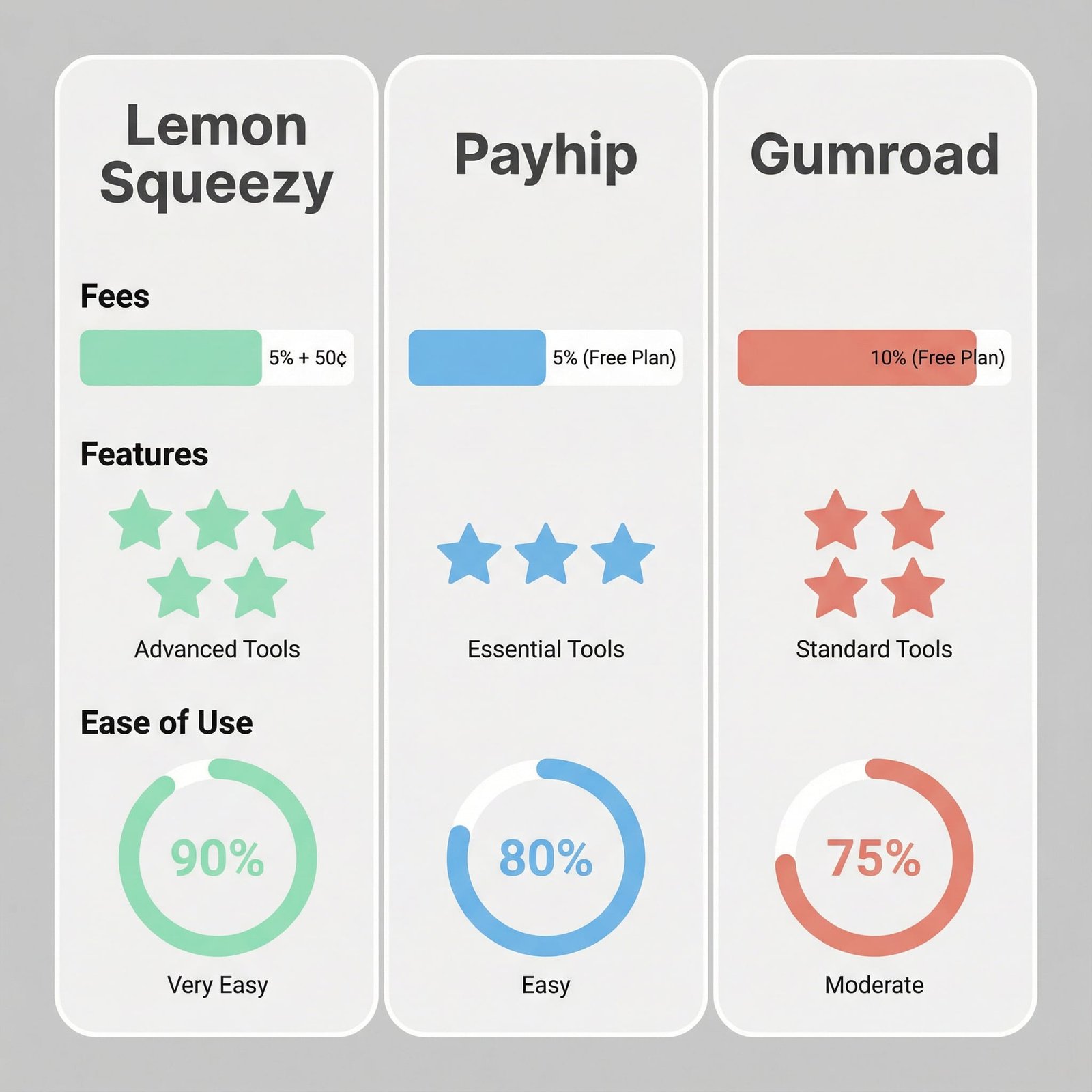
    Using January 2026 numbers from current published comparisons and platform info, here’s the rough “what I keep” picture on $1,000 in sales:

    • Gumroad: about $895
    • Lemon Squeezy: about $945
    • Payhip (Pro plan example): about $971

    This is meant as a gut-check, not a promise. Final totals can change based on payment method, buyer country, refunds, and any plan you’re on. Still, the direction is clear: Gumroad is easiest to start, but it’s usually the priciest once sales stack up.

    Hidden cost checks: refunds, chargebacks, and per-sale add-ons

    The fee page never tells the full story. What bites small shops is the messy stuff that shows up after the sale.

    Here’s what I always check before committing:

    • Refund handling: Can I issue refunds cleanly, and does the platform keep its fee or return it?
    • Chargebacks and disputes: Who fights the dispute, and are there extra dispute fees?
    • Payout timing: Do I get paid daily, weekly, twice monthly, or on a rolling delay?
    • Minimum payout thresholds: Some platforms hold payouts until I hit a minimum.
    • Per-sale fixed fees: A flat amount (like $0.50) hurts more on low-priced items.
    • Add-ons that cost extra: Any feature I “assume” is included (email, affiliates, licenses) that actually needs an upgrade.

    If I sell a $9 template, a $0.50 fixed fee stings. If I sell a $99 course, I care more about the percentage fee and chargeback risk.

    Features that matter day-to-day: checkout, taxes, delivery, and trust

    This is where I stop thinking like an accountant and start thinking like a solo shop owner. Every feature either increases conversion or cuts support time.

    To make this practical, imagine three common products:

    • a $15 ebook
    • a $39 template bundle with updates
    • a $149 mini-course

    All three need a checkout that feels trustworthy, delivery that “just works,” and a way to handle taxes without panic.

    Taxes and VAT: which one saves me the most stress?

    If taxes are my biggest fear, Lemon Squeezy is hard to ignore. As a Merchant of Record for many sellers, it can handle the collection and remittance of applicable taxes for supported regions. That’s a big deal when buyers come from multiple countries.

    Gumroad also positions itself as a Merchant of Record in many cases, which can reduce tax admin for creators selling globally.

    Payhip is different. The standout is EU VAT support, which can be exactly what I need if Europe is a major market. If most of my customers are outside the EU, I still need to understand what I’m responsible for where I live.

    No matter what platform I choose, I still keep clean records, track expenses, and set aside money for income taxes. The platform can help with sales tax or VAT, but it won’t run my whole business for me.

    Payments and conversion: card, PayPal, Apple Pay, and global buyers

    Checkout drop-off is often just “they couldn’t pay the way they wanted.”

    As of January 2026, Lemon Squeezy accepts a wide mix of payment methods, including credit and debit cards, PayPal, Apple Pay, Google Pay, AliPay, WeChat Pay, and bank transfers. If I sell to a global audience, that menu matters because it removes excuses at checkout.

    Gumroad has fewer payment options available to customers, which can be fine if my audience is mostly US-based card buyers. It can be limiting if I sell internationally.

    Payhip supports standard payment methods, but it typically does not match Lemon Squeezy’s range. For many shops, standard is enough, but if I see a lot of international traffic, I pay attention here.

    If you want a more feature-by-feature breakdown between Payhip and Lemon Squeezy, this overview is helpful: Payhip vs Lemon Squeezy? A Comprehensive Review.

    Digital delivery and customer experience: downloads, updates, and support load

    Delivery is where small shops quietly lose hours.

    What I want:

    • Buyers get their file immediately.
    • Download links don’t break.
    • I can update a product without chaos.
    • I can handle “I lost my link” without a 20-email thread.

    All three platforms handle digital delivery, but the support load differs based on what you sell.

    If I sell software, Lemon Squeezy’s license management is the clearest differentiator. When customers can manage licenses in a portal, I spend less time playing help desk.

    For downloads like ebooks and templates, Payhip’s store structure can make it easier to build a clean product catalog, bundle items, and deliver a more “shop-like” experience. Gumroad is still fine for simple delivery, but it can feel more like standalone product pages than a full storefront.

    Marketing and growth tools: email, affiliates, coupons, and course selling

    Most small shops don’t fail because of product quality. They fail because promotion is hard to repeat, and the system doesn’t help.

    I care about marketing tools that I’ll actually use on a busy week: coupons, affiliates, simple email, and basic upsells or bundles.

    Selling courses and memberships: where Payhip pulls ahead for learning content

    If I’m building a course business, Payhip often feels like the most complete option out of the box. The reason is structure: courses, bundles, and drip content support a real curriculum, not just a pile of files.

    This matters for long-term revenue because I can sell learning in layers. For example:

    Starter course: a focused 90-minute course for a low price point.
    Monthly add-ons: new lessons, templates, or office hours as a membership library.

    That setup helps me keep customers longer, and it gives me a reason to email them that isn’t “please buy again.”

    Affiliates, discounts, and simple promos: what I can run this week

    A stylized image of a laptop screen displaying a digital product storefront, with elements from Lemon Squeezy, Payhip, and Gumroad subtly integrated, conveying the idea of 'choosing your platform'.

    All three platforms can support basic promos, but the best tool is the one I’ll use consistently.

    Here’s the simple campaign I run when I want momentum without burning out:

    Launch week discount: A short, clear offer (like 20% off for 5 days).
    Evergreen newsletter coupon: A smaller discount that only new subscribers get.
    Affiliate push: Invite a few creators with the same audience, give them a fair cut, and give them swipe copy.

    Payhip includes affiliate tools and creator-friendly marketing features that make this kind of plan easy to repeat. Gumroad can also run coupons and simple promos quickly, which is part of its appeal for beginners. Lemon Squeezy supports marketing features too, and it pairs well with higher-priced products where the extra payment options and tax handling can lift conversion.

    For another angle on Gumroad vs Payhip tradeoffs, this breakdown is worth scanning: Gumroad vs. Payhip (+ dealbreakers).

    Conclusion

    Here’s how I call it: Lemon Squeezy is my pick when I want strong tax handling and software licensing, Payhip is my pick when I want strong value plus solid courses and memberships, and Gumroad is my pick when I want the simplest quick start and a familiar brand, even if I pay more as I grow.

    There isn’t one perfect platform. The right choice depends on what I sell, who buys it, and how steady my sales are. My best move is practical: pick the top two, run a small test sale, then commit to one for 30 days and focus on selling, not switching. If you do that, momentum starts to beat guesswork.

    FAQ Section:
    Which platform has the lowest fees?

    Each platform has different fee structures (transaction fees, monthly plans). Gumroad has higher transaction fees but no monthly fee for basic. Payhip offers free and paid plans. Lemon Squeezy combines payment processing and platform fees into one rate.

    Is Lemon Squeezy good for beginners?

    Yes, Lemon Squeezy is designed to be user-friendly with built-in tax handling, making it great for beginners, especially those new to international sales and compliance.

    Can I sell subscriptions on Payhip?

    Yes, Payhip supports selling subscriptions, memberships, and various other digital products like courses, ebooks, and downloads directly from your storefront.

    What are the main differences between Gumroad and Payhip?

    Gumroad is known for its simplicity, discoverability features, and established audience, while Payhip offers more robust features for branding, marketing, and integrated storefronts and email marketing tools.

    Do these platforms handle sales tax (VAT/GST)?

    Lemon Squeezy offers comprehensive tax handling for global sales, including VAT/GST, often simplifying compliance. Payhip and Gumroad also have features to help with tax calculations and reporting, but Lemon Squeezy’s is often highlighted as a key differentiator.

  • Unlock the $10k/Month Canva Pro User Earning Secrets

    Unlock the $10k/Month Canva Pro User Earning Secrets

    Did you know everyday people are making $10k/month with Canva Pro? It’s not just about making social media posts. Successful users are turning Canva into a business worth thousands each month.

    Canva isn’t just for freelancers. It’s for anyone who wants to make money. This article shows how designers, marketers, and entrepreneurs use Canva Pro to earn big. The difference between basic templates and huge earnings starts here.

    The Untapped Potential of Canva Pro Beyond Basic Design

    Many think Canva Pro is just for social media posts. But that’s where the real canva pro secrets start. This tool is a full-service solution for building a thriving design business. Let’s break it down.

    • Brand Kits: Create cohesive visuals for logos, websites, and print materials.
    • Content Planners: Schedule campaigns and templates for clients.
    • Team Collaboration: Manage projects with freelancers or clients in real time.

    These features turn Canva Pro into a business hub. Imagine offering brand guides to startups or designing annual reports for small businesses. That’s where the money flows. The canva pro tips pros use? They automate repetitive tasks, freeing time to focus on high-paying clients.

    “Canva isn’t a tool—it’s a revenue engine.”

    canva pro secrets for design business

    Business owners miss out when they stick to basic designs. Explore templates for eBooks, product launches, or email campaigns. Clients pay top dollar for this level of service. Start by upgrading to Canva Pro today. The hidden features are your gateway to a profitable design business.

    Canva Pro Users Are EARNING $10k/Month—Here’s Their Secret!

    Real people are making a lot of money with Canva Pro. Let’s explore canva pro success stories that show its earning potential. From small businesses to freelancers, they found ways to make good money.

    Amanda, a mom in Texas, sells social media templates and makes $12k/month. Mark, a teacher turned freelancer, earns $10k/month from client work. Jen, a marketer, sells printable planners and makes $9k/month. These stories show how to make money with canva pro in different ways.

    canva pro success stories

    What do these earners have in common? They all use automation tools to grow. Amanda uses email marketing funnels. Mark delegates tasks with project management apps. Jen’s website sells products automatically 24/7. They also focus on specific niches, not trying to appeal to everyone.

    “I never considered myself a designer, but Canva Pro let me specialize in event invitations. Now I’m quitting my day job.” – Lisa, event planner earning $8k/month

    These success stories are not just luck. They show canva pro earnings are possible with the right approach. The key is to choose a profitable niche, create repeatable processes, and market consistently. The next section will guide you on how to find your ideal path.

    The Evolution from Simple Design Tool to Income-Generating Powerhouse

    Canva’s journey has changed how creators make money online. It started with simple designs for social media and flyers. Now, Canva Pro offers advanced tools like custom templates and team collaboration. These features help freelancers and small businesses turn their designs into income.

    Year Key Feature Launch Impact on Earnings
    2013 Basic templates for social media Intro to design experimentation
    2018 Canva Pro launch Advanced editing for premium clients
    2021 Brand Kit integration Professional consistency for repeat work

    Today, earnfromhome opportunities are booming. Design portfolio builders use Canva Pro’s advanced features. Marketing agencies work more efficiently, and solopreneurs sell templates online. The platform has evolved from a simple tool to a powerful income source.

    • Team collaboration features reduce project setup time by 40%
    • Custom fonts/colors let users match client branding instantly
    • Export options at 4K resolution meet professional standards

    Creators can now make money at every stage, from idea to delivery. This approach makes it easier for those building a design portfolio to succeed on freelance platforms. The journey from beginner to earning $10k/month starts with mastering Canva Pro’s advanced tools.

    Identifying Your Most Profitable Canva Pro Service Offerings

    Solopreneurs, small businesses, and marketing agencies all focus on design that works. Finding your niche means looking at which Canva Pro services get the highest prices. Branding services like logos, color palettes, and style guides are often in high demand because they shape a client’s image for the long term.

    • Branding services: 85% of clients see cohesive branding as key to building trust
    • Social media ad templates for e-commerce brands
    • Pitch decks for startups looking to present to investors

    Start by making a list of your best design skills. Then, compare them to what’s in demand on platforms like Upwork or Fiverr. Ask yourself: “Does this service solve a common problem for my target client?” Services that are both in demand and require a special skill set are often the most profitable.

    “My $10k/month milestone came from specializing in Shopify store banners and Instagram carousels for wellness brands,” says Mia Carter, a Canva Pro freelancer with 475+ five-star reviews.

    Look for service bundles that work well together. For instance, offering website headers with email campaign templates can lead to more repeat business. Use freelance platforms to keep an eye on pricing trends. This way, you can make sure your rates are competitive and turn your design skills into a steady income without overextending yourself.

    Lucrative Digital Products You Can Create and Sell Today

    Use your Canva Pro skills to make money with digital products. Focus on items people can use right away, without needing a client project. Here’s how to begin:

    • Social media templates: Make Instagram post grids, ad sets, and Stories bundles. Start with kits priced at $15–$25. You can also sell these on Etsy or your own website.
    • Printables: Design planners, goal trackers, and worksheets. Topics like productivity, wellness, and homeschooling are in high demand. Sell PDFs for $10–$30.
    • Brand kits: Offer full branding packages with logos, color palettes, and social media graphics. Charge $50–$100 per bundle.

    “My wedding planner printables hit $3k/month in 6 months. No client calls, just repeat sales.”

    Choose marketplaces like Creative Market or Gumroad for easy access. Use keywords like “social media templates for small businesses” to get noticed. Add tutorials in ZIP files to increase value.

    Make once, sell forever. Start with 3–5 targeting niches like parenting, small business owners, or educators. Update collections seasonally to keep demand high.

    Building Your Design Business Foundation with Canva Pro

    Every successful design business starts with strong systems. Use these canva pro tips to build repeatable processes. These processes turn casual projects into a thriving income stream.

    1. Client onboarding: Create welcome kits in Canva Pro with style guides, timeline checklists, and contract templates. Use Canva’s collaboration features to streamline sign-offs.
    2. Project tracking: Design custom dashboards with milestone timelines and progress bars to keep clients informed. Shareable PDFs keep everything organized.
    3. Communication templates: Pre-made response templates for common client questions save hours each week. Store them as Canva templates for instant access.

    Use this pricing formula to calculate your rates: (Hourly cost x 3) + (project setup time x 2) = Minimum fair rate. Always present your design portfolio with client testimonials and before/after examples. This justifies premium pricing.

    Portfolio Element Basic Approach Professional Strategy
    Project showcases 3-5 generic samples 10+ case studies with client challenges/solutions
    Visual style Default Canva themes Custom color palettes + brand typography
    Contact options Email address only Live chat button + project inquiry form

    Invest time now to automate these systems. Consistent systems + a standout design portfolio = predictable revenue growth. Start with one process this week and watch your business efficiency soar.

    Turning One-Time Projects into Recurring Revenue Streams

    Many Canva Pro users make a steady income by creating repeatable systems. This move from one-off jobs to ongoing income is crucial for earning $10k/month. Here’s how successful creators achieve this:

    Retainer agreements are a top strategy. Offer monthly packages for brands needing regular design updates. For example, a lifestyle blogger pays $500/month for 10 social media posts using Canva Pro templates. Details like turnaround times and asset types are outlined upfront to avoid confusion.

    • Retainer models: Set fixed hours or deliverables per month
    • Subscription tiers: Tiered pricing for template libraries or coaching access
    • Automated billing: Simplify payments with platforms like PayPal or Stripe

    Subscription-based models unlock passive income. Consider selling access to pre-made Canva Pro templates for event planners or small businesses. One user built a $3k/month passive income stream by bundling 50+ marketing templates into a $99/month subscription. These models work because clients pay upfront for ongoing value.

    Model How It Works Canva Pro Tools Used
    Retainer Monthly design services for clients Team Library, Collaborate features
    Subscription Paywall access to template bundles Asset Library, Publish features

    Canva Pro success stories show recurring models cut the stress of chasing new clients. Focus on automating delivery and leveraging existing relationships. This approach builds predictable income while expanding your reach.

    How to Scale Your Canva Pro Business Beyond $10k/Month

    To grow your design business, you need to work with a team. Canva Pro users who make $10k/month share how to expand by adding team members. Start by using Canva’s team tools to hire freelancers or virtual assistants.

    Train them with template libraries and shared project links. This keeps your work consistent.

    Automation is key to keeping things running smoothly. Use Canva’s integrations with apps like Calendly or Trello. This makes talking to clients and tracking projects easier.

    Successful Canva Pro users automate tasks. This lets them focus on important work like meeting new clients or creating new products.

    • Assign roles: Designers handle templates; admins manage client portals
    • Use Canva’s shared team libraries for centralized assets
    • Automate invoice reminders via Zapier or QuickBooks
    Solo Mode Team-Driven
    Limited by personal time Scalable through delegation
    Single revenue stream Multiple service offerings
    Higher client workload Systemized processes

    Many Canva Pro users start making $10k/month solo but hit a wall without growing. Teams can make six-figure incomes by standardizing and automating work. The key is to create systems that increase output, not just work more hours.

    Common Pitfalls to Avoid on Your Canva Pro Income Journey

    Maximizing your canva pro secrets means avoiding hidden obstacles. Many users lose out on earning potential because of mindset traps and operational errors. These mistakes can hurt even the most skilled designers. Spot them early to improve your how to make money with canva pro plan.

    Pitfall Sign You’re Stuck Quick Fix
    Undervaluing Work Consistently undercutting competitors Research industry rates and adjust pricing tiers
    Scope Creep Projects taking 2x estimated time Use Canva Pro’s templates to set clear project limits
    Inactive Portfolio No new client inquiries in 30 days Refresh portfolio with 3 standout case studies

    Ignoring client feedback is a big earnfromhome mistake. Watch for patterns like frequent revisions or low client retention. For instance, if clients ask for free edits, update your contract terms. Use Canva Pro’s advanced features like animated graphics to stand out.

    Changing your mindset is key. Instead of thinking “I’m not good enough,” focus on data. Track how much time each project takes. Charge based on value, not hours. Avoid free design contests—these waste time without profit.

    Stay ahead by regularly reviewing your workflow. Small adjustments can unlock the full potential of canva pro secrets. By avoiding these traps, you turn stumbling blocks into stepping stones toward steady earnings.

    Conclusion: Your Roadmap to Canva Pro Financial Freedom

    Start today and plan your path to earning with Canva Pro. In the first 30 days, pick a profitable service like social media graphics or e-books. Use official tutorials to create your first templates.

    By day 60, launch three digital products and get your first clients. At 90 days, set up systems for ongoing income like subscription boxes or premium bundles.

    Join Canva’s Design School to improve your skills and meet others. Look at Canva’s marketplace for trending templates. Use Fiverr or Etsy to grow your income beyond local clients.

    Follow Canva’s success stories for real strategies. Remember, reaching $10k/month is just the start. Use Canva’s analytics to track your progress weekly.

    Adjust your pricing and offerings based on feedback. Keep up with marketing on Instagram and LinkedIn to find high-paying clients. Each step brings you closer to financial freedom through design.