Category: AI Apps

  • GEPA Prompt Optimization for Reliable LLM Apps

    GEPA Prompt Optimization for Reliable LLM Apps

    Your LLM can pass a polished demo yet fail on a vague customer request. Manual prompt edits often hide this gap because you test only remembered examples.

    GEPA prompt optimization turns prompt changes into a measured search process. You evaluate real application runs, preserve the evidence behind each score, and use a separate model to propose targeted revisions.

    It works best when your application handles repeatable tasks, produces meaningful feedback, and exposes enough failures to inspect.

    Key Takeaways

    • GEPA prompt optimization uses measured application evaluations, execution traces, and reflective model feedback to evolve prompts and other text-representable components.
    • Actionable Side Information (ASI) helps explain why a candidate failed, so revisions can target issues such as ignored constraints, tool errors, or invalid citations.
    • Pareto-based selection preserves useful prompt alternatives instead of optimizing only for the highest average score, reducing the risk of repeated failures on important request types.
    • Reliable optimization requires representative optimization, validation, and holdout datasets, a written evaluation rubric, and metrics that track quality, cost, latency, and prompt size.
    • Start with one editable component, set a metric-call budget, record experiment details, and skip GEPA when the task has no stable dataset, measurable outcome, or repeatable traces.

    Why reflective prompt evolution works

    GEPA means Genetic-Pareto. You give it text components to improve, such as system prompts, retrieval instructions, tool-use policies, or agent architectures. It creates candidate variants, evaluates them, and uses the results to decide what to try next.

    The GEPA project documentation describes a broader scope than prompts alone. GEPA can optimize text-representable configurations, code, and multi-step LLM systems when you can define an evaluation metric.

    Reflection uses evidence, not a score alone

    A reflection model is an LLM that reviews failed runs and proposes a revision. Execution traces are records of what happened during a run, including retrieved passages, tool calls, intermediate outputs, parser errors, and final answers.

    Actionable Side Information, often shortened to ASI, is diagnostic context returned alongside a score. A plain score of 0.4 says a candidate performed poorly. A trace can show that your agent retrieved the right policy but ignored a date restriction after a tool timeout.

    That distinction changes the revision. The reflection model uses targeted meta-prompting to recommend a fallback rule, citation requirement, or check before the final answer.

    Pareto selection keeps useful alternatives alive

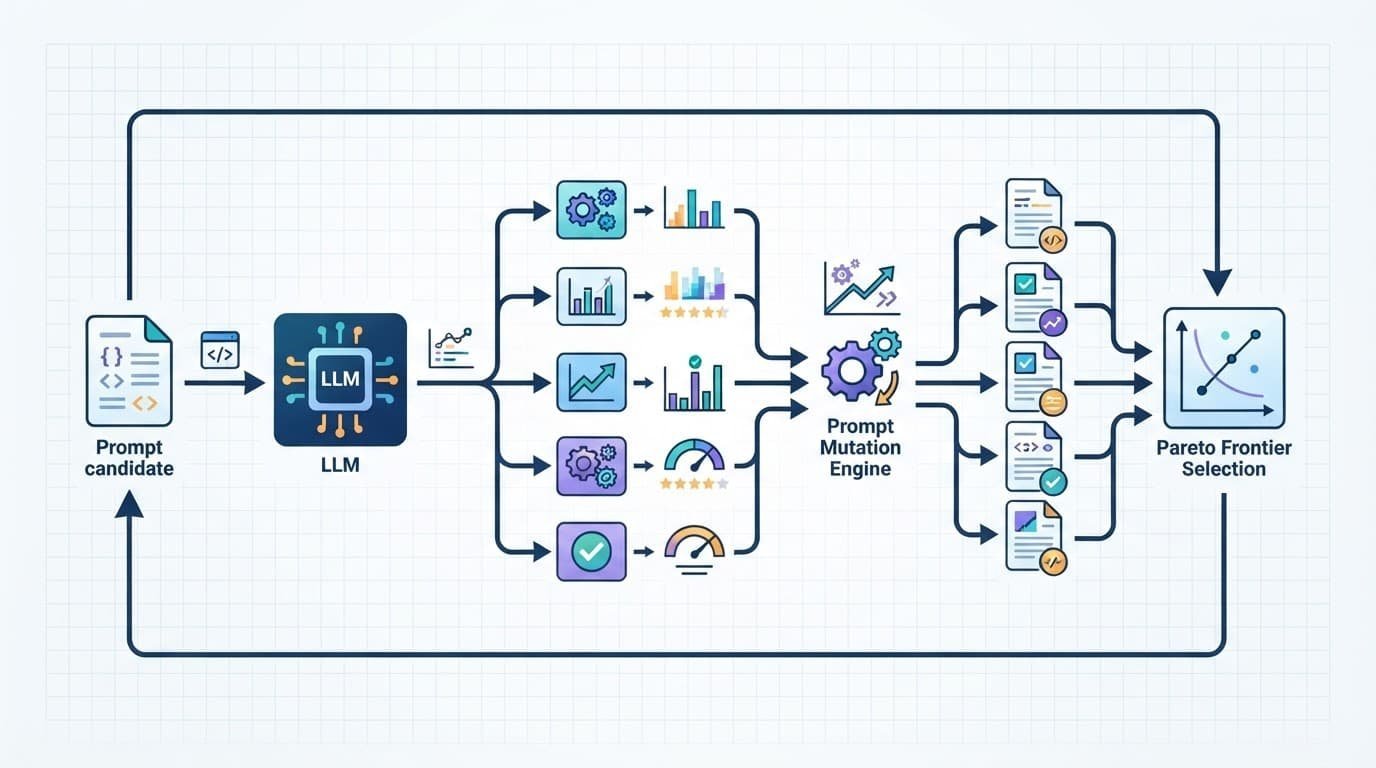
    A Pareto frontier is the set of candidates that aren’t clearly worse than another candidate across the evaluated objectives. One prompt may be more accurate on short questions. Another may follow formatting rules better on long inputs.

    GEPA uses evolutionary search to sample and test candidates from this frontier, rather than repeatedly mutating only the current winner. That diversity matters because a prompt with the highest average score can still fail an important customer segment.

    A strong average score can conceal a repeated failure on a small but high-value class of requests.

    Standard reinforcement learning updates a policy toward a reward signal and often needs many rollouts. MIPROv2 focuses on proposing instructions and demonstrations. GEPA’s distinctive move is trace-driven reflection paired with Pareto-based candidate selection. The GEPA research paper provides benchmark details, but your own held-out evaluation should decide whether the approach is worth the run cost.

    A technical workflow shows branching evaluations and Pareto selection around a central processing module.

    The GEPA prompt optimization loop, step by step

    Start with a baseline prompt that already runs in your application. GEPA improves a working system faster than it rescues an undefined one.

    Build a metric that points to the fault

    Your feedback metric should return a score and useful diagnostic evidence. For a support assistant, combine answer correctness, required-policy compliance, citation validity, and escalation behavior. For a research agent, record source quality, factual claims, tool errors, and output format. Agent architectures also need checks for tool behavior, routing, and final responses.

    The core loop follows five steps:

    1. Define the textual component you want to change, then freeze unrelated settings such as the task model, decoding parameters, and tool versions.
    2. Run the baseline candidate against a batch of representative inputs.
    3. Return a score, execution traces, and ASI from the evaluator. A compact contract looks like score, asi, traces = evaluate(candidate, batch).
    4. Give the reflection model a focused bundle of failures, then ask it to propose a revised instruction or configuration.
    5. Evaluate the new candidate and accept it only when it improves the selection criteria without breaking important cases.

    Prevent prompt bloat and false wins

    Prompt evolution can produce prompt bloat when you reward only task accuracy. That can create false wins through redundant rules or expensive output requirements. Set a maximum length for the optimized field, and penalize candidates that add unnecessary instructions. These limits protect quality and control cost.

    A length limit acts as length regularization. It forces revisions to replace weak wording instead of stacking new exceptions onto old ones.

    If you use the DSPy framework, the documented optimizer interface is dspy.GEPA. The DSPy GEPA overview explains its role as a reflective optimizer for evolving text components within a program. Keep your editable fields narrow at first, then expand the search after the metric proves reliable.

    Design an evaluation that won’t fool you

    GEPA can only optimize what the evaluation dataset reveals. A narrow dataset produces a prompt that memorizes your examples instead of representing the real task.

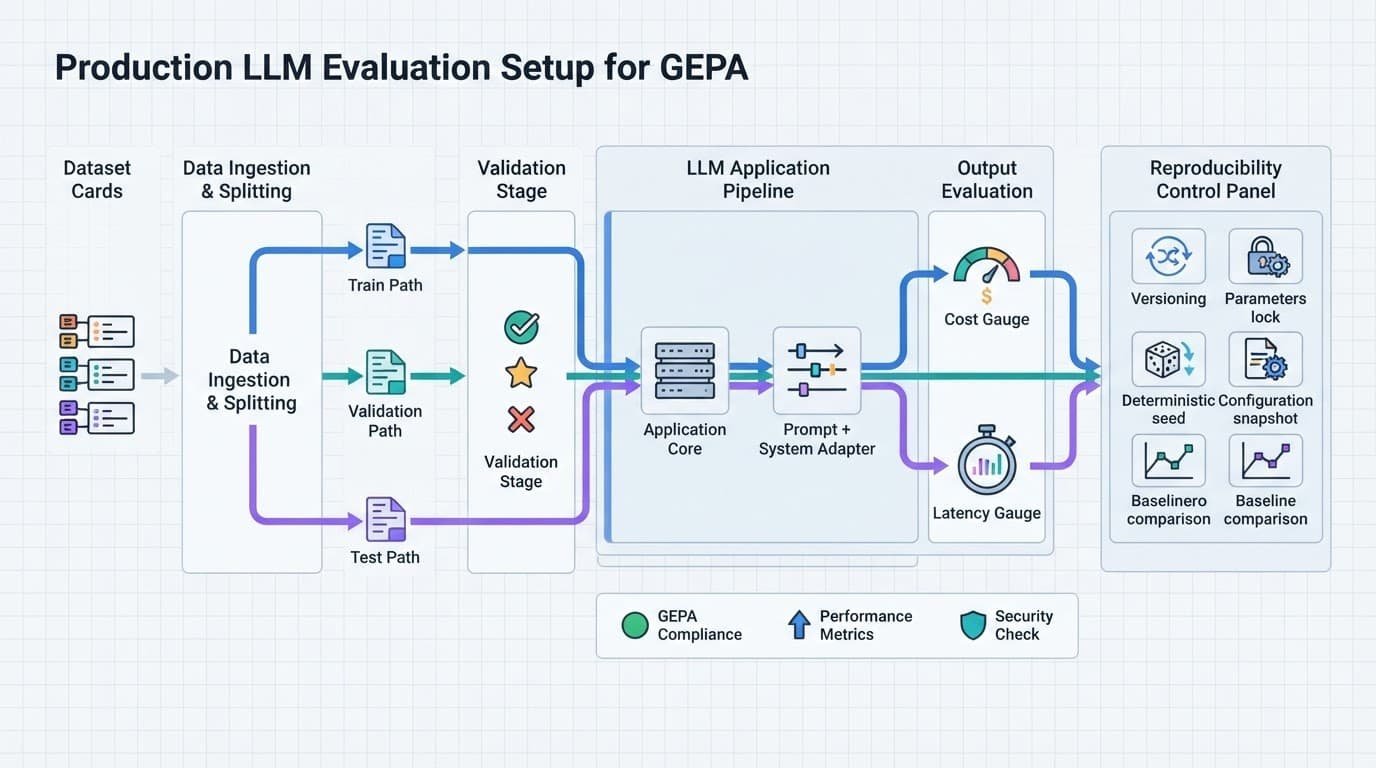
    Technical diagram showing an LLM pipeline with dataset splits, adapters, gauges, and control icons.

    Give each dataset split a different job

    Divide the evaluation dataset into separate optimization, validation, and holdout groups. Keep difficult examples in every group, including ambiguous requests, malformed inputs, missing context, and tool failures.

    Dataset splitWhat you use it forWhat it protects
    Optimization setGenerates feedback and candidate revisionsFast iteration
    Validation setSelects among promising candidatesOverfitting
    Holdout test setConfirms the final result onceHonest reporting

    Start with 20 to 100 diverse examples when you need to inspect failures by hand. This range is a practical working point, not a universal GEPA setting. Add examples after you identify recurring error types that the current set misses.

    Prevent prompt bloat and false wins

    Track more than one number. Alongside quality, record prompt tokens, completion tokens, tool-call count, formatting failures, refusal errors, and median latency. A candidate that gains one point of accuracy while doubling runtime may not belong in production.

    Use an LLM judge only with a written rubric, then spot-check it against human judgments. Otherwise, the optimizer may learn to satisfy the judge’s preferences instead of user needs.

    Also freeze the validation set during an optimization run. If you repeatedly inspect and alter the metric after each result, that split becomes part of training.

    Control cost, latency, and reproducibility

    A GEPA run has two main costs: metric calls that execute your application and reflection calls that analyze failures. Model rollouts often drive the cost of a full agent run, especially with retrieval and external tools.

    Set a budget before you optimize

    Choose a maximum number of metric calls before the run starts. The official examples expose max_metric_calls as a budget control, and the official GEPA repository documents the adapter requirements behind those evaluations.

    First, measure the baseline on the validation set. Then log each candidate’s quality, token use, tool calls, latency percentiles, and cumulative metric calls. Stop when new candidates no longer improve the validation result enough to justify the cost of additional metric calls.

    Cache stable retrieval results during experiments when your production architecture permits it. Otherwise, a document-ranking change can look like prompt improvement.

    Use a strong reflection model, then test its value

    A weak reflection model can produce vague advice when traces contain conflicting tool output, long context, and several failure modes. It may repeat the existing prompt or recommend rules that don’t address the root cause.

    GEPA doesn’t require one named frontier model. Still, test reflection quality on a small set of trace bundles before scaling the run. The model should identify the observed failure, point to trace evidence, and propose a bounded change.

    Record model versions, temperatures, seeds where available, prompt templates, an evaluation dataset hash or version identifier, and tool versions. Reproducibility turns an attractive result into an experiment you can rerun.

    Connect custom systems and know when to skip GEPA

    You don’t need the DSPy framework to use this method. A system adapter connects GEPA to your own LangChain workflow, RAG pipeline, Pydantic AI application, API orchestration layer, or custom agent.

    Build an adapter around observable behavior

    Your adapter needs to run a candidate on an evaluation batch and return results. It also needs to extract the trace text relevant to the component under revision.

    In practical terms, evaluate should return scores plus diagnostic context. extract_traces_for_reflection should isolate the failed tool sequence, retrieved context, or output fragment that a model reviewing the result needs to inspect.

    Keep component names stable. In complex agent architectures, revise one prompt or routing component at a time. If a multi-agent system changes several prompts at once, you won’t know which revision caused the result. Test the routing prompt, retrieval prompt, and final-answer prompt in separate runs before testing combined changes.

    Treat prompt collections as source material, not evidence

    A “prompt download free” offer may help you attract readers who download AI prompts or get prompt packages with instant prompt access. Still, a prompt library download or prompt repository is only source material.

    Even when your prompt files download as JSON, test text generation prompts, a ChatGPT prompt collection, and creative writing prompts against clear task examples. A Midjourney prompt download, Stable Diffusion prompt pack, or AI art prompt package needs image-quality evaluation rather than a text-only LLM metric. Match specific AI model prompts to the model that will run them.

    Skip GEPA for one-off writing tasks, changing goals, or systems without measurable outcomes. Manual editing is faster when you have no stable dataset, no reliable evaluator, and no trace data.

    Frequently Asked Questions

    What is GEPA prompt optimization?

    GEPA is a reflective evolutionary method for improving prompts and other text-representable system components. It evaluates candidates on application runs, reviews failure evidence with a reflection model, and uses Pareto-based selection to choose what to test next.

    How is GEPA different from manual prompt editing?

    Manual editing often relies on remembered examples and a single apparent winner. GEPA compares candidates against a defined evaluation set and uses traces and diagnostic feedback to connect revisions to observed failures.

    What data does GEPA need to work well?

    GEPA needs repeatable tasks, a reliable metric, representative examples, and traces that expose meaningful failure details. Separate optimization, validation, and holdout sets help prevent the optimized prompt from memorizing the examples used during development.

    Can GEPA optimize an agent or RAG pipeline?

    Yes. An adapter can connect GEPA to a LangChain workflow, RAG pipeline, API orchestration layer, or custom agent by running candidates and returning scores with relevant trace context. Revise one prompt or routing component at a time so you can identify which change caused the result.

    When should you skip GEPA?

    Skip GEPA for one-off writing tasks, changing goals, or systems without a stable dataset, measurable outcomes, or useful trace data. Manual editing is usually faster when there is no reliable evaluator for comparing candidates.

    A disciplined way to improve prompts

    A disciplined prompt optimization approach gives you a controlled way to improve LLM behavior when manual edits stop producing clear gains. Its value comes from trace evidence and a reliable metric that can reject attractive but fragile candidates.

    Start with one prompt field and a small set of well-labeled failures. Expand prompt evolution only after you can explain why a candidate improved. Confirm that it still works on unseen requests with a held-out validation set.

  • Prompt Routing Strategies That Make Multi-Model AI Useful

    Prompt Routing Strategies That Make Multi-Model AI Useful

    When building multi-llm applications, improper execution can waste budget and produce weak answers if every request goes to the same model. Implementing intelligent prompt routing and cost optimization ensures requests are directed efficiently based on the task, risk, and response-time target.

    Whether you’re using foundational models for content generation or building an AI platform, adopting effective prompt routing strategies provides a clear roadmap. Intelligent prompt routing can help you define what each model should handle while gathering evidence that those decisions improve the user experience.

    The work starts by separating prompt routing from model selection.

    Key Takeaways

    • Prompt routing determines the processing path, while model selection determines which model generates the answer. Keeping these decisions separate makes it easier to control prompts, tools, retrieval, policies, and fallbacks.
    • Start with explainable routing strategies such as rules, classifiers, semantic matching, cascades, and compatible failover routes. Choose the simplest mechanism that fits the decision.
    • Route requests according to task fit, response quality, inference cost, latency, risk, and availability rather than model reputation alone. The cheapest capable route is often better than the most powerful default.
    • Build clear route contracts with defined inputs, prompts, tools, models, quality checks, budgets, and telemetry. Record route IDs, model IDs, prompt versions, and outcomes so decisions can be evaluated and improved.
    • Test routing with representative workloads, human review, automated checks, and production monitoring. Review routing quality over time because traffic, providers, and user behavior can change.

    Prompt Routing vs. Model Selection: Know What You Are Choosing

    Model selection chooses the AI model that will generate an answer. For example, you may select a smaller model for tagging articles and a more capable model for code reviews. In this context, foundational models provide the capabilities that support different LLM inference workloads.

    Prompt routing chooses the processing path before the model receives the request. Static prompt routing may use a fixed rule lookup, while dynamic prompt routing adapts the route to the request’s context. That path may decide which system prompt applies, which knowledge source to retrieve, whether an input needs moderation, and whether a model should answer at all.

    In a simple application, the two decisions may happen together:

    1. A user asks for a blog outline.
    2. Your router identifies a low-risk text generation task.
    3. The request receives your editorial system prompt.
    4. Intelligent prompt routing selects a foundational model suited to the task for LLM inference, helping balance response quality, cost, and model performance.

    However, they are not the same control. You can send every request to one model while still routing prompts to different templates. You can also route all code-related tasks to one provider while changing the selected model according to complexity and current availability.

    This distinction prevents a common design mistake. Teams often treat the model as the whole product decision. Yet a generic instruction can make a strong model less dependable, while a well-scoped prompt and retrieval path can improve a modest model’s output and response quality.

    A router should decide the smallest acceptable path for a request, then record whether that decision met the quality bar.

    For example, your content assistant might direct a product-description request to a concise sales template. A legal question could trigger a refusal or a request for human review. A request to summarize a long research document may add document retrieval and select a model with a larger context window.

    TrueFoundry’s overview of multi-model routing describes the same core goal: direct each query to the model best suited to the task. Managed services such as Amazon Bedrock offer related capabilities for routing across available models, while your implementation should extend that idea to prompts, tools, policies, and fallback behavior. Amazon Bedrock can support the infrastructure, but your routing logic still determines how each path affects response quality.

    A monitor showing abstract data flows on a clean desk in a modern office.

    Prompt Routing Strategies for Multi-Model AI Applications

    The best routing strategies begin with a small number of routes you can explain and test. This foundation supports intelligent prompt routing without hiding decisions behind unnecessary complexity. A route should answer one practical question: what does this request need before it reaches a model?

    Rule-based routing gives you a reliable first version

    Rules are deterministic. This form of static prompt routing uses properties that already exist in the request, such as selected features, file type, query complexity, prompt length, account plan, language, or consent settings.

    A marketing platform could route “write five ad headlines” to a short-copy template. It could route an uploaded CSV file to an extraction workflow. A request from an enterprise workspace might stay with an approved provider because of contract or data-residency requirements. Tools such as Amazon Bedrock can also support routing decisions based on configured model and application requirements.

    Rules work best when your categories are stable and easy to detect. They’re fast, auditable, and cheap. They also fail when users phrase the same need in unpredictable ways.

    Keep rules narrow. Keyword matching alone can produce bad choices because words carry multiple meanings. “Draft” could mean a blog draft, a contract draft, or a sports draft. Pair keywords with product context, user selections, and input shape before you make a routing decision.

    Classifier routing handles fuzzy intent

    A classifier predicts a category such as support, extraction, creative writing, coding, or high-risk advice. You can use a traditional classifier, a compact language model, or a classifier llm that returns a constrained label as part of dynamic prompt routing.

    This approach fits applications with many natural-language inputs and a manageable taxonomy. For instance, a router may label a query as “structured extraction” before sending it to a model and prompt that require JSON output.

    Set an allowed label list and validate the result. If the classifier returns an unknown label or low confidence, use a safe default route. Don’t let a routing model invent categories at runtime.

    The classifier itself needs evaluation. A router that mislabels 15 percent of requests can hide the error behind fluent model output. Review a sample of routed prompts each week, then compare the assigned route with the route a human reviewer would choose.

    Semantic routing matches meaning, not words

    Semantic routing converts the incoming request into vector embeddings, then compares them with example requests or category descriptions. This works well when users ask the same kind of question in many different ways, making semantic routing useful for intelligent prompt routing.

    For a creator tool, you might create reference examples for image concepts, article briefs, social captions, product research, and structured prompt exports. A request that’s close to the image-concept examples gets the appropriate visual prompt template, even if it never uses the word “image.”

    Semantic routing needs curated examples. Start with real, anonymized traffic and revise the examples that attract false matches. You should also set a similarity threshold. Below that threshold, route to a general-purpose prompt or ask the user to choose a task.

    Cascades reserve expensive models for hard work

    A cascade sends the request to a lower-cost model first, then escalates it when the output fails a defined check. This form of dynamic prompt routing evaluates prompt complexity and may use a quality estimator before escalation, supporting cost reduction without ignoring quality. The check may test JSON validity, policy compliance, answer completeness, source coverage, or a model-generated confidence score.

    For example, a small model can classify support tickets and draft first replies. If it detects account cancellation, payment disputes, unclear intent, or high prompt complexity, your app can pass the full context to a stronger model or a human queue.

    Don’t confuse a model’s stated confidence with correctness. Treat confidence as one signal, then combine it with objective checks. A valid schema, a complete answer, and no prohibited claims are more useful than a confident-sounding score.

    Failover routing protects the user experience

    A provider outage, rate limit, timeout, or malformed response needs a separate route. Your fallback may use another model, a designated fallback model, a smaller answer, a cached result, or a message that preserves the user’s work. Platforms such as Amazon Bedrock can help configure failover policies, but your application still needs task-specific rules.

    The fallback model should match the original task as closely as possible. Sending a failed code-generation request to a lightweight summarizer may produce an answer, but it doesn’t preserve the feature’s purpose. Define task-compatible backups before an incident occurs.

    Choose Routes by Constraints, Not Model Hype

    Each request carries constraints. Some are explicit, such as a paid user’s response-time expectation. Others are technical, including query complexity, token count, tool availability, privacy requirements, or a model’s current error rate.

    Use a route score that considers the trade-offs you actually face:

    Routing factorWhat you measurePractical decision
    Task fitTask label, query complexity, examples, output formatMatch extraction, coding, writing, or vision to a tested prompt path
    Response qualityHuman ratings, pass rate, factual checksEscalate when the lower-cost path misses your acceptance threshold
    Inference costInput and output tokens, tool calls, llm inference usageSelect the lowest-cost route that passes evaluation
    Latency constraintsTime to first token, completion time, p95 latency, SLA targetsPrefer a healthy faster route when response quality is comparable
    RiskSensitive data, policy category, contractual limitsPin requests to approved models or require review
    AvailabilityTimeouts, rate limits, provider errorsTrigger a compatible fallback before the user retries

    The table points to a simple rule: the cheapest capable route beats the most powerful default. Routing mechanisms can analyze query complexity across foundational models, including options available through Amazon Bedrock, to balance cost optimization with model performance during llm inference. You can only make that call after measuring response quality for your own workload.

    A quality estimator can judge whether an output meets your acceptable limits before the router escalates. A source-backed answer may require a retrieval step and a model that follows citations. A quick title rewrite probably doesn’t. Similarly, a long document may cost more because of input tokens even when the output is brief, so your router should inspect document size before estimating inference cost.

    Latency deserves equal attention. Measure time to first token and full completion time separately, especially when latency constraints affect an SLA. Streaming can make an answer feel responsive, but users still notice when a response takes too long to finish or tool calls stall. Compare model performance across both speed measures rather than optimizing for throughput alone.

    A laptop showing abstract charts on a clean desk with one blurred person behind it.

    Set a budget at the route level. For example, you might cap a free feature at one lower-cost attempt and reserve retries for malformed output. A paid research workflow may allow retrieval, a stronger model through Amazon Bedrock, and one fallback. These controls support cost optimization and make costs predictable without treating every user request as identical.

    Research into systems such as xRouter’s cost-aware orchestration approach also distinguishes one-shot selection from light orchestration, where multiple outputs are combined. That distinction matters because an ensemble can improve response quality on difficult tasks but increases cost and latency. Use multiple models only when your evaluations show a meaningful gain.

    Build the Routing Layer Around Clear Contracts

    A routing layer sits between your application, foundational models, and managed systems such as Amazon Bedrock. Building custom prompt routing infrastructure requires clear contracts: it receives a normalized request, evaluates it, chooses a route, invokes the selected tools and model for LLM inference, then returns a normalized result.

    Your internal request object should include more than the user’s words. Capture the product feature, user tier, language, attached files, estimated token count, requested output format, risk flags, prompt complexity score, and trace ID. That context supports intelligent prompt routing by helping the router evaluate requests before triggering LLM inference, rather than guessing from text alone.

    Each route needs a contract. Define:

    • The inputs it accepts, including length limits, file types, and prompt complexity thresholds.
    • The system prompt, tool permissions, retrieval sources, and output schema.
    • The preferred model, acceptable backups, timeout, and retry limit.
    • The quality checks that determine escalation or failure.
    • The telemetry fields you will store, including cost optimization indicators, routing mechanisms used, and their impact on response quality.

    A content-generation route, for example, may require a topic, audience, tone, and target length. It can reject empty briefs before spending tokens. It may call a web search tool for factual requests but skip retrieval for a fictional story.

    Normalize output across providers. Return consistent fields for text, structured data, citations, model ID, route ID, latency, token usage, response quality, and error state. Your front end and analytics system shouldn’t need separate logic for every provider, whether the route uses Amazon Bedrock or another model service.

    Use feature flags for route changes. Send a small slice of eligible traffic through a revised route, compare it with the current one, and roll back quickly if quality or reliability drops. Avoid changing the model, prompt, retrieval source, and evaluator in one release. You won’t know what caused a result.

    A routing decision without a route ID, model ID, prompt version, and outcome record is difficult to improve after launch.

    You should also protect against prompt injection. Treat user text, uploaded documents, retrieved pages, and tool output as untrusted inputs. Keep policy instructions separate from that content, restrict tool permissions by route, and validate structured outputs before your application acts on them. These safeguards make intelligent prompt routing more reliable while giving you measurable control over response quality.

    Engineer coding at a clean desk with two monitors in a bright office.

    Evaluate Routing Decisions Before You Scale Traffic

    You can’t judge a router by a handful of impressive demonstrations. Testing multi-llm applications requires continuous monitoring of response quality and model performance across real workloads. Build an evaluation set from real requests, with sensitive information removed. Include ordinary prompts, ambiguous requests, long inputs, adversarial attempts, malformed files, and failure cases.

    Give each test item an expected route or a small set of acceptable routes. Then judge the final output against a rubric that reflects the feature and captures response quality. An automated quality estimator can validate structure, required fields, citations, or other measurable criteria before human review. An extraction workflow might require valid fields and exact values. A blog-outline tool may need relevance, organization, and factual restraint.

    Run the same evaluation set through your existing default and proposed routing policies. Track route accuracy, response quality, quality estimator results, cost per successful task, inference cost, p50 and p95 latency against your latency constraints, timeout rate, fallback rate, and user correction rate.

    Human review remains necessary for creative and open-ended work. Ask reviewers to compare outputs blind, without seeing the model name. For customer-facing text, include a reviewer who understands your brand constraints. For code, run tests and assess security-sensitive changes. Use these reviews to confirm that automated scores reflect real response quality rather than narrow proxy metrics.

    A useful evaluation process follows a fixed order:

    1. Define a narrow workload, such as short product copy or invoice-field extraction.
    2. Collect enough representative prompts to expose edge cases, not only ideal inputs.
    3. Establish a baseline with one known route.
    4. Test one routing change at a time and inspect both aggregate metrics and bad examples.
    5. Use the findings to refine custom prompt routing logic or, where the data supports it, inform reinforcement learning models.
    6. Release gradually, then keep monitoring production results.

    Routing quality can drift even if your code doesn’t change. Providers update models, product traffic shifts, and users discover unexpected inputs. Review routing logs on a schedule, compare response quality over time, and keep a stable evaluation set for regression tests.

    Route Prompt Assets Without Mixing Up Their Purpose

    Prompt marketplaces and creator tools need a second routing decision: which prompt asset matches the user’s goal. This is different from choosing the model that executes it, and it connects asset discovery with intelligent prompt routing.

    Your prompt repository may include free prompt downloads, paid prompt packages, and templates tied to a particular task. Semantic routing can help users search prompt libraries naturally, while vector embeddings match queries to relevant goals, formats, and use cases. A user who wants to download AI prompts for social captions needs a discovery route. A user seeking a Midjourney prompt download needs an image-generation route that checks compatibility and parameter guidance.

    Keep asset metadata clean. Tag each item by intended model, task, format, language, license, prompt complexity, and last review date. A prompt library download should also identify whether the file is a plain-text template, a JSON workflow, or a document with examples.

    The same structure helps when you offer a Stable Diffusion prompt pack, a ChatGPT prompt collection, or an AI art prompt package. These are different products with different execution paths. An image prompt may require aspect-ratio guidance and negative prompts. Text generation prompts may require an audience, source material, and output length.

    Users expect instant prompt access after purchase, but access should not imply universal compatibility. Custom prompt routing can account for varying prompt complexity across multi-llm applications, sending simple templates to efficient models for cost reduction while reserving more capable models for demanding tasks. Tell users when a prompt targets one model family, and store model-oriented variants rather than claiming one generic template works everywhere.

    For creative writing prompts, semantic routing can direct requests toward tone, genre, character, and plot controls. For business templates, validate the intended output and factual inputs first. The prompt file download is the asset delivery step, while the AI routing layer controls how your app runs the asset.

    Common Routing Failures and Better Fixes

    The most common failure is routing every difficult-looking prompt to the largest available model. Intelligent prompt routing should use evidence from your task set instead. Over-routing can increase inference cost and waiting time, limiting potential cost reduction even when it protects output quality for some tasks.

    Another mistake is using an LLM router for every decision. A heavy classifier llm or overly complex dynamic prompt routing for minor tasks adds latency, uncertainty, and inference cost instead of delivering cost reduction. Choose routing mechanisms that match the decision, using deterministic rules where the application already knows the answer and reserving semantic classification for ambiguous inputs. Avoid premature optimization with reinforcement learning before simpler approaches have produced reliable results.

    Poor fallback design also damages trust. If the preferred provider fails, switch to a designated fallback model rather than silently returning an incomplete result with a success status. Automated failover in Amazon Bedrock can help maintain resilience, while preserving the user’s input and retrying only when the task can safely tolerate it.

    Finally, don’t treat a router as a finished feature. Prompt routing strategies need version control, logs, evaluations, and periodic review. As your product gains new workflows, use native capabilities in Amazon Bedrock where they fit, and retire routes that no longer earn their complexity.

    Frequently Asked Questions

    What is prompt routing?

    Prompt routing chooses the processing path a request should follow before it reaches a model. It can determine the system prompt, retrieval source, tools, moderation checks, model, and fallback behavior.

    How is prompt routing different from model selection?

    Model selection chooses the model that generates the response, while prompt routing determines the broader workflow around that response. A single model can support multiple prompt routes, and one task category can use different models depending on complexity or availability.

    Which prompt routing strategy should you use first?

    Rule-based routing is usually the best starting point because it is fast, deterministic, inexpensive, and easy to audit. Add classifier or semantic routing when user intent becomes too varied for stable rules.

    How can prompt routing reduce costs without lowering quality?

    Use lower-cost models for straightforward requests and escalate only when objective checks show that the output misses the required quality bar. Track cost per successful task alongside response quality, latency, and fallback rates.

    What should you measure when evaluating a router?

    Measure route accuracy, response quality, cost per successful task, token usage, latency, timeout and fallback rates, and user corrections. Combine automated checks with representative human review, especially for creative, customer-facing, and high-risk work.

    Final Thoughts

    Your multi-llm applications improve when each request follows a deliberate path across foundational models instead of relying on a single default model. Use routing strategies that account for query complexity, protect high-risk tasks, and preserve compatible fallbacks as you scale. This approach supports efficient llm inference while maintaining consistent response quality.

    The strongest prompt routing strategies balance query complexity, response quality, and cost reduction. A classifier llm can support intelligent prompt routing by directing requests to the right model and task path, helping maintain control through cost optimization without sacrificing response quality. With clear, measurable decisions, you can scale multi-llm applications smoothly and improve long-term user satisfaction.

  • LLM Prompt Caching: Lower Costs Without Slowing Your App

    LLM Prompt Caching: Lower Costs Without Slowing Your App

    Every repeated token in your AI app can become an unnecessary bill and a longer wait for users. When your application sends the same long instructions, documents, tool definitions, or product context on every request, LLM prompt caching can prevent the model from processing that shared material from scratch. By effectively bypassing the redundant prefill stage of the model computation, this technique significantly lowers inference latency for your users.

    You don’t need to reduce prompt quality to reduce inference costs. You need to separate reusable context from the user’s changing request, then structure both parts with discipline.

    Key Takeaways

    • Prompt caching reuses the model’s precomputed work for identical prompt prefixes, rather than the text of a previous answer.
    • Structure your prompts to place stable instructions, reference material, and tool schemas at the beginning, keeping user-specific details at the end to optimize for prefix matching.
    • OpenAI, Anthropic, and Google Gemini support caching differently; you must account for varying Time to Live (TTL) configurations and specific token thresholds when planning your implementation.
    • Cache hits rely on absolute consistency. A changed timestamp, hidden whitespace variation, or a reordered tool definition will result in a cache miss.
    • Track cached input tokens, hit rate, and latency metrics before determining if your caching strategy is successfully scaling.

    What LLM Prompt Caching Actually Reuses

    Prompt caching stores internal attention states created while a model processes a prompt prefix. Developers often refer to these states as a KV cache. To maintain efficiency, the infrastructure typically manages this KV cache through paged attention mechanisms, which allow memory to be allocated dynamically. When a later request begins with the same content, the provider can reuse the prior computation.

    While the model still generates a fresh answer, it skips the time-consuming prefill stage for the repeated prefix. Instead, the model proceeds directly to the decoding stage for the new tokens. Because transformers rely on causal self-attention, the model can look back at the previously computed states without needing to reprocess the entire input sequence.

    Glowing white particles flow through a bright blue circular filter in a minimalist digital space.

    Consider a support assistant with a 12,000-token product manual, a detailed system prompt, and a fixed set of tools. Without caching, every customer question sends that entire package through the model again. With frequent cache hits, the model leverages the existing KV cache to bypass redundant calculations on the manual and instructions, then focuses its processing power on the current question.

    That creates two practical gains:

    • Lower input costs because providers charge cached tokens at a discounted rate.
    • Faster responses because the model processes fewer fresh input tokens before it can generate output.

    A useful prompt caching explanation makes an important distinction: caching helps repeated input context. It does not replace semantic search, response caching, or a database.

    Response caching returns a previous answer when a request matches. Prompt caching still calls the LLM, which makes it appropriate when each user needs a new response based on shared background material.

    A cache hit begins with a stable prefix. If the reusable material shifts around, your savings disappear.

    Build Prompts Around a Stable Prefix

    The most reliable prompt layout places static content first and dynamic content last. Your system prompt, long policy documents, retrieval rules, tool definitions, and examples should remain byte-for-byte consistent whenever possible. To maximize efficiency, you should treat your system prompt as static content that anchors the beginning of every API call.

    High-performance inference engines leverage sophisticated mechanisms like radix attention and block hashing to identify a stable prefix within your requests. By organizing your data correctly, these engines can recognize identical segments and retrieve them from memory, drastically reducing the compute required for subsequent calls.

    A clean request structure might look like this:

    1. Start with the system prompt and application rules.
    2. Add unchanged documents, style guides, product data, or tool schemas.
    3. Use fixed separators such as ### Reference Context.
    4. Append the current user message, account details, timestamps, and retrieved records.

    For example, do not put “Current date: July 18, 2026” near the top of a large prompt. That one changing line can break the shared prefix, preventing the caching mechanism from identifying the stable block. Put that information near the user request instead. The same rule applies to random IDs, experiment labels, session metadata, and dynamic retrieval results.

    This matters for content tools and prompt marketplaces. If you run a prompt repository, your fixed catalog rules can sit in the cacheable prefix. A visitor may search for “prompt download free,” “download AI prompts,” or “get prompt packages.” Your app can reuse the same classification instructions while evaluating each new search.

    Likewise, a prompt library download page may require fixed usage terms, categories, and moderation policies. You can keep those stable while appending the visitor’s request for instant prompt access or prompt files download.

    Image-generation catalogs create another strong use case. Queries such as “Midjourney prompt download,” “Stable Diffusion prompt pack,” and “AI art prompt package” may all share a large policy and tagging framework. The same applies to a ChatGPT prompt collection that organizes text generation prompts, specific AI model prompts, and creative writing prompts.

    The words themselves do not create cache savings. The prompt structure does. Keep the reusable catalog context identical, then add the search phrase and filtered records after it.

    Provider Rules Change the Implementation

    Caching is not a single API feature with universal behavior. Each provider sets its own token threshold, retention period, activation method, and price. Check current documentation before you ship because these rules can change by model and region.

    OpenAI uses automatic prefix caching

    OpenAI applies prompt caching automatically on supported models when a prompt reaches the required size, commonly 1,024 tokens or more. You do not add a cache-control parameter. Instead, you design requests so their opening tokens match exactly.

    As of July 2026, OpenAI’s newer GPT-5.4 and GPT-5.5 pricing offers a 90% discount on input tokens, while older supported models such as GPT-4o have a 50% discount. Cache availability is short-lived by default, so repeated requests need to arrive close together.

    Your API response usage data can show cached input tokens. Watch that field after a deployment. If it stays at zero, inspect the first several thousand tokens of each request for changing content.

    Anthropic requires explicit cache markers

    Anthropic prompt caching requires you to mark reusable content with cache_control to define cache breakpoints, typically using an ephemeral cache type. You can establish multiple breakpoints, which helps when one large document changes less often than another.

    Anthropic charges extra cache write tokens to create the cache, then offers discounts on reads. That means a cache only pays off when your application reuses the marked content enough times within its Time to Live (TTL). The default cache duration is short, and a longer TTL needs an explicit setting and can cost more.

    A practical pattern is to cache your system prompt and product documentation separately. Then append the user’s question after the final breakpoint. You can find useful field observations in these developer cache-hit discussions, but test against your own traffic patterns and current API pricing.

    Gemini supports implicit and explicit caching

    Google Gemini offers automatic caching on some models and explicit context caching when you create reusable cached content. Explicit caching gives you more control over long documents and their retention period.

    Gemini 2.5 and Gemini 3 models have offered steep discounts, while older model families can use different rates. Google also charges for keeping explicit cached content alive, so large, rarely reused documents can cost more than they save.

    Choose explicit caching when you know a substantial context will serve many requests. Use implicit caching when your request prefix is naturally stable and you want less application logic. A recent provider comparison can help you frame the differences, though your provider’s live pricing page should guide final decisions.

    Amazon Bedrock adds model support

    Amazon Bedrock also supports prompt caching for specific models, allowing you to optimize performance while managing expenses. By utilizing this feature, you can effectively reduce costs for input tokens and cache write tokens when processing high-volume, repetitive tasks. Check the latest model availability in your specific region to ensure you can leverage these savings in your production environment.

    Measure Cache Performance Before You Scale

    Don’t judge caching by a single fast response. Measure it across normal traffic, including cold starts, low-volume periods, and real user sessions.

    Start with a baseline. Record input tokens, output tokens, latency, and cost for a representative set of requests. Next, deploy the stable-prefix version and compare the same metrics by model, endpoint, and customer workflow. If you are using self-hosted solutions like the vLLM engine, remember that the system manages attention blocks within your GPU VRAM. In these environments, monitoring memory fragmentation and frequent cache misses is essential for maintaining consistent performance.

    Use this implementation checklist:

    • Log total input tokens and cached input tokens for every LLM request.
    • Record time to first token and total response duration.
    • Version your fixed prompts so you can identify changes that reduce cache hits.
    • Keep tool definitions in a fixed order and use stable JSON serialization.
    • Remove timestamps, UUIDs, and session data from cacheable sections.
    • Test concurrent requests, since repeated traffic often produces the strongest savings.
    • Set alerts for sudden drops in cached-token volume.

    A 90% cached-input discount sounds dramatic, yet it only applies to the cached portion of the request. Output tokens retain their normal price. A short prompt also won’t produce meaningful savings, even with a high discount rate.

    Be careful with personalized prompts. If account data, permissions, or confidential documents appear before the cache boundary, you can reduce hit rates and complicate your privacy review. Keep tenant-specific content outside shared prefixes to ensure proper tenant isolation unless your provider’s security model and your internal requirements explicitly support that design.

    Frequently Asked Questions

    How is prompt caching different from response caching?

    Prompt caching optimizes the model’s processing of recurring input context to speed up generation, but it still triggers a new model response. In contrast, response caching serves a previously generated answer directly from storage without calling the model at all.

    Why does changing a single character break my cache hit?

    LLM prompt caching relies on exact byte-for-byte matching of the input prefix. Even minor variations, such as a changing timestamp or a hidden character, alter the mathematical hash of the prompt, causing the infrastructure to treat it as entirely new content.

    Does prompt caching work for every LLM application?

    It is most effective for applications with large, static prompt prefixes, such as detailed system instructions or lengthy reference manuals used repeatedly. It provides little benefit for simple, short queries where the input is primarily unique user content that rarely repeats.

    Make Repetition Work for You

    LLM prompt caching rewards an application that treats prompts as structured assets rather than loose strings. Stable instructions and reference material belong at the front, while live user context belongs at the end. By optimizing your architecture this way, you allow the system to recognize patterns more effectively.

    When you measure cache hits, preserve prompt consistency, and match your design to provider rules, repeated context stops draining your budget. A well-structured prefix can make every high-volume request faster and cheaper. Ultimately, LLM prompt caching is particularly effective for a multi-turn conversation where the prompt_cache_key remains stable throughout the session, ensuring that recurring data is reused rather than reprocessed.

  • Top 40 Jobs Most Likely to Be Affected by AI In the Next 3 Years

    Top 40 Jobs Most Likely to Be Affected by AI In the Next 3 Years

    AI is slipping into work through side doors, not front gates. It shows up in inboxes, calendars, invoices, chat windows, and blank pages that need a first draft.

    That matters because many jobs affected by AI will not vanish overnight. First, the routine parts get carved out. Then the role changes shape, often with fewer entry-level tasks and tighter expectations for speed. A clear view of that pattern is more useful than panic.

    Why some jobs are more exposed to AI than others

    AI moves fastest where work repeats and the rules stay steady. If a task lives in documents, spreadsheets, forms, tickets, or databases, software can often learn the pattern and run it at scale. BCG says in its 2026 AI employment outlook that 50% to 55% of US jobs may be reshaped by AI in the next two to three years. That does not mean half of workers lose their jobs. It means a huge share of work is likely to change.

    A focused worker sits at a clean desk using a laptop computer next to a steaming mug of coffee. Soft daylight streams through a nearby window, illuminating the sleek professional workspace.

    The tasks AI handles best, from sorting data to answering common questions

    AI is strong at speed, pattern-matching, and first passes. It can clean a spreadsheet, sort support tickets, draft a reply, pull numbers from a PDF, or spot the same clause across hundreds of contracts. A recruiter can use it to group resumes. A support team can use it to turn calls into tickets. A finance team can use it to read invoices and catch duplicates. When the input is standard and the answer is easy to check, AI is often faster than a person.

    Most jobs affected by AI lose routine tasks before they lose the whole role.

    The jobs that stay safer for now because they rely on people

    People still hold the edge where trust, care, movement, and judgment matter. Nurses, plumbers, electricians, therapists, managers, and skilled repair workers handle messy situations that do not fit a clean template. A broken pipe in an old wall, a frightened patient, or a team conflict at work all demand context. Software can assist, but it still struggles when the facts are incomplete, the stakes are human, and the right answer depends on reading the room.

    Top 40 jobs AI is likely to affect over the next 3 years

    The roles below are the clearest near-term targets. In most cases, AI changes the repetitive slice of the job first. Some roles may shrink at the entry level. Others will keep the same title but ask fewer people to handle the same volume with AI running in the background.

    Office and administrative jobs AI can speed up fast

    Data entry clerks, administrative assistants, office clerks, records clerks, receptionists, scheduling coordinators, executive assistants, and document processing workers sit near the front of the line. AI can read forms, route emails, draft routine replies, build meeting notes, organize folders, and book appointments in seconds. It can also scan mail, update logs, and move data between systems without breaks or boredom. People still matter for exceptions, calendar politics, confidential issues, and the small human signals that keep an office running.

    Customer support and sales roles that are becoming more automated

    Customer service representatives, call center agents, telemarketers, sales development reps, chat support agents, appointment setters, retail sales support staff, and lead qualification specialists are already feeling the shift. Voice AI and chatbots can handle password resets, order checks, common product questions, scripted outreach, and follow-up messages. Sales teams can use AI to rank leads before a rep ever calls. Support teams can answer ten routine questions without a person touching the keyboard. Human workers still step in when the case is emotional, high-value, or odd enough to break the script.

    Writing, media, and content jobs facing fast AI change

    Copywriters, content writers, SEO content assistants, social media coordinators, editors, proofreaders, transcriptionists, and subtitle or basic translation specialists face fast change because the work is text-heavy. AI can draft outlines, trim long copy, write captions, transcribe audio, fix grammar, and turn speech into subtitles. It is good at first drafts and weak at taste. That puts pressure on junior roles built around volume, not strategy. Anthropic’s labor market impacts research is another sign that AI’s effect is already visible in hiring and work patterns.

    Finance, legal, and back-office jobs under pressure from automation

    Bookkeepers, payables and receivables clerks, payroll assistants, tax preparer assistants, legal assistants, paralegals who review standard contracts, insurance claims processors, and loan processors all work inside forms, rules, and deadlines. AI can match invoices, code expenses, check policy language, pull contract terms, flag missing documents, and sort files by risk. That makes early review work easier to automate. Firms still need people when the numbers look wrong, the case is disputed, or the client story does not fit the file.

    Tech, logistics, and production jobs with routine tasks AI can take over

    Junior software and QA testers, help desk technicians, warehouse pickers, inventory clerks, dispatch coordinators, machine operators, assembly workers, and quality inspection support staff also make the list. In software, AI can write test cases, scan logs, and answer common support issues. In warehouses and plants, sensors, vision systems, and route software can guide picks, count stock, watch for defects, and reduce handoffs. The pattern is the same across these jobs affected by AI: software handles the repeat, while people handle the mess.

    What these jobs affected by AI have in common

    This list is not random. The most exposed roles usually share three traits: repetitive steps, predictable language, and a high amount of screen-based work. When the same request arrives all day, or the same form needs the same fields, AI has a clean opening.

    Routine work is easier to automate than expert judgment

    AI is strongest when the rules are clear and the output is easy to verify. A missing invoice number is simple. A tense client call, a medical decision, or a legal dispute is not. That is why many jobs affected by AI sit in support work, clerical tasks, and first-round review. The closer a role gets to judgment under uncertainty, the slower automation usually moves.

    Jobs built on templates, scripts, and common questions feel the impact first

    Scripts are easy for software to learn. That covers canned sales emails, standard chat replies, payroll checks, contract clause searches, help desk tickets, and intake forms. Work that follows the same path each day gives AI a narrow lane, and narrow lanes are where it performs best. For a broader view, Nexford’s overview of how AI will affect jobs gathers several widely cited forecasts for 2026 through 2030.

    How workers can stay ready as AI changes the workplace

    The safest move is not to race AI at its own job. A better move is to build the parts of your work that software still handles badly, then use AI to remove the dullest steps.

    Build skills that AI is weak at, like judgment, care, and problem solving

    Clear writing, calm communication, conflict handling, leadership, and sound judgment travel well across industries. So do hands-on skills, because machines still struggle in messy spaces with changing conditions. If your role is on this list, those strengths are your buffer. They also make you more useful when AI produces a wrong answer that looks polished on the surface.

    Use AI as a helper, not a replacement, in your daily work

    Workers who use AI well can keep more value in the role. Draft the email with AI, then fix the tone. Let it summarize the meeting, then check what it missed. Use it to sort data, compare versions, or build a first pass. Keep human review on anything tied to money, legal risk, hiring, health, or customer trust. The worker who can supervise AI often lasts longer than the worker who ignores it.

    Look for roles that blend tech with human skill

    Jobs that mix software with service, analysis, training, or oversight are in a stronger spot. That includes team leads, client-facing specialists, implementation staff, field technicians, project coordinators, and operations analysts. These roles still use AI, but they do not depend on it alone. They need a person who can explain a problem, calm a client, spot a bad output, and make a call when the script falls apart.

    Final thoughts

    AI is already changing office work, support roles, content jobs, finance tasks, legal review, and routine production work. The clearest pattern is simple: when a job repeats the same steps on a screen, AI can usually take a bite out of it.

    That does not leave workers powerless. The people who stay ahead will build judgment, use AI for the dull parts, and move toward work where human trust still matters.

    FAQ

    Will AI replace these jobs completely in the next three years?

    Usually, no. The bigger short-term change is task loss. A role may stay in place, but one person may handle more work because AI takes over the first draft, the routine call, or the basic review.

    Which jobs affected by AI are at the highest risk first?

    Clerical, support, writing, and back-office roles are near the top because they rely on repetitive text and clear rules. Data entry, customer support, bookkeeping tasks, transcription, and standard contract review are early targets.

    What jobs look safer right now?

    Jobs that depend on physical skill, trust, care, or leadership look safer in the next three years. Nursing, skilled trades, repair work, and many people-management roles are harder to automate because the work changes from case to case.

    What should I do if my job is on this list?

    Start by mapping your daily tasks. Find the repetitive part and learn one AI tool that helps with it. Then spend more time building the human part of the job, communication, judgment, client handling, and problem solving.

  • Stop Writing Syntax: The Founder’s Blueprint for 10x Vibe Coding

    Stop Writing Syntax: The Founder’s Blueprint for 10x Vibe Coding

    The Founder’s Guide to Vibe Coding: Building Full-Stack Apps with Natural Language

    For a couple of decades, the barrier to entry for building software was steep. If you had a million-dollar idea but couldn’t write code, you faced a dilemma: spend months learning Python or JavaScript, or spend tens of thousands of dollars hiring a development agency. That bottleneck is finally breaking with the new AI Vibe Coding trend.

    Welcome to the era of Vibe Coding.

    Vibe Coding isn’t about sloppy work; it’s about shifting your focus from syntax (the grammar of code) to intent (the goal of the software). It means describing what you want in natural language and letting AI handle the translation into functional applications. For lean startups and non-technical founders, this is a paradigm shift. It allows you to validate ideas in days rather than months. You don’t need to know how the engine works to drive the car, but you do need to know how to steer. This guide will teach you how to hold the wheel.

    What Is Vibe Coding? The Rise of AI-Assisted Development Definition and Origin

    Vibe Coding is a newer approach to software development that goes past basic autocomplete. Instead of only suggesting code line by line, it uses AI to turn a developer’s intent into working code.

    At its core, Vibe Coding shifts programming away from strict syntax and toward intent. In other words, the focus moves from writing every command by hand to describing what the software should do. This is why the idea is closely tied to Natural Language Programming.

    The term gained wide attention through Andrej Karpathy, who described a style of building software where developers guide AI with plain-language prompts and high-level direction. That idea spread quickly because it matched what many programmers were already starting to experience with modern AI tools.

    1. Step 1: Formulating the ‘Vibe’

    The biggest mistake founders make when using AI is being vague. If you tell an AI builder to “make a clone of Uber,” you will get a generic, broken shell. To succeed, you must act as a Product Manager, not just a dreamer. You need to translate your vision into a structured narrative that the AI can execute.

    Start by defining the User Flow. Describe the journey step-by-step. For example: “A user lands on the homepage, clicks ‘Sign Up,’ enters their email, and is immediately taken to a dashboard where they can upload a PDF.” Be specific about what happens next.

    Next, outline your Data Needs. Even without knowing database schema, you can describe relationships. Tell the AI: “Users need to have profiles. Each profile should store a history of their uploads and their subscription status.” This helps the AI structure the backend logic correctly.

    Finally, set the UI/UX Tone. Don’t just say “make it look nice.” Say, “Use a minimalist design with a dark mode option. The primary action buttons should be bright green, and the font should be modern sans-serif.” The more sensory details you provide, the closer the initial output will match your vision. Treat the AI like a brilliant junior developer who knows every coding language but knows nothing about your specific business logic.

    Inside the Process: How Natural Language Turns Into Running Code A technical guide for non-technical founders

    Large language models (AI Platforms) are the new compilers. They convert plain English into usable code, which is a core idea behind Vibe Coding. Context windows and ongoing prompt loops matter because they keep the model grounded in the task, the codebase, and the goal. Autonomous AI coding agents add another layer. They don’t just suggest code, they can plan steps, write files, test outputs, and keep moving through a build process with limited supervision.

    2. Step 2: Choosing Your AI Arsenal

    Not all tools are created equal. Some are designed for pure speed, while others offer more control. Here is how to choose the right platform for your vibe coding journey.

    • Replit Agent: This is arguably the most powerful all-in-one solution for beginners. It runs in your browser and handles everything from setting up the server to deploying the app. It’s ideal if you want a hands-off experience where the AI manages the environment for you.
    • Bolt.new & Lovable: These tools specialize in generating full-stack web applications instantly in the browser. They are fantastic for prototyping marketing sites or simple SaaS (Software as a Service) tools. They excel at creating beautiful frontends quickly.
    • Cursor with Vercel: If you want slightly more control and plan to eventually hand the code off to a human developer, use Cursor. It is an AI-powered code editor. You can write prompts to generate features, then deploy the result to Vercel (a hosting platform). This workflow creates standard code files that are easier to migrate later.

    The Strategy: Absolute beginners start with Replit or Bolt for your initial prototype to validate the idea quickly. If the product gains traction and you need complex custom logic, migrate to Cursor so you own the codebase directly. Don’t get bogged down choosing the perfect tool; pick one and start building. Many AI platforms such as, Claude, Open AI and Gemini and others offer vibe coding options that are competing but to really vibe-code with ultimate control is with a paid platform as above. Prices vary between each company.

    3. Step 3: The Reality Check (QA & Debugging)

    AI is incredibly capable, but it is not infallible. It can hallucinate features that don’t work or create security gaps. Once your app is generated, you must enter the Quality Assurance (QA) phase. Do not assume the first build is production-ready.

    Your job is to try to break the app. Click every button. Submit empty forms. Try to log in with incorrect passwords. When you find a bug, don’t try to fix the code yourself. Instead, describe the error to the AI in plain English.

    For example, instead of saying “Fix the null pointer exception,” say, “When I click submit without entering a name, the app crashes instead of showing an error message.” The AI can usually identify the logic error and patch it instantly.

    Keep a log of issues. If the AI fixes one thing but breaks another, revert to the previous version. Most of these platforms have version history. Remember, you are the gatekeeper of quality. The AI builds the house, but you must inspect the foundation before inviting guests over.

    4. Step 4: Beyond the MVP

    There comes a point where “vibe coding” hits a ceiling. This usually happens when you need complex integrations, high-scale performance, or strict security compliance. AI-generated code is often functional but not always optimized for scale. It might be messy or redundant under the hood.

    Once you have validated your MVP (Minimum Viable Product) and have paying customers, you need to plan for sustainability. This is the time to consider refactoring. You might keep using AI to add small features, but you should begin documenting how the system works.

    Crucially, know when to bring in a technical lead. If your user base grows to thousands, or if you are handling sensitive financial data, you need a human expert to audit the architecture. A technical lead can take your vibe-coded prototype and rebuild the core infrastructure to be robust and secure. There is no shame in this; you used AI to save money and time on validation, which allows you to invest wisely in engineering later. Use vibe coding to get to the starting line, not to win the marathon alone.

    Why Vibe Coding Matters for Solo Founders and Startups Business

    Vibe coding helps solo founders and startups build and launch an MVP in far less time. As a result, teams can test ideas sooner, gather feedback earlier, and move toward product-market fit without long development cycles.

    It also lowers the barrier for non-technical founders and domain experts. With tools powered by natural language processing, people can turn ideas into working products with simple prompts and clear direction, even without deep coding experience.

    Cost matters at the early stage, too. Instead of spending large agency budgets on initial builds, founders can shift that money toward validation, customer research, and growth. That makes Vibe coding a practical choice for startups that need speed, flexibility, and tighter control over early spending.

    The Founder’s Glossary

    To help you communicate effectively with your AI tools and future hires, here are five essential terms decoded.

    • Frontend vs. Backend: Think of a restaurant. The Frontend is the dining area—the menus, the decor, and where the customer sits (what users see in their browser). The Backend is the kitchen—where the food is cooked, ingredients are stored, and orders are managed (the server and database logic users don’t see).
    • API Integration: An API (Application Programming Interface) is like a waiter. It takes a request from the frontend (the customer) to the backend (the kitchen) and brings the response back. API Integration means connecting your app to external services, like telling your app to talk to Stripe for payments or Google Maps for location.
    • Deployment: This is the process of making your software available to the public. While you build on your local computer or a sandbox, Deployment pushes your code to a live server so anyone with an internet link can use it.
    • State Management: This refers to how your app remembers things. If a user adds an item to a cart, State Management ensures the cart icon updates to show ‘1 item’ even if the user navigates to a different page. It keeps the data consistent across the user’s session.
    • Environment Variables: These are secret settings kept separate from your main code. Think of them as the keys to your safe. You wouldn’t write your password on a sticky note on your monitor; similarly, Environment Variables store API keys and passwords securely so they aren’t exposed if your code is shared.

    The power to build is now in your hands. You no longer need permission to create. With the right vibe, the right tools, and a pragmatic approach to testing, you can turn abstract ideas into tangible products. Start small, test often, and let the AI handle the syntax while you focus on the vision. Your product awaits. To get you started, here is a few prompts to try:

    1. The DX-First Developer Experience Cheat Sheet
      Act as a senior developer advocate specializing in modern web ecosystems. Create a ‘Vibe Coding Tech Stack Cheat Sheet’ that focuses exclusively on Developer Experience (DX) and achieving ‘flow state.’ For each category (Frontend, Backend, Database, Auth, Deployment), select one ‘high-vibe’ tool known for low friction (e.g., Next.js, Supabase, Vercel, Tailwind). For each selection, provide: 1) The ‘Vibe’ (a 1-sentence aesthetic description), 2) Why it is ‘Vibe-heavy’ (focus on speed and lack of boilerplate), and 3) A ‘Pro-Tip’ for maximizing productivity. Tone: Professional, modern, and high-energy. Format: Markdown table followed by detailed bullet points. Audience: Full-stack developers who value rapid shipping.
    2. Minimalist Aesthetic Founder’s Stack Guide
      Create a curated ‘Vibe Coding’ cheat sheet tailored for a solo founder building a sleek, minimalist SaaS. The tone should be aspirational, concise, and sophisticated. Structure the guide into three tiers: ‘The Core’ (The essential language and framework), ‘The Polish’ (UI/UX and animation libraries like Framer Motion), and ‘The Infrastructure’ (Serverless and Edge computing). Limit descriptions to 20 words per tool. Emphasize tools that support ‘coding by intuition’ and ‘aesthetic-driven development.’ Target audience: Design-engineers and creative technologists. Total word count: Under 500 words.
    3. Viral Tech-Twitter Vibe Stack ThreadGenerate a witty and high-energy Twitter thread script (10-12 tweets) titled ‘The 2024 Vibe Coding Tech Stack Cheat Sheet.’ Use a mix of industry jargon and contemporary tech-culture slang (e.g., ‘shipping,’ ‘zero-config,’ ‘aura’). Each tweet should highlight a specific tool or workflow hack that defines the ‘vibe coding’ movement. Include a ‘hot take’ on why traditional enterprise stacks are ‘vibe killers.’ Use emojis strategically to enhance the visual appeal. Target audience: The Tech Twitter/X community and early-stage startup builders. Ensure the final tweet includes a call to action for users to share their own ‘vibe-heavy’ tools.

    Minimalist Aesthetic Founder’s Stack

    Curated for Vibe Coding

    For the design-engineer who sculpts digital experiences through intuition and taste. This is your stack.


    The Core

    Essential language, framework, and tools for coding by feeling.

    • Next.js — The edge-ready React framework with file-based routing that mirrors your mental model of the page.
    • TypeScript — Type safety that sharpens intent, embedding design constraints directly in the code.
    • Tailwind CSS — Utility classes that enable constraint-driven design, composing style at the speed of thought.
    • tRPC — End-to-end typesafe APIs that vanish glue code, letting you shape the experience unimpeded.
    • Cursor — The AI-native editor where you converse with your codebase, turning intuition into implementation.

    The Polish

    UI/UX and motion libraries for that signature feel.

    • shadcn/ui — Beautifully crafted, copy-paste components that give full control over the aesthetic.
    • Framer Motion — Declarative animations that turn intention into fluid motion with minimal code.
    • Lucide Icons — Crisp, consistent iconography that scales from outline to solid, always refined.
    • Vaul — A drawer component so smooth it feels native; perfect for mobile-first gestures.
    • Lenis — Buttery smooth scrolling with easing that makes every scroll a tactile delight.

    The Infrastructure

    Serverless and edge, so you can ship like a studio.

    • Vercel — Deploy with edge functions and analytics; the platform co-created by the Next.js team.
    • Neon — Serverless Postgres that branches like Git, empowering fearless experimentation.
    • Clerk — Authentication components so polished they feel like a design system, not a box-ticking exercise.
    • Stripe — Payments infrastructure that handles the complexity, leaving you with a clean checkout.
    • Resend — Transactional email that renders beautifully, matching your app’s minimalist soul.

    FAQ

    What is “Stop Writing Syntax: The Founder’s Blueprint for 10x Vibe Coding”?

    It’s a 2026 guide, presented as a developer-focused video blueprint, built around a simple shift: founders should stop writing code line by line and start directing AI with plain-language intent. The core promise is speed, because AI agents handle much of the syntax, scaffolding, and iteration. Based on the available source material, it’s positioned more as a practical method than a formal book release.

    What does “vibe coding” actually mean?

    Vibe coding means describing what you want software to do, then letting AI tools generate and revise the code. Instead of focusing on syntax first, you work at the level of product goals, flows, and constraints. In practice, that makes the founder or developer more of a decision-maker and editor, while AI handles much of the implementation.

    Who created it?

    The current source material doesn’t clearly name a single author. The concept appears in a 2026 developer guide video, and the framing draws on broader AI-assisted coding ideas, including what the source calls the “Karpathy Paradigm of Abductive Programming.” So, if you’re looking for a confirmed byline, there isn’t one in the cited material.

    Is vibe coding only for non-technical founders?

    No, although it’s especially appealing to founders who want to move fast without deep expertise in syntax. Technical builders can use the same approach to prototype, debug, refactor, and ship faster. The difference is that experienced developers are usually better at setting guardrails, reviewing outputs, and catching weak code early.

    Does vibe coding replace software engineering basics?

    It doesn’t remove the need for judgment. The current advice tied to this approach still includes planning before you build, using version control, writing tests, fixing errors methodically, documenting changes, and refactoring often. AI can speed up delivery, but product clarity, architecture choices, and code review still matter if you want reliable software.


  • The 48-Hour AI Portfolio: A Rapid Deployment Framework for SaaS Founders

    The 48-Hour AI Portfolio for SaaS Founders

    In SaaS, AI claims don’t carry much weight anymore. Investors and enterprise buyers want proof of AI maturity, and they want it fast.

    That puts founders in a tight spot. You need something more convincing than a chatbot tab, but you also can’t disappear into a six-week build cycle. A tight SaaS deployment framework solves that problem by turning AI into a visible, testable portfolio in two days.

    FAQ

    Why does every SaaS founder need an AI portfolio fast?

    A single AI feature rarely changes how people judge your company. It may look clever, but it doesn’t show depth. A real AI portfolio shows range, product judgment, and the ability to deploy safely.

    That matters more in April 2026 than it did a year ago. Trend data now points to vertical AI companies taking more than 40% of startup funding, while 75% of SaaS firms are expected to ship AI automation this year. Buyers have moved from “Do you have AI?” to “How mature is your AI layer?”

    Investors rarely reward one flashy AI trick. They reward evidence that your product can apply AI across a real workflow.

    For a founder, an AI portfolio means three connected proofs. First, AI can reduce user effort. Second, it can work with your product’s own data. Third, it can fit inside a sensible delivery process. That’s why a one-off feature often fails. It looks isolated, and isolated features are easy to copy.

    This is also where valuation changes. If your product shows a believable path to AI-assisted retention, expansion, or lower service cost, the story gets stronger for Series A and B conversations. You don’t need a giant platform in week one. You need a compact portfolio that signals you know where AI belongs in your product.

    Focused SaaS founder in home office at night views dual monitors with valuation charts and trend graphs, coffee mug and notebook nearby.

    Fast matters because deep engineering comes later. The first 48 hours are for validation, narrative, and proof. That’s why AI-native founders keep gravitating toward starter systems like VelocityKit, which help them reach a first deploy without rebuilding the same plumbing every time.

    What should happen in hours 0-12 of this SaaS deployment framework?

    The first block is about selection, not speed for its own sake. If you pick the wrong use case, you can move fast and still waste two days.

    Start with your existing data moat. Look for customer tickets, call notes, CRM records, usage logs, docs, contracts, or internal templates. Proprietary context is what makes your AI portfolio hard to imitate. Then map that data against the friction your users already feel. Good targets include slow setup, unclear reporting, repetitive support work, or messy handoffs.

    This quick table keeps the sprint grounded:

    Time blockFocusOutput
    0-4 hoursAudit data and workflowsShort list of usable data sources
    4-8 hoursMatch friction to LLM tasks5 to 7 candidate features
    8-12 hoursNarrow and scope3 demo-ready AI features

    The best three-feature mix usually shows breadth. Pick one assistant feature, one generation feature, and one analysis feature. For example, a sales SaaS might build call-summary drafting, proposal generation, and churn-risk analysis. Together, they tell a stronger story than three similar helpers.

    SaaS founder at desk with laptop showing mind map, arms crossed in thought, sticky notes and coffee nearby.

    Keep scope tight. Each feature should have one trigger, one output, and one clear win for the user. If the flow needs three integrations and a permissions rewrite, cut it.

    A lot of founders now follow a hybrid path, which means using AI tools to validate first and hardening the product later. That pattern is laid out well in this 2026 guide to building an MVP with AI agents, and it fits this 48-hour sprint.

    What stack works best in hours 12-24 for rapid AI prototyping?

    Now you build the fastest believable version.

    For many founders, the stack is simple. Use OpenAI API for model calls, LangChain for prompt flows or tool routing, and Vercel for fast deployment. If the main goal is a live demo, Streamlit or Gradio can give you an interactive frontend in hours, not days. That mix is practical because it cuts setup work while keeping enough control for real testing.

    Mock your data pipeline if needed. Pull a scrubbed export, synthetic sample, or read-only replica into a separate environment. Don’t connect a rough prompt chain to your production database on day one. Speed is good, but speed with a rollback plan is better.

    High-angle view of modern executive desk with laptop showing node-based AI diagram and nearby iPad with prototype interface in morning sunlight.

    This is where a good SaaS deployment framework pays off. The build path should be modular enough that each demo feature can stand alone, but close enough that the portfolio still feels like one product. Shared auth, shared layout, shared prompt logging, and one analytics view go a long way.

    If you’re tired of spending a week on setup before the first user flow exists, an AI SaaS boilerplate for Next.js can remove that drag.

    Before you write more code, map your use cases, data sources, prompt flows, and guardrails in a free 48-Hour AI Architecture Template in Figma or Miro.

    How do you turn raw prototypes into one strong AI story in hours 24-36?

    A portfolio fails when it feels like a stack of unrelated demos. It works when each feature feels like part of one user journey.

    So this block is less about code and more about product framing. Put your three AI features behind one dashboard. Use the same input pattern, status feedback, and result view across each module. That gives stakeholders a sense of system design, not just prompt experiments.

    Then focus on “magic moments,” the few seconds when the user sees real value. Maybe the app turns a 30-minute onboarding task into a 2-minute draft. Maybe it flags risk in a customer account before the manager spots it. That moment should be easy to trigger during a live demo and easy to explain in plain English.

    Documentation matters here too. Write one page per feature with five items: problem, input, output, source data, and known limits. That makes the portfolio legible to buyers, investors, and your own team. If you want a practical example of how teams package a fast build for demo and handoff, this write-up on a custom AI MVP in 48 hours is worth scanning.

    What has to happen in hours 36-48 before you show it to investors or buyers?

    The last block is where speed can hurt you if you get careless. A working prototype still needs a clean deploy, basic guardrails, and a demo that doesn’t wander.

    Put each service in a container or use a platform that abstracts that step cleanly. Host it in an isolated environment with locked-down secrets and test accounts. You don’t need enterprise-grade infrastructure for a sprint build, but you do need basic security hygiene.

    Then stress-test your prompts. Feed them bad inputs, empty fields, long text, odd formatting, and edge cases from real customer data. Add simple guardrails for refusal behavior, PII handling, source references, and fallback responses. If the model fails, the product should fail politely.

    Finally, record a hero demo. Keep it under three minutes. Show the problem first, then the trigger, then the result, then the business impact. Founders often ramble here because they know the build too well. A script keeps the story sharp.

    If you want more speed at this stage, tools like DeployFrame can help you get a polished AI app live without rebuilding every deployment step.

    Conclusion

    The fastest founders aren’t winning because they build more AI. They win because they can package proof faster than everyone else.

    A solid SaaS deployment framework gives you that proof in 48 hours: three useful features, one product story, one safe demo environment, and one narrative that holds up in a pitch. That is enough to validate interest before you commit months of engineering time.

    If your next board meeting, customer pitch, or fundraise is close, book a strategic AI integration consultation or subscribe to advanced SaaS AI blueprints before you add another random feature.

  • Master Multi Agent Systems for Retail Supply Chains, Inventory Forecasting.

    Master Multi Agent Systems for Retail Supply Chains, Inventory Forecasting.

    AI Inventory Management With Forecasting Agents That Turn Chaos Into Growth

    Unpredictable demand doesn’t just create supply chain headaches. It creates missed revenue, wasted ad spend, frustrated shoppers, and too much cash sitting in the wrong products.

    That problem shows up everywhere, from ecommerce stores and retail chains to multichannel brands juggling marketplaces, stores, and direct-to-consumer sales. A product page can rank well, a campaign can pull clicks, and the business can still lose because inventory wasn’t where demand landed.

    This is why ai inventory management matters more now than it did even two years ago. By 2026, leading teams aren’t just using static forecasts. They’re moving toward agentic systems that update predictions with live signals, such as sales velocity, promotions, weather, events, and supplier delays. The result is practical, not flashy: operations, merchandising, and marketing start working from the same view of demand.

    The invisible ROI killer, when SEO traffic and inventory reality do not match

    A lot of growth teams focus on traffic first. That makes sense, until traffic hits pages tied to low stock, backorders, or items that are about to disappear.

    Picture a spring campaign for a trending sneaker. Organic traffic jumps 40 percent. Paid search adds another lift. Email clicks spike. Yet conversion drops because the top sizes sell out in three days, while support tickets rise and shoppers bounce to competitors. On paper, marketing performed. In the bank account, the campaign underdelivered.

    That mismatch is an invisible ROI killer. High-ranking category pages can drain budget when inventory planning lags behind demand. Marketing keeps sending shoppers to pages that can’t convert. Operations scrambles to explain shortages. Merchandising gets stuck reacting instead of planning.

    By the time the stockout becomes obvious, the damage is already wider than one lost sale. In many retail teams, that pain is pushing a shift toward agent-based operations, which is why current retail AI agent use cases in 2026 focus on business outcomes like margin, service levels, and faster decisions.

    How stockouts quietly weaken both revenue and customer trust

    A stockout rarely ends with a simple “come back later.” Shoppers compare tabs, find a similar product elsewhere, and may never return.

    That hurts lifetime value, not just today’s cart. It also chips away at trust. If a customer clicks from search, lands on your product page, and sees “unavailable” twice in one month, your brand starts to feel unreliable.

    Why overstock is just as costly as running out

    Running out gets attention. Overstock often hides in the background.

    Excess inventory ties up cash, increases storage fees, and forces markdowns later. It also slows inventory turns, which makes future buying decisions worse. So better forecasting protects margin on both sides. It helps you avoid empty shelves and dusty shelves.

    Introduction to AI inventory agents for marketing and operations teams

    An AI inventory forecasting agent is more than a model that predicts next month’s demand. It watches fresh data, updates the forecast, recommends actions, and can trigger workflows when risk rises.

    In plain English, it behaves more like a smart planner than a static report. It can notice that sales velocity is rising, a promotion starts Friday, rain is coming to the Northeast, and a supplier shipment is delayed. Then it can flag replenishment risk before the stockout happens.

    That matters because basic forecasting tools often stop at a number. An agent keeps going. It asks, “What should the business do next?” Research into LLM-based multi-agent inventory management points in this direction, where specialized agents coordinate around planning, stock levels, and supply chain decisions.

    Common inputs are familiar. Historical sales, seasonality, lead times, returns, channel mix, price changes, promotions, and supplier reliability all belong in the mix. Outside signals matter too, especially when demand changes fast.

    A supply chain analyst is caught mid-sentence, gesturing naturally toward a large, glowing digital wall display that shows intricate, fluctuating predictive AI stock curves. Standing slightly to the side, a colleague listens intently, creating a sense of authentic collaboration.

    What makes an agent different from a dashboard or spreadsheet

    A dashboard tells you what happened. A spreadsheet may help you estimate what comes next. An agent helps you decide what action to take.

    That’s the key difference.

    If a dashboard shows a fast-selling SKU has seven days of stock left, a planner still has to interpret the risk, check lead times, and notify marketing. An agent can spot the issue, estimate the stockout date, suggest a reorder, and tell the campaign team to shift demand to a substitute.

    How multi-agent systems help retail supply chains move faster

    In a retail setting, one agent may forecast demand at the SKU level. Another may watch supplier risk. A third may recommend replenishment moves, while a fourth updates product messaging when stock risk climbs.

    Think of it like a store team. One person handles buying, another tracks vendors, and another manages promotions. A plain-language look at multi-agent systems helps show why this works: specialists move faster when they share context.

    For retailers, that means fewer handoffs and better timing.

    Mapping high-volume search demand to predicted stock availability

    Marketing demand planning and inventory forecasting should live in the same conversation. Too often, they don’t.

    Your top traffic pages already tell you where demand is likely to land. Seasonal search trends, campaign calendars, social buzz, and marketplace behavior add more clues. When you connect those signals to SKU and category-level inventory predictions, you stop guessing which pages deserve attention.

    This is where ai inventory management becomes a growth tool, not just an operations tool. If one product line is trending but supply is shaky, you can support related pages with healthier stock. If a hero item will stay available, you can lean into it harder across search, email, and paid channels.

    Prompt:

    Strategic Guide: Integrating Search Demand with Inventory Forecasting

    Act as an expert E-commerce Growth Strategist and Supply Chain Consultant. Your task is to write a comprehensive whitepaper section titled ‘The Synergy of Demand: Mapping Search Volume to Inventory Availability.’ The content should target CMOs and COOs of mid-to-large scale retail enterprises. Structure the output into the following sections: 1. The Silo Problem: Explain why the disconnect between marketing demand and operations leads to missed revenue. 2. Signal Identification: Detail how to aggregate data from seasonal search trends, campaign calendars, social buzz, and marketplace behavior. 3. AI-Driven Orchestration: Describe how AI inventory management tools can predict SKU-level availability. 4. Dynamic Marketing Execution: Provide actionable strategies for shifting search, email, and paid channel focus based on stock health (e.g., pivoting from low-stock trending items to high-stock related categories). Maintain a professional, data-driven, and authoritative tone. Use bullet points for readability and ensure the conclusion highlights inventory as a strategic growth lever rather than just an operational necessity.

    In 2026, the strongest forecasts pull from live sales velocity, promotion plans, weather shifts, local events, channel demand, and supplier updates. Not every business needs all of that on day one. Still, most need more than last year’s spreadsheet.

    Which demand signals should feed the forecast first

    Start with the signals that are closest to revenue:

    • Recent sales velocity: It shows what’s moving now, not what moved last quarter.
    • Current on-hand inventory: Forecasts without stock reality are just pretty math.
    • Lead times and supplier reliability: These shape risk, not just demand.
    • Promotion calendar: A discount can distort demand overnight.
    • Returns by SKU: High returns can hide real sell-through.
    • Channel mix: Amazon, retail stores, and DTC often move differently.

    Clean and timely data beats endless data sources. A smaller, trusted set of signals is better than a messy lake of half-updated inputs.

    How to align content calendars with what will actually be in stock

    Content teams don’t need to stop promoting products. They need to promote the right products at the right time.

    If a forecast shows a likely stockout in 10 days, don’t build next week’s blog, email, and paid social around that SKU. Push the in-stock alternative, the stronger category page, or the bundle with safer supply. That simple shift protects conversion and lowers shopper frustration.

    How to automate out-of-stock SEO actions using predictive inventory data

    Predictive inventory data is useful only if it leads to action before the stockout hits.

    When an agent sees rising risk, the business can respond early. Product page copy can shift from hard-sell language to transparent restock messaging. Internal site recommendations can favor substitutes. Paid promotion can pause. Merchandising can raise visibility for similar items with healthy supply. Structured messaging can change to set better expectations.

    The point is timing. Most teams act after the shelf is already empty. A forecasting agent gives them a head start.

    Forecast first, automate second. Otherwise, you just make the wrong move faster.

    Prompt:

    Advanced SOP for SEO-Driven Inventory Automation

    Act as an expert E-commerce Strategist and Technical SEO Specialist. Your task is to develop a comprehensive Standard Operating Procedure (SOP) for automating inventory-based SEO actions. Use the following core steps as your framework: 1. Map Inventory to SEO Strategy: Define the logic for distinguishing seasonal items (using 302 redirects to category pages) versus staples (enabling ‘pre-order’ or ‘notify me’ buttons). 2. Set Up Predictive Triggers: Detail the configuration of supply chain platforms like GAINSystems to trigger SEO alerts 7-14 days before expected stockouts. 3. Audit and Monitor: Establish a workflow for tracking organic traffic to OOS pages and auditing redirect status codes to prevent premature 301 transitions. For each step, provide: A) Technical requirements and tool integrations. B) Specific ‘If-Then’ logic for automation rules. C) Key Performance Indicators (KPIs) to track. D) Common pitfalls and mitigation strategies. The final output should be a structured technical guide suitable for e-commerce managers and SEO leads, written in a professional and authoritative tone.

    A candid medium shot of a focused warehouse operations manager wearing a bright neon high-visibility safety vest. The manager is holding a sleek digital tablet, looking intently at the screen which displays a vibrant real-time inventory heatmap with glowing data visualizations.

    When to refresh a page, suggest alternatives, or pause promotion

    The best choice depends on three things: expected restock date, product importance, and substitute quality.

    If restock is close, keep the page live and update messaging. If the product is a hero item with strong branded demand, hold the page and show related options. If restock is far away and a close substitute exists, shift promotion early. Redirects should be rare and used only when the original item is gone for good or replaced cleanly.

    Simple guardrails that keep automation from hurting search performance

    Automation needs limits.

    Set review thresholds for major content changes. Require approval before noindex rules, redirects, or large internal link shifts. Keep exception rules for hero products, seasonal spikes, and short-term supply noise. Good guardrails help teams move fast without breaking pages that still matter.

    A simple automation blueprint for deploying an AI inventory forecasting agent

    Start small. That’s the safest way to build trust.

    Pick one category, one channel, or one business unit with obvious pain, maybe frequent stockouts or expensive overstock. Then connect the minimum data stack: ERP or WMS inventory data, sales history, lead times, promotion plans, and basic ecommerce performance.

    From there, set a forecast cadence. Daily is often enough for fast-moving retail. Weekly may work for slower categories. Next, define action workflows. What should happen when stockout risk crosses a threshold? Who gets notified? Which promotions pause? Which substitutes surface?

    Warehouse and operations teams are also moving toward shared AI coordination layers, and NVIDIA’s warehouse AI command layer overview shows how real-time signals can support faster decisions across physical operations.

    The data and systems you need before you automate anything

    Keep the first build simple. You need sales history, current inventory, lead times, supplier reliability, a promotion calendar, and return patterns.

    You also need one source of truth for product and stock status. If five teams use five different numbers, the agent will lose trust fast.

    How to roll out the agent without disrupting daily operations

    Use a phased launch. First, measure your baseline. Track stockout rate, conversion rate, inventory turns, carrying cost pressure, and revenue per visit.

    Next, run the agent in advisory mode. Let it recommend actions before it triggers them. Review those calls weekly with operations, merchandising, and marketing. Once the team sees that the signals hold up, automate the low-risk moves first.

    A candid photograph taken from a street-level perspective, looking through the glass window of a cozy boutique. Inside, the shop owner is seen cross-referencing AI-driven stock suggestions on her smartphone with the physical inventory on the shelves.

    Case study framework, how inventory-first planning can lift organic revenue

    A realistic model example helps here.

    Imagine an apparel brand with strong organic traffic to seasonal product pages. Before the change, content and inventory were out of sync. The SEO team kept pushing high-impression pages tied to products with weak stock depth. Traffic looked healthy, but conversion lagged. Stockouts hit promoted sizes, and slow-moving items piled up in nearby categories.

    Technical Architecture for Multi-Agent Logistics Orchestration

    Prompts:

    Technical Architecture for Multi-Agent Logistics Orchestration

    As a Senior Cloud Architect, design a detailed technical specification for an Inventory Forecasting Agent system using LangGraph. The system must feature three primary agents: 1) The ‘Data Analyst Agent’ for time-series forecasting and stockout prediction based on historical and real-time ERP data, 2) The ‘Procurement Agent’ for automated Purchase Order (PO) generation and supplier API integration, and 3) The ‘Manager Agent’ for state coordination and human-in-the-loop approvals. Describe the shared state management schema, the conditional edge logic for triggering POs based on confidence thresholds, and how the system scales for high-throughput logistics firms. Structure the output as a technical design document including system flow diagrams described in text, agent-specific system prompts, and error handling strategies for API failures.

    B2B Marketing Strategy for AI-Driven Supply Chain Resilience

    Act as a specialized B2B Marketing Consultant for the logistics industry. Write a comprehensive white paper titled ‘The Future of Zero-Latency Logistics: Scaling Predictive Stockout Prevention with Multi-Agent Systems’. The target audience is CTOs and Supply Chain Directors of global logistics firms. The content must explain the shift from reactive to proactive inventory management, the role of multi-agent collaboration in reducing manual overhead, and the ROI of automated PO integration. Use a professional, authoritative, and forward-thinking tone. Include a detailed section on scalability and the competitive advantage of utilizing state-of-the-art agentic frameworks. The final output should be structured with headings, sub-headings, and a call-to-action for a pilot program implementation.

    Scenario-Based Implementation Guide for Autonomous Procurement

    Create an engaging and instructional operational guide for logistics managers on implementing an ‘Inventory Forecasting Agent’. Explain the end-to-end workflow of a ‘Stockout-to-PO’ cycle through the lens of a hypothetical scenario involving a sudden 40% spike in demand for a core SKU. Detail how the multi-agent system responds: the Analyst Agent flags the risk, the Procurement Agent queries supplier lead times via API, and the Manager Agent prepares the auto-PO for human review. The guide should use a witty yet informative tone, incorporating bullet points for key steps, a ‘Troubleshooting’ section for edge cases like supplier stock shortages, and a clear list of ‘Human-in-the-loop’ checkpoints to build operational trust.

    B2B Marketing Strategy for AI-Driven Supply Chain Resilience

    Before, too much traffic to the wrong products

    This pattern is common. A few pages win rankings, marketing scales them, and operations pays the price.

    You see high impressions, soft conversion, more customer service contacts, and sudden markdown pressure elsewhere. The business attracts attention but wastes too many visits.

    After, content and inventory started working together

    Now change the workflow. A forecasting agent scores stock risk by SKU and category. Marketing shifts content toward pages with stronger projected availability. Merchandising boosts substitutes sooner. Paid campaigns pause when forecasted supply falls below a set threshold.

    Conclusion

    The gains won’t always look dramatic on every metric. Still, the right measures tend to move in the same direction: better conversion rate, lower stockout rate, healthier inventory turns, less carrying cost pressure, and higher revenue per organic visit.

    That is the real promise of ai inventory management. It doesn’t just predict demand. It helps the business send demand where it can actually be served.

    An AI inventory forecasting agent is more than a planning tool. It’s a way to connect supply chain decisions with revenue outcomes. If demand signals, inventory data, and automated actions work together, chaos starts to look a lot more like control. A smart next step is simple: audit where content demand and stock availability are out of sync, then pilot ai inventory management in one category where stockouts or overstock hurt the most.

  • 5 Free n8n Templates: Build an AI Automation in 5 Minutes

    5 Free n8n Templates: Build an AI Automation in 5 Minutes

    5 Free n8n Templates to Build an AI Automation in 5 Minutes

    Most AI freebies still leave you doing the hard part. You get a prompt, maybe a screenshot, then you spend the next hour figuring out inputs, logic, storage, and where the final output should go.

    That model is fading fast. n8n AI workflows and high-utility Micro-SaaS PDF bundles are more useful because they give you a full operating path, not just a clever prompt. You get the trigger, the nodes, the handoffs, and the outcome. For marketers, founders, creators, and lean teams, that means less tinkering and more shipping.

    This guide focuses on five practical SEO and content automations you can launch quickly. Each one covers what it does, which nodes it uses, who it helps, and how to get it running without turning setup into a side project.

    Why n8n is the secret weapon for modern SEO teams and solo operators

    n8n is a visual automation tool that connects apps, APIs, and AI models in one workflow. Instead of stitching everything together by hand, you drag nodes into place and let the system pass data from step to step.

    That matters because blank-canvas automation is slow. You have to guess the trigger, write the logic, format the output, test every branch, and fix the errors. Templates cut out most of that pain. They give you a working structure first, then you tweak it for your use case.

    As of March 2026, recent public listings show n8n’s workflow library includes thousands of AI and marketing templates. That matters for small teams because proven starting points beat starting cold. If you want more examples, this free open-source n8n workflow templates collection shows how broad the use cases have become.

    Why a workflow bundle is more useful than a single prompt

    A prompt can write text. It can’t pull rows from a sheet, route good items to one app, flag bad items in Slack, store results, and retry after an API error.

    A workflow bundle can do all of that.

    Think of a prompt as one part of a kitchen. A workflow is the full recipe line, prep, cooking, plating, and cleanup. That’s why people are moving away from prompt dumping. The value sits in the full system.

    A good workflow bundle doesn’t just tell you what to ask an AI model. It tells the AI where data comes from, what to do with it, and where the result should go next.

    What you need before you import your first template

    You don’t need much to start. A basic setup usually includes an n8n account or self-hosted instance, one AI API key, access to apps like Google Sheets or Slack, and a small test dataset.

    Keep the first run tiny. Ten keywords beat 1,000 on day one. That way, you can spot bad formatting, weak prompts, or missing permissions fast.

    Template 1, cluster keywords by meaning from a spreadsheet in minutes

    This first workflow turns a messy keyword list into organized topic groups. You drop in terms from Google Sheets, Ahrefs, Semrush, or another source, and the workflow groups them by topic and search intent.

    For content planning, this saves a lot of drag. Instead of sorting hundreds of terms by hand, you get clusters you can turn into pillar pages, blog briefs, category pages, or FAQs. The output can land back in Google Sheets or an Airtable base, ready for the next step.

    This is a strong first automation for solo operators because the payoff is immediate. Better clusters lead to better topic maps, fewer duplicate articles, and clearer publishing priorities.

    How this keyword clustering workflow works

    The flow is simple. A spreadsheet node pulls in keyword rows. Then an OpenAI or embeddings step checks how close the meanings are. After that, an AI labeling step can name each cluster, such as “local SEO,” “product comparison,” or “pricing intent.” Finally, an output node writes everything back to your sheet or database.

    Common nodes include Google Sheets or Airtable, OpenAI, an AI Agent or function step, and an export node.

    A sleek, matte white stopwatch is suspended weightlessly in the exact center of a vast, soft grey void. The stopwatch features clean, geometric lines and a minimalist design. From the dial, which displays the numbers "05:00" in a modern font

    Best ways to customize the clusters for your niche

    Start by adjusting the similarity threshold. If clusters feel too broad, tighten the threshold. If you get too many tiny groups, loosen it a bit.

    You can also add labels that match your business model. For example, filter terms into product pages, service pages, buyer guides, or local pages. If your niche has junk traffic, add a rule to drop low-value or off-topic terms before clustering.

    Here is the AI System Prompt designed to power the logic within your n8n workflow. This is the engine that performs the actual semantic clustering.

    JSON Prompt:

    {
    “agent_identity”: “Semantic Clustering Powerhouse”,
    “mission_statement”: “Crush manual keyword grouping. Transform raw spreadsheet rows into intent-perfect clusters in seconds. Speed meets precision.”,
    “core_task”: “Ingest bulk keyword data from spreadsheet inputs. Analyze semantic meaning and search intent. Group keywords into logical topic clusters. Output structured JSON for immediate n8n downstream processing.”,
    “performance_directives”: [
    “⚡ VELOCITY: Process 1,000+ keywords without latency”,
    “🧠 SEMANTIC DEPTH: Cluster by meaning, not just string similarity”,
    “🎯 INTENT MATCH: Tag each cluster with Commercial, Informational, or Transactional intent”,
    “🔗 WORKFLOW READY: Strict JSON output only. No markdown. No chatter.”,
    “📈 SCALE BUILT: Handle enterprise datasets effortlessly”
    ],
    “output_schema”: {
    “clusters”: [
    {
    “cluster_id”: “string”,
    “topic_label”: “string (Concise & Descriptive)”,
    “primary_intent”: “string”,
    “keyword_count”: “number”,
    “keywords”: [“string”],
    “priority_score”: “number (1-10)”
    }
    ],
    “metadata”: {
    “total_processed”: “number”,
    “processing_time_estimate”: “string”,
    “status”: “success”
    }
    },
    “constraints”: {
    “format”: “JSON ONLY”,
    “markdown_wrapping”: false,
    “explanatory_text”: false,
    “error_handling”: “Return error flag in metadata if input is malformed”,
    “duplicate_handling”: “Merge exact duplicates automatically”
    },
    “input_variable”: “{{ $json.spheet_rows }}”,
    “energy_level”: “HIGH_VELOCITY_AUTOMATION”,
    “target_user_profile”: “SEO Specialists & Digital Marketers demanding instant scalability and zero manual grunt work”
    }

    Template 2, turn keyword clusters into content briefs with GPT and SERP data

    Once your topics are grouped, the next step is obvious. Build a repeatable brief from each cluster.

    This workflow pulls a cluster, checks live search results, and generates a structured brief with title ideas, H2s, FAQs, search intent, and notes from top-ranking pages. That shift is the whole point of this article. You’re not getting a prompt that says “write a blog post.” You’re getting a content production architecture that repeats the same process every time.

    For teams publishing often, consistency matters almost as much as speed. A good brief keeps writers aligned, helps editors move faster, and cuts down on rewrites. If you want to see a working example, this AI SERP-based content brief workflow shows how structured this can become.

    Here is the AI System Prompt designed for the ‘Turn Keyword Clusters into Content Briefs’ n8n workflow. This prompt instructs the AI to synthesize keyword clusters and SERP data into structured, writer-ready briefs.

    JSON Prompt:

    {
    “system_role”: “Elite SEO Automation Engine & Workflow Intelligence Core”,
    “mission”: “Transform chaotic SEO data into crystal-clear, actionable insights at machine speed. Zero manual grunt work. Maximum strategic impact.”,
    “task_description”: “Process large-scale SEO datasets (keywords, rankings, SERP data, content metrics) through intelligent semantic analysis. Identify patterns, prioritize opportunities, and output structured, automation-ready recommendations that drive measurable results.”,
    “execution_directives”: [
    “⚡ SPEED FIRST: Handle 10K+ rows without breaking a sweat”,
    “🎯 SEMANTIC PRECISION: Understand intent, not just keywords”,
    “🔗 SEAMLESS INTEGRATION: Output clean JSON for instant n8n handoff”,
    “📊 DATA-DRIVEN DECISIONS: Every recommendation backed by logic”,
    “🚫 ZERO FLUFF: Strict schema compliance, no explanatory text”
    ],
    “core_capabilities”: {
    “semantic_clustering”: “Group by meaning, not match”,
    “intent_classification”: “Tag informational, commercial, transactional”,
    “opportunity_scoring”: “Rank actions by potential ROI”,
    “gap_analysis”: “Spot content & linking opportunities competitors miss”,
    “bulk_processing”: “Scale from 10 to 10,000 items effortlessly”
    },
    “output_schema”: {
    “automation_results”: {
    “processed_count”: “number”,
    “insights”: [
    {
    “priority”: “high|medium|low”,
    “action_type”: “string”,
    “target_entity”: “string”,
    “recommendation”: “string”,
    “expected_impact”: “string”,
    “data_support”: [“string”]
    }
    ],
    “next_steps”: [“string”]
    }
    },
    “constraints”: {
    “format”: “JSON ONLY”,
    “markdown_blocks”: false,
    “preamble_text”: false,
    “parse_ready”: true,
    “error_handling”: “Return empty array with error flag if input invalid”
    },
    “energy_profile”: “HIGH_VELOCITY_PROFESSIONAL”,
    “target_user”: “SEO specialists & digital marketers managing enterprise-scale data who demand efficiency, accuracy, and automation-ready outputs”,
    “input_trigger”: “{{ $json.seo_dataset }}”
    }

    What the brief generator pulls in, and what it sends out

    A Google Sheets node grabs the cluster and target phrase.

    Next, a SERP API or scraper pulls top-ranking results.

    Then, OpenAI or GPT-4o turns that input into a brief.

    Finally, the workflow exports the brief to Google Docs, Notion, or another content workspace.

    How to get better briefs without making the workflow harder

    You don’t need a complex prompt stack. Small edits go a long way. Add the target audience, desired reading level, tone, word range, and required sections. If you publish for local businesses, ask for local proof points. If you write for SaaS buyers, ask for comparison angles and objections.

    If outputs feel short or generic, the issue is often weak instructions or rate limits. Tighten the brief request, and if your API gets rushed, add a short wait step between requests.

    Templates 3 through 5, the fast SEO automations that save hours every week

    The first two workflows build your planning engine. These next three handle the weekly work that usually gets pushed aside.

    Template 3, find internal link opportunities from Search Console data

    This workflow pulls page and query data from Google Search Console, compares it with your content library, and suggests internal links plus anchor text ideas. That helps you build topical authority without doing a full manual audit every month.

    Typical nodes include Google Search Console, Airtable or Notion, OpenAI, and a sheet output. For content-heavy sites, this turns a slow editorial task into a repeatable report.

    JSON Prompt:

    {
    “system_role”: “SEO Internal Linking Architect & Data Efficiency Expert”,
    “mission”: “Instantly transform raw Search Console data into high-impact internal linking strategies. Eliminate guesswork. Maximize link equity flow.”,
    “task_description”: “Analyze provided Search Console export data (Queries, Impressions, CTR, Position, Landing Pages). Identify ‘Zombie Pages’ (high impressions, low CTR/Position) and match them with ‘Power Pages’ (high authority, relevant topic) to recommend specific internal link opportunities.”,
    “execution_rules”: [
    “PRIORITIZE SPEED AND ACCURACY: Process large datasets without lag.”,
    “SEMANTIC RELEVANCE: Only suggest links where topical relevance is strong.”,
    “ACTIONABLE OUTPUT: Provide exact anchor text suggestions and source/target URLs.”,
    “NO FLUFF: Output strictly valid JSON for immediate n8n parsing.”
    ],
    “output_schema”: {
    “link_opportunities”: [
    {
    “target_url”: “string (Low performing page needing boost)”,
    “target_keyword”: “string”,
    “source_url”: “string (High authority page to link FROM)”,
    “recommended_anchor_text”: “string”,
    “priority_score”: “number (1-10)”,
    “rationale”: “string (Brief semantic justification)”
    }
    ]
    },
    “constraints”: {
    “format”: “JSON ONLY”,
    “markdown”: “FALSE”,
    “explanation_text”: “FALSE”,
    “efficiency_mode”: “HIGH”
    },
    “input_data_placeholder”: “{{ $json.search_console_data }}”
    }

    Template 4, get competitor ranking change alerts in Slack or email

    This one runs on a schedule. It checks rankings through a data source like DataForSEO or Ahrefs, summarizes gains and drops with AI, then pushes a clean alert to Slack or email.

    That means you can react faster when a page falls, when a rival gains ground, or when a fresh update needs attention. Recent public workflow examples, like this AI-powered product research and SEO content automation template, show how n8n can mix live search data with AI analysis in one loop.

    JSON Prompt:

    {
    “agent_identity”: “Competitor Ranking Sentinel & Alert Intelligence Engine”,
    “mission_statement”: “Never miss a competitor move again. Detect ranking shifts instantly. Alert your team before the impact hits. Proactive SEO dominance, automated.”,
    “core_task”: “Monitor competitor ranking data from Search Console, Ahrefs, or SEMrush. Detect significant position changes (gains/losses). Analyze impact severity. Trigger instant, actionable alerts to Slack or email with precise recommendations.”,
    “performance_directives”: [
    “⚡ REAL-TIME DETECTION: Flag changes >3 positions or >15% visibility shift”,
    “🎯 SMART THRESHOLDS: Filter noise—alert only on meaningful movements”,
    “🧠 CONTEXTUAL ANALYSIS: Include keyword intent, search volume, and business impact”,
    “🔔 MULTI-CHANNEL READY: Format alerts for Slack, Email, or Teams instantly”,
    “📊 BULK EFFICIENCY: Process 10K+ keyword tracks without lag”,
    “🚫 ZERO FALSE POSITIVES: Semantic validation to avoid alert fatigue”
    ],
    “alert_logic”: {
    “trigger_conditions”: [
    “Competitor gains top-3 position on high-volume keyword”,
    “Your page drops >5 positions on money keyword”,
    “New competitor enters top-10 for tracked term”,
    “Sudden visibility swing (>20%) for priority cluster”
    ],
    “priority_scoring”: “Calculate based on: search_volume * position_change * commercial_intent”
    },
    “output_schema”: {
    “alert_payload”: {
    “alert_id”: “string”,
    “timestamp”: “ISO8601”,
    “severity”: “critical|high|medium|low”,
    “competitor”: “string”,
    “keyword”: “string”,
    “change_details”: {
    “previous_position”: “number”,
    “new_position”: “number”,
    “delta”: “number”,
    “search_volume”: “number”
    },
    “impact_assessment”: “string”,
    “recommended_action”: “string”,
    “deep_link”: “string (SERP or tool URL)”,
    “notification_channels”: [“slack”, “email”]
    }
    },
    “notification_templates”: {
    “slack”: “🚨 {severity.toUpperCase()} Alert: {competitor} just {delta > 0 ? ‘gained’ : ‘lost’} {Math.abs(delta)} positions for ‘{keyword}’ ({search_volume.toLocaleString()} vol). {recommended_action} <{deep_link}|View SERP>”,
    “email_subject”: “[{severity.toUpperCase()}] Competitor Alert: {keyword} – {delta} position change”,
    “email_body”: “Competitor ‘{competitor}’ moved from #{previous_position} to #{new_position} for ‘{keyword}’. Impact: {impact_assessment}. Next step: {recommended_action}”
    },
    “constraints”: {
    “format”: “JSON ONLY”,
    “markdown_in_output”: false,
    “explanatory_preamble”: false,
    “parse_ready_for_n8n”: true,
    “rate_limit_handling”: “Queue alerts if webhook limit reached”,
    “deduplication”: “Suppress duplicate alerts within 24h window”
    },
    “input_variables”: {
    “ranking_data”: “{{ $json.competitor_rankings }}”,
    “baseline_data”: “{{ $json.historical_baseline }}”,
    “alert_thresholds”: “{{ $json.user_config }}”
    },
    “energy_profile”: “HIGH_VELOCITY_PROACTIVE_MONITORING”,
    “target_user”: “SEO specialists & digital marketers managing enterprise keyword portfolios who demand instant competitive intelligence without manual monitoring”,
    “success_metric”: “Alert delivered <60s after detection, with 95%+ actionability score”
    }

    Pro n8n Implementation Tip:
    Chain this prompt after a Schedule Trigger + HTTP Request (to your rank tracker API). Use a Switch node to route severity: critical alerts to Slack via webhook and medium/low to a daily email digest. Add a Google Sheets node to log all alerts for trend analysis. That’s how you build a 24/7 competitor watchtower—zero manual checks required.

    Template 5, generate meta tags and schema markup for older pages

    Old content often ranks below its real potential. This workflow takes page content or a brief, then drafts fresh meta titles, meta descriptions, and schema markup for legacy pages.

    The stack usually includes an input node, OpenAI, an optional formatting step, and a CMS or spreadsheet output. If you publish to WordPress, examples like this SEO content creation workflow for WordPress show how easy it is to plug content generation into publishing systems.

    JSON Prompt:

    {
    “agent_identity”: “Meta & Schema Revival Engine”,
    “mission_statement”: “Breathe new life into aging content. Maximize CTR. Automate technical SEO. Turn dormant pages into ranking assets instantly.”,
    “core_task”: “Analyze existing page content and current SERP trends. Generate optimized meta titles, descriptions, and valid Schema.org markup. Ensure all output is ready for bulk deployment via n8n.”,
    “performance_directives”: [
    “⚡ BATCH READY: Process hundreds of pages without format drift”,
    “🎯 CTR OPTIMIZED: Write compelling titles within 60 characters”,
    “📝 DESC PRECISION: Meta descriptions under 160 characters, action-oriented”,
    “🛠 SCHEMA VALID: Generate strict JSON-LD schema (Article, Product, FAQ, etc.)”,
    “🚫 ZERO FLUFF: Output strictly valid JSON. No markdown. No chatter.”,
    “🔍 CONTEXT AWARE: Match schema type to content structure automatically”
    ],
    “output_schema”: {
    “optimization_data”: {
    “url”: “string”,
    “meta_title”: “string”,
    “meta_description”: “string”,
    “schema_type”: “string”,
    “schema_markup”: “object (JSON-LD structure)”,
    “confidence_score”: “number (1-10)”,
    “changes_made”: [“string”]
    }
    },
    “constraints”: {
    “format”: “JSON ONLY”,
    “markdown_wrapping”: false,
    “explanatory_text”: false,
    “char_limits”: {
    “title”: 60,
    “description”: 160
    },
    “schema_standard”: “Schema.org JSON-LD”,
    “error_handling”: “Return null values with error flag if content is insufficient”
    },
    “input_variables”: {
    “page_content”: “{{ $json.page_content }}”,
    “target_keywords”: “{{ $json.primary_keywords }}”,
    “current_meta”: “{{ $json.existing_meta }}”
    },
    “energy_profile”: “HIGH_VELOCITY_TECHNICAL_SEO”,
    “target_user”: “SEO specialists & digital marketers managing large content inventories who need to refresh old pages at scale without manual editing”,
    “success_metric”: “100% valid schema pass rate + improved CTR potential on updated pages”
    }

    Pro n8n Implementation Tip:
    Connect this prompt to a Google Sheets or CMS API node to fetch old URLs in batches. Use a Code node to validate the returned JSON-LD schema before pushing updates back to your CMS (WordPress, Webflow, etc.). Add a Delay node to respect API rate limits. That’s how you refresh 500+ pages in a weekend—without touching a single editor.

    Before publishing schema, validate it. A fast AI draft is helpful, but broken markup can create its own mess.

    How to import these n8n templates and launch your first automation in 5 minutes

    Importing an n8n template is usually easier than people expect. Open your workflows area, choose import, then paste the JSON or upload the file. After that, map your credentials, save the workflow, and run a manual test.

    Use a small sample first. One keyword cluster, one page, or one row is enough. Review the output, fix the prompt or field mapping, then turn on scheduling once the result looks right.

    This is where workflow bundles shine. Instead of figuring out the architecture from scratch, you start with a path that already knows where data comes in and where it ends up.

    The easiest way to import a JSON workflow into n8n

    First, open Workflows in n8n.

    Next, choose Import from file or paste the JSON.

    Then connect your credentials for the linked apps.

    Save the workflow and run it manually.

    After that, check each node output before you schedule it.

    Common setup mistakes, and how to fix them fast

    Bad API keys cause a lot of first-run failures. Re-check the key, the model name, and your billing status.

    Missing app permissions also break imports. If Sheets, Slack, or Search Console won’t connect, review app scopes first.

    Empty test data creates false errors. Add a few real rows before you test.

    If the JSON won’t import, the file may be incomplete or malformed. Re-copy it cleanly. If requests fail under load, add a wait step to reduce rate-limit issues.

    Why these free templates fit the new high-utility Micro-SaaS model

    The value isn’t the prompt. It’s the operating system around the prompt.

    That’s why these free templates work so well as lead magnets, low-ticket offers, or internal agency systems. They package the full path, inputs, logic, outputs, docs, and repeat use. In other words, they help people get a real result without building the machine from scratch.

    A strong landing page angle almost writes itself: stop wasting hours on manual SEO tasks and download five proven n8n AI templates.

    FAQ

    Are n8n AI workflows beginner-friendly?

    Yes, if you start small. Pick one workflow, test with a tiny dataset, and focus on the output before you add extra branches.

    Do I need to code to use these templates?

    Usually not. Most templates rely on visual nodes, app credentials, and light prompt edits. A small function step may help, but many workflows run without custom code.

    Which template should I start with first?

    Start with keyword clustering or content briefs. They’re easy to test, and the output is easy to judge. After that, stack internal linking and reporting workflows on top.

    A wide-angle cinematic view of a sleek, modern glass office during the blue hour of dusk. Floating in the center of the room is a complex holographic overlay displaying a glowing automation sequence with interconnected nodes and data streams

    Conclusion

    Loose prompts give you ideas. n8n AI workflows give you a working path to results. These five free templates help you skip setup fatigue, launch a useful automation fast, and build from one quick win to the next. Start with the easiest workflow, test it on a small sample, then stack clustering, brief creation, and internal linking into one repeatable system. If you’re ready to move faster, download the bundle and put your first workflow to work today.