Category: AI Apps

  • AI Prompt Package Pricing Guide: Find the Best Value for Your Budget

    AI Prompt Package Pricing Guide: Find the Best Value for Your Budget

    Alright, settle in! Grab your favorite beverage – whether it’s coffee, tea, or some super-charged creative fuel – because we’re about to jump into a topic that, honestly, feels a bit like the Wild West right now: how to figure out pricing and actually buy AI prompt packages. If you’re a digital creator, a tech blogger, an entrepreneur trying new things, or a business owner looking to simplify operations, you’ve definitely heard the buzz. AI is here, it’s incredibly powerful, and prompts? They’re the secret ingredient that makes it truly shine.

    But here’s the challenge: with so many options popping up, how can you tell if you’re getting real value for your hard-earned cash, or just a fancy collection of words? That’s exactly what we’re going to sort out together today. My goal isn’t to tell you what to buy, but to give you a clear path to make smart choices and get the absolute best bang for your buck. Think of this as your personal AI prompt pricing guide, designed to help you cut through all the confusion.

    Why Even Bother with Prompt Packages? Understanding the Real Value

    Before we get into the money side of things, let’s take a quick step back. You might be wondering, “Why on earth would I buy prompt packages when I can just type stuff into ChatGPT myself?” It’s a totally valid question! The key is understanding what a really good prompt package brings to the table, far beyond just a simple list of sentences.

    Here’s an analogy: You could build a house entirely from scratch, learning everything from plumbing to roofing along the way. Or, you could hire an experienced architect and a skilled builder. Prompt packages are a lot like hiring that architect. They offer:

    1. Huge Time Savings: This is probably the biggest perk. Staring at a blank screen, trying to coax the perfect response from an AI, can eat up hours. Expert-crafted prompts are designed to get you from a blank page to a high-quality draft in minutes. Think about it: needing to write ten social media posts, a blog outline, and an email sequence. Doing that manually with AI involves a lot of thought, refinement, and trial-and-error. With a solid package, you’re plugging in your info, making quick tweaks, and moving on. And as we all know, time is money.
    2. Higher Quality & Consistency: Not all prompts are created equal. A generic ‘write me a blog post about X’ will give you a generic result. But a prompt developed by someone who truly understands content structure, SEO, audience psychology, and all the nuances of AI? That’s going to deliver something far more polished, compelling, and consistent with your brand’s voice. You’re essentially tapping into someone else’s specialized knowledge.
    3. Faster Learning Curve: Let’s be honest, becoming a prompt engineering pro is a skill in itself. Good prompt packages often come with guides, explanations, and even frameworks that teach you why certain prompts work. You’re not just getting a fish; you’re learning to fish, much faster. This is incredibly valuable, especially for creators and tech bloggers who need to stay ahead.
    4. Targeted Solutions for Specific Needs: Are you a marketer? A coder? A graphic designer? A prompt package designed specifically for ‘AI content marketing’ or ‘AI coding assistance’ will be far more useful than a general list. These niche prompts are built with precise goals in mind, tackling the unique challenges and requirements of your field. They’re not just prompts; they’re strategic tools tailored for you.
    5. More Than Just Prompts – The Full Toolkit: Many premium packages offer much more than just text prompts. We’re talking templates, step-by-step workflows, video tutorials, community access, future updates, and even direct support. This transforms a simple list into a comprehensive toolkit, significantly boosting its usefulness. For entrepreneurs and business owners, this integrated approach can mean the difference between a small efficiency boost and a major operational upgrade.

    So, when you see a price tag, remember you’re often paying for expertise, efficiency, and a shortcut to better quality output. It’s an investment in your productivity and the excellence of your work, not just a purchase of words.

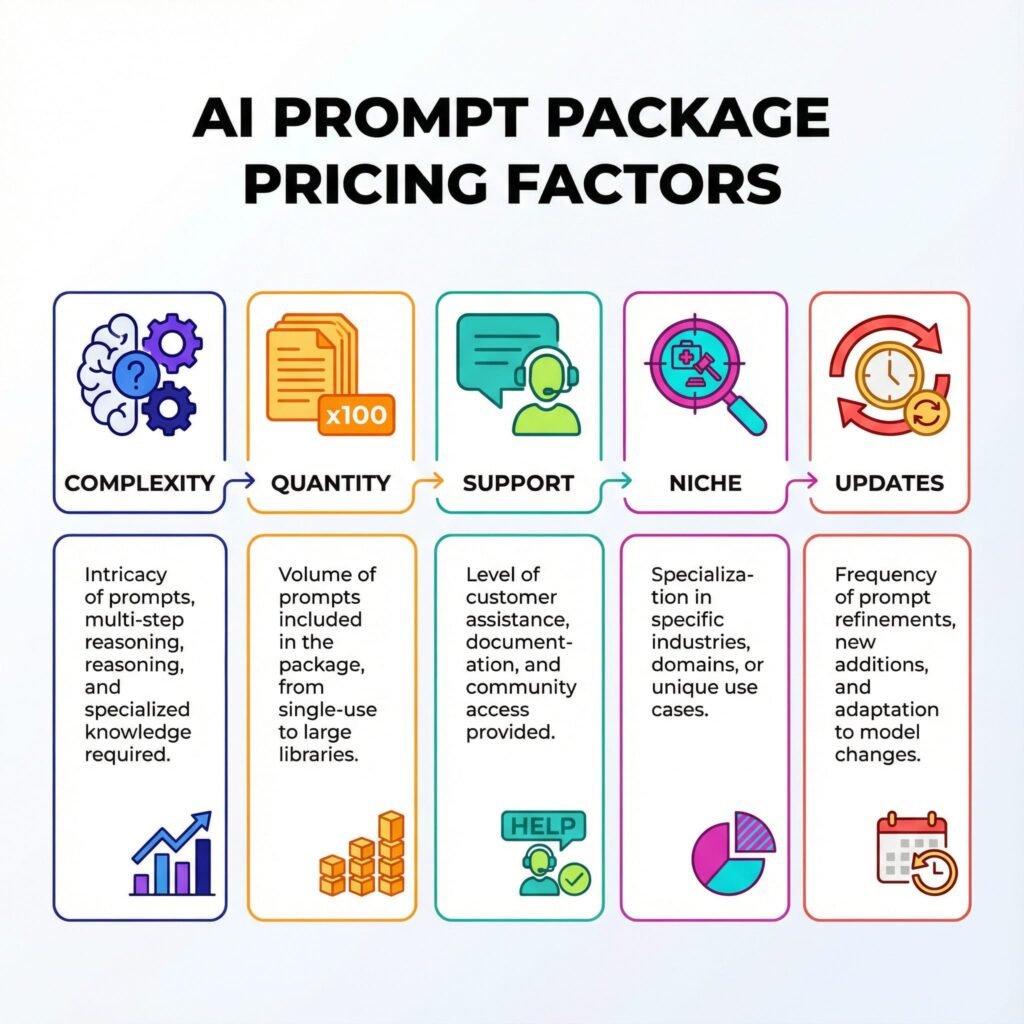
    Deconstructing the Price Tag: What Factors Influence AI Prompt Package Pricing?

    Now that we’ve covered why these packages are worth considering, let’s get down to the brass tacks: what makes one package cost $27 and another $297? Grasping these factors is crucial for making smart choices and finding budget AI prompts that genuinely deliver.

    1. Quantity: Just How Many Prompts Are We Talking About?
      The Obvious: More prompts usually mean a higher price. A package with 50 prompts will likely be cheaper than one boasting 500.
      The Catch: Don’t fall into the ‘more is better’ trap! Fifty highly effective, niche-specific prompts are infinitely more valuable than 500 generic, barely useful ones. Always prioritize quality over sheer volume. What’s the point of having a hundred prompts for obscure tasks you’ll never touch?
    2. Quality & Complexity: The Brainpower Behind the Prompts
      Simple vs. Sophisticated: Some prompts are straightforward (‘Write a tweet about X’). Others are multi-step, multi-persona, iterative prompts designed for complex tasks, like developing an entire marketing strategy or debugging tricky code. These sophisticated prompts take significant effort to craft and refine.
      Refinement & Testing: Has the creator clearly invested time in testing and refining these prompts across various AI models to ensure top-notch output? Prompts that consistently deliver excellent results come at a premium. This often includes specific instructions for you on how to adapt variables.
    3. Niche & Specialization: Generalist vs. Expert
      Broad Appeal: General content creation prompts (for blog posts, emails, social media) tend to be more accessible and sometimes lower priced due to their wider market appeal.
      Deep Dive: Highly specialized prompts for fields like medical writing, legal research, advanced coding, or specific marketing funnels often command higher prices. Why? Because they demand deep subject matter expertise from the creator, making them incredibly valuable to a smaller, more focused audience willing to pay for that precision.
    4. Support & Updates: The Gift That Keeps on Giving
      One-Time vs. Ongoing Value: Is it just a static download, or does the creator offer future updates as AI models evolve? Do you get access to a community forum or direct support if you have questions or run into issues?
      AI Evolution: AI is a rapidly moving target. Prompts that work brilliantly today might need tweaking tomorrow. Packages that include ongoing updates or a subscription model often justify a higher price because they promise continued relevance and value.
    5. Format & Delivery: Beyond a Plain Text File
      Basic: A simple PDF or text file containing prompts.
      Enhanced: Interactive templates (think Notion, Google Docs), video walkthroughs, detailed use-case examples, AI-powered tools that help you customize prompts, or even direct integration into specific platforms. The more robust the delivery mechanism and accompanying resources, the higher the perceived (and actual) value.
    6. Creator’s Expertise & Reputation: Who’s Behind the Magic?
      Proven Track Record: Is the creator a recognized expert in their field? Do they have a portfolio of successful projects or a strong reputation for understanding AI and its applications? Buying from a known, trusted entity often means you’re paying for reliability and a higher likelihood of quality.
      New Kid on the Block: Newer creators might offer lower prices to build their reputation. This can be a fantastic way to find budget AI prompts if you’re willing to take a slight chance.
    7. Licensing: Personal vs. Commercial Use
      Individual Use: Many packages are priced for personal or internal business use.
      Resale/Client Work: If you plan to use the AI-generated content for clients or to resell the output (for instance, as part of a service), some packages might require a higher-tier commercial license. Always double-check the terms!

    By weighing these factors, you can start to understand why an AI prompt marketplace comparison isn’t just about the number you see. It’s about what that number truly represents in terms of tangible and intangible value.

    The Great AI Prompt Marketplace Comparison: Navigating Your Options

    Okay, so you’ve got a handle on what drives pricing. Now, the big question: where do you even find these prompt packages, and what are the upsides and downsides of each type of marketplace? Let’s map out the landscape.

    1. Dedicated Prompt Marketplaces (like PromptBase, PromptHero, etc.)
      Pros:
      Tons of Variety: You’ll discover prompts for practically every AI model and every imaginable use case, from crafting marketing copy to generating unique images.
      User Reviews & Ratings: Many platforms let users review prompts, offering valuable social proof and insights into quality before you buy. This is a huge help when hunting for budget AI prompts – you can often unearth hidden gems.
      Competitive Pricing: The sheer volume of sellers often leads to competitive prices, which is great for your wallet.
      Cons:
      Quality Can Be a Mixed Bag: Just because there are many options doesn’t mean they’re all winners. You’ll need to do your homework, read reviews, and check out samples.
      Overwhelm is Real: The sheer number of choices can be daunting, making it tough to pinpoint exactly what you need.
      Less Direct Support: Often, you’re just buying a static file. Extensive guides or direct support might be limited unless the seller explicitly offers them.
    2. Individual Creators/Consultants (on platforms like Gumroad, personal websites, LinkedIn)
      Pros:
      Tailored & High Quality: These creators are often experts in a specific niche and pour their deep knowledge into their prompts. You might get more personalized, in-depth solutions.
      Direct Support & Community: Many individual creators offer direct access, private community groups, or even one-on-one coaching as part of their higher-tier packages.
      Unique Approaches: You’re often buying into a specific methodology or framework that could be truly innovative.
      Cons:
      Higher Cost: Because of the specialized nature and often smaller scale, these packages can be pricier.
      Less Variety: You’re limited to what that specific creator offers, so you might need to buy from multiple sources for different needs.
      Harder to Discover: You might need to actively seek them out rather than just stumbling upon them in a marketplace.
    3. SaaS Platforms with Built-in Prompts/Templates (e.g., Jasper.ai, Copy.ai, Writesonic)
      Pros:
      Seamless Integration: The prompts are built right into the AI writing tool, making the workflow incredibly smooth and intuitive.
      Optimized for the Platform: These prompts are usually fine-tuned to work perfectly with the specific AI model the platform uses.
      Comprehensive Suites: These platforms often provide a wide array of tools beyond just prompts, offering an all-in-one solution.
      Cons:
      Vendor Lock-in: You’re essentially tied to that platform’s ecosystem. If you decide to switch AI tools, your purchased prompts might not be transferable.
      Subscription Model: Typically, these involve monthly or annual subscriptions, which can add up, even if they include great budget AI prompts within their plans.
      Limited Customization: While they offer variety, you might have less flexibility to customize or engineer prompts yourself compared to a standalone package.
    4. Subscription Services for Prompts (e.g., PromptVine, PromptLayer, specific creator’s Patreon/Substack)
      Pros:
      Ongoing Access & Updates: This is their main selling point. You get continuous access to new prompts as they’re developed and updated.
      Community & Learning: Often includes access to a community, educational content, and support.
      Predictable Cost: A set monthly fee helps with budgeting.
      Cons:
      Recurring Cost: If you don’t use it consistently, that recurring fee can feel like a waste.
      Potential for Unused Prompts: You might be paying for a huge library of prompts you only occasionally dip into.
      Quality Can Still Vary: Even with subscriptions, the quality and relevance of new prompts can fluctuate.
    5. Free Resources (Reddit, GitHub, AI Community Forums)
      Pros:
      Zero Cost: You can’t beat free, especially when you’re searching for budget AI prompts!
      Community Wisdom: You’ll often find innovative ideas and prompts shared by passionate users.
      Great for Experimentation: A fantastic place to start if you’re just getting your feet wet.
      Cons:
      Highly Inconsistent Quality: From brilliant to utterly useless, it’s a total mixed bag.
      Lack of Organization & Support: You’ll spend a lot of time sifting through unorganized lists, and there’s no guarantee of support if a prompt doesn’t work.
      Outdated Information: Prompts can become less effective as AI models evolve, and free resources aren’t always updated.

    Doing an AI prompt marketplace comparison is vital because it helps you match your budget with the kind of value and experience you’re truly looking for. Are you after a specific, one-time fix, or do you need ongoing support and a constantly updated library?

    Your AI Prompt Pricing Guide: Making Informed Decisions & Getting the Best Value

    Alright, time for the practical stuff! How do you take all this information and actually make a smart purchase? Here’s your hands-on AI prompt pricing guide to help you cut through the confusion and find the perfect package for you.

    Step 1: Pinpoint Your Needs & Goals – What Do You Reall Want AI For?

    Before you even glance at a price tag, hit pause. What specific problem are you trying to solve with AI?
    Content Creation: Are you generating blog posts, social media captions, email sequences, or video scripts? How many, and how often?
    Marketing: Are you developing ad copy, crafting buyer personas, or brainstorming campaign ideas?
    Coding: Need help debugging, generating code snippets, or translating languages?
    Design: Are you creating image prompts or brainstorming visual concepts?
    Research: Summarizing articles, extracting key information, or generating questions?
    Business Operations: Drafting proposals, writing job descriptions, or creating internal communications?

    Be super specific. For example: ‘I need AI to help me write better blog posts for my tech review site, specifically focusing on SEO-optimized titles and outlines.’ This clarity will drastically narrow down your search.

    Step 2: Figure Out Your Budget – What Are You Realistically Willing to Spend?

    This might seem obvious, but it’s often overlooked in the excitement.
    Low Budget (under $50): Focus on individual, niche-specific prompt packs from marketplaces or smaller creators. Look for introductory offers. Free resources are your friend here, but understand their limitations. You’ll be hunting for budget AI prompts with a keen eye for quality.
    Mid-Range Budget ($50-$200): Here, you can start exploring more comprehensive packages from individual creators or smaller bundles from reputable marketplaces. You might even find entry-level subscription services.
    Higher Budget ($200+): This opens up premium bundles, advanced subscription services with extensive support, or even bespoke prompt engineering services from consultants.

    Remember, it’s an investment. Think about the return on investment (ROI). If a $100 package saves you 10 hours of work a month (at, say, $50/hour), that’s a $500 return. It’s not just an expense; it’s a productivity booster.

    Step 3: Prioritize Quality Over Quantity – Don’t Fall for the ‘More Prompts’ Trap

    Seriously, ten incredibly effective, well-documented prompts will serve you far better than 500 generic, poorly-explained ones.
    Read Descriptions Carefully: Does the seller clearly explain how the prompts work? What kind of output can you realistically expect?
    Look for Examples: Are there screenshots or examples of the AI’s output using these prompts? This is a huge indicator of quality.
    Check for Structure & Variables: Good prompts aren’t just one-liners. They often include placeholders for you to customize (like [TOPIC], [AUDIENCE], [TONE]). This shows careful thought and engineering.

    Step 4: Understand the ‘Package’ – What’s Really Included?

    Look beyond just the list of prompts.
    Are there accompanying guides or tutorials? These are invaluable for getting the most out of your prompts.
    Are there templates or frameworks? (For example, a ‘Blog Post Framework’ that includes multiple prompts for different sections).
    Is there community access or support? Getting help when you’re stuck or sharing insights with others can be incredibly valuable.
    What about updates? In the fast-moving world of AI, this can make a huge difference to long-term value.

    Step 5: Consider Long-Term Value – Thinking About Scalability and Future-Proofing?

    Scalability: If your business grows, will these prompts still be useful, or will you quickly outgrow them?
    Updates: Does the creator commit to updating the prompts as AI models change? This is especially important for more complex prompts.
    Learning: Does the package help you learn prompt engineering, or just hand you prompts? The former offers far greater long-term value.

    Step 6: Trial & Error (Where Possible) – Test Before You Commit

    Free Samples: Many creators offer a few free prompts as a taste. Take advantage of these!
    Money-Back Guarantees: Look for sellers who offer a refund if you’re not satisfied. It shows confidence in their product.
    Start Small: Instead of buying a massive, expensive bundle, maybe try a smaller, cheaper pack from a creator first to gauge their quality.

    Step 7: Check Creator Credibility – Who Made These Prompts?

    A quick search on the creator’s background, their online presence, testimonials, or even their activity in relevant communities can tell you a lot. Are they known experts in their field? Do they have a good reputation? This step can save you from low-quality purchases, especially when exploring less-known sources for budget AI prompts.

    Budget AI Prompts: Smart Strategies for Every Wallet

    Even if your budget is stretched thin, you can absolutely still leverage AI prompts effectively. It just means being a bit more strategic.

    1. Start Small, Scale Up: Instead of splurging on a huge, expensive bundle, pinpoint your most critical AI need right now. Find a small, focused prompt pack that addresses just that. For instance, if you primarily need social media captions, grab a dedicated social media prompt pack. Once you see the value, you can invest more.
    2. Use Free Trials and Samples Wisely: Many platforms and individual creators offer free samples or trials. Don’t let them go to waste! Test their effectiveness, understand their style, and see if they genuinely solve your problem before committing.
    3. Community Sourcing (with a Healthy Dose of Caution): Platforms like Reddit (r/ChatGPT, r/PromptEngineering), various Discord channels, and online forums are often goldmines for shared prompts.
      Pros: Free, diverse ideas, often innovative.
      Cons: Quality is incredibly variable, often lacks context or instructions, and can quickly become outdated. Use these for inspiration and a starting point, but don’t rely on them for mission-critical tasks without thoroughly checking them out.
    4. DIY Customization: Become Your Own Prompt Engineer (Gradually): Even with budget AI prompts, make an effort to tweak and adapt them. Take a basic prompt you find and experiment with adding variables, changing the tone, or including specific instructions. Understanding why certain prompt elements work helps you get more out of any prompt, whether it’s free or paid.
    5. Keep an Eye Out for Bundle Deals and Sales: Many creators and marketplaces run seasonal sales or offer bundle deals that can significantly reduce the cost per prompt. Sign up for newsletters from creators you like to stay in the loop.

    The ROI of Smart Prompt Investment: It’s More Than Just Money

    Ultimately, investing in the right AI prompt package isn’t just about the money you spend; it’s about the incredible return you get.

    Time Saved: Every hour you save generating content, ideas, or code is an hour you can pour into higher-level strategy, client work, or simply enjoying your life.
    Improved Output Quality: Better prompts lead to better AI output, which translates to more engaging content, more effective marketing, and smoother operations. This can directly boost your brand’s reputation, generate more leads, and ultimately, improve your bottom line.
    Faster Learning Curve: You’ll become more skilled at using AI tools, making you more competitive and adaptable in our rapidly changing digital world.
    Less Frustration, More Creativity: No more staring at a blank screen or battling with the AI. Good prompts reduce friction, free up mental energy, and let you focus on the truly creative aspects of your work.

    Wrapping It Up: Your Path to Prompt Package Clarity

    Navigating the world of AI prompt package pricing can certainly feel like a maze, but now, armed with this guide, you’re ready to make truly informed decisions. Remember to clearly define your needs, carefully examine what’s included, prioritize quality above all else, and always think about the long-term return on your investment.

    The right prompt package isn’t merely a collection of words; it’s a powerful tool that can revolutionize your workflow, elevate your output, and give you a significant advantage in today’s fast-paced digital world. So, go forth and prompt wisely!

    Ready to supercharge your content creation with AI?

    Email me and request my free PDF “110 ChatGPT Content Creation Prompts” with Guide. It’s packed with proven prompts to help you generate ideas, craft compelling copy, and streamline your workflow – absolutely free!

    FAQ Section
    What factors determine the price of an AI prompt package?

    The price of an AI prompt package is influenced by factors like quantity, complexity, niche specificity, level of customization, ongoing support, updates, and the creator’s reputation. Unique, high-quality, and well-tested prompts for specialized applications often command higher prices.

    How can I assess the ‘value’ of an AI prompt package before purchasing?

    To assess value, consider its relevance to your needs, the clarity and effectiveness of its output, package comprehensiveness (variations, usage guides), provided support, community access, and how much time/effort it saves compared to creating prompts yourself. Look for testimonials and case studies.

    Is it better to buy a one-time AI prompt package or a subscription service?

    A one-time purchase is ideal for specific project needs without frequent updates. A subscription suits continuous access to new prompts, updates, and broader libraries, especially for ongoing AI-driven work or if you require consistent fresh inputs and support.

    What are common red flags to watch out for when buying AI prompt packages?

    Beware of vague descriptions, generic prompts, inflated promises, lack of examples, no clear support channels, or suspiciously low prices that might indicate low quality. Always verify seller credibility and check reviews.

    Can I customize purchased AI prompts, and does that affect their value?

    Many AI prompts are designed for customization. The ability to easily adapt prompts to your specific brand, audience, or use case significantly increases their value, allowing for greater flexibility and tailored output. Packages with customization guidance are highly beneficial.

  • From Zero to AI Hero: Your Straightforward Guide for Anyone, Not Just Tech Pros

    From Zero to AI Hero: Your Straightforward Guide for Anyone, Not Just Tech Pros

    Let’s be honest. The world of Artificial Intelligence (AI) can feel like a high-speed train whizzing past your station, leaving you wondering if you’ve completely missed your stop. Every day, it seems there’s a new AI tool, a new breakthrough, another expert proclaiming a new era. And if you’re not steeped in code or a tech-savvy wizard, it’s incredibly easy to feel left behind, a bit overwhelmed, or even intimidated.

    You’re definitely not alone if the sheer volume of information feels like a foreign language. Maybe you’re a small business owner seeing competitors experiment with AI. Or perhaps you’re just curious about how this “AI thing” could simplify your daily life. Whatever your reason, you’ve absolutely landed in the right place.

    This isn’t a deep dive into neural networks or a lecture on complex machine learning algorithms. Oh no. This is your beginner’s guide to AI, built specifically for you – the non-techie, the curious explorer, the person who simply wants to understand and use AI’s power without needing a computer science degree. We’re going to make AI clear, break it down into simple, actionable steps, and show you the incredible practical ways you can already use it.

    Think of this as your friendly, human-voiced roadmap from “What even is AI?” to “Hey, I can actually use this!” Ready to become an AI hero in your own right? Let’s jump in.

    AI Isn’t Magic – They’re Just Really Smart Tools

    Before we get to the “how-to,” let’s clear the air: What is AI, really? Forget the Hollywood blockbusters of sentient robots taking over the world (at least for now!). At its core, artificial intelligence simply means teaching computers to do things that usually require human smarts. Think of it less as a super-brain and more as your super-assistant.

    Imagine you had an intern who could:
    Read and understand millions of documents in seconds.
    Spot patterns in huge amounts of data that would take you years to find.
    Generate creative text, images, or even music based on your instructions.
    Learn from its mistakes and get better over time.

    That’s AI. It’s a collection of incredibly powerful software tools designed to automate tasks, solve tricky problems, and make predictions using data. It’s not about replacing human ingenuity; it’s about boosting it. It’s about giving you superpowers for tasks that are tedious, repetitive, or require processing information at a scale no human ever could.

    We actually encounter AI every single day without even realizing it:
    When Netflix suggests your next binge-worthy show.
    When Spotify curates a playlist just for your mood.
    When your phone’s GPS finds the fastest route to your destination.
    When your email filters out spam.
    When your smart speaker answers your questions.

    These aren’t futuristic concepts; they’re woven into our modern lives. The “new” AI we’re hearing so much about, especially “generative AI” like ChatGPT, is simply the next evolution of these smart tools, capable of much more creative and complex tasks.

    Why Should You Care? The Practical Power of AI

    “Okay, I get it,” you might be thinking. “It’s smart software. But why does that matter to me? I’m not a developer.”

    And that’s precisely the point! You don’t need to be. The beauty of today’s AI is that it’s becoming incredibly user-friendly, putting powerful capabilities directly into the hands of everyday people and business owners.

    Here’s why you should absolutely care, and why getting comfortable with AI isn’t just a tech trend, but a vital skill for the future:

    For Individuals:
    Boost Productivity: Imagine drafting emails, summarizing long articles, or even planning your next vacation itinerary in minutes instead of hours.
    Enhance Creativity: Stuck on a writing project? Need ideas for a gift? AI can be your brainstorm buddy, sparking new thoughts and directions.
    Personalized Learning: AI can help you learn new skills, explain complex topics in simple terms, or even practice a new language.
    Simplify Daily Tasks: From managing your calendar to organizing your notes, AI can act as your digital assistant.

    group of non-technical professionals, including a middle-aged small business owner, a young artist, and an experienced teacher, from various ethnic backgrounds, are actively collaborating and interacting with user-friendly AI tools. They are gathered in a bright, modern co-working space or a relaxed home office, exhibiting genuine enthusiasm and engaged expressions as they use sleek laptops and tablets. Photorealistic, ultra-detailed, 8k, award-winning editorial photography, cinematic lighting. Soft, warm, diffused natural light from large windows, creating an inviting and optimistic ambiance.

    For Business Owners & Professionals:
    Supercharge Content Creation: Generate blog post ideas, draft social media captions, write compelling sales copy, or even create unique images for your marketing. This is a game-changer for anyone who creates content!
    Automate Tedious Tasks: Data entry, customer service FAQs, email sorting – many repetitive tasks can be streamlined, freeing you and your team for more strategic work.
    Gain Insights: Analyze customer feedback, identify market trends, or personalize marketing messages with AI-driven insights.
    Improve Customer Service: AI-powered chatbots can handle routine inquiries 24/7, improving response times and freeing up human agents for more complex issues.
    Competitive Edge: Early adopters of AI are already seeing significant gains in efficiency, innovation, and customer engagement. You definitely don’t want to be left behind.

    In short, AI is no longer just for the tech giants. It’s a universal toolkit that can empower you to work smarter, create faster, and achieve more, regardless of your background.

    Your Journey from Zero to AI Hero: Actionable Steps

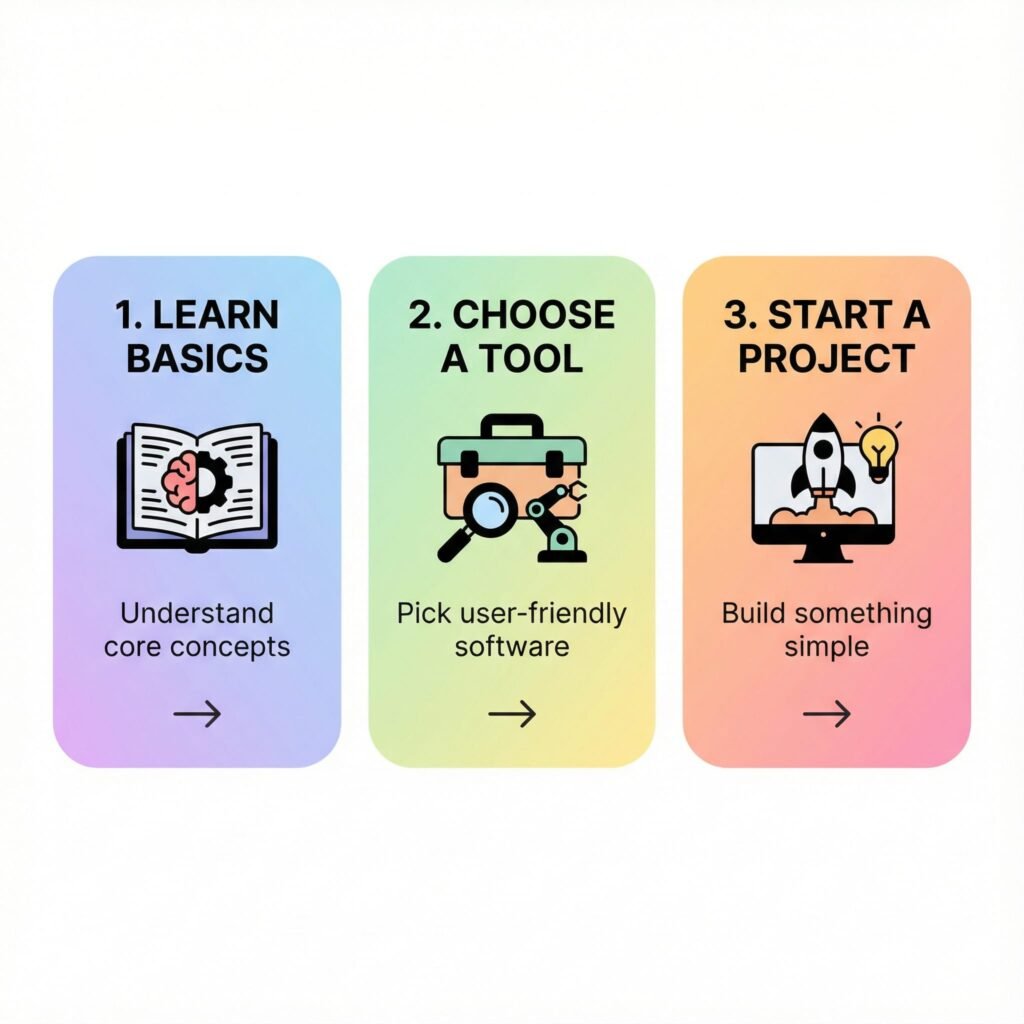
    Alright, enough talk! You’re ready to roll up your sleeves and get started. Here are your practical, actionable steps to go from zero to AI hero. Remember, the goal isn’t perfection; it’s exploration and experimentation.

    Step 1: Start Small, Start Simple – Explore Everyday AI

    Don’t try to conquer the entire AI landscape at once. Pick one easy-to-use tool and just play with it. Think of it like dipping your toe in the water.

    Your First Task: Choose one of these and spend 15-30 minutes interacting with it.
    ChatGPT, Google Bard, or Claude: These are conversational AI platforms. You type in questions or prompts, and they respond. They’re incredibly versatile!
    Grammarly: If you write anything (emails, reports, social media posts), Grammarly uses AI to improve your writing, check grammar, and even suggest tone adjustments.
    Canva’s Magic Studio: If you create visuals, explore Canva’s AI features for generating images, writing copy, or resizing designs.
    Spotify/Netflix: Pay attention to how they recommend content to you. Notice how personalized it feels.

    Pro Tip: For ChatGPT/Bard, try asking it:
    “Explain [complex topic] to me like I’m 5 years old.”
    “Give me 5 ideas for [dinner/a blog post/a birthday gift for a friend].”
    “Write a short, friendly email asking for a meeting next week.”

    The goal here is simply to get comfortable with the interface and see what these tools can do. It’s about making the interaction less mysterious.

    Step 2: Get Hands-On with Generative AI (Your Content Creator’s Best Friend)

    This is where the real fun begins, especially if you’re a business owner, a marketer, or anyone who deals with content. Generative AI, like ChatGPT, can create new content based on your instructions. It’s one of the most powerful practical AI applications for non-techies.

    Your Next Task: Use a conversational AI (like ChatGPT, Claude, or Bard) for a specific content task.
    Brainstorming: “Give me 10 catchy headlines for a blog post about [your topic].”
    Drafting: “Write a short social media post for Instagram announcing [your product/service] with 3 relevant hashtags.”
    Summarizing: Copy-paste a long article and ask, “Summarize this article in 3 bullet points.”
    Rewriting: “Rewrite this paragraph to be more engaging and conversational: [paste paragraph].”
    Idea Generation: “What are 5 common questions people ask about [your industry/product]?”

    Pro Tip: The Power of Prompts: The key to getting good output from generative AI is good prompts. Think of it like giving instructions to a very smart, but literal, intern. Be clear, specific, and provide context.

    Bad Prompt: “Write about dogs.” (Too vague!)
    Good Prompt: “Write a 150-word blog paragraph for a pet owner’s blog about the benefits of adopting an older dog, focusing on their calm demeanor and established personalities. Use a warm, encouraging tone.” (Specific, provides context, sets length and tone.)

    Experiment with different prompts. You’ll quickly discover what works best for your needs.

    Step 3: Understand the “Why” and “How” (Without the Code)

    You don’t need to know how a car engine works to drive one, but a basic understanding of traffic laws and how to fill the gas tank is crucial. The same goes for AI.

    Your Learning Task: Consume AI content that simplifies concepts.
    Read Explainer Articles: Look for articles titled “AI for beginners,” “What is machine learning?” or “How does ChatGPT work?” that avoid technical jargon.
    Watch YouTube Videos: Search for “AI explained simply” or “AI for non-techies.” Many creators do an excellent job of using analogies and visuals to make complex ideas digestible.
    Follow Accessible Voices: Find AI educators or content creators on LinkedIn, X (Twitter), or Instagram who genuinely simplify AI for a general audience. They often share practical tips and insights.

    Pro Tip: Focus on understanding concepts like:
    Data is Fuel: AI learns from data. More good data generally means better AI.
    Patterns: AI is brilliant at finding patterns in data.
    Iteration: AI models are constantly being refined and improved.
    Bias: If the data AI learns from is biased, the AI’s output can also be biased. (More on this later).

    This step helps you build a foundational understanding, making you a more informed and effective user of AI tools.

    Step 4: Identify Your Own AI Opportunities

    Now that you’ve played with some tools and have a basic grasp of AI’s capabilities, it’s time to personalize your AI journey.
    Your Brainstorming Task: Think about where AI could genuinely help you in your daily life or business.
    Personal: Where do you feel bogged down? Email management? Research for a hobby? Planning meals? Writing thank-you notes?
    Professional/Business:** What are your biggest time sinks? Content creation? Customer inquiries? Market research? Brainstorming new product ideas? Drafting internal communications? Analyzing sales data?

    Pro Tip: Grab a pen and paper (or open a document). Create two columns: “Tasks I dislike/take too long” and “How AI might help.” Don’t censor yourself – even wild ideas are welcome.

    Example:
    “Writing LinkedIn posts” -> “AI could draft initial posts for me.”
    “Summarizing long client reports” -> “AI could extract key points.”
    “Coming up with blog ideas” -> “AI could brainstorm topics relevant to my niche.”

    This exercise shifts AI from an abstract concept to a tangible solution for your specific challenges.

    Step 5: Experiment and Iterate – Be a Curious Explorer

    The AI landscape is changing rapidly, and the best way to keep up (without getting overwhelmed) is to maintain a spirit of curiosity and experimentation.

    Your “Try It Out” Task: Pick one AI opportunity from Step 4 and try to solve it with an AI tool.
    Try a New Tool: If you’ve only used ChatGPT, try Google Bard or Claude. Each has slightly different strengths. Explore AI image generators like Midjourney or DALL-E for visual content.
    Refine Your Prompts: Did the AI’s output not quite hit the mark? Don’t give up! Tweak your prompt. Add more detail, specify a tone, request a different format.
    Share and Learn: Talk to friends, colleagues, or online communities about your AI experiments. What worked for them? What challenges did they face? Learning from others is invaluable.

    Pro Tip: Treat AI like a creative partner, not a magic bullet. It’s a tool to kickstart ideas, draft content, and automate tasks, but your human touch, critical thinking, and editing skills are always essential. The more you experiment, the better you’ll become at giving AI the right instructions and leveraging it effectively.

    Step 6: Stay Informed, But Don’t Get Overwhelmed

    The pace of AI development can be dizzying. Your goal isn’t to know everything, but to stay aware of significant shifts and new tools that might benefit you.

    Your “Stay Current” Task: Choose one or two reliable, non-technical sources for AI news.
    Subscribe to a Curated Newsletter: Many newsletters summarize key AI news and breakthroughs in an accessible way. Look for ones specifically for business owners or general interest, not just developers.
    Follow Reputable Publications: Major news outlets often have tech sections that cover AI’s impact on society and industry without getting too technical.
    Attend a Beginner-Friendly Webinar: Many platforms offer free introductory webinars on AI tools or concepts.

    Pro Tip: Set a realistic time limit. Maybe 15 minutes once a week to skim a newsletter or watch a short video. Avoid getting sucked into the hype cycle. Focus on what’s genuinely useful and relevant to your journey.

    Common Pitfalls to Avoid (And How to Navigate Them)

    As you embark on your AI journey, be mindful of a few common traps:

    1. Over-Reliance Without Critical Thinking: AI is a tool, not a guru. Always fact-check information, review generated content for accuracy and tone, and apply your own judgment. AI can “hallucinate” or make things up.
    2. Ignoring Ethical Considerations: Be aware of data privacy. Don’t input sensitive personal or business information into public AI models unless you understand their data policies. Also, remember that AI can reflect biases present in the data it was trained on.
    3. Expecting Perfection: AI isn’t perfect. Its first draft might be clunky, or its answers might be slightly off. It requires your guidance and refinement. Embrace the iterative process.
    4. Fear of the Unknown: It’s natural to feel a bit apprehensive about new technology. But fear can paralyze. Remember, you’re learning to use AI, not build it. Approach it with curiosity, not dread.

    Your AI Hero Journey Begins Now

    You’ve made it this far, and that’s already a huge step. You’ve moved from potentially feeling overwhelmed to understanding that AI is a powerful, accessible set of tools designed to help you. You’ve seen the practical ways AI can fit into your life and work, and you have a clear, beginner’s guide with actionable steps.

    The future isn’t about if you’ll use AI, but how you’ll use it. By taking these simple steps, by experimenting, by maintaining a curious mindset, you’re not just keeping up – you’re getting ahead. You’re building a new superpower, and trust me, it’s going to make a significant difference.

    So, go on. Pick one step. Try one tool. Ask one question. Your journey from zero to AI hero starts right now.

    Ready to dive deeper into practical AI content creation?

    Email me and request a copy of my free PDF, “110 ChatGPT Content Prompts Ultimate Creator’s Toolkit.” It’s packed with ready-to-use prompts to kickstart your content creation with AI, making your journey to AI hero even smoother!

    FAQ Section
    Q. Do I need a tech background or coding skills to understand and use AI?

    A. Absolutely not! This guide is specifically designed for non-techies. We’ll focus on practical AI applications and tools that require no coding or advanced technical knowledge.

    Q. What kind of AI tools can a beginner use right now?

    A. Many user-friendly AI tools are available today, such as AI writing assistants, image generators, advanced search engines, and personal productivity apps. We’ll introduce you to some of the easiest to get started with.

    Q. How can AI practically help me in my daily life or small business?

    A. AI can automate repetitive tasks, help generate creative content, analyze data for better decision-making, personalize customer experiences, and much more. This article will provide concrete examples for everyday situations and small business needs.

    Q. Is AI safe and ethical for personal use?

    A. While AI offers incredible benefits, understanding its ethical implications and data privacy is crucial. We’ll touch upon key considerations to ensure you use AI responsibly and safely.

  • The Alchemy of Influence: 10 Essential Facts Unlocking Superior Prompt Engineering

    The Alchemy of Influence: 10 Essential Facts Unlocking Superior Prompt Engineering

    Intro:

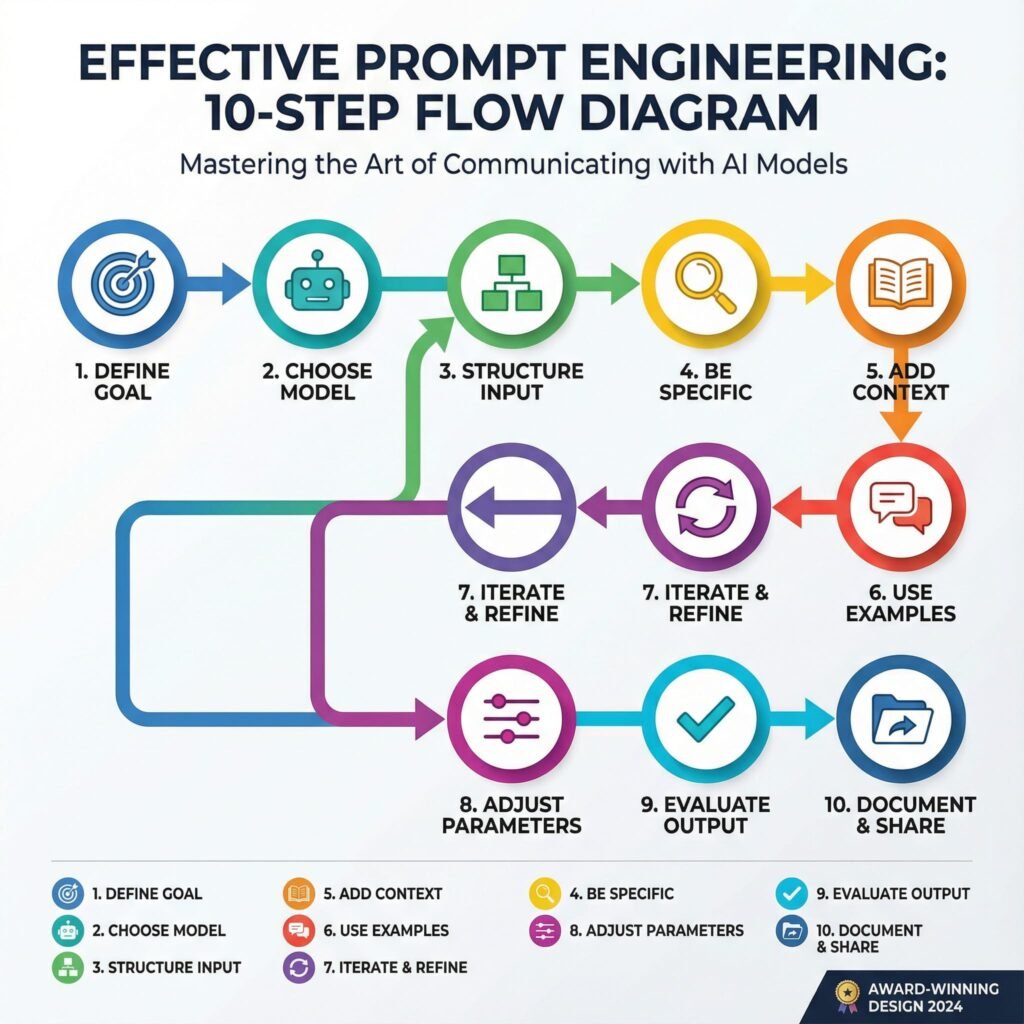
    In the world of AI, prompt engineering stands as a key skill that turns simple words into powerful results. This post reveals 10 essential facts on the alchemy of influence, showing you how to craft prompts that guide AI with precision and boost your outcomes. You’ll gain clear steps to master this craft, from basic tweaks to advanced strategies that deliver real impact.

    Imagine typing a few words into an AI tool and watching it spit out gold. That’s the thrill of good prompt engineering. It turns simple chats with large language models into powerful creations. You control the output with care. Small tweaks lead to big wins in quality and speed.

    These ten facts show how prompts shape AI results. They go beyond basic tips. Master them, and you’ll craft prompts like a pro. Let’s dive in. Each one builds your skill in prompt optimization.

    Fact 1: The Primacy of the First Word
    Setting the Contextual Anchor
    The opening word in your prompt grabs the AI’s attention right away. It sets the tone and direction. Think of it as the spark that lights the whole fire. Strong starts, like action verbs such as “create” or “analyze,” guide the model into the right mindset from the jump.

    Models process text token by token. Early words lock in the path. A fuzzy start, like “um, maybe write about,” leads to weak results. Pick bold openers to steer clear of that mess.

    Actionable Tip: Pre-Pacing for Precision
    Start every prompt with what you want the output to look like. Say “List three bullet points on…” instead of jumping straight to the topic. This paces the AI. It knows the format before the details hit.

    Try it next time. You’ll see cleaner responses. No more sifting through junk to find the good stuff.

    Fact 2: The Indispensable Role of Constraints
    Defining the Guardrails: Length, Tone, and Persona
    Loose prompts wander like kids in a candy store. They grab too much and lose focus. Set rules on length, like “in 200 words,” or tone, such as “in a friendly voice.” Even pick a persona, like “as a history teacher.”

    This keeps things tight. AI stays on track. You get what you need without extra fluff.

    Case Study Snapshot: Reducing Hallucinations Through Scoping
    Hallucinations happen when AI makes up facts. A vague ask, “Tell me about ancient Rome,” might invent wild stories. But try “Explain ancient Rome’s fall using only events from 400-500 AD.” Now it’s grounded.

    Before: Wild guesses. After: Solid facts. Constraints cut errors by up to 70% in tests with tools like GPT. Your prompts turn risky guesses into reliable info.

    Fact 3: The Implicit Weight of Instruction Placement
    Recency Bias vs. Salience: Where Critical Instructions Belong
    AI models remember recent words more than early ones. But key rules shine brightest up front. Put must-follow orders at the start for impact. Save details for the end if they build on the base.

    It’s a balance. Front-load for clarity in short prompts. End-place for flow in longer ones. Test both to see what fits your style.

    Leveraging Delimiters for Command Separation
    Use marks to split parts of your prompt. Triple quotes hold examples. Tags like keep data separate from orders.

    This avoids mix-ups. AI treats sections as distinct. Your instructions land clear and strong.

    Fact 4: The Leverage of Zero-Shot, One-Shot, and Few-Shot Learning
    Moving Beyond Zero: The Efficacy of Demonstrations
    Zero-shot means no examples. Just ask, and hope. One-shot gives one sample. Few-shot shares a few. Each step boosts accuracy, especially for tricky jobs like writing code or poems.

    Zero works for basics. But add a demo, and outputs match your vision better. It’s like showing a map instead of guessing the route.

    Data Richness in Few-Shot Examples
    Pick examples that show the range. One for a simple case, another for tough spots. This teaches the AI patterns fully.

    Quality beats quantity. Bad samples confuse. Good ones guide to spot-on results every time.

    Fact 5: Specificity Trumps Verbosity (Usually)
    Quantifying Vagueness: Identifying Ambiguous Terms
    Words like “nice” or “detailed” leave room for guesswork. Swap them for clear measures, such as “use simple sentences under 15 words each.” This pins down the goal.

    Vague prompts waste time. Specific ones deliver fast. You avoid rewrites and frustration.

    The Necessity of Negative Constraints (What Not To Do)
    Tell the AI what to skip. “Don’t add opinions” or “No lists here.” These blocks shape the flow.

    It’s a quick fix. Outputs stay pure. Think of it as pruning a bush for better growth.

    Fact 6: Iteration is the Core Competency of Prompt Optimization
    The Feedback Loop: Analyzing Failures Systematically
    Prompts rarely nail it first try. When it flops, check why. Did the tone miss? Was the structure off?

    Treat it like science. Tweak one part. Run again. Track what changes help. This builds your edge over time.

    Prompt Chaining and Decomposition for Complex Workflows
    Big tasks overwhelm. Break them down. First prompt outlines ideas. Second refines them.

    Chain outputs as inputs. It handles depth better than one giant ask. You get layered, sharp results.

    Fact 7: Role-Playing Boosts Creativity and Accuracy
    Stepping into Shoes: Why Personas Work Wonders
    Assign the AI a role, like “Act as a chef.” It shifts the style to match. Outputs feel alive and on-point.

    This taps hidden strengths in models. A plain ask gets dry facts. Role-play adds flavor and focus.

    Tailoring Roles for Task Fit
    Match the persona to your need. Detective for mysteries. Expert for advice. Test roles to find the sweet spot.

    Results jump in relevance. You pull more from the AI than before.

    Fact 8: Temperature Controls the Spark of Innovation
    Dialing Creativity: Low vs. High Settings
    Temperature sets randomness. Low means safe, steady replies. High brings wild ideas.

    For facts, go low. For stories, crank it up. It shapes the vibe just right.

    Balancing Risk and Reward
    Start at 0.7. Adjust based on output. Too bland? Raise it. Too crazy? Lower.

    This fine-tune keeps things fresh without chaos.

    Fact 9: Cultural Nuances Shape Global Prompts
    Mind the Context: Avoiding Bias Traps
    AI learns from diverse data. But prompts can stir old biases if not careful. Add “from a neutral view” to even it out.

    This ensures fair play. Outputs respect all angles.

    Adapting for Audiences
    Tweak for regions. US style? Direct. Asian? Polite layers.

    Your prompts connect wider. They build trust across lines.

    Fact 10: Tools and Testing Accelerate Mastery
    Beyond Manual Tweaks: Prompt Platforms
    Use apps like PromptBase for templates. They speed learning.

    Test in real time. See what sticks.

    Building a Prompt Library
    Save winners. Mix and match. Over time, your collection grows strong.

    This habit turns practice into power.

    Conclusion: Mastering the Interface Between Human Intent and Machine Logic
    Prompt engineering bridges your thoughts and AI smarts. These ten facts—from first words to tools—give you the keys. Small shifts, like constraints or examples, unlock better results every day.

    FAQ Section

    Q. What is prompt engineering and why is it important for AI users?

    A. Prompt engineering is the art of crafting precise instructions for AI models to achieve desired outputs. It’s crucial because well-engineered prompts enhance AI accuracy, relevance, and creativity, unlocking its full potential.

    Q. How can I improve my prompt engineering skills quickly?

    A. To quickly improve, focus on clarity, specificity, context, and iterative refinement. Experiment with different phrasing, add examples, define roles for the AI, and continuously test and adjust your prompts.

    Q. Are there any common mistakes to avoid in prompt engineering?

    A. Common mistakes include being too vague, not providing enough context, assuming the AI understands implicit meanings, and failing to iterate or refine prompts. Avoid lengthy, unstructured prompts and always test your assumptions.

    The prompt is your wand. Wave it with these tips, and watch magic happen. Start testing now. Refine as you go. You’ll craft AI interactions that wow. What’s your next prompt? Try one fact today and see the difference.

  • 12 Free Alternatives to Paid AI Prompt Packages Your 2025 Guide

    12 Free Alternatives to Paid AI Prompt Packages Your 2025 Guide

    Discover free AI prompt libraries, AI tools with built-in templates

    Great prompts turn tools like ChatGPT into sharper, faster assistants. With the right prompt, you get clearer drafts, tighter code, and better decisions in less time. That win starts before you ever type a word.

    Prompt packages are simple. They are ready-made collections of prompts for common tasks, like blog outlines, product descriptions, cold emails, SQL fixes, or UX copy. You copy, paste, adjust, and move on. They save time and reduce guesswork.

    Paid prompt packs have exploded in the last year, but you do not need to spend to get strong results. As of October 2025, there are free options that match or beat many paid bundles. Some even include up-to-date research, coding support, or long-context writing, all at no cost.

    This guide highlights 12 free alternatives you can use today. Expect options for research and citations, long-form writing, coding help, and task automation. You will see standouts like Claude, Perplexity, Google Gemini, DeepSeek, and more, each with practical use cases. Pick the right mix and you will save money while boosting output.

    Here is the plan. You will learn where free prompt libraries live, which AI tools include built-in prompt templates, and how to adapt them to your voice or codebase. You will also get a quick way to test prompts so you keep only what works. Then you can ship faster, spend less, and keep your edge.

    Why Choose Free Alternatives to Paid Prompt Packages

    Prompt packages bundle tested inputs for writing, coding, research, and images. They reduce trial and error and help you get strong outputs fast. Many paid packs charge a monthly fee, often 10 to 50 dollars, which adds up over a year. Free options give you similar gains without the bill and with fewer limits on how you work.

    Save Money Without Losing Quality

    Free prompt libraries and templates often match the utility of paid sets. You keep cash for tools that truly need a subscription, like premium data sources or model access.

    • Lower risk: Try multiple styles before you commit to a workflow.
    • Faster iteration: Mix and match prompts across tasks without worrying about quotas.
    • Plenty of choice: Roundups of the best AI prompt generators in 2025 surface free plans that cover most needs.

    Community Quality and Constant Updates

    Free alternatives thrive on active communities. Contributors test, refine, and share improvements. You benefit from a living library that adapts to new models and use cases.

    • Real-world feedback: Issues get flagged, fixes ship fast, and templates improve.
    • Broad coverage: From SEO drafts to SQL fixes, you will find examples for common tasks.
    • Trust signals: Guides like this overview of leading AI tools in 2025 help you spot reliable, well-supported options.

    Pick Based on Your Use Case

    Match the tool to the job. Start simple, then refine.

    • Chat prompts: Choose libraries with role prompts, writing tones, and safety guards.
    • Image generation: Look for prompt sets that include styles, camera terms, and negative prompts.
    • Coding: Prefer repositories with testable snippets, error-handling patterns, and docstrings.
    • Research: Use prompts that request sources, summaries, and follow-up questions.

    Example approach: Define your task, pick two free prompt sets, run a quick A/B test, then keep the winner. Save the prompt, add your notes, and reuse it. This habit keeps your workflow fast, consistent, and cost-effective.

    12 Powerful Free Tools to Supercharge Your AI Prompts

    You do not need a paid prompt bundle to get strong, consistent outputs. These free tools cover strategy, chat flows, image prompts, data-driven inputs, and advanced customization. Use them to build a personal system that is fast, organized, and easy to update as models change.

    1. AI Parabellum: Build Smart Prompts with Ease

    AI Parabellum focuses on structured, strategic prompts for ChatGPT. The generator is simple, clean, and ready in seconds. No sign-up gets in the way. You choose your role, goal, tone, and constraints, then export a prompt that reads like a pro wrote it. For many users, it rivals paid packs that promise “prompt strategy” without offering much depth.

    Key strengths:

    • No registration and a clear interface.
    • Built for role prompts, system prompts, and guided outputs.
    • Clean copy you can paste into ChatGPT with minimal edits.

    How it compares to paid: You get similar strategic structure at zero cost. The prompts are as detailed as many premium templates. You can save your best versions and reuse them, which removes the main draw of paid bundles.

    Quick start:

    1. Open the free generator at AI Parabellum’s prompt builder.
    2. Select role, task, audience, and tone.
    3. Add constraints, examples, and success criteria.
    4. Copy the result, test in ChatGPT, then refine.

    2. WebUtility ChatGPT Prompt Generator: Craft Natural Conversations

    WebUtility’s prompt builder helps you set up natural chat prompts with just a few inputs. It is friendly for first-time users, yet deep enough for power users who want variables, tone, and guardrails. Everything runs in the browser, and it is free to use.

    What stands out:

    • Simple for beginners, rich controls for pros.
    • Conversational focus that suits ChatGPT and similar models.
    • Fast setup and plenty of presets to adapt.

    How it compares to paid: Many paid packs sell “conversation frameworks.” WebUtility gives you the same structure for free, plus speed. You can tweak inputs and regenerate until the tone fits your brand.

    Quick start:

    1. Go to the WebUtility ChatGPT Prompt Generator.
    2. Pick a use case, like emails, summaries, or support replies.
    3. Set tone, format, and constraints.
    4. Generate, paste into ChatGPT, and iterate.

    3. PromptoMANIA: Generate Ideas for Images and More

    PromptoMANIA is a free prompt builder geared toward image models like Stable Diffusion and DALL·E. You can mix styles, lighting, lenses, and negative prompts without sign-up. The tool helps you learn by doing, which makes it great for fast inspiration and repeatable results.

    Why it works:

    • Visual presets that translate into solid prompt tokens.
    • No account, easy exploration, and fast exports.
    • Good for artists, marketers, and makers who need style guides.

    How it compares to paid: Paid packs often bundle style prompts and stock phrases. PromptoMANIA covers the same ground, with live controls that let you tune output faster.

    Quick start:

    1. Choose the model and style family.
    2. Add subject, camera terms, and quality settings.
    3. Include negative prompts to avoid unwanted elements.
    4. Copy the final prompt and test in your image model.

    4. PromptHero: Get Fast Inspiration for Visual Prompts

    PromptHero helps you find visual prompt ideas fast. Browse prompts that others have used, then adapt them to your theme or brand. It is handy when you need a push on composition, mood, or style, and it is free to access core content.

    Why creators like it:

    • Quick search by style, model, or theme.
    • Real examples that make prompt language easier to learn.
    • Saves time when you are stuck or under a deadline.

    How it compares to paid: Paid libraries curate prompts and styles behind a paywall. PromptHero gives you a broad view at no cost. You still need to refine and test, but the head start is real.

    Quick start:

    1. Search a style or subject.
    2. Save a few examples that fit your use case.
    3. Merge elements you like, then remove fluff.
    4. Test in Stable Diffusion or DALL·E and adjust.

    5. AIPRM: Access Thousands of ChatGPT Prompts

    AIPRM is a large, community-driven library for ChatGPT. You can browse thousands of prompts for writing, SEO, coding, sales, product, and support. An account helps you save and sync favorites, but you can explore and use many prompts without one.

    Standout points:

    • Huge free catalog, searchable by role or task.
    • Strong coverage across business and tech topics.
    • Ongoing community contributions in 2025 keep it fresh.

    How it compares to paid: Paid packs often include 100 to 300 prompts. AIPRM has far more variety and constant updates. The tradeoff is quality variance, which you can manage by testing and rating.

    Quick start:

    1. Open ChatGPT and install the AIPRM extension, or use the website.
    2. Search by task, like “SEO briefs” or “bug triage.”
    3. Save your best performers and add notes.
    4. Create your own prompt and contribute back if you improve one.

    6. Reddit’s Google Sheets and Colab Notebooks: Customize Your Own

    On Reddit’s r/ChatGPT and related subs, users share free Google Sheets templates and Colab notebooks for prompt design. These are simple to edit, easy to copy, and perfect for teams that want a shared, living library. You can add fields for persona, voice, constraints, examples, and success criteria.

    Why use them:

    • High customization with zero cost.
    • Easy to standardize across a team.
    • Fast versioning with comments and change history.

    How it compares to paid: Paid packs give you ready-made prompts but limit change. A sheet or notebook gives you structure that you can bend to your workflow. You control fields, naming, and versioning.

    Quick start:

    1. Search Reddit for prompt sheets or Colab templates on r/ChatGPT.
    2. Make a copy to your Drive or Colab.
    3. Add fields for task, tone, examples, and output format.
    4. Share with your team and log results per prompt.

    7. GitHub Repositories: Modify Open-Source Prompt Tools

    GitHub hosts many prompt tools, from CLI utilities to prompt formatters and evaluators. You can clone, modify, and adapt them to your stack. This suits advanced users who want repeatable workflows and tight control.

    What you get:

    • Free, open code you can audit and change.
    • Tools for templating, testing, and scoring prompts.
    • A path to automation with Makefiles or CI hooks.

    How it compares to paid: Paid packs do not offer code-level control. Open repos let you define templates, run batch tests, and track changes. That oversight boosts quality and cuts guesswork.

    Quick start:

    1. Search GitHub for “prompt templates,” “prompt engineering,” or “prompt eval.”
    2. Star and fork a repo that matches your needs.
    3. Add your use cases and output checks.
    4. Run tests, review outputs, and keep only strong templates.

    8. Coefficient’s Free Features: Data-Driven Prompts in Spreadsheets

    Coefficient adds AI and data connections to Google Sheets. The free tier includes helpful features for building prompts that pull from live data. You can feed structured inputs to a model, then format outputs into your sheet for quick review.

    Why it helps:

    • Combine real data with prompt templates.
    • Keep prompts consistent across rows and teams.
    • Speed up briefs, product notes, and support replies.

    How it compares to paid: Paid prompt packs cannot connect to your data. Coefficient lets you create prompt templates that fill in context from live sources. That produces stronger, more factual outputs.

    Quick start:

    1. Install Coefficient in Google Sheets.
    2. Create a prompt column and input columns for key details.
    3. Use cell references to build dynamic prompts.
    4. Review outputs, add checks, and export final text.

    9. Reddit Communities: Learn and Share Prompt Tips

    Subreddits like r/PromptEngineering, r/ChatGPT, and r/LocalLLaMA share free tools, prompt patterns, and real examples. In 2025, these forums remain active with side-by-side tests, failure cases, and fixes. You can learn faster by seeing what others tried and what worked.

    What you gain:

    • Field-tested prompts from real users.
    • Honest feedback on models and settings.
    • New techniques for style, safety, and evaluation.

    How it compares to paid: Paid packs rarely show the messy parts. Reddit threads capture wins and mistakes in the open. That transparency is valuable when you need reliable results.

    Quick start:

    1. Browse weekly prompt threads and top posts.
    2. Save prompts that match your use case.
    3. Ask for help with a clear goal and sample input.
    4. Share back your best prompt with notes and examples.

    10. Prompt Manager: Organize and Optimize Your Prompts

    Prompt Manager is a new 2025 tool focused on storing, tagging, and refining prompts. The core features are free, which makes it a strong hub if you juggle many workflows. You can track versions, add notes, and compare results over time.

    Benefits:

    • Central place to manage prompts and variants.
    • Tags and folders for fast retrieval.
    • Version history that shows what changed and why.

    How it compares to paid: Many paid packs ignore organization. Prompt Manager gives you structure and speed. You keep your best prompts close and retire weak ones.

    Quick start:

    1. Import your current prompts or paste them in manually.
    2. Tag by task, tone, and model.
    3. Add brief test notes and results.
    4. Review monthly, keep winners, archive the rest.

    11. Kaizena AI Prompt Generator: Adapt Tools for Quick Wins

    Kaizena began in education, but its AI prompt generator works well for general tasks. The interface is simple, and you can produce clean prompts for writing, feedback, and summaries. It is free to use for quick creation and helps when you need a ready prompt without setup.

    Why it is useful:

    • Straightforward UI with clear fields.
    • Good starting points for feedback and structured writing.
    • Easy to adapt to marketing, ops, or support.

    How it compares to paid: Paid prompts often repackage basic structures. Kaizena gives you those structures for free, with a nicer flow than a blank page.

    Quick start:

    1. Open the generator and pick a use case.
    2. Fill in goal, audience, and tone.
    3. Add a few examples or constraints.
    4. Copy, test in your model, and refine.

    12. Custom Python Scripts: Tailor Prompts with Code

    If you know Python, you can shape prompts at a deeper level with NLTK or spaCy. These libraries help you clean text, detect entities, extract keywords, and build prompt templates that adapt to inputs. The setup is free and works well for teams that need control and repeatability.

    Power moves:

    • Use spaCy to pull entities and inject them into prompt slots.
    • Use NLTK for summarization helpers and keyword extraction.
    • Add rules to keep tone, format, and constraints consistent.

    How it compares to paid: Paid packs are static. Python lets you create dynamic prompts that change based on data. You can test at scale and log outputs for quality.

    Quick start:

    1. Install spacy and nltk, then download language models.
    2. Write a script to parse inputs and build prompt strings.
    3. Add checks for length, tone markers, and banned phrases.
    4. Save strong outputs and use them as templates.

    Tips to Get the Most from Free Prompt Alternatives

    Free tools can match paid packs when you use them with intent. Build a simple system, test in small loops, and keep what works. Treat prompts like products. Ship, measure, and iterate.

    Standardize a Simple Workflow

    Create a short prompt template you reuse across tools:

    • Role: who the model is.
    • Goal: the outcome you want.
    • Constraints: format, tone, length, banned details.
    • Examples: one input and one ideal output.

    If you work with a team, adapt ideas from this guide on building an AI prompt library. Keep fields tight and naming clear.

    Run Fast A/B Tests

    Test two prompts on the same input. Score the outputs for clarity, accuracy, and format. Pick a winner, then test it against a new challenger. Set a timer for 15 minutes to avoid overthinking.

    Example: Ask for a 120-word product blurb with bullets and a CTA. Rate both versions, save the better prompt, and move on.

    Combine Tools for Better Context

    Use a research model to gather facts, then feed that into your writing prompt. Pair an image prompt builder with a text model that writes alt text. Stack tools, but keep each step short and clear.

    Avoid Common Pitfalls

    • Overcomplicating: Long prompts can confuse models. Trim fluff.
    • Vague goals: State the target format and outcome.
    • One-shot reliance: Always iterate at least once.
    • No source checks: Ask for citations when facts matter. For basics, review this primer on effective prompts.

    Track Results and Update Monthly

    Log each prompt, model, input, and score in a sheet. Tag winners by task. Retire weak versions. In 2025, models shift fast, so review monthly. Keep a shortlist of 5 to 10 prompts per use case, ready to paste and run.

    Conclusion

    Free prompt alternatives give you three wins at once. You save money, gain flexibility, and raise output quality across writing, code, research, and images. The 12 tools here cover strategy, templates, organization, and testing, which beats buying a static pack that goes stale.

    Start simple. Pick one or two options from this list and run a quick A/B test on a real task. Keep the prompt that hits your format, tone, and accuracy goals, then archive the rest. Repeat weekly and your personal library will get sharper, fast.

    As of October 2025, these free choices stand shoulder to shoulder with many paid bundles. You get steady updates, a broad community, and enough control to fit any workflow. That is how you ship faster without adding cost.

    Try a tool today and post your results in the comments. What worked, what fell short, and what you will keep using. Thanks for reading, and expect fresh updates as models and methods improve.

    FAQ Section
    Why should I use free AI prompt alternatives instead of paid ones?

    Free alternatives offer significant cost savings, especially for individuals and small businesses, while often providing comparable quality and a wide range of options for various AI tasks and creative projects.

    Where can I find reliable free AI prompt libraries?

    Reliable free prompt libraries can be found on platforms like GitHub, specialized AI community forums (e.g., Reddit’s /r/promptengineering), open-source AI project websites, and certain AI tool providers that offer public prompt repositories.

  • Top 5 AI Strategies for Small Businesses to Boost Profit

    Top 5 AI Strategies for Small Businesses to Boost Profit

    AI Strategies for Small Businesses: Smart Growth Hacks

    Let’s talk about something that might seem a bit scary but is actually really exciting for us small business owners: AI. Forget the sci-fi movies and the big tech companies; AI isn’t just for them anymore. It’s truly becoming a big help, even a secret tool, for businesses just like yours and mine.

    You know, the business world moves fast, right? And sometimes, it feels like we’re constantly doing many things at once, trying to keep up, stay current, and, most importantly, make good money. That’s where AI steps in, not to replace you, but to help you do more, to make your life a little easier, and your business a whole lot smarter.

    Think of AI not as complex tech, but as a very smart helper who can handle the boring, time-consuming tasks, find useful ideas from lots of information, and even help you connect with your customers in ways you never thought possible. It’s about using these AI strategies for small business to work better, make customers happier, and, in the end, put more money in your pocket.

    So, if you’ve been wondering if AI is too complicated or too expensive for your small operation, let’s prove that wrong right now. Many powerful AI tools for small businesses are affordable, easy to use, and made specifically to help you do well. Ready to jump in and see how we can put AI to work for your profit? Let’s explore five fantastic ways AI can help your small business earn more.

    1. Boost Your Marketing with Personalized AI

    Imagine this: every single one of your customers feels like you know them personally. You’re sending them offers they really want, showing them products they’ve been secretly wishing for, and talking to them in a way that truly connects with them. Sounds like a dream, right? Well, AI makes it a real possibility.

    This isn’t just about sending out a general email to everyone and hoping for the best anymore. AI helps you understand your customers much better. It can look at what they’ve viewed online, what they’ve bought before, even how they interact with your emails and social media posts. With this lot of useful information, AI can then sort your customers into very specific groups.

    How is AI used in business strategies like marketing? Let’s say you run a small online clothing shop. Instead of sending an email about your whole new collection to everyone, AI can find customers who often buy dresses and send them a special selection of new dresses. Or, it can spot customers who’ve left items in their online cart and send them a friendly, personal reminder, perhaps with a small discount. This kind of personal touch makes it much more likely they’ll buy.

    AI tools for business development in this area are easier to get than you think. Many email marketing platforms (like Mailchimp or ActiveCampaign) now have AI features that help you write better email titles, find the best times to send emails, and even suggest what to write. Customer relationship systems like HubSpot often use AI to help you follow what customers do and guess what they’ll do next. There are also AI-powered ad platforms that can change your ads and pictures on the fly based on who’s seeing them, making sure your marketing money is used better.

    The benefit here is clear: more sales, customers who stick with you, and a much smarter marketing budget. When your marketing feels less like just yelling out there and more like a friendly, relevant chat, your customers are more likely to listen – and buy. This is a big boost for small business AI profit.

    2. Give Your Customers 24/7 Care with AI-Powered Support

    Honestly, as a small business owner, you can’t be everywhere at once. Your phone isn’t glued to your ear all the time, and your team (if you have one) probably isn’t working around the clock. But your customers? Their questions and needs don’t always stick to business hours. This is where AI comes in to save the day.

    Imagine a customer landing on your website at 11 PM on a Sunday, wondering about your return policy or their order status. Instead of them having to wait until Monday morning for an answer (and possibly getting frustrated and leaving), an AI-powered chatbot can give them the answer right away.

    These aren’t those old, annoying chatbots. Modern AI chatbots are very smart. They can understand how people talk, learn from past chats, and give correct, helpful answers to many common questions. They can guide customers through your website, help them fix small problems, and even get details for bigger problems before a person takes over.

    AI tools for business management in customer service are a huge help. Platforms like Intercom, Zendesk, or even simple chatbot options available through website builders (like Shopify or WordPress plugins) can set up an online helper in no time. This means your customers get quick answers, leading to higher satisfaction and trust.

    But it’s not just about happy customers. Think about the time it frees up for you and your team. Instead of repeatedly answering the same basic questions, your staff can focus on more complex, important tasks that truly need a human touch. This is a massive boost to getting things done and directly means you save money and get more done, really helping your AI automation for small businesses plan. Happy customers and a less stressed team? That’s a win-win for your money.

    3. Make Your Operations Smoother and Save Big with AI Automation

    AI running a warehouse with profit margins climbing with efficiency

    Running a small business often involves a lot of tasks that you do over and over, right? From managing items in stock and scheduling appointments to processing bills and updating customer records, these things take up important time that could be spent on growth and new ideas. This is where AI becomes your best helper for getting things done fast.

    How is AI used in business strategies for operations? AI can take over many of those boring, simple tasks, doing them faster, more correctly, and without getting bored! Think about managing stock: AI can look at sales data, guess how much people will want, and even order more items by itself when levels get low. This stops you from running out of items (missing sales!) and having too many (wasting money!).

    Or consider scheduling. If you run a service business, AI can make your team’s work times best, thinking about travel, what clients like, and when staff are free, making sure you’re getting the most work done that you can charge for, and less wasted time. Even something as simple as entering data can be totally changed; AI can pull info from papers and put it into your computer systems, getting rid of mistakes people make and speeding up processes.

    There are fantastic AI tools for small businesses made specifically for working better. Many accounting software packages now have AI features that can sort expenses and match up bank records. Project management tools (like Asana or Monday.com) are adding AI to help assign tasks, track progress, and find things that might slow you down. Even your online store platform likely has AI features for guessing stock needs or spotting fraud.

    The immediate benefit of this AI automation for small businesses is a big drop in how much it costs to run your business. Less time spent on manual tasks means fewer labor hours, less waste, and smoother workflows. It allows you to do more with less, freeing up money and time that can be put back into other parts of your business or, even better, directly increasing your small business AI profit. It’s like having a hidden team of very fast workers working tirelessly behind the scenes!

    4. Find Secret Useful Information for Smarter Decisions with AI Data Analysis

    Ever feel like you’re making decisions based on hunches or not enough information? Small businesses often don’t have the money for dedicated data experts. But in today’s world full of data, making informed decisions is key to staying ahead and getting bigger. This is where AI steps in as your personal data expert.

    Your business makes a lot of information every single day – sales figures, website visits, social media likes and comments, customer feedback, market trends. By themselves, these pieces might not tell you much. But when AI gets its hands on them, it can find trends, connections, and useful ideas that a person might not even notice.

    How is AI used in business strategies for decision-making? Imagine AI looking through what rivals do, market news, and social media talks to find new trends or customer groups you haven’t reached yet. It could tell you which products are likely to be popular next season, or how your rivals price things to get an advantage. It can look at your sales data to guess future income, helping you make better plans for spending and investing.

    For example, an AI tool could look at your customer reviews and social media comments to find main problems or good feedback, giving you clear ideas on how to make your product or service better. Or, it could look at your marketing campaign data to show you exactly which ways of advertising and messages are making the most money back.

    You don’t need a supercomputer for this. Tools like Google Analytics already offer smart insights from AI, showing important changes or patterns in your website traffic. There are also more special tools that show business information (some even free) that use AI to show complicated data in simple pictures.

    By turning basic data into useful ideas you can act on, AI helps you make smart plans ahead of time, instead of just reacting. You can find opportunities before your rivals do, lower risks before they cause trouble, and use your money and time much better. This smart edge is super important for making small business AI profit and growing steadily.

    5. Become a Great Content Creator (Without Getting Tired Out) with AI

    In the digital age, content is super important, right? Whether it’s blog posts, social media updates, email newsletters, or website text, keeping a constant flow of interesting content going is key to getting and keeping customers. But let’s be real, always thinking of new ideas and writing well can be tiring, especially when you’re a small team.

    Here’s where AI becomes your creative helper. It’s not about AI writing everything for you (though it can certainly help with that!), but about it being a powerful assistant for thinking of ideas, making plans, and writing first versions.

    What are the best AI tools for business development when it comes to content? AI tools that create content like ChatGPT, Jasper, or Copy.ai can be a huge help. Stuck for blog post ideas? Ask AI for 10 catchy titles on a specific topic. Need a good social media caption for your latest product? AI can make a few choices quickly. Can’t think of what to write for an email newsletter? AI can provide a plan or even a first draft that you can then make your own and make better.

    It can also help you use content in new ways. Turn a long blog post into several social media snippets, or an old webinar into a series of email tips. AI can even help you translate your content into different languages, opening up new markets without hiring a whole new team.

    The beauty of using AI for content creation is twofold. First, it saves you a lot of time and brainpower. Instead of looking at an empty page for an hour, you’ve got a good place to begin in minutes. Second, it helps you maintain a steady and good online look, which is crucial for making your brand seem expert and trustworthy.

    By quickly making more interesting content, you can attract more visitors to your website, grow your social media following, and guide potential customers better. This directly helps your marketing, brings more people to your site, and ultimately helps boost your small business AI profit. Think of AI as your always patient, very fast junior writer who never stops!

    Your AI Journey Starts Now: Don’t Be Shy!

    So, there you have it: five powerful ways AI can truly change your small business for the better, making it work better, more focused on customers, and much more profitable. It’s easy to feel a bit swamped by how fast technology is changing, but remember, the goal here isn’t to become an AI expert overnight. It’s about taking small, easy steps to add AI strategies for small business into what you already do.

    You don’t need to do all five strategies at once. Pick one area where you feel the biggest problem or see the best chance. Maybe it’s customer service, or perhaps you’re struggling with content creation. Start there. Explore a few AI tools for small businesses that fit your budget and needs. Many offer free trials, so you can try it without having to buy it.

    The beauty of AI for small businesses is its ability to make things fair. It gives you access to things only big companies with lots of money could do. By cleverly using AI automation for small businesses, you can get your time back, spend less, make customers happy, and make better choices – all leading to a much better profit for your small business with AI.

    This isn’t just about keeping up with the times; it’s about being in front. It’s about helping your small business work as fast and smart as a big company, but still keeping that personal feel that makes your business special. So, what are you waiting for? Your future with AI is waiting!

    Isometric 3D illustration of a small business ecosystem powered by AI: customers, inventory, analytics, automation all connected with glowing light trails
  • The Future Is Here: 5 AI Agent Shifts in Your Workplace

    The Future Is Here: 5 AI Agent Shifts in Your Workplace

    Grasp These 5 crucial AI Agent shifts for your workplace.

    For today’s creative entrepreneur, “The future is here: 5 AI agent shifts in your workplace” isn’t just a catchy headline. It’s a real transformation unfolding right now. AI agents aren’t sci-fi anymore; they’re smart, independent systems that can plan, act, and adapt without you constantly overseeing every step.

    Whether you’re running a design studio, managing a content agency, or freelancing as a digital creator, grasping how these intelligent AI tools are reshaping the game is absolutely vital. It’s how you stay competitive, and honestly, how you keep your creative spark alive.

    So, let’s dive into five powerful ways AI agents are truly revolutionizing what your creative business can achieve.

    What Are AI Agents, Anyway?

    Before we jump into the big shifts, let’s quickly get on the same page: What exactly are AI agents?

    Imagine software systems that can “see” their digital environment, make smart decisions, and take action to hit specific goals. Unlike older AI tools that just do exactly what you tell them (like “generate an image”), these intelligent agents can operate with a surprising amount of independence. They can research, refine ideas, and even collaborate, all on their own.

    How do they pull this off? They combine powerful AI models (like the ones behind ChatGPT) with memory systems, planning algorithms, and real-time data. This allows them to:

    Understand your overall objectives.
    Break down big projects into smaller, manageable steps.
    Perform actions (like sending emails, editing videos, or analyzing market trends).
    Learn and improve from the results they get.

    Think of them as digital co-workers – they’re not here to replace you, but to be proactive, reliable partners.

    For instance, an AI agent helping a branding agency could analyze a client’s past campaigns, suggest fresh visual directions, whip up mood boards, and even schedule feedback sessions with stakeholders – all without needing your daily oversight.

    Modern office with AI agents enhancing productivity and collaboration.

    Shift #1: From Tools to Teammates

    The old way? You type a prompt, AI gives you a response.
    The new way with AI agents? You set a goal, and the AI plans, executes, and reports back on its progress.

    Creative entrepreneurs are moving beyond using AI as just passive tools (like Canva’s Magic Design or Midjourney). Instead, they’re bringing on autonomous AI teammates capable of managing entire project phases.

    What does this look like for your business?

    A solo copywriter might use an AI agent to draft blog outlines, research keywords, and propose headlines. This could free up 10+ hours a week, letting them focus on high-level strategy and client calls.
    A video editor could deploy an agent that automatically cuts raw footage based on the script timing and desired emotional tone.

    This isn’t just a small upgrade; it fundamentally changes your relationship with technology. You’re no longer just the operator; you become the director, orchestrating a team.

    In fact, a 2024 McKinsey report found that 65% of creative professionals using AI agents saw a significant boost in their project throughput.

    Shift #2: Autonomous AI Takes the Initiative

    Self-operating AI doesn’t just sit around waiting for instructions. It actively anticipates what you need.

    Imagine this: an AI agent notices your social media engagement dipped last week. It then analyzes top-performing competitor posts, drafts three new content concepts perfectly aligned with your brand voice, and even schedules them for your review. All without you lifting a finger to ask.

    This kind of proactive initiative is now possible thanks to frameworks like Microsoft’s AutoGen and CrewAI, which allow multiple agents to work together seamlessly.

    Why does this matter for creatives? You’re no longer bogged down in the minutiae of administrative tasks. Your AI agents become true partners in innovation – they’ll spot trends, flag potential risks, and surface opportunities even before you think to ask.

    Shift #3: AI Workers Handle Repetitive Creative Tasks

    Let’s be honest, not all creative work is glamorous. Client onboarding, tracking invoices, organizing files – these tasks can drain your energy, pulling you away from the truly high-value creative stuff you love.

    This is where AI workers shine: specialized agents designed to automate the mundane, preserving your precious creative flow.

    Consider these examples:

    Design studios: AI agents can automatically generate various style guide options based on client feedback.
    Podcasters: Agents transcribe episodes, pull out key quotes, and even create social media snippets and audiograms.
    Freelancers: Agents manage calendar bookings, send follow-ups, and keep track of project milestones.

    By handing over these repetitive tasks to autonomous AI, you free up your mental space for ideation, storytelling, and building strong client relationships – the very heart of creative entrepreneurship.

    Shift #4: Self-Operating AI Optimizes Workflows

    Beyond just automating individual tasks, self-operating AI can fine-tune entire workflows, making them smarter and more efficient.

    Picture a content agency using an AI agent system that:

    1. Monitors content performance across all platforms.
    2. Identifies which formats are actually generating the most leads.
    3. Recommends reallocating budget from underperforming channels.
    4. Adjusts the editorial calendar in real time to reflect these changes.

    This isn’t just a futuristic dream. Tools like LangGraph and Microsoft AutoGen are already making these dynamic, self-correcting systems a reality today.

    For the creative entrepreneur, this means:

    Faster cycles of iteration and improvement.
    Creative decisions backed by solid data, not just guesswork.
    Less wasted effort and precious resources.

    A 2025 Gartner study predicts that by 2027, 40% of creative teams will use AI agents to autonomously manage at least one core workflow.

    Shift #5: AI Agents Personalize Client Experiences

    Your clients aren’t just looking for generic deliverables; they crave unique, perfectly tailored experiences. AI agents make it possible to deliver hyper-personalization at scale, even with a small team.

    An AI agent can:

    Analyze a client’s LinkedIn activity, past projects, and communication style.
    Customize presentation decks with truly relevant case studies and examples.
    Even adjust the tone and visuals in real time during a pitch, based on client reactions.

    Case Study: Luma Studio, a boutique branding firm, implemented an AI agent that crafts custom brand narratives for each client. It does this by synthesizing industry data, competitor analysis, and insights from founder interviews. The result? 30% faster onboarding and an impressive 92% client satisfaction rate.

    This shift allows your small team to offer that coveted “white-glove” service without all the associated overhead.

    FAQs

    So, what exactly are AI agents?**
    They’re autonomous digital systems that observe their environment, set goals, and take action to achieve those goals – essentially, proactive digital teammates for your business.

    Okay, but how do they actually work?
    They combine powerful AI models (like large language models), memory, planning algorithms, and APIs to break down tasks, execute steps, and learn from what happens, often without needing you to intervene.

    Will AI agents replace human creatives?
    No, absolutely not. They’re designed to handle the repetitive or data-heavy tasks, freeing up human creatives to focus on strategy, emotion, and originality – areas where AI still can’t match human depth and intuition.

    Is my client data safe with AI agents?
    Security always depends on how it’s implemented. Always choose platforms with strong end-to-end encryption, data residency controls, and clear privacy policies (like Azure AI or Google Vertex AI) to keep your data secure.

    Ready to jump in? How can I start using AI agents now?
    Begin with accessible tools like CrewAI, LangChain, or Microsoft AutoGen. Start small – pick one repetitive workflow, like social media scheduling, automate it, and then scale up from there as you get comfortable.

    Conclusion & Your Next Step

    The future isn’t just on the horizon—it’s already here, actively shaping your creative world. These five shifts driven by AI agents are fundamentally changing how creative entrepreneurs brainstorm, produce, and deliver value. From intelligent agents acting as your true teammates to self-operating AI optimizing your entire operation, these technologies aren’t just about boosting efficiency; they’re about empowering you to do more meaningful work.

    Don’t wait to be disrupted. Embrace AI agents as your co-pilot in creativity.

    Your next step: Take a moment to audit just one repetitive task in your weekly routine. Then, explore an AI agent framework (like CrewAI or LangGraph) to automate it. Give it a try – your creative capacity will definitely thank you.

    About the Author

    Alex Rivera is a content strategist and AI adoption consultant for creative entrepreneurs. With a background in digital storytelling and machine learning, Alex helps indie creators leverage autonomous AI to scale their impact without sacrificing authenticity. Follow Alex on LinkedIn for weekly insights on the future of creative work.

    Sources:

    McKinsey & Company, “The State of AI in 2024”
    Gartner, “Predicts 2025: AI Agents Will Redefine Creative Workflows”
    Microsoft Research, “AutoGen: Enabling Next-Gen Agentic AI Applications”
    CrewAI Official Documentation (https://www.crewai.com)

  • You Can Create Stunning Digital Art with AI Art Prompts

    You Can Create Stunning Digital Art with AI Art Prompts

    Picture this: you type a few words, then watch a blank canvas bloom into color, light, and detail. With smart AI art prompts, you turn quick ideas into stunning digital art in minutes. You can create breathtaking scenes with just a few words, then refine them until they feel like your style.

    AI art prompts are simple text instructions that guide tools like DALL-E, Midjourney, and Stable Diffusion. You describe the subject, mood, style, and light, and the model fills in the visuals. This helps artists, designers, and creators move fast, test looks, and stay consistent across projects. From lo-fi nostalgia to Studio Ghibli warmth or biophilic calm, your words steer the vibe.

    You’ll get practical tips and clear examples next, so you can prompt with confidence and save hours. Create masterpiece AI art with curated prompts for DALL-E, Midjourney, and Stable Diffusion. Instant inspiration. For more tools that speed up your process, explore these Top Free AI Art Prompt Tools to Explore. And if you like a quick primer, this video is a helpful start: https://www.youtube.com/watch?v=nWKz74RvA8o.

    Get to Know the Top AI Art Tools

    You have strong ideas. The right AI art tools turn them into images that match your taste. Each model responds to AI art prompts in its own way, so your wording matters. Use the strengths of each tool to move from rough idea to gallery-ready visual, fast.

    DALL-E: Your Go-To for Realistic Visions

    You can describe your scene in full sentences to get sharp results. DALL-E reads longer prompts well, and it follows natural language with ease. It is great for lifelike scenes, product mockups, and clean compositions.

    Example prompt:

    • “A realistic painting of a surfing dog on a sunny beach with a beautiful sunset background.”

    To make it pop, add specific color notes and feeling:

    • “A realistic painting of a surfing dog on a sunny beach at golden hour, warm orange and pink sky, crisp highlights on wet fur, gentle waves, joyful mood, shallow depth of field.”

    You describe the scene like you would to a photographer. DALL-E fills in the rest, giving you a strong first render for stunning digital creations.

    Midjourney: Quick Sparks for Artistic Flair

    You start with key words to ignite creative outputs. Midjourney loves short, punchy prompts stacked with style cues. Keep it crisp. The model thrives on bold art styles, clear subjects, and tight descriptors.

    Example prompt:

    • “Surfing dog, impressionist style, sunny beach, vibrant sea.”

    Tips that help:

    • Style labels: impressionist, ukiyo-e, cyberpunk, watercolor.
    • Lighting words: golden hour, overcast, studio softbox.
    • Parameters: Adjust aspect ratio and detail to steer look. Midjourney’s Prompt Basics explains image prompts, multiple phrases, and parameters.

    Start with a few strong nouns and styles. If you like the vibe, nudge it with more texture and light details. This quick loop keeps your art fresh and expressive.

    Stable Diffusion: Build Custom Worlds Step by Step

    You refine your prompts with specifics to shape perfect images. Stable Diffusion responds to weighted keywords and negative prompts, so you can dial in detail and remove noise. It suits custom styles, consistent characters, and intricate scenes.

    Example prompt:

    • “Photorealistic cityscape at night, neon lights, dark sky, –ar 16:9.”
      • Many Stable Diffusion interfaces let you set aspect ratio in the UI or with flags. Use what your interface supports.

    Ways to gain control:

    • Weighted keywords: “neon signs:1.2, wet pavement:1.1, pedestrians:0.9” to raise or lower impact.
    • Negative prompts: “blurry, low-res, extra fingers, tilt-shift, watermark” to block unwanted artifacts.
    • Stepwise edits: Upscale, then inpaint small fixes like eyes, logos, or reflections.

    Pair specific positives with strong negatives. Your AI art prompts become a blueprint, guiding composition, texture, and polish until the image matches your goals.

    Master Tips to Craft Powerful AI Art Prompts

    You do not need long paragraphs to guide the model. You need clear building blocks. Use AI art prompts to set the subject, style, lighting, and mood, then layer details until the image clicks. Think of it like painting with words, one controlled stroke at a time.

    Start Simple and Add Details Layer by Layer

    You begin with the main idea, then build it out. Start with a clean base, then stack specifics to steer composition and vibe without clutter.

    Use this four-part mental checklist:

    • Subject: what the image is about, the focal point.
    • Style: the visual treatment or medium.
    • Lighting: how the scene is lit, time of day, softness or contrast.
    • Mood: the feeling or tone you want.

    Example progression, from basic to detailed:

    1. Base: “A fox in a forest.”
    2. Add style: “A fox in a forest, watercolor illustration.”
    3. Add lighting: “A fox in a forest, watercolor illustration, morning light through mist.”
    4. Add mood and color: “A fox in a forest, watercolor illustration, morning light through mist, calm mood, soft greens and amber highlights.”
    5. Add composition and texture: “A fox in a forest, watercolor illustration, morning light through mist, calm mood, soft greens and amber highlights, centered subject, shallow depth of field, fine paper grain.”

    Quick cues that help across tools:

    • Styling: oil painting, isometric, film still, tilt-shift, ukiyo-e.
    • Lighting: backlit, golden hour, overcast, studio softbox, neon glow.
    • Mood: serene, whimsical, gritty, cinematic.

    For more prompt structure ideas, skim practical guidance in MIT Sloan’s primer on effective prompts for AI. If you want a list of tools that help you move faster, review these Top free AI art prompt tools.

    Experiment and Refine Your Prompts

    You try a prompt, see the art, then adjust for better results. Iteration wins. Change one variable at a time so you can see what actually helped.

    Tighten results with these moves:

    • Tweak color or elements: shift from “neon city” to “teal and magenta signage,” or swap “crowded street” for “three pedestrians with umbrellas.”
    • Dial aspect ratios: square for portraits, 16:9 for landscapes, 4:5 for social feeds. Use your tool’s parameter or UI control.
    • Use negative prompts: block artifacts like “blurry, watermark, extra fingers, low-res.” This is essential for Stable Diffusion and helpful in many UIs.
    • Control detail: raise or lower texture words, for example “fine pores, microfibers, crisp reflections” or “minimal detail, flat color blocks.”
    • Lock consistency: repeat key tokens for a character or product across runs to keep faces, colors, and logos stable.

    A simple iteration loop:

    1. Generate your first image with a short, clear prompt.
    2. Analyze what you like: subject, palette, composition.
    3. Add or remove one thing: mood word, lighting, or a color.
    4. Run variants. Compare. Keep the best, discard the rest.
    5. Finish with clean-up: upscale, light inpainting, or a sharper negative list.

    What is new and useful for October 2025:

    • Prompt optimizers are common in many image UIs. They rewrite your input into clearer phrasing and better keyword order. Use them to test phrasing A/B without guesswork. See a current overview of core elements in CNET’s guide on why AI art prompts fail and how to fix them.
    • Meta prompting helps when you feel stuck. Ask an AI assistant to propose three variations of your prompt with tighter style, lighting, and negative lists, then paste the best version back into your image model. For a fundamentals refresh, Articulate’s tutorial on how to write great AI art prompts highlights clarity and specificity.

    Keep your edits small and focused. Treat AI art prompts like camera settings. One click at a time, you shape the shot until it looks exactly right.

    Ready AI Art Prompts for Fall and Halloween Vibes

    You want quick wins for seasonal art, with prompts that hit on the first try. Use these AI art prompts to warm up your portfolio for fall, then switch to eerie night scenes for Halloween. If you want more seasonal ideas, skim these inspiration lists of Midjourney Halloween prompts or browse high-performing autumn Midjourney prompts to spark new directions.

    Fall Scenes to Warm Your Portfolio

    Aim for rich color, soft light, and tactile textures. You create a cozy forest path with this prompt. Keep each tailored to the model’s strengths.

    • DALL-E, photoreal warmth:
      • “Late-autumn forest path, golden leaves, misty morning, warm backlight through trees, shallow depth of field, soft lens flare, natural color grading, quiet mood.”
        You create a cozy forest path with this prompt.
    • Midjourney, painterly vibe:
      • “Harvest market, wicker baskets, apples and pumpkins, knitted sweaters, golden hour, watercolor wash, gentle grain, soft vignette, –ar 4:5.”
        You capture seasonal charm with gentle texture and shape.
    • Stable Diffusion, texture control:
      • “Cabin by a lake, fog, birch trees, amber and moss palette, wet wood reflections, fine film grain:1.2, soft light:1.1, leaves swirling:0.9, negative: blurry, watermark, low-res.”
        You dial in tactile detail and remove noise with a clean negative list.
    • Bonus, product-forward scene:
      • “Minimal fall flat lay, kraft paper, cinnamon sticks, knit scarf, ceramic mug with steam, overhead composition, muted terracotta and cream, soft window light.”
        You build a shop-ready visual for thumbnails and ads.

    Halloween Magic for Spooky Art

    Night, glow, and movement sell the mood. You bring ghosts to life using these words. Work bioluminescent accents into each scene so the dark feels alive.

    A spooky pumpkin head in a hoodie exudes a creepy Halloween vibe with red smoke. Photo by David Gomes

    • DALL-E, cinematic night:
      • “Victorian alley at midnight, rain-slick cobblestones, bioluminescent fog curling around gas lamps, subtle ghost silhouettes, cool moonlight, teal and violet glow, high contrast.”
        You stage a moody scene with glow that guides the eye.
    • Midjourney, graphic poster look:
      • “Neon jack-o’-lantern, smoke tendrils, pitch-black background, bioluminescent carve lines, crisp rim light, dramatic shadows, horror poster style, –ar 3:4.”
        You get punchy contrast that reads even at thumbnail size.
    • Stable Diffusion, eerie ecosystem:
      • “Ancient forest at night, luminous mushrooms and fireflies:1.3, spectral deer:1.1, cool blue moonbeams, fog layers:1.2, negative: cartoonish, oversaturated, extra limbs.”
        You control glow, remove artifacts, and keep forms believable.
    • Bonus, character-forward:
      • “Witch on a rooftop, wind-tossed cloak, city skyline at night, broom bristles lit with bioluminescent embers, star-swept sky, subtle film grain, crisp highlights.”
        You balance character, light, and setting for a hero image.

    Use these AI art prompts as seasonal presets. Start with one, generate, then tweak color, light, or composition until the image clicks.

    Conclusion

    You started with a few words and a blank canvas, now you can guide light, mood, and style with intent. Strong AI art prompts give you clear control, faster results, and consistent looks across tools. You now have the tools to make digital art that stands out.

    Create masterpiece AI art with curated prompts for DALL-E, Midjourney, and Stable Diffusion. Instant inspiration.

    Try the tips, test the seasonal examples, then tweak one setting at a time until your image clicks. Share your favorite results, note what worked, and save prompt presets so your next project moves even faster. If you want more ideas, explore more on the site and keep building your prompt library.

  • AI That Feels Like Magic: My Favorite Tools to Automate and Optimize the Whole Customer Journey

    AI That Feels Like Magic: My Favorite Tools to Automate and Optimize the Whole Customer Journey

    Customer Journey Automation 101: From First Tap to Raving Fan

    The stages that matter, in plain English

    What AI actually does at each step

    Data you need before you automate

    A quick readiness checklist

    Top AI Tools for Automating and Optimizing Every Stage of the Customer Journey

    Favorite AI tools integrating to automate and optimize the customer journey.

    Klaviyo: Ecommerce automation that prints revenue politely

    Microsoft Dynamics 365 Customer Insights: Real-time CDP with brains

    Fullstory: See where users struggle, then fix it fast

    XM Discover (formerly Clarabridge): Voice of customer that does not miss a tone

    Braze: Cross-channel messaging that feels human

    Emarsys: Retail and omnichannel personalization at scale

    Iterable: Powerful workflows and dynamic content for growth teams

    Salesforce Marketing Cloud: Enterprise journeys that tie to CRM

    Miro: Map journeys with your team so the plan is clear

    Person using a self-service kiosk, a simple metaphor for assisted customer journeys
    Photo by Anna Shvets

    TheyDo: AI-assisted journey management that scales

    TheyDo + Miro + Your Orchestrator: The trio that keeps everyone honest

    How I Pick the Right Stack: Simple Criteria and Clear Fits

    My criteria checklist you can steal

    Starter stack for small teams

    Mid-market stack that balances power and speed

    Enterprise stack tied to your data backbone

    Implementation Playbook: Launch in 30 Days and Prove ROI

    Week 1: Goals, data, and consent

    Week 2: Map the journey and pick quick wins

    Week 3: Build, test, and go live

    Week 4: Measure, learn, and scale

    Quick Comparison Table

    AI-powered tools magically guiding a customer through a seamless digital journey.

    What is trending right now, in plain words

    Common mistakes I see, and how to avoid them

    Final word

  • Top 15 AI Agents for Automation: Your 2025 Guide

    Abstract visual of interconnected AI agents integrating with business applications for automation.

    Okay, So What Exactly Are These AI Agents?

    Why 2025 is The Moment to Embrace AI Agents

    I automation visual, smart agents, futuristic tech, business graphics, workflow automation

    Your 2025 Toolkit: The Top 15 AI Agents for Serious Automation

    Category 1: Visual Content & Design – Your Creative Powerhouses

    Category 2: Content Creation & Marketing – Your Communication Command Center

    Category 3: Workflow Automation & General Business – Your Efficiency Engine

    Category 4: Specialized & Emerging Creative Agents – Pushing the Boundaries

    Picking Your AI Co-Pilot: What to Consider

    Business team using AI agents for enhanced productivity and automation in a modern office.

  • Unlock Smarter, Faster Web Work with Atlas AI Browser (macOS)

    Unlock Smarter, Faster Web Work with Atlas AI Browser (macOS)

    Ever wish your browser did more than just, you know, browse? Imagine having a digital co-pilot that actually helps you navigate the web, instead of just showing you pages. That’s Atlas AI Browser! Get ready for a smarter, faster online experience, launching first on macOS in October 2025. If you’re tired of endless tabs and digital clutter, Atlas is designed to bring you speed, clear information, and fewer distractions.

    What makes it so different? It seamlessly weaves ChatGPT right into every page you visit. This means you can ask questions, get quick article summaries, pinpoint key details, or even kick off an email draft – all without ever leaving your current tab. Atlas is truly built to supercharge everything you do online, whether you’re reading, researching, writing, or just tackling simple automated tasks. And don’t worry if you’re not on a Mac; Windows, iOS, and Android versions are on their way!

    We’re even rolling out a special preview of “Agent Mode” in select regions. Think of it like having a personal assistant for those annoying, repetitive chores – things like putting together a shopping list or filling out a form. Just a heads-up: this is “supervised automation,” so you’ll always want to quickly review its plan before giving it the green light. Your watchful eye is super important!

    No matter what you do – whether you’re a content creator, a marketing wizard, a developer, a student, or a journalist – Atlas is designed to shave precious hours off your day. This guide will show you how to truly make the most of it. We’ll cover everything: from ditching those old extensions and mastering AI summaries, to building your very own “prompt playbook.” You’ll learn how to switch seamlessly from Chrome, supercharge your journalist workflows, keep your privacy locked down, compare products like a pro, conquer SEO research, set up Atlas for classroom success, and ultimately, unlock your inner power user.

    Curious for more details on the launch and all its cool features? Check out OpenAI’s official announcement, “Introducing ChatGPT Atlas.” For a hands-on look at the top 7 features, Tom’s Guide offers a fantastic roundup. And if you’re wondering how Atlas stacks up against Chrome, Wired has a useful overview.

    A Week with Atlas: Ditch Five Extensions with Smart, On-Page AI

    Picture this: In just one week, you could swap out your separate summarizer, translator, grammar checker, web clipper, and even a basic price tracker. How? Simply by using the Atlas sidebar on any page – and always ensuring the AI provides its sources. It’s truly that straightforward.

    Here’s a realistic daily flow that can make a real difference:

    Morning: Breeze through your inbox. Get quick summaries and draft replies in a flash.
    Mid-day: Dive into deep research, effortlessly using section summaries and pulling direct quotes.
    Late-day: Power through drafting tasks with AI-powered rewrites, outlines, and perfectly organized notes.

    Of course, you’ll still want to hang onto your ad blocker, password manager, and screenshot tool. Those are definitely must-haves!

    Day 1 Setup: Your First Steps with the Sidebar and Page Actions

    Ready to get started?

    When you open Atlas on your mac device and pin the sidebar. This keeps it visible and ready whenever you need a hand.
    Try selecting any paragraph on a page, then ask Atlas for a quick, one-paragraph summary.
    Experiment with these three essential actions: “Summarize this page,” “Extract the headings,” and “Give me a one-paragraph brief with the page title and URL at the top.”
    Just a friendly reminder: Agent Mode is still in preview, so always keep an eye on it. Double-check any steps before you approve them!

    For more on why OpenAI created Atlas, check out Axios’s coverage of the release.

    Ditch Your Separate Summarizer and Translator – Atlas Does It All

    Atlas makes summarizing and translating incredibly simple. Just use these short, yet powerful, prompts:

    “Give me a 5-bullet summary with the source link.”
    “One sentence TLDR, plain English.”
    “Rewrite for clarity in plain English. Keep names and dates exact.”
    “Translate this paragraph to Spanish, keep quotes in English if they are names or brands.”

    Always remember to ask Atlas to include the source link in its output. This ensures your notes are trustworthy and easy to trace back!

    Clip Notes with Citations – Your Web Clipper is Now Built-In

    You can finally say goodbye to your old web clipper! Just highlight a section, then give Atlas a prompt:

    “Key takeaways in bullets. Add the page title and URL at the top.”
    “Pull exact quotes with short context.”

    Try this super simple note format for instant organization:

    Heading: Topic or page title
    Bullets: Key points with short quotes
    Source: Page title and URL

    Compare Prices Without a Separate Price Tracker

    Here’s a neat trick for comparing products across different sites:

    On your first product page, run this prompt: “Extract price, model, specs, shipping, and return policy from this page.”
    Hop over to the second tab and run that exact same prompt.
    Now, back in either tab, simply ask: “Create a two-column comparison using the extracted data.”

    You’ll get a handy mini-table like this – perfect for making quick, informed decisions:

    ItemStore A
    Price$1,199
    ModelX13, 16 GB RAM, 512 GB SSD
    ShippingFree, 3 to 5 days
    Returns30 days, restocking fee may apply

    Just a heads-up: prices and policies can change, so always click through to verify before you hit “buy.” For a closer look at privacy when shopping with AI, The Washington Post’s article, “ChatGPT’s new browser and memories,” explains what Atlas remembers.

    Supercharge Your Research with AI Summaries – Keep That Context Intact!

    You’ll seriously boost your research speed by controlling how much Atlas summarizes and always keeping your sources front and center. You can summarize an entire page, a specific section, or even just a small selection. Make it a habit to include citations, dates, and names in every output. For those really long articles, try breaking them into smaller chunks, then combine them for a full, comprehensive overview.

    Choose Your Focus: Page, Section, or Just a Bit

    Full page: Brilliant for quickly scanning news, hefty documents, or lengthy articles.
    Section by heading: Your go-to when you need specific details without all the surrounding noise.
    Selection: Perfect for when you just want to focus on one paragraph or a particular table.

    Try limiting long content to 7 bullets and shorter pieces to 3. It’s amazing how much this helps you focus!

    Always Keep Sources Visible in Your Summaries

    Always ask Atlas to add the page title and URL. If you’re pulling from multiple sources, request numbered citations with links after each point. This makes fact-checking and tracing claims super quick and easy.

    Break Down Long Reads and Build a Polished Brief

    Work through content section by section for peak efficiency:

    1. Summarize Section A with a 3-bullet limit and a key quote.
    2. Summarize Section B, making sure to grab important dates and names.
    3. Then, ask Atlas to weave these section notes into a concise, one-page brief, complete with clear headings, bullets, and a handy reference list.

    Steer Clear of Blind Spots: Double-Check Dates, Authors, and Conflicts

    Prompt Atlas for the publish date, last update, author, and any disclosed sponsorships. For an extra layer of fact-checking, try asking:

    “Find two opposing sources and list their key claims with links.”

    Your Atlas Prompt Playbook: 25 Quick Commands for Any Page

    Think of these as your secret weapon! Save these powerful, short commands right in your sidebar, ready to fire off instantly.

    To Read and Extract:

    1. TLDR in 5 bullets with link
    2. Outline the headings
    3. Pull key stats with units
    4. Extract FAQs with answers
    5. List claims with citations
    6. Summarize pros and cons
    7. Quote the top three lines with context
    8. Convert to a 100-word abstract
    9. Explain like I am 13
    10. Translate to Spanish

    To Compare and Decide:

    1. Turn this into a checklist
    2. Turn tables into CSV
    3. Compare these two tabs by spec
    4. Price, shipping, and return policy table
    5. Find missing counterarguments

    To Rewrite and Create:

    1. Create a meta description under 155 chars
    2. Draft an email reply in a friendly tone
    3. Rewrite for clarity and short sentences
    4. Make a 7-day study plan from this page
    5. Create a step-by-step guide

    To Investigate and Catalog:

    1. Timeline of events with dates
    2. Extract entities: people, organizations, products
    3. Pull definitions with quotes
    4. Turn this into interview questions
    5. Summarize comments into themes

    Read and Extract: Outlines, Stats, and FAQs in a Flash

    Next time you’re on an article, try running the outline, key stats, and FAQs prompts one after another. Ask Atlas to pop citations right next to each item. You’ll get a super fast brief and clear follow-ups, making your research way more efficient.

    Compare and Decide: Specs, Pricing, Pros, and Cons Made Easy

    Got two product tabs open? Ask for a side-by-side comparison. Then, go a step further and add pros and cons, plus a “fit note” – maybe for students, travelers, or power users. And always keep links for each row; it makes verifying details and making smart choices a breeze.

    Rewrite and Create: Emails, Briefs, and Spotless Tables

    Transform your messy notes into a concise email with a clear call to action, or a powerful one-page brief packed with bullets and links. And if you stumble upon a jumbled table on a page, just ask Atlas to convert it to CSV. You can then import it easily, saving you a ton of manual cleanup!

    Save and Reuse: Build Your Own Quick Prompts

    Start building a small collection of your absolute favorite, most-used prompts. Give them clear, easy-to-remember names, tell Atlas exactly what kind of output you’re looking for, and always, always ask for links. This little personal playbook will quickly become something you can’t live without.

    Switching from Chrome to Atlas: Making the Move Easy

    If you’re on macOS, Atlas makes bringing over your old data incredibly simple. You can easily map your favorite Chrome extensions to Atlas’s powerful built-in actions, then set your new default preferences. And no worries, you’re absolutely welcome to stick with your current password manager if that’s what you prefer!

    For a quick comparison of Atlas versus Chrome, take a look at Wired’s report.

    Import Your Bookmarks, Passwords, and History

    Head to Settings, then simply select “Import.” While you’re at it, take a moment to tidy up old folders during the import. This way, Atlas starts fresh and organized. Archive those stale bookmarks and only keep what you truly use – it’s like a digital spring cleaning!

    Swap Your Favorite Extensions for Atlas’s Built-in Power

    That old summarizer? Now it’s an Atlas summary.
    Your translator? That’s an Atlas translate.
    Your note clipper? Meet Atlas notes with links.
    And your basic writing helper? That’s an Atlas rewrite.

    Set Your Search, Start Page, and Privacy Defaults

    Pick a default search engine you trust. Choose a clean, distraction-free start page. And customize your cookie, history, and site permission rules to truly feel comfortable and secure. It’s a great habit to review these settings monthly!

    Have a Backup Plan for Unique Features

    Some super specialized extensions might not be ready or even needed with Atlas. And that’s totally fine! Feel free to keep Chrome or another browser handy for those rare, unique tasks. You can easily switch between them without skipping a beat.

    Journalist’s Toolkit: Transform Long Filings into Clean Notes, Quotes, and Timelines

    Work faster and maintain accuracy. The goal is always clean text, exact quotes, clear timelines, and consistent, traceable sources. Atlas helps you achieve all of this effortlessly.

    Grab Clean Text with the Source Always Visible

    Select your filing, then ask for a section summary. Pop the page title and URL right at the top. Using a standard note template ensures your newsroom can scan it quickly and efficiently.

    Extract Quotes and Keep Them Word-for-Word

    Ask Atlas to pull quotes exactly as they appear. If possible, include the section header or paragraph number. Remember, never paraphrase quotes – accuracy is absolutely vital.

    Build a Timeline of Events, Complete with Dates

    Prompt Atlas for a date-sorted list, including one-line summaries and citations. Even better, ask it to flag any gaps or unclear dates for you to double-check later, ensuring your reporting is comprehensive.

    Move Notes to Your Editor Without Losing Those Crucial Links

    Copy Atlas’s output as plain text, making sure you keep all source links intact. A smart tip: tag items that need a fact-check later – it’s a fantastic way to stay organized.

    Privacy Check: What Happens When AI Reads a Page, and How You Stay in Control

    Atlas offers “on-page” help, which means it might read the content you’re looking at to answer your prompts. But don’t worry – you are always in charge of what gets shared. Make it a habit to regularly review your settings, site permissions, and sidebar history to stay on top of things.

    For a really clear look at the privacy implications, check out The Washington Post’s explainer: “Use it, but understand what it remembers.”

    Understand What Might Be Shared, and Why

    Atlas can use the text you highlight or the page you’re currently viewing to summarize, answer questions, or pull out information. It’s always best to avoid sending private data or internal documents unless you’re completely comfortable with its privacy policy. If you’re ever unsure, just don’t share.

    Control Sharing on Sensitive Websites

    Make sure to turn off AI help when you’re on banking, HR, or health pages. For any sensitive research, always use a private window. And get into the habit of clearing your sidebar history regularly – it’s a simple, yet powerful, privacy step.

    Leverage Profiles, Clear Data, and Local Notes

    Consider keeping separate profiles for work and personal browsing. Store any sensitive notes offline or in a local app. And only hold onto what you truly need – decluttering your digital footprint is always a smart move.

    Always Supervise Agent Mode Before Approving Actions

    Once Agent Mode rolls out, make sure you always review its proposed plan, confirm the steps, and don’t hesitate to cancel if anything looks a bit off. It’s also wise to keep a quick record of its actions for any future checks – just in case.

    For more context on Atlas’s features, Tom’s Guide has a great rundown of the top ones.

    Shop Smarter with Atlas: Compare Specs, Prices, and Reviews All in One Spot

    Open a few product tabs, then easily extract specs, prices, shipping, and return policies. Summarize reviews into their main themes. You can build a quick shortlist and pick what truly fits your needs – all without that endless tab juggling!

    Transform Product Pages into a Clean Spec Table

    Ask for the model, CPU, RAM, storage, size, ports, and warranty. Make sure to keep a source link for each row. If some details are missing, ask for likely values and mark them for a quick manual check – it’s always good to be thorough!

    Summarize Reviews and Quickly Spot Common Issues

    Pull out pros and cons, complete with short quotes and links. Ask for the top three recurring themes. Keep an eye out for patterns related to battery life, build quality, heat, or customer support experiences – these insights are incredibly valuable.

    Quickly Check Price, Shipping, and Return Policy

    Create a mini-table showing price, delivery time, shipping cost, and the return window. Always, always verify these details on the seller’s page before buying, as prices can change in a flash. You don’t want any surprises!

    Build a Shortlist with “Fit Notes”

    Ask Atlas to rate options for things like travel, school, or gaming. Add a quick one-line reason, such as “lightweight, better battery” or “best screen for color work.” This helps you zero in on the perfect choice.

    Your SEO Workday: Extract Outlines, FAQs, and Content Gaps Right as You Browse

    Imagine planning your content directly from the Atlas sidebar while you’re scanning search engine results pages (SERPs)! You can grab outlines from top-ranking pages, collect FAQs, and pinpoint exactly where content gaps exist. Then, draft a one-page brief complete with title ideas, H2s, FAQs, and even internal link suggestions. Just remember to keep citations on each item for accuracy!

    For the latest on how Atlas is transforming browsing, check out OpenAI’s launch post and the broader launch news from KSL’s Atlas report.

    Scan SERPs and Quickly Grab Top Page Headings

    Ask Atlas to list the H2 and H3 headings from the top search results. Organize them into a simple outline, complete with links. This is a super fast way to reveal common content structures and kickstart your own planning.

    Gather FAQs from Pages, Forums, and Reviews

    Collect common questions with short answers and source links. Tag each one as either beginner or advanced. This quickly turns into your go-to FAQ set and schema map, saving you hours of tedious research.

    Uncover Content Gaps and Angles Where You Can Shine

    Prompt Atlas to compare outlines and highlight any missing topics or weak sections. Then, ask for two new subtopics you could cover even better than the current top results – a brilliant way to find your competitive edge!

    Draft a One-Page Brief Directly in the Sidebar

    Generate title ideas, H2s, key points, FAQs, and internal link targets. Add notes on search intent and reader level. Then, simply paste it straight into your CMS or document – instant content planning, just like that!

    Ready for the Classroom: Help Students Summarize Sources and Cite Links Smartly

    Atlas can be a fantastic tool for teaching students how to craft short, effective summaries, pull exact quotes, and practice proper citation. Encourage them to always stay connected to the original source, rather than just relying on the summary alone.

    Encourage Active Reading with Short Prompts

    Ask for key points, any open questions, and one counterpoint. Keep the outputs under 150 words. These short limits really push students towards focused, critical reading and better comprehension.

    Cite Sources and Keep Quotes Exact

    Require the page title and URL in every note. Quotes must be word-for-word and enclosed in quotation marks. This is a great way to reinforce academic integrity.

    Help Avoid Plagiarism with Paraphrase Checks

    Ask Atlas to compare a student’s paragraph to its source and flag any overly similar phrasing. This is a great opportunity to teach them how to paraphrase effectively and cite correctly – a truly crucial skill.

    Support Diverse Reading Needs

    Utilize short-sentence rewrites, vocabulary lists, and step-by-step outlines. Where available, encourage audio reading options, making learning more accessible for all students.

    Power User Shortcuts: Master Keyboard, Sidebar, and Prompt Chains for Lightning-Fast Work

    Real speed comes from building muscle memory, keeping your sidebar conveniently pinned, and crafting smart prompt chains. Just be ready for occasional context drift and slow-loading pages – even the pros run into these!

    Your First Keyboard Shortcuts to Master

    Practice opening the sidebar, focusing your input, copying the last answer, and switching tabs. Use them daily until they feel like second nature – you’ll be zipping through tasks in no time.

    Pin That Sidebar and Switch Modes in a Flash

    Keep your AI assistant visible as you browse. You can easily switch between summarizing, extracting, and rewriting, depending on your current task – it’s all about making your workflow as smooth as possible.

    Chain Prompts to Breeze Through Multi-Step Tasks

    Here’s a sample chain to kick things off:

    1. Outline the page.
    2. Pull stats with links.
    3. Draft a 120-word summary.
    4. Create a 5-point email for a teammate.

    Save your favorite chains as your very own mini-playbook! They’ll become incredibly handy.

    Troubleshooting Common Hiccups Like Context Drift

    If Atlas seems to lose track of the page, just restate your task and re-include your selection. For slow-loading pages, try working in smaller chunks – that often does the trick!

    Wrapping Up

    So, what’s the big picture? Atlas AI Browser weaves ChatGPT right into every page, giving you the power to read, compare, and create faster than you ever thought possible. It first launched on macOS in October 2025, with plans to expand to even more platforms soon, bringing its incredible capabilities to a wider audience. Start by getting comfortable with summaries and notes, then dive into prompt playbooks, quick comparisons, and simple prompt chains to truly unlock its full potential. Always keep privacy at the forefront, and remember to supervise Agent Mode before approving any actions. Why not pick just one workflow from this guide and give it a shot today? You might be surprised at the difference it makes!

    Frequently Asked Questions

    1. What is Atlas AI Browser?

    Atlas AI Browser is a tool built for macOS users. It uses AI to speed up tasks like searching and browsing. You get smarter results without extra hassle.

    2. How do I install it on my Mac?

    Download the app from the official site. Open the file and drag it to your Applications folder. It takes just a few minutes to set up.

    3. What key features does it have?

    It offers quick AI summaries of web pages. You can ask questions right in the browser for instant answers. Tabs stay organized with smart grouping.

    4. Is Atlas AI Browser free to use?

    Yes, the basic version is free for all Mac users. Premium options add more AI tools for a small fee. Start with the free plan to test it out.

    5. Does it protect my privacy?

    The browser keeps your data local on your Mac. AI processes happen without sending info to servers. You control what gets shared.

    6. What are the system needs for macOS?

    It runs on macOS 12 or later. You need at least 4GB of RAM for smooth use. Most recent Macs handle it well.