Category: best platform for digital products

  • AI Agents for Market Research: Automate Everything!

    AI Agents for Market Research: Automate Everything!

    AI Agents for Market Research: Strategic Automation That Actually Holds Up

    Market data moves faster than most teams can track. Competitors change pricing overnight, new features ship weekly, and customer sentiment swings with a single outage. Meanwhile, manual research still feels like the same old grind: expensive, slow, and hard to repeat.

    AI agents for market research solve a different problem than chatbots. An AI agent is software that can plan work, run tasks across tools, check results, then keep going until it hits a goal. That means fewer hours spent collecting screenshots and copying notes, and more time spent making decisions.

    The payoff is real: quicker competitor insights, stronger trend detection, cleaner reports, and less busywork. Still, agents need guardrails. Use them to move faster, but keep humans on the hook for high-stakes calls.

    What makes an AI agent different from a chatbot (and why it matters for research)

    A chatbot answers questions you ask. An agent finishes a job you assign.

    That shift matters because market research is rarely one question. It’s a workflow: find sources, collect evidence, normalize messy text, compare against last week, then write a brief that leadership can act on. If you’ve ever watched an analyst juggle 14 browser tabs, a spreadsheet, and a slide deck, you already understand why “just ask the model” isn’t enough.

    In early 2026, the bigger story is reliability. Many teams are past the demo stage and now care about run-after-run consistency, logs, and failure modes. Recent industry reporting also points to a wide adoption gap: large spend on agents, but a much smaller share running them at scale, mostly because mistakes and security issues still show up in production.

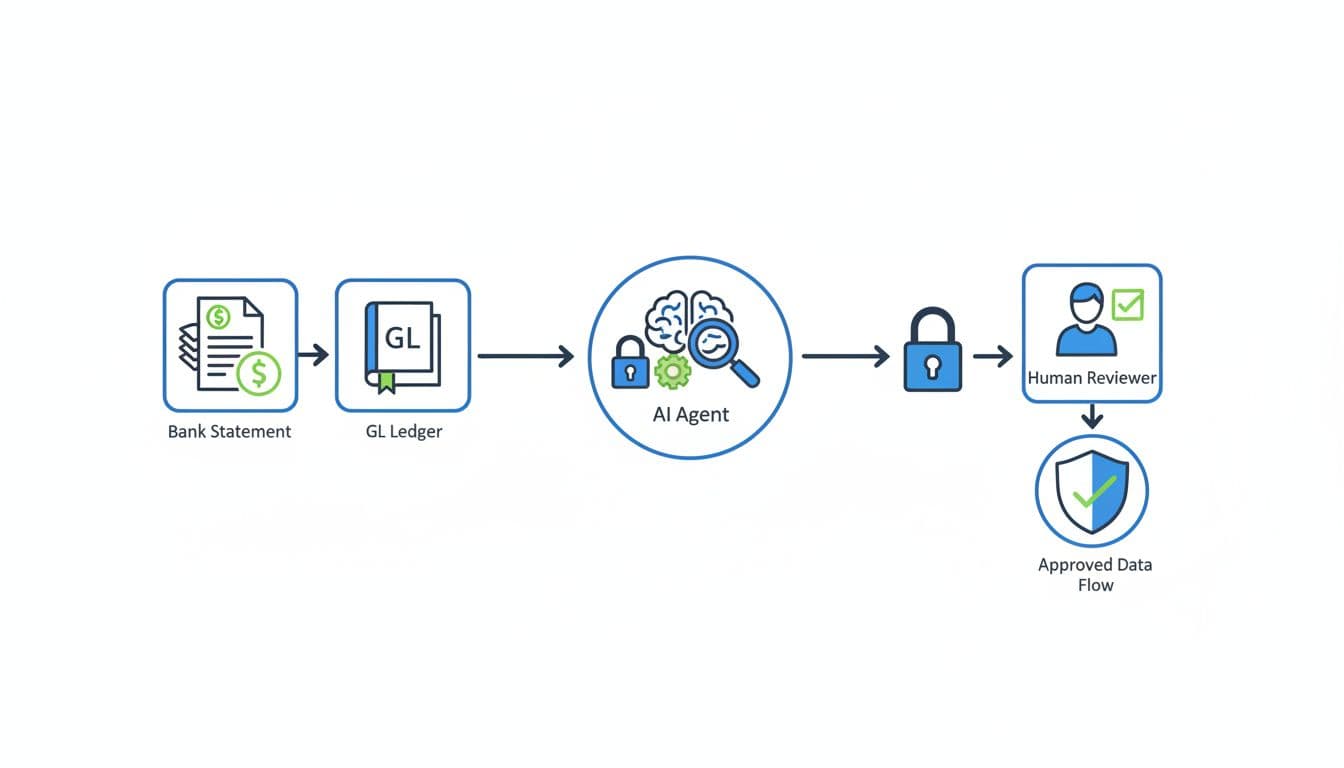
    The agent loop in plain English: observe, think, act, then double-check

    A good research agent works in a loop:

    • Observe: pull signals from approved sources (web pages, reviews, CRM notes, social posts).
    • Think: decide what matters (pricing change vs. copy tweak), then plan steps.
    • Act: run tasks like extracting tables, summarizing reviews, or clustering themes.
    • Double-check: cite sources, verify numbers, and flag uncertainty.

    That last step is where most “agent hype” falls apart. Without evaluation, you get confident summaries that may be wrong. With evaluation, you get a system that can say, “I found three sources, two disagree, so I’m marking this as unconfirmed.”

    For a broader snapshot of current frameworks and how teams use them, see DataCamp’s overview of AI agents in 2026.

    A simple architecture for a market research agent team

    Most teams start small: one agent plus a few tools (browser, scraping, spreadsheet export). Later, they split responsibilities into a team.

    Here’s a practical structure that holds up:

    • Data connectors: web, app store reviews, Reddit, YouTube transcripts, newsletters, CRM, call transcripts.
    • Planning agent: breaks the assignment into steps and schedules runs.
    • Specialists: competitor agent, trends agent, sentiment agent, SEO research agent.
    • Judge (QA) agent: checks citations, catches weird jumps in logic, and runs sanity checks.
    • Reporting layer: sends alerts, updates dashboards, and drafts weekly briefs.

    Frameworks like LangChain, CrewAI, and AutoGPT-style projects help orchestrate tools, but they’re not magic. Think of them as wiring. The real advantage comes from tight inputs, repeatable rubrics, and clear “stop conditions.” If you want a quick tour of what’s popular right now, this 2026 AI agent frameworks tier list gives helpful context.

    High-impact workflows you can automate end-to-end with AI agents

    The best workflows share one trait: humans hate doing them, but leaders still need the output. Agents shine when the work is repetitive, multi-source, and time-sensitive.

    A realistic cadence is simple: daily monitoring for changes, weekly summaries for teams, and a monthly memo for leadership. In addition, many companies now run “risk scans” that watch supply chain or regulatory news, then alert procurement or ops when a vendor or region spikes in negative coverage.

    If an agent can’t show where it got a claim, treat it like a rumor, not a finding.

    Competitor gap analysis that updates itself every week

    A competitor agent collects structured and unstructured signals, then compares them to your offer.

    What it collects: pricing pages, feature lists, release notes, help docs, status pages, job posts, and key landing pages.
    How often it runs: daily change detection, weekly synthesis.
    What the output looks like: a “what changed” brief, plus a prioritized gap list mapped to your roadmap.
    So what decision it supports: whether to adjust packaging, shift positioning, or fast-track a feature.

    The best version doesn’t just say “Competitor X added SSO.” It tells you where, when, and what it might mean. For example, it can trigger an alert when a competitor changes tier names, rewrites their hero section, or adds enterprise language to SMB pages.

    Trend spotting from many sources, not just one dashboard

    Trend spotting fails when you only watch one channel. A research agent should scan across places where demand shows up early.

    What it collects: niche forums, Reddit threads, product review sites, YouTube transcript summaries, newsletters, and news coverage.
    How often it runs: light daily scans, deeper monthly scoring.
    What the output looks like: a monthly trend memo with evidence links and representative quotes.
    So what decision it supports: what to build next, what to stop building, and which vertical to target.

    The key is separation: short-term noise vs. durable demand. Agents can score momentum by counting repeated themes across sources, then checking if the same theme appears in “money conversations” (pricing complaints, switching stories, procurement requirements).

    If you’re building agent workflows for marketing teams, Vellum’s list of 2026 marketing agents is a useful menu of patterns you can adapt for research.

    Social listening at scale, with sentiment you can trust

    Sentiment is easy to compute and easy to get wrong. Agents can help, but only if you add quality checks.

    What it collects: brand and competitor mentions, review text, support forums, and public social posts.
    How often it runs: daily ingestion, weekly QA sampling.
    What the output looks like: a sentiment dashboard plus 10 real quotes that explain the score.
    So what decision it supports: which product pain to fix first, and which message to avoid.

    Add a simple “trust layer”:

    • Re-check a sample of labels each run and track false positives.
    • Keep a “do not infer” list for sensitive topics (health, protected traits, personal identity).
    • Tag sentiment by theme (price, reliability, integrations, support), not just positive or negative.

    A “hidden intent” prompt library for market intelligence

    Most research teams lose time because every analyst writes prompts differently. A shared library fixes that.

    What it collects: the same source text you already have (reviews, calls, surveys), but with consistent interpretation prompts.
    How often it runs: every time new text lands, with monthly prompt tuning.
    What the output looks like: structured fields like buyer stage, switching trigger, objection type, and compliance needs.
    So what decision it supports: sharper positioning, better sales enablement, and cleaner SEO topic selection.

    A practical library includes prompts for:

    • Buyer stage (curious, comparing, ready to buy, renewal risk)
    • Switching triggers (price hike, outage, missing integration, security review)
    • Objections (setup time, trust, vendor lock-in, reporting gaps)
    • Compliance needs (SOC 2, HIPAA, data residency, audit logs)

    Consistency matters because it lets you compare month to month without the “prompt drift” effect.

    Synthetic users and simulated focus groups, when to use them and when not to

    Synthetic users can speed early learning, especially when you’re still shaping positioning and don’t have enough interviews. They can also mislead you if you treat simulation like reality.

    Use synthetic focus groups for idea pressure-testing, not for pricing validation or final messaging. They work best when you already have some real inputs, such as interview snippets, win-loss notes, and support tickets. Without that grounding, the agent will mirror your assumptions.

    A simple way to explain it to stakeholders: synthetic users are like a flight simulator. Great for practice, but you still need a real test flight.

    For research on agent evaluation and bias risks in decision contexts, the paper What Is Your AI Agent Buying? is a helpful reference point.

    How to create persona-based agents to test messages and concepts

    Persona agents should be built from your own evidence, not invented backstories.

    Inputs that work well: ICP notes, actual interview quotes, onboarding feedback, support tickets, and churn reasons.
    Outputs to ask for: reactions to landing pages, friction points on pricing pages, likely objections, and alternative positioning angles.

    One rule keeps this honest: require the persona agent to cite the source snippets you fed it. If it can’t trace a claim to an input, it should label it as a hypothesis, not a “persona truth.”

    Reducing bias, avoiding fake confidence, and validating with real data

    Agents can amplify bias in two ways: they overfit to the docs you feed them, and they speak with calm confidence even when evidence is thin.

    Safeguards that don’t slow you down:

    • Compare synthetic insights to a small set of real interviews each month.
    • Run a red-team prompt that tries to poke holes in the top recommendation.
    • Use holdout checks (keep some data out, then test if the agent’s themes still appear).
    • Label outputs clearly: synthetic insight vs. observed insight.

    That labeling alone prevents bad meetings. Leaders stop treating simulated reactions as customer facts.

    Turning agent outputs into an executive-ready research and SEO roadmap

    Agent output becomes useful when it answers three questions: what changed, why it matters, and what we’re doing next. Otherwise, you just automated a messy inbox.

    The strongest teams set a single reporting standard across product, marketing, and insights. They also pick one “system of record” for findings, such as a doc hub or research repository, so insights don’t disappear into Slack.

    This is also where model choice comes in. Teams often use a stronger reasoning model (for example, GPT-4-class or Claude-class) for planning and QA, and a cheaper model for high-volume labeling. Open models (for example, Llama-class) can fit privacy needs when data can’t leave your environment.

    Automating keyword clustering and topic maps without losing intent

    Keyword clustering breaks when it ignores intent. Agents can help, but you need a workflow that starts with real language.

    A solid pipeline looks like this:

    1. Collect queries from Search Console, competitor pages, and customer wording from reviews and calls.
    2. Cluster by intent, not by shared words.
    3. Label each cluster with a plain-English promise (what the searcher wants to achieve).
    4. Map clusters to funnel stage, then draft one content brief per cluster.

    Quality checks matter here. Remove near-duplicates, separate brand terms, and spot clusters that don’t match actual SERP patterns.

    From raw signals to a one-page plan: priorities, owners, and timelines

    To keep decisions clean, use a simple scoring model before you ship work to teams. This table is easy to reuse in a monthly review.

    FactorWhat it meansScore (1 to 5)
    ImpactRevenue, retention, pipeline, or risk reduction
    EffortEngineering or content time required
    ConfidenceStrength of evidence and source agreement
    Time sensitivityCompetitor move, launch window, or news cycle

    After scoring, convert the top items into three deliverables: weekly alerts (changes and risks), a monthly insight report (themes and evidence), and a quarterly roadmap (bets with owners).

    Assign clear owners: marketing for content and positioning, product for feature gaps, sales for objections and enablement. Track outcomes with a short set of metrics, such as traffic, conversion rate, churn drivers, and win rate.

    Guardrails that keep agents safe and credible

    Agent failures are rarely mysterious. They come from weak boundaries.

    Put these in place early:

    • Source citations for every claim that might influence spend or strategy.
    • “Show your work” requirements (what sources were used, what changed since last run).
    • Rate limits and domain allowlists for web actions.
    • Approval gates for external actions (posting, emailing, purchasing).
    • Full logging so you can replay decisions.

    Also plan for common threats. Prompt injection can sneak instructions into scraped pages. Data leakage can happen when proprietary notes get pasted into the wrong system. Human review should be mandatory for pricing moves, legal topics, and any recommendation with major budget impact.

    FAQ (Readers Asked Questions Frequently)

    Are AI agents for market research worth it for small teams?
    Yes, if you start with one workflow that saves hours weekly, such as competitor change alerts. Avoid building a “do everything” system first.

    What’s the safest first use case?
    Monitoring public competitor pages and summarizing changes is low-risk, because the sources are visible and easy to verify.

    Do agents replace surveys and interviews?
    No. Agents speed collection and synthesis. You still need real customer conversations for truth and nuance.

    How do I stop hallucinations from entering a report?
    Require citations, run a QA agent that checks quotes and numbers, and block “uncited claims” from the final brief.

    What tools do I need to get started?
    A model, a browser or scraping tool, a place to store sources, and a report template. Frameworks can help later, but process matters more than tooling.

    Conclusion

    If market data feels like a moving train, agents are how you stop sprinting beside it. Start with one workflow, either competitor change tracking or a monthly trend memo. Define inputs, success criteria, and QA checks, then expand into a small agent team with a judge step.

    Next, turn outputs into action with a one-page plan and clear owners. With the right guardrails, AI agents for market research won’t just automate busywork, they’ll improve how fast your team learns.

    Download the AI Research Agent Architecture Diagram, grab the Python starter script for a basic competitor analysis agent, and use the hidden intent prompt pack to standardize insights across teams.

  • 10 Best Free AI Prompt Libraries for Creators (2026)

    10 Best Free AI Prompt Libraries for Creators (2026)

    AI can boost what you make, not replace it. Writers, artists, and designers are hitting new highs by pairing their taste with smart tools. The right prompt turns a rough idea into a strong draft, a clean layout, or a striking image in minutes.

    AI prompt libraries are simple to use. They’re curated collections of ready‑made prompts for tools like ChatGPT, Claude, and Midjourney. Think of them as starter kits that help you ask better questions, so you get better results, faster.

    In 2025, creators need speed and consistency. A good library saves hours, kills the blank page, and keeps your voice on track. It also sparks fresh angles for briefs, scripts, mood boards, and client work, without guesswork.

    This guide spotlights the top 10 free options, based on recent tools and user feedback. You’ll find large community hubs, official prompt sets, and visual builders that suit different workflows. Each pick helps you get from idea to output with less friction and more control.

    If you want cleaner copy, tighter concepts, or sharper images, this list will help. Use these libraries to jumpstart drafts, test styles, and refine prompts that actually perform. Grab a few favorites, try them on a live project, and watch your creative process speed up.

    Why Free AI Prompt Libraries Boost Your Creative Work

    Free prompt libraries give you structure, speed, and fresh ideas. You get proven templates, clear formats, and real examples that cut guesswork. They help you move from a fuzzy thought to a strong prompt that delivers.

    Artistic depiction of a light bulb seated on a crescent moon amidst bookshelves.
    Photo by Pixabay

    Faster Starts, Better Results

    Blank pages slow you down. A free library gives you prompts you can reuse and tweak. You get clarity on tone, style, role, and steps. That leads to cleaner drafts and tighter images in less time. For a deeper take on how prompt libraries improve consistency and output, see this guide on the advantages of a well-stocked prompt library.

    Great for Beginners and Pros

    Beginners learn the basics fast. You see how to set context, goals, and constraints. You learn how to ask for format, voice, and length.

    Pros get refinement. You can A/B test prompt variants, stack instructions, and lock voice. You also build your own set from proven examples.

    Turn Vague Ideas Into Clear Requests

    A good library shows you the jump from rough to precise. Example:

    • Vague idea: “I need a product launch post.”
    • Clear prompt: “You are a senior copywriter. Write a 120-word LinkedIn post for a new eco water bottle. Use a confident, friendly tone. Include one stat, a soft CTA, and three hashtags. Output in two versions.”

    Idea Generation for Content, Art, and Design

    Use curated prompts to spark topics, angles, and styles:

    • Content: outlines, hooks, headlines, scripts.
    • Art: styles, moods, camera cues, lighting.
    • Design: layout prompts, color palettes, brand voice rules.

    Works With Popular AIs

    Most libraries include templates for ChatGPT, Claude, Midjourney, and similar tools. You can copy, paste, and adapt across platforms with small tweaks to syntax.

    Real Value Without the Price Tag

    Free sets cover most needs. You can ship client work, test formats, and build your voice at zero cost. If you ever outgrow them, compare options with this guide on free vs. paid AI prompts.

    Quick Tip: Start Small

    Pick three prompts. Run them on a live task. Tweak wording, save wins, and build a mini library you trust.

    Top 10 Free AI Prompt Libraries to Try Right Now

    You do not need to start from scratch. These free prompt libraries give you fast starts, clear structure, and solid examples you can copy and adapt. Use them to shape tone, format, and steps, then tweak for voice and context. Pick two or three, test on a real task, and save what works.

    1. The Prompt Index: Community Ideas for All AI Tools

    A large, free, community-driven library with prompts for ChatGPT, Claude, Midjourney, and more. It also teaches prompt engineering with clean patterns you can reuse.

    • Best for: writers, artists, and designers who want ready prompts they can adapt.
    • Key features: broad categories for writing, art, and design, practical examples, fast browsing.
    • Try this: “You are an editor. Rewrite this blog intro in 120 words, clear tone, short sentences, keep one stat, end with a soft CTA.”
      Explore it here: The Prompt Index.

    2. Claude 3 Prompt Library: Optimized Tips for Better AI Replies

    The official library for Claude 3 offers concise templates that improve clarity, structure, and output quality.

    • Best for: writers and content teams working in Claude.
    • Key features: business and personal task prompts, role prompts, formatting instructions.
    • Try this improvement: Instead of “Write a post,” use “You are a senior copywriter. Draft a 130-word LinkedIn post in a confident, friendly voice, include one data point, a single CTA, and three hashtags.”
      Browse the official set: Claude Prompt Library.

    3. AIPRM: Quick ChatGPT Prompts for Marketing and SEO

    A free Chrome extension with categorized templates for content, ads, and SEO tasks. Great for saving time when you need a prompt on demand.

    • Best for: marketers, bloggers, SEO specialists.
    • Key features: one-click prompt insertion, topic categories, community ratings.
    • Try this: “You are an SEO strategist. Create a content brief for ‘best running shoes for flat feet,’ include H2s, FAQs, and internal link ideas.”

    4. PromptHero: Free Prompts for Stunning AI Images

    A smartphone showing the Midjourney website on its screen against a gray textured surface.
    Photo by Sanket Mishra A broad gallery of free image prompts for Midjourney, Stable Diffusion, and DALL·E. Ideal for visual research and quick concept art.

    • Best for: artists, art directors, brand designers.
    • Key features: style tags, model-specific syntax, searchable references.
    • Sample prompt: “portrait, natural window light, 85mm look, Fujifilm Pro 400H, subtle film grain, shallow depth of field, relaxed candid pose.”

    5. EasyPrompt on GitHub: Open-Source Tools for Productivity

    An open-source collection for ChatGPT aimed at automation, brainstorming, and structured workflows.

    • Best for: developers and creators who like versioned, reusable prompts.
    • Key features: prompt templates in repos, task automation patterns, idea generation.
    • Try this: “You are a product strategist. Generate 10 feature ideas for a note app, group by user value, add effort score and risk notes.”

    6. Taskade AI Prompt Generator: Custom Prompts for Any Platform

    Build custom prompts for emails, blogs, analysis, and more, then paste into your AI of choice.

    • Best for: writers, managers, and teams that need consistent output.
    • Key features: fields for tone, audience, format, and steps, easy export.
    • Try this: “You are a newsletter editor. Write a 180-word weekly email, friendly tone, 2 insights, 1 stat, scannable bullets, and a single CTA.”

    7. Feedough AI Prompt Generator: Sharpen Your Own Prompt Ideas

    Refine rough prompts into clear, detailed versions that work in ChatGPT and Midjourney.

    • Best for: creators who struggle with phrasing or missing details.
    • Key features: prompt expansion, clarity checks, model-ready syntax.
    • Try this: Turn “make a logo prompt” into “Create a logo prompt for a minimalist coffee brand, warm palette, negative space mark, vector output, 3 variations.”

    8. PromptBuilder: Visual Way to Build Structured Prompts

    A drag-and-drop interface that turns complex asks into clean, modular prompts.

    • Best for: marketing and content teams, solo creators planning campaigns.
    • Key features: blocks for role, task, constraints, and format, easy sharing.
    • Try this: Stack blocks for purpose, audience, tone, and steps to build a reusable blog outline prompt.

    9. God of Prompt: Huge Collection for ChatGPT and Midjourney

    A massive library with over 30,000 free prompts across marketing, SEO, writing, and design.

    • Best for: business creators who need many options fast.
    • Key features: wide categories, quick copy-and-paste, multi-model support.
    • Try this: “You are an ecom copywriter. Write a 60-word product description, benefits first, one sensory detail, one social proof line, and a clear CTA.”

    10. Wharton Generative AI Labs Prompt Library: Customizable Use Cases

    A clean library organized by purpose, with shareable prompts for research and writing.

    • Best for: students, analysts, and writers who want clear structure.
    • Key features: use-case folders, editable templates, guidance on adapting prompts.
    • Try this: “You are a research assistant. Summarize five sources on remote work productivity, list claims, methods, sample sizes, and limits in a table.”

    How to Pick and Use These Libraries in Your Daily Routine

    Team working on laptops around a table with notebooks and coffee cups.
    Photo by fauxels

    You have strong free options. Now turn them into a daily habit that speeds work and keeps quality high. Start with your main output, add a simple test loop, and save what performs. Small, repeatable steps beat long setup.

    Match Libraries to Your Creative Needs

    Pick based on what you ship most days.

    • Text-first: Choose AIPRM or God of Prompt for briefs, outlines, and SEO. They cut setup time and push clear structure. Pair with the Claude 3 Prompt Library when you need crisp roles and formatting.
    • Image-first: Use PromptHero for styles and camera cues. Keep The Prompt Index handy for model syntax and quick variations.
    • Hybrid: Write in Claude or ChatGPT, then mirror the concept in PromptHero. This keeps story and visuals aligned.

    For stronger prompts across tools, review these practical prompting tips for 2025.

    Steps to Integrate Prompts Into Your Day

    Build a tight loop you can finish in 10 minutes.

    1. Search: Spend five minutes in one library that fits today’s task. Save two candidates.
    2. Test: Paste one prompt, run it, then tweak a single variable, like tone, length, or constraints.
    3. Lock: Save the better version with a clear name, like LI_post_130w_confident_stat_cta.
    4. Use: Start each session with your top three saved prompts. Warm up with one quick run.

    Example tweak: change “friendly tone” to “clear, confident tone,” set length to “120–140 words,” and add “one stat” for sharper posts.

    Combine Libraries for Stronger Results

    Stack strengths to get complete outputs.

    • Idea to outline: AIPRM for an SEO brief, then Wharton Labs for research notes and summary templates.
    • Rough to polished: Feedough to expand a vague ask, then Taskade to structure steps and format.

    Teams can go farther by curating shared winners. This guide on building a team prompt library outlines a simple system.

    Keep Up With 2025 AI Updates

    Models shift, syntax tightens, and context limits change. Schedule a monthly review, refresh your top prompts, and note model-specific tweaks. If you want a quick trend check with real examples, scan this 2025 workflow roundup on Medium, Mastering AI for Work in 2025. Small updates keep results sharp and stable.

    Conclusion

    Free prompt libraries turn ideas into clear asks, fast. They give you structure, ready templates, and model-aware syntax that reduce guesswork. You get cleaner drafts, stronger visuals, and more consistent results with less effort.

    Pick one from this list and use it today on a live task. Start with a single prompt, tweak tone or length, then save the version that works. Small wins stack, and soon you will have a personal set that fits your voice and workflow.

    These tools help creators move quicker in 2025 without losing quality. They cut the blank page, support A/B tests, and keep teams aligned across text and images. That means more time for taste, craft, and client goals.

    Try one library now, then tell us what you shipped. Share your best prompt in the comments, or bookmark this post for your next sprint. Your process gets faster when your prompts are clear, repeatable, and ready to run.

    FAQ:
    What are AI prompt libraries?

    AI prompt libraries are curated collections of pre-written prompts designed to guide AI tools like ChatGPT, Midjourney, and Claude. They act as starter kits, helping creators ask better questions to get more specific and high-quality outputs faster.

    How can free AI prompt libraries benefit creators?

    Free AI prompt libraries save creators significant time, eliminate writer’s block or creative inertia, provide consistent quality, spark new ideas for various projects, and allow for efficient experimentation with different styles and tones.

    Are these AI prompt libraries really free to use in 2026?

    Yes, the libraries highlighted in this guide are selected specifically for their free access to a substantial collection of prompts. While some platforms might offer premium features, their core prompt repositories are available at no cost.

    Can I use these prompts with any AI tool?

    Most prompts are designed to be versatile, but some libraries specialize in prompts for specific AI models (e.g., text-based for ChatGPT, image-based for Midjourney). The article will specify compatibility where relevant.

  • Create Viral Videos with AI: Prompt Hacks That Actually Work

    Create Viral Videos with AI: Prompt Hacks That Actually Work

    What if anyone could make fun, shareable videos that blow up online, using simple AI tools? You can. Today’s apps can write the script, build the visuals, add a voice, and slap on captions in minutes. No studio, no fancy gear, just your idea and a smart prompt.

    AI makes video creation fast because it handles the heavy lifting. Type what you want, pick a style, and get a ready-to-post clip. New tools even offer hooks, pacing, and subtitles by default, so beginners can move from idea to upload in one session.

    The real cheat code is in your prompts. Think of prompt hacks as secret instructions that tell the AI exactly what vibe, timing, and visuals to produce. Ask for a strong hook, keep it short, set a clear mood, and call out the format for TikTok, Reels, or Shorts.

    In this post, you’ll get the exact prompts and tweaks that boost watch time and shares. You’ll see which tools are fastest for quick wins, which give you the best look, and how to guide them with simple, repeatable scripts. By the end, you’ll have plug-and-play prompts, time-saving tips, and a posting plan that helps your next video hit. Ready to try one today?

    Pick the Best AI Tools to Build Your Videos Quickly

    You do not need a studio to post scroll-stopping clips. These AI tools speed up scripting, visuals, voice, and edits, so you can publish more often with a tighter look. Use them to test hooks fast, keep your style consistent, and stack more wins per week.

    InVideo AI: Turn Ideas into Full Videos in Minutes

    InVideo AI turns a prompt into a ready-to-share video with script, stock shots, captions, and music. You also get huge stock media, team comments, and simple customization for colors, fonts, and layouts. It shines for social clips that hit hard in the first three seconds.

    • Quick win: paste your hook, set length to 20–30 seconds, and pick vertical.
    • Try the AI generator to auto build shorts from text with subtitles and B-roll. See the tool here: InVideo AI video generator.
    • For more formats and presets, check the InVideo video maker page.

    Canva: Easy Edits for Eye-Catching Social Posts

    Canva is ideal for mixing video with bold graphics, captions, and stickers. The template library is huge, and the AI tools can resize, remove backgrounds, and suggest layouts that fit TikTok, Reels, and Shorts. That polish earns more saves and shares.

    • Quick win: start with a trending Reels template, swap in your clips, then add punchy text on beat.
    • Use the Canva AI Video Editor to auto-cut dead space and add music that matches the pace.

    AI Studios: Add Human-Like Avatars to Your Clips

    AI Studios by DeepBrain AI gives you human-like avatars with natural text-to-speech in many languages. Pick a template for a product pitch, quick ad, or explainer, then type your script. Personal touches like names, on-screen captions, and brand colors make it feel real.

    • Quick win: open with an avatar greeting, then cut to product shots with captions and a call to action in the last five seconds.

    Google Veo and Runway: Pro Videos from Simple Prompts

    Use Google Veo for crisp, cinematic clips from text prompts, then polish inside Runway. Veo helps with motion, lighting, and style. Runway adds timeline edits, inpainting, upscaling, and text-to-video that is great for variations.

    • Quick win: prompt Veo for a 5-second hook shot, then finish the 20-second piece in Runway.
    • Fast viral ideas: before-and-after reveals, listicles with B-roll, meme remixes with bold captions, or quick duets that stitch a reaction.

    Use These Prompt Hacks to Make AI Videos Pop

    You do not need long scripts to keep people watching. Strong prompts set the tone, pick the best shots, and time the beats. Short-form viewers stick around when the opening hits, the story flows, and the visuals feel tight. Data backs it up. Nearly 6 in 10 short videos get watched for 41 to 80 percent of their length, so your first seconds and pacing matter a lot. See more in these short-form video statistics. Also, TikTok’s monthly time spent is massive, which means a great hook can spread fast. Check the latest attention span stats across platforms.

    Hook Viewers Right Away with Strong Openings

    Smartphone displaying a captivating short-form video generated by artificial intelligence, with social media engagement icons

    Your opening should do one of three things: share a surprising stat, crack a quick joke, or ask a simple question. That primes the viewer to wait for the payoff.

    • Keep it to one sentence.
    • Add a visual cue in the first second.
    • Promise a result the viewer wants.

    Example prompt for InVideo AI: Produce a high-impact, 20-second vertical video specifically for Instagram Reels, designed to educate quickly. Opening Hook: Immediately display on-screen text: "You’re losing 70% of views in 3 seconds." Visual Transition: Instantly cut to rapid B-roll footage of individuals scrolling on mobile devices. Narrative & Solution: Feature a witty narrator introducing the solution: "Let’s fix that in 3 steps." Audio & Visual Style: Employ bold, highly legible captions, sharp, punchy sound effects, and an energetic pop music track at 120 BPM to maintain engagement. Concluding Message: End with a prominent title card clearly stating the key takeaway: "Hook, Pace, Payoff." Mandatory: Enable auto-captions.

    Tell Stories That Keep People Watching

    Viewers stay for tension and payoff. Ask the AI for a simple arc: setup, problem, solution, result. Add emotion words to guide tone.

    • Use time boxes: 5s setup, 10s middle, 5s payoff.
    • Call out the feeling for each beat, like surprise, relief, or pride.

    Example prompt for Runway: Craft a high-impact 25-second social media video concept, designed with a bright and modern aesthetic, showcasing a creator's journey from a common trend mishap to mastery. Opening (0-5s, Engage Curiosity): The creator attempts a popular, visually appealing trend but encounters an immediate, relatable setback or humorous blunder. Mid-Section (5-15s, Build Tension/Solution): Present three distinct, rapid-fire visual demonstrations of corrective actions or expert tips, utilizing quick cuts and informative on-screen graphics/overlays to highlight the solutions. Climax (15-25s, Deliver Relief/Impact): A compelling before-and-after split-screen reveals the significant, polished transformation, emphasizing the successful outcome. Production Style: Maintain subtle, organic camera motion. Utilize warm, inviting lighting throughout. Feature a confident, instructional voiceover. Implement dynamic, verb-triggered kinetic typography for captions.

    Boost Appeal with Smart Visuals and Sounds

    Write what you want to see and hear. Name colors, angles, textures, and music mood. Ask for seamless stock, not random clips.

    • Use 1 color family and 1 font for brand recall.
    • Call out sound hits that match on-screen actions.

    Example prompt for Canva: Produce a dynamic 30-second vertical video designed for social media Reels, showcasing hands-on professional work. Integrate your logo prominently. Feature three distinct stock clips depicting detailed, hands-on work, complemented by concise, bold text overlays that highlight key messages. Adhere to an electric blue and white color palette, using Montserrat font for all text. Implement energetic swipe transitions synchronized precisely with the beat of a modern hip-hop track featuring light bass. Position captions mid-screen, utilizing white text with a black shadow for optimal readability. Conclude the video with your custom voiceover delivering the tagline. Ensure the final export includes burned-in captions and is formatted with safe margins suitable for Instagram Reels.

    Turn Your AI Videos into Viral Hits with Smart Strategies

    Close-up view of a robotic arm equipped with a video camera, showcasing modern technology. Photo by Pavel Danilyuk

    You do not need luck to go viral. You need smart timing, clear prompts, and a push for comments and shares. Post short tests first, follow trends with your twist, and keep a steady schedule. Then use AI to read the room fast and adjust.

    • Stand out with a fresh angle: remix a trend with your brand voice or a quick demo.
    • Post at peak times: reach more people when your audience is active.
    • Spark comments: end with a question or a tag prompt.
    • Stay consistent: train the algorithm with steady, quality posts.

    Time Your Posts for Maximum Reach

    Timing is a multiplier. Aim for when your viewers are scrolling, not when you have free time. Use your analytics to spot spikes. If you are new, start with industry ranges, then tune by audience data. See broad posting windows in this guide on the best times to post by platform.

    Use AI to scan trends and plan fast:

    • Ask a chatbot to summarize top sounds and topics in your niche today.
    • Pull your last 10 posts, then have AI flag the top hour blocks and common traits.
    • Draft a weekly posting plan with 2 to 3 time slots per platform.

    Try: Review my last 20 Shorts. List the top 3 days and top 3 posting hours that drove the most watch time and new viewers. Suggest a 2-week schedule with A/B times.

    Post short clips first, like 8 to 15 seconds, to test your hook and topic before you build a longer cut.

    Get Shares by Encouraging Interaction

    Views spread when people respond. Tell them what to do, in a way that fits your story. Add the nudge in the last 3 to 5 seconds while the payoff is fresh. For more ideas on CTAs that get replies, check this guide to creating engaging social content.

    Ways to prompt action:

    • Ask a choice: “Team A or B?”
    • Invite tags: “Tag a friend who needs this.”
    • Prompt saves: “Save this for your next shoot.”
    • Open a loop: “Part 2 tomorrow, comment ‘Part 2’ if you want it.”

    AI prompt examples to add CTAs naturally:

    • Craft a friendly outro (max 12 words) including one question and one clear call-to-action.
    • Generate two distinct, non-salesy concluding lines for a piece of informational content, each designed to genuinely invite reader comments and foster thoughtful discussion. Focus on open-ended questions or invitations that encourage personal reflection or sharing of experiences.
    • Craft a concise and impactful social media caption for a [TYPE OF POST, e.g., 'new product launch', 'event announcement', 'blog promotion']. The caption should feature an attention-grabbing opening line, a single, unambiguous call-to-action (e.g., 'Shop Now', 'Learn More', 'Register Today'), and exactly three specific, low-competition hashtags relevant to [INDUSTRY/THEME]. Ensure the output clearly delineates the hook, CTA, and hashtags.

    These steps, plus strong prompts, help your clips earn watch time, spark comments, and grow fast.

    An abstract representation of an AI brain, with data streams flowing into a visual representation of a short, engaging video clip

    Conclusion

    You have the pieces you need. Tools like InVideo AI, Canva, AI Studios, Google Veo, and Runway make the build simple, prompts shape the hook and pacing, and smart timing and CTAs push shares. Short, clear, and punchy wins more watch time, then your posting plan compounds results.

    Pick one tool and one prompt hack, and try it today. Start with a 15 to 30 second test, add bold captions, and close with a clean ask. Post, review the numbers, then tweak the hook or beat timing on the next cut.

    There is real joy in watching a clip take off, comment by comment, share by share. That rush is closer than you think.

    Drop your first AI video in the comments. Tell us the prompt you used and what you would change next time.

    FAQ:
    What kind of AI tools can help me make viral videos?

    AI tools range from script generators (like ChatGPT), video creators (like InVideo, Descript, RunwayML), voiceover artists, and subtitle generators. Many platforms now integrate these features for an all-in-one solution, simplifying the video creation process.

    How do AI prompts make my videos go viral?

    Smart AI prompts act as blueprints, guiding the AI to generate content with specific viral elements: strong hooks, fast pacing, trending styles, and optimized formats for platforms like TikTok or Reels. They ensure consistency and relevance to current trends.

    Do I need technical skills to create AI-powered viral videos?

    No, that’s the beauty of it! Modern AI video tools are designed for ease of use, often with intuitive interfaces. If you can type a clear, descriptive prompt, you can create a video. The focus is on your idea and the prompt, not complex editing software.

    What’s the ‘real cheat code’ mentioned for AI video creation?

    The ‘real cheat code’ lies in mastering your prompts. By using specific instructions for vibe, timing, visuals, hooks, and desired platform formats (TikTok, Reels, Shorts), you can direct the AI to produce content highly optimized for virality.

  • I Ranked Top AI Prompt Generators for Instant Results

    I Ranked Top AI Prompt Generators for Instant Results

    The right prompt can make or break your AI results. A single unclear line can waste time, budget, and ideas. A clear prompt, tuned to your goal, can unlock sharp answers, strong images, and clean code on the first try.

    That is why I use AI prompt generators. These are simple tools that help you write clear, effective prompts for models like ChatGPT, Claude, Midjourney, and Stable Diffusion. They guide tone, context, and structure, then suggest improvements so you get instant, consistent output. You save time, avoid trial and error, and hit publish faster.

    This review focuses on tools that work today, at scale. PromptPerfect stands out for fast, multi‑model optimization and batch prompts. Originality.ai offers a quick prompt builder that sparks ideas and clears writer’s block. Both align with October 2025 trends: cross‑platform support, strong defaults, and smart guardrails that reduce rewrites.

    I wrote this to help busy teams, solo creators, and product folks who want reliable results without fiddling with prompt syntax. I will show where each tool shines, where it falls short, and how to get a strong first draft in seconds. I will also point to safe starter picks, including a resource on top beginner-friendly AI prompt generators, so you can move quickly with confidence.

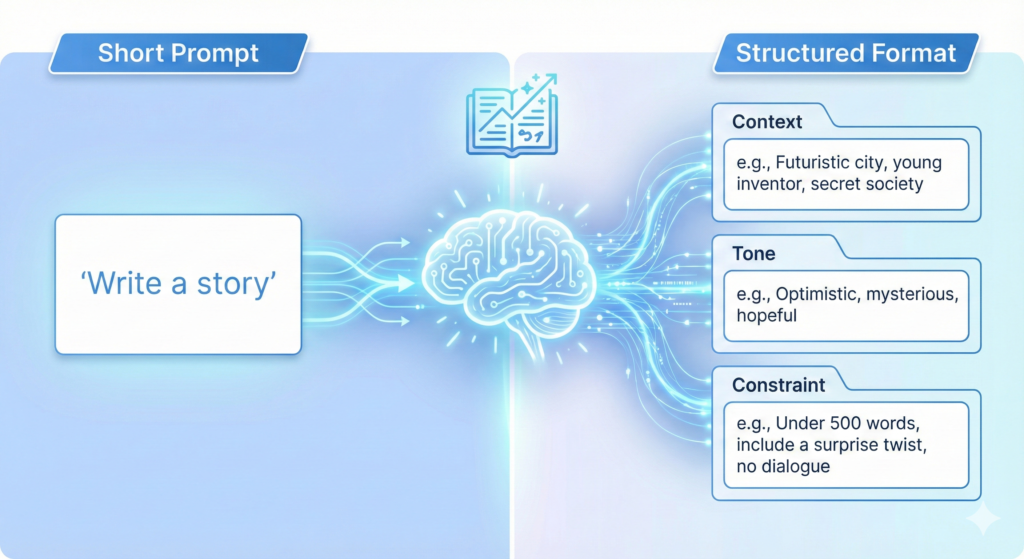
    You will see how AI prompt generators shape context, add role hints, and lock in style. You will get quick templates for product copy, blog outlines, UX flows, and image prompts. You will learn when to use short prompts, when to use structured formats, and how to test fast.

    If you want my free PDF, email me and I will send “110 ChatGPT productivity pack for content.” I will send it asap, no obligation.

    Key Benefits of Using AI Prompt Generators

    AI prompt generators help me move from vague ideas to clear instructions that models can follow. The payoff shows up in faster drafts, tighter structure, and consistent tone across tasks. Below, I break down the benefits I see every day when I use these tools for content, product, and design work.

    Faster Output With Fewer Rewrites

    Speed matters when I need a strong first draft. AI prompt generators structure intent, audience, tone, and constraints upfront, so I avoid guesswork.

    • Time saved: I cut ideation and setup by minutes per prompt, hours per project.
    • Tighter loops: I get usable output in 1 to 2 iterations instead of 5.

    Example:

    • Input: “Write a product update email.”
    • Optimized prompt: “You are an email copywriter for a B2B SaaS. Write a 150-word product update email for existing customers. Tone is confident and friendly. Include a headline, 3 bullet benefits, and a one-line CTA. Avoid hype. Mention the new analytics dashboard for SMB users.”

    Consistent Voice and Brand Control

    Consistency builds trust. Good generators lock in role, tone, length, and banned phrases, then reuse those patterns.

    • Reusable templates: I save prompts for blog intros, case studies, and release notes.
    • Guardrails: I set must-include details, compliance notes, and style rules.

    If you want more structure for creative work, these top free AI art prompt tools show how prompt patterns shape visual style and quality.

    Higher Quality Responses and Less Noise

    Clear prompts reduce vague output. They also cut hallucinations by forcing sources, scope, and format.

    • Evidence prompts: Ask for citations, quotes, or data ranges.
    • Scope prompts: Define what to ignore and what to prioritize.
    • Format prompts: Require tables, bullets, or sections.

    For a brief overview of benefits like accuracy, relevance, and efficiency, see this summary of features and benefits for 2025.

    Creativity on Demand

    When I feel stuck, prompt generators spark angles I would not try on my own.

    • Pattern prompts: “X but for Y,” “contrarian take,” “5 audience lenses.”
    • Style prompts: “Explain like a PM,” “technical explainer,” “product teardown.”

    For more ideas, this guide covers overcoming writer’s block and creative use cases in an AI Prompt Generator breakdown. I also keep a personal library. If you want it, email me for my free PDF “110 ChatGPT productivity pack for content.”

    You can also explore broader tools and examples in this roundup of 10 AI prompt tools for boosting creativity.

    Cross-Model Results Without Rework

    AI prompt generators adapt structure for different models and media. I can take one prompt and tune it for ChatGPT, Claude, Midjourney, or Stable Diffusion.

    • Structured fields: Audience, goal, constraints, format, tone.
    • Model tags: Add negative prompts for images or function calls for code.
    • Batch prompts: Scale one pattern across dozens of inputs.

    This reduces context loss when switching tools and keeps results aligned.

    Better Collaboration and Handoff

    Clear prompts turn into a shared spec. Teams can review, edit, and reuse them.

    • Traceability: Why the prompt works, what inputs it needs, what to avoid.
    • Versioning: Keep a changelog and note which version delivered the best result.
    • Training: New contributors get consistent outputs on day one.

    Cost Control and Measurable ROI

    Stronger prompts use fewer tokens and fewer model calls. That drops cost over time.

    • Fewer retries: Precise instructions reduce long, drifting chats.
    • Shorter outputs: Set word counts and only request useful sections.
    • Repeatable wins: Templates cut project setup and QA time.

    Quick audit checklist:

    1. Is the goal explicit and measurable?
    2. Does the prompt define audience and tone?
    3. Are must-include details listed?
    4. Is the output format specified?
    5. Are limits set for scope, sources, and length?

    Where This Helps Most

    I get the biggest gains in these workflows:

    • Content: briefs, outlines, headlines, meta descriptions, summaries.
    • Product: release notes, UX microcopy, onboarding flows, FAQs.
    • Research: synthesis, pro and con tables, source questions.
    • Images: style references, negative prompts, variant instructions.

    AI prompt generators make these steps faster, clearer, and more repeatable. When I add simple guardrails and reuse proven patterns, my first draft is often my final draft.

    Best AI Prompt Generators for Instant Prompt Creation in 2025

    When I need results on the first try, I reach for AI prompt generators that turn rough ideas into tight, model-ready instructions. The tools below focus on speed, structure, and cross-model support. They help me ship clean drafts, image prompts, and technical instructions with less trial and error.

    PromptPerfect: Fast Optimization for Multiple AI Tools

    PromptPerfect excels when I need strong prompts in seconds. I can paste a short idea, choose a model, and get a refined prompt that locks in role, tone, and format. The output is clear and ready for ChatGPT, Claude, Midjourney, or Stable Diffusion. For official details and current features, see the product page for PromptPerfect – AI Prompt Generator and Optimizer.

    What stands out:

    • Rapid refinement: It expands vague inputs into complete, structured prompts with constraints.
    • Batch processing: I feed a list of topics or keywords, then export a set of optimized prompts at once.
    • Model-aware tuning: It adds model-specific tags, image negatives, or format rules based on target output.

    Benefits for multi-model work:

    • One pattern, many variants: I set a prompt template once, then generate versions for text, image, or code tools.
    • Lower rework: Fewer rounds with each model since the prompt is tailored upfront.
    • Team speed: Stakeholders can review the optimized prompt text before any model call.

    Example workflow:

    1. Input a short brief, like “Write a 120-word product update for SMB customers.”
    2. Select the target model and tone.
    3. Generate a structured prompt with goals, key points, and a clear format.
    4. Batch apply the same structure to multiple features or audiences.

    If you want a neutral roundup for comparison, this summary of the 10 Best AI Prompt Generators In 2025 offers feature notes across tools.

    Originality.ai: Free Creative Boost for Writers

    Originality.ai offers a simple prompt builder that works without sign-up. I use it when I am stuck and need fresh angles, hooks, or outlines fast. It focuses on unique prompts that reduce repetition, which is ideal for blogs, emails, and social posts. For a helpful overview, see the guide on AI Prompt Generator.

    Why it helps:

    • No account needed: I test ideas instantly and keep moving.
    • Idea variety: It proposes multiple prompt angles to break writer’s block.
    • Clean defaults: The outputs are easy to copy into ChatGPT, Claude, or Gemini.

    Use cases I like:

    • Blog intros with a clear voice and structure.
    • Alternative headlines across tones, such as direct, witty, or analytical.
    • Short social posts that keep brand voice consistent.

    Compatibility:

    • Works well with most text LLMs, and I have used its prompts across ChatGPT and Claude with strong results.

    Taskade: Prompts Tailored for Productivity Tasks

    Taskade connects prompt creation to project structure. I build prompts inside tasks, documents, or workflows, then reuse them where work actually happens. That keeps briefs, context, and outputs in one place. It suits teams that want prompts tied to checklists, due dates, and docs.

    What I like in daily work:

    • Project-specific prompts: Prompts live next to tasks, notes, and status updates, so context never gets lost.
    • Reusable blocks: I save prompt templates for standups, meeting summaries, and sprint reviews.
    • Linked outcomes: Outputs sit in the same workspace, which makes review and revisions fast.

    Practical examples:

    • Meeting summary prompt inside each calendar-linked task.
    • Product requirements prompt template stored in the project wiki.
    • QA checklist prompts that generate test cases from user stories.

    Result:

    • Less copy and paste across tools, fewer missed details, and faster handoffs.

    HIX AI: Precision for Technical and Workflow Needs

    HIX AI shines when I need exact, task-specific instructions, especially for code, data, or structured outputs. I use it to write API call prompts, test case formats, or step-by-step procedures that require strict rules. It reduces ambiguity and keeps model responses inside the lines.

    Strengths I notice:

    • Instruction clarity: It produces prompts with clear roles, inputs, and acceptance criteria.
    • Format control: It standardizes output into JSON, tables, or numbered steps with minimal drift.
    • Developer focus: Great for error messages, log analysis, and code comments that explain tradeoffs.

    Sample patterns:

    • “You are a senior backend engineer. Return a JSON object with fields and validation notes. No extra text.”
    • “Write unit tests for this function with edge cases. Include setup, mocks, and expected outputs.”

    When the work is technical, precision saves tokens and time. Prompts that specify constraints and formats keep LLMs accurate and reduce review cycles.

    Tip: If you want my free PDF “110 ChatGPT productivity pack for content,” email me and I will send it right away.

    Tips to Maximize Your AI Prompt Generator Experience

    Strong prompts save time and reduce rework. I treat AI prompt generators like a spec builder for my tasks. With a few simple habits, I get faster drafts, cleaner structure, and fewer surprises across ChatGPT, Claude, Midjourney, and Stable Diffusion.

    Start With a Clear Intent and Constraints

    Define the job before you hit generate. State the goal, audience, and required sections. Then lock scope and length to cut fluff.

    • Goal: What must the output achieve in one sentence.
    • Audience and tone: Who it is for, plus tone hints like authoritative, friendly, or technical.
    • Format: Bullets, table, JSON, or sections.
    • Limits: Word count, what to exclude, banned phrases.

    Example intent block:

    • Goal: “Summarize a product launch for existing SMB users.”
    • Audience and tone: “Current customers, direct and confident.”
    • Format: “Headline, 3 bullets, 1 CTA line.”
    • Limits: “150 words, avoid buzzwords, no emojis.”

    For a solid primer on prompt structure, I recommend MIT’s guide on Effective Prompts for AI.

    Use Roles, Inputs, and Evidence

    Give the model a role that fits the task. Feed it the right inputs. Ask for source-backed claims when needed.

    • Role: “You are a senior technical writer,” or “You are a product marketer.”
    • Inputs: Paste snippets, user quotes, or feature notes.
    • Evidence: Ask for citations, data ranges, or quotes if accuracy matters.

    Quick template:

    • Role: “You are a B2B copywriter.”
    • Inputs: “Use these 3 features and this customer quote.”
    • Output rules: “Return 2 versions, each under 120 words, with a CTA.”

    Add Few-Shot Examples for Style and Structure

    Examples teach pattern and reduce drift. Include one strong example, then a short instruction to replicate style, not content.

    • One well-formed sample beats five weak ones.
    • Keep examples short to control tokens and cost.
    • Mark variable fields with brackets to encourage reuse.

    Example pattern:

    • “Headline: [Benefit-focused line]
    • Bullets: [3 scannable points]
    • CTA: [One action]”

    A power user tip I like is to build a simple framework first, then generate content from it. This matches ideas in this thread: AI Prompting Tips from a Power User.

    Iterate With Tight Feedback Loops

    Treat each run like a controlled experiment. Change one variable at a time so you can trace the lift.

    • Give direct feedback: “Shorten by 30 percent,” or “Add one proof point.”
    • Freeze the winning parts: “Keep the intro as-is, rework the examples.”
    • Version your prompts: V1, V2, V3 with short notes.

    I keep a simple changelog inside my docs. It makes handoff and review faster.

    Control Format for Reliable Outputs

    AI prompt generators excel when the format is explicit. Use firm output rules so results are easy to scan and compare.

    • Specify structure: “Return a table with columns: Feature, Benefit, Proof.”
    • Use clear markers: “Start with ‘Summary:’ then ‘Action Items:’”
    • For images, include subject, style, camera details, and negative prompts.

    If you focus on visuals, browse these references on Top free AI art prompt tools to sharpen style control.

    Reduce Hallucinations With Scope and Sources

    Narrow the task and ask for boundaries. This reduces fluff and factual errors.

    • Set guardrails: “If unsure, say ‘insufficient data’.”
    • Restrict scope: “Limit answers to the inputs and date range provided.”
    • Require sources for claims and stats.

    When accuracy matters, I paste source snippets and ask for a line-cited summary.

    Use Variables and Templates for Scale

    Turn winning prompts into reusable templates. Add fields for inputs so you can run them in batches.

    • Variables: {{audience}}, {{product}}, {{tone}}, {{word_count}}.
    • Library: Store prompts by task type, like intros, updates, FAQs, or release notes.
    • Batch runs: Feed a CSV or list of inputs and export results.

    I standardize naming so teams can find and reuse the best patterns.

    Match the Model and Modality

    Tune prompts to fit the target model or media. Do not copy the same prompt across text and image without adjustments.

    • Text models: Clarity, role, and stepwise instructions.
    • Image models: Detailed descriptors, lighting, lens, style tags, and negatives.
    • Code tasks: Inputs, acceptance criteria, and output format rules.

    When switching models, keep the intent and structure, then rephrase the tags and constraints.

    Measure Quality and Cost

    Track output quality and token use. Small tweaks pay off at scale.

    • Quality checklist: Goal met, structure followed, tone consistent, no banned phrases.
    • Token aware: Shorten context and examples when possible.
    • Cost control: Set word ceilings, limit variants to two or three, and stop early if output is ready.

    Simple scorecards help compare variants and lock the winner.

    Keep a Personal Style Guide

    Document your voice, format rules, and banned words. Feed it to your generator as a short, reusable block.

    Include:

    • Tone sliders, like concise, confident, and friendly.
    • Must-include brand phrases or disclaimers.
    • Format rules for headings, bullets, and tables.

    As models update, refresh the guide and archive old versions. If you want my free PDF “110 ChatGPT productivity pack for content,” email me and I will send it right away.

    For a broader view on structured prompting in 2025, this overview on prompt engineering essentials is useful for planning advanced workflows.

    Screenshot of Originality.ai's prompt builder generating creative ideas for content.

    Conclusion

    AI prompt generators turn rough ideas into clear, repeatable instructions, which lifts quality and cuts waste. In minutes, I can move from a blank page to structured prompts that fit the task, the model, and the format. The result is faster drafts, fewer rewrites, and more consistent voice across teams.

    PromptPerfect gives me refined prompts tailored for text, image, or code, with batch options that save hours. Originality.ai sparks strong angles on demand, ideal for quick hooks, headlines, and outlines. Taskade keeps prompts tied to work, so briefs, tasks, and outputs stay in one place. HIX AI locks down structure and format for technical work, which reduces drift and speeds reviews. Together, these tools deliver instant gains in clarity and speed.

    Pick one tool and run a simple test today. Take a current task, add intent, audience, and format, then generate a prompt and ship the result. Small wins compound when you reuse the best patterns.

    I am confident you will see better AI interactions once you standardize on a prompt generator. If you want extra momentum, email me and I will send my free PDF “110 ChatGPT productivity pack for content.” I will send it asap, no obligation.

    FAQ Section
    What is an AI prompt generator and why do I need one?

    An AI prompt generator is a tool that helps you write clear, effective prompts for AI models like ChatGPT or Midjourney, saving time and improving output quality by guiding tone, context, and structure. They ensure instant, consistent results and reduce trial and error.

    Which AI prompt generators are best for beginners?

    For beginners, tools like Originality.ai offer quick prompt builders to spark ideas and clear writer’s block. The article also points to safe starter picks and a resource on top beginner-friendly AI prompt generators, making it easy to move quickly with confidence.

    How do AI prompt generators help with different AI models?

    These tools offer cross-platform support, guiding you to create effective prompts tuned for specific models like ChatGPT (text), Midjourney (images), or Stable Diffusion (images). They help shape context, add role hints, and lock in style, ensuring optimal results across various AI applications.

  • Lemon Squeezy vs Payhip vs Gumroad: Best for Small Digital Shops (My 2026 Pick Guide)

    Lemon Squeezy vs Payhip vs Gumroad: Best for Small Digital Shops (My 2026 Pick Guide)

    Lemon Squeezy vs Payhip vs Gumroad: Best for Small Digital Shops (My 2026 Pick Guide)

    Choosing where to sell my digital products feels like picking a checkout line when I’m already late. I want something easy, trusted, and predictable, and I don’t want surprise fees nibbling away at every sale.

    Digital products are booming in 2026, but the boring details matter more than ever: fees, taxes, and payout timing can turn a “good month” into a shrug. That’s why my shortlist comes down to three names I see everywhere: Lemon Squeezy, Payhip, and Gumroad.

    In this Lemon Squeezy vs Payhip vs Gumroad comparison, I’m going to break down what actually affects my day-to-day: fees, taxes, setup, checkout, marketing tools, and who each platform fits. The goal is to help you pick the best platform for digital products for a small shop without overthinking it.

    Quick decision guide: which platform fits my small digital shop?

    If I’m trying to choose in under a minute, I start with one question: what pain am I trying to avoid, and what outcome do I want most?

    Here’s the fast filter I use:

    • If I want to start fast and I don’t care (yet) about higher fees as I grow, I lean Gumroad.
    • If I sell worldwide and I want tax handling done for me, or I sell software with license keys, I lean Lemon Squeezy.
    • If I want strong value over time and I’m selling downloads, courses, or memberships, I lean Payhip.

    Now I’ll back those picks up with the details that usually decide it.

    I want the fastest setup and a familiar marketplace feel: when Gumroad makes sense

    When I’m starting from zero, Gumroad has a real advantage: it’s quick. I can upload a file, set a price, publish, and start selling without building a full storefront.

    Gumroad also has a familiar vibe for buyers. Many people have bought something there before, so the brand recognition can reduce friction. For a tiny shop selling a first ebook, a Notion template, presets, or a small asset pack, that matters.

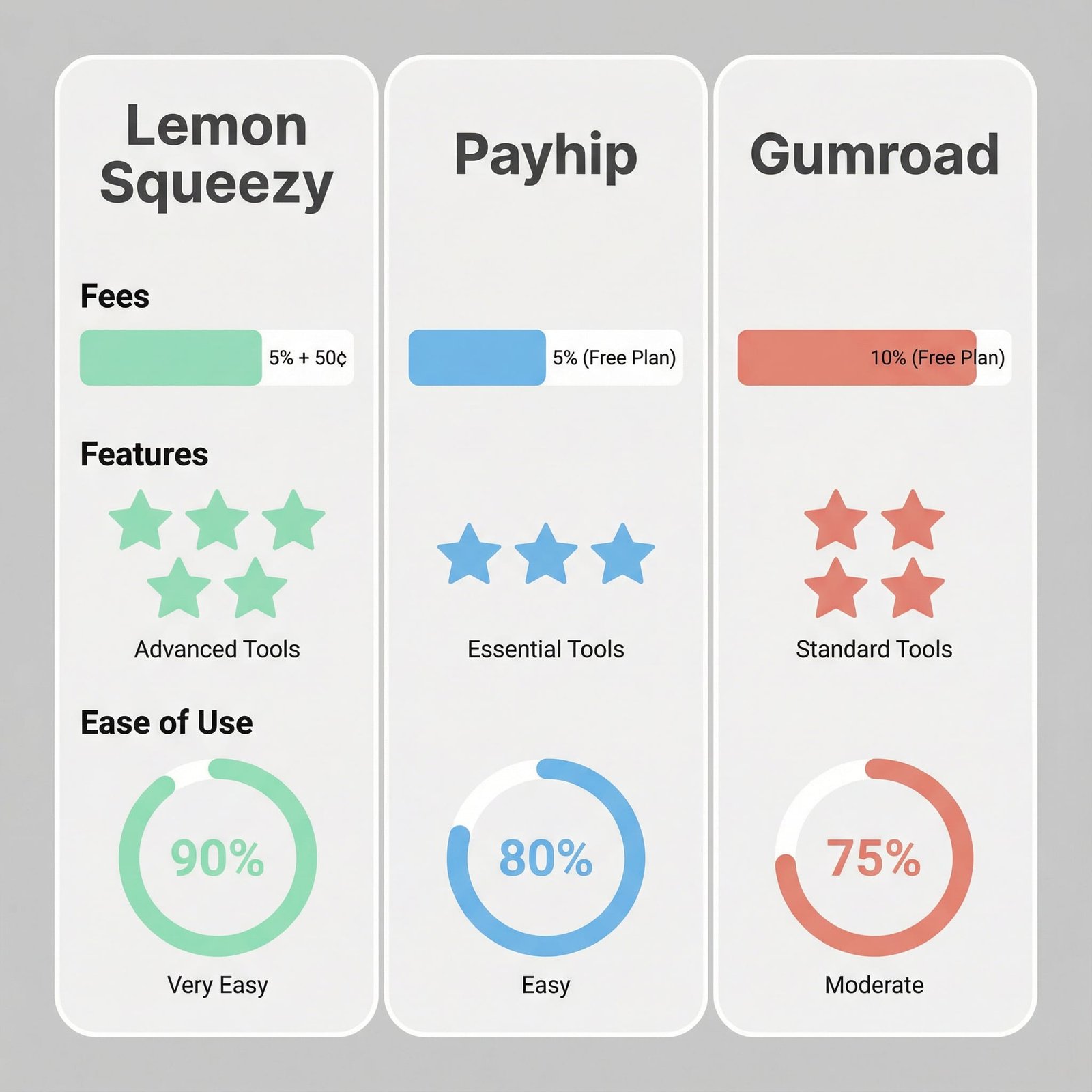
    The tradeoff is the part that sneaks up on me later: fees. As of January 2026, Gumroad’s common pricing is 10% + $0.50 per sale (plus payment processing that can still apply). When I’m testing one product, I can live with that. When sales grow, it can feel like I’m paying “rent” on every checkout.

    If you want a deeper outside comparison of the three, this 2026 roundup is useful context: Gumroad vs Payhip vs Lemon Squeezy vs IndieStand.

    I hate tax headaches or I sell software licenses: when Lemon Squeezy is the better fit

    Lemon Squeezy is the one I think about when I want fewer admin chores. The big headline is taxes: Lemon Squeezy works as a Merchant of Record for many sellers, which means it collects and remits applicable sales tax or VAT for you in supported regions. If I’ve ever stared at “VAT rules by country” and felt my brain shut down, I know why that matters.

    It’s also strong for software sales. If I’m selling an app, a plugin, or anything that needs license keys, Lemon Squeezy has licensing tools and customer license management. That reduces the support emails that drain my week, like “I lost my key” or “I switched computers.”

    It also supports a wider mix of payment methods than most creator-first stores, including cards plus wallets and regional options (more on that later). For international buyers, that can lift conversion.

    The main downside I plan around is that some sellers report an approval or review step, depending on the account and product type. That can slow launch day if I’m in a hurry.

    If you’re weighing it against Gumroad, this comparison can help frame the differences: Gumroad vs Lemon Squeezy: Which Platform is Best for Selling Digital Products?.

    I want strong value for downloads, courses, or memberships: when Payhip wins

    Payhip hits a sweet spot for small shops that care about margins and want built-in selling tools without duct-taping five services together.

    For digital downloads, Payhip is straightforward. Where it starts to stand out is learning content and recurring revenue. Payhip supports courses, bundles, and drip content, which is perfect if my “one product” is really a library that grows over time.

    Taxes are a key point too. Payhip is well-known for EU VAT handling, which helps if I sell to customers in Europe. I still need basic bookkeeping and clean records, but Payhip can remove a big chunk of the VAT stress.

    Payhip also tends to feel like a “store builder” more than a single product checkout link, which matters when I’m building a brand and want multiple offers under one roof. For Payhip’s own side-by-side framing, this page lays out how they position it: Payhip vs Lemon Squeezy.

    Pricing and fees that actually change my profit

    Fees are emotional when you see them in real dollars. A difference that sounds small on paper becomes loud once I’m making steady sales.

    Also, “fees” often mix three separate things:

    Platform fee: the percent the platform takes.
    Per-transaction fixed fee: often a flat amount like $0.50 per sale.
    Payment processing: card network fees, PayPal fees, and other payment costs that vary by country and method.

    Some platforms also offer monthly plans that reduce the per-sale cut. That can be worth it once sales become consistent.

    A quick rule I use:

    • If I’m testing or low volume, I prefer a fee-based plan so I’m not paying monthly for hope.
    • If I sell steadily, a monthly plan can beat a percentage fee fast.

    For broader perspective on Payhip as a Gumroad alternative, this is a solid read: Why Payhip Is Still the Best Gumroad Alternative 2026.

    What I keep from $1,000 in sales (simple math, no spreadsheets)

    Using January 2026 numbers from current published comparisons and platform info, here’s the rough “what I keep” picture on $1,000 in sales:

    • Gumroad: about $895
    • Lemon Squeezy: about $945
    • Payhip (Pro plan example): about $971

    This is meant as a gut-check, not a promise. Final totals can change based on payment method, buyer country, refunds, and any plan you’re on. Still, the direction is clear: Gumroad is easiest to start, but it’s usually the priciest once sales stack up.

    Hidden cost checks: refunds, chargebacks, and per-sale add-ons

    The fee page never tells the full story. What bites small shops is the messy stuff that shows up after the sale.

    Here’s what I always check before committing:

    • Refund handling: Can I issue refunds cleanly, and does the platform keep its fee or return it?
    • Chargebacks and disputes: Who fights the dispute, and are there extra dispute fees?
    • Payout timing: Do I get paid daily, weekly, twice monthly, or on a rolling delay?
    • Minimum payout thresholds: Some platforms hold payouts until I hit a minimum.
    • Per-sale fixed fees: A flat amount (like $0.50) hurts more on low-priced items.
    • Add-ons that cost extra: Any feature I “assume” is included (email, affiliates, licenses) that actually needs an upgrade.

    If I sell a $9 template, a $0.50 fixed fee stings. If I sell a $99 course, I care more about the percentage fee and chargeback risk.

    Features that matter day-to-day: checkout, taxes, delivery, and trust

    This is where I stop thinking like an accountant and start thinking like a solo shop owner. Every feature either increases conversion or cuts support time.

    To make this practical, imagine three common products:

    • a $15 ebook
    • a $39 template bundle with updates
    • a $149 mini-course

    All three need a checkout that feels trustworthy, delivery that “just works,” and a way to handle taxes without panic.

    Taxes and VAT: which one saves me the most stress?

    If taxes are my biggest fear, Lemon Squeezy is hard to ignore. As a Merchant of Record for many sellers, it can handle the collection and remittance of applicable taxes for supported regions. That’s a big deal when buyers come from multiple countries.

    Gumroad also positions itself as a Merchant of Record in many cases, which can reduce tax admin for creators selling globally.

    Payhip is different. The standout is EU VAT support, which can be exactly what I need if Europe is a major market. If most of my customers are outside the EU, I still need to understand what I’m responsible for where I live.

    No matter what platform I choose, I still keep clean records, track expenses, and set aside money for income taxes. The platform can help with sales tax or VAT, but it won’t run my whole business for me.

    Payments and conversion: card, PayPal, Apple Pay, and global buyers

    Checkout drop-off is often just “they couldn’t pay the way they wanted.”

    As of January 2026, Lemon Squeezy accepts a wide mix of payment methods, including credit and debit cards, PayPal, Apple Pay, Google Pay, AliPay, WeChat Pay, and bank transfers. If I sell to a global audience, that menu matters because it removes excuses at checkout.

    Gumroad has fewer payment options available to customers, which can be fine if my audience is mostly US-based card buyers. It can be limiting if I sell internationally.

    Payhip supports standard payment methods, but it typically does not match Lemon Squeezy’s range. For many shops, standard is enough, but if I see a lot of international traffic, I pay attention here.

    If you want a more feature-by-feature breakdown between Payhip and Lemon Squeezy, this overview is helpful: Payhip vs Lemon Squeezy? A Comprehensive Review.

    Digital delivery and customer experience: downloads, updates, and support load

    Delivery is where small shops quietly lose hours.

    What I want:

    • Buyers get their file immediately.
    • Download links don’t break.
    • I can update a product without chaos.
    • I can handle “I lost my link” without a 20-email thread.

    All three platforms handle digital delivery, but the support load differs based on what you sell.

    If I sell software, Lemon Squeezy’s license management is the clearest differentiator. When customers can manage licenses in a portal, I spend less time playing help desk.

    For downloads like ebooks and templates, Payhip’s store structure can make it easier to build a clean product catalog, bundle items, and deliver a more “shop-like” experience. Gumroad is still fine for simple delivery, but it can feel more like standalone product pages than a full storefront.

    Marketing and growth tools: email, affiliates, coupons, and course selling

    Most small shops don’t fail because of product quality. They fail because promotion is hard to repeat, and the system doesn’t help.

    I care about marketing tools that I’ll actually use on a busy week: coupons, affiliates, simple email, and basic upsells or bundles.

    Selling courses and memberships: where Payhip pulls ahead for learning content

    If I’m building a course business, Payhip often feels like the most complete option out of the box. The reason is structure: courses, bundles, and drip content support a real curriculum, not just a pile of files.

    This matters for long-term revenue because I can sell learning in layers. For example:

    Starter course: a focused 90-minute course for a low price point.
    Monthly add-ons: new lessons, templates, or office hours as a membership library.

    That setup helps me keep customers longer, and it gives me a reason to email them that isn’t “please buy again.”

    Affiliates, discounts, and simple promos: what I can run this week

    A stylized image of a laptop screen displaying a digital product storefront, with elements from Lemon Squeezy, Payhip, and Gumroad subtly integrated, conveying the idea of 'choosing your platform'.

    All three platforms can support basic promos, but the best tool is the one I’ll use consistently.

    Here’s the simple campaign I run when I want momentum without burning out:

    Launch week discount: A short, clear offer (like 20% off for 5 days).
    Evergreen newsletter coupon: A smaller discount that only new subscribers get.
    Affiliate push: Invite a few creators with the same audience, give them a fair cut, and give them swipe copy.

    Payhip includes affiliate tools and creator-friendly marketing features that make this kind of plan easy to repeat. Gumroad can also run coupons and simple promos quickly, which is part of its appeal for beginners. Lemon Squeezy supports marketing features too, and it pairs well with higher-priced products where the extra payment options and tax handling can lift conversion.

    For another angle on Gumroad vs Payhip tradeoffs, this breakdown is worth scanning: Gumroad vs. Payhip (+ dealbreakers).

    Conclusion

    Here’s how I call it: Lemon Squeezy is my pick when I want strong tax handling and software licensing, Payhip is my pick when I want strong value plus solid courses and memberships, and Gumroad is my pick when I want the simplest quick start and a familiar brand, even if I pay more as I grow.

    There isn’t one perfect platform. The right choice depends on what I sell, who buys it, and how steady my sales are. My best move is practical: pick the top two, run a small test sale, then commit to one for 30 days and focus on selling, not switching. If you do that, momentum starts to beat guesswork.

    FAQ Section:
    Which platform has the lowest fees?

    Each platform has different fee structures (transaction fees, monthly plans). Gumroad has higher transaction fees but no monthly fee for basic. Payhip offers free and paid plans. Lemon Squeezy combines payment processing and platform fees into one rate.

    Is Lemon Squeezy good for beginners?

    Yes, Lemon Squeezy is designed to be user-friendly with built-in tax handling, making it great for beginners, especially those new to international sales and compliance.

    Can I sell subscriptions on Payhip?

    Yes, Payhip supports selling subscriptions, memberships, and various other digital products like courses, ebooks, and downloads directly from your storefront.

    What are the main differences between Gumroad and Payhip?

    Gumroad is known for its simplicity, discoverability features, and established audience, while Payhip offers more robust features for branding, marketing, and integrated storefronts and email marketing tools.

    Do these platforms handle sales tax (VAT/GST)?

    Lemon Squeezy offers comprehensive tax handling for global sales, including VAT/GST, often simplifying compliance. Payhip and Gumroad also have features to help with tax calculations and reporting, but Lemon Squeezy’s is often highlighted as a key differentiator.