

AI Prompts for Finance Reconciliation: 15 Epic Prompts for Automated Agents That Match, Flag, and Summarize Fast
Month-end close has a special kind of cruelty. It’s 10:47 p.m., your eyes burn, and the last “small” mismatch turns into a two-hour hunt across bank exports, card feeds, and the general ledger.
AI prompts for finance reconciliation can flip that script. With the right instructions, an AI reconciliation agent can match transactions, flag exceptions, and draft clean notes in minutes, not days.
In plain words, a “reconciliation agent” is an AI helper that takes your files, matches records across sources, and explains what didn’t match and why. You still approve the final entries, because finance controls matter, but the agent does the heavy sorting and first-pass analysis.
How automated reconciliation agents work, and what makes a prompt “good” in finance
A solid reconciliation agent follows a predictable path. First, it ingests your sources (bank CSVs, card statements, payment processor payouts, and GL exports). Next, it normalizes fields (dates, amounts, vendor names). Then it matches records using rules plus “fuzzy” logic, scores confidence, routes exceptions, and produces notes you can keep for audit support.
That’s the promise behind many modern reconciliation tools and workflows, especially as teams move toward continuous checks instead of waiting for month-end. If you want a broader sense of how vendors describe audit-ready close workflows, see AI-powered reconciliations for faster closes.

A “good” finance prompt is strict. It doesn’t sound creative, because you’re not writing poetry. You’re writing operating instructions.
Here’s a quick checklist you can reuse:
- Role and goal: “You are a reconciliation analyst. Your job is to match X to Y.”
- Accepted formats: CSV columns, date formats, currency codes.
- Matching rules: date window, amount tolerance, vendor normalization rules.
- Thresholds: confidence scoring, auto-match cutoff, manual review cutoff.
- Required outputs: match table, exceptions table, summary stats.
- Audit trail notes: cite source row IDs, explain why each match happened.
Two guardrails keep you out of trouble:
Never invent transactions, never “fix” missing data, and always cite the exact source row IDs you used. If a field is missing, ask a question before matching.
The minimum inputs your agent needs to reconcile cleanly
Think of inputs like puzzle pieces. If half the pieces are missing, the agent will guess, and guessing is the enemy of clean books.
At minimum, include these fields for bank or card data:
- Transaction date (and posted date if available)
- Amount and currency
- Description or memo
- Vendor or counterparty name
- Reference ID (bank ref, trace, authorization, check number)
For GL data, include:
- Posting date
- Amount and currency
- Vendor or customer
- Account name and account number
- Journal entry ID (or transaction ID)
- Posting period
A few optional fields can boost match rates fast: invoice number, PO number, last-4 card digits, store location, exchange rate, settlement batch ID, and payout ID.
Also, watch out for timing. A bank “transaction date” and a GL “posting date” can be days apart. Time zones can shift card swipes across midnight, especially for online tools and subscriptions.
A simple “prompt wrapper” you can reuse for every reconciliation run
Use this wrapper to keep outputs consistent across runs and across models. Paste it once, then paste one of the 15 prompts under it.
Reusable prompt wrapper (copy/paste):
You are a finance reconciliation agent. Your goal is to reconcile [SOURCE_A] to [SOURCE_B] using only the rows provided. Rules: do not invent data, do not assume missing fields, cite row IDs for every conclusion, and ask clarification questions when needed. Matching rules: allow a date window of [X] days, amount tolerance of [$Y] or [Z%], and vendor fuzzy-match only when other fields support it. Scoring: output a confidence score from 0 to 100 with a one-sentence reason. Outputs required: (1) Matches table with source row IDs, match type (1:1, 1:many, many:1), confidence, and notes, (2) Exceptions table with source row IDs, suspected cause, and next question, (3) Summary with match rate, total $ matched, total $ unmatched, and top 5 exception themes.
If you want more ideas for prompt structure in a banking-style reconciliation context, this prompt engineering guide for reconciliation analysis shows how others frame constraints and evidence.
15 epic AI prompts for finance reconciliation agents (copy, paste, and run)
These prompts are tool-agnostic (ChatGPT, Claude, Gemini). They work best with file uploads. Use the placeholders like [BANK_CSV] and [GL_CSV] to keep your process repeatable.

Category 1: Transaction matching and categorization prompts (Prompts 1 to 5)
Prompt 1: Fuzzy-match vendor reconciliation (DBA names and memo noise)
Use when: vendor names don’t line up (DBA vs legal name, spelling, memo clutter).
Paste/upload: [BANK_CSV] (date, amount, description, reference_id), [GL_CSV] (date, amount, vendor, gl_id, account).
Prompt text: Reconcile [BANK_CSV] to [GL_CSV]. Normalize vendor names (remove suffixes, ignore punctuation, collapse whitespace). Only fuzzy-match vendors if amount matches within [$1.00] and date within [3] days. Output “Ready to Post” matches (confidence ≥ 90) and “Needs Review” matches (confidence 70 to 89) plus questions for anything below 70.
Output: Matches table + exceptions table + short summary with match rate.
Prompt 2: Bank statement to GL auto-pairing (handles splits and bundles)
Use when: one bank line maps to multiple GL lines (or vice versa).
Paste/upload: [BANK_CSV] and [GL_CSV] plus GL debit/credit indicator if you have it.
Prompt text: Match [BANK_CSV] to [GL_CSV] allowing 1:many and many:1 matches. Use subset-sum style matching for same-day items within [5] days and variance up to [$2.00]. Provide confidence and list the component GL IDs for each grouped match. Separate results into Ready to Post (≥ 90) and Needs Review (70 to 89).
Output: Match table with match type and component IDs, plus exceptions.
Prompt 3: Multi-currency normalization (FX rounding and settlement rates)
Use when: payouts settle in USD but invoices post in other currencies.
Paste/upload: [BANK_CSV], [GL_CSV], and [FX_RATES_CSV] (date, from_ccy, to_ccy, rate) if available.
Prompt text: Convert all amounts to [USD] using [FX_RATES_CSV] by transaction date, then reconcile [BANK_CSV] to [GL_CSV]. Flag FX rounding as “FX rounding” when variance ≤ [0.5%] and explain the math using row IDs and rates used. Never guess missing FX rates, ask for them.
Output: Matches with converted amounts, FX notes, and an FX exceptions list.
Prompt 4: Orphaned transactions finder (unmatched bank or unmatched GL)
Use when: you need a clean “what’s missing” list fast.
Paste/upload: [BANK_CSV], [GL_CSV].
Prompt text: Identify unmatched items on both sides after attempting standard matching (date ± [3] days, amount tolerance [$1.00], vendor normalization). For each orphan, propose likely causes (timing, fee netting, missing invoice, duplicate entry, wrong account) and ask the next best question to resolve it.
Output: Two exception tables (unmatched bank, unmatched GL) plus themes.
Prompt 5: PO and invoice cross-check (light 3-way match)
Use when: you want a fast control check on AP flow.
Paste/upload: [PO_CSV], [INVOICE_CSV], optional [RECEIPT_CSV], plus [GL_CSV] if you want posting validation.
Prompt text: Cross-check PO to invoice (and receipt if provided). Flag price variances > [2%], quantity variances > [1 unit], missing receipts, and invoices posted to the wrong GL account. Output Ready to Post vs Needs Review, with confidence scores and row IDs for PO, invoice, and receipt used.
Output: Variance table + exceptions + short posting recommendations (no assumptions).
Category 2: Discrepancy resolution and anomaly detection prompts (Prompts 6 to 10)
Prompt 6: Hidden bank fees and miscalculations (netted settlements)
Use when: deposits don’t equal sales totals because fees got netted.
Paste/upload: [PROCESSOR_PAYOUT_CSV] (gross, fees, net, payout_id), [BANK_CSV], [GL_CSV].
Prompt text: Reconcile net payouts to bank deposits, then reconcile gross sales and fees to GL. Detect missing fee entries and fee rate changes. Output an exception list with likely root cause, recommended next step, and a suggested journal entry idea marked “Suggestion only, approval required.”
Output: Exceptions + root cause + next step + JE suggestion (labeled).
Prompt 7: Duplicate payments and phantom invoices (near-match detection)
Use when: AP is busy and duplicates slip in.
Paste/upload: [AP_PAYMENTS_CSV], [BANK_CSV], [GL_CSV].
Prompt text: Find duplicates and near-duplicates by vendor + amount + date proximity (within [7] days) and by invoice number similarity. Separate “Probable duplicate” (confidence ≥ 85) from “Possible duplicate” (70 to 84). For each, list evidence row IDs and suggest the next verification step. Include a suggested reversal entry idea marked approval required.
Output: Duplicate list + evidence + next steps + suggestion.
Prompt 8: Grouped merchant gateway payouts (Stripe/PayPal batches, chargebacks)
Use when: batch payouts include refunds, disputes, and reserves.
Paste/upload: [GATEWAY_BALANCE_TXNS_CSV], [BANK_CSV], [GL_CSV].
Prompt text: Reconcile gateway balance activity to bank payouts by payout_id and dates. Explain net vs gross, and break out refunds, chargebacks, and reserves. Flag mismatches over [$5.00] or [0.3%]. Produce an exception list, root cause hypothesis, and next action, plus JE suggestion ideas labeled approval required.
Output: Payout tie-out table + exceptions + notes suitable for audit.
For more background on how invoice and payout reconciliation agents get designed, this walkthrough on automated invoice reconciliation with AI agents is a helpful reference point.
Prompt 9: Month-over-month variance explainer (top drivers, new vendors)
Use when: stakeholders ask why an account moved.
Paste/upload: [GL_DETAIL_CURRENT_MONTH_CSV], [GL_DETAIL_PRIOR_MONTH_CSV].
Prompt text: Compare current vs prior month for account(s) [LIST]. Identify top 10 drivers by $ impact, call out new vendors, and separate timing shifts from real spend changes. For each driver, cite the GL row IDs. Output a short exec summary plus a drill-down table.
Output: Exec-ready narrative + driver table + questions for missing context.
Prompt 10: Split payments across accounts (partials and mixed methods)
Use when: one invoice gets paid in chunks or via multiple rails.
Paste/upload: [INVOICE_CSV], [BANK_CSV], [CARD_CSV], [GL_CSV].
Prompt text: Match invoices to payments across bank and card, allowing partials and mixed methods. Track remaining balance per invoice, and flag overpayments and unapplied cash. Provide a recommended next step for each exception and a labeled JE suggestion idea (approval required) for reclasses or unapplied balances.
Output: Invoice-to-payment ledger + exceptions + next steps.

Category 3: Automated reporting and stakeholder follow-up prompts (Prompts 11 to 15)
Prompt 11: Missing receipt request drafts (polite, short, deadline included)
Use when: you need receipts without chasing all day.
Paste/upload: [EXPENSES_CSV] (date, amount, merchant, employee, expense_id, policy_limit).
Prompt text: Draft short receipt requests for items missing documentation. Include transaction date, merchant, amount, expense_id, and a response deadline of [3 business days]. Keep tone polite and firm. Output in a table with employee, subject line, and message body.
Output: Copy-ready email or Slack drafts.
Prompt 12: Daily reconciliation executive summary (match rate, top risks)
Use when: you want a tight daily heartbeat report.
Paste/upload: Your day’s reconciliation outputs (matches and exceptions tables).
Prompt text: Summarize today’s reconciliation: match rate, $ matched, $ outstanding, and top 5 risks. Add “What changed since yesterday” if yesterday’s summary is provided. Keep it under 150 words, plus a short bulleted risk list with row IDs.
Output: One paste-ready update for Slack or email.
Prompt 13: Audit-ready discrepancy narratives (evidence, approvals, timestamps)
Use when: you need clean support for auditors or a controller review.
Paste/upload: [EXCEPTIONS_TABLE_CSV], supporting documents list (invoice IDs, emails, approvals), and final resolution notes.
Prompt text: Turn each exception into a narrative: what happened, evidence used (IDs only), who approved, and when it was resolved. Do not add facts not in the file. End each narrative with “Open items” if anything is pending.
Output: One narrative per exception, ready to paste into workpapers.
Prompt 14: Accrual and reclass journal entry suggestions (with rationale)
Use when: close needs accruals and quick cleanups, but you want control.
Paste/upload: [GL_DETAIL_CSV], [OPEN_INVOICES_CSV], optional [PAYROLL_CSV] or [CONTRACTS_CSV].
Prompt text: Suggest accrual and reclass entries based on patterns and timing, but label every entry as “Suggestion only, approval required.” For each, give rationale, affected accounts, period, and the exact source row IDs that triggered the suggestion. Ask questions when critical info is missing.
Output: Suggested JE table + rationale notes + approvals reminder.
Prompt 15: Month-end close sign-off checklist (accounts tied to evidence)
Use when: you need a final control pass before sign-off.
Paste/upload: Reconciliation summaries per account, open exceptions list, and approval log.
Prompt text: Build a sign-off checklist by account: evidence attached, match rate, open items, owner, and required approvals. Highlight any account with high exceptions or missing evidence as “Do not sign off.” Provide a short close-ready status summary for leadership.
Output: Checklist table + short leadership summary.
Make these prompts safe in real finance workflows
Automation can reduce stress, but only if you keep control. The safest pattern is simple: let the agent auto-match low-risk items, and route anything uncertain to a human reviewer. In March 2026, many teams are also moving to more frequent reconciliation runs (daily or continuous) so exceptions shrink before close week.
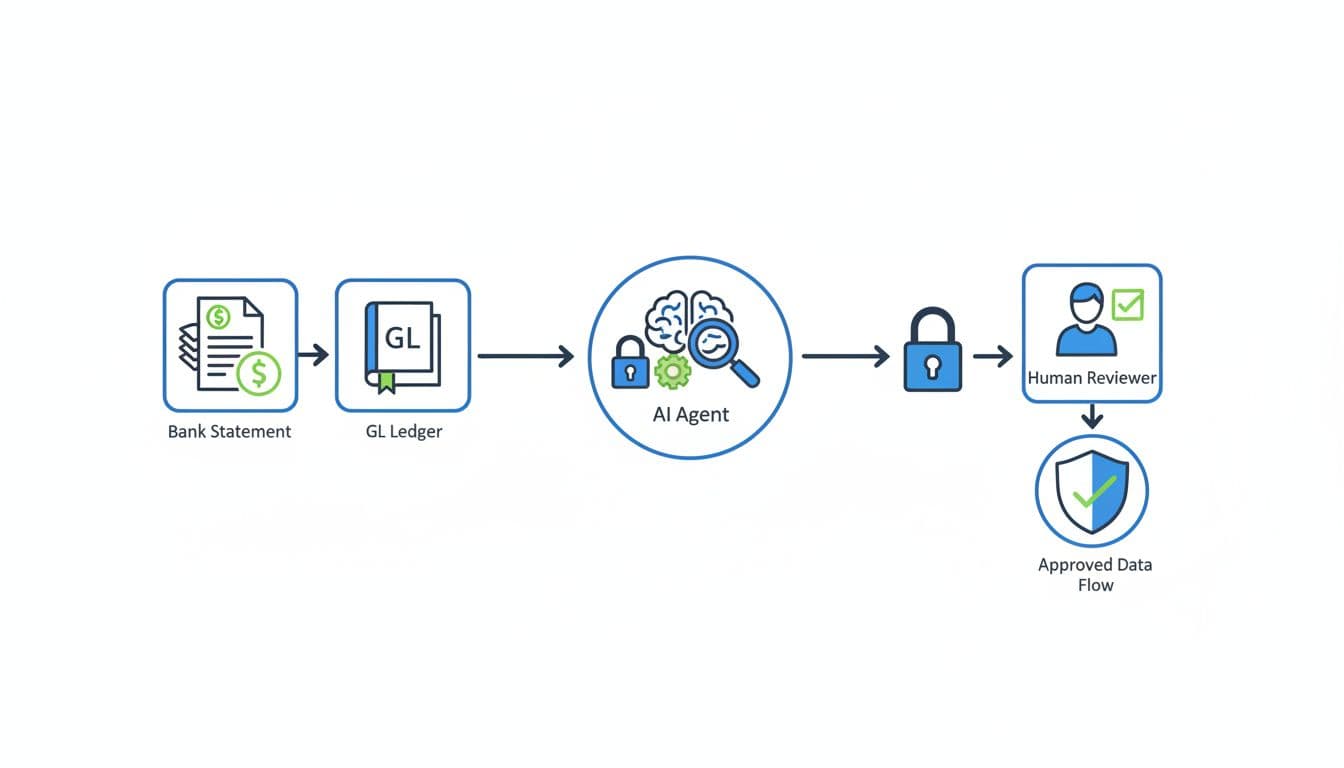
This is workable for solo operators on QuickBooks or Xero, and it also scales to ERPs. The trick is to put “seatbelts” around the prompts: tight thresholds, clear evidence requirements, and logging.
If you’re comparing how multi-source reconciliation is being framed this year, this 2026 guide to multi-source reconciliation tools offers helpful context on what’s becoming standard.
Privacy and data handling rules to follow before you paste anything
Before you upload files to any model or agent, reduce what you share. You usually don’t need full identifiers to reconcile.
Mask or remove:
- Full bank account numbers (keep last 4 if needed)
- Full card numbers (never include), CVVs, PINs
- SSNs, tax IDs, DOBs
- Full addresses when not needed for matching
Also, don’t hand over credentials. Never paste API keys, login links, tokens, or “live access” instructions into a chat. If you later connect tools, use least-privilege permissions and keep a clear off switch.
A lightweight rollout plan that proves value in one week
A one-week pilot beats a long “AI project” every time.
Pick one account (usually the main bank or highest-volume card). Track three numbers daily: match rate, time spent, and exception count. Tune thresholds, then expand only after results hold for three straight days.
A simple scorecard works:
- Good: match rate climbs, exception count stabilizes, close prep time drops
- Bad: match rate looks high but exceptions feel “hand-wavy” (tighten evidence rules)
By day 7, you should know if the agent saves time without adding risk.
FAQ (Frequently Asked Questions)
Will an AI reconciliation agent replace my accountant or bookkeeper?
No. It replaces the repetitive matching and first-pass triage. A human still approves postings and resolves judgment calls.
What’s the biggest reason reconciliation prompts fail?
Missing identifiers. If you don’t include row IDs, reference numbers, and clear dates, the agent can’t prove matches.
Can I use these prompts with QuickBooks or Xero?
Yes, as long as you can export CSVs. Start with bank-to-GL pairing, then add orphan detection.
How do I prevent “confident wrong” matches?
Require evidence: row IDs, rules, and confidence reasons. Also, don’t allow auto-posting below your cutoff.
Do I need a paid AI tool for this?
Not always. File upload support helps a lot, but the prompt structure matters more than the brand.

Conclusion
Late-night closes happen when matching stays manual and exceptions pile up. With AI prompts for finance reconciliation, you turn messy inputs into repeatable steps: match, score, explain, and route for approval. Start with the bank-to-GL auto-pairing prompt, then add duplicates and payout batching once you trust your thresholds. If you want it all in one place, grab the downloadable swipe file of all 15 prompts via email signup, then book a demo of the AI reconciliation tool to see the workflow run end-to-end.
Leave a Reply