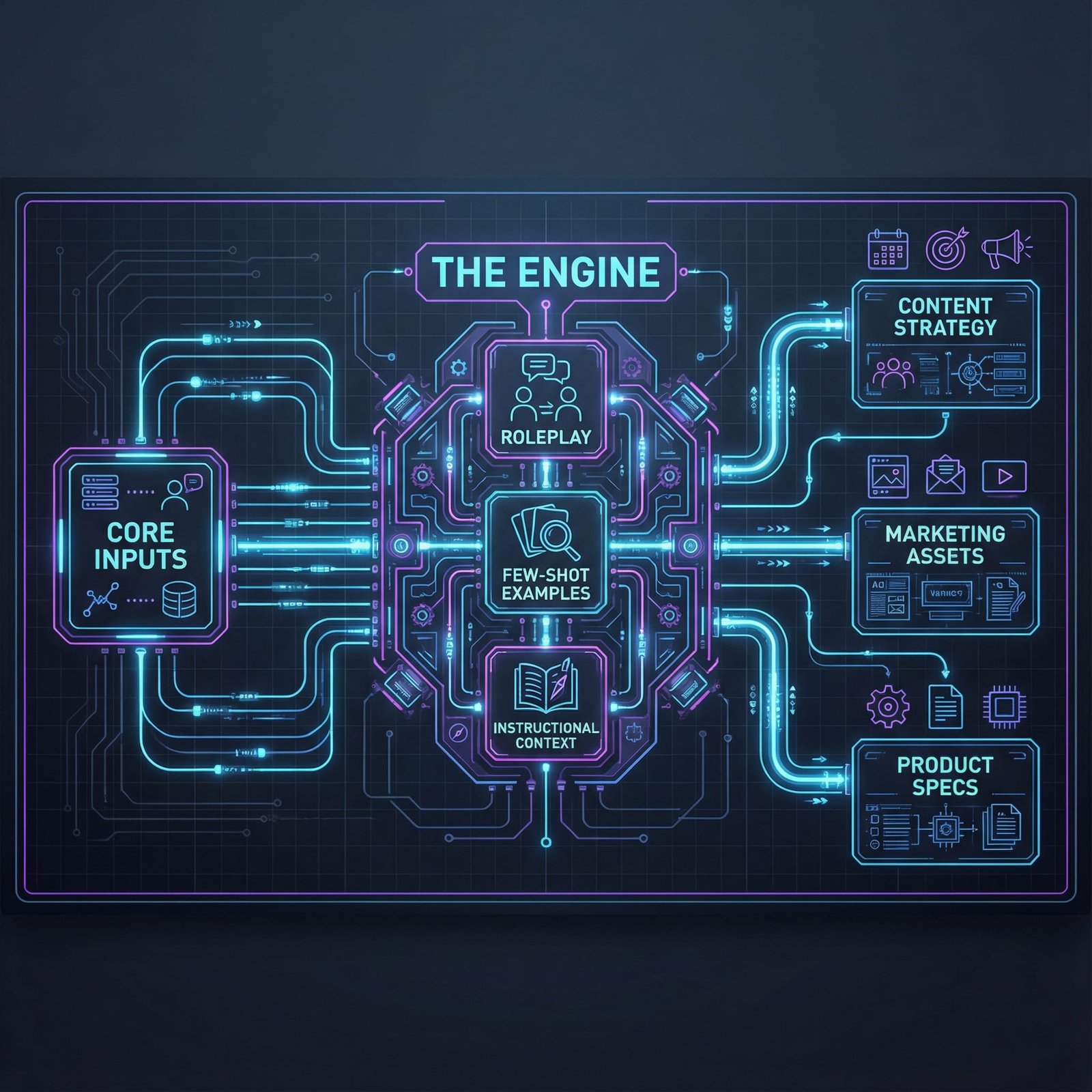
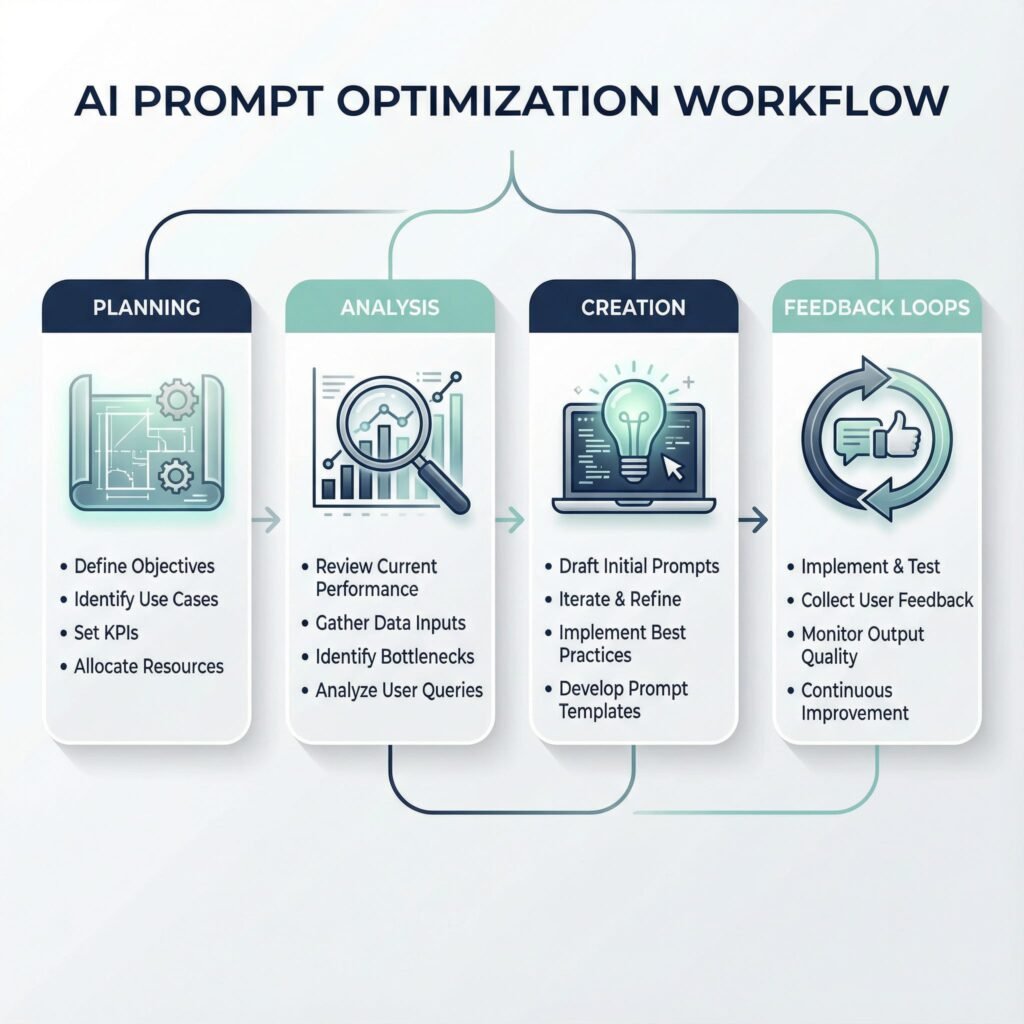
How to Turn AI Into Your Business Consultant via Reverse Prompting
If you use AI for content briefs, landing pages, or keyword planning, you’ve felt it: you spend more time rewriting prompts than using the output.
One-shot prompts fail because they hide your real context. The model can’t see your audience, offer limits, proof points, or tone rules unless you spell them out. So it plays it safe, sounds like everyone else, and sometimes invents details to fill gaps.
Reverse prompting flips the work. Instead of you guessing the perfect instructions, you make the AI interview you first. After it gathers the missing context, it writes. This guide gives you a copy-paste master prompt, an interview workflow, a keyword cluster method, a short case example, and a 15-minute quick start you can run today.
What reverse prompting is, and why it beats the guess-and-check prompt loop
Reverse prompting is a simple behavior shift: the AI asks questions first, then produces the deliverable only after it understands your situation.
Traditional prompting is you pushing instructions into a black box. The AI guesses what you meant, you correct it, then you repeat. Reverse prompting treats the model like a consultant. Consultants don’t start with a slide deck. They ask, “Who is this for, what’s the goal, what constraints exist, and what does success look like?”
Here’s the difference in practice:
Standard prompt: “Write a landing page for our SEO audit service.”
Reverse prompting: “Before you write, ask me questions until you can target the right buyer, match search intent, and use only real proof. Then draft.”
If you want a broader refresher on what makes prompts work (roles, constraints, examples), this pairs well with Stack AI’s guide to writing good AI prompts. Reverse prompting does not replace good prompting, it makes good prompting easier because the model helps you build it.
The real reason traditional prompts produce generic content
Generic output usually comes from context gaps.
When you omit details, the model fills blanks with the safest average answer. For SEO and content planning, those blanks matter:
Search intent: Are readers trying to learn, compare, or buy?
Audience level: Beginners, practitioners, or executives?
Offer: What you actually sell, and what you don’t.
Proof: Case studies, reviews, certifications, or product data.
Voice: Direct and plain, or formal and academic?
Without those inputs, the model defaults to common claims. That’s why drafts often sound interchangeable. It’s also why you sometimes see “hallucinated” specifics. The model tries to be helpful, so it supplies numbers, timelines, and features you never said were true.
Reverse prompting reduces that risk by making uncertainty visible. The model has to ask, “Do you have proof for X?” instead of guessing and hoping you won’t notice.
When to use reverse prompting (and when not to)
Reverse prompting shines when the task is important and the requirements are fuzzy.
Use it when:
You’re entering a new industry and don’t know the right angles yet.
The page is high stakes (home page, pricing, core landing page).
Constraints are complex (legal, compliance, regulated claims).
You need a repeatable team workflow, not hero prompts.
You want content that reflects real experience, not summaries.
Skip it when:
The task is a clean transformation (rewrite for clarity, shorten to 120 words).
You already have a complete spec, including examples and structure.
The output is trivial and you can fix it faster than you can answer questions.
A fast decision check helps: if you can’t answer who, what, and why in 30 seconds, use reverse prompting.
For extra background on the “work backward” idea and how reverse prompt engineering is commonly defined, see Reverse prompting explained in depth.
The master reverse prompt that makes AI take the lead (copy, paste, run)
You don’t need ten prompt templates. You need one solid script that forces the right behavior.
A strong reverse prompt has five parts:
Primer (role): Tell the model who it is for this session.
Goal (deliverable): Define the output and what “good” means.
Constraints (questions first): Make it interview you before drafting.
Format (question batches): Keep questions in sets of five.
Stop rule (no early draft): Prevent the model from writing too soon.
This structure works for content, coding, and strategy. You only swap the deliverable line. Everything else stays the same.
A copy-paste reverse prompting script with a built-in stop rule
Paste this as-is, then replace the bracketed parts.
You are an expert [role, e.g., “SEO content strategist and conversion copywriter”].
My target outcome: Create a [deliverable, e.g., “content brief for a pillar page”] that will [business goal, e.g., “increase demo requests from mid-market SaaS teams”].
Target audience: [who it’s for, job titles, level, pain points].
Constraints and rules:
Ask me questions first to gather missing context before you write anything.
Ask exactly 5 questions at a time, in a numbered list.
After I answer, summarize what you learned in 6 to 10 bullets.
Confirm assumptions you’re making, and label them as assumptions.
Request any missing inputs you need (examples, proof, sources, limits).
Do not write the final output until I say: READY.
If you think you have enough info, ask for READY instead of drafting.
Start by asking your first 5 questions now.
That’s the whole trick: you’re not “adding more detail.” You’re forcing the model to pull detail out of you, in a controlled way.
Tiny tweaks that change everything (tone, depth, and sources)
Small add-ons can raise quality without turning your prompt into a novel. Add 3 to 5 lines like these:
Reading level: “Write at an 8th to 9th grade level, short paragraphs.”
Voice: “Direct, practical, no hype, avoid buzzwords.”
Length: “Target 1,200 to 1,500 words, concise sentences.”
Examples: “Include one realistic example with numbers if I provide them.”
Claim handling: “Flag any claim that needs proof with: NEEDS PROOF.”
You can also control the workflow by asking for outputs in stages: first a brief, then an outline, then the draft. That keeps you in charge while the AI does the heavy lifting.
If you’re curious how people also use reverse prompting to infer what prompt may have produced a strong answer, this perspective is described in The Reverse Prompt Trick. It’s a different angle, but it reinforces the same idea: stop guessing forward.
The interview phase: letting AI pull out your unique topical authority
The interview is where reverse prompting earns its keep.
Most content sounds generic because it’s built from the same public inputs. Your advantage is hidden in details you take for granted: your process, your constraints, your real objections, your sales calls, and your customer language.
A good reverse prompting loop looks like this:
AI asks 5 questions.
You answer fast.
AI summarizes what it learned, then lists assumptions.
AI asks sharper questions based on your answers.
You say READY only when the summary matches reality.
This is how you turn “AI wrote it” into “we wrote it, faster.” It also supports topical authority because the model can surface subtopics that connect to what you actually do, not what the internet repeats.
Speed comes from structure, not longer replies. Use this simple format:
Facts: short bullets with what’s true right now.
Must include: 3 to 7 points you want covered.
Do not include: claims you can’t support, taboo angles, competitor mentions.
Examples: one real scenario, even if it’s rough.
Links: internal docs, public pages, or references (when allowed).
Unknown: say “unknown” if you don’t have the data.
Short answers work because the AI will keep asking. Think of it like a phone screen, not a deposition.
After one good interview, save your answers as a reusable “brand and product fact sheet.” Next month, you reuse it instead of starting from zero.
Add a confidence check so the AI knows when it has enough context
Without guardrails, interviews can drag on. A confidence check stops that.
Ask the model to rate its understanding from 1 to 10, then tell you what it needs to reach a 9. Use this mini template after any recap:
Confidence (1 to 10):
What you understand well:
Assumptions you’re making:
Missing info to reach 9:
Next 5 questions:
This does two things. First, it prevents endless questioning. Second, it reduces early drafting because the model has a formal step before output.
Gotcha: If the model’s confidence is high but its recap feels off, don’t proceed. Correct the recap first, then continue.
Turn AI questions into keyword clusters and a content roadmap you can actually ship
The interview questions are not just “setup.” They’re a content plan hiding in plain sight.
Each question points to a subtopic your audience cares about. When you group those questions by intent, you get clusters that are easier to write, easier to link, and easier to keep consistent across a team.
Keep it tool-agnostic. You can run this in any AI chat, then move the structure into your project tracker.
A simple way to convert questions into clusters, pages, and internal links
Use this repeatable method:
Collect every AI question from the interview.
Group questions by intent: learn, compare, buy, troubleshoot.
Name clusters after the real problem, not a single term.
Pick one pillar page per cluster.
Assign supporting posts that answer one question each.
Map internal links from supports to the pillar, and between related supports.
Ask the AI to output a table like this so you can ship it. Here’s the format to request:
Cluster
Primary page
Support pages
Search intent
CTA
Example: SEO Audit Basics
What an SEO audit includes
Audit checklist, common mistakes, timeline, deliverables
Learn
Download checklist
Example: Choose an SEO Partner
How to choose an SEO agency
Pricing models, red flags, questions to ask, contract terms
Compare
Book a consult
Example: Fix Technical SEO
Technical SEO fixes that matter
Crawl issues, indexation, Core Web Vitals, redirects
Troubleshoot
Request a site review
Takeaway: once you see questions as inventory, planning stops feeling like guesswork.
Automation prompts for briefs, outlines, and FAQs from one interview
After the interview, reuse the AI’s recap as the “context pack,” then run short prompts like these (paste as plain text):
Brief prompt: “Using the interview recap below, write a one-page content brief for [page]. Include audience, intent, angle, H2 outline, must-include proof, and internal link targets. Keep claims grounded, and label anything that needs proof as NEEDS PROOF. Use the brand voice from the recap.”
Outline prompt: “Using the same recap, create a detailed outline with H2s and H3s. Add 2 suggested examples per section. Do not draft paragraphs yet. Flag any section that requires product data or legal review.”
FAQ prompt: “From the recap, generate an FAQ section with 8 questions and concise answers. Avoid promises, avoid invented metrics, and keep answers consistent with the offer limits in the recap.”
Case study: the Reverse Hack that cut content research time by 80 percent
Here’s a realistic pilot example from a small in-house team (no company name, because the point is the workflow).
A senior strategist needed new content briefs for a B2B service page cluster. The old process involved manual SERP review, a draft brief, then rounds of edits after stakeholder feedback. Results were inconsistent because each brief started from a different prompt.
They switched to reverse prompting for one cluster and tracked time for two weeks. Research and briefing time dropped by about 80 percent (from roughly 10 hours per pillar to about 2 hours), mostly because the interview pulled the right constraints upfront.
Before and after: what changed in the workflow
Before:
Skim search results and competitor pages.
Guess intent and outline.
Draft brief from scratch.
Send to stakeholders.
Get corrections (offer limits, proof, tone).
Rewrite brief, then repeat for each page.
After:
Run the master reverse prompt for the pillar page.
Answer 5 questions at a time in bullets.
Ask for a recap, then request a confidence score.
Fill gaps, correct assumptions, then say READY.
Reuse the same recap to generate support-page briefs.
Get faster approvals because the recap matches stakeholder reality.
The best improvement was not the draft itself. It was fewer rewrites and fewer “that’s not how we do it” comments.
The lesson: reverse prompting works best when you save the interview output
The compounding effect comes from saving the interview recap as a living “context pack.”
Store it somewhere your team can reuse: a doc, a wiki page, or a shared prompt library. Update it when your offer changes, when you learn new objections, or when you add proof points. Over time, your prompts stop being fragile because the context is stable.
Quick start checklist and conversion path: your first 15 minutes with reverse prompting
You don’t need a big rollout. Start with one real task, today, and keep the loop tight.
15-minute quick start checklist
Pick one task (content brief, landing page, email sequence, or FAQ).
Paste the master reverse prompt.
Answer the first 5 questions in bullets.
Request the recap and correct anything wrong.
Ask for a confidence score and what’s missing to reach 9.
Answer the next 5 questions, then repeat once if needed.
Say READY and get the first deliverable.
Save the recap as your reusable context pack.
A simple conversion path that does not feel pushy
If you want this to stick across projects, give yourself one asset to reuse.
Offer a downloadable PDF cheat sheet with 10 reverse prompt templates (coding, writing, strategy), plus a copy-paste reverse prompt generator your team can use without thinking. Keep the next step low-friction: run the method on one page, then fold the recap into your normal brief process. After that, pilot it on a full cluster.
FAQ
Is reverse prompting the same as reverse prompt engineering?
They overlap, but they’re not identical. Reverse prompt engineering often means inferring the prompt from an output. Reverse prompting, in day-to-day work, usually means letting the AI ask questions first so it can write with real context.
Will reverse prompting slow me down?
The first run can take longer than a one-shot prompt. However, it usually saves time by cutting rewrites and rework, especially on high-stakes pages.
How many questions should I answer before I say READY?
Stop when the recap matches reality and the confidence score is at least an 8. If the model keeps asking low-value questions, tighten constraints (tone, audience, proof) and proceed.
Can I use reverse prompting for coding tasks?
Yes. It’s great when stack details matter (language, framework, database, constraints, deployment). The interview format reduces back-and-forth debugging because the model gathers environment details early.
How do I prevent made-up facts?
Add a rule: “If you lack proof, ask me, or label it NEEDS PROOF.” Also require an assumptions list in every recap, then correct it before drafting.
Conclusion
Reverse prompting works because it shifts the burden of clarity onto the model, where it belongs. Once the AI interviews you first, it can write with your audience, constraints, and proof, not generic filler. Use the master prompt, run the 5-question interview loop, turn questions into clusters, then save the recap as a context pack. Run the 15-minute checklist on one real task today, then reuse the same summary for your next five pieces of content.
Use Real Estate Agent Prompts to Turn One Property Tour Into a Week of Posts
You walk a listing once, then you sit down to post, and your brain goes blank. Meanwhile, buyers who felt something in that kitchen are already scrolling, and another agent is already in their DMs. If you aren’t hitting your visitors’ inboxes within hours, you’re losing money.
This is where real estate agent prompts give you a repeatable system. You’ll walk away with plug-and-play prompts that turn one tour or open house into a full week of Reels captions, Stories sequences, and short video scripts, plus lead follow-up messaging you can send by text, email, and call.
Speed matters after a tour because interest drops fast once they leave the driveway. Short-form video still wins in 2026 because it matches how people shop homes now, quick, emotional, and easy to share on a phone.
In this post, you’ll run a 5-part framework, categorize visitors, send hot lead scripts, nurture warm leads with value, re-engage cold leads without wasting time, and set up AI automation so the follow-up runs even when you’re in showings. If you want to see the filming side too, start here: https://www.youtube.com/watch?v=r4EMPUguQWk
Categorize your open house visitors in 2 minutes so you follow up the right way
If you treat every open house visitor the same, your follow-up gets messy fast. You either burn time chasing window-shoppers, or you under-serve the people who are ready to move. A simple tagging habit fixes both problems.
The trick is to make your decision while the interaction is still fresh. You do not need a long conversation or a full buyer consult in the living room. You just need a few cues, a few questions, and a clean way to capture what matters. Then your real estate agent prompts (and your CRM workflows) can fire the right message on the right channel within hours.
The 3-tag system (Hot, Warm, Cold) and what each one actually means
You are not judging people, you are sorting urgency. Think of it like triage. Everyone gets care, but not everyone gets the same speed.
Hot (0 to 30 days) They have a real reason to move, and they can act. They might say, “Our lease ends next month,” or “We close on our sale in two weeks.” They often ask pointed questions (offer strategy, comps, inspection issues, HOA rules). Many are pre-approved or can explain their financing clearly. One-line goal: Book a showing or consult.
Everyday examples:
A couple touring their third home today, already working with a lender.
A relocation buyer who needs to be in the new school zone before the semester.
A cash buyer who asks when the seller will review offers.
Warm (30 to 90 days) They are interested, but something is fuzzy. Sometimes it is financing, sometimes it is fear, sometimes it is a decision-maker who is not there. They ask good lifestyle questions (commute, schools, noise, remodel cost), but their timeline sounds like “soonish.” One-line goal: Build trust and reduce fear.
Everyday examples:
A first-time buyer who says, “We are watching rates and saving.”
A move-up buyer who needs to talk through selling first.
A couple who likes the home, but needs to see “a few more” before deciding.
Cold (90+ days, or unknown) They are browsing, planning, or just curious. That does not mean they are worthless. It means you should not spend your best follow-up minutes here today. Put them on a light, helpful track and let time do its job. One-line goal: Stay top of mind.
Everyday examples:
Neighbors who want to see how the home compares to theirs.
Renters who say, “Maybe next year.”
A casual visitor who does not want to share a timeline or budget.
A quick warning: Do not label everyone as Hot because you want the deal. When you chase too hard, you sound desperate, and your real Hot leads get slower replies because your time is split. If you want a solid baseline for capturing open house info without friction, use a simple sign-in flow and plan, then tag right after (this guide on open house lead capture basics is a helpful reference).
Fast questions to ask during the tour that tell you their real timeline
You can ask qualifying questions without turning the tour into an interview. The tone matters more than the words. Keep it casual, tie it to the house, and give them an easy out.
Here are questions that fit naturally as you walk:
“Are you also touring any other homes this weekend?”
“What prompted the move, job change, space, schools, something else?”
“If you found the right place, how soon would you want to move?”
“Do you already have a lender, or are you still deciding?”
“Is there a home you need to sell first, or are you buying before you sell?”
“What price range feels comfortable for you right now?”
“What is one thing you do not want to compromise on?”
“Are you already working with an agent, or are you still meeting people?”
How to ask without feeling pushy:
Use permission language: “Do you mind if I ask a quick question so I can point out the right things?”
Make it about service: “So I do not waste your time, what is your must-have?”
Ask while you are moving: A question in the hallway feels lighter than a sit-down.
Mirror their energy: If they are quiet, keep it to two questions, then follow up by text later.
The goal is not to win the contract in the kitchen. The goal is to learn their pace so your next message feels spot-on.
Your note-taking template: what to jot down in your phone before you leave the driveway
Do this before you start the car. If you wait until later, you will confuse people, forget the one detail that mattered, and send a generic follow-up that gets ignored.
Copy and paste this into your notes app and fill it in quickly:
Name:
Preferred channel (text, email, call, DM):
Tag (Hot, Warm, Cold):
Timeline (0 to 30, 30 to 90, 90+):
Must-haves (3 max):
Deal breakers:
Favorite feature (their words):
Concern (their words):
Next step (specific):
Content hook (what they reacted to):
A few examples of strong entries:
Favorite feature: “The pantry, finally enough storage.”
Concern: “Backyard slope, worried about drainage.”
Content hook: “They stopped at the mudroom bench and talked about kids’ backpacks.”
Two guardrails that keep you safe and professional:
Keep notes factual. Write what they said, not what you assume.
Respect privacy. Store notes in your CRM or a locked phone, and avoid sensitive personal details that are not needed for the transaction.
Once you have this captured, your follow-up becomes simple. Hot gets speed (text, then call). Warm gets reassurance and proof (a helpful mini-sequence). Cold gets a light touch and automation so you stay visible without burning hours. If you want more plug-and-play real estate agent prompts that match each tag, download the Real Estate Prompt Vault for 50+ more scripts you can send the same day.
Immediate action scripts for hot leads (Text + Email + Call) within hours
Hot leads cool off fast because life rushes back in the second they leave the driveway. Your job in the first day is simple: be useful and clear, then offer one easy next step. When you combine a tight cadence with real estate agent prompts you can reuse, you stop staring at a blank screen and start booking appointments.
The key is to hit three channels quickly (text, email, call), then add one value touch the next morning. That mix feels attentive, not clingy, because each message has a purpose.
Your 24-hour follow-up cadence that feels helpful, not desperate
You want a schedule you can follow even on your busiest showing day. Use this four-touch cadence for true hot leads, then taper if they go quiet.
Here is a simple flow that works because it respects attention and gives them choices:
When
Channel
What you send
Why it works
Within 1 hour
Text
2 lines, personal detail, two-time option
Low effort to reply
Within 3 hours
Email
Recap + answers + 1 resource
Builds trust and proof
Same day (late afternoon or early evening)
Call or voice note
20 to 40 seconds, direct booking ask
Creates momentum
Next morning
Text or email
Value add tied to their concern
Keeps you helpful, not pushy
Within 1 hour text (keep it light): Mention what they liked, then offer a tiny next step. If they said “we loved the backyard,” use that exact phrase. People reply when they feel seen.
Within 3 hours email: This is where you earn the relationship. Recap their must-haves, answer the big question they asked (HOA, schools, commute, offer timing), then link one useful item (a short neighborhood guide, a lender intro, a comp snapshot). If you want a reference point for solid follow-up structure and subject lines, skim these real estate follow-up email templates.
Same day call or voice note: Your goal is not a long chat. Your goal is a booked slot. A voice note can feel more personal than a missed call, especially if they are at work.
Next morning value add: Tie it to the objection you heard. If they worried about “busy street noise,” send three quieter-pocket streets nearby, or one similar home that backs to a greenbelt.
If they do not reply, follow this rule so you do not chase:
Send one gentle nudge about 24 to 30 hours later (short, polite, with an easy yes or no).
If they still stay silent, move them to warm. Put them on weekly value touches and property alerts, then re-engage when they click or reply.
Reel prompt: the 20-second tour recap that gets DMs and showing requests
When you post a quick recap the same day, you stay connected to the emotion they felt in the home. Keep it short, specific, and filmed like a friend giving a tip, not like a commercial. This works on Reels, but the structure also fits Shorts and TikTok.
Use this master prompt to generate your full plan in one shot. Paste it into your AI tool, then fill in the brackets.
Master AI prompt (copy and paste): Write a platform-neutral short video plan for a 20-second property tour recap (optimized for Reels). Use a confident, friendly tone in second person. Inputs:
Filming constraints: [daylight only/handheld/quiet/no faces shown] Output all of the following:
5 hook ideas (5 to 8 words each)
A second-by-second shot list (0 to 20 seconds) with camera moves and what to show
On-screen text for each shot (max 6 words per screen)
A voiceover script (35 to 55 words) that sounds natural
A caption (80 to 130 words) that includes: one local detail, one quick value tip, a question, and a clear CTA to DM you Constraints: No fair housing violations, no exaggerations, no “dream home” language. Avoid jargon. Keep it punchy.
Two swap-in hooks you can rotate to keep your posts fresh:
Curiosity hook: “This layout fixes a common regret.”
Post it, then watch your DMs. When someone replies, move them straight into your booking script (below). If you want more prompt ideas tailored to agents, this list of ChatGPT prompts for real estate agents is a useful supplement.
Stories prompt: a 6-frame sequence that handles objections in real time
Stories are where you pre-handle objections without sounding defensive. The trick is to let your audience vote and steer the conversation. That way, you learn what they care about, and you get responses you can follow up on.
Use this prompt to generate a six-frame plan with interactive stickers:
Stories AI prompt (copy and paste): Create a 6-frame Instagram Stories plan from one property tour. Write in second person. Each frame must include: what to film, on-screen text (max 8 words), and one interactive element (poll, emoji slider, or question sticker). Inputs:
Common objections for this price point: [objection 1], [objection 2]
Your local angle: [school zone/commute/new development/park access] Required frames (in order):
Quick intro teaser with a poll (Yes/No)
Kitchen clip with poll: “Would you change this kitchen?” (Yes/No)
Backyard clip with emoji slider: “Rate the backyard” (1 to 10)
Objection handler clip (choose one objection) with a poll offering two solutions
Question sticker: “What is your must-have?”
Closing clip with CTA: Invite a DM for the full tour video or disclosures, and offer two time options for a private 15-minute walk-through.
A practical way to use replies: if someone votes “Yes, I’d change the kitchen,” you can DM a simple renovation range for cosmetic updates, plus one alternative listing with an updated kitchen. You are not arguing, you are helping them decide.
Copy-paste hot lead scripts: text, email, and voicemail that book the next step
These are short on purpose. You are trying to earn a reply, not write a novel. Personalize one detail, then ask for a specific next step with two time options.
Buyer hot lead (tour or open house)
Text: “Hey [Name], it was good meeting you at [Property Address]. You mentioned [must-have], and that [favorite feature] stood out. Want me to hold a private 15-minute walk-through today at [time] or [time]?”
Email (plain text): Subject: Quick next step for [Address] “Hi [Name], Thanks for touring [Address] today. Based on what you said you want ([must-have 1], [must-have 2]), this one is close, and the main question is [their concern]. If you want, I can set a private 15-minute walk-through today at [time] or [time], and I will also send 2 similar options in [Neighborhood]. Which time works best?”
Voicemail: “Hi [Name], it’s [Your Name]. Thanks again for touring [Address]. I noted you liked [feature], and you asked about [concern]. I can get you a clear answer and do a quick 15-minute walk-through today at [time] or [time]. Call or text me at [number].”
Seller hot lead (thinking of listing, met at open house or inquiry)
Text: “Hey [Name], thanks for chatting today. If you’re considering selling in [Neighborhood], I can send a quick price range based on recent sales. Want me to hold a private 15-minute walk-through today at [time] or [time] to give you a clear plan?”
Email (plain text): Subject: Quick sale plan for [Street/Neighborhood] “Hi [Name], If your goal is [goal, for example: sell before school starts], the first step is a fast look at condition, pricing, and timing. I can do a private 15-minute walk-through today at [time] or [time]. If you reply with your address, I’ll also share a short snapshot of recent comps.”
Voicemail: “Hi [Name], it’s [Your Name]. You mentioned you may sell in [timeline]. I can give you a clear price range and a simple next-step plan. Want me to stop by for a private 15-minute walk-through today at [time] or [time]? Text me at [number].”
Unrepresented visitor (no agent, toured your listing or open house)
Keep this clean and respectful. You are offering help, not pressuring them to switch anything.
Text: “Hey [Name], thanks for coming through [Address]. If you’re not currently working with an agent, I’m happy to set up a private 15-minute walk-through today at [time] or [time], and answer your questions about the process. Which works?”
Email (plain text): Subject: Quick questions on [Address]? “Hi [Name], Thanks for visiting [Address]. If you don’t have an agent yet, I can help you understand the next steps, timelines, and what you’d need to submit an offer. Want me to hold a private 15-minute walk-through today at [time] or [time]?”
Voicemail: “Hi [Name], it’s [Your Name] with [Brokerage]. Thanks for touring [Address]. If you’re not working with an agent, I can walk you through next steps and set a private 15-minute showing today at [time] or [time]. Call or text me at [number].”
If you want a bigger menu of variations for different lead situations, keep a reference like agent script examples for any lead bookmarked, then adapt them to your tone. When you’re ready to stop rewriting the same messages every week, download the Real Estate Prompt Vault for 50+ more scripts you can send the same day.
Nurture sequences for warm prospects that turn “maybe later” into “let’s meet”
Warm prospects are the people who liked the house, asked smart questions, and then went quiet. They are not ignoring you, they are buffering. Life gets loud, numbers feel stressful, and decisions stall.
Your job is to keep the connection alive without chasing. The easiest way is a short nurture sequence that rotates between one helpful takeaway, one interactive touch, and one simple next step. Use these real estate agent prompts right after the tour while your notes are fresh, and you will sound personal because you are.
The “tour takeaway” Reel: teach one simple thing and earn trust fast
A warm lead does not need more hype. They need clarity. A “tour takeaway” Reel works because it teaches one small lesson they can use on their next showing, even if they never call you. That generosity builds trust fast.
Film it in 20 to 30 seconds right after the tour, using one spot in the home as your prop. Keep it specific, practical, and calm. If you want a content mindset that matches what performs now, the 80/20 split (mostly helpful, lightly promotional) is still a solid rule of thumb, and it fits real estate perfectly.
Reusable prompt (copy and paste into your AI tool): Write a 25 to 35-second Reel plan in second person for a “tour takeaway” from a home showing. Inputs:
Home type and price band: [ ]
One room or feature to anchor the lesson: [ ]
What the buyer said they care about: [ ]
One common mistake buyers make here: [ ] Output requirements:
A 3-part lesson (Part 1: what to notice, Part 2: why it matters, Part 3: how to compare it on the next tour).
A relatable example pulled from this home (use concrete details like pantry depth, window placement, outlet count, noise, storage).
On-screen text for each part (max 6 words each).
A soft CTA at the end: “If you want a list of homes like this, message me ‘LIST’.” Constraints: No fair housing language, no pressure, no exaggerations.
To keep it reusable across almost any tour, rotate topics like these:
“Layout flow test”: Teach how to spot wasted space (hallways, dead corners, awkward furniture walls).
“Light and noise check”: Show how window direction and street placement change daily comfort.
“Storage reality check”: Compare linen closets, pantry shelving, and entry drop zones (it predicts clutter).
If you want more automation ideas for prompt-based marketing, this video on 9 prompts to automate realtor marketing can spark extra angles without changing your tone.
Stories prompt: turn questions into a mini FAQ your audience actually watches
Stories are perfect for warm leads because they feel low-stakes. People will tap, vote, and watch without committing to a call. Better yet, their taps tell you what to follow up on.
Instead of posting random clips, turn the tour into a short FAQ that answers what buyers are already thinking. Then save the best sequences so new followers can binge them later.
Prompt (for a 6 to 8 frame Stories mini FAQ): Create an Instagram Stories plan based on one home tour. Write in second person. Inputs:
One concern you heard (noise, yard, layout, repairs, HOA): [ ] Output:
5 common buyer questions and short answers (1 to 2 sentences each).
For each Q and A, specify: what to film (tour clip, b-roll, neighborhood shot), on-screen text (max 8 words), and which sticker to use (poll, slider, quiz).
End with a frame that invites DMs for a custom list and says to save this to a Highlight. Highlight name options: “Tours” or “Buy Tips”.
A simple example of sticker pairing that keeps viewers watching:
Use a poll when you want a binary choice (“Would you change this kitchen? Yes or keep it”).
Use a slider when you want emotion (“How does this backyard feel?”).
Use a quiz when you want quick education (“What does a HOA cover here?”).
After you post, reply to voters with something useful, not a pitch. If someone taps “concerned about noise,” send one sentence about what you noticed, then ask what quiet looks like to them (cul-de-sac, interior lot, double-pane windows, distance from arterial roads).
Short video script: “If you liked this house, here are 3 others you should see”
Warm prospects often stall because they fear making the wrong call. This video lowers the pressure by giving them options. It also positions you as a guide, not a salesperson.
You do not need to show other listings on camera. In fact, you can record this with generic visuals: your notepad, a map screenshot (no private info), neighborhood b-roll, exterior streetscapes, coffee shop walk-by shots, or even you talking to camera in the car (parked).
Script template (30 to 45 seconds):
Hook (on camera, 1 sentence): “If you liked that [feature they loved], you should see these 3 alternatives before you decide.”
Set the filter (1 to 2 sentences): “You said your must-haves are [must-have 1] and [must-have 2]. So I’m looking for homes that match the feel, not just the bed count.”
Option 1 (b-roll: neighborhood or generic exterior): “First, a [home type] in [area pocket]. It gives you a similar [benefit], plus [one upgrade].”
Option 2 (b-roll: parks, sidewalks, commute route): “Second, a place closer to [landmark]. It trades [tradeoff] for [payoff].”
Option 3 (b-roll: you scrolling a saved list, blurred): “Third, a home that fixes your concern about [concern]. It’s a better fit if you want [preference].”
Reply invite (direct, low pressure): “Reply with your must-haves and your deal breakers, and I’ll send a short list that matches your budget.”
Close (soft CTA): “If you want the list, message me ‘LIST’.”
Post it within 24 hours of the tour. Then DM anyone who comments with one question only, like: “Do you want similar style, or similar monthly payment?” That keeps the conversation moving without turning it into an interrogation.
Warm lead follow-up messages that feel personal (because they are)
Warm follow-up should read like a friend who paid attention. Use your notes, especially their favorite feature, concern, and timeline. Keep each message about one next step, not the whole process.
If you need a wider set of nurture sequence examples, this resource on lead nurturing email sequences is a helpful reference for pacing and structure.
3 text templates (copy and paste)
Text #1 (value plus easy reply, same day): “Hey [Name], good meeting you at [Address]. You lit up when you saw the [favorite feature]. Quick tip for your next tour: [1-sentence takeaway tied to feature]. Are you still thinking [timeline], or did that change after today?”
Text #2 (address the concern, next day): “Hi [Name], circling back on your [concern]. I pulled 2 options: one that keeps the [favorite feature] feel, and one that solves the [concern] better. Want me to send them over, and should I keep it in [neighborhood] or expand the search?”
Text #3 (lender intro or strategy call, not pushy): “Hey [Name], since you mentioned [timeline], a quick numbers check can remove a lot of stress. If you want, I can intro you to a lender I trust for a no-pressure rate and payment snapshot. Or we can do a 10-minute strategy call and map out next steps. Which is easier for you?”
2 email templates (plain text style)
Email #1 (recap plus options, send within 24 hours): Subject: Quick recap from [Address] “Hi [Name], Thanks again for touring [Address]. You said your favorite part was the [favorite feature], and your main question was [concern]. That helps a lot.
Based on what you told me, I can send you a short list of 3 to 5 homes that match the same vibe, plus one that solves the [concern] better. Are you aiming to move around [timeline], or are you still flexible?
If you want the list, just reply with your top 3 must-haves and any deal breakers.”
Email #2 (gentle nudge with a clear next step, 3 to 5 days later): Subject: Want me to narrow this down? “Hi [Name], Quick check-in. If you’re still in the ‘maybe later’ stage, that’s normal. Most buyers just need a clearer filter.
If you reply with (1) your must-have, (2) your concern, and (3) your timeline, I’ll narrow it to three strong options and tell you why each one made the cut. If a lender intro would help, I can also connect you for a simple payment snapshot, no pressure.
Want to keep your search focused in [area], or widen it?”
When you are ready to stop rewriting these every week, download the Real Estate Prompt Vault for 50+ more scripts you can send the same day.
Gentle re-engagement for cold visitors using lifestyle content and low-pressure check-ins
Cold visitors are rarely a “no.” Most are a “not yet.” They might be early in the process, unsure on timing, or just tired of salesy follow-ups. So you stay visible without cornering them. Lifestyle content works here because it keeps the conversation about daily life, not a transaction.
Think of this as leaving the porch light on. Your real estate agent prompts should help you show up consistently, stay factual, and invite a reply that feels easy. If you want a broader view of how agents are reactivating older contacts, this breakdown on reviving cold leads with AI is a helpful reference point.
Neighborhood spotlight Reel prompt: sell the lifestyle, not the listing
Use this when someone toured, then disappeared. You are not trying to drag them back to that house. You are reminding them why the area fits their life.
Copy-paste prompt (25 to 30-second script): Write a 25 to 30-second Instagram Reel script in second person for a “Neighborhood Spotlight” that re-engages cold visitors from a recent property tour. The goal is to sell the lifestyle, not a specific listing. Keep it friendly, calm, and factual. Inputs you must use:
Neighborhood/area: [NEIGHBORHOOD]
City/market: [CITY, STATE]
Buyer type (choose one): [families / first-time buyers / downsizers]
5 factual reasons this area fits that buyer type (no hype):
[Reason 1]
[Reason 2]
[Reason 3]
[Reason 4]
[Reason 5]
One proof point you can verify: [example: trail miles, commute time range, number of nearby parks, walkable blocks, local staples] Output requirements:
Hook (2 seconds) that names the buyer type without stereotyping.
Five reasons (about 4 to 5 seconds each), each stated as a clear, factual benefit.
One quick “how to use this” tip (example: best time to visit, how to test noise, where to park).
Soft CTA (2 seconds): invite them to DM “AREA” for a curated short list that matches their budget and must-haves. Constraints:
Keep it factual. No exaggerations, no “perfect,” no “dream home.”
Avoid any sensitive targeting or anything that could violate Fair Housing. Do not mention or imply protected classes.
Do not mention crime. Do not mention demographics.
Do not mention school quality rankings unless you cite an official source. Use neutral phrasing like “near schools” if needed.
When you record, use quick b-roll: sidewalks, a coffee shop exterior, the park sign, a quiet street, then a simple map screenshot (no client info).
Stories prompt: polls and “this or that” that get taps even from quiet followers
Quiet followers will still tap a poll because it feels private. Better yet, those taps tell you what to send later. Keep each Story to one choice, one clip, one sticker. Then reply to voters with a helpful one-liner, not a pitch.
Use these 10 fast poll ideas tied to features you can film on any tour:
Island vs peninsula: “Meal prep station?”
Gas range vs electric: “Which would you pick?”
Open concept vs defined rooms: “More walls, or more flow?”
Tub vs shower: “Soak, or quick rinse?”
Single sink vs double vanity: “Share space, or separate?”
Fenced yard vs open yard: “Contain pets, or open feel?”
Mudroom drop zone vs front entry: “Shoes here, or there?”
Big pantry vs extra cabinets: “Food storage, or dish storage?”
Garage storage vs finished garage: “Utility, or clean look?”
Covered patio vs open patio: “Shade, or sun?”
Two simple ways to make these feel like re-engagement, not random content:
Add one factual line of context on the clip (example: “This is a 7-foot island,” or “South-facing backyard”).
Save the sequence to a Highlight named “This or That” so cold leads can binge later.
DM CTA to end the sequence (copy and paste): “If you voted on any of these, want a curated list that matches your picks (plus your budget and timeline)? DM me the word ‘CURATE’ and tell me your top 2 must-haves.”
If you need a reminder on why nurture touches fall apart over time, this explainer on why leads go cold and how to fix it lays it out clearly.
The no-pressure DM and text templates that reopen the conversation
Your re-openers should sound like you noticed them, then gave them an easy on-ramp. Keep the message short, offer one choice, and include a clean opt-out so you do not create friction.
Template 1: “Want me to send similar homes?” “Hey [Name], quick one. Want me to send 3 homes similar to what you liked about [Address] (same vibe, not just same bed count)? If yes, tell me your max monthly payment or max price. If you’d rather not get updates, reply STOP.”
Template 2: “Any areas you are watching?” “Hi [Name], are there 1 or 2 areas you’re watching right now, or are you still wide open? I can keep it light and only send the best matches. If you want me to pause messages, reply STOP.”
Template 3: “Open houses only or private tours too?” “Quick check-in, do you want open houses only, or do you want private tours too when something fits? Either is totally fine. If you don’t want texts from me, reply STOP.”
Template 4: Seasonal check-in (choose one angle) “Hey [Name], since [season or local timing, example: spring listings] is picking up, do you want a short list of the best new options in [Neighborhood] this week, or are you on pause for now? If you’d rather not hear from me, reply STOP.”
If you want more ready-to-send real estate agent prompts like these (plus content scripts that turn one tour into a full week), download the Real Estate Prompt Vault for 50+ more scripts you can use immediately.
Using AI to automate the whole follow-up workflow (from tour notes to scheduled posts)
When you leave a tour with a dozen quick observations, you have everything you need, you just don’t have time to turn it into content and follow-up. AI can handle the heavy lifting if you feed it clean notes, keep guardrails, and review before anything goes out.
Think of this like setting up a conveyor belt. Your tour notes go in at one end. A 7-day plan, short scripts, Story frames, and segmented follow-ups come out the other end. You stay the editor, not the typist, and your real estate agent prompts finally become a system instead of a pile of ideas.
Your master prompt: paste your tour notes and get a 7-day content plan plus scripts
Copy and paste this prompt into your AI tool. Then paste your tour notes where it says “TOUR NOTES.” The output is built to be usable as-is, with an 8th grade reading level, friendly voice, questions, and clear CTAs. Every video script stays under 30 seconds.
Copy-ready master prompt:
Role: You are my real estate content assistant and follow-up writer. You write in second person, friendly, clear, and factual. You do not exaggerate. You avoid Fair Housing issues and sensitive targeting. You avoid slang, hype, and too many emojis (max 1 emoji total across everything).
Goal: Turn one property tour into a 7-day content plan and ready-to-record scripts, plus segmented follow-up messages I can send today.
Reading level and style rules:
8th grade reading level, short sentences, plain words.
Sound like a helpful local agent, not a salesperson.
Include questions that invite replies.
Include a clear CTA in every caption and every message (DM, reply, or book).
Keep each video script under 30 seconds when spoken (about 65 to 85 words).
Avoid generic phrasing like “dream home” or “won’t last.”
Inputs (paste exactly and do not invent missing facts):
Market/city: [CITY, STATE]
Property address (public): [ADDRESS OR “DO NOT INCLUDE ADDRESS”]
Your tour notes (raw, messy is fine): TOUR NOTES: [PASTE YOUR NOTES HERE]
What I want you to produce (use the notes only):
One-page “7-day content plan” For each day (Day 1 to Day 7), give:
Post type (Reel, Stories, Short, Carousel, Live, or Static)
Topic angle (one sentence)
Hook (5 to 9 words)
CTA (one sentence)
What to film (one sentence, practical)
3 Reel ideas with captions (ready to post) For each Reel:
Hook line (say it on camera)
Shot list (3 to 6 shots)
On-screen text (max 6 words per screen, 3 to 5 screens)
Voiceover or talk track (65 to 85 words, under 30 seconds)
Caption (90 to 140 words) that includes:
2 concrete details from the tour notes
1 quick buyer tip
1 question
CTA: “DM me [KEYWORD]” (pick a keyword that fits the Reel)
Instagram Stories frames: 5 frames per day for 3 days (15 frames total) For each day, label Frame 1 to Frame 5 and include:
What to film (1 line)
On-screen text (max 8 words)
Sticker type (poll, slider, quiz, or question box)
Sticker copy (exact words)
A 1-sentence DM reply I can send to anyone who engages
Day rules:
Day 1 should recap the tour and ask preferences.
Day 2 should handle 1 common concern (from notes).
Day 3 should compare 2 options or tradeoffs.
2 short scripts for Shorts (YouTube Shorts or TikTok) Each script must include:
1-sentence hook
3 quick points (each one sentence)
1 question
CTA (DM or reply) Keep each script 65 to 85 words, under 30 seconds.
6 follow-up messages segmented by Hot/Warm/Cold (2 each) For each segment, write:
Message 1: same-day text (max 360 characters)
Message 2: next-day text (max 360 characters) Requirements:
Use variables in brackets: [first name], [favorite feature], [concern], [timeline], [next step]
Ask 1 simple question in each message.
Include one clear CTA (reply with a word, pick a time, or confirm).
Keep it human, not corporate.
Final checks before you output:
If a fact is missing, ask me one question at the top called “One quick question.”
Do not include more than one exclamation point total.
Do not mention that you are an AI.
Do not include any protected class language or anything that could be read as steering.
If you want more variations like this, it helps to keep a swipe file of real estate agent prompts, then rotate hooks and CTAs so your content never feels copy-pasted. A solid reference list can also spark angles you forget in the moment, for example ChatGPT prompts for agents.
Turn one walkthrough into a content batch in 30 minutes (a simple checklist)
You do not need a full film crew day. You need repeatable shots and two short clips where you talk like a normal person. Set a timer, follow the same order every tour, and you will stop overthinking.
Here is a simple, time-boxed flow you can run right after the showing (or during a quiet open house window):
0 to 7 minutes: Film key shots (8 to 12 clips)
Do wide shot, mid shot, detail shot in the same room.
Grab the “money moments” first (kitchen, primary, backyard, best surprise).
Keep clips to 2 to 4 seconds each so they edit clean.
7 to 12 minutes: Record 2 talk-to-camera clips
Clip A (10 to 15 seconds): “One thing you might miss here is…”
Clip B (10 to 15 seconds): “If you care about [benefit], watch this…”
Stand still, face a window, and keep it simple.
12 to 17 minutes: Capture neighborhood b-roll (5 quick clips)
Avoid filming people, kids, license plates, or anything private.
17 to 20 minutes: Note 5 feature reactions
Write their words, not yours.
Example: “Loved the pantry depth” beats “great storage.”
20 to 25 minutes: Generate your batch
Paste notes into your master prompt.
Save outputs into a folder: Reels, Stories, Shorts, Follow-up.
25 to 30 minutes: Edit, schedule, and set engagement
Edit 1 Reel and 1 Short now, schedule the rest.
Add 10 minutes on your calendar for replies after posting.
Scheduling matters because your best follow-up fails if you forget to post or reply. If you use DM automation (for example, keyword replies), keep it transparent and reply like a person as soon as someone bites. Many agents also pair content batching with DM automation tools to reduce manual back-and-forth, and ManyChat’s Instagram automation is a common option for that style of workflow.
Automation that still feels personal: rules, variables, and review steps
Automation only works if it still sounds like you. The fastest way to keep that “real human” feel is to write templates with variables, then fill them from your notes. Your goal is not to sound clever. Your goal is to sound accurate.
Start with three variables you can use everywhere (texts, emails, captions, DMs):
[first name]: Use it once, usually at the start.
[favorite feature]: Use their exact words (example: “the mudroom bench”).
[timeline]: Mirror what they said (example: “before your lease ends”).
Add a few more when you have them:
[concern] (the thing holding them back)
[next step] (showing time, lender intro, comp snapshot)
[neighborhood] (only if you are sure)
One non-negotiable rule: never send without a quick read. Even 10 seconds catches the big mistakes. After that, always add one human line that only you could write, based on the moment. For example: “I keep thinking about how you paused in that breakfast nook.”
Check tone: remove hype, remove pressure, keep it calm.
Add one human line: a real observation from your notes.
Trim: if it feels long, it is long.
Common AI mistakes to watch for (and fix fast):
Wrong address or wrong neighborhood: happens when you paste multiple tours back-to-back.
Overhype: “perfect” and “won’t last” can turn people off.
Too many emojis: it reads like spam, especially by text.
Generic phrasing: if it could be sent to anyone, it will be ignored.
If you want a bigger-picture view of how agents set up automated follow-ups without dropping the personal touch, see this guide on automating real estate follow-ups with AI.
When you are ready to stop rebuilding these workflows from scratch, download the Real Estate Prompt Vault for 50+ more scripts you can send the same day.
FAQ
You already know the feeling, you leave a tour with great footage and a few strong lead conversations, then the follow-up and posting gets pushed to “later.” This FAQ clears up the most common hangups so your real estate agent prompts turn into actual posts, messages, and booked appointments.
How many posts can you realistically get from one property tour?
You can get 5 to 10 pieces of content from one walkthrough without repeating yourself. The trick is to treat the tour like a “content grocery run.” You are grabbing ingredients, not filming one perfect video.
A simple weekly mix that stays fresh:
1 tour recap Reel (20 to 30 seconds, top 3 features plus 1 concern you heard)
1 buyer tip Reel (teach one quick test, like light, noise, layout flow)
2 to 4 Stories sequences (polls, sliders, mini FAQ, objection handler)
1 follow-up post (common question you got at the showing, answered clearly)
If you only have time for two, prioritize the recap Reel and a Stories mini FAQ. Those usually pull the most DMs fast because they feel timely and personal.
What details should you feed your AI prompt so the output doesn’t sound generic?
Generic output usually comes from generic input. If you give your AI vague notes, you will get bland captions that could fit any house.
Use this “three layers” rule:
Concrete facts: property type, general area, price range (optional), 3 standout features, 1 tradeoff.
Human reactions: what people paused at, what they asked twice, what made them smile, what worried them.
Your point of view: one practical tip you would tell a friend before touring a similar home.
Also, keep a few consistent “voice anchors” so every caption sounds like you:
Start with a calm hook, not hype.
Use one short sentence that starts with “If you care about…”
End with a simple CTA that invites a DM (not a big pitch).
How do you avoid Fair Housing issues when writing captions and follow-up messages?
You stay safe by focusing on the property and the process, not the “type of person” who should live there. Keep your language neutral, factual, and tied to features buyers can verify.
A good rule: describe what someone can do in the home, not who they are.
Safer content angles:
Room use ideas without identity labels (home office, gym corner, hobby space)
Commute and access in neutral terms (near major routes, close to parks)
Home features (storage, layout, light, yard shape, HOA rules if confirmed)
Risky angles to avoid:
Anything that implies protected classes or who “belongs” in an area
Comments about demographics
Crime claims or “safe neighborhood” language
When in doubt, rewrite your line so it points back to something measurable (square footage, layout, finishes, lot shape, distance to amenities). You can still be persuasive, you just do it with facts and clarity.
Should you tell people you used AI for your real estate content?
You don’t need to announce it in every post. Your audience cares more about whether you are accurate, helpful, and responsive.
What matters most is how you use it:
You stay the editor. Read everything before you post or send.
You verify facts. Never let AI guess on price, HOA, or property details.
You add one human line. Mention the real moment you noticed during the tour.
If you ever do mention it, keep it simple and confidence-based, like: “I use templates to post faster, so you get info same day.” That frames it as service, not a gimmick.
What’s the best same-day follow-up if someone says, “We’re just looking”?
When someone says “just looking,” they are often protecting themselves from pressure. Your goal is to lower friction, not to push for a consult in the kitchen.
Send a short text that does two things:
Confirms you are low-pressure.
Offers one useful next step that takes 10 seconds to answer.
A strong pattern:
Personal detail from the tour
One choice question
Easy opt-out
Example structure (in your voice, not robotic): “Good meeting you today, you mentioned you liked the [feature]. Want me to send 3 similar homes (same vibe), or would you rather just keep an eye on open houses for now?”
This works because it gives them control. It also lets you tag them warm or cold without guessing.
How do you keep your content consistent when you are slammed with showings?
Consistency is not about posting every day, it’s about having a repeatable path from tour to content. Think of it like meal prep. You are not cooking nightly, you are batching once.
A realistic approach that holds up in busy weeks:
Film 10 short clips per tour (wide, mid, detail in 3 rooms, plus 1 exterior).
Record one 15-second talk-to-camera tip before you leave.
Paste your notes into your master prompt and generate:
1 Reel script
1 Stories plan
2 follow-up texts (hot or warm)
Then schedule what you can and post the rest as Stories later. Stories are forgiving. They let you stay visible even when your camera roll is messy.
If you want more prompt variations that match real agent workflows, keep a swipe file like Avenue HQ’s essential ChatGPT prompts and adapt the CTAs to your market.
What if the AI writes something wrong about the property?
Assume it will, at least sometimes. Treat AI like a junior assistant that types fast and needs supervision.
Compliance: no sensitive targeting, no steering language, no crime talk.
Tone: remove hype, keep it calm, keep it you.
Brevity: if it feels long, cut 20 percent.
One practical safeguard: keep a saved note titled “Verified Listing Facts” and paste only those facts into your prompt. That way, you are not asking AI to remember anything. You are handing it clean ingredients.
Where do real estate agent prompts fit if you already have a CRM and templates?
They fit in the gap between “I have a template” and “I have something personal to send right now.”
Your CRM templates handle the base structure. Real estate agent prompts help you generate:
A version that matches the lead type (hot, warm, cold)
A version that matches the objection (price, repairs, layout, noise)
A version that matches the channel (text vs email vs DM)
In other words, templates give you a skeleton. Prompts help you add muscle and voice fast, using the notes you already captured.
If you want a ready-to-use pack that covers the full week (tour content plus follow-up scripts), download the Real Estate Prompt Vault for 50+ more ChatGPT scripts for agents.
Conclusion
You already have the raw material for a full week of posts every time you walk a property, you just need a repeatable way to turn tour notes into Reels captions, Stories, and short video scripts. That system is simple: tag every visitor Hot, Warm, or Cold, then match your follow-up and content to their pace. Most importantly, move fast with Hot leads, because if you aren’t hitting your visitors’ inboxes within hours, you’re losing money. The data backs it up: responding within 5 minutes can make you 21 times more likely to convert than waiting 30 minutes, and 78% of buyers pick the first agent to respond.
Keep Warm prospects moving with value, like quick buyer tips and personal observations from the tour. Meanwhile, treat Cold leads as a long play, automate light touches so you stay visible without burning your day.
Save the master prompt, then build a routine you can run after every showing. Today, pick one recent tour, write your notes, run the master prompt, then post your first Reel within 24 hours.
Download the Real Estate Prompt Vault for 50+ more ChatGPT scripts for agents, with the exact real estate agent prompts and automation ideas that turn a casual walkthrough into a closed deal.
If ChatGPT keeps giving you the same bland, “it depends” answer, it’s usually not the model. It’s the prompt. AI is like a smart intern with no context. If you give vague direction, you’ll get a generic draft. If you give clear direction, you’ll get work you can actually use.
Here’s a quick before vs after:
Vague: “Write a launch plan for my app.”
Better: “Act as a senior growth marketer. Create a one-page launch plan for a B2B habit-tracking app for remote teams. Include assumptions, channels, week-by-week milestones, and 5 risks.”
This is chatgpt prompting 101 in plain language: tell it who it is, what success looks like, what constraints matter, then iterate. Below are 10 copy-and-paste prompts tied to 5 beginner-friendly techniques, personas, structured reasoning, few-shot examples, constraints, and feedback loops.
The power of personas, tell ChatGPT who to be before you ask
A persona narrows tone, depth, and assumptions in one move. Without a role, the model tries to please everyone. With a role, it chooses a point of view, a vocabulary, and a set of “default” trade-offs that match the job.
Think of it like walking into a meeting and saying, “We need advice.” You’ll get a debate. Say, “We need our CFO’s view,” and the room snaps into a frame.
A simple rule of thumb that works across most tasks:
Role + job + style + boundaries
Pair that with your goal and audience, and generic advice drops fast. If you want more background on why prompt structure matters, OpenAI’s own guidance on prompting patterns is worth skimming, especially the parts about clear instructions and format control in OpenAI prompt engineering best practices.
How to write a persona in one sentence (role, domain, tone, and goal)
Use this fill-in template:
“Act as a (role) with (domain experience). Your goal is to (goal) for (audience). Use a (tone) style. Stay within (boundaries).”
Two quick examples you can steal:
Work (email, strategy): “Act as a product marketing lead in B2B SaaS. Your goal is to rewrite my email so a busy VP says yes. Use a direct, friendly tone. No hype, no buzzwords.”
Personal (learning, planning): “Act as a patient math tutor. Your goal is to help me understand, not just answer. Use simple steps and check my understanding each step.”
One 2026 best practice to add: give real inputs whenever you can (notes, numbers, drafts). Better information beats fancy wording.
Easy Prompt 1 and 2: Persona prompts you can copy today
Easy Prompt 1 (launch plan):
Act as a senior growth marketer with 20 years of B2B experience. Create a one-page launch plan for [product] for [audience]. Include: positioning, top 3 channels, week-by-week plan for 4 weeks, budget ranges, and a list of assumptions. Constraints: write in clear sections, no filler, end with the top 5 risks.
Easy Prompt 2 (resume bullets, honest):
Act as a hiring manager for [role] at a [company type]. I’m pasting resume bullets below. Before rewriting, ask me 3 questions to avoid making things up. Then rewrite the bullets for impact, keep them honest, and preserve facts. Constraints: 4-6 bullets, each under 22 words, start each with a strong verb.
What a good response looks like: clear headings, fewer generic adjectives, and questions that protect accuracy.
Chain of thought prompting, get clearer logic without the messy ramble
When people say “chain of thought,” they often mean “show your work.” In practice, you don’t need a long internal monologue. You need structured reasoning you can audit: steps, assumptions, quick checks, then the final answer.
This is great for planning, debugging, comparing options, and math. It’s also useful when you’re anxious about hallucinations, because you can force the model to show where it’s guessing.
Make the model think like a teammate (steps, assumptions, and a quick self check)
A mini framework that keeps answers tight:
Restate the task in one sentence
List assumptions (and mark what’s uncertain)
Outline the approach in steps
Produce the result
Run a quick self-check for gaps, edge cases, or missing inputs
If the output gets too long, don’t suffer through it. Tell it to compress:
“Now rewrite the same answer in half the words, keep the table, remove repetition.”
Easy Prompt 3 and 4: Step by step prompts that reduce mistakes
Easy Prompt 3 (A vs B decision with a scoring table):
Help me decide between A and B for [goal]. First, restate the decision and list any assumptions. Then create a simple scoring table with 5 criteria (you propose them), score 1-5, and explain each score in 1 sentence. End with a recommendation and one downside of your choice.
Easy Prompt 4 (messy notes to plan):
Turn my messy notes into a project plan. Steps: (1) restate the project in 1 sentence, (2) list assumptions, (3) propose milestones, (4) list tasks with owners and due dates, (5) list risks and mitigations. Then ask me what’s missing or unclear before finalizing. Notes: [paste]
A good response feels like a coworker who thinks ahead, not a chatbot that fills space.
Few shot prompting, show one good example and get consistent results
Few-shot prompting is simple: you show 1 to 3 examples of what “good” looks like, then you ask for the next one in the same style. Examples teach format, voice, and quality faster than rules.
This shines in repeatable business writing: summaries, LinkedIn posts, support replies, meeting recaps, weekly status updates, and internal docs. Keep examples short and close to your real task. Don’t mix styles, or the model will average them into something weird.
If you want a reference page you can share with teammates, few-shot prompting guidance lays out the idea clearly and includes helpful variations.
The simplest few shot setup (example, example, now you)
Use this template:
“Here are examples. Match the structure and tone. Then do the next input.”
Make your examples consistent in:
length
tone (friendly vs formal)
formatting (bullets vs paragraphs)
level of detail
One more 2026 reality: context windows are bigger than they used to be, so you can include longer examples and more source text. Still, clarity wins. If you paste a lot, label sections so the model doesn’t miss what matters.
Easy Prompt 5 and 6: Use examples to lock in tone and format
Easy Prompt 5 (meeting recap, with one example):
You convert raw notes into a meeting recap. Use this format: Summary, Decisions, Action Items (owner, due date), Risks. Example: Input notes: “Discussed onboarding delays. Decided to add a checklist. Alex owns draft by Friday.” Output recap: “Summary: … Decisions: … Action Items: Alex, draft checklist, due Friday … Risks: …” Now do mine using the same format and tone. Notes: [paste]
Easy Prompt 6 (support replies, with two examples):
You write calm, helpful customer support replies. Keep it human, no legal talk, no blame. Example 1 (ticket and reply): [paste] Example 2 (ticket and reply): [paste] Now draft a reply to this ticket, match the same tone and structure: [paste ticket]
What you should see: fewer random “As an AI…” vibes, and more consistent brand voice.
Constraint based prompting, set boundaries so the answer fits your needs
Constraints turn an okay answer into a usable deliverable. They also reduce hallucinations because the model can’t wander.
The constraints that matter most in real work:
Length (max words, max bullets)
Reading level (plain language, avoid jargon)
Format (table, bullets, sections, JSON if needed)
Must include (risks, next steps, assumptions)
Must avoid (buzzwords, speculation, invented stats)
Sources needed (and what to do when sources aren’t available)
A practical hallucination control move: ask it to label uncertainty. For example, “If you can’t verify a claim, mark it as ‘Unverified’ and suggest what data would confirm it.”
The constraint checklist (format, length, audience, and do not do list)
Before you hit enter, add a short constraint line like this:
Format: “Use a table with columns X, Y, Z.”
Length: “Max 120 words.”
Audience: “Write for a busy VP.”
Do not do: “No buzzwords. No made-up numbers.”
When unsure: “Ask up to 3 questions first.”
These aren’t “extra.” They’re what turns AI into something you can paste into an email, doc, or ticket without cleanup.
Easy Prompt 7 and 8: Tight prompts for summaries, plans, and drafts
Easy Prompt 7 (doc summary with risks and next steps):
Summarize the document I paste in 8 bullets, each under 12 words. Include exactly 3 risks and exactly 3 next steps. Constraints: plain language, no buzzwords, don’t add facts not in the text. Document: [paste]
Easy Prompt 8 (idea table + pick winners):
Create a table with 5 ideas to achieve [goal]. Columns: Idea, Effort (Low/Med/High), Impact (Low/Med/High), First step (one sentence). Then pick the top 2 ideas and explain why in 2 sentences total. Constraints: prioritize speed, assume we have [resources/time].
You’ll notice a theme: a good prompt tells the model what to do, what to avoid, and how to present it.
Iterative feedback loops, the fastest way to go from okay to great
Prompting isn’t a one-shot vending machine. It’s closer to editing with a sharp partner. Your first draft is a baseline. The value shows up when you critique, tighten, and re-run.
This matters even more in 2026 because the best results come from better context and better revision, not from collecting 500 prompt templates. Many teams also rely on saved instructions and memory in ChatGPT so they don’t repeat the same preferences every time, OpenAI’s overview on why prompts matter is a helpful starting point: what a prompt is and why it matters.
A simple revise loop that works for any task (draft, critique, rewrite)
Use a 3-message script and make it a habit:
Message 1: “Create draft v1 in the requested format.” Message 2: “Evaluate v1 against these criteria: clarity, accuracy, usefulness.” Message 3: “Rewrite as v2, keep what works, fix what doesn’t.”
Add a naming habit (v1, v2, v3). It keeps you from losing the plot in long threads. If the critique feels soft, ask for sharper feedback: “Be direct, point out weak claims and missing info.”
Easy Prompt 9 and 10: Critique and rewrite prompts for polished results
Easy Prompt 9 (critique, then rewrite):
Critique the output below using: clarity, accuracy, and usefulness. Be direct, use short bullets. Then rewrite it, keep what works, remove fluff, and fix errors. Output: [paste]
Easy Prompt 10 (ask questions, then finalize):
Ask me up to 5 questions that would improve this result. Wait for my answers. After I answer, produce the final version in this format: [describe format]. Constraints: don’t guess facts, label any assumptions, keep it under [limit]. Draft: [paste]
This is the quickest path from “meh” to “ship it.”
Conclusion
Personas tell ChatGPT who it is, structured reasoning forces clear steps and checks, few-shot examples lock in consistent output, constraints keep answers usable and honest, and feedback loops turn rough drafts into strong ones. You now have 10 easy prompts you can reuse for work and personal projects.
Save these prompts into a personal library, test them on one real task this week, then run the critique loop until the output feels ready to send. The prompt you refine today becomes the template that saves you time tomorrow.
Maya stared at another bland AI reply, the kind that says a lot yet helps little. She had a deadline, a draft, and a prompt that sounded fine. The output missed context, tone, and depth. It felt like shouting into a fog.
Here is the fix. Small tweaks to your prompt can flip vague answers into clear, useful results. In 2025, tools like GPT-4.1 and Claude 4 make this even easier. You do not need tech skills, just a smarter way to ask.
This post shows simple prompt tricks that work right away. You will learn how to set a role, add a goal, and give one key constraint. You will see how to ask for a format, set a tone, and name your audience. You will also learn to include one example so the model copies the style, not just the idea.
Expect quick wins. Think one-line upgrades, short templates, and repeatable patterns. You will go from “write about marketing” to “write a 120-word email for busy founders, friendly tone, short subject, two bullet points.” Better prompts, better AI results, less guesswork.
If you have ten minutes, you can get sharper answers today. Ready to turn short prompts into strong output, with zero stress?
Start Strong with Clear and Specific Prompts
Small details change everything. Tell the AI the task, the format, the length, the tone, and the style, and you cut out guesswork. That means fewer rewrites and faster wins. For a deeper dive into why clarity matters, see this practical guide on prompt structure in How to Write Effective Prompts for ChatGPT.
Short, clear prompts also work well in quick zero-shot asks, like, “List three dinner ideas, 15 minutes each.”
Why Clarity Beats Vague Questions Every Time
Vague prompts force the AI to guess. Guessing leads to fluff, tangents, and edits. Clarity gives the AI rails. You get focused answers that fit your goal.
Job hunt example:
Vague prompt: “Help with my resume.”
Typical output: Long, generic tips with no structure.
Specific prompt: “Rewrite my resume summary for a marketing analyst role, 60 words, confident tone, highlight Excel, SQL, and A/B testing.”
Typical output: A tight, role-ready summary with the right keywords.
Another quick win for students:
Vague prompt: “Summarize photosynthesis.”
Specific prompt: “Summarize photosynthesis for 9th graders in 5 bullet points, plain language, include the role of sunlight and chlorophyll.”
Assign a role to shape voice and depth without extra effort. It sets context, tone, and the level of detail.
Try these:
“Act as a career coach. Draft a 120-word cover letter for a junior data analyst, friendly tone, 3 short paragraphs, mention SQL and dashboards.” Output lands with hiring managers and fits the word count.
“Act as a tutor. Explain the French Revolution to a 10th grader in 6 bullets, neutral tone, include causes and outcomes.” Output is clear, balanced, and age-appropriate.
“Act as a chef. Plan a 3-night dinner plan for two people, 20 minutes per meal, include a single grocery list.” Output is practical and ready to use.
Everyday use:
Email: “Act as a polite assistant. Write a 90-word follow-up email, warm tone, ask for a meeting, include two time options.”
Meal plan: “Act as a nutrition coach. Create a high-protein, vegetarian lunch plan for 5 days, under 500 calories, bullet points.”
Level Up with Examples and Step-by-Step Thinking
Small prompts win quick tasks. Tougher jobs need structure. Give the model a pattern to mimic, then ask it to think in steps. New models like GPT-4.1, Claude 4, and Gemini 2.5 Pro pick up patterns fast and reason more clearly when you guide them. You get fewer bland answers and more work you can ship.
Examples teach style, tone, and structure without long rules. You show the model what “good” looks like, then it mirrors the pattern. In 2025, in-context learning is stronger, so a few solid examples go a long way. For a quick refresher, see this short guide on Few-Shot Prompting.
How to use it:
Use 2 to 4 examples that match your goal.
Keep each example short, clear, and labeled.
Stick to one pattern, like bullet length or sentence cadence.
Product description prompt you can paste:
Role: You are a product copywriter for an online store.
Task: Write a 70–90 word description with 3 scan-friendly bullets.
Style: Friendly, crisp, benefits first.
Examples:
“Travel Mug, 12 oz: Locks heat for 6 hours, fits cup holders, leak-resistant lid.”
“Yoga Mat, 5 mm: No-slip grip, quick clean, rolls tight for small spaces.”
“LED Desk Lamp: Soft light presets, tap dimmer, neck bends for focus work.”
Now write for: “Wireless Earbuds, 32-hour case, sweat-resistant, quick-charge 10 minutes for 3 hours.”
Step-by-step prompts invite the model to reason, not just answer. Ask it to show the steps, then give the final result. This feels more human and improves accuracy on planning, puzzles, and math. A deeper explainer is here: Chain-of-Thought (CoT) Prompting.
Try these quick formats:
Puzzle: “Think step by step to find the missing number in this sequence. Show each check, then give the final number.”
Trip plan: “Plan a 3-day Tokyo visit. Outline goals, time blocks, travel time, then propose a schedule with reasons.”
Recipe tweak: “I have almond flour and no eggs. List constraints, test swaps, choose the best, then output the final recipe.”
Why it works in 2025:
New models keep longer context, so they can walk through options.
They correct themselves mid-thought when you ask for steps first, answer second.
Tip: Ask for steps, but request a short final answer. You get clarity without a wall of text.
Polish and Perfect Your AI Outputs
Great prompts start the work, polished outputs finish it. Shape the format, test a few runs, then pick and refine the best. Think like an editor with a clear brief and a sharp red pen.
Demand Structure for Outputs That Wow
Structure turns chaos into clarity. Ask for bullets, a table, or even short code when it fits. Scannable formats help you spot gaps fast and ship with confidence. For extra control, many tools also support structured outputs, as discussed in this practical thread on prompts for structured output.
Try these copy-ready prompts:
Report: “Create a 1-page monthly SEO report. Use 5 bullets, each starts with a metric, include trend and action in 12 words or less.”
Comparison: “Compare three email tools in a table with headers: Feature, Cost, Templates, Ease. End with a 1-sentence pick and why.”
Code-style checklist: “Return a JSON-like checklist with keys task, owner, due, status. Include five items.”
Quick example table for a feature choice:
Criteria
Option A
Option B
Cost
$
$$
Setup time
1 hour
1 day
Best for
Solo users
Small teams
Finish with a brief summary line, “Pick A if speed, B if depth.”
Refine Through Trial and Smart Checks
Iteration makes results reliable. Start simple, review the output, then tweak one element at a time, such as audience, length, or format.
Self-consistency boosts trust. Run 3 to 5 versions, compare, and blend the strongest lines.
Story ideas, Version A: “A chef who loses taste, learns flavor by memory.”
Version B: “A courier who reads futures in street maps.”
Version C: “A gardener who grows plants that keep secrets.”
Pick the best, then prompt, “Combine B’s hook with C’s stakes, 120 words, present tense.”
Try a light Tree of Thoughts pass for complex tasks. Prompt, “List three paths, outline pros and cons, choose the winner.” A helpful primer on this approach is here: Beginner’s guide to Tree of Thoughts prompting.
Keep a simple prompt journal:
Date and goal
What worked
Final prompt snippet
Example output slice
Key takeaway: precision plus practice wins in 2025, so structure your asks, test fast, and trust the best version.
Conclusion
Small moves, big lift. Clear tasks, tight formats, and named roles turn fog into signal. Add a goal, one constraint, and the right tone, and your output snaps into focus. Show a short example, ask for steps, and close with a crisp final answer. Structure it, test a few runs, then blend the best lines.
These tricks work today across GPT-4.1, Claude 4, and Gemini 2.5 Pro. Models keep changing in 2025, yet the habit stays gold. Clarity, pattern, and iteration keep your prompts sharp as tools evolve. Think of it as steady practice that pays every week.
Try one upgrade now. Rewrite a task with role, length, and audience, then share your win in the comments. Have two minutes, write a few-shot example and watch the tone land. Thank you for reading and pushing for better work.
Next step, experiment with prompts for work or fun. Draft emails, plan trips, test ideas, and ship faster. Better prompts, better results, less guesswork.
FAQ: What are the easiest prompt tricks to start with?
Begin by setting a clear role for the AI, defining a specific goal for its output, and adding one key constraint to guide its response.
Do I need technical skills to improve my AI prompts?
Absolutely not. The tricks shared in this guide focus on smarter communication, not coding or advanced technical knowledge. Anyone can apply them.
How does providing an example help the AI?
Including an example helps the AI understand the desired style, tone, and format, allowing it to mimic those elements in its own generated content, beyond just the core idea.
Will these prompt tricks work with all AI models?
While effectiveness can vary slightly, core principles like clarity, context, and examples are universal and significantly improve results across models like GPT-4.1, Claude 4, and similar LLMs.
How quickly can I expect to see results from these prompt changes?
You can expect quick wins. Many of these are one-line upgrades that yield immediate improvements in the quality and specificity of AI outputs.
AI can boost what you make, not replace it. Writers, artists, and designers are hitting new highs by pairing their taste with smart tools. The right prompt turns a rough idea into a strong draft, a clean layout, or a striking image in minutes.
AI prompt libraries are simple to use. They’re curated collections of ready‑made prompts for tools like ChatGPT, Claude, and Midjourney. Think of them as starter kits that help you ask better questions, so you get better results, faster.
In 2025, creators need speed and consistency. A good library saves hours, kills the blank page, and keeps your voice on track. It also sparks fresh angles for briefs, scripts, mood boards, and client work, without guesswork.
This guide spotlights the top 10 free options, based on recent tools and user feedback. You’ll find large community hubs, official prompt sets, and visual builders that suit different workflows. Each pick helps you get from idea to output with less friction and more control.
If you want cleaner copy, tighter concepts, or sharper images, this list will help. Use these libraries to jumpstart drafts, test styles, and refine prompts that actually perform. Grab a few favorites, try them on a live project, and watch your creative process speed up.
Why Free AI Prompt Libraries Boost Your Creative Work
Free prompt libraries give you structure, speed, and fresh ideas. You get proven templates, clear formats, and real examples that cut guesswork. They help you move from a fuzzy thought to a strong prompt that delivers.
Blank pages slow you down. A free library gives you prompts you can reuse and tweak. You get clarity on tone, style, role, and steps. That leads to cleaner drafts and tighter images in less time. For a deeper take on how prompt libraries improve consistency and output, see this guide on the advantages of a well-stocked prompt library.
Great for Beginners and Pros
Beginners learn the basics fast. You see how to set context, goals, and constraints. You learn how to ask for format, voice, and length.
Pros get refinement. You can A/B test prompt variants, stack instructions, and lock voice. You also build your own set from proven examples.
Turn Vague Ideas Into Clear Requests
A good library shows you the jump from rough to precise. Example:
Vague idea: “I need a product launch post.”
Clear prompt: “You are a senior copywriter. Write a 120-word LinkedIn post for a new eco water bottle. Use a confident, friendly tone. Include one stat, a soft CTA, and three hashtags. Output in two versions.”
Idea Generation for Content, Art, and Design
Use curated prompts to spark topics, angles, and styles:
Content: outlines, hooks, headlines, scripts.
Art: styles, moods, camera cues, lighting.
Design: layout prompts, color palettes, brand voice rules.
Works With Popular AIs
Most libraries include templates for ChatGPT, Claude, Midjourney, and similar tools. You can copy, paste, and adapt across platforms with small tweaks to syntax.
Real Value Without the Price Tag
Free sets cover most needs. You can ship client work, test formats, and build your voice at zero cost. If you ever outgrow them, compare options with this guide on free vs. paid AI prompts.
Quick Tip: Start Small
Pick three prompts. Run them on a live task. Tweak wording, save wins, and build a mini library you trust.
Top 10 Free AI Prompt Libraries to Try Right Now
You do not need to start from scratch. These free prompt libraries give you fast starts, clear structure, and solid examples you can copy and adapt. Use them to shape tone, format, and steps, then tweak for voice and context. Pick two or three, test on a real task, and save what works.
1. The Prompt Index: Community Ideas for All AI Tools
A large, free, community-driven library with prompts for ChatGPT, Claude, Midjourney, and more. It also teaches prompt engineering with clean patterns you can reuse.
Best for: writers, artists, and designers who want ready prompts they can adapt.
Key features: broad categories for writing, art, and design, practical examples, fast browsing.
Try this: “You are an editor. Rewrite this blog intro in 120 words, clear tone, short sentences, keep one stat, end with a soft CTA.” Explore it here: The Prompt Index.
2. Claude 3 Prompt Library: Optimized Tips for Better AI Replies
The official library for Claude 3 offers concise templates that improve clarity, structure, and output quality.
Best for: writers and content teams working in Claude.
Key features: business and personal task prompts, role prompts, formatting instructions.
Try this improvement: Instead of “Write a post,” use “You are a senior copywriter. Draft a 130-word LinkedIn post in a confident, friendly voice, include one data point, a single CTA, and three hashtags.” Browse the official set: Claude Prompt Library.
3. AIPRM: Quick ChatGPT Prompts for Marketing and SEO
A free Chrome extension with categorized templates for content, ads, and SEO tasks. Great for saving time when you need a prompt on demand.
Best for: marketers, bloggers, SEO specialists.
Key features: one-click prompt insertion, topic categories, community ratings.
Try this: “You are an SEO strategist. Create a content brief for ‘best running shoes for flat feet,’ include H2s, FAQs, and internal link ideas.”
4. PromptHero: Free Prompts for Stunning AI Images
Photo by Sanket Mishra A broad gallery of free image prompts for Midjourney, Stable Diffusion, and DALL·E. Ideal for visual research and quick concept art.
Best for: artists, art directors, brand designers.
Try this: Turn “make a logo prompt” into “Create a logo prompt for a minimalist coffee brand, warm palette, negative space mark, vector output, 3 variations.”
8. PromptBuilder: Visual Way to Build Structured Prompts
A drag-and-drop interface that turns complex asks into clean, modular prompts.
Best for: marketing and content teams, solo creators planning campaigns.
Key features: blocks for role, task, constraints, and format, easy sharing.
Try this: Stack blocks for purpose, audience, tone, and steps to build a reusable blog outline prompt.
9. God of Prompt: Huge Collection for ChatGPT and Midjourney
A massive library with over 30,000 free prompts across marketing, SEO, writing, and design.
Best for: business creators who need many options fast.
Try this: “You are an ecom copywriter. Write a 60-word product description, benefits first, one sensory detail, one social proof line, and a clear CTA.”
10. Wharton Generative AI Labs Prompt Library: Customizable Use Cases
A clean library organized by purpose, with shareable prompts for research and writing.
Best for: students, analysts, and writers who want clear structure.
Key features: use-case folders, editable templates, guidance on adapting prompts.
Try this: “You are a research assistant. Summarize five sources on remote work productivity, list claims, methods, sample sizes, and limits in a table.”
How to Pick and Use These Libraries in Your Daily Routine
You have strong free options. Now turn them into a daily habit that speeds work and keeps quality high. Start with your main output, add a simple test loop, and save what performs. Small, repeatable steps beat long setup.
Match Libraries to Your Creative Needs
Pick based on what you ship most days.
Text-first: Choose AIPRM or God of Prompt for briefs, outlines, and SEO. They cut setup time and push clear structure. Pair with the Claude 3 Prompt Library when you need crisp roles and formatting.
Image-first: Use PromptHero for styles and camera cues. Keep The Prompt Index handy for model syntax and quick variations.
Hybrid: Write in Claude or ChatGPT, then mirror the concept in PromptHero. This keeps story and visuals aligned.
Models shift, syntax tightens, and context limits change. Schedule a monthly review, refresh your top prompts, and note model-specific tweaks. If you want a quick trend check with real examples, scan this 2025 workflow roundup on Medium, Mastering AI for Work in 2025. Small updates keep results sharp and stable.
Conclusion
Free prompt libraries turn ideas into clear asks, fast. They give you structure, ready templates, and model-aware syntax that reduce guesswork. You get cleaner drafts, stronger visuals, and more consistent results with less effort.
Pick one from this list and use it today on a live task. Start with a single prompt, tweak tone or length, then save the version that works. Small wins stack, and soon you will have a personal set that fits your voice and workflow.
These tools help creators move quicker in 2025 without losing quality. They cut the blank page, support A/B tests, and keep teams aligned across text and images. That means more time for taste, craft, and client goals.
Try one library now, then tell us what you shipped. Share your best prompt in the comments, or bookmark this post for your next sprint. Your process gets faster when your prompts are clear, repeatable, and ready to run.
FAQ: What are AI prompt libraries?
AI prompt libraries are curated collections of pre-written prompts designed to guide AI tools like ChatGPT, Midjourney, and Claude. They act as starter kits, helping creators ask better questions to get more specific and high-quality outputs faster.
How can free AI prompt libraries benefit creators?
Free AI prompt libraries save creators significant time, eliminate writer’s block or creative inertia, provide consistent quality, spark new ideas for various projects, and allow for efficient experimentation with different styles and tones.
Are these AI prompt libraries really free to use in 2026?
Yes, the libraries highlighted in this guide are selected specifically for their free access to a substantial collection of prompts. While some platforms might offer premium features, their core prompt repositories are available at no cost.
Can I use these prompts with any AI tool?
Most prompts are designed to be versatile, but some libraries specialize in prompts for specific AI models (e.g., text-based for ChatGPT, image-based for Midjourney). The article will specify compatibility where relevant.
ChatGPT can speed up almost any daily task, from drafting emails to planning campaigns, but it needs clear prompts to shine. When you start with a blank box, results vary. With the right template, you get focused, repeatable output that saves real time.
That is where free prompt packs help. They are ready-made templates for writing, marketing, and business that tell ChatGPT what role to take, what data to use, and what format to return. You fill in a few details, then get consistent results without guesswork.
Think of them like checklists for AI. A blog outline becomes a clean structure with headings. A product launch turns into emails, social posts, and ad copy that align.
Here is a quick story. Mia, a solo marketer, used a free launch pack to map a 7-day email series, a social calendar, and a landing page brief. She finished in one afternoon, and said it saved her three hours she used to spend rewriting and fixing tone.
In 2025, these packs matter for both beginners and pros. Starters get a clear path to ask better questions. Power users get role-specific templates for sales, SEO, customer support, and planning that they can tweak and stack.
You will see prompts that handle outlines, briefs, reports, and scripts, plus checklists for research and QA. Many include fields for audience, brand voice, and goal, so you keep control of the output. Use them as is, or adjust and save your own set.
Up next, the top free prompt packs for writing, marketing, and business, plus simple tips to customize them for your workflow.
Why Free ChatGPT Prompt Packs Boost Your Success
Free prompt packs take the guesswork out of AI. You get proven templates that guide ChatGPT to produce consistent, on-brand output without endless trial and error. In 2025, when your calendar is packed, that means faster drafts, fewer rewrites, and more time for real work. Bloggers lock in SEO structure. Marketers spin up campaigns. Founders get plans and summaries that read clean and clear.
Save Time and Cut Frustration
You no longer start from scratch. Prompt packs ship with tested templates, so you skip the messy part of figuring out what to ask. Vague prompts lead to vague results. Clear templates produce clear output.
Try this simple shift:
Instead of: “Write emails for my product launch.”
Use a pack’s sequence prompt: Act as a lifecycle email strategist. Create a 5-part launch sequence for [product], targeting [audience]. Use [brand voice], include subject lines and preview text, and add one CTA per email.
Result, you get a tight series with structure, tone, and calls to action, ready to paste into your ESP. Busy week? You can go from idea to draft in minutes. That means your Monday planning block now fits emails, a landing page outline, and a social caption set without stress.
Good packs cover niches, from writing and marketing to sales, self-improvement, and operations. They help you match outputs to your audience, product, and tone.
Role-play prompts: Make ChatGPT act like an SEO strategist, email copywriter, or project manager. You get expert-level structure with your inputs layered in.
Audience alignment: Set persona, pain points, and benefits, then keep that thread across blogs, emails, and ads.
Customization: Swap in your brand voice, format, and length. Save a “house style” version with your rules for readability, grade level, and banned phrases.
Example wins:
A blogger uses an SEO brief prompt to map keywords, headings, FAQs, and internal links, then drafts faster with fewer edits. For more prompt ideas to adapt, see this large reference list: 500+ Best Prompts for ChatGPT (Ultimate List for 2025).
A marketer plugs in an email sequence prompt to generate hooks, angles, and subject line tests that match the brand and campaign goal.
You get consistent output, faster iterations, and templates you can refine over time. That is how small daily wins stack into big results.
Top Free Prompt Packs to Grab in 2025
If you want quick wins, start with proven packs and tweak them to fit your style. Most of these are free, updated often, and easy to remix. I also like LivePlan’s business starters for planning and TechPoint’s 300 for productivity, both handy for day-to-day work.
GitHub’s Awesome Collection for All Users
The classic GitHub list is open source, broad, and battle tested. You get prompts for many AI models, not just ChatGPT, and the community ships edits often. Beginners can fork it, add their own prompts, and build a personal library over time. Check the main repo here: f/awesome-chatgpt-prompts.
What you will find:
Roles and formats for writing, coding, research, and study
Community contributions, so fresh ideas show up weekly
Easy customization, just copy, adapt, and save
RightBlogger’s Prompts for Creative Writing
RightBlogger shares 25 free prompts built for writers who want clean drafts fast. You get blogging, copy, and fiction templates with SEO intent baked in. The set helps you nail topic focus, headings, and search-friendly language that ranks.
Highlights:
Blog outlines and briefs that map headers, FAQs, and internal links
Copy prompts for hooks, intros, CTAs, and edits
Fiction starters to spark plots, scenes, and dialogue
This giant pack covers almost every topic you can name. It shines with expert simulations, like acting as a senior copywriter, interviewer, strategist, or editor. Use it to draft faster, pressure test ideas, or prepare interviews and surveys.
Why it works:
Huge variety, easy to scan
Role prompts that structure output like a pro
Strong starting points for repeatable workflows
Team-GPT’s Marketing Essentials
Marketers get 25 prompts ready for SEO, social, and email. Use them to plan content, build calendars, and ship campaigns with less back-and-forth. The set fits daily tasks, from keyword maps to subject line tests.
What you get:
SEO prompts for briefs, outlines, and on-page fixes
Social prompts for hooks, formats, and captions
Email prompts for sequences, angles, and A/B tests
Pick one today, run it with your brand voice, and save your best version.
Simple Steps to Use Prompt Packs Effectively
Prompt packs work best when you treat them like starting points, not final scripts. Pick a pack that fits your task, add the right context, then test and tweak until the output matches your brand. In 2025, clear inputs, examples, and guardrails produce stronger results with fewer edits.
Here is a simple flow that keeps you fast and accurate:
Choose a pack aligned to your goal.
Add details about audience, tone, and format.
Include examples and rules that show what good looks like.
Generic prompts give generic results. Add your voice, audience, and formatting rules so the model writes like you.
Audience: Who is this for, and what do they care about?
Tone: Friendly, concise, confident, witty, or serious.
Format: Word count, headings, bullets, CTA, and any banned phrases.
Context: Product, goal, source notes, or key facts.
Example: Paste a short sample that shows the style you want.
Try this structure:
Role: Act as a [role].
Task: Create [deliverable] for [audience] to [goal].
Voice: [tone], avoid [banned items].
Format: [length], [sections], [CTA].
Example: “Here is a sample paragraph I like: […]”
For deeper control, set standing rules in your chat settings. See this guide on making instructions stick: Best Custom Instructions for ChatGPT.
Review and Refine Every Output
Never publish a first pass. Check facts, tone, and structure. AI can sound smooth yet miss details.
Scan for errors: Names, dates, data, claims, and links.
Fix bland spots: Ask for stronger verbs, sharper hooks, or tighter focus.
Iterate: Use follow-ups like, “Tighten to 120 words,” or “Add two examples.”
Combine prompts: Brief, outline, draft, then edit. One step per prompt keeps quality high.
Quick example, blog idea to draft:
Use an “idea generator” prompt for 10 topic ideas.
Pick one and run an “SEO outline” prompt with H2s and FAQs.
Feed the outline into a “draft” prompt with your voice and length.
Edit for accuracy and clarity. Add sources where needed.
Keep a small library of your best versions. Use them daily, and your output gets faster, cleaner, and more on-brand.
Conclusion
Free prompt packs turn a blank chat into a working system. You get proven templates, clear roles, and repeatable formats that cut draft time, reduce rewrites, and keep your voice steady across blogs, emails, and briefs. That is the simple edge in 2025, speed with quality you can trust.
Start small today. Pick one pack from the list above, drop in your audience, voice, and goal, then run a single task like an SEO outline or a 5-part email sequence. Save the best version, test it on your next task, and build a tiny library you reuse every week.
If you want momentum, stack two prompts for multi-step work. Outline, then draft. Brief, then edit. The gains add up fast, and you keep control of tone and structure at every step.
Grab one free pack now and experiment for 15 minutes. Share your first win in the comments, or subscribe for more practical AI tips and new prompt packs as they drop. Your next draft can be faster, cleaner, and on-brand, and you can get there today.
FAQ Section What are free ChatGPT prompt packs?
Free ChatGPT prompt packs are collections of pre-written templates designed to guide ChatGPT, ensuring specific, consistent, and high-quality outputs for various tasks like writing, marketing, and business operations.
How do prompt packs save time?
By providing ready-made structures and instructions, they eliminate the guesswork of starting with a blank prompt, leading to focused results faster and reducing the need for extensive rewriting or editing.
Can I customize these free prompt templates?
Yes, most free prompt packs are designed to be highly customizable. You can adjust fields for audience, brand voice, and specific goals, or even create and save your own modified versions for future use.
Who benefits most from using ChatGPT prompt packs?
Both beginners and experienced users benefit significantly. Beginners get a clear path to better AI interaction and consistent results, while pros can streamline role-specific tasks, enhance output consistency, and scale their AI usage efficiently.
I’ve had this happen more times than I can count, I type a prompt, hit generate, and the result is close, but not right. The pose is weird, the background steals the spotlight, or the style drifts into something I didn’t ask for.
The good news is that great AI Image Prompts aren’t magic words. They’re clear instructions, in a predictable order, with just enough detail to guide the model and not enough clutter to confuse it.
In this post, I’ll share the core prompt parts I rely on, how I keep prompts clean, how I control style and composition, and a simple workflow I reuse so I can get better images fast.
The core ingredients of AI Image Prompts that actually work
The best prompts I write aren’t long and poetic. They read more like a short brief you’d hand to a photographer or illustrator.
Most of the time, I aim for 15 to 50 words, usually 1 to 2 sentences. Short prompts keep the model focused. Longer prompts can work, but only when each phrase adds a real visual constraint.
Here’s a quick before-and-after to show what changes the output.
Before (too loose): “A fox in the snow, cinematic.”
After (structured): “Red fox sitting in fresh snow in a pine forest at sunrise, cinematic photo, soft golden-hour light, shallow depth of field, calm mood, close-up portrait.”
Same idea, totally different level of control.
Start with a clear subject and action
If I want the model to listen, I start by naming one main subject and what it’s doing. One subject first is my easiest fix for cluttered scenes, especially when I’m tempted to describe everything at once.
A few prompt patterns I use a lot:
Portraits: “Freckled teen laughing, looking off-camera”
Landscapes: “Storm clouds rolling over a desert highway”
Product shots: “Ceramic mug with steam rising, on a wooden table”
Specific nouns beat vague ones almost every time. “Red fox” is stronger than “animal.” “Handmade ceramic mug” is stronger than “cup.” For action, I keep it simple: sitting, pouring, running, holding, reading. Clear verbs give the model a pose, not just a thing.
If you want more examples of how prompt wording affects quality, I like this practical overview from How-To Geek on prompt crafting, it matches what I see in daily use.
Add setting, time, and key details (but only the ones that matter)
Once the subject is set, I place it somewhere real. Setting and time are the “stage directions” that stop images from feeling generic.
I also add 2 to 4 key details that change the image the most, like materials, color, weather, props, or texture. The trick is picking details that steer the look, not decorating the prompt with random adjectives.
Here’s a mini checklist I run through before I hit generate:
Quick scene checklist
Where is it happening (forest, studio, street, kitchen)?
What time is it (sunrise, noon, night)?
What’s the one standout material or texture (glass, denim, marble)?
What’s the one standout color (teal, warm orange, monochrome)?
What’s the one prop that supports the story (book, lantern, skateboard)?
If I feel tempted to add 12 details, I cut it down. I’d rather get a clean first render and iterate than drown the model in mixed signals.
Control the look: style, lighting, and composition that shape the final image
In January 2026, most text-to-image tools are strong enough that the biggest difference isn’t “model quality,” it’s whether I’ve clearly chosen the look. Style, lighting, and composition are the steering wheel.
If you want a good reference on prompt structure from a tool maker’s perspective, Runway’s text-to-image prompting tips are worth skimming. I use similar building blocks even when I’m not using Runway.
Pick one style and one mood so the model does not get confused
Prompt: A digital painting depicting a medium close-up of a weary but resolute astronaut sketching in a notebook with a physical pencil. The notebook has the words ‘MISSION LOG: EXODUS’ written clearly on the cover in a bold, sans-serif font. The astronaut is positioned in a cramped, minimalist spaceship cockpit filled with glowing wires and exposed circuit boards. Outside the reinforced glass window behind them, the hazy neon lights of a sprawling cyberpunk megacity glow through the darkness. The lighting is dominated by heavy shadows, with sharp highlights reflecting off the astronaut’s visor and the metallic edges of the desk. The atmosphere is thick with a sense of isolation and purpose.
My rule: one main style, one mood, then maybe a small extra flavor phrase.
Common style anchors:
“realistic photo”
“watercolor illustration”
“3D render”
“anime-style illustration”
“flat vector”
Clashing styles are a common reason prompts “almost” work. Two quick examples:
Clashing: “macro photo, watercolor, 3D render, anime style” Cleaned up: “macro photo, soft studio lighting, shallow depth of field”
Mood words are small, but they change a lot: palette, contrast, expression, and atmosphere. I keep a short set I reuse: cozy, eerie, joyful, tense, peaceful, epic. If I pick “cozy,” I expect warmer tones and softer contrast. If I pick “eerie,” I expect colder tones and deeper shadows.
Use lighting and camera words to get more realistic, polished images
Lighting is the fastest way I know to improve results without rewriting the whole prompt. These phrases tend to produce reliable shifts:
Lighting phrases I use often: golden hour, soft window light, studio lighting, neon night, backlight, overcast daylight.
Camera and framing words help most when I want photo-like images or cleaner composition:
Framing and camera cues: close-up portrait, wide shot, eye-level, low angle, aerial view, 35mm, 50mm, macro, shallow depth of field, rule of thirds.
When I’m doing portraits, “close-up portrait, 50mm, shallow depth of field” often cleans up the background and pushes attention to the face. For environments, “wide shot, eye-level” can stop the model from zooming into random details. For products, “studio lighting, macro, clean background” usually gets me closer to a catalog look.
A simple workflow for better results every time (and the mistakes I avoid)
I treat prompting like tuning a recipe. I don’t throw out the whole dish because it needs salt.
My repeatable workflow:
Draft the prompt using the formula.
Generate once.
Diagnose the biggest issue.
Edit only 1 to 2 parts.
Generate again.
Here’s my quick troubleshooting map:
If faces look off: I simplify the subject, add portrait cues (close-up, eye-level), and reduce background detail. If the background is messy: I cut extra props, pick one setting detail, add a composition cue (wide shot, rule of thirds). If the style drifts: I reuse a saved “style block” word-for-word and stop mixing style terms. If the crop feels wrong: I change aspect ratio to match the goal (square for avatars, wide for scenes). If artifacts show up: I add negative prompts when the tool supports them.
For extra beginner-friendly prompt habits (especially if you use Midjourney or Stable Diffusion), I’ve also found PromptBuilder’s tips for prompts to be a solid checklist.
Iterate like a pro: change one thing, keep the rest the same
When I change everything at once, I learn nothing. When I change one variable, I start to see cause and effect.
A mini example, using the same base prompt and changing one piece:
Base: “Portrait of a chef plating pasta in a small kitchen, realistic photo, calm mood.”
Change only lighting: “…soft window light, warm tones”
Change only camera: “…50mm lens, shallow depth of field”
Change only mood: “…tense mood, high contrast shadows”
That’s it. Small edits, big clarity.
I also save reusable blocks for consistency, especially for series work:
Character block: age, hair, outfit, defining features
Style block: “realistic photo” or “watercolor illustration” plus a short descriptor
Lighting block: one lighting phrase I keep consistent across a set
Common prompt problems and quick fixes (vague, overloaded, wrong format)
Prompt: A wide-angle view of a magical forest floor where towering mushrooms with translucent, bioluminescent caps glow in shades of neon cyan and amethyst. Tiny, delicate fairies with gossamer wings like dragonflies hover near the glowing fungi, their trails leaving faint sparkles in the air. The background features ancient, gnarled trees covered in thick emerald moss and hanging vines. Rays of golden sunlight pierce through the dense leafy canopy in thick volumetric beams, illuminating the floating dust motes and mist. The art style is a richly detailed fantasy illustration with a focus on painterly textures and vibrant, contrasting colors.
These are the issues I see most, and how I fix them fast:
Too vague: “A cool city at night.” Fix: name the subject and one anchor detail (neon alley, rainy street, street market, skyline).
Overloaded: long strings of adjectives and mixed ideas. Fix: cut it to one subject, one setting, one style, one lighting cue.
Mixed styles: asking for “photo + watercolor + anime” in the same breath. Fix: pick the one you want most, then commit.
Forgetting what I don’t want: text overlays, watermarks, extra limbs. Fix: add negative prompts when supported, like no text, no watermark, no extra limbs, no blur, no low resolution.
Conclusion
When my AI Image Prompts work best, they’re clear, structured, and easy to tweak. I stick to one simple line: subject + setting + style + lighting + mood + (camera/framing), then I iterate with small changes until the image locks in.
Try the template today, save one style block you love, and run three quick variations by changing only lighting, camera, or mood. You’ll get more consistent images, and you’ll actually understand why they improved.
FAQ Section What are the essential components of an effective AI image prompt?
Effective AI image prompts typically include a clear subject, desired action/context, specific style, composition/shot type, lighting details, and additional descriptive elements, all arranged in a logical sequence.
How can I prevent AI from misinterpreting my prompt’s style or composition?
To prevent misinterpretations, be highly specific with style keywords (e.g., ‘photorealistic’ vs. ‘oil painting’), use negative prompts to exclude unwanted elements, and experiment with prompt weighting if your AI model supports it to emphasize certain aspects.
Is there a universal workflow for getting better AI images faster?
While not strictly universal, a highly effective workflow involves starting with a simple core prompt, iteratively adding details, using negative prompts for refinement, and analyzing minor variations to learn what works best for your desired output.
Why do my AI image prompts often produce results that are ‘almost’ right but not perfect?
This usually stems from ambiguity, insufficient detail in key areas (like lighting or camera angle), an overabundance of confusing information, or not clearly specifying what not to include (negative prompting).
Mara schedules posts at midnight, chases trends at dawn, and still sees crickets. The captions feel fine, the visuals look sharp, but comments stay quiet. The clock keeps ticking, and ideas run thin.
ChatGPT prompt packs fix that. They are ready sets of instructions that guide the AI to write posts, captions, hooks, and content plans fast. You plug in your brand, goals, and audience, then get fresh ideas on demand.
For Instagram and TikTok, this means scroll-stopping hooks, clean captions, and punchy scripts. You save hours, keep your voice, and spark new angles you would not try alone. Results improve when content stays consistent and on-brand.
This post breaks down how prompt packs work, what to include, and when to use them. You will see 2025 trends like smart content calendars that pick the best times to post, and AI-generated ad ideas that fit your niche. We will share examples, setup steps, prompts to copy, and a simple plan you can use today.
What Are ChatGPT Prompt Packs and How Do They Help Your Social Media Game?
Prompt packs are collections of clear instructions you feed into ChatGPT to get fast, on-brand content ideas. Think of them as recipe cards for captions, hooks, stories, carousels, and even weekly plans. In 2025, they shine when text meets visuals, since you can plan captions, story frames, and image ideas in one go. A small shop owner can line up a week of posts in an hour, then tweak tone and timing to fit the audience.
Start simple. You do not need a giant library to see results. Build a small set that fits one goal and one audience.
Pick your goal. Examples: more story views, more saves, or sales from DMs.
Define your audience. Say who they are and what they care about.
List 5 to 7 prompts for posts you use often, like Reels, carousels, and stories.
Add voice rules. Mention tone, banned words, and brand phrases.
Plan visuals. Pair each prompt with a simple image or video note.
Simple example prompt for an Instagram Story:
“Write 3 IG Story frames for swap in your business name, teasing a 20% weekend offer. Use one poll sticker, one tip, and one DM nudge. Keep lines under 12 words. Audience: young shoppers in your city. Goal: clicks to bio link.”
Customize every line. Swap in your niche, city, and product terms. If you sell sneakers, mention drop dates. If you run local events, add timing and location. Start with one goal for one week to build confidence, then expand.
For extra ideas, scan these prompt libraries and tailor them to your brand: the concise list of social prompts from Digital First AI and the broad 2025 prompt roundup at God Of Prompt.
Top Benefits for Busy Content Creators
Prompt packs keep your flow tight and your feed alive. You post more, stress less, and stay on voice.
Faster schedules: Batch a week of captions in 30 minutes. Example: a café doubles posting days without overtime.
Trend-ready ideas: Add a “trend check” line in your prompts. ChatGPT suggests hooks that fit current sounds or topics.
Clear funnel fit: Map prompts to awareness, consideration, and buy. Teaser reel, FAQ carousel, then DM-ready offer.
Better audience fit: Use audience notes, like slang and pain points. A student brand cut bounce and grew saves by 2x.
Consistent tone: Lock style rules right in the pack. Every post sounds like you, not a template.
Less decision fatigue: Open the pack, pick a prompt, post. You feel calm, not rushed, and you enjoy creating again.
In 2025, packs guide both words and visuals, so your captions, story frames, and image ideas match. That unity lifts reach and makes each post easier to ship.
Fresh 2025 Trends to Supercharge Your Prompt Packs
Your prompt packs can do more in 2025. Think longer plans, sharper platform fits, and ads that stop the scroll. Blend evergreen tips with timely moments. Pair text with quick visuals for speed and impact. Want proof it works? See holiday prompts that map to real dates in guides like January 2025 social media holidays.
Smart Content Calendars for Non-Stop Posting
Prompts now build 30-day maps that match your products, audience pain points, and sales windows. You save time, post steady, and avoid burnout.
Why it works: Fewer daily decisions, more consistent reach, cleaner story arcs.
Mix formats: Tips, behind-the-scenes, UGC, promos, FAQs, and live reminders.
Try: Create a 30-day calendar for a DTC skincare brand targeting acne-prone Gen Z. Include 3 reels per week, 2 carousels, 1 live Q&A, and 2 UGC reposts. Mark soft sells vs hard sells. Align with a mid-month bundle promo. Add alt-text suggestions and best posting times.
For more templates, explore this prompt list from SocialPilot.
Platform-Tailored Prompts for Instagram, TikTok, and More
Right tone, right format, right length. That combo boosts saves, shares, and watch time.
TikTok sample: Write a 15-second script with a bold hook and 3 quick cuts for a local coffee shop. Trendy sound, on-screen captions, CTA: “Comment your go-to order.”
Instagram sample: Write a carousel caption with a 2-line hook, 3 value tips, and a save-worthy summary for a fitness coach. Include 3 hashtag clusters.
Facebook sample: Write a friendly question-led post for a neighborhood bakery. Invite comments, include an event link, and end with a simple poll idea.
Test, track, and double down on what gets replies and shares.
Ad Ideas and Visual Boosts That Drive Results
Use prompts that shape tight hooks, crisp benefits, and clear CTAs. Link them to image tools or avatars for fast visuals.
2025 example: Generate 5 ad variations for a 48-hour spring sale on eco sneakers. Each needs a punchy hook, 2 benefits, social proof, and a “Shop Now” CTA. Suggest a product photo plus a lifestyle shot with alt-text.
Pair with quick visuals from your editor or stock. Expect higher clicks and leaner cost per sale when the hook and image align.
Real Examples and Smart Tips to Get Started Today
You do not need a massive library to see traction. Start with a few high-yield prompts, tuned to your niche, and ship posts that spark replies, saves, and clicks. Use the examples below, then tailor the voice and details to sound like you.
Prompt Examples That Spark Ideas Fast
Copy these and post faster. Each shows a raw prompt and a polished output you could use today.
Full 14-Day Calendar, filled for Sunny Sips Coffee
Raw prompt: Create a 14-day content calendar for Sunny Sips Coffee in Austin. Goals: more comments and 50 email signups. Mix: 4 Reels, 4 carousels, 4 stories, 2 live reminders. Include hooks, CTAs, and basic alt text.
Polished post: Day 3 Reel hook: “This latte art almost failed. Here is how we saved it.” CTA: Comment your go-to order. Alt text: Barista pours heart latte art. Story idea: 2-frame poll, “Cold brew or flat white?” Live reminder: “Friday 5 PM, free tasting. Tap to get a seat.”
Witty Captions for GlowNest Skincare
Raw prompt: Write 5 cheeky IG captions for GlowNest Skincare’s acne line. Keep under 120 words. Goal: more saves and replies.
Polished post: “Breakouts happen. Panic does not. Save this 3-step fix for your next flare.” CTA: Comment your skin type. Hashtags: #acnesupport #skincaretips
Ad Variations for TrailLite Running Shoes
Raw prompt: Write 3 paid social ad captions for TrailLite. Include one pain, two benefits, one proof line, and a clear CTA.
Raw prompt: Plan a 5-day UGC drive for CozyCrate. Goal: 60 tagged photos. Add daily prompts, an incentive, and comment-focused CTAs.
Polished post: Day 1 caption: “Show us your coziest corner. Tag #CozyCrateHome. We pick 5 winners for a $25 gift card.” CTA: Comment your favorite candle scent.
Swap details for relevance: location, product names, slang, and buyer pains.
Test voice: short lines, clear verbs, and your brand phrases. No corporate fluff.
Blend text with visuals: pair captions with Canva templates, simple color rules, and alt text for clarity.
Brand check: tone, banned words, and CTAs that match your funnel.
Refine in four steps:
Generate: run 3 prompt variations per post.
Edit: trim 20 percent, add one clear hook, one CTA.
Post: schedule at peak times, pin comments when helpful.
Track: watch comments, saves, and link clicks; keep winners, cut duds.
Tie posts to goals like lead growth or UGC, not vanity metrics. Update prompts when platforms tweak features or caption length. Keep it human. Share small stories, admit lessons, and talk like a person.
Want a head start? Grab a free starter pack idea: one calendar prompt, one caption prompt, one ad prompt, and one campaign prompt. Mix, post, and measure this week.
Conclusion
Mara is not chasing trends anymore. Her prompt pack runs the plan, her feed hums, and comments keep rolling.
That is the power here. Prompt packs save hours, lock voice, and ride 2025 moves like smart calendars, platform-fit scripts, and lean ad ideas. You get steady posts, sharper hooks, and real results you can track.
Start now. Take one prompt from this guide, plug in your brand, and publish today. Share a win in your next post, or invite replies and learn in public.
Keep it simple, keep it human, keep it consistent. Ready to fill your feed with great posts?
Thanks for reading. Drop your first prompt idea below, and tell us what happens. Easy mastery is closer than it looks.
What if your everyday AI chats could power your next product, campaign, or course? With the right system, they can. You will turn scattered prompts into a repeatable engine that saves time and grows ideas on command.
Think of AI prompt packages as bundled scripts for common tasks. Each bundle covers one goal, like blog briefs, ad angles, email sequences, or product research. You plug them in, follow simple steps, and get consistent results, even on a busy day.
If you are new to prompts or run a small business, this is your cheat code. No more guessing what to type or fixing messy outputs. AI Prompt Package Creation gives you structure, guardrails, and quality control you can count on.
You will learn how to build clear roles, inputs, and examples, plus when to use mega-prompts, prompt chaining, and simple multimodal cues for better context. We will also touch on safe prompting habits that cut errors and bias. By the end, you will have a starter set you can use across content, marketing, and ops.
Get ready to map your core tasks, wire in smart prompts, and run them like templates. Our comprehensive guide walks you through the entire process. You will learn how to create prompts that save time and boost your ideas, starting today.
Understand AI Prompt Packages and Why You Need Them
Think of an AI prompt package as a ready-to-run system for a task. You get structured prompts, roles, inputs, examples, and QA checklists, all built to work together. Instead of guessing what to type, you follow a simple flow and get reliable results.
This is the core of AI Prompt Package Creation. You build once, then reuse daily. It saves time, locks in voice and style, and reduces rework across your content, marketing, and ops.
What an AI Prompt Package Includes
A strong package has a few core parts that keep outputs consistent and on-brand:
Role setup: Clear model identity and constraints, like “You are an SEO editor.”
Inputs: What you supply each time, such as audience, topic, brief, and data.
Steps or chains: Small prompts that run in a set order for quality control.
Examples: Short input and output pairs to show the model what “good” looks like.
Style guardrails: Tone, banned phrases, formatting, and reading level targets.
QA checks: A checklist the model follows to catch errors before final output.
Variants: Optional prompts for short, long, or platform-specific versions.
Steps: Brief, title ideas, outline, draft, meta data, QA.
QA: Check reading level, link placement, claims, and duplicates.
Run this flow and you get tight, on-brand content, every time. That is the promise of AI Prompt Package Creation.
Grab the Latest Tips to Build Even Better Prompts in 2025
You can get sharper outputs with less effort this year. Models handle more context, more modes, and tighter instructions. Pair that power with smart structure and you will ship stronger work with your AI Prompt Package Creation system.
Treat Every Prompt Like a Mini Spec
Loose prompts create loose results. Write prompts as if you are handing a clear brief to a junior teammate.
Role: Define who the model is and the limits of its job.
Goal: State the output format and success criteria.
Inputs: List the variables you will supply each run.
Rules: Include tone, banned phrases, and must-have checkpoints.
Example you can adapt: You are a senior SEO editor. Goal: produce a 600-word blog outline with H2s and H3s. Inputs: topic, audience, primary keyword, internal links. Rules: active voice, 8th grade reading level, no hype words, include 2 internal links, return JSON with fields: title, outline, notes.
Why this works: you reduce guesswork, prompt length, and rework. The model fills a form, not a blank page.
Chain Short Steps, Not One Giant Ask
Short, focused steps beat one mega prompt. Split your package into a small chain, then review each step.
Step 1, clarify inputs and edge cases.
Step 2, produce outline options.
Step 3, draft with constraints.
Step 4, run QA and fix gaps.
Multi-agent flows can help for complex work, like one agent for research and another for editing. 2025 tools make this easier, and the pattern is backed by current best practices on multi-step prompting and structure seen in resources like Lakera’s prompt engineering guide for 2025.
Use Few-Shot Micro Examples for Style and Format
One or two small examples steer tone and structure better than long lectures.
Show a good outline and a weak outline, then explain why the good one wins.
Include one labeled example of the JSON or table format you want.
Keep examples short, so they do not bloat context.
Quick comparison:
Bad: “Write a great outline.”
Better: “Write 5 H2s with 2 H3s each. Use 8 to 12 words per heading. Match this sample style: H2: Problem, H3: Symptom, H3: Fix.”
Models now accept text plus images or audio in many tools. Use that to add context, not clutter.
Paste a product screenshot, then ask for a 70-word feature summary.
Attach a chart image and ask for three key takeaways in bullets.
Provide a brand voice audio clip, then request copy in that tone.
Tip: always restate the objective and constraints in text, even when you add images. Visuals guide context, text locks precision.
Control Cost and Speed Without Sacrificing Quality
Token waste adds up. Trim, structure, and reuse.
Store your role and rules as a reusable system prompt.
Keep variables short and clear. Use the same names every time.
Ask for compact outputs where possible, like bullet summaries before drafts.
Prefer JSON or simple tables for intermediate steps. They are easy to review and refeed.
A quick tactic:
First prompt: “Draft 6 title ideas with a 60-character limit.” Choose one.
Second prompt: “Write the outline using the selected title.” This saves tokens and time.
Build Safety and QA Into the Flow
Quality checks should not be an afterthought. Bake them in.
Add a short QA checklist at the end of each step.
Require sources for claims and reject vague language.
Flag risky phrasing and verify numbers before finalizing.
For public content, include a bias and risk pass.
Simple end-of-step QA example: Before returning the final draft, confirm reading level is grade 8 to 9, confirm two internal links are present, verify all data points with sources, and remove filler phrases.
If you want tools to help explore, test, and improve prompts faster, scan this curated roundup of Top 10 AI Prompt Tools for Boosting Creativity in 2025. It is a practical add-on to your AI Prompt Package Creation workflow.
FAQ Section What is an AI prompt package?
An AI prompt package is a curated bundle of structured prompts designed for a specific goal, allowing users to achieve consistent, high-quality AI outputs for tasks like blog briefs, ad copy, or product research, making AI interactions more efficient and reliable.
Why should I use AI prompt packages?
They save time by reducing guesswork, ensure consistency in AI outputs, provide built-in quality control, and allow for repeatable workflows. This makes AI more predictable and effective for everything from content creation to marketing campaigns and operational tasks.
What are mega-prompts and prompt chaining?
Mega-prompts are comprehensive, single prompts designed to handle complex tasks with extensive context and instructions. Prompt chaining involves a series of interconnected prompts, where the output of one prompt feeds as input into the next, breaking down complex tasks into manageable, sequential steps.
How do prompt packages help small businesses?
For small businesses, prompt packages act as a ‘cheat code’ by providing ready-to-use, effective AI workflows without needing extensive prompt engineering knowledge. They enable consistent, high-quality support across content, marketing, and operational needs, saving time and resources.
What are safe prompting habits?
Safe prompting involves creating prompts with clear boundaries, specifying ethical guidelines, and regularly reviewing AI outputs for potential biases or inaccuracies. It also includes protecting sensitive information and refining prompts to reduce errors and undesirable responses, ensuring responsible AI use.
Conclusion
You started with casual chats, now you have a repeatable system that turns ideas into outputs on command. Build small, clear steps, add micro examples, and run tight QA to keep quality high. The payoff is speed, consistency, and results you can trust across content, marketing, and ops, powered by AI Prompt Package Creation.
You have the tools, so create your first package today. Take one task you do every week, write the role, inputs, and rules, then ship a simple v1. Our comprehensive guide walks you through the entire process. Start creating.
Try one prompt right now, record your result, then share what worked. Keep refining, keep shipping, and keep your system simple. This is how you turn everyday AI into output you can count on.
You feel stuck writing posts at 11 p.m., just like Maya, a boutique owner who dreaded marketing day. She tried prompts from random threads, got bland results, and lost hours. Then she switched to business AI prompt packages and her weekly content plan took 30 minutes, not three hours.
These are ready-made instructions for AI tools that handle tasks like ad ideas, SEO briefs, email sequences, support replies, and launch plans. You plug in your details and the AI follows proven steps, so outputs stay sharp, on-brand, and consistent.
In 2025, the best kits use longer context windows, multimodal inputs, and role-based workflows for marketing, sales, and support. Think of them as plug-and-play systems designed for growth, efficiency, and a real competitive edge, even if you do not have a big team.
You will see how to pick the right stack and vendors, plus what to automate first. If you want a quick shortlist of trusted providers, scan this resource: Best Picks for Business AI Prompt Packages.
By the end, you will know how to roll out business AI prompt packages, measure time saved, and keep improving prompts with feedback. You will turn scattered tasks into a repeatable workflow that scales with your goals.
Discover the Power of Business AI Prompt Packages
Business AI prompt packages give you ready-to-run workflows for planning, analysis, and creation. You get reusable prompts that pull context from your numbers, your offers, and your customers, so you work faster and make clear decisions. Use them to reduce guesswork, standardize processes, and move from idea to output in minutes.
Examples Tailored for Entrepreneurs
Use these prompt templates to expand, analyze, and plan without hiring a data team. Plug in your metrics, target market, and constraints. Then run the prompts in sequence to get a clean action plan.
Market entry brief: Act as a market analyst. Compare [your product] with the top 3 competitors in [new region]. List buyer segments, pricing ranges, and barriers to entry. Suggest the lowest-risk entry strategy for the first 90 days. What you get: a focused plan with segments, price points, and a go-to-market path.
Sales pattern finder: Given these last 90 days of sales by SKU, channel, and discount level, find trends and anomalies. Flag products with high return rates or margin erosion. Recommend three pricing or bundling tests. Benefit: better decisions from data insights, not hunches.
Inventory optimizer: Using sales velocity and lead times, forecast stockouts for the next 8 weeks. Recommend reorder points, safety stock, and suppliers to contact. Output a simple table: SKU, Forecasted Demand, Reorder Point, Safety Stock, Action. Result: fewer stockouts and less cash trapped in slow movers.
Expansion math: Model three scenarios for entering [market]. Use assumptions for CAC, AOV, and conversion rate. Show breakeven month, payback period, and required budget. Outcome: a clear yes or no with numbers you can defend.
Sales call script builder: Create a consultative sales script for [buyer persona] with questions to qualify budget, authority, need, and timing. Include objection handling for price, timing, and competitors. Value: consistent calls that surface real objections.
How to use these efficiently:
Collect a single CSV or spreadsheet with the past 90 days of sales and inventory.
Paste key rows into the prompts, or upload the file if your AI tool supports it.
Run planning prompts weekly, then track results in a simple sheet.
Update the prompts with what worked, so the system gets sharper over time.
If you want real-world examples of prompts that reveal profit leaks and sales gaps, study this walkthrough on using ChatGPT to improve a business, including sales process checks: I Used ChatGPT to Transform My Business With These Prompts.
Quick wins you will notice:
Faster planning: weekly plans in under 30 minutes.
Cleaner insights: trends and anomalies you would miss by eye.
Confident decisions: numbers-backed steps for pricing, stock, and offers.
Boosts for Digital Creators and Designers
For creators and designers, business AI prompt packages help you spin up content ideas, on-brand posts, and production-ready visuals. You keep your tone, speed up drafts, and test more concepts.
Idea engine for weekly content: List 20 content angles for [niche and audience], mapped to awareness stages: problem-aware, solution-aware, product-aware. Add hook, takeaway, and CTA. Use it to shape your calendar and avoid repeating themes.
Social post builder: Write 5 variations of a LinkedIn post that promotes [offer] to [persona]. Include a crisp hook, a proof line, and a clear CTA. Add 3 hashtag options. Paste, schedule, and track which style pulls the most saves.
Email personalization: Given this subscriber segment description and product benefit, write an email that addresses their main obstacle. Keep it under 120 words, add a P.S. with a time-bound incentive. Result: higher opens and replies with minimal edits.
Design prototype prompts for Midjourney:
brand identity, [industry] startup, minimal logo mark, flat vector, high contrast, negative space, black on white, style guide sample, --v 6
product mockup, lifestyle setting, soft natural light, shallow depth of field, photorealistic, for Instagram carousel, --v 6 These help you test directions fast. For deeper prompt structures and realism tips, review this guide on realistic photo prompts for Midjourney: 55+ Midjourney Prompts for Realistic Photos.
Ad creative matrix: Generate 6 ad concepts for [product] targeting [persona]. For each, provide headline, body, visual concept, and scroll-stopping hook. Map to pain, dream, and proof angles. Hand this to your designer or use it to draft carousels.
Speed tips you can apply today:
Start with one content prompt, one email prompt, and one design prompt. Make them your base kit.
Save the winners as templates inside your tool, then clone and tweak each week.
Track post saves, CTR, and session length. Keep prompts that move those metrics.
With the right business AI prompt packages, you create more output with less effort, keep brand quality tight, and test ideas faster than your competitors.
Unlock Growth Benefits with AI Prompts
You want faster output, fewer bottlenecks, and consistent quality. Business AI prompt packages give you reusable instructions that turn messy tasks into clean workflows. With the right setup, you move from manual grunt work to predictable systems that free your time and fuel growth. If you need a reliable source for ready-made prompts, browse the Top AI Prompt Marketplaces for Buying and Selling.
Save Time and Scale Your Operations
AI prompts take on repetitive work, so you can handle more clients, campaigns, or SKUs without adding headcount. You set the rules once, then run them daily.
What this looks like in practice:
Automated email flows: Use prompts to draft replies, route tickets, and prioritize by intent. Feed in FAQs, policies, and tone of voice. Get inbox zero by lunch.
Personalized outreach at scale: Generate cold emails and follow-ups that reference industry pain points and buyer role. Keep variables like name, company, and trigger event in a simple sheet.
Faster reporting and analysis: Paste your metrics, then run prompts that summarize week-over-week changes, highlight anomalies, and suggest next steps. Add charts if your tool supports it.
Launch acceleration: Spin up landing copy, ad angles, and onboarding emails in one session. Use prompts that map messages to buyer stages, so you keep the story tight across channels.
A simple workflow you can copy:
Export key data, such as support tags, sales by channel, and ad spend.
Run your analysis prompts to find trends, winners, and waste.
Trigger email and ad prompts that reflect those insights.
Pro tip: build a small library of your best-performing prompts, then schedule them. You will create a repeatable production line for emails, reports, and launches.
Spark Creativity and Engage Customers
Prompts do not replace your taste. They multiply it. You get more ideas, faster iteration, and sharper content that feels made for your audience.
Ways to use prompts for standout creative:
Concept sprints: Ask for 20 hooks, 10 visual angles, and 5 headlines per offer. Pick the top three and refine. Think of it like a rapid-fire writer’s room.
Audience-tailored content: Prompt for different segments and buyer stages. Keep variables for pain, dream outcome, objection, and proof. Outputs stay relevant and human.
Design direction: Feed brand rules, then generate moodboards, color stories, and layout notes. Your designer moves from blank page to viable directions in minutes.
Conversational touchpoints: Use prompts to shape scripts for DMs, comment replies, and chat assistants. Consistent tone builds trust across every interaction.
If you plan to add chat assistants, study how AI agents can understand context and complete tasks after a conversation in McKinsey’s 2025 report on AI in the workplace. This level of handoff helps you turn engagement into actions, like booking a call or sending a quote.
Quick creative stack you can deploy today:
One prompt to generate hooks and angles for your next campaign.
One prompt to adapt messages by persona and stage.
One prompt to outline a carousel, short video script, or email sequence.
One prompt to polish and tighten voice for final review.
With business AI prompt packages, you turn blank-page moments into structured ideation, produce more on-brand content, and keep customers engaged across each touchpoint.
Get Started with AI Prompt Packages Today
You can start small and win fast. Business AI prompt packages work best when you tailor them to your brand, plug them into your current tools, and track results in plain numbers. Keep a tight feedback loop and your prompts will pay for themselves.
Tips for Entrepreneurs and Creators
Treat your prompts like playbooks, not one-off scripts. Use these steps to get working value in days, not weeks.
Customize for your offers and tone
Swap in your product names, audience, guarantees, and price points.
Add voice rules, such as short sentences, plain language, and a no-hype style.
Include constraints, like character limits or compliance notes, so outputs are usable.
Build a simple prompt stack
Core set: strategy brief, ad angle generator, email sequence, social post builder, support reply guide.
Keep versions for each buyer stage. Early stage needs education, late stage needs proof and urgency.
Save winning outputs as templates. Reuse, then tweak based on data.
Combine with tools you already use
Pair prompts with Jasper for draft speed, content briefs, and brand voice memories.
Pipe outputs into your CMS, email tool, or ad manager so you move from idea to shipped.
For growth experiments, review these practical ideas in Entrepreneur’s guide on using AI for startups, including A/B testing and on-site personalization: How to Use AI to Master Growth.
Feed real context to boost accuracy
Add your FAQs, product specs, competitor claims, and recent performance data.
Share a short customer profile with pains, outcomes, and objections.
Attach examples of your best conversions. Ask the AI to mirror style and structure.
Ship in weekly sprints
Monday: run analysis prompts on sales, ad spend, and support tags.
Tuesday: generate angles, scripts, and visuals based on findings.
Wednesday: publish and schedule. Keep one variable per test.
Friday: review results and update prompts. Archive losers, promote winners.
Measure what matters
Marketing: hook rate, click-through, cost per lead, saves, and replies.
Sales: call booked rate, proposal acceptance, average order value, time to close.
Support: first response time, resolution rate, CSAT, and ticket deflection.
Keep a light governance layer
Set a review checklist for claims, tone, and compliance.
Require human sign-off on ads, emails, and pricing.
Version prompts with dates and notes so you know what changed.
Example starter table to guide your setup:
Goal
Prompt Use
Primary Metric
Fill pipeline
Cold email and LinkedIn prompts with 3 pain angles
Meetings booked
Raise ROAS
Ad angle matrix mapped to buyer stages
Cost per purchase
Improve retention
Renewal and win-back email flows
Repeat purchase rate
Reduce support load
Intent-based reply templates + FAQ context
Ticket deflection
Pro move for idea validation and fast planning: study these prompt structures and adapt them to your niche with Bernard Marr’s examples on idea testing and outreach: 5 Powerful AI Prompts That Can Boost Any Business Idea.
Quick setup checklist you can run today:
Define your brand voice in 5 lines. Set tone, reading level, and banned phrases.
Pick 5 prompts from your business AI prompt packages. Cover strategy, ads, email, social, and support.
Connect to Jasper for drafting and rephrasing. Use brand voice settings for consistency.
Ship one test per channel. Track a single metric per test.
Review on Friday. Keep what moved numbers, refine what fell flat.
If you are solo or part-time, start with one hour per week. Tight inputs, clear metrics, and a short review loop will compound results.
Conclusion
You now have a clear path to faster work, sharper output, and steady growth. With business AI prompt packages, you turn messy tasks into repeatable systems that cut time, raise quality, and keep your voice on point.
Use your data, ship in weekly sprints, and refine from results. The same prompts that speed operations also fuel creativity, from ad angles to design directions, so you test more, learn faster, and win more often.
Start today with a small stack tailored to your offers and metrics. Commit to a short feedback loop, then scale what works. Explore AI prompts now to lock in real business gains, built for growth, efficiency, and competitive advantage.
FAQ:
What exactly are business AI prompt packages?
Business AI prompt packages are collections of pre-designed, context-aware AI prompts organized into structured workflows. They are tailored for specific business tasks like planning, analysis, or content creation, enabling repeatable, efficient, and standardized use of AI.
How can AI prompt packages help my business save time and reduce guesswork?
By providing ready-to-run prompts that pull context from your specific business data (numbers, offers, customers), these packages eliminate the need to craft prompts from scratch. This standardizes processes, minimizes trial-and-error, and significantly accelerates the journey from an idea to a tangible output.
Can I customize the prompts within these packages to fit my unique business needs?
Yes, the core benefit of effective AI prompt packages is their flexibility. While they offer a robust framework, they are designed to be adapted. You can easily modify, extend, and integrate your unique business context into the prompts to ensure outputs are highly relevant and tailored to your specific requirements.





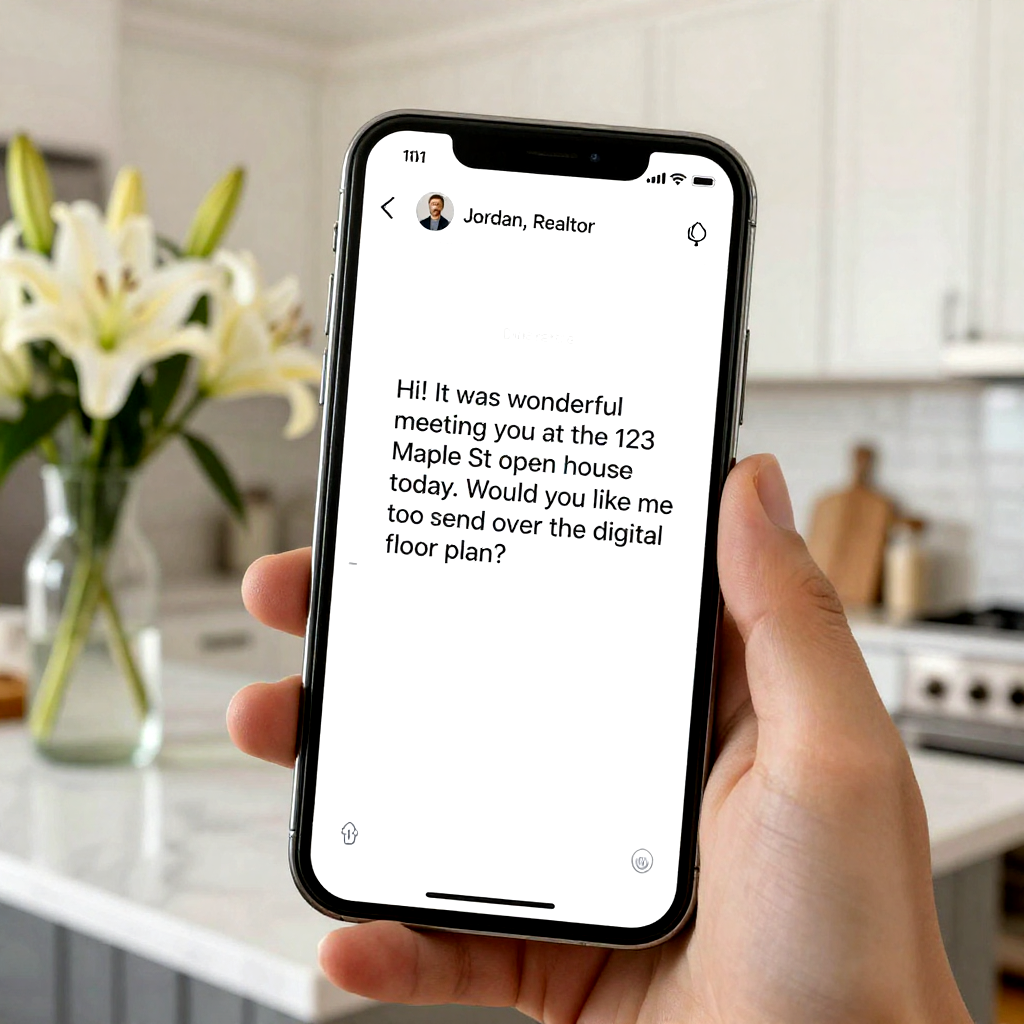





 Photo by
  Photo by













 Photo by