Category: Uncategorized

  • Unlock Nano Banana Pro: Expert Tips & Prompts for Stunning AI Images

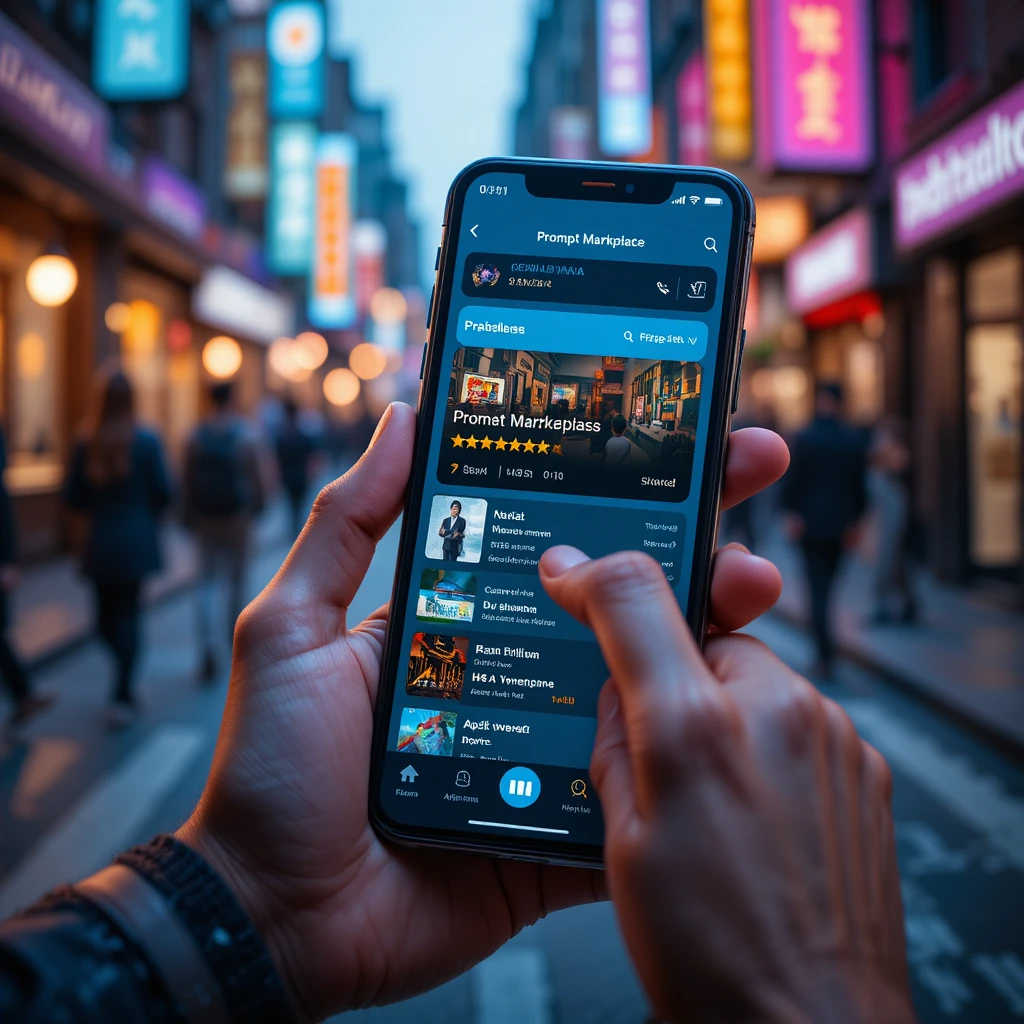
    Nano Banana Pro interface screenshot showing prompt input field and generated image gallery

    Most people treat Nano Banana Pro like “just another AI image model.” That is a huge mistake. Under the hood it is Gemini 3 Prom the highly upgraded Google image model that can read, write, and reason about what is inside your visuals, including text and data you will find the option under the “Thinking” Mode.

    If you are a techie, developer, entrepreneur, blogger, or influencer, this guide is for you. You will get five Nano Banana Pro features not talked about much, prompt formulas that actually hold up under real work, and practical hacks to speed up content, campaigns, and product experiments.

    Everything here is built to stay simple and action focused. You can copy these patterns into Gemini or your API calls and start shipping today.


    Nano Banana Pro Basics: How It Works And When To Use It

    Nano Banana Pro is Google’s high-end image model built on Gemini 3 Pro. You use it inside Gemini, in Google AI Studio, or through the API. It can:

    • Generate images up to 4K
    • Render readable text inside images, across fonts and languages
    • Keep characters and objects consistent across a set
    • Blend up to 14 images with text prompts
    • Edit local regions instead of regenerating the whole image
    • Use Google Search grounding to stay aligned with real data

    For a deeper technical overview, the official style and strategy breakdown in the Nano-Banana Pro: Prompting Guide & Strategies on DEV Community is worth a read once you start pushing the model harder.

    Think of the model family like this:

    • Nano Banana: great for fast drafts, rough thumbnails, low-stakes visuals.
    • Nano Banana Pro: the “final pass” tool for sharp, on-brand, higher resolution work.

    Once you understand how prompts interact with its text rendering, consistency, and editing tools, those “final pass” images become faster and more predictable. That is the point of the five features and hacks below.

    Core Features That Matter For Smart Prompts

    Nano Banana Pro has many knobs. For prompt design, these matter most:

    • Text in images
      Use it for social posts, ads, thumbnails, and diagrams where words must be readable. The failure fixes in this Nano Banana Pro prompt breakdown from Skywork match what most creators run into: long, messy copy.
    • Character and object consistency
      You can keep up to 5 people or 14 objects stable. Great for web comics, brand mascots, ongoing UGC characters, or a product line.
    • Multi-image blending
      Combine sketches, UI wireframes, product photos, and reference styles into one image. Perfect for product mockups and quick design prototypes.
    • Aspect ratios
      Tell it the target surface: 16:9 for YouTube, 9:16 for Stories, 1:1 for feed, 4:5 for carousels. You get layouts that “fit” without heavy cropping.
    • Localized editing
      Edit only what you name: background, logo, shirt color, or a small object. Huge time saver when campaigns change weekly.
    • Studio controls
      Ask for soft studio lighting, 50 mm camera look, bokeh background, or high-contrast color grading. This is how you match brand visuals without touching Photoshop.
    • Search grounding for data
      For charts, diagrams, and infographics, Nano Banana Pro can look up current facts through Google Search grounding, then turn them into visuals. You still need to double-check the numbers, but it gives a strong first draft.

    Together, these features serve three main groups:

    • Developers: app logic diagrams, data visualizations, UI mockups.
    • Founders: product shots, pitch deck slides, website hero images.
    • Creators: social graphics, thumbnails, carousels, course visuals.

    Prompt Structure That Gets Reliable Results

    Use this simple pattern as your starting point:

    [Goal] + [Subject] + [Style] + [Context] + [Technical details]

    Where:

    • Goal: what the image is for.
    • Subject: the main person, object, or scene.
    • Style: photo, 3D, flat, comic, etc.
    • Context: audience, platform, mood.
    • Technical: aspect ratio, resolution, text, language.

    Example 1: Launch campaign ad

    “Create a Facebook ad image for a new productivity SaaS, sleek laptop on a white desk with the dashboard on screen, clean modern photo style, aimed at busy founders, minimal colors, 16:9 aspect ratio, crisp readable text that says ‘Ship faster, stress less’ at the top center in bold sans-serif.”

    Example 2: Product mockup

    “High-detail product mockup of a matte black smart water bottle on a light gray background, soft studio lighting, 4K resolution, 3:4 aspect ratio, realistic shadows, small logo near the bottom of the bottle, no text outside the logo.”

    Once this pattern feels natural, you can plug it into the hacks that follow.


    Hidden Feature 1: Rock-Solid Text In Images For Posts, Ads, And Thumbnails

    Most AI tools still struggle with clean, readable text in images. Nano Banana Pro is different. It can lay out crisp words across fonts and languages, which makes it ideal for thumbnails, ads, carousels, and headers.

    You get the best results when you:

    • Put exact copy in quotes.
    • Keep lines short and punchy.
    • Specify where text goes (top center, bottom left).
    • Describe hierarchy (big title, small subtitle).

    The prompt is your layout spec. Think like a lightweight Figma description, not a vague idea.

    If you want more text-heavy examples, the Nano Banana Pro Prompting Guide on ImagineArt includes ready-made templates for content creators and product work.

    Prompt Hack: Lock In Exact Text And Layout

    Here are practical templates you can use today.

    YouTube thumbnail

    “YouTube thumbnail, bold close-up of a developer at a desk with dual monitors, high contrast and saturated colors, 16:9 aspect ratio, big headline at top center that says ‘SHIP APPS 5X FASTER’, small subtitle below that says ‘Real AI workflows’, both in thick sans-serif font, keep text perfectly sharp and readable.”

    Instagram carousel cover

    “Instagram carousel cover slide, pastel background with modern flat icons of a laptop, chat bubbles, and charts, 4:5 aspect ratio, centered title that says ‘Nano Banana Pro Hacks’ in playful handwritten-style font, smaller tagline under it that says ‘For devs, founders, and creators’, keep all text clean and not distorted.”

    SaaS ad banner

    “Horizontal web banner ad for a B2B analytics SaaS, minimalist dark background with subtle grid, glowing dashboard cards in the center, 1600×628 resolution, main headline on the left that says ‘See your revenue in real time’, small CTA button on the right that says ‘Start free trial’, both in clean sans-serif, align text neatly and make it easy to read.”

    Blog header image

    “Blog header image about AI prompt engineering, 16:9 ratio, abstract shapes and lines forming a brain made of light, no people, text on the right side that says ‘Nano Banana Pro Prompt Playbook’ in bold condensed font, small caption under it that says ‘From idea to asset in minutes’, keep all text clear and not curved.”

    You can tune font words like “bold serif,” “handwritten,” “monospaced,” but keep them short. The more layout detail you put in, the more stable your output.

    Prompt Hack: Multilingual Creatives Without Broken Letters

    Nano Banana Pro handles multiple languages well if you guide it. The key rules:

    • State the language and script.
    • Keep copy short.
    • Limit lines to 2 or 3 per visual.

    Spanish product poster

    “Vertical product poster in Spanish for a fitness app, 3:4 aspect ratio, fit woman running in a city at sunrise, modern photo style, big title at top center in Spanish that says ‘Entrena más inteligente’, smaller subtitle below that says ‘Planes guiados con IA’, both in clean sans-serif, text must be perfectly readable in Spanish.”

    Hindi event announcement

    “Square social graphic for a tech meetup, 1:1 ratio, dark blue background with neon line art cityscape, bilingual text with Hindi and English, large Hindi title at top that says ‘टेक भविष्य सम्मेलन 2025’ in Devanagari script, smaller English subtitle under it that says ‘Tech Future Summit’, all letters clear and not distorted.”

    Bilingual launch graphic

    “Instagram Story graphic for a SaaS launch, 9:16 aspect ratio, gradient background with subtle geometric shapes, two-line title in English and Spanish centered in the top half, first line says ‘AI for real work’, second line says ‘IA para trabajo real’, sharp sans-serif font, keep both languages easy to read.”

    If you start to see broken letters, shorten the text, or move secondary details into the caption instead of the image.


    Hidden Feature 2: Consistent Characters And Objects For Brand Stories

    Nano Banana Pro can keep up to 5 people or 14 objects consistent across scenes. That means the same mascot, influencer avatar, or product can show up in many images without changing face shape, colors, or key traits.

    This is perfect for:

    • Web comics and content series.
    • Brand mascots that appear across touchpoints.
    • UGC-style characters that “host” your content.
    • Full product lines for e-commerce or SaaS dashboards.

    For inspiration on consistent character prompts, the Best Nano Banana Pro Prompts roundup on PlusAI has some breakdowns of style patterns that tend to hold across sets.

    Prompt Hack: Build A Reusable Brand Mascot Or Influencer Avatar

    First, write a “character spec” you can reuse.

    Example reference chunk:

    “friendly 30-year-old software engineer, medium brown skin, short curly dark hair, clear glasses, navy hoodie with a small lightning logo, casual jeans, white sneakers, relaxed confident smile, semi-realistic illustration style with soft shading”

    Save that text as your base.

    Scene 1: Coding at a desk

    “Use the same character as my reference, sitting at a clean desk with a laptop, coffee mug, and a second monitor showing code, warm indoor lighting, semi-realistic illustration, 16:9 ratio, keep face, hairstyle, glasses, and hoodie identical to the reference.”

    Scene 2: Presenting on stage

    “Use the same character as my reference, standing on a small conference stage with a big screen behind them showing app wireframes, holding a clicker, soft spotlight, semi-realistic illustration, keep all character details matching the reference.”

    Scene 3: Filming a short video

    “Use the same character as my reference, sitting in front of a camera with a ring light, bookshelf background, horizontal 16:9 thumbnail style, character looking slightly to the side and talking, keep the same face, glasses, hoodie, and color palette as the reference.”

    You can keep that reference chunk inside your prompt templates, or store it in your app and prepend it when you call the API.

    Prompt Hack: Keep Product Shots Consistent Across A Full Funnel

    Treat your product description as a single “source of truth.” Reuse it everywhere.

    Example base spec:

    “primary product is a matte black smart fitness band with a slim rectangular screen, rounded edges, subtle teal accent around the display, no extra logos, clean and modern look”

    Website hero

    “Website hero image of the primary product resting on a white marble surface, soft natural light, subtle shadow, 16:9 ratio, lots of empty space on the left for headline text that is not included in the image, keep the fitness band design exactly as in the primary product description.”

    Feature callout

    “Close-up shot of the primary product screen showing a heart rate graph, on a light gray background, 1:1 ratio, high detail, keep the same color, shape, and teal accent from the primary product description.”

    Social ad

    “Lifestyle photo of a runner wearing the primary product on their wrist, city background with motion blur, 4:5 ratio, focus on the band in the foreground, keep the device matching the primary product description so it looks identical to the website hero and close-ups.”

    You never need complex IDs. Plain language plus a shared “primary product” spec is enough.


    Hidden Feature 3: Multi-Image Blending For Fast Prototypes And Mockups

    Nano Banana Pro can blend up to 14 images. Combined with text prompts, this becomes a very fast prototype machine.

    You can upload:

    • Hand-drawn UI wireframes.
    • Low-fidelity landing page layouts.
    • Mood board images: colors, styles, textures.
    • Rough product photos.

    Then tell Nano Banana Pro how to “upgrade” them. The model respects layout more when you mention it.

    For more copy-paste prompt ideas around product and UI scenes, Fotor’s Nano Banana Pro prompt list has several layouts that match common marketing assets.

    Prompt Hack: Turn A Sketch Or Wireframe Into A Realistic Product Image

    Workflow:

    1. Upload your sketch or wireframe.
    2. Ask Nano Banana Pro to keep the layout.
    3. Define style, lighting, and polish.
    4. Refine small parts with local edits.

    Mobile app screen

    “Using the uploaded mobile app wireframe, keep the exact layout of buttons and sections, turn it into a clean modern UI in a light theme, subtle blue accent color, realistic smartphone mockup in a human hand, make it look like a polished product screenshot, 9:16 ratio.”

    Gadget prototype

    “Using the uploaded hand-drawn sketch of the gadget, keep the overall shape, buttons, and screen position, turn it into a realistic product photo on a neutral background, soft studio lighting, metallic silver body with a black glass front, 4K resolution.”

    Landing page hero

    “Using the uploaded landing page wireframe, keep the same placement of headline, subheadline, CTA button, and main illustration, convert it to a modern SaaS hero section, pastel gradient background, flat illustration of people collaborating on laptops, clean web design, 16:9 aspect ratio.”

    Mention “keep the layout from the sketch” in every prompt that relies on your upload. This signals that composition matters more than freeform creativity.

    Prompt Hack: Build Mood Boards And Visual Concepts From Mixed Inputs

    Blend 3 to 5 key images:

    • Color palette swatch.
    • Style reference (photo, 3D, flat).
    • One or two product photos or logos.

    Brand kit concept

    “Blend the uploaded color palette, logo, and lifestyle reference photo into a single brand scene, show a desk with a laptop, notebook, and coffee cup, apply the palette to objects and background, clean daylight photo, 16:9 ratio, make it look like a brand mood board turned into a real workspace.”

    Event visual

    “Blend the uploaded venue photo and neon poster reference into one image, show a tech conference stage with colored lights and a large screen, use the neon style from the poster, keep the venue shape from the photo, 3:4 aspect ratio, no text.”

    Content series cover

    “Using the uploaded portrait and abstract pattern, create a podcast cover for a weekly AI show, subject on the left, abstract pattern on the right, colors from the pattern, bold but minimal style, 1:1 ratio, no text, save space for overlay later.”

    Short, direct style directions work better than vague art jargon.


    Hidden Feature 4: Localized Editing For Pixel-Perfect Fixes With Plain Language

    Localized editing lets you adjust only part of an image. You can fix colors, lighting, objects, or text size without starting over.

    This is perfect when:

    • A logo changed.
    • A shirt color is off brand.
    • Background feels messy.
    • Lighting is too harsh.

    You describe what to keep and what to change. Nano Banana Pro handles the rest.

    Prompt Hack: Quick Fixes For Lighting, Colors, And Backgrounds

    Here are edits you can stack across turns:

    • “Keep everything the same but make the background pure white.”
    • “Keep the same scene, soften the shadows on the face and brighten the eyes a little.”
    • “Change the shirt color to our brand blue, keep texture and folds the same.”
    • “Turn this into a night scene with cooler light, city lights visible in the background.”

    You can chain prompts like this:

    1. First edit: “Make the background pure white and keep the subject unchanged.”
    2. Second edit on the new image: “Keep the scene but slightly increase overall brightness and contrast.”
    3. Third edit: “Reduce reflections on the product surface while keeping shape and color the same.”

    Short, single-focus edits are more reliable than giant “fix everything” instructions.

    Prompt Hack: Swap Elements Without Breaking The Whole Image

    To swap one element, call it out clearly and freeze the rest.

    Pattern:

    “Keep everything the same but replace [old thing] with [new thing].”

    Laptop model update

    “Keep everything the same in this office scene, but replace the old laptop with a modern thin-bezel MacBook-style device, similar size and angle, matching the lighting.”

    Logo refresh

    “Keep the storefront, lighting, and people exactly the same, but replace the old logo sign with the new logo from the uploaded image, same size and position.”

    UI chart update

    “Keep the same dashboard layout, colors, and typography, but update the bar chart on the right side to show higher bars for 2025 compared to 2024, numbers should look realistic for SaaS revenue growth.”

    This pattern is very effective for marketers, bloggers, and dev tool makers who update UI or brand assets often.


    Hidden Feature 5: Data-Aware Infographics And Diagrams For Clear Stories

    Nano Banana Pro can turn text or structured notes into charts, diagrams, and infographics that are both attractive and data aware. It uses Google Search grounding to pull current facts when you ask for it.

    That matters if you:

    • Explain trends in blog posts.
    • Teach with visuals.
    • Build pitch decks with charts.

    You still need to verify any numbers. Think of the model as a smart designer that drafts the slide, not an analyst you blindly trust. The Analytics Vidhya guide to Nano Banana Pro prompts walks through several good starter patterns for data-focused content.

    Prompt Hack: Turn Notes And Outlines Into Visual Diagrams

    Feed it your outline, then point at the diagram type.

    App logic flowchart

    “Create a simple flowchart that explains mobile app login logic, starting from ‘Open app’ then ‘Check user session’ then branches to ‘Auto-login’ or ‘Show login form’, use rectangular boxes and arrows, bright but minimal color palette, 16:9 ratio, keep text short and easy to read.”

    Customer journey map

    “Turn these stages into a customer journey diagram: ‘Discover’, ‘Compare’, ‘Sign up’, ‘Onboard’, ‘Renew’, show them as a horizontal timeline with five labeled boxes, use our brand colors of blue and orange, keep all labels very short and clear.”

    Process chart

    “Create a vertical step-by-step process chart for ‘Launch an AI side project’ with 5 steps: ‘Idea’, ‘Prototype’, ‘Test’, ‘Iterate’, ‘Ship’, minimal flat design, light background, 3:4 aspect ratio, clear text labels inside each box.”

    Keep labels tight and avoid long sentences inside diagrams. Use the blog or slide body copy for longer text.

    Prompt Hack: Create Data-Backed Infographics With Search Grounding

    Tell Nano Banana Pro to use recent data, show the numbers it used, and then format the visual.

    Blog post infographic

    “Use Google Search grounding to find the most recent global smartphone usage statistics by year for the last 5 years. First, show me the data you found in bullet points with sources. Then, based on that data, create a clean infographic in 16:9 format with a simple line chart and 3 short callout facts in plain English, light background, blue accent color, text must be readable.”

    Pitch deck slide

    “Use Google Search grounding to get current estimates of the global generative AI market size and projected growth over the next 3 years. Show the numbers and sources first so I can confirm them. After that, create a pitch deck slide image in 16:9 format with a bar chart on the left and three key data points as short bullets on the right, dark background with cyan accents, text large enough to present on stage.”

    Always pause after the “show me the data” step. Once you confirm the numbers, you can ask Nano Banana Pro to adjust the chart style or reorder the callouts.


    Workflow Tips: Multi-Turn Prompts, Batches, And API Tricks

    The five features above really shine when you organize your workflow. Pros rarely try to get a perfect image in a single prompt. They move in small, controlled steps.

    From Draft To Final: A Simple Multi-Turn Prompt Flow

    Here is a reliable flow for a launch graphic or course thumbnail:

    1. Rough idea
      “Create a rough 16:9 thumbnail concept for a course on Nano Banana Pro prompts, focus on a single person at a desk with vivid colors, no text yet, just explore composition.”
    2. Refine style and layout
      “Keep this composition but change the lighting to soft studio style, simplify the background, and reduce visual clutter behind the subject.”
    3. Add and polish text
      “Now add a big title at the top that says ‘Nano Banana Pro Prompt System’ and a small subtitle at the bottom that says ‘From zero to launch-ready’, use bold sans-serif font, make the text super sharp and easy to read.”
    4. Run small variations
      “Generate three variations of this thumbnail with different background colors and slightly different facial expressions, keep layout and text exactly the same.”
    5. Export high resolution
      “Take the best version and recreate it at 4K resolution, 16:9 ratio, keeping every detail and text layout identical.”

    Each step edits the previous result instead of starting from zero. That is how you get repeatable, brand-safe images.

    Scaling Up: Batch Prompts And API Ideas For Teams

    If you work on growth, dev tools, or content teams, Nano Banana Pro’s API can save hours. A few ideas:

    • Ad sets in multiple sizes
      Start with one strong prompt for a hero visual, then auto-generate 1:1, 9:16, and 4:5 versions by only changing the aspect ratio in your prompt templates.
    • Localized creatives
      Use the same visual prompt plus language-specific text snippets for headlines and CTAs. Feed “headline_es,” “headline_fr,” and “headline_pt” into the same layout pattern.
    • A/B test variants
      Fix layout and text, only vary one thing at a time: background color, subject pose, or lighting style. Bake that pattern into your prompt template so engineers can automate tests without changing creative direction.

    If you want ready-made prompt patterns to plug into batch workflows, the 15 production-ready Nano Banana Pro prompts on Ace Cloud are a solid reference to adapt.


    Prompt: A surreal and cohesive dream-like landscape that seamlessly merges five iconic world wonders into one breathtaking vista. In the foreground, the lush green canopy of the Amazon Rainforest transitions into the golden sand dunes of the Sahara Desert. The Great Wall of China snakes gracefully across the dunes, leading the eye toward the elegant silhouette of the Eiffel Tower in the mid-ground. To the side, the Sydney Opera House rests peacefully on the edge of a crystal-clear river flowing from the forest. The entire scene is bathed in the soft, ethereal glow of a twilight sky where the words ‘Global Adventures’ are written in elegant, glowing script among the wispy clouds. The lighting is warm and cinematic, creating a sense of wonder and unity across the diverse environments.
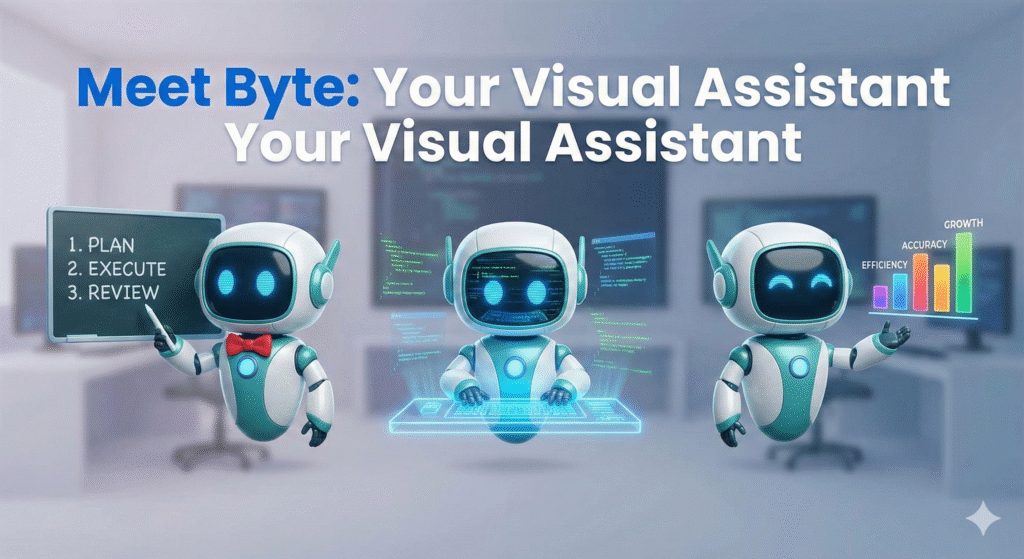
    A consistent cartoon character, a friendly robot named 'Byte', shown in three different poses and outfits

    Prompt: A high-quality composite illustration featuring three distinct versions of a friendly, consistent cartoon robot named ‘Byte.’ Byte is a sleek, white-and-teal robot with expressive blue digital eyes and a rounded body. In the first pose on the left, Byte is teaching, wearing a small red bowtie and pointing at a digital chalkboard. In the center pose, Byte is coding intently at a glowing holographic workstation with floating lines of code reflected in its eyes. In the right pose, Byte is presenting confidently, gesturing toward a colorful bar chart. The background is a clean, minimalist tech studio with soft-focus lighting. Centered at the top of the image in a bold, modern sans-serif font is the text ‘Meet Byte: Your Visual Assistant’. The style is vibrant and polished with soft shadows and 3D-rendered textures.

    Conclusion

    Nano Banana Pro is more than a “pretty picture generator.” Its strengths in text in images, consistent characters and objects, multi-image blending, localized edits, and data-aware infographics turn it into a serious tool for techies, developers, entrepreneurs, bloggers, and influencers.

    You now have practical prompt hacks for each of those features. Pick one to test today, maybe rock-solid text for your next thumbnail, or a reusable brand mascot that shows up across your funnel.

    As you experiment, save every prompt that works into a simple “Nano Banana Pro prompt library.” Over a few projects, that library becomes a private asset that speeds up every launch, campaign, and prototype you touch.

    FAQ

    What is Nano Banana Pro and how does it differ from other AI image generators?

    Nano Banana Pro is Google’s premium image model, powered by Gemini 3 Pro, designed for high-end visual generation. Its unique features include 4K output, readable text rendering, character consistency, multi-image blending, local region editing, and Google Search grounding, setting it apart from standard AI tools.

    How can I ensure consistent character appearances across multiple images with Nano Banana Pro?

    To maintain character consistency, use a robust initial prompt describing the character in detail, including physical attributes, clothing, and style. Then, consistently reference the character by a specific name or identifier in subsequent prompts, utilizing Nano Banana Pro’s built-in consistency features.


  • Your Guide: 23 AI Prompt Categories for Beginners  With 350 Prompts for You to Use

    Your Guide: 23 AI Prompt Categories for Beginners  With 350 Prompts for You to Use

    This guide provides exactly that: 350 categorized prompts designed to demystify AI prompting, boost your creative output, and reveal why structured prompt categories are indispensable for precision and innovation.

    This extensive guide will arm you with practical, categorized prompts, turning overwhelm into empowerment, streamlining your AI journey, and illustrating how understanding these categories is the foundation for truly unlocking AI’s creative genius.

    This set will get you started on your way and show you exactly why understanding prompt categories is the key to consistent, mind-blowing results.


    1. Content Creation

    NamePrompt 1Prompt 2
    Blog WritingDraft an engaging 1,500-word blog post summarizing the top 5 emerging AI trends for small businesses.Outline a 10-point structure for a ‘how-to’ blog post titled “Mastering Remote Work Productivity.”
    CopywritingWrite three distinct calls-to-action (CTAs) targeting a high-value software product aimed at B2B CEOs.Generate short, punchy sales copy (under 50 words) for a new line of eco-friendly athletic wear.
    Social Media PostsCreate 5 Instagram carousel slide captions detailing a new feature launch, focusing on benefits.Draft 10 tweet ideas centered around the importance of digital detoxing.
    Video Scripts (TikTok, YouTube, Reels)Develop a 60-second TikTok script demonstrating a quick life hack related to organization and productivity.Write the opening 3 minutes of a YouTube script for a detailed product review of a new smartphone.
    SEO OptimizationIdentify 10 high-intent long-tail keywords relevant to sustainable gardening supplies.Optimize the provided existing blog post content for the target keyword “AI-driven marketing strategy.”
    Email MarketingDesign a 3-stage lead nurturing email sequence for new subscribers interested in financial planning services.Draft a subject line and body copy for a promotional email announcing a 48-hour flash sale.
    Product DescriptionsWrite a compelling product description for a luxury leather backpack, emphasizing craftsmanship and durability.Generate three bullet-point features/benefits lists for a new cloud-based project management tool.
    Headlines & HooksGenerate 5 viral-worthy headlines for a video about unexpected historical facts.Create three intriguing hooks (the first 1-2 sentences) for a sales letter promoting a fitness course.
    Storytelling & NarrativesDevelop a short narrative (300 words) about a customer overcoming a significant challenge using a generic software product.Outline the key plot points for an inspirational brand story focusing on resilience and innovation.
    Creative Writing / PoetryWrite a sonnet about the feeling of being overwhelmed by modern technology.Draft a short story focusing on dialogue between two characters who meet unexpectedly at a train station.

    2. Business & Marketing

    NamePrompt 1Prompt 2
    Branding & PositioningDefine the brand voice and three core values for a modern, minimalist coffee shop startup.Develop a positioning statement for a niche consulting firm specializing in AI ethics.
    Offer CreationStructure a compelling premium package for a 6-month executive coaching service, including deliverables.Create a low-cost, high-value introductory offer designed to attract cold leads to an online course platform.
    Market ResearchList 5 key questions to ask potential customers during the initial discovery phase for a new app idea.Summarize the current market size and growth rate for the global sustainable fashion industry.
    Competitor AnalysisAnalyze the pricing model and unique selling propositions (USPs) of three main competitors in the digital learning space.Detail the strengths and weaknesses of a major competitor’s recent marketing campaign.
    Customer Avatar / PersonaDevelop a detailed customer persona, “Tech-Savvy Tina,” who is a busy mother and freelance graphic designer.Create a needs/pain point map for a small business owner considering outsourcing their social media.
    Funnels & AdsOutline the necessary steps and touchpoints for a classic 5-stage marketing funnel (awareness to purchase).Write three variations of Facebook ad copy targeting cold audiences interested in home automation.
    Affiliate MarketingDraft an email template to recruit high-tier affiliates for a SaaS product launch.Define the commission structure and key terms for a new B2C affiliate program.
    Influencer OutreachGenerate a personalized pitch message for a mid-tier lifestyle influencer regarding a potential brand collaboration.List criteria for vetting potential influencers based on engagement rate and audience demographics.
    Business StrategyUse the OKR (Objectives and Key Results) framework to define goals for Q3 focused on expansion into a new territory.Develop a viable long-term growth strategy (3-5 years) for a small e-commerce business selling specialized goods.
    Product LaunchesDetail a complete 7-day pre-launch content strategy leading up to the release of a new mobile game.Write the official press release announcing the launch of a new environmentally friendly product line.
    Marketing PsychologyIdentify three psychological triggers (e.g., scarcity, social proof) most effective for selling limited edition products online.Explain how to use the principle of reciprocity in a free lead magnet offering.

    3. Design & Visuals

    NamePrompt 1Prompt 2
    Graphic Design Prompts (Midjourney / DALL·E / SD)Generate an image of a futuristic cityscape at sunset, highly detailed, cinematic lighting, 8k resolution.Create a minimalist abstract painting featuring geometric shapes in muted earth tones.
    Logo ConceptsDevelop five initial logo concepts for a financial advisory firm, emphasizing trust and stability.Design a playful, vectorized mascot logo for a children’s tutoring service.
    Brand Identity SystemsDefine the complete visual identity guidelines (logo usage, color theory, image style) for a luxury skincare brand.Outline a simplified brand identity system for a non-profit organization focused on community gardening.
    Web Design LayoutsCreate a low-fidelity wireframe for the homepage of a complex news and media publication website.Sketch three alternative layout options for the ‘Pricing’ page of a subscription software service.
    Color Palette GenerationGenerate a 5-color palette suitable for a brand targeting Gen Z consumers interested in vintage fashion.Create a professional, accessible color scheme (primary, secondary, accent) for a B2B tech company website.
    Typography PairingSuggest a harmonious pairing of serif and sans-serif fonts appropriate for a fine dining restaurant menu.Recommend an accessible and clean typography pairing for a large-scale government informational website.
    UI/UX WireframesDevelop a detailed wireframe for a user flow showing a customer adding an item to a cart and checking out on a mobile app.Design a high-fidelity wireframe for a personalized user dashboard emphasizing key metrics and clear navigation.
    Moodboards / Aesthetic ConceptsCreate a moodboard concept focusing on the aesthetic of ‘cozy minimalism’ for a home goods store.Generate an aesthetic concept for a science fiction novel cover, emphasizing dark colors and neon accents.
    3D / Illustration PromptsGenerate a detailed 3D rendering of a fantastical clockwork mechanism in a steampunk style.Create a friendly, vectorized illustration of a person successfully solving a difficult puzzle, suitable for a help center article.
    Print-on-Demand Art PromptsDesign a scalable graphic print suitable for t-shirts featuring a stylized motivational quote and nature elements.Generate 10 unique abstract patterns that can be used for sublimation printing on mugs and phone cases.

    4. Productivity & Workflow

    NamePrompt 1Prompt 2
    Time ManagementDevelop a detailed daily schedule using the Pomodoro Technique tailored for a remote student.Outline a strategy for prioritizing tasks using the Eisenhower Matrix for a project manager managing multiple deadlines.
    Focus & Deep WorkGenerate a list of 5 actionable steps to eliminate digital distractions during designated deep work blocks.Create a script for a 10-minute guided focus session designed to prepare the mind for complex tasks.
    Task AutomationIdentify three manual, repetitive tasks in a typical freelance workflow that could be easily automated.Describe a hypothetical automation flow to automatically categorize and respond to common customer support inquiries.
    AI Workflow DesignDesign a complete workflow where AI handles the initial draft of marketing copy, followed by human refinement.Outline a system where an AI agent continuously monitors industry news and summarizes relevant articles hourly.
    SOP GenerationGenerate a Standard Operating Procedure (SOP) for securely onboarding a new remote employee.Draft an SOP detailing the steps for publishing a piece of content using a Content Management System (CMS).
    Notion / Airtable TemplatesDesign the structure and key fields for a comprehensive project tracking template in Airtable.Create a detailed Notion template for managing personal finances, including sections for budgets and expenses.
    Email Sorting / SummarizationSummarize the key action items and decisions made in the following thread of 10 hypothetical emails.Create a filtering rule system to prioritize emails from clients versus internal team communications.
    Brain Dump OrganizersStructure the following unstructured list of hypothetical ideas into 5 logical, actionable categories.Design a template for a rapid brain dump session, focusing on separating immediate actions from long-term goals.
    Mind MappingCreate a visual mind map structure exploring the necessary components for starting a successful podcast.Develop a hierarchical mind map outlining the entire organizational structure of a mid-sized tech company.
    Meeting SummariesExtract the decisions made, assigned owners, and required follow-up actions from a hypothetical meeting transcript.Draft a concise, professional meeting summary for a 90-minute quarterly review session.

    5. Education & Learning

    NamePrompt 1Prompt 2
    Lesson PlanningDevelop a 45-minute lesson plan for teaching 10th-grade history students about the causes of World War I.Outline the learning objectives, materials, and assessment method for a college-level course on foundational Python programming.
    Study GuidesCreate a comprehensive study guide covering key terminology and concepts for an introductory biology test on cellular structure.Generate a detailed study schedule for a professional preparing for a major industry certification exam (e.g., PMP).
    Flashcard GenerationGenerate 20 dual-sided flashcards based on provided text about European Renaissance art.Create flashcards focusing specifically on formulas and definitions for an undergraduate statistics course.
    Concept BreakdownExplain the concept of quantum entanglement to a high school student using simple analogies.Break down the complex economic theory of supply and demand into three easily digestible steps.
    Exam PrepGenerate 10 multiple-choice questions suitable for a final exam on the principles of digital marketing.Create a practice short-answer essay prompt based on the theme of ethical leadership.
    Academic WritingDraft a compelling introduction paragraph for a scholarly paper on the environmental impacts of renewable energy sources.Write a literature review section summarizing 5 key academic articles on behavioral economics.
    Essay EditingReview a hypothetical essay for clarity, flow, and strong supporting evidence, suggesting improvements.Edit a provided argumentative essay draft to ensure consistency in citation style (e.g., APA).
    Research SummarizationSummarize the main findings, methodology, and conclusion of a hypothetical scientific paper in 250 words.Condense a 50-page industry report on telemedicine into 10 key bullet points.
    Course CreationOutline the module structure, topics, and estimated length for a beginner’s online course on landscape photography.Define the target audience and learning outcomes for an advanced certification program in cloud computing.
    Learning PathwaysDesign a step-by-step learning pathway for someone aiming to become proficient in data science over 12 months.Create a suggested reading list and associated activities for a pathway focused on mastering negotiation skills.

    6. Personal Development

    NamePrompt 1Prompt 2
    Journaling PromptsProvide 5 thought-provoking journaling prompts centered around defining your personal definition of success.Generate prompts designed to explore past challenges and the lessons learned from overcoming them.
    Mindset & MotivationWrite a motivational passage (200 words) encouraging persistence after experiencing a failure.Develop a reframing technique to shift a negative self-limiting belief (e.g., “I’m not good enough”) into a positive growth mindset statement.
    Goal SettingUse the SMART framework to set a measurable 90-day goal related to physical fitness.Outline a breakdown of necessary intermediate steps required to achieve a long-term goal of starting a side business.
    Habit TrackingDesign a simple system for tracking three key daily habits: hydration, meditation, and reading.Analyze potential triggers and obstacles for maintaining the habit of daily exercise.
    VisualizationCreate a short guided visualization script focused on preparing for a high-stakes public speaking event.Generate a detailed description of what your ideal productive workday looks and feels like.
    Emotional IntelligenceAnalyze a hypothetical conflict scenario between two coworkers and suggest three emotionally intelligent ways to de-escalate the situation.List 5 practical strategies for improving self-awareness regarding emotional responses.
    Shadow Work / Inner DialogueWrite prompts designed to explore why you react strongly to specific types of criticism.Generate an inner dialogue script designed to confront and understand a hidden fear related to vulnerability.
    Gratitude PromptsList 10 specific things you are grateful for today, focusing on small, often overlooked details.Write a thank-you note to a person in your past who taught you a valuable life lesson.
    AffirmationsCreate 5 strong, positive affirmations related to building professional confidence and self-worth.Generate a set of affirmations specifically focused on overcoming anxiety related to money and finances.
    Daily ReflectionOutline 5 questions to ask yourself at the end of the workday to gauge productivity and learning.Design a template for a morning reflection practice focusing on setting intentions for the day ahead.

    7. Finance & Wealth

    NamePrompt 1Prompt 2
    Budget PlanningCreate a zero-based budget template for a family of four based on hypothetical monthly income and expenses.Identify areas where a recent college graduate could cut expenses by 15% to increase savings.
    Investment StrategyOutline a diversified, long-term investment strategy for a conservative investor in their 50s preparing for retirement.Research and summarize the pros and cons of investing in exchange-traded funds (ETFs) versus mutual funds.
    Side Hustle IdeasGenerate 5 viable side hustle ideas requiring low startup capital that can be managed alongside a full-time job.Detail the steps necessary to launch a successful dog-walking and pet-sitting service in a suburban area.
    Business ModelsAnalyze and describe the subscription-based business model, including examples and monetization strategies.Develop a freemium business model strategy for a new educational mobile app.
    Financial ForecastingCreate a basic 12-month financial forecast (revenue and expenses) for a hypothetical small consulting business.Detail the key variables and assumptions needed to accurately forecast sales for a seasonal retail business.
    Money MindsetGenerate 5 journaling prompts designed to identify and challenge limiting beliefs about personal wealth.Develop a strategy for practicing abundance and gratitude related to finances.
    Crypto / Web3 PromptsExplain the concept of Decentralized Autonomous Organizations (DAOs) and their current applications.Analyze the potential impact of non-fungible tokens (NFTs) on the future of digital asset ownership.
    Pricing PsychologyRecommend three psychological pricing strategies (e.g., charm pricing, decoy effect) for a SaaS product.Explain how using tiered pricing structures can appeal to different segments of a market.
    Passive Income IdeasList 5 realistic passive income streams suitable for an individual with strong writing and editing skills.Detail the steps for generating passive income through the creation and sale of digital assets (e.g., stock photos, digital planners).

    8. Technology & AI

    NamePrompt 1Prompt 2
    Prompt EngineeringWrite a meta-prompt designed to ensure the AI output consistently uses a professional, authoritative tone and format responses as structured JSON.Experiment with Chain-of-Thought reasoning to solve a complex logical puzzle.
    Automation FlowsDesign an automation flow to automatically detect negative customer feedback and create a high-priority support ticket.Outline the necessary steps to set up an automated system that archives old project files after 90 days of inactivity.
    API & Tool IntegrationDescribe the necessary steps to integrate a CRM system (e.g., Salesforce) with a bulk email marketing platform.Detail the requirements for using an external weather API to trigger specific actions within an internal scheduling tool.
    AI Agents & Chatbot DesignDesign the decision tree and conversational flow for a customer service chatbot handling basic billing inquiries.Outline the required training data and parameters for an AI agent designed to perform preliminary legal document review.
    AI Ethics & SafetyIdentify and analyze three potential ethical risks associated with using deepfake technology in marketing.Draft a corporate policy statement on the responsible and unbiased use of AI tools internally.
    AI in MarketingDescribe how AI can be used to personalize email content and product recommendations for e-commerce customers.Outline a strategy for using predictive analytics (AI) to optimize ad spend across multiple platforms.
    AI for Business OptimizationDetail how an AI system can optimize supply chain logistics by predicting inventory needs and shipping delays.Analyze potential applications of machine learning to improve efficiency in human resource management tasks.
    Dataset CreationDesign the requirements (size, diversity, labeling protocol) for a dataset intended to train a computer vision model to identify different dog breeds.Describe a structured process for ethically gathering and anonymizing customer feedback data for model training.
    Model ComparisonCompare and contrast the strengths and weaknesses of large language models (LLMs) and diffusion models in creative applications.Summarize the key performance metrics used when evaluating different machine learning classification models.
    Emerging AI TrendsResearch and summarize the potential long-term impact of multimodal AI on creative industries.Identify 5 specific emerging AI trends (e.g., synthetic media, edge computing) and their primary business applications.

    9. Writing & Editing

    NamePrompt 1Prompt 2
    Tone & Voice AdaptationRewrite a hypothetical technical specification document to adopt a friendly, conversational, and highly enthusiastic voice.Adapt a press release copy to fit a formal, academic, and serious tone suitable for an investor briefing.
    Grammar & Clarity ChecksProofread a provided paragraph for grammatical errors, punctuation mistakes, and sentence clarity, suggesting edits.Analyze a hypothetical text and simplify any overly complex jargon to improve general readability.
    Rewrite for Style / EmotionRewrite a standard announcement about a price increase to convey empathy and genuine concern for the customer.Transform a bland, informative paragraph about climate change into a dramatic, emotionally resonant appeal for action.
    Story Plot GeneratorGenerate a three-act structure plot outline for a mystery novel set in a remote Antarctic research station.Create a simple plot summary for a children’s book about a lonely robot learning the value of friendship.
    Dialogue CreationWrite a tense, revealing dialogue exchange between a detective and a suspect during an interrogation scene.Draft a lighthearted, humorous dialogue between two elderly neighbors discussing neighborhood gossip.
    Character DevelopmentDevelop a comprehensive backstory and psychological profile for a deeply flawed but charismatic antagonist in a fantasy series.Create a detailed character sheet for a supporting character, including their motivations, appearance, and internal conflict.
    GhostwritingDraft a compelling personal essay (500 words) written in the voice of a retired athlete reflecting on their career defining moment.Write a professional email response on behalf of a CEO handling a sensitive media inquiry.
    Book OutlineGenerate a chapter-by-chapter outline for a non-fiction self-help book focused on overcoming procrastination.Create a detailed outline for the first three parts of an epic historical fiction novel.
    Summary & AnalysisProvide a detailed thematic analysis of the novel The Great Gatsby, focusing on the American Dream.Summarize the key arguments presented in a hypothetical political speech and analyze the rhetorical devices used.

    10. Research & Analysis

    NamePrompt 1Prompt 2
    Trend AnalysisAnalyze current consumption patterns to identify emerging food trends for Q4 of the current year.Detail the key technological and societal trends currently influencing the education sector globally.
    Data SummarizationSummarize the main takeaways from hypothetical spreadsheet data regarding Q2 website traffic and conversions.Present the results of a recent customer satisfaction survey, focusing on the top 3 positive and negative findings.
    SWOT / PESTLE AnalysisConduct a SWOT analysis (Strengths, Weaknesses, Opportunities, Threats) for a newly opened organic grocery store.Perform a PESTLE analysis (Political, Economic, Sociocultural, Technological, Legal, Environmental) for expanding business operations into Southeast Asia.
    Consumer InsightsGenerate 5 deep consumer insights based on provided hypothetical social media comments regarding a popular fast-food chain.Analyze the behavioral patterns of Gen Z consumers concerning subscription services and digital content consumption.
    Keyword ResearchPerform preliminary keyword research to identify high-volume, low-competition terms related to “eco-friendly travel.”Group a hypothetical list of 50 keywords into logical thematic clusters for content planning.
    Industry ReportsOutline the necessary sections and key data points required for a comprehensive annual report on the global renewable energy industry.Summarize the competitive landscape and regulatory challenges detailed in a hypothetical FinTech industry report.
    Forecasting ModelsExplain the differences between qualitative and quantitative forecasting models and when each is best used.Apply a basic linear regression model to predict next month’s sales based on provided hypothetical historical data.
    Market Gap DiscoveryAnalyze the current offerings in the pet technology market to identify three underserved consumer needs or market gaps.Suggest a unique product or service idea designed to fill an identified gap in the current home fitness equipment sector.

    Specialized / Advanced Prompt Categories

    11. Creative Strategy

    NamePrompt 1Prompt 2
    Idea GenerationGenerate 15 innovative product ideas by combining elements of sustainable technology and children’s toys.Brainstorm 10 creative ways to use augmented reality (AR) in a museum setting.
    Content AnglesDevelop three distinct content angles (e.g., educational, controversial, aspirational) for a single topic: the rise of remote work.Suggest a list of fresh content angles that challenge conventional wisdom about personal finance.
    Naming / SlogansGenerate 10 catchy, short names for a new brand of artisanal hot sauce.Create 5 memorable slogans or taglines for a software company specializing in data security.
    Viral HooksDraft three specific, curiosity-driven opening lines designed to immediately hook viewers in a 15-second video.Create a controversial or unexpected statement hook to introduce a blog post about productivity tools.
    Brainstorm SessionsFacilitate a virtual brainstorm session focused on solving a persistent customer retention problem using the SCAMPER technique.Generate a structured agenda and guiding questions for a 60-minute ideation meeting.
    Pattern RecognitionAnalyze hypothetical customer support logs and identify recurring issues or sentiment patterns.Detect three consistent visual or thematic patterns in successful social media campaigns from the last six months.
    Brand Story ArcsOutline a ‘Hero’s Journey’ brand story arc for a small startup that invented a revolutionary new medical device.Develop a narrative arc that focuses on transformation and overcoming skepticism for a new clean energy company.
    Emotional PositioningDefine the primary emotion (e.g., excitement, relief, belonging) that a luxury travel agency should focus on in its messaging.Create messaging pillars that emotionally position a financial literacy course as a tool for empowerment rather than stress reduction.

    12. Sales & Conversion

    NamePrompt 1Prompt 2
    Sales Page CopyDraft the main body copy (features and benefits section) for a high-ticket online coaching program.Write a compelling guarantee section for a product, emphasizing risk reversal and trust.
    Persuasive Frameworks (AIDA, PAS, etc.)Apply the AIDA (Attention, Interest, Desire, Action) framework to write a short product description for a premium coffee maker.Use the PAS (Problem, Agitate, Solve) framework to write a script for a brief cold sales call targeting busy executives.
    Objection HandlingCreate three effective rebuttals for the common sales objection, “Your product is too expensive.”Generate strategies for handling the objection, “I need to discuss this with my team/partner first.”
    Product Benefit MappingMap the technical features of a new project management software to specific, relatable customer benefits.For a noise-canceling headphone, map the feature “30-hour battery life” to emotional and practical benefits for a traveler.
    Call-to-Action CreationGenerate 10 high-conversion, urgency-driven CTAs suitable for the end of a webinar pitch.Create clear, non-aggressive CTAs for a non-profit website focused on securing recurring donations.
    Lead Nurture SequencesDesign a four-email lead nurture sequence aimed at educating a warm audience about the value of a high-priced service.Draft the first “welcome” email in a sequence, setting expectations and providing immediate value to a new subscriber.
    Value Proposition BuilderUse a structured format (e.g., Jobs-to-be-Done) to articulate the unique value proposition for a personal chef service.Refine a confusing statement into a clear, concise, and compelling value proposition.

    13. Community & Engagement

    NamePrompt 1Prompt 2
    Comment RepliesDraft three varying responses (positive, neutral, handling mild criticism) to a general comment on a company’s Instagram post.Generate a polite, professional reply to a customer comment that is factually incorrect but needs gentle correction.
    Discussion StartersCreate 5 engaging discussion starter questions for an online professional networking community focused on remote work.Generate a provocative statement designed to spark debate in a forum dedicated to environmental policy.
    Poll / Quiz IdeasDevelop 3 engaging poll questions for a LinkedIn audience regarding the future of AI in their industry.Outline a 5-question quiz designed to test basic knowledge of healthy eating habits.
    Event PlanningDraft a detailed timeline and checklist for organizing a virtual 2-day conference for 500 attendees.Generate creative ideas for networking activities and icebreakers at an industry mixer.
    Member OnboardingWrite a detailed welcome message and step-by-step guide for onboarding new members into a private online coaching group.Design a 7-day automated email sequence focused on ensuring new users successfully complete the setup process for a SaaS product.
    Gamification PromptsDevelop a system for awarding badges and points to encourage user participation in an educational app.Generate ideas for incorporating competitive elements (leaderboards, streaks) into a fitness community platform.
    Support ScriptsDraft a polite, clear support script for assisting a user who has forgotten their password and is locked out of their account.Write a script for a customer service agent handling a complaint about a delayed shipment, focusing on apology and resolution.

    14. Health & Wellness

    NamePrompt 1Prompt 2
    Fitness CoachingDesign a 4-week workout plan focusing on building core strength for a beginner who can exercise 3 times a week.Draft 5 motivational text messages suitable for sending to a client struggling to stay consistent with their fitness routine.
    Meal PlanningCreate a 7-day high-protein, low-carb meal plan suitable for someone managing type 2 diabetes.Generate a grocery list and 5 simple recipes for a vegetarian budget-friendly weekly plan.
    Sleep OptimizationOutline a strict evening routine (starting 2 hours before bed) designed to maximize deep sleep quality.List 5 actionable environmental changes to improve the ambiance of a bedroom for better rest.
    Meditation ScriptsWrite a 15-minute guided meditation script focused on achieving calm and presence in a busy environment.Generate a 5-minute breathing exercise script designed for immediate stress reduction.
    Mental Health ReflectionsProvide 5 prompts for self-reflection aimed at identifying sources of chronic stress in one’s life.Draft a compassionate inner monologue response to feelings of anxiety or self-doubt.
    Biohacking PromptsResearch and summarize three emerging biohacking techniques focused on cognitive enhancement (e.g., nootropics, light therapy).Detail a protocol for using cold exposure (e.g., cold showers) to boost mood and focus.
    Nutrition AdviceProvide balanced nutritional advice for a marathon runner during their high-mileage training weeks.Summarize the key benefits and recommended daily intake of Omega-3 fatty acids.
    Habit BuildingDesign a system using the “Atomic Habits” methodology to successfully build the habit of reading daily.Generate 5 strategies for making a desired habit (e.g., stretching) more immediately satisfying.

    15. Lifestyle & Creativity

    NamePrompt 1Prompt 2
    Travel PlanningCreate a detailed 10-day itinerary for a backpacking trip through Scotland, focusing on scenic routes and historical sites.Plan a budget breakdown for a 5-day luxury getaway to a tropical island destination.
    Interior DesignSuggest a design concept and specific furniture pieces for a small urban apartment utilizing a Scandinavian style.Develop a color scheme and lighting plan for a home office designed to maximize productivity and calmness.
    Fashion StylingGenerate 5 outfit ideas based on sustainable fashion principles for a professional business casual environment.Advise on how to build a versatile capsule wardrobe for the upcoming winter season.
    Recipes & CookingGenerate a detailed recipe for a challenging gourmet dish: Beef Wellington, complete with ingredient list and step-by-step instructions.Create 5 quick (under 20 minutes) weeknight dinner ideas using chicken and seasonal vegetables.
    Life CoachingDraft a script for a life coaching session focused on helping a client navigate a major career change.Generate 5 powerful, open-ended questions designed to help a client identify their core personal values.
    Bucket List IdeasCreate a “Creative & Adventurous” bucket list containing 15 unique experiences or skills to acquire.Generate bucket list items focused specifically on travel and cultural immersion.
    Relationship PromptsGenerate 5 deep conversation starters designed to enhance communication and intimacy in a long-term partnership.Create prompts for self-reflection on defining healthy boundaries in professional and personal relationships.

    16. Spirituality & Philosophy

    NamePrompt 1Prompt 2
    Bible Study PromptsProvide a detailed study guide and reflection questions for the Book of Ecclesiastes.Generate prompts for applying the teachings of the Sermon on the Mount to modern ethical situations.
    Prayer & AffirmationWrite a calming prayer focused on seeking peace and acceptance during times of uncertainty.Generate 5 affirmations rooted in spiritual belief focused on self-forgiveness and growth.
    Stoic ReflectionGenerate 5 Stoic reflection prompts focused on practicing Negative Visualization (premeditation of evils).Use Stoic philosophy to analyze and advise on handling the stress of a professional setback.
    Existential QuestionsGenerate 5 thought-provoking questions exploring the meaning and purpose of human suffering.Write a philosophical essay exploring the nature of free will versus determinism.
    Chakra / Energy WorkDescribe a visualization exercise focused on balancing the Solar Plexus Chakra (Manipura).Detail the characteristics, associated colors, and emotional imbalances related to the Root Chakra (Muladhara).
    Moral Dilemma ExplorationPresent a complex moral dilemma regarding resource allocation (e.g., healthcare) and explore potential ethical frameworks for resolution.Write a scenario where personal loyalty conflicts with legal obligation, prompting discussion on moral duty.
    Meditation GuidanceWrite a guided meditation focusing on developing compassion and kindness towards others.Draft a script for a walking meditation centered on grounding and sensory awareness.

    17. Entertainment & Media

    NamePrompt 1Prompt 2
    Scriptwriting (Film / TV)Write a short scene (2 pages) where two characters meet unexpectedly in a futuristic government office.Outline the opening sequence of a dramatic television pilot focused on a political scandal.
    Character BuildingDevelop the core motivations and fatal flaw for the protagonist of a psychological thriller.Create a detailed psychological profile for a non-human entity (alien or robot) operating with human emotions.
    Comedy & Skit PromptsGenerate 5 humorous concepts for a short video skit based on common workplace video call mishaps.Write a short comedic monologue detailing the frustrations of assembling complicated IKEA furniture.
    Music LyricsWrite the lyrics for the chorus and first verse of a sad, acoustic ballad about lost opportunities.Generate rap lyrics focused on the themes of hustle, success, and overcoming urban challenges.
    Game DesignOutline the core mechanics and objectives for a puzzle-based mobile game centered on environmental conservation.Design a system for character progression and skill trees in a fantasy role-playing game (RPG).
    WorldbuildingDetail the socio-political structure, currency, and dominant religion of a fantasy kingdom built entirely within giant trees.Describe the unique flora, fauna, and environmental hazards of an alien planet colonized by humans.
    Story Universe LoreWrite a historical legend or creation myth for a magical artifact that powers a civilization.Generate 5 major historical events that shaped the current political tension in a cyberpunk story universe.

    18. Legal & Compliance

    NamePrompt 1Prompt 2
    Contract DraftingDraft a basic freelance service agreement outlining payment terms, scope of work, and termination clauses.Write a non-disclosure agreement (NDA) suitable for protecting confidential business information shared with potential investors.
    Policy WritingGenerate an internal corporate policy regarding the responsible use of generative AI tools by employees.Write a clear and concise workplace policy on anti-harassment and discrimination.
    Risk AssessmentPerform a preliminary risk assessment for a company considering migrating all its data storage to a third-party cloud service.Identify and analyze potential legal and financial risks associated with launching a new product in an un-regulated industry.
    Privacy / GDPR TemplatesDraft a simplified privacy policy statement detailing how user data is collected, stored, and used on a small blog website.Generate a template for obtaining informed consent from users regarding the use of cookies, compliant with GDPR principles.
    Terms of ServiceWrite a Terms of Service agreement outlining user responsibilities, intellectual property rights, and limitations of liability for a social networking platform.Draft the specific clauses related to account suspension and termination in an online service’s Terms of Service.
    Regulatory SummariesSummarize the key requirements and deadlines of the CCPA (California Consumer Privacy Act) for businesses operating online.Condense the most critical compliance obligations related to financial reporting for publicly traded companies.

    19. Science & Research

    NamePrompt 1Prompt 2
    Hypothesis TestingFormulate a null hypothesis and an alternative hypothesis for testing the effectiveness of a new fertilizer blend on crop yield.Design a statistical test to determine if there is a significant correlation between hours of sleep and cognitive performance scores.
    Data InterpretationInterpret the results of a hypothetical clinical trial Phase III, specifically focusing on p-values and confidence intervals.Analyze a hypothetical graph displaying climate change trends over 50 years and summarize 3 key observations.
    Experiment DesignDesign a controlled, double-blind experiment to test the placebo effect of a non-medicinal substance.Outline the methodology, control groups, and ethical considerations for a psychological experiment on memory recall.
    Research SummariesWrite an executive summary (200 words) of a complex paper detailing breakthroughs in fusion energy technology.Summarize the abstract and discussion sections of a provided peer-reviewed article in environmental science.
    Technical Explanation SimplificationExplain the complex mechanism of CRISPR gene editing technology to a layperson with no scientific background.Simplify the technical workings of blockchain technology for a 10-year-old.
    Patent IdeationGenerate 3 novel concepts for energy-efficient heating and cooling systems suitable for patent protection.Draft a preliminary claim describing a new method for securing digital communications using quantum mechanics.

    20. Career & Resume

    NamePrompt 1Prompt 2
    Resume WritingWrite a powerful professional summary (4 lines) for a senior software engineer seeking a leadership role.Rewrite the “Experience” section of a hypothetical resume using action verbs and quantifiable results.
    Interview PracticeGenerate 5 common behavioral interview questions for a marketing manager role, and provide detailed suggested answers for the “Tell me about a time you failed” question.Conduct a mock interview for a data analyst position, focusing on technical skills and problem-solving scenarios.
    Cover Letter BuilderDraft a compelling cover letter customized for an entry-level position at a prestigious non-profit organization.Write a personalized paragraph for a cover letter explaining how specific past experience aligns perfectly with the requirements of the new role.
    LinkedIn OptimizationGenerate 3 ideas for engaging LinkedIn posts designed to establish thought leadership in the field of cybersecurity.Optimize the “About” section of a LinkedIn profile for a recent MBA graduate focused on consulting.
    Professional Development PlanCreate a 12-month professional development plan for a mid-career teacher looking to transition into school administration.Outline 3 key skills to develop in the next quarter, including resources and milestones, for a graphic designer aiming to specialize in UI/UX.
    Career Transition PlanningDetail a step-by-step plan for a successful career transition from military service to the corporate technology sector.Identify transferable skills and potential job roles for someone moving from hospitality management to project coordination.

    21. Prompt Engineering Utilities

    NamePrompt 1Prompt 2
    Role-based Prompts (e.g., “Act as a…”)Write a role-based prompt instructing the AI to “Act as a seasoned investigative journalist” whose goal is to uncover hidden facts and challenge assumptions.Create a prompt starting with “Act as a friendly, overly optimistic kindergarten teacher” who must explain complex astrophysics concepts.
    Chain-of-Thought FrameworksApply the Chain-of-Thought framework to guide the AI to first analyze the problem, list required steps, and then execute the solution for a mathematical word problem.Instruct the AI to use step-by-step reasoning before providing the final answer to an ethical dilemma.
    Reframing / Refinement PromptsWrite a prompt that instructs the AI to analyze its previous output and reframe the content to be shorter, more direct, and use simpler vocabulary.Create a refinement prompt asking the AI to expand the tone of the provided text from “neutral” to “passionately persuasive.”
    Meta Prompts (Prompt to improve prompts)Write a meta-prompt that analyzes a user’s initial prompt and suggests three specific ways to make it clearer, more detailed, and increase the likelihood of achieving the desired output.Create a prompt asking the AI to evaluate the ambiguity level of an input prompt and score it from 1 to 10.
    Few-Shot ExamplesProvide three examples of concise summary paragraphs followed by instructions to apply that same style to a new piece of text.Use a few-shot technique by providing pairs of bad copy/good copy examples before asking the AI to revise a final piece of text.
    Output Formatters (JSON, Tables, etc.)Instruct the AI to output the results of a competitive analysis strictly in a structured JSON format, defining the required keys (name, price, features).Write a prompt that requires the AI to present the generated data as a comparison table, including headers for categories and criteria.

    22. Automation Prompts

    NamePrompt 1Prompt 2
    Zapier / Make ScenariosOutline a detailed Zapier automation scenario where a new row added to a Google Sheet triggers a Trello card creation and sends a confirmation email.Describe a Make scenario that watches for new podcast episodes (via RSS), summarizes the transcript using AI, and posts the summary to Twitter.
    Workflow MappingMap the complete workflow for handling a customer refund request, from initial contact to final transaction completion.Create a visual map outline for the process of developing, reviewing, and approving a new marketing asset.
    System InstructionsWrite a set of system instructions for an AI tool ensuring it always checks for factual accuracy against provided internal data before generating external content.Draft the core system instructions for an internal knowledge base chatbot, prioritizing safety and avoiding speculation.
    Multi-Agent OrchestrationDesign a multi-agent system where Agent A researches a topic, Agent B drafts content, and Agent C acts as a final editor/verifier.Outline the communication protocol and hand-off requirements for two AI agents collaborating on generating a market entry report.
    Task DecompositionDecompose the large task “Plan and Execute a successful Webinar” into 10 smaller, manageable sub-tasks with estimated completion times.Break down the complex process of “Implementing a new software update” into granular, sequential steps.

    23. Creative AI Experiments

    NamePrompt 1Prompt 2
    AI + Human CollaborationEngage in a collaborative session where the AI generates the opening paragraph of a story, the user provides a twist, and the AI continues the narrative.Write a prompt requiring the AI to critique a human-generated poem and offer three alternative metaphors or imagery suggestions.
    Artistic Style TransferGenerate an image (concept) that combines the painting style of Van Gogh with the subject matter of modern-day street photography.Prompt an AI image generator to transfer the visual style of 1980s retro sci-fi movies onto an image of a current-day household item.
    Infinite Idea ExpansionTake the concept “A restaurant where the menu changes based on the weather” and prompt the AI to expand it into 10 detailed, distinct business models.Ask the AI to continuously generate unique variations on the theme of “time travel paradoxes” until stopped by the user.
    Randomized Concept GeneratorInstruct the AI to randomly select one animal, one historical period, and one emotion, and combine them into a creative writing prompt.Use a randomized concept generator to pair two seemingly unrelated industries (e.g., deep sea mining and personalized fashion) and propose a viable business concept.
    Constraint-Based CreativityWrite a short story (300 words) that must contain the words ‘submarine,’ ‘silk,’ and ‘eclipse,’ and adhere to a strict tragic tone.Generate a marketing campaign concept that is severely constrained by a budget of $100 and must utilize only free, open-source platforms.

    Bonus: Emerging / Viral Categories

    NamePrompt 1Prompt 2
    Trendspotting & Viral Topic PromptsIdentify three currently trending sounds or themes on TikTok and suggest how a B2B SaaS company could relevantly participate.Analyze recent search engine data to predict a topic that will peak in popularity next month.
    Meme CreationGenerate 5 concept captions for a popular existing meme template (e.g., Distracted Boyfriend) related to the struggles of working from home.Create a text-based meme concept illustrating the difference between expectation and reality when starting a new diet.
    TikTok Story EditorsOutline a 3-part storyline structure for a 90-second educational TikTok video designed to hold audience attention until the final call to action.Generate sound and visual effects suggestions for a fast-paced tutorial video about editing photos on a mobile device.
    Short-Form Video Hook BuildersGenerate 5 powerful, statistics-driven hooks designed for short videos targeting entrepreneurs.Create three intriguing “Wait for it…” style hooks that promise a surprising resolution for a finance-related reel.
    Influencer AI AssistantsWrite a prompt for an AI assistant to analyze an influencer’s content schedule and suggest optimal posting times based on audience engagement data.Instruct an AI assistant to draft a professional response to a brand collaboration request, including the influencer’s current media kit details.
    Brand Voice EmulatorProvide 5 examples of a luxury, witty, and slightly cynical brand voice, then ask the AI to emulate it when writing a product announcement.Use the AI to emulate the friendly, supportive, and slightly informal brand voice of a popular fitness apparel company to write an FAQ response.
    Niche Discovery PromptsAnalyze two broad industries (e.g., travel and education) and generate 5 highly specific, underserved niche market ideas at their intersection.Identify three hyper-niche markets currently showing low competition but high consumer search intent based on general data.
    Audience Empathy MapsCreate a detailed empathy map for a target customer who is skeptical of technology adoption (What they Hear, See, Think & Feel, Say & Do, Pains, Gains).Use an empathy map framework to define the motivations and pain points of an enterprise-level decision-maker evaluating high-cost software.

    FAQ
    What are AI prompt categories?

    AI prompt categories are classifications that group similar types of prompts together, helping users understand different applications and structures for generating specific AI outputs, from creative writing to code.

    How can a beginner start using AI prompts?

    Beginners can start by exploring basic categories like ‘Creative Writing’ or ‘Information Retrieval.’ Experiment with simple prompts, observe the AI’s responses, and gradually refine your queries using examples from this guide.

    Why is it important to use different prompt categories?

    Using different prompt categories allows you to leverage AI for a wider range of tasks, from brainstorming ideas to summarizing complex information, ensuring you get the most relevant and effective outputs for your specific needs.

    Where can I find more examples of AI prompts?

    This guide provides 350 prompts across 23 categories. You can also find more examples in AI community forums, prompt libraries, and by experimenting with AI tools directly.

    Are these prompts compatible with all AI models?

    While the fundamental principles apply broadly, specific prompt effectiveness can vary slightly between AI models (e.g., GPT-3.5, GPT-4, Llama). We recommend testing and adapting them for your preferred AI tool.

  • 7 Surprising Ways AI Prompt Packages Will Change Your Workflow

    7 Surprising Ways AI Prompt Packages Will Change Your Workflow

    What Are AI Prompt Packages?

    1. Say Goodbye to Blank Page Paralysis (Forever!)

    2. Unlock Super-Niche Expertise (No Consultant Needed!)

    3. Consistency is Key (And Your AI is on the Job!)

    4. Iterate Fast, Succeed Faster!

    5. Bridge Your Knowledge Gaps (Become a Polymath, Almost!)

    6. Supercharge Your Creativity (Beyond the Obvious!)

    7. Reclaim Your Time (Work Smarter, Live Better!)

    Ready to Unleash Your AI Superpowers?

    FAQ

    Q: What are AI prompt packages?
    A: AI prompt packages are curated collections of structured instructions designed to guide AI tools like ChatGPT and Midjourney to produce high-quality, specific outputs. Unlike simple prompts, these packages include detailed parameters for tone, audience, format, and goals.

    Q: How are AI prompt packages different from regular prompts?
    A: Regular prompts are often vague questions, while AI prompt packages are comprehensive instructions with specific guidelines for tone, structure, audience targeting, and desired outcomes. This produces more consistent, professional results.

    Q: Do I need technical skills to use AI prompt packages?
    A: No technical skills required. AI prompt packages are designed to be copy-and-paste ready. Simply select the appropriate prompt for your task and customize the specific details for your project.

    Q: Can AI prompt packages work with any AI tool?
    A: Most prompt packages work with popular AI tools like ChatGPT, Claude, and Google Gemini for text generation, and Midjourney or DALL-E for images. Always check compatibility with your specific tool.

    Q: How much time can AI prompt packages save?
    A: Users typically report 50-70% time savings on content creation tasks by eliminating trial-and-error with AI tools and receiving higher-quality first drafts.

  • The Future Is Here: 5 AI Agent Shifts in Your Workplace

    The Future Is Here: 5 AI Agent Shifts in Your Workplace

    Grasp These 5 crucial AI Agent shifts for your workplace.

    For today’s creative entrepreneur, “The future is here: 5 AI agent shifts in your workplace” isn’t just a catchy headline. It’s a real transformation unfolding right now. AI agents aren’t sci-fi anymore; they’re smart, independent systems that can plan, act, and adapt without you constantly overseeing every step.

    Whether you’re running a design studio, managing a content agency, or freelancing as a digital creator, grasping how these intelligent AI tools are reshaping the game is absolutely vital. It’s how you stay competitive, and honestly, how you keep your creative spark alive.

    So, let’s dive into five powerful ways AI agents are truly revolutionizing what your creative business can achieve.

    What Are AI Agents, Anyway?

    Before we jump into the big shifts, let’s quickly get on the same page: What exactly are AI agents?

    Imagine software systems that can “see” their digital environment, make smart decisions, and take action to hit specific goals. Unlike older AI tools that just do exactly what you tell them (like “generate an image”), these intelligent agents can operate with a surprising amount of independence. They can research, refine ideas, and even collaborate, all on their own.

    How do they pull this off? They combine powerful AI models (like the ones behind ChatGPT) with memory systems, planning algorithms, and real-time data. This allows them to:

    Understand your overall objectives.
    Break down big projects into smaller, manageable steps.
    Perform actions (like sending emails, editing videos, or analyzing market trends).
    Learn and improve from the results they get.

    Think of them as digital co-workers – they’re not here to replace you, but to be proactive, reliable partners.

    For instance, an AI agent helping a branding agency could analyze a client’s past campaigns, suggest fresh visual directions, whip up mood boards, and even schedule feedback sessions with stakeholders – all without needing your daily oversight.

    Modern office with AI agents enhancing productivity and collaboration.

    Shift #1: From Tools to Teammates

    The old way? You type a prompt, AI gives you a response.
    The new way with AI agents? You set a goal, and the AI plans, executes, and reports back on its progress.

    Creative entrepreneurs are moving beyond using AI as just passive tools (like Canva’s Magic Design or Midjourney). Instead, they’re bringing on autonomous AI teammates capable of managing entire project phases.

    What does this look like for your business?

    A solo copywriter might use an AI agent to draft blog outlines, research keywords, and propose headlines. This could free up 10+ hours a week, letting them focus on high-level strategy and client calls.
    A video editor could deploy an agent that automatically cuts raw footage based on the script timing and desired emotional tone.

    This isn’t just a small upgrade; it fundamentally changes your relationship with technology. You’re no longer just the operator; you become the director, orchestrating a team.

    In fact, a 2024 McKinsey report found that 65% of creative professionals using AI agents saw a significant boost in their project throughput.

    Shift #2: Autonomous AI Takes the Initiative

    Self-operating AI doesn’t just sit around waiting for instructions. It actively anticipates what you need.

    Imagine this: an AI agent notices your social media engagement dipped last week. It then analyzes top-performing competitor posts, drafts three new content concepts perfectly aligned with your brand voice, and even schedules them for your review. All without you lifting a finger to ask.

    This kind of proactive initiative is now possible thanks to frameworks like Microsoft’s AutoGen and CrewAI, which allow multiple agents to work together seamlessly.

    Why does this matter for creatives? You’re no longer bogged down in the minutiae of administrative tasks. Your AI agents become true partners in innovation – they’ll spot trends, flag potential risks, and surface opportunities even before you think to ask.

    Shift #3: AI Workers Handle Repetitive Creative Tasks

    Let’s be honest, not all creative work is glamorous. Client onboarding, tracking invoices, organizing files – these tasks can drain your energy, pulling you away from the truly high-value creative stuff you love.

    This is where AI workers shine: specialized agents designed to automate the mundane, preserving your precious creative flow.

    Consider these examples:

    Design studios: AI agents can automatically generate various style guide options based on client feedback.
    Podcasters: Agents transcribe episodes, pull out key quotes, and even create social media snippets and audiograms.
    Freelancers: Agents manage calendar bookings, send follow-ups, and keep track of project milestones.

    By handing over these repetitive tasks to autonomous AI, you free up your mental space for ideation, storytelling, and building strong client relationships – the very heart of creative entrepreneurship.

    Shift #4: Self-Operating AI Optimizes Workflows

    Beyond just automating individual tasks, self-operating AI can fine-tune entire workflows, making them smarter and more efficient.

    Picture a content agency using an AI agent system that:

    1. Monitors content performance across all platforms.
    2. Identifies which formats are actually generating the most leads.
    3. Recommends reallocating budget from underperforming channels.
    4. Adjusts the editorial calendar in real time to reflect these changes.

    This isn’t just a futuristic dream. Tools like LangGraph and Microsoft AutoGen are already making these dynamic, self-correcting systems a reality today.

    For the creative entrepreneur, this means:

    Faster cycles of iteration and improvement.
    Creative decisions backed by solid data, not just guesswork.
    Less wasted effort and precious resources.

    A 2025 Gartner study predicts that by 2027, 40% of creative teams will use AI agents to autonomously manage at least one core workflow.

    Shift #5: AI Agents Personalize Client Experiences

    Your clients aren’t just looking for generic deliverables; they crave unique, perfectly tailored experiences. AI agents make it possible to deliver hyper-personalization at scale, even with a small team.

    An AI agent can:

    Analyze a client’s LinkedIn activity, past projects, and communication style.
    Customize presentation decks with truly relevant case studies and examples.
    Even adjust the tone and visuals in real time during a pitch, based on client reactions.

    Case Study: Luma Studio, a boutique branding firm, implemented an AI agent that crafts custom brand narratives for each client. It does this by synthesizing industry data, competitor analysis, and insights from founder interviews. The result? 30% faster onboarding and an impressive 92% client satisfaction rate.

    This shift allows your small team to offer that coveted “white-glove” service without all the associated overhead.

    FAQs

    So, what exactly are AI agents?**
    They’re autonomous digital systems that observe their environment, set goals, and take action to achieve those goals – essentially, proactive digital teammates for your business.

    Okay, but how do they actually work?
    They combine powerful AI models (like large language models), memory, planning algorithms, and APIs to break down tasks, execute steps, and learn from what happens, often without needing you to intervene.

    Will AI agents replace human creatives?
    No, absolutely not. They’re designed to handle the repetitive or data-heavy tasks, freeing up human creatives to focus on strategy, emotion, and originality – areas where AI still can’t match human depth and intuition.

    Is my client data safe with AI agents?
    Security always depends on how it’s implemented. Always choose platforms with strong end-to-end encryption, data residency controls, and clear privacy policies (like Azure AI or Google Vertex AI) to keep your data secure.

    Ready to jump in? How can I start using AI agents now?
    Begin with accessible tools like CrewAI, LangChain, or Microsoft AutoGen. Start small – pick one repetitive workflow, like social media scheduling, automate it, and then scale up from there as you get comfortable.

    Conclusion & Your Next Step

    The future isn’t just on the horizon—it’s already here, actively shaping your creative world. These five shifts driven by AI agents are fundamentally changing how creative entrepreneurs brainstorm, produce, and deliver value. From intelligent agents acting as your true teammates to self-operating AI optimizing your entire operation, these technologies aren’t just about boosting efficiency; they’re about empowering you to do more meaningful work.

    Don’t wait to be disrupted. Embrace AI agents as your co-pilot in creativity.

    Your next step: Take a moment to audit just one repetitive task in your weekly routine. Then, explore an AI agent framework (like CrewAI or LangGraph) to automate it. Give it a try – your creative capacity will definitely thank you.

    About the Author

    Alex Rivera is a content strategist and AI adoption consultant for creative entrepreneurs. With a background in digital storytelling and machine learning, Alex helps indie creators leverage autonomous AI to scale their impact without sacrificing authenticity. Follow Alex on LinkedIn for weekly insights on the future of creative work.

    Sources:

    McKinsey & Company, “The State of AI in 2024”
    Gartner, “Predicts 2025: AI Agents Will Redefine Creative Workflows”
    Microsoft Research, “AutoGen: Enabling Next-Gen Agentic AI Applications”
    CrewAI Official Documentation (https://www.crewai.com)

  • Top 3 AI Tools To Automate Your Side Hustle And Earn More (2025 Guide)

    Person using AI tools on a laptop to automate a side hustle and earn more income.

    Time is your edge. With simple AI workflows, you can turn a spare hour into paid projects, products, and posts. In 2025, your best stack is small and fast: ChatGPT or Claude or Gemini for words, Synthesia for videos, and Canva Magic Studio for visuals. You will see what each tool does, quick steps, a weekly stack you can run, and pricing tips that keep profit high. Real prompts are included so you can copy, paste, and ship today. Keep reading and pick one quick win before you close this tab.

    The only 3 AI tools you need to automate and earn in 2025

    These three cover writing, video, and design, the core tasks that turn ideas into income.

    ChatGPT (Claude, Gemini): fast writing and research for scripts, posts, and emails

    You need clear words on demand. These models draft scripts, product descriptions, emails, captions, blog posts, and briefs in minutes. Best uses that pay: YouTube scripts, Etsy listings, gig proposals, and client emails.

    • 3 quick wins:
      • Outline a 5-minute video.
      • Write 10 Etsy tags.
      • Draft a cold email.
    • Mini prompt pack:
      • “Write a 5-part YouTube script on [topic]. Tone: friendly. Target: [niche]. Include hook, CTA.”
      • “Turn this transcript into an Instagram caption and 5 hashtags.”
      • “Rewrite this product description to focus on benefits and SEO keywords.”
    • Tips that speed results:
      • Add brand voice in the prompt. Example: fun, simple, no jargon.
      • Ask for 3 variations to pick the best line fast.
      • Use bullet lists for clarity and skimmability.

    Outcome: you write in minutes, not hours. For more ideas on AI-driven side income, browse this list of AI side hustle ideas.

    Synthesia: make faceless videos from text for YouTube, ads, and courses

    Turn a script into a clean video with an AI avatar and voice. No camera. No mic. No studio.

    • Use cases:
      • Faceless YouTube channel in a tight niche.
      • Short ads for local businesses.
      • Bite-size lessons for a mini course.
    • Simple steps:
      1. Paste your script.
      2. Pick an avatar and voice.
      3. Add captions.
      4. Add b-roll or on-screen text.
      5. Export.
    • Hook tips:
      • Lead with a strong first line.
      • Use big on-screen text.
      • Cut every 3 to 5 seconds.
      • Keep captions on.

    Outcome: you publish more videos each week with less effort. For a peek at how solo founders build lean content engines, skim this breakdown of one-tool side hustles.

    Canva Magic Studio: quick thumbnails, social posts, and digital products

    Design that sells is simple, bold, and clear. Magic Studio helps you create thumbnails, carousels, logos, and lead magnets fast.

    • Use cases:
      • YouTube thumbnails that get clicks.
      • Instagram carousels that teach.
      • Pinterest pins that drive traffic.
      • Simple digital templates you can sell.
    • Steps:
      1. Start with Magic Design.
      2. Pick a style.
      3. Drop in brand colors and fonts.
      4. Resize for each platform.
    • Checklist:
      • Bold title text.
      • High contrast.
      • Clear subject.
      • One focus per design.
      • Small logo for trust.

    Outcome: pro visuals that boost click rate and save you time.

    For market context, read how AI is changing freelance work in this research-backed piece from Business Insider. It shows why you must sell outcomes, not hours.

    Stack the tools: a plug-and-play workflow that runs each week

    One idea becomes a script, a video, and a set of posts you can sell or use to grow your audience.

    Pick a simple niche and offer you can sell this week

    Try one of these:

    • Faceless YouTube shorts about useful apps, then sell a Notion template.
    • Etsy store with printable planners and matching social posts.
    • Local business package: 4 short promo videos and 8 social posts per month.

    One-line test: if you can explain the offer in one line, keep it.

    From idea to script to video to posts in one hour

    1. Ask ChatGPT for 5 hooks and a 90-second script on your topic.
    2. Drop the script into Synthesia, add captions, export a 9:16 short and a 16:9 version.
    3. Use Canva to make a YouTube thumbnail, 1 Instagram carousel, and 2 Pinterest pins.
    4. Write a short description and 5 hashtags with ChatGPT.

    Tip: batch 4 scripts on Monday, render 4 videos on Tuesday, design all visuals on Wednesday.

    Batch, schedule, and track simple metrics

    Batching saves context switching time. Schedule posts so you stay consistent. Track results in a simple sheet with columns: video title, publish date, platform, views after 7 days, clicks, sales.

    Metrics to watch:

    • Hook rate: views in the first 24 hours.
    • Click rate: thumbnail and title strength.
    • Saves or shares: content value.

    Improve one metric at a time. That focus compounds.

    Repurpose one script into five assets

    • 1 YouTube short via Synthesia.
    • 1 square post and 1 carousel in Canva.
    • 1 email and 1 blog outline from ChatGPT.

    Change the first line for each platform so it matches the audience.

    For more real examples from builders, this active thread on AI side hustle ideas can spark quick tests.

    Pricing, ROI, and safe use of AI so you protect your income

    Keep your costs tight, sell clear value, and protect your work.

    Keep costs low with free trials and starter plans

    ChatGPT, Synthesia, and Canva offer free tiers or trials, plus paid plans with more features. Start on free or entry plans, then upgrade after your first sale. Plan for design assets and video storage if you scale. Keep monthly tool spend lean until your pipeline is steady.

    Price your work with simple packages that clients understand

    • 4 short videos per month: $200 to $600.
    • Thumbnail and post set for a channel: $100 to $300.
    • Etsy template packs: $7 to $29 per pack.

    Offer 2 tiers at first, and include one revision. Make delivery times clear. Keep scope in writing so projects stay clean.

    Do quick ROI math before you build more

    Example: you sell 8 shorts at $75 each, total $600. If tools cost under $100 for the month, profit is about $500. Time saved matters. If AI cuts production from 8 hours to 3 hours, your hourly rate jumps. Raise prices once you have a steady queue and repeat wins.

    If you want more possibilities to test, this roundup of lucrative AI side hustles lists digital products, content, and services you can start fast.

    Use AI safely: rights, brand voice, and disclosure

    Check licenses for fonts, images, and music. Do not use brands or faces without permission. Keep a short brand voice note so outputs stay consistent. Be honest about AI use if clients ask. Always review drafts for accuracy before you publish. Treat AI as a helper, not a final judge.

    Conclusion

    Here is your stack: ChatGPT for words, Synthesia for video, Canva for visuals. Pick one small win today. Draft one script, render one short, design one thumbnail. Post it in the next 24 hours and learn from the data. The momentum you build this week sets up next month’s income. You are one finished asset away from your next sale.

  • Top 7 Coding Apps That Double as Digital Art Studios: Stunning Themes

    Top 7 Coding Apps That Double as Digital Art Studios: Stunning Themes

    More Than Just Code: Your Coding App Can Be a Work of Art

    Many of us spend hours coding, making our ideas real. But does your coding space feel special, or just useful? If it’s plain and boring, you’re missing out on making it more creative.

    We want to help you make your coding work exciting. Imagine your workspace as a digital art studio. It can have great themes that not only look good but also help you feel better, focus, and even work smarter. It’s not just about looks; it’s about making your daily work fun and nice to see.

    If you’re a business owner with new ideas, a content creator learning web design, or someone who codes for fun, a good setup can change everything. It makes you happy, is easier on your eyes, and honestly, makes you want to spend more time on your projects.

    So, ditch the boring standard settings and get ready to see some cool stuff. We’ve searched online to find seven coding apps that are more than just tools; they’re like art studios. You can decorate them with themes that make your code look awesome. Let’s check out the top 7 coding apps that can be like digital art studios. Enjoy nice themes that make your coding better and give you new ideas. Let’s go!

    Why Your Coding Space Is More Important Than You Think

    Artists choose their brushes, musicians pick their instruments, and writers choose their pens. Coders should do the same. Your coding tool (like an IDE or text editor) is your main tool. How it looks really changes how comfortable and interested you feel.

    A well-chosen theme can:
    Help Your Eyes: Dark themes with good colors for your code can really help when you code for a long time.
    Improve Focus: A clean, tidy, and nice-looking screen helps you stay focused.
    Boost Creativity: Yes! Working in a space that makes you feel creative can really help new ideas pop up. It’s like painting in a beautiful studio instead of a dusty garage.
    Make It Yours: It makes your digital workspace truly yours, showing who you are and what you like.

    Discover 7 coding apps that are also art tools. Make beautiful visuals as you code, and take your projects to the next level. Start exploring now.

    The Top Seven: Coding Apps That Are Secret Art Studios

    Developer's hands coding digital art with a dark theme and neon accents.

    1. Visual Studio Code (VS Code): The King of Themes

    If any editor feels like a “digital art studio,” it’s VS Code. This strong tool from Microsoft is very adaptable and has many features. It’s also a great place for people who love themes. The VS Code Marketplace has tons of great looks, from the simple “One Dark Pro” to the bright colors of “SynthWave ’84” (which even glows like neon!).

    You’re not just changing colors; you’re changing your whole creative coding space. With add-ons for special icon sets, beautiful fonts, and even moving backgrounds, VS Code lets you build a workspace that feels less like a basic tool and more like your own art you can play with. It’s popular because it’s both useful and stylish.

    2. Sublime Text: Fast and Stylish

    Sublime Text is known for being super fast and looking simple. But don’t let its quiet style fool you; you can change how it looks more than you’d guess. While it doesn’t have as many themes as VS Code, Sublime’s themes are often made very carefully. They focus on clear lines, good colors, and a space where you can focus.

    With the right dark theme and a carefully chosen font, this editor feels like a stylish design piece. If you like tools that are simple, smart, and work well, Sublime Text offers a very smooth way to work with your coding tools that looks as good as it works.

    3. Atom: The Customizable Canvas

    Remember Atom? GitHub’s “hackable text editor” might not get as many new updates now, but it’s still great for people who love to change things a lot and want a space with lots of visual options.

    Its package manager has many themes for the app’s look, themes for code colors, and even tools that let you add your own styles right to the editor. This means you can truly color your workspace with special colors, change every small part, and make a coding experience that is totally yours. Atom is for coders who see their editor as part of their art.

    4. JetBrains IDEs (e.g., IntelliJ IDEA, WebStorm): The Professional’s Art Studio

    For serious developers who need powerful features and a nice look, the JetBrains tools (like IntelliJ IDEA for Java, WebStorm for JavaScript, PyCharm for Python, etc.) are excellent. They are known for their smart features and tools to make code better, but they also have lots of different themes.

    Besides the basic light and dark options, the JetBrains Marketplace has many themes made by users. These themes range from very dark blacks with bright code colors to soft, gentle colors. You can change everything, from the editor’s background to the tab colors. This makes these professional places for visual coding feel very personal and inspiring. It’s where powerful tools meet great design.

    5. Vim/Neovim: The Expert’s Command-Line Art

    Wait, listen up. Vim and its newer version, Neovim, might seem like the opposite of a “digital art studio” because you control them with text commands and mostly the keyboard. But for people who use them a lot, these editors let you change how they look in amazing ways. Since everything is set up using text files, you have full control over every color, font, and layout piece.

    The Vim/Neovim community is known for its beautiful setup files (dotfiles), showing editors that are true pieces of art. From status lines with lots of details that show system info with nice symbols, to special color sets that make code stand out, turning Vim into a space that looks really good is a creative coding project all by itself. It shows that beauty can be found even in very technical places.

    6. Brackets: The Web Designer’s Live Colors

    Adobe’s free editor, Brackets, was made for web developers and designers, and its looks show this. It’s known for its “Live Preview” feature, which shows changes in your browser as you type. This makes Brackets naturally good for an easy way to work that you can see.

    Its themes, while not as many as VS Code’s, often have clean, modern designs and good color choices that match its live-editing tools. If you’re building websites and want your editor to feel like a seamless part of your design work, Brackets offers a fresh and clear way to work with your coding tools.

    7. p5.js Web Editor / Processing: The True Digital Art Studio

    Now, for something a bit different, but very important when we talk about visual coding tools as art studios. Tools like the p5.js Web Editor (which uses the Processing language) are made just for creative coding and making digital art. The editor itself might be simple, but the results are truly amazing to look at.

    Here, your code isn’t just about making things work; it is the art. You write code that draws shapes, makes particles move, and creates things you can play with. The editor becomes your canvas. The themes you pick for its look (often a clean, dark mode) help show off the bright, moving art you’re making in the preview window. It’s the best blend of code and art, making the whole coding process a joy to see.

    More Than Just Colors: Making Your Workspace Truly Yours

    Finding the perfect theme is just the start. To truly turn your coding app into a digital art studio, think about:

    Custom Fonts: Find special fonts made for coding (like Fira Code, Dank Mono, or JetBrains Mono). These fonts are easy to read and join certain letters and symbols in a cool way.
    Icon Packs: Many editors let you change file icons. This makes things look even better and helps you find files faster.
    Backgrounds: Some editors (like VS Code with certain add-ons) even let you put your own backgrounds, which you can see a little bit behind your code.
    Look at Communities: Check out Reddit groups (like r/unixporn for Vim/Neovim setups, or other editor groups) for lots of ideas from other creative coders.

    Your workspace shows off your skill. Why use something plain when you can have something inspiring?

    Code Beautifully, Create Freely

    Coding in boring, plain spaces is old news. Today, your coding app is a powerful tool for your creative ideas, like a digital canvas waiting for your personal style. Whether you’re a developer with lots of experience, a new business owner, or someone who codes for fun and likes to learn, taking time to make a beautiful workspace isn’t just a small bonus; it helps you feel good, focus better, and get more done.

    So go ahead, try things out! Download some themes, play with different fonts, and watch your creative coding space change into a place that truly inspires you. Who knew that just changing colors could make you so much more creative? Now, go make some beautiful code!

  • How Much Money You Can Make from AI Prompt Marketplaces in 2025

    How Much Money You Can Make from AI Prompt Marketplaces in 2025

    Want to turn your AI skills into cash? You can. AI prompt marketplaces are simple shops where people sell ready-made prompts for tools like ChatGPT and Midjourney. Buyers want prompts that save time, improve output, and work on demand.

    So how much can you make? In 2025, creators report a wide range, from a few dollars per week to hundreds per week, and some reach thousands per month. Results depend on your niche, quality, marketing, and how often you publish. Small wins stack up when you build a portfolio and repeat buyers.

    Why now? AI is expanding fast. The overall market keeps surging, and several segments are growing over 32.9% per year through 2034, with some areas rising even faster. More users means more demand for prompts that produce reliable results.

    This post breaks down what earns in prompt marketplaces, how pricing works, and which niches pay. You’ll see what top sellers do right, how to build prompt packs that move, and where to list them. We’ll cover real earning ranges, smart promotion, and simple steps to get your first sales.

    If you write prompts that solve a clear task, you can get paid. Start small, measure what sells, and improve fast. Ready to learn what to sell, how much to charge, and how to scale? Let’s map it out.

    Top AI Prompt Marketplaces and Real Earnings Examples

    Choosing the right marketplace shapes your income, your workflow, and the buyers you attract. Here is how the top platforms stack up for price, volume, and real earning potential in 2025, with simple guidance on where each one fits.

    PromptBase: Mass Market for Quick Sales

    PromptBase runs on fixed prices and high volume. Listings often start near the low end, then climb as demand grows. The platform’s scale does the heavy lifting for discovery, so new creators can get early traction with the right niches and clean product pages.

    • What to expect: Active sellers report monthly ranges of $500 to $2,000 from a handful of popular prompts, plus smaller daily sales from long-tail listings.
    • Pricing style: Fixed price per prompt, usually budget friendly for buyers, built for repeat sales.
    • Where it shines: Fast-moving utility prompts that solve a clear task and require little hand-holding.

    Best-selling niches on PromptBase:

    • Business ops: SOP writers, sales email generators, meeting note condensers, productized cold outreach.
    • Marketing: Ad variants, SEO briefs, content outlines, product description systems.
    • Art and design: Midjourney prompt packs for styles, lighting, product mockups, and thumbnails.
    • Data and analysis: Research scaffolds, summarizers, spreadsheet helpers, QA checklists.

    Simple ways to win:

    • One task, one result: Keep the promise tight and measurable.
    • Clear proof: Show sample outputs for two to three use cases.
    • Prompt packs: Offer small bundles to raise average order value.
    • Iterate weekly: Ship updates, add variants, and refresh thumbnails.

    Explore current listings and categories on the official site: PromptBase marketplace.

    PromptSea and PromptAi: Custom Deals for Higher Pay

    These platforms serve buyers who want tailored work or premium prompts with global reach. They differ from mass platforms by leaning into higher price points and direct relationships.

    • PromptSea: Uses a negotiation model for custom prompt systems, fine-tuning, and integrations. Pros who handle scoping calls and revisions can land $1,000 or more per project. Fees tend to be lower than broad marketplaces, which keeps more profit in your pocket. This suits consultants, agencies, and builders who can package training, documentation, and light support.
    • PromptAi: Focuses on selling in-demand prompts to a global buyer base. Top listings for ChatGPT, Midjourney, and Gemini can reach $100 or more per sale, which makes $1,000+ in a month realistic with a few winning products. Think high-impact prompts with polished instructions, clear tags, and strong visual examples for image models.

    Positioning tips:

    • Lead with outcomes buyers value, not model jargon.
    • Offer tiers: base prompt, enhanced version with variables, and a pro tier with templates.
    • Include a short usage guide and a troubleshooting note to reduce refunds.
    • Track feedback fast, then ship upgraded versions as paid add-ons.

    Etsy: Creative Prompts for Everyday Buyers

    Etsy taps into huge consumer traffic, which helps creative prompts find buyers who are not active on niche tech platforms. It is a great fit for fun, artistic, and hobby-focused sets.

    • What sells: Aesthetic packs for Midjourney and Stable Diffusion, printable planners powered by LLM prompts, journaling systems, social caption kits, KDP interior helpers, and crafting guides.
    • Bundles move better: Sellers who package themed sets see higher conversion and fewer support questions. Buyers want plug-and-play prompts they can use today.
    • Earnings range: Many shops report $200 to $800 per month once listings rank and reviews build. Top shops with seasonal bundles can spike higher during holidays.

    How to stand out on Etsy:

    • Use strong thumbnails with before and after samples.
    • Write short benefits-focused descriptions, then link to a usage PDF.
    • Offer a starter bundle, then a deluxe bundle with 3 to 5 extra themes.
    • Refresh seasonal sets every quarter to catch trend traffic.

    Quick comparison at a glance:

    • Pricing: PromptBase uses fixed, budget-friendly prices; PromptSea pushes custom quotes; PromptAi supports premium per-sale pricing; Etsy favors bundles and themed sets.
    • Fees: PromptSea often has lower fees for large deals; Etsy adds listing and transaction fees; PromptBase and PromptAi apply standard marketplace commissions.
    • Best fit: PromptBase for volume and quick sales, PromptSea for scoped client work, PromptAi for premium global products, Etsy for creative bundles and hobby buyers.

    Real earnings in 2025 point to a wide band: many individual creators make $100 to $1,000 per month after a few solid listings, while top sellers hit several thousand with proven mega-prompts and bundles. Start where your strengths match buyer intent, then scale with updates, tiers, and clear outcomes.

    How to Start Earning from AI Prompts Today

    Diverse people with AI prompt ideas converging on a marketplace icon, representing selling AI prompts.

    You can start today with a simple workflow, a clear niche, and smart pricing. Keep quality high, move fast, and update often as models change. Aim for your first $100 per month, then build from there with bundles and upgrades.

    Steps to Create and List Your First Prompt

    Start with a tight scope and a real task buyers want.

    1. Brainstorm ideas
      • Pick one niche you know, like SEO briefs, Etsy titles, or product photos.
      • Scan active marketplaces to spot gaps and trends. See options in this guide to platforms: Where to Sell AI Prompts.
    2. Write the prompt
      • Use clear structure, variables, and examples.
      • Add a short usage guide and troubleshooting tips.
    3. Test on AI
      • Run on ChatGPT or Gemini for text, Midjourney or Stable Diffusion for images.
      • Try at least three inputs. Fix weak outputs.
    4. Refine
      • Tighten instructions, add guardrails, include positive and negative examples.
      • Create a basic and a pro version.
    5. Upload with strong metadata
      • Title with outcome, not jargon. Add targeted tags and short bullets on benefits.
      • Show 2 to 4 sample outputs. For Etsy, use clean thumbnails, before and after visuals, and a PDF guide. For PromptBase, highlight a single outcome and add a mini FAQ.
      • Note model versions and include a quick update policy.

    Tip: Multimodal prompts that combine text with image inputs or reference links tend to convert better in 2025. See a practical case study for motivation: I Tried Selling AI Prompts For 60 Days.

    Common pitfalls to avoid: vague results, no examples, weak tags, and no updates after model changes.

    Pricing Strategies to Maximize Profits

    Price for value, then test and adjust.

    • Start simple: $2 to $5 for single-task prompts.
    • Charge more for depth: $8 to $15 for “mega” systems with variables, examples, and guides.
    • Use bundles: 3 to 7 related prompts at a 20 to 30 percent discount to raise average order value.
    • Research competitors on your platform, then set a clean price ladder.
    • Offer tiers: basic, pro with extras, and a bundle.

    2025 examples that can reach $500+ per month:

    • PromptBase: a small catalog of high-demand utility prompts plus one mega system.
    • Etsy: themed Midjourney packs with strong visuals, seasonal refreshes, and a starter bundle.
    • Gumroad or your site: niche packs with updates and a simple license.

    Promote with platform SEO, short demos on social, and quick user guides. Track sales weekly, retire weak listings, and ship updates when new AI versions drop.

    Graph showing rising AI prompt marketplace income projections for 2025.

    Conclusion

    AI prompt marketplaces pay real money when you pair useful ideas with steady output. In 2025, creators see anything from $100 per month to several thousand, driven by niche fit, clear outcomes, and consistent updates. Start small, track results, and build on what works.

    Key takeaways

    • Earnings are real: from $100 to thousands monthly with focused catalogs.
    • Pick platforms that match your products and buyers, then commit to them.
    • Ship quality prompts with examples, simple guides, and clear outcomes.
    • Use pricing ladders, bundles, and upgrades to raise average order value.
    • Update prompts as models change to protect rankings and repeat sales.

    Your next step

    Pick one platform, write one prompt today, and publish it. Keep the scope tight, include samples, and add a short usage guide. Want extra help refining your offer and pricing? Review these practical earnings tips for prompt creators at Maximize Your Earnings as an AI Prompt Creator. Then come back, share what you tried in the comments, and tell us what sold.

  • Ultimate AI Prompt Store Guide: Where to Find Premium Prompts

    Digital marketplace interface for premium AI prompts and creative resources.

    Your Go-To Guide: Finding the Best AI Prompts to Supercharge Your Creativity

    The AI revolution isn’t just on the horizon; it’s already here, transforming how we work and create. Whether you’re whipping up stunning visuals with Midjourney and DALL-E, or churning out compelling copy and complex code with ChatGPT, artificial intelligence is a game-changer for everyone – from digital artists and graphic designers to business owners and tech enthusiasts. But here’s the catch: AI is only as good as the instructions you give it. Feed it generic prompts, and you’ll get generic results. That often leaves users feeling frustrated and wondering if these powerful tools are really all they’re cracked up to be.

    It’s not the AI’s fault, though! The real key to unlocking its full potential lies in “prompt engineering” – that’s the fancy term for the art and science of giving AI super clear, effective instructions so it can deliver exactly what you want, every time. Sure, you could spend hours trying to master this skill through trial and error. Or, you could take a shortcut. A whole new marketplace of expertly crafted, premium AI prompts has popped up, ready to help you achieve excellent results much faster.

    This guide is your roadmap to navigating that exciting world of AI prompt stores. I’ll show you where to find the best expert-crafted prompts for tools like ChatGPT, Midjourney, DALL-E, and many others. We’ll dive into why these premium prompts are such a game-changer, what to keep an eye out for when choosing a store, and how to use these fantastic resources to truly level up your creative and professional projects.

    The Rise of Prompt Engineering: From Basic Commands to Strategic Instructions

    Remember when a simple command like “write a poem about a cat” was enough for AI? Those days are long gone! As AI gets incredibly sophisticated, our instructions need to keep up. Prompt engineering has become a vital skill, helping us bridge the gap between what we want AI to do and what it actually does.

    Think of prompt engineering as all about being clear, specific, and providing context. It’s like learning how a specific AI model “thinks” and what kind of information it needs to perform its best. A basic prompt is like telling a chef, “Make some food.” An engineered prompt, however, is like handing them a detailed recipe: ingredients, cooking methods, desired flavors, even how you want it presented. The results? Night and day!

    For digital creators, this means you can consistently generate artwork in a specific style, create characters with consistent features, or design social media graphics that perfectly match your brand. Business owners can get marketing copy that actually converts, detailed reports, or innovative product descriptions that grab attention. Honestly, without well-engineered prompts, you’re just skimming the surface of what AI can do – settling for “meh” results when “mind-blowing” is totally possible!

    Why Invest in Premium AI Prompts? The ROI for Every Professional

    Now, you might be thinking, “Why would I buy prompts when many AI tools are free or subscription-based?” Good question! But trust me, premium prompts offer an incredible return on investment for all sorts of professionals:

    For Digital Creators & Graphic Artists: Unleash Your Inner Artist!

    Save Tons of Time: This is huge! No more endless trial-and-error. Instead of tweaking prompts for hours to get that perfect look or concept, a premium prompt gives you a proven starting point. Often, you’ll get stunning results on your very first try.
    Get Higher Quality, Unique Results: Expert prompts are built to really dig into AI’s creative core. This means you get outputs that aren’t just technically brilliant, but also far more imaginative and less “cookie-cutter” than what you’d get with a basic prompt. Think consistent artistic styles, intricate compositions, and specific visual stories.
    Beat Creative Blocks: We’ve all been there – inspiration just isn’t hitting. A curated prompt can be that m uch-needed spark! It offers fresh perspectives, challenges you with specific limitations, or introduces stylistic elements you hadn’t even thought of, really pushing your creative boundaries.
    Keep Things Consistent:** If you’re working on branding or a series, premium prompts help maintain a consistent look and feel across all your image generations. This keeps your brand identity strong and your narrative cohesive.

    For Business Owners: Boost Efficiency and Spark Innovation

    Faster Content Creation: Need blog posts, email newsletters, social media updates, or product descriptions? Premium prompts can seriously speed up how fast you create high-quality, on-brand content, giving your marketing and content teams precious time back.
    Smarter Marketing & Sales Copy: Get prompts specifically designed to craft captivating headlines, persuasive calls-to-action, and engaging sales copy that truly speaks to your audience. This can seriously boost your conversion rates!
    Streamlined Operations: Use prompts for everything from generating internal reports and summarizing long documents to drafting professional emails or even creating simple code. It all adds up to better operational efficiency.
    Gain a Competitive Edge: By using top-notch AI-generated assets, your business can project a more polished, innovative, and professional image. This keeps you ahead of competitors who are still fumbling with basic AI results.

    For Prompt Enthusiasts: Become an AI Master!

    Learn from the Pros: Premium prompts are like a secret playbook! By breaking down these expert-crafted prompts, you can figure out the strategies and techniques used by seasoned prompt engineers, rapidly improving your own skills.
    Discover New AI Tricks: Many premium prompts really push the envelope, showing off innovative ways to use AI. They can help you uncover new functionalities or stylistic possibilities you might never have dreamed of.
    Expand Your Toolkit: Build up a diverse collection of prompts for all sorts of situations. This way, you’ll always be ready to tackle any creative or professional challenge using AI.

    Understanding Different AI Models and Their Prompt Needs

    Before we jump into specific prompt stores, it’s super important to know that different AI models have their own quirks – their own strengths, weaknesses, and unique prompt requirements. What works perfectly for Midjourney likely won’t cut it for ChatGPT, and vice-versa.

    ChatGPT (and other Large Language Models like Claude, Gemini)

    What it’s for: Generating text, creating content, summarizing, coding, brainstorming ideas, and having conversations.
    Prompt style: You need to be crystal clear and specific. Often, this means giving the AI a “role” (like “Act as a marketing expert”), telling it what tone to use (“professional,” “humorous”), setting specific limits (“under 500 words,” “include three bullet points”), and sometimes even providing examples to guide its writing style. Keywords, context, and the format you want are absolutely key here.

    Midjourney (and other Image Generators like Stable Diffusion)

    What it’s for: Creating stunning images, exploring artistic styles, visual concepts, and intricate compositions.
    Prompt style: Get really descriptive! Think vivid adjectives, specific artistic styles (“photorealistic,” “impressionistic,” “cyberpunk”), and technical details (like aspect ratios --ar 16:9, camera angles, or lighting). You’ll also need to describe subjects, actions, and environments. And don’t forget “negative prompts” to tell it what you don’t want. Midjourney loves evocative language and lots of detail.

    DALL-E (and other Image Generators)

    What it’s for: Generating images, often with a knack for clear, literal interpretations and imaginative mashups.
    Prompt style: Similar to Midjourney, but DALL-E often prefers language that’s a bit more concise and direct. It can handle artistic styles, but it tends to be more literal with objects and scenes. Being very specific about the subject, action, setting, and desired visual attributes is crucial.

    Navigating the Landscape: What Makes a “Good” Prompt Store?

    With so many AI prompt stores popping up, the quality can really swing from amazing to “meh.” To make sure you’re spending your money wisely, here’s what to look for:

    1. Quality Control: Does the store actually check and approve prompts? Are they tested on different AI versions to ensure they work? Prioritize platforms that value quality over just having a huge number of prompts.
    2. Variety & Niche Focus: Do they have prompts for your AI model (ChatGPT, Midjourney, DALL-E, Stable Diffusion, etc.)? And do they cater to your specific niche – maybe a particular art style, business function, or content type? The best stores offer a good mix, both broad and deep.
    3. Clear Instructions & Examples: Any premium prompt should come with a straightforward explanation of what it does, how to use it, and ideally, examples of the results you can expect. This transparency is super helpful.
    4. User Reviews & Community Buzz: What are other people saying? Positive reviews, especially those with output examples, are a great sign that a prompt really works. A lively community can also offer support and insights.
    5. Pricing: You’ll find different models: one-time buys for single prompts or bundles, subscription services for continuous access, or even free, community-shared prompts. Pick what fits your usage and budget best.
    6. Updates & Future-Proofing: AI models are always changing! Do the prompt creators update their offerings to stay compatible and optimized with the latest versions of ChatGPT, Midjourney, and so on?
    7. Expertise Behind the Prompts: Who made these prompts? Are they experienced prompt engineers or subject matter experts? Their background can seriously impact how good and useful the prompts are.

    Top AI Prompt Stores: A Curated Selection for Premium Prompts

    The market for AI prompts is always changing, but a few platforms have really become trusted spots for high-quality options:

    1. PromptBase:
      What it is: A top marketplace for buying and selling AI prompts. It’s got tons of categories for Midjourney, DALL-E, Stable Diffusion, and ChatGPT. Prompts usually come with clear descriptions and output examples.
      Why it’s great: Fantastic variety across different AI models, solid quality control, and helpful examples. Perfect if you’re looking for specific prompts for both images and text.
      Who it’s for: Anyone wanting a diverse selection of high-quality, vetted prompts for various AI needs.
    2. Creative Market / Etsy:
      What they are: Not just AI prompt stores, but these platforms are home to tons of independent creators selling prompt bundles, especially for graphic design and art using Midjourney and DALL-E. You can dig up some really niche collections and unique stylistic prompts here.
      Why they’re great: You get access to unique, creator-specific styles and bundles, often at competitive prices. Awesome for finding prompts for a specific aesthetic or themed project.
      Who they’re for: Graphic artists, digital designers, and creators hunting for unique artistic styles or comprehensive prompt bundles.
    3. PromptHero:
      What it is: A brilliant resource mainly for image generation prompts (think Midjourney, Stable Diffusion). It’s a community-driven spot where users share and discover prompts, often with breathtaking visual examples. Many prompts are free, making it a superb place to learn what makes an image prompt effective.
      Why it’s great: Loads of visual examples, a strong community, and an excellent way to see what image AI can really do. Fantastic for learning and getting inspired before you even think about buying.
      Who it’s for: Midjourney and Stable Diffusion users looking for inspiration, wanting to understand prompt structures, and eager to discover new visual styles.
    4. AIPRM (for ChatGPT):
      What it is: This is a popular browser extension (for Chrome and Edge) that pops a curated list of prompt templates right into your ChatGPT interface. It’s community-driven but really focuses on prompts for business, marketing, SEO, and content creation.
      Why it’s great: It integrates seamlessly with ChatGPT, gives you a huge library of professionally made prompts for all sorts of text tasks, and just makes your workflow smoother.
      Who it’s for: Content creators, marketers, SEO specialists, and business owners who lean heavily on ChatGPT for generating text and content strategy.
    5. FlowGPT:
      What it is: Another community-powered platform, this one also hones in on ChatGPT prompts. Users can browse, share, and upvote prompts, making it a lively spot to discover new and effective ways to chat with those large language models.
      Why it’s great: A huge variety of prompts for different situations, an active community, and a solid source for innovative text-based applications.
      Who it’s for: ChatGPT users seeking a wide array of community-tested prompts and inspiration for diverse text-based projects.

    How to Effectively Use Purchased Prompts

    Okay, so you’ve got your premium prompts – awesome! But simply buying them is just the beginning. To really get the most out of them, try these strategies:

    1. Understand, Don’t Just Copy: Don’t just paste and go! Take a moment to really break down the prompt. What elements are in there? Which parameters are being used? Understanding the structure and the why behind an expert prompt will seriously boost your own prompt engineering skills.
    2. Adapt and Customize: It’s rare for a purchased prompt to be a perfect fit right out of the box. Feel free to tweak variables, swap out keywords, or adjust parameters to match your brand’s voice, artistic style, or specific project needs.
    3. Experiment (Little by Little): Use that premium prompt as a strong foundation, then play around with small modifications. See how tiny changes affect the AI’s output – it’s how you really fine-tune your results.
    4. Mix and Match: Don’t shy away from combining elements from different premium prompts. Maybe you’ll take a stylistic touch from one image prompt and a subject description from another, or blend different writing approaches for a truly comprehensive piece of content.
    5. Keep a “Prompt Journal”: Log the prompts you use, any changes you make, and the results you get. This “prompt journal” will become an incredibly valuable resource for future projects and for honing your skills.

    Beyond the Purchase: Developing Your Own Prompt Engineering Skills

    Premium prompts are a huge leg up, but they’re not a replacement for building your own prompt engineering skills. Think of them as advanced training wheels! Keep doing these things:

    Practice, Practice, Practice: The more you play around with AI, the better you’ll grasp its little quirks and nuances.
    Read the Manuals: Stay current with the latest features and recommended prompting techniques for the AI models you use.
    Follow the Pros: Connect with prompt engineers and AI artists on social media and in forums. Their insights are invaluable!
    Know AI’s Superpowers and Weak Spots: Understanding what AI is brilliant at and where it tends to stumble will help you create prompts that are both more realistic and more effective.

    Conclusion: Empowering Your AI Journey

    The AI era is all about access, yes, but it’s equally about skill. While these powerful tools are becoming more common, knowing how to really make them sing is what sets you apart. AI prompt stores aren’t just places to buy things; they’re goldmines of expert knowledge, offering digital creators, artists, business owners, and AI fans a direct route to unlocking AI’s true potential.

    By smartly investing in premium, expertly crafted prompts, you’ll save precious time, boost the quality of your work, conquer creative blocks, and gain a real competitive edge. This guide has given you the know-how to explore this exciting new world, helping you move past basic inputs and start an AI journey filled with incredible creativity, efficiency, and innovation.

    Want to supercharge your content creation with ChatGPT?

    Shoot me an email to get your free PDF: “ChatGPT Prompts Bundle for Content Creators.”

  • How I Sell AI Prompts in 2025 with AI Prompt Marketplaces

    Clean comparison infographic showing major AI prompt marketplaces (Etsy, Gumroad, PromptBase, Creative Fabrica) with icons, fee structures displayed as percentages, traffic indicators, and best-use-case labels, professional business visualization with clear hierarchy, modern flat design, easy to scan"

    ChatGPT, Midjourney, and DALL-E went mainstream, and prompt creation turned into real income. I’ve seen how easy it can be to start, and the demand keeps rising in 2025. Sellers report steady monthly income, often in the low four figures, with top creators crossing five figures.

    An AI prompt is a short set of instructions that guides the model to produce a better output. Great prompts save time, reduce edits, and push quality higher. That’s why buyers return and why AI Prompt Marketplaces keep growing.

    If you’re a creator, artist, or small business owner, this is a practical way to monetize skills you already have. You can list prompts on AI Prompt Marketplaces or run your own AI prompt store and keep more control. Shop the best AI prompt stores for ChatGPT, Midjourney, and DALL-E. Get expert-crafted prompts that deliver results.

    What Are AI Prompts and Why Sell Them Now?

    An AI prompt is a short, clear instruction that directs a model to produce a useful output. The right words change the output from average to publish-ready. That is why buyers return to AI Prompt Marketplaces and why a well-stocked AI prompt store can pay off fast. I focus on prompts that save time, reduce edits, and hit a consistent style. If you want proof that shops are thriving, look at active marketplaces like PromptBase. Shop the best AI prompt stores for ChatGPT, Midjourney, and DALL-E. Get expert-crafted prompts that deliver results.

    Key Tools That Need Great Prompts

    I use these tools daily and know the right prompt makes all the difference.

    • ChatGPT for writing: strong for briefs, posts, and outreach.
      • Example: “Generate a blog idea for small businesses targeting local SEO.”
      • Example: “Write a 150-word product blurb in a friendly tone.”
    • Midjourney for visuals: great for stylized art and scenes.
      • Example: “Create a fantasy landscape image with glowing rivers, cinematic lighting.”
      • Example: “Logo concept for a coffee truck, minimalist, vector.”
    • DALL-E for visuals: fast iterations with clear style tags.
      • Example: “Illustration of a retro robot reading a book, flat style, pastel palette.”
      • Example: “Product mockup of a skincare bottle on marble, soft shadows.”

    Artists can sell image prompts that unlock repeatable styles. Businesses can buy content prompts that speed up campaigns. Better prompts lead to sharper outputs, fewer revisions, and higher ROI.

    The Growing Demand in 2025

    Demand is up because adoption outpaced prompt skill. Teams rely on AI, but many users do not know how to ask for what they need. From what I’ve researched, sellers earn steady from repeat buyers, since prompts that solve a clear job get reused across projects. Product leaders and operators are sharing what works, and interviews in Lenny’s Newsletter on prompt engineering mirror what I see in practice.

    Here is why 2025 is hot:

    1. Businesses need custom content fast. Marketing, support, and ops are under deadlines, and prompts turn hours into minutes.
    2. One-time creation, ongoing sales. A single prompt pack can sell for months with minor updates.
    3. Clear fit for side gigs. Creators, artists, and small businesses can turn niche know-how into prompt products.
    4. Marketplaces add reach. AI Prompt Marketplaces bring traffic and social proof, while an AI prompt store gives control and better margins.
    5. Buyers want consistency. Teams pay for prompts that lock in tone, style, and compliance.

    I build prompt packs that target specific outcomes, like “cold outreach with high reply rates” or “brand visuals with a consistent color system.” The result is repeatable value and predictable sales.

    Content creator at modern home office desk working on laptop, screen showing AI prompt marketplace dashboard with sales notifications and earnings graph trending upward, smartphone displaying ChatGPT and Midjourney apps, notebook with prompt ideas, coffee cup, plants, natural lighting through window, sense of success and passive income"

    Step-by-Step Guide to Creating and Selling AI Prompts

    Selling prompts is a repeatable process. I keep it simple: pick a niche, write prompts that work, then package and price for profit. This works across AI Prompt Marketplaces and my AI prompt store.

    Pick a Niche That Fits You

    I started with what I knew best. That choice made writing, testing, and messaging much easier. Good niches solve a clear job for a clear buyer. A few that work right now:

    • Marketing copy for small businesses, like local SEO posts and product blurbs.
    • Art styles for DALL-E users, with consistent color, lighting, and composition.
    • Chat scripts for ChatGPT, such as sales rebuttals, cold outreach, and support replies.

    Match the niche to your strengths. If you are an artist, focus on Midjourney or DALL-E styles. If you write, go deep on content and sales prompts. Targeted buyers pay more for ready-to-use results. I also scan proven prompt patterns to spot demand and gaps. For a solid primer on structure and clarity, the guidance in The ultimate guide to writing effective AI prompts is useful when shaping niche-specific templates.

    Write Prompts That Deliver Results

    My best sellers come from prompts I refined over time. I use three rules:

    1. Use details. Define audience, tone, format, and constraints.
    2. Specify style or length. For images, include lens, lighting, and mood. For text, set word count and structure.
    3. Include examples. A short input and a model answer set the standard.

    Then I test on free or low-cost tools until outputs are predictable. I track what improves outcomes, like adding constraints for tone or examples for structure. This helps average Joes create pro-level work with a single paste-and-go prompt. For marketing use cases, I align with best practices like those in A marketer’s guide: How to write (much) better AI prompts, which mirror what buyers want from prompt packs in AI Prompt Marketplaces.

    Quick example format:

    • Instruction: “Write a 150-word product blurb in a friendly tone.”
    • Context: “Audience is local shoppers, bakery sells sourdough.”
    • Output: “Include headline, two sentences, and a soft CTA.”

    Package and Price for Profit

    Bundling helped me boost sales quickly. I ship themed packs of 10 to 20 prompts at $20 to $50, organized by use case, like “Local SEO” or “Brand Visuals.” Single prompts work at $2 to $5 for impulse buys. I add simple bonuses, such as usage tips, a quick start PDF, or a short prompt-testing checklist. These add perceived value and reduce refunds. This structure makes it easy to list on AI Prompt Marketplaces and mirror the same packs in my AI prompt store for higher margins.

    Best AI Prompt Marketplaces to Launch Your Store

    I list on AI Prompt Marketplaces for reach, then mirror the same packs in my AI prompt store for higher margins. Each platform has a vibe, a fee structure, and a buyer base. I pick the ones that match my products and test two or three before I scale. Shop the best AI prompt stores for ChatGPT, Midjourney, and DALL-E. Get expert-crafted prompts that deliver results.

    Etsy and Gumroad: Easy Starts for Beginners

    Etsy is a familiar launchpad if you sell visual or printable-style products. It shines for Midjourney and DALL-E prompt packs that produce consistent art styles. Tags and keywords matter. I use clear search terms like “Midjourney logo prompts” and “AI image style pack,” then add visual thumbnails that show sample outputs. Etsy brings built-in traffic, but you pay marketplace and payment fees, and competition is high.

    Gumroad is simple and fast for digital downloads. I can build a clean product page, host prompt files, and start selling without setup headaches. Gumroad let me keep more earnings. The audience is more creator-friendly, with buyers who expect PDFs, prompt templates, and updates. My take: Etsy for image-focused prompts and discovery, Gumroad for speed, email capture, and better margins on repeat buyers.

    • Quick tip: Match thumbnails to outputs a buyer can repeat, not one-off art.

    Specialized Sites Like PromptBase

    PromptBase is built for prompt buyers. Listings are organized by tools like ChatGPT, Midjourney, and image or writing use cases. I get sharper traffic and fewer refund requests because buyers understand prompts. PromptBase connected me to AI fans. The community vibe helps with feedback, and top listings show what outcomes people pay for. Before I publish, I test prompts on the stated model, include input examples, and show 2 to 3 output samples.

    For visual-heavy packs, Creative Fabrica and similar platforms attract designers who want repeatable styles. I keep listings tight: outcome, tool, steps, and a short usage guide. That structure works across niche marketplaces and my own store.

    Split-screen showing generic AI output on left (bland, unfocused result) versus professional prompt output on right (polished, on-brand result), visible prompt text at bottom showing the difference in instructions, green dollar signs on right indicating monetization value, clean professional design"

    Maximize Your Earnings with Smart Strategies

    I focus on two levers to grow revenue fast: smart promotion and simple automation. This fits whether you sell on AI Prompt Marketplaces, your own AI prompt store, or both. Shop the best AI prompt stores for ChatGPT, Midjourney, and DALL-E. Get expert-crafted prompts that deliver results.

    Promote Your Prompts Effectively

    Visibility wins. I pair free value with clear calls to action and consistent posting. On Twitter, I share mini prompts and short output clips as free samples. “Sharing teasers grew my audience.” I write threads that show before-and-after outputs and link to the full pack. For artists, Pinterest pins with vertical mockups drive steady clicks, especially for Midjourney and DALL-E styles. Etsy ads help me rank early while listings gain favorites and reviews.

    Partnerships push reach further. I collaborate with AI influencers for shoutouts and short demos that feature a prompt in action. I also use social proof, like testimonials and quick screen recordings. If you need fresh post ideas that convert, this guide on AI prompts for social media has solid frameworks. For a deeper look at how prompts fuel content beyond ideas, I like this overview on AI prompts that go beyond content creation.

    • What I post: 1 teaser, 1 proof of output, 1 clear link to buy.

    Scale to Passive Income

    I package winners and let systems sell. I bundle top prompts by outcome, then add a short course on prompt writing and workflow tips. I list on multiple AI Prompt Marketplaces and mirror the catalog in my AI prompt store for higher margins. I track views, clicks, and conversion so I can expand bestsellers and retire weak listings. I update packs quarterly to keep them current in 2025. “Now, sales happen without daily work.” For inspiration on building a prompt-based income stream, this piece on turning a ChatGPT prompt into passive income makes the case for systems and scale.

    Conclusion

    You now have the plan: create strong prompts, choose the right platforms, and promote with proof. AI Prompt Marketplaces bring reach, and your AI prompt store gives control and better margins. Shop the best AI prompt stores for ChatGPT, Midjourney, and DALL-E. Get expert-crafted prompts that deliver results.

    Pick one niche today, write one prompt, and list it this week. Check top AI prompt stores for inspiration, then ship a simple pack and learn from the data. You can do this; I did. Creators and businesses are turning consistent prompt packs into steady income in 2025.

    I would love to hear how your first listing goes, share your experience in the comments. Also, make sure to message me and get my free PDF “ChatGPT Prompts Bundle for
    Content Creators.” For Free download…

  • 2025 Guide to AI Prompt Marketplaces – Best AI prompt store

    Great prompts turn ChatGPT, Midjourney, and DALL-E into real workhorses. If you run a small shop, design for clients, or build content daily, the right words save hours and raise quality. That is where AI prompt stores come in. They are simple marketplaces to buy or sell ready-made prompts that improve outputs fast.

    In 2025, AI prompt marketplaces are booming. You can shop expert-crafted prompts for product photos, ad copy, blog outlines, code refactors, and more. Many stores now feature mega-prompts, clear instructions with context and variables that beat quick one-liners. Expect more multimodal prompts too, which pair text with image references for sharper results.

    I wrote this guide to help you find the best AI prompt store for your goals. I will compare options for beginners and pros, point out smart filters, and show how to test before you buy. I will also cover licensing basics, refund policies, and what to look for in seller profiles so you do not waste budget.

    If you want a quick start, I recommend shopping AI prompt marketplaces that focus on ChatGPT, Midjourney, and DALL-E. Look for strong ratings, transparent examples, and prompts that include input fields you can reuse. Shop the best AI prompt stores for ChatGPT, Midjourney, and DALL-E. Get expert-crafted prompts that deliver results.

    What Are AI Prompt Marketplaces and Why Do You Need Them?

    AI Prompt Marketplaces make finding high-performing prompts simple. Think of an AI prompt store as Etsy for prompts, with expert-built templates you can plug into ChatGPT, Midjourney, and DALL·E. You shop by use case, preview results, and buy only what fits your workflow. If you want consistent quality without trial and error, these marketplaces cut the guesswork and save hours.

    Key Features of Top AI Prompt Stores

    The best stores focus on clarity, quality, and speed. Here is what I look for when I shop AI Prompt Marketplaces:

    • Curated catalogs: Editors highlight proven prompts, so you skip low-quality fillers. Curation keeps you close to winning options for marketing, design, coding, and research.
    • User ratings and reviews: Star ratings and comments reveal if a prompt delivers real results. I scan for notes on output quality, ease of use, and where it shines.
    • Model support: Support for ChatGPTMidjourney, and DALL·E is table stakes. Top listings specify model versions, ideal parameters, and image ratios for visual models.
    • Clear instructions: Prompts with variables, input fields, and step-by-step usage lower the learning curve. You do not need to be a prompt engineer to get great output.
    • Live examples: Before-and-after samples show what to expect. This helps you judge tone, style, and image quality.
    • Search and filters: Category filters for product photos, ad copy, blog outlines, and code refactors speed up shopping.
    • Licensing clarity: Clean license terms help you use prompts in client work without surprises.
    • Seller profiles: Top sellers show niche expertise, update history, and support channels.

    Together, these features make an AI prompt store easy for average users. You browse by result, not by theory, then apply prompts with minimal tweaks. For a quick overview of popular marketplaces in 2025, this roundup of the best AI prompt marketplaces offers a helpful starting point.

    Who Benefits Most from Premium Prompts

    Premium prompts pay for themselves when you need reliable output fast. These buyers get the most value:

    • Digital creators: You can turn ideas into polished scripts, thumbnails, and social captions in minutes. For example, a YouTube creator can use a prompt pack to generate titles, hooks, and B-roll shot lists that match a channel’s voice.
    • AI prompt engineers: You get advanced frameworks that stack personas, constraints, and system prompts. This reduces setup time and improves consistency across teams.
    • Artists and designers: Midjourney and DALL·E prompts with style tags, camera cues, and color guidance help you hit a brand look on demand. Product mockups, album covers, and character sheets become repeatable.
    • Small businesses: Need ad copy, email sequences, or product descriptions now? Store-bought prompts give you templates you can reuse across campaigns. Results are more consistent than writing from scratch each time.
    • Everyday users new to image prompts: If you are learning Midjourney or DALL·E, premium prompts act like training wheels. You get the structure right away, then adjust variables like subject, lighting, and mood.

    If you want to sharpen your skills while you buy, pair marketplace prompts with a solid prompting guide. This practical resource on writing better prompts in 2025 can help you adapt templates to your brand voice and workflow.

    Bottom line, AI Prompt Marketplaces cut trial and error, and a strong AI prompt store gives you well-documented, model-ready prompts that scale. Shop the best AI prompt stores for ChatGPT, Midjourney, and DALL·E, and use expert-crafted prompts that deliver results.

    Top AI Prompt Stores for ChatGPT, Midjourney, and DALL-E in 2025

    I keep a shortlist of AI Prompt Marketplaces I trust when I need fast, repeatable results. Each AI prompt store below supports core models like ChatGPT, Midjourney, and DALL·E, with clear examples and fair pricing. If you want to save time, start here, then refine your toolkit based on your use cases.

    PromptBase: The Go-To AI Prompt Store

    PromptBase has the most mature mix of scale and quality. The marketplace lists 220,000+ curated prompts for DALL·E, Midjourney, and ChatGPT, and it is easy to filter by use case or model. You can scan previews, see ratings, and buy in minutes with Stripe.

    • Why I use it: Big catalog, steady curation, and clear examples. I can find prompts for ads, product photos, blog outlines, and style-specific image work without digging.
    • Pricing: Low single-prompt prices keep testing cheap. I can try a few options, then standardize on one.
    • Workflow fit: Many listings include variables and usage notes. This helps teams reuse the prompt across briefs.

    If you want a one-stop shop with scale and strong seller activity, start with the PromptBase marketplace.

    Chatsonic and Other Free or Low-Cost Options

    Free and low-cost platforms are great for testing or building your prompt muscle. Chatsonic’s prompt library ties into a broader writing and marketing workflow, which is ideal if you draft, edit, and publish in one place. I use it when I want quick drafts with context and brand voice in the loop. Check out Chatsonic if you want prompts that sit next to research, outlines, and campaign tools.

    FlowGPT offers a large user-driven gallery that makes discovery simple. You can browse trending prompts, test ideas, and pick up patterns that work with popular LLMs. The social feedback loop is handy for beginners who want to see what others use. Try the core gallery at FlowGPT.

    ChatX also shares free prompts that help new users learn structure and improve output quality. It is a good way to build confidence before you buy premium packs.

    Smart ways to use these options:

    • Start with free prompts, then upgrade to paid when you need consistency.
    • Save top performers in your own swipe file, and track changes as models update.
    • Measure results by output quality, not just novelty.

    Specialized Stores for Art and Niche Needs

    When style and control matter, you want stores built for visuals. PromptHero stands out for Stable Diffusion and DALL·E art prompts with rich tags, artist references, and lighting notes. If you build product mockups, brand lookbooks, or album covers, this catalog speeds up your path to a consistent style.

    For tailored work, PromptSea connects you with creators who build custom prompts. This is useful when you need brand-safe outputs, a unique visual language, or prompts tuned to your client’s sector. You pay more than a single listing, but you gain a reusable asset that fits your pipeline.

    What I look for in art-focused AI Prompt Marketplaces:

    • Granular metadata: Camera cues, aspect ratios, and model versions.
    • Clear remix notes: Tips on changing subject, mood, or palette without breaking the style.
    • Before-and-after: Real samples that match the final image quality I expect.

    If you run client design work or high-volume content, pair a general AI prompt store with a specialized art catalog. You get breadth for everyday tasks, plus depth for high-stakes visuals.

    Pro tip: Shop the best AI prompt stores for ChatGPT, Midjourney, and DALL·E when you need speed, then standardize on a small set that delivers reliable, on-brand results.

    Mobile shopping experience for AI prompts on marketplace platform

    How to Pick and Use Premium Prompts Effectively

    Buying a great prompt is like getting a seasoned creative partner. It cuts trial and error, speeds delivery, and lifts quality. Here is how I pick winners from AI Prompt Marketplaces, plug them into my stack, and squeeze the most value from every AI prompt store purchase.

    Steps to Buy Your First Premium Prompt

    Start with a clear use case and a simple process. I keep it tight and repeatable:

    1. Search for your outcome Use specific terms that match your workflow, like “product photo white background Midjourney,” “email welcome sequence ChatGPT,” or “long-form SEO blog outline.” Scan top categories in your preferred AI prompt store.
    2. Review real examples Look for listings with before-and-after samples, usage notes, and parameters. If you work with images, confirm model versions and ratios. Browse a large, curated catalog like PromptBase to compare styles and success rates.
    3. Check instructions and variables Strong prompts include placeholders and clear steps. You should see fields like {product}, {audience}, {tone}, and image tags for lighting or lens style. Clear instructions reduce setup time.
    4. Purchase and save your baseline Buy the top fit, then store the original prompt in your swipe file. Keep a clean “as purchased” version, plus a working copy where you adapt tone and brand rules.
    5. Plug into your model and test Paste the prompt into ChatGPT, Midjourney, or DALL·E. Replace variables with your details, then run a small test set. For image models, set the listed aspect ratio and quality settings. Example input for ChatGPT: You are a senior copywriter. Use the structure below to draft 5 ad variants for {product} targeting {audience}. Tone: {tone}. Constraints: {constraints}.
    6. Evaluate results quickly Judge against your brief: clarity, brand voice, and on-spec outputs. If it hits 80 percent on the first run, you picked well.

    Tips to Maximize Results from AI Prompts

    You get the best output when you refine, mix sources, and measure performance. I use a simple loop:

    • Tweak variables first: Change subject, audience, tone, or constraints before editing structure. Small shifts often fix output fast.
    • Add a system role: For ChatGPT, set a role like “You are a senior UX writer” to guide style and depth.
    • Chain prompts: Run a plan prompt, then a drafting prompt, then an editing prompt. Modular steps reduce errors.
    • Combine stores for reach: Use one marketplace for general tasks and another for visuals. This guide to the best AI prompt marketplaces can help you build a balanced toolkit.
    • Track what works: Keep a spreadsheet with prompt name, source, model, parameters, and a 1-5 score by task. Note changes that improved results.
    • Version with intent: Save variants for short copy, long form, and strict compliance. Different goals need different constraints.
    • Tune for your brand: Add your voice rules, banned words, and reading level. Lock these into the top of the prompt.
    • Document winning settings: For Midjourney or DALL·E, save aspect ratios, camera cues, and seed values with the prompt.

    When you approach AI Prompt Marketplaces with a plan, you buy fewer prompts and get more done. Shop the best AI prompt stores for ChatGPT, Midjourney, and DALL·E, and build a small library that delivers on demand.

    Content creator shopping for premium AI prompts at online marketplace store

    Conclusion

    AI Prompt Marketplaces make AI easier, faster, and far more consistent, especially when quality matters. The right AI prompt store gives you proven templates, clear instructions, and model-ready settings that cut trial and error. Start small, test one prompt against your real task, then expand your library as wins stack up. I suggest beginning with PromptBase for breadth and ratings, then adding niche sources for art or custom needs.

    Keep your workflow tight. Save a clean baseline, track variables, and document what works. Mix free trials for ideas with paid prompts for reliable delivery. Treat each prompt like a reusable asset that you improve over time. The result is a steady pipeline of outputs that match brand voice, meet specs, and ship on schedule.

    These tools changed how I plan, produce, and iterate. I spend less time fixing and more time publishing. If you want more practical tips on prompts, testing, and workflows, check our site for more AI guidance and fresh picks.

    Ready to act? Pick one use case, buy one prompt, and run a measured test. Momentum starts with a single result that proves the value.

    Shop the best AI prompt stores for ChatGPT, Midjourney, and DALL-E. Get expert-crafted prompts that deliver results.

    FAQ

    Q: What is an AI prompt marketplace?
    A: An AI prompt marketplace is an online store where users can buy and sell ready-made prompts for AI tools like ChatGPT, Midjourney, and DALL-E. These marketplaces offer curated catalogs of expert-crafted prompts with ratings, examples, and clear instructions.

    Q: How much do AI prompts cost?
    A: AI prompt prices vary by marketplace and complexity. Most individual prompts cost $2-20, with some specialized or comprehensive prompt packages ranging up to $50. Many marketplaces also offer free prompts for users to test.

    Q: Where can I buy ChatGPT prompts?
    A: The best places to buy ChatGPT prompts are PromptBase (largest catalog), FlowGPT (free and paid options), and Chatsonic (integrated workflow). Each offers curated prompts with user ratings and clear usage instructions.

    Q: Is it worth buying premium AI prompts?
    A: Yes, premium prompts save significant time and deliver more consistent, professional results than trial-and-error experimentation. They’re especially valuable for business use cases where quality and reliability matter.

    Q: Can I resell prompts I buy from marketplaces?
    A: Licensing varies by marketplace and seller. Most prompts are licensed for personal or commercial use but not for resale. Always check the specific license terms before purchasing.

    Q: What’s the best AI prompt marketplace for Midjourney?
    A: PromptHero and PromptBase are the top choices for Midjourney prompts. PromptHero specializes in visual AI with detailed metadata, while PromptBase offers the largest overall catalog with strong image prompt sections.