Category: Business

  • Ditch Vague Prompts: Unlock the 5 Elite Secrets of Engineers

    Ditch Vague Prompts: Unlock the 5 Elite Secrets of Engineers

    The Five Unspoken Laws of Elite AI Prompting (Stop Hoping, Start Engineering)

    If you’ve ever run the same prompt twice and gotten two very different levels of quality, you’ve felt the real problem: you’re not “using AI,” you’re managing ambiguity. That’s why you lose time polishing outputs that should’ve been solid on the first pass.

    The shift is simple. Stop collecting prompt hacks and start building intent architecture. You’re not asking for magic, you’re specifying a job, with requirements and acceptance tests.

    Vague prompt (hit or miss):
    “Write a LinkedIn post about our product.”

    Engineered prompt (repeatable):
    “Write a 140 to 170-word LinkedIn post for CTOs, focus on reduced incident response time, include one metric from the notes, end with a single question, no hashtags.”

    That difference is the gap between casual users and architects of intent. Here are The Five Unspoken Laws of Elite AI Prompting that close it.

    The transition from prompt hacks to intent architecture

    Copying “winning prompts” fails because models vary, tasks vary, and your context changes every week. Even within one tool, small input shifts can change what the model assumes. When assumptions change, quality swings.

    Elite prompting treats each request like a system: inputs, rules, checks, then a loop. You define what matters, what’s allowed, and what “done” looks like. The result is consistency across writing, analysis, planning, and coding. Better yet, it scales across teams because the prompt becomes a reusable template, not a one-off message.

    If you want a baseline from a reputable source, OpenAI’s guidance on clear instructions and formats is a solid reference point, see OpenAI prompt engineering best practices.

    What casual users do (and why it keeps backfiring)

    Most prompting failures come from missing specs, not model limits. Common patterns look like this:

    • Asking for “a great answer” with no audience or purpose, which leads to generic tone.
    • Providing no source material, which pushes the model to fill gaps (and sometimes invent).
    • Skipping output format, which creates long, rambling responses.
    • Forgetting constraints like length, scope, or exclusions, so the model wanders.
    • Never defining “good,” which turns revisions into guesswork.

    The model isn’t being stubborn. It’s doing what it’s trained to do: complete the text in a plausible way.

    What elite users do instead, they reduce guesswork on purpose

    Elite users assume the model will fill blanks, then they remove the risky blanks. They front-load context, set constraints, and run a short refinement loop. This is less “talk to a chatbot” and more “write a spec.”

    Before: “Summarize this report.”
    After: “Summarize for a CFO in 6 bullets, each under 18 words, focus on budget impact and risk, quote only from the report text pasted below.”

    Same model, same report, very different outcome.

    Law 1: Contextual anchoring and semantic precision, make the AI stand on your facts

    When outputs feel fluffy, it’s usually because the prompt is built from adjectives instead of anchors. “Make it better” has no stable meaning. Concrete nouns do. Numbers do. Examples do.

    Contextual anchoring means you give the model a base to stand on: your facts, your definitions, your boundaries. Semantic precision means you choose words the model can’t reinterpret without getting caught.

    This is also where teams save the most time. The more shared context you bake into the prompt, the fewer back-and-forth messages you need.

    Anchor the task with “who, what, why, and what you already know”

    Keep it short. Five items is enough:

    Objective, Audience, Constraints, Inputs, Success criteria.

    Here’s a prompt skeleton you can reuse:

    Objective: Draft an email that confirms next steps after a sales call.
    Audience: IT director at a 500-person company.
    Inputs: Call notes (below) and pricing tier summary (below).
    Constraints: 120 to 160 words, friendly but direct, no buzzwords.
    Success criteria: Includes 3 next steps, one clear deadline, and a single CTA.

    When possible, paste real materials (notes, tables, policies, drafts). That’s how you stop “best guess” writing.

    Replace fuzzy words with testable meaning

    Translate vague language into targets the model can hit. A simple swap changes everything:

    Vague phrasePrecise replacement
    “Make it professional”“Write at an 8th to 9th-grade level, no slang, no hype”
    “High-level overview”“4 sections with headings, 1 paragraph each”
    “Optimize this”“Reduce to 220 to 260 words, keep all key claims, remove repetition”
    “Make it more engaging”“Add one analogy, one concrete example, and a clear takeaway”

    When “good” is measurable, first-pass accuracy jumps.

    Law 2: The strategic implementation of constraints, clarity is a force multiplier

    Constraints are not limitations, they’re guardrails. They keep the model from exploring paths you’ll reject anyway. Good constraints cut revision time because they reduce the model’s degrees of freedom.

    Use a few high-impact constraints, then prioritize them. Too many rules can conflict, and the model may satisfy the wrong ones. Pick the constraints that affect shipping: structure, length, scope, and tone.

    For a practical roundup of constraint styles and prompt patterns, see DigitalOcean’s prompt engineering best practices.

    Use output contracts: format, length, and structure that ships

    An output contract is a mini spec for the response. Three copy-ready examples:

    1. “Reply in bullets only, 7 bullets max, each under 14 words.”
    2. “Reply as a table with columns: Risk, Impact, Mitigation, Owner.”
    3. “Reply as a 7-day plan with daily time estimates and dependencies.”

    If the task depends on missing data, add: “If you lack info, call out assumptions and list what you’d need to confirm.”

    Add quality gates so the model checks itself before you do

    A quality gate is a short self-check instruction. Keep it plain:

    Ask it to (a) list assumptions, (b) flag missing info, (c) verify internal consistency, (d) avoid invented numbers, and (e) ask up to 3 questions if uncertain.

    This doesn’t eliminate errors, but it catches the obvious ones early, which is where most wasted time lives.

    Law 3: Persona synthesis and domain simulation, don’t ask for answers, borrow expert minds

    Personas are not theater. They set standards, vocabulary, and priorities. A “clear writing editor” persona will cut fluff. A “compliance reviewer” persona will spot risky claims. The trick is to choose personas that change the content, not just the voice.

    Use one persona for straightforward tasks. Use a small panel when the stakes are high or the problem is cross-functional.

    Pick personas that change the output, not just the tone

    A few that reliably improve business and technical work:

    • Skeptical CFO (catches weak ROI logic and vague metrics)
    • Staff engineer (catches hand-wavy technical claims)
    • Compliance reviewer (catches unprovable promises and risky wording)
    • Editor for clarity (cuts filler and improves structure)
    • Customer support lead (spots confusion points and missing steps)

    Each persona acts like a filter. You’re choosing which mistakes you want to prevent.

    Run a quick “expert panel” to surface blind spots fast

    Keep it to three voices to avoid noise:

    Act as three reviewers: skeptical CFO, staff engineer, and clarity editor.
    For each, list: (1) risks, (2) missing info, (3) best next step.
    Then produce a single reconciled final answer that addresses their points.

    This pattern turns one response into a mini review cycle, without scheduling a meeting.

    Law 4: Recursive refinement and the iterative loop, your first prompt is a draft

    Iteration isn’t babysitting. It’s planned refinement. You should expect 2 passes for most work, and 3 passes for high-risk output. The goal is controlled improvement, not endless chat.

    When accuracy matters, generate two or three options, pick the best base, then refine. That beats trying to force perfection from a single shot with a bloated prompt.

    Use the two-pass loop: draft, critique, rebuild

    A simple script:

    1. Produce v1 based on the output contract.
    2. Critique v1 against: clarity, completeness, correctness, tone match.
    3. Produce v2 with changes applied, keep the same constraints.

    This gives you structure without turning the process into a project.

    When accuracy matters, force the model to show its work safely

    You don’t need a long reasoning monologue. Ask for a brief checklist:

    “Before finalizing, list assumptions, then verify each claim is supported by the provided inputs.”

    Other safe patterns: “solve, then verify,” “generate 3 answers and compare,” and “state uncertainties clearly.” These reduce confident nonsense without bloating the output.

    Law 5: Turn prompts into reusable blueprints (so results survive model updates)

    The final law is the one most people skip: convert your best prompts into assets. A great prompt is a blueprint with slots, not a single message tied to one task.

    Save a template with labeled fields (Objective, Audience, Inputs, Constraints, Output contract, Quality gates, Persona, Refinement loop). Then version it. Run it on 5 to 10 similar tasks and adjust until it’s stable.

    If you want an example of thinking in systems rather than one-off prompts, see Casey West’s take on evolving prompts into system “masterpieces”. The point is not style, it’s repeatability.

    Conclusion

    The difference between luck and consistency is design. The Five Unspoken Laws of Elite AI Prompting boil down to: anchor with facts, constrain the output, borrow expert filters, iterate on purpose, then reuse what works. That’s how you get fewer revisions, a more consistent voice, and prompt templates your team can run without you. Build one prompt blueprint today, reuse it for your next 10 tasks, and watch how quickly “hit or miss” turns into “mostly right on the first pass.”

  • Mastering AI: The Ultimate Guide to Becoming a Prompt Engineer

    Mastering AI: The Ultimate Guide to Becoming a Prompt Engineer

    What Is an AI Prompt Engineer? A Practical Guide for 2026 and Beyond

    Prompt engineering is no longer a niche hobby; it is a foundational pillar of the 2026 digital economy. By mastering the ability to direct generative AI, you position yourself at the forefront of the next technological revolution. Whether you are looking to pivot careers or enhance your current professional workflow, the time to master the prompt is now.

    That’s why the ai prompt engineer role exists. A prompt is a short set of instructions and context you give an AI model so it can produce an output. Prompt engineering is the art and science of speaking ‘AI’ to maximize output quality and reliability.

    This guide keeps things calm and practical. You’ll learn what prompt engineers do (and don’t do), what skills matter most, how to read job posts without getting misled, the core techniques pros rely on, and how to stay valuable as tools and models change.

    What an ai prompt engineer actually does in 2026 (and what they don’t)

    An ai prompt engineer designs, tests, and maintains the instructions that make generative AI systems produce reliable results for a real business task. That can mean customer support replies that follow policy, summaries that fit a strict template, or data extraction that returns consistent fields.

    The key shift is this: prompts aren’t just chat messages. In many companies, prompts are product inputs. They sit next to code, UI copy, routing logic, and evaluation tests. A good prompt reduces risk and rework the same way good code does.

    Professional prompt engineering also looks different from casual prompting. Casual prompting is about getting a decent answer once. Professional work is about repeatability across many users, inputs, and edge cases. It includes testing, tracking changes, documenting decisions, and aligning outputs with business goals like accuracy, tone, and compliance.

    What prompt engineers usually don’t do is “find a magic phrase” that works forever. Models update, data changes, and the prompt that was perfect last month can drift. The job is closer to maintaining a living system than writing a one-time script.

    For a hiring-oriented view of the role’s scope, the Prompt Engineer job description is a useful baseline, even if real jobs vary a lot.

    A day in the life, testing prompts, adding context, and checking for errors

    Most days aren’t spent in a single chat window. They’re spent comparing outputs and tightening the process that produces them. Success in this field requires more than just a creative vocabulary. Key prompt engineering skills include a deep understanding of LLM architecture, linguistic analysis, and basic Python for automation. You must also possess strong critical thinking to identify model hallucinations and bias.

    A typical day can include writing prompt drafts, running batches of test inputs, and reviewing the outputs side by side. When results fail, the prompt engineer looks for the root cause: missing context, unclear constraints, conflicting instructions, or a formatting requirement the model keeps ignoring. The ability to iterate through experimentation is vital, as the best prompts are often the result of dozens of minor adjustments to tone, context, and constraints.

    Documentation matters more than people expect. Prompt engineers often keep a library of templates, notes on what changed and why, and examples of failures. That record helps teammates avoid repeating mistakes, and it helps explain output behavior when a stakeholder asks, “Why did it answer like that?”

    Quality checks also come up daily. You might flag hallucinations (confident wrong answers), tone issues, privacy risks, or biased phrasing. In many teams, you’ll also verify sources or require the model to respond with “not enough info” when the input doesn’t support a claim. A typical generative AI prompt engineer job description involves designing reusable prompt templates, testing model robustness against adversarial inputs, and collaborating with software developers to integrate AI into products.

    Where prompt engineers sit on a team, product, data, engineering, and legal

    Prompt engineering is cross-team work. A prompt engineer often starts by gathering requirements from product and support. What’s the user trying to do, what is “good,” and what’s unacceptable? Companies across finance, healthcare, and marketing are hiring for these roles to streamline workflows. These positions often command six-figure salaries because they require a unique intersection of domain expertise and AI fluency.

    From there, they translate that into success metrics. For a support assistant, it might be fewer escalations or faster resolution time. For an internal summarizer, it might be time saved per ticket and a drop in formatting errors.

    They also partner with engineering and data teams when prompts are part of an API workflow, when retrieval is needed, or when outputs feed downstream systems. If your model produces JSON that drives an automation, a single extra comma can break production.

    In regulated industries, legal and compliance join the loop. That can include privacy rules, customer data handling, or content boundaries. Prompt engineers help set guardrails so the model doesn’t accidentally generate disallowed advice or reveal sensitive info.

    Skills you need to master generative AI (no computer science degree required)

    You don’t need a computer science degree to become effective here. You do need strong written communication, comfort with testing, and enough technical fluency to work inside real systems.

    Think of the skill set in three buckets, each tied to a business outcome:

    Skill areaWhat it helps you doWhat improves in practice
    Clear writingGive the model unambiguous instructionsMore consistent tone, fewer off-topic answers
    Technical basicsRun prompts at scale and integrate into toolsFaster iteration, fewer production surprises
    EvaluationMeasure quality and catch regressionsFewer hallucinations, safer outputs

    If you want a broader primer on prompt engineering as a discipline, IBM’s guide to prompt engineering provides a solid map of common patterns and terms.

    Core language skills, clear instructions, constraints, tone, and format

    The most important skill is plain writing. Not poetic writing, not academic writing, but instructions that leave little room for guesswork.

    Pros get specific about audience, reading level, and what the output should look like. They don’t say, “Summarize this.” They say, “Summarize for a busy support manager, 6th to 8th grade reading level, 5 bullets max, each bullet under 18 words, include one ‘next step’ bullet.”

    Constraints do real work. Length limits, required sections, banned topics, and “do and don’t” rules reduce messy output. So does telling the model what to do when it lacks data. “If you can’t confirm from the provided text, say ‘Not stated.’” That one line can cut hallucinations fast.

    Role and goal also matter, when used with restraint. “You are a customer support agent” is useful. A long fictional backstory usually isn’t. The win is focus, not theatrics.

    Finally, always specify the output format. If a downstream tool expects headings, bullets, or fields, you must say so. Models don’t read your mind, and “make it neat” is not a format.

    Technical basics that make you hireable, LLM limits, Python, and APIs

    You don’t need to become a full-time engineer, but you should understand model limits.

    LLMs can sound certain while being wrong. They can miss details when context is long. They can also react strongly to small wording changes, which is why testing matters. If you treat one successful run as proof, you’ll ship surprises.

    Basic Python helps because it lets you run quick experiments: load a CSV of test inputs, call a model, save outputs, and compare versions. You can do this with simple scripts, not a complex app. Familiarity with APIs also helps because many prompt roles sit inside products, not just chat tools.

    You’ll also run into “prompt chains,” where one prompt cleans input, another generates a draft, and a final prompt checks policy or formatting. The bigger the workflow, the more technical comfort pays off.

    A close-up of a human hand with realistic skin texture typing on a sleek, transparent glass keyboard.

    How pros judge quality, accuracy checks, rubrics, and version control

    Professional prompting is judged by outcomes, not vibes.

    Teams often create a small evaluation set: 20 to 200 representative inputs, including edge cases. Then they define a rubric. Did it follow the format, stay within policy, avoid unsafe claims, and match the tone?

    Version control is a hidden superpower. Prompts change often, and model updates can shift behavior. Tracking versions like code helps you answer, “What changed?” and roll back if a new version makes things worse.

    Safety checks are part of quality, not an add-on. That includes biased phrasing, sensitive attributes, and personal data. A prompt engineer doesn’t just push for better answers, they push for fewer risky ones.

    For practical tactics that map well to software teams, LaunchDarkly’s prompt engineering best practices is a strong reference.

    How to read a prompt engineering job description without getting tricked

    Job posts for prompt engineering range from “write better prompts” to full AI product work. The same title can mean three different jobs.

    When you read a description, look for the real deliverables. Are you producing reusable templates? Building evaluation sets? Training teams? Owning production monitoring? The more a role touches measurement and deployment, the more senior it tends to be.

    Salary ranges also swing because the field is new and job sites measure pay differently. As of January 2026, US pay often lands roughly in the $93,000 to $147,000 range for many roles, with seniors sometimes much higher in top markets. Treat any single number as a snapshot, not a promise.

    For a high-level view of roles and pay data gathered from public sources, Coursera’s prompt engineering jobs guide is a helpful comparison point.

    Common responsibilities in job posts, prompt libraries, optimization, and team training

    A lot of postings list “optimize prompts,” but what they mean is “ship a system others can use.”

    In practice, that can include a prompt library with naming conventions, templates for common tasks, and system instructions that encode tone and safety rules. It can include writing internal docs so support, marketing, and ops teams can use AI without breaking policy.

    Many roles also include monitoring. If outputs are used in production, someone has to watch failure rates, route tricky cases to humans, and report quality trends. You may spend more time measuring and fixing than writing brand-new prompts.

    Training shows up too. Teams want workshops and playbooks because the fastest way to improve results is often to raise the baseline skill across the org, not to centralize every prompt request.

    What to put in a portfolio, before and after examples with measurable wins

    Hiring managers want proof you can improve outcomes, not just produce clever text. A strong portfolio shows a baseline, an improved version, and a way you measured the change.

    Good project ideas include a support chatbot that follows policy and tone, a strict-format sales email summarizer, a “safe content” generator that refuses disallowed requests, and a data extraction task that returns consistent JSON fields. Another strong piece is a mini test suite that catches common failures.

    Try to show numbers, even small ones. Time saved per task, drop in formatting errors, fewer human edits, higher pass rate on your rubric. Screenshots and write-ups beat claims.

    If you want inspiration for how teams describe the skill in 2026, Tredence’s prompt engineering career guide offers a useful snapshot of how the market talks about use cases and expectations.

    Prompt techniques that separate beginners from pros, from zero-shot to agent workflows

    Beginners often write one big prompt and hope it works. Pros choose a technique based on the task, then test it against realistic inputs.

    The progression is simple. Start with a direct instruction (zero-shot). Add examples when the format matters (few-shot). Break complex work into steps when accuracy matters. Then turn it into a workflow that can run the same way every time.

    The common mistake is adding more words instead of better structure. Long prompts can still be unclear. Tight prompts with good examples often win.

    Zero-shot and few-shot prompts, when examples beat long instructions

    A zero-shot prompt gives instructions without examples. It’s fast and often good enough for brainstorming, summarizing, and simple rewriting.

    Few-shot prompting adds a couple examples that match the exact output format you want. This is best when structure matters, like labeling tickets, generating a specific template, or rewriting in a precise voice.

    Choose examples carefully. Short is better than long. Match the same fields, same tone, and same edge cases you expect in real use. If your examples include a subtle mistake, models can copy it. If your examples skew toward one type of customer or scenario, you can accidentally bias the outputs.

    The goal is not to teach the model everything. It’s to show what “correct” looks like in your context.

    Chain-of-thought, tree-of-thoughts, and self-consistency for harder problems

    Some tasks need more reasoning, like comparing policy clauses, multi-step calculations, or deciding between options with tradeoffs.

    A common approach is to ask the model to think step by step, then provide a clean final answer. In many business settings you don’t want the reasoning shown, you want the result. You can request that explicitly: “Do your reasoning privately, then output only the final decision and a one-sentence justification.”

    For tough problems, reliability improves when you generate multiple candidate answers and pick the most consistent one. This “self-consistency” approach helps when one run is shaky, but patterns across runs reveal the stable answer.

    Tree-of-thoughts is a similar idea: explore a few paths, then choose the best. In practice, it often looks like “generate three approaches, critique each, then select one.”

    Role, context, and structure patterns that reduce messy outputs

    Messy outputs usually come from missing context, unclear priorities, or vague formatting.

    A simple standard can help teams scale: Context, Role, Action, Format, Tone. You provide the necessary facts, assign a sensible role, describe the task, define the exact output shape, and set voice rules.

    Structure is where teams get the biggest gain. If you need a table, say so. If you need fields, name them. If you need a refusal when info is missing, make that a rule. Prompts that read like a contract beat prompts that read like a conversation.

    Once you have a strong template, lock it down and reuse it. Then treat changes as versioned releases, with tests.

    How to future-proof your career as AI tools change

    The job title might shift, but the advantage stays the same: you can turn business intent into reliable machine output.

    Tools will keep moving toward workflows, monitoring, and safer deployment. Companies don’t just want someone who can get a good answer once. They want someone who can build a system that performs on Tuesday night with messy input and real users.

    This is also where domain knowledge matters. A prompt engineer who understands support ops, finance workflows, healthcare language, or security review will outperform a generalist, even with the same model access.

    The role is shifting from “prompt writer” to “AI workflow designer”

    Many teams now expect multi-step flows: retrieve relevant context, generate a draft, run a compliance check, and output a final result in a strict format.

    That shift pushes the role closer to product and engineering. You’re not only writing prompts, you’re designing the steps around them, including fallback behavior when the model is unsure.

    Multimodal work is growing too. Models can take text plus images, like screenshots, forms, or product photos. That creates new prompt problems: instructing the model what to look for, how to describe it, and how to avoid guessing when the image is unclear.

    A practical learning plan, practice projects, feedback loops, and credible signals

    A good learning plan looks like real work in a small box.

    Pick one business task you can measure. Build a prompt template with strict format rules. Create a small test set (at least 10 cases) and a scoring rubric. Run your tests, improve the prompt, then document what changed and why.

    Try to get feedback from humans who do the task today. If a support lead says, “This still reads too stiff,” that’s useful signal. If an analyst says, “Field B is missing half the time,” that’s a clear bug.

    Certs can help, but proof wins. A simple portfolio write-up with tests, failures, and improvements will carry more weight than a badge with no artifact.

    Conclusion

    An ai prompt engineer turns clear communication into dependable AI outputs. The skill stack is simple writing, basic technical fluency, and a testing mindset. Job posts make more sense when you read them as deliverables, not buzzwords, and the best techniques focus on structure, examples, and evaluation. Prompt engineering is no longer a niche hobby; it is a foundational pillar of the 2026 digital economy. By mastering the ability to direct generative AI, you position yourself at the forefront of the next technological revolution. Whether you are looking to pivot careers or enhance your current professional workflow, the time to master the prompt is now.

    This week, do three things:

    1. Build one reusable prompt template with strict output rules.
    2. Create 10 test cases and a simple pass-fail rubric.
    3. Publish a short portfolio write-up showing before and after results.

    The tools will change. The ability to make AI behave in a real workflow won’t.

    FAQ:

    Who Is an AI Prompt Engineer’s Supervisor?
    It depends on the organization, but you could report to a Head of Innovation, a Creative Director, or an AI Operations Manager.

    What Does It Take to Excel at This Job?
    You must be curious above all else. It’s less about coding in Python and more about understanding how to break complex problems into step-by-step instructions a machine can follow, and how to coax the desired output from the AI.

    How Can Someone Break Into This Field?
    No specific degree is required yet, as the field is so new, but this is changing as many schools and online programs develop curricula for this new area. For now, experts recommend building a portfolio of “Before and After” examples: show a basic prompt and the average result, then show your engineered prompt and the superior result.

  • Must-Try AI Prompts for Business Success in 2026

    Must-Try AI Prompts for Business Success in 2026

    Must-Try AI Productivity Prompts for Business Success (2026)

    In 2026, the biggest productivity boost often comes from how you talk to an LLM, not which app you buy. The difference is simple: vague inputs create vague outputs, then you spend your day correcting, re-prompting, and pasting things together like a tired editor.

    The right AI productivity prompts cut the back-and-forth. They protect your calendar and give you outputs you can actually use: a plan you can present, a draft you can ship, a process you can assign.

    Below are ready-to-copy prompts for strategic planning, marketing, and operations. Customize the bracketed parts like [industry], [goal], [customer], and [constraints] so the model has something real to work with. I am including 15 additional Highly Optimized Business productivity prompts at the end of this article…enjoy!

    Strategic planning and market analysis prompts that save hours

    Most “business prompts” fail because they don’t ask for decisions. They ask for ideas. Leaders don’t need more ideas, they need a clear path, trade-offs, and what to do next Monday.

    A solid strategy prompt has three parts:

    • Context: where the business is right now (and what’s broken).
    • Constraints: budget, headcount, timeline, compliance, tools.
    • Output format: tables, bullets, KPIs, and explicit next actions.

    If your team is experimenting with AI agents and automation, bake that into the prompt. You want the model to assume a 2026 pace: faster testing cycles, more automation options, and competitors who can change direction quickly. If you want more examples of 2026-oriented business prompt sets, skim a 2026 business prompt collection and notice how the best ones force structured outputs.

    One prompt to build a 12-month strategy, goals, risks, and KPIs

    Use this when you’re planning a new year, a new quarter, or a reset after a messy period. It’s designed to produce a plan you can paste into a memo or a deck with minimal edits.

    Copy-ready master prompt (CEO advisor mode):

    Act as my CEO advisor and operator. Build a 12-month strategy for a business in [industry].

    Context: We sell [product/service] to [customer type]. Our team size is [team size]. Our budget for growth is [budget]. Our current bottleneck is [current bottleneck]. Our biggest constraint is [constraint: time, compliance, cash, hiring, etc.].

    Assumptions: If you must assume anything, label it clearly as an assumption.

    Output format (plain language, bullets):

    1. 3 to 5 strategic priorities for the next 12 months (each with a one-sentence “why now”).
    2. A roadmap by quarter (Q1 to Q4) with the main initiatives and dependencies.
    3. A KPI list with targets (include leading and lagging indicators).
    4. The top 8 risks (market, execution, legal, tech, brand) and mitigation steps.
    5. A next 7 days action plan with owners (use roles, not names), time estimates, and what “done” looks like.

    Keep it realistic for 2026. Include where AI automation or agents could reduce manual work, but don’t propose anything that requires a full rebuild.

    One-line tip: Use it after you’ve written a messy brainstorm, it’s great at turning chaos into a clean plan.

    Market and competitor intel prompts that turn research into decisions

    Research is expensive because it’s sticky. Notes end up scattered across tabs, and nobody turns them into a move. These prompts force the model to summarize, label uncertainty, and recommend action.

    If you want inspiration for marketing and sales prompt structures that include test plans, the 2026 sales and marketing prompt guide is a good reference point for how prompts can demand usable outputs, not fluff.

    Prompt 1: Competitor deep dive (top 5)

    You are my competitive analyst. For [market], analyze the top 5 competitors to [our company] (include direct and “good enough” substitutes).

    For each competitor, provide:

    • Positioning in one sentence
    • Core offers and pricing model (flag unknowns)
    • Strengths and weaknesses
    • Distribution channels (where they win attention)
    • Recent news and likely strategic direction (label assumptions)

    End with:

    • A “sources to verify” list (what I should check manually)
    • 3 recommended moves we can make in the next 30 days
    • A one-paragraph summary I can send to my exec team

    One-line tip: Use it before budgeting, it helps you spend where the market is actually pulling.

    Prompt 2: 2026 customer trends and buyer personas

    Act as a customer insights lead for [industry]. Based on 2026 buyer behavior, generate 3 buyer personas for [product/service].

    For each persona include: job-to-be-done, triggers, objections, success metrics, buying committee (if any), and what makes them trust a vendor.

    Label assumptions, list “unknowns,” and give 3 messaging angles we should test first.

    One-line tip: Use it when your content sounds generic, it forces real-world objections.

    Prompt 3 (optional): Market alert for policy changes or seasonal shifts

    Monitor [topic: regulation, platform policy, supply chain, seasonal demand] that could impact [industry] in the next 90 days.

    Provide:

    • What might change (and why it matters)
    • Which parts of our funnel or ops are exposed
    • A “prepare vs panic” recommendation

    Label assumptions and end with 3 actions we should take now.

    One-line tip: Use it at the start of each month, it keeps surprises smaller.

    High-impact content and marketing prompts you can use every week

    Most AI-written marketing fails for the same reason bad meetings fail: nobody sets an agenda. If you don’t define audience, proof points, and tone, the model fills the space with shiny words that don’t convert.

    The fix is simple. Make the prompt carry your brand’s spine:

    • Who it’s for (one segment, not “everyone”)
    • What you can prove (results, data, demos, reviews)
    • What you want them to do next (one clear step)

    If you want a quick view of how marketers are structuring prompt packs this year, see Knack’s 2026 marketing prompt guide for examples of prompts that ask for multiple variants and specific formats.

    Content generator prompts for blogs, LinkedIn posts, and case studies

    Prompt 1: Blog outline plus first draft (ready to edit)

    You are a senior content strategist and editor. Write a blog post for [audience] promoting [offer] without hype.

    Topic: [topic]
    Goal: [lead gen, demo requests, newsletter sign-ups, product adoption]
    Brand voice: [direct, helpful, a bit casual, no buzzwords]
    Proof points to include: [2 to 5 facts, outcomes, customer quotes, data points]
    Constraints: short paragraphs (1 to 3 sentences), no fluff, avoid clichés, avoid exaggerated claims.

    Deliverables:

    1. A tight outline with H2 and H3 headings
    2. A first draft with a strong hook in the first 3 lines
    3. A short checklist at the end (5 bullets max)
    4. A CTA that fits [offer] and feels natural

    Write in plain US English, keep sentences short, and keep the tone practical.

    One-line tip: Use it when you have a topic but no time, it gets you to “editable draft” fast.

    Prompt 2: LinkedIn post pack (angles that don’t sound the same)

    Create 8 LinkedIn posts for [audience] about [topic] connected to [offer].

    Requirements:

    • Each post uses a different angle: story, data, lesson, mistake, checklist, myth-bust, behind-the-scenes, simple how-to
    • 120 to 220 words each
    • Short sentences, no hype, no generic “AI will change everything” claims
    • Include a soft CTA at the end (comment, DM, or read)

    Provide 3 alternate opening lines for the best 2 posts.

    One-line tip: Use it weekly, then save the strongest openings as your personal swipe file.

    Sales and campaign prompts for emails, landing pages, and A/B tests

    If your sales emails feel “AI-ish,” it’s usually missing two things: real context and a real next step. Your prompt should include the ICP, the offer, the proof, and what to cut.

    Prompt 1: 5-email sequence with follow-ups

    You are my outbound copywriter for [audience/ICP]. Create a 5-email sequence to promote [offer].

    Inputs:

    • Persona: [job title, industry, company size]
    • Pain: [top pain]
    • Proof: [case study, metric, review, credential]
    • Personalization fields: [first_name], [company], [relevant_trigger]
    • CTA: [book a 15-min call, reply with yes/no, start trial]

    Deliverables: subject line options (3 each), email copy, and follow-up logic if they don’t reply. Keep it human, short, and direct. End each email with one clear next step.

    One-line tip: Use it after you’ve defined proof, otherwise it will sound like a brochure.

    Prompt 2: Landing page draft with objections and FAQ

    Draft a landing page for [offer] aimed at [audience].

    Include:

    • 5 headline options
    • A simple “who it’s for, who it’s not” section
    • Benefits tied to outcomes (not features)
    • 6 common objections with answers
    • FAQ (6 questions)
    • A short section called “What we removed” where you cut fluff and explain why

    Keep the copy grounded, avoid buzzwords, and make the CTA obvious.

    One-line tip: Use it when your current landing page is long but still unclear.

    Prompt 3: A/B testing plan that prioritizes what matters

    You are my growth analyst. For [page/email/ad], generate 10 A/B test variations.

    Provide: emphasizes, audience fit, risk level, and estimated effort. Then recommend what to test first based on impact and speed.

    End with a one-week testing plan and what success metrics to watch.

    One-line tip: Use it when you’re stuck debating wording, it forces prioritization.

    Operational efficiency and internal docs hacks with AI productivity prompts

    Ops work expands to fill the week. Emails multiply, meetings sprawl, and “quick questions” turn into slow leaks.

    The best ops prompts do three things: they name owners, they set deadlines, and they produce a format you can paste into tools like Notion or Google Docs. They also acknowledge a 2026 reality: you can automate a lot without writing code, as long as you map the process cleanly first.

    For examples of prompt starter packs built for regulated work, see Thomson Reuters’ AI prompt starter pack. The most useful part is the structure: clear scope, clear outputs, and a “client-ready” bar.

    Ops automation prompts that map tasks, tools, and time saved

    Use this when your team keeps saying “we should automate that” but nothing happens.

    Copy-ready prompt: Weekly process audit and automation plan

    Act as my operations analyst. Audit our weekly processes for [team/department].

    Inputs:

    • Tools we use: [Google Workspace, Notion, Slack, HubSpot, Airtable, Zapier, Motion, etc.]
    • Work types: [sales ops, support, onboarding, billing, reporting]
    • Constraints: [security/compliance rules, approvals, budget]

    Output:

    1. List the top 10 repeat tasks (with frequency and who does them)
    2. An impact vs effort table (impact, effort, risk, time saved per week)
    3. Recommend what to automate first (top 3) and explain why
    4. A simple build plan using our tools (step-by-step, no code)
    5. Risk checks: data access, permissions, audit trail, approvals
    6. A 2-week rollout plan with owners, deadlines, and a rollback plan if it breaks

    One-line tip: Use it after you’ve tracked work for a week, even messy notes help.

    Documentation prompts for meetings, SOPs, and a searchable knowledge base

    Docs are boring until you need them. Then they’re gold.

    Prompt 1: Meeting transcript summary that people will read

    Summarize this meeting transcript for a busy team.

    Output format:

    • Decisions made (bullets)
    • Action items (owner, deadline, next step)
    • Open questions (who will answer, by when)
    • Risks or dependencies

    Keep terms consistent, use short paragraphs, and end with a “new hire version” summary in 5 bullets.

    One-line tip: Use it right after meetings, speed beats perfection.

    Prompt 2: SOP creation from messy notes

    Turn these notes into a clear SOP for [process].

    Requirements:

    • Step-by-step instructions with numbered steps
    • Screenshot placeholders like [Screenshot: …]
    • Edge cases and what to do
    • QA checklist (what to verify before marking done)
    • Owner and review cycle (monthly/quarterly)

    Use simple words, no long paragraphs, consistent terms.

    One-line tip: Use it when only one person “knows how it works.”

    Prompt 3: Clean, tagged knowledge base page

    Convert these messy notes into a knowledge base page for [team].

    Include: title, summary, tags, related pages (placeholders), and a quick “if you only read one thing” section. Keep it scannable and consistent with our terms.

    One-line tip: Use it before onboarding a new hire, it reduces repeat questions.

    Here are your bonus productivity prompts to copy and paste as needed!

    Productivity Prompts:
    1. Draft a comprehensive daily agenda for a project manager, prioritizing tasks based on urgency and impact, and allocating time blocks for meetings, deep work, and team check-ins.

    2. Generate a detailed outline for a business proposal aimed at securing funding for a new software product, including sections for executive summary, market analysis, financial projections, and team structure.

    3. Analyze the key takeaways from the provided transcript of a 30-minute team meeting, identifying action items, responsible parties, and deadlines for each.

    4. Compose a professional email to a prospective client introducing our services, highlighting three key benefits relevant to their industry, and suggesting a follow-up call.

    5. Brainstorm five innovative strategies for improving customer retention in a SaaS business, detailing the implementation steps and expected outcomes for each.

    6. Summarize a lengthy industry report (provided separately) into a concise executive brief, focusing on emerging trends, competitive landscape, and strategic recommendations.

    7. Create a project plan timeline for launching a new marketing campaign, breaking down tasks into phases, assigning estimated durations, and identifying potential dependencies.

    8. Develop a script for a 5-minute internal presentation explaining the benefits of adopting a new CRM system, targeting employees with varying technical proficiencies.

    9. Refine the tone and clarity of the attached draft press release to ensure it is professional, engaging, and effectively conveys our company’s recent achievement to a broad audience.

    10. Generate a list of 10 potential interview questions for a Senior Software Engineer role, focusing on technical skills, problem-solving abilities, and team collaboration experience.

    11. Outline a learning path for an employee looking to master data analytics, suggesting online courses, practical projects, and relevant certifications.

    12. Identify and categorize the common objections a sales team might encounter when selling a premium subscription service, and suggest effective rebuttals for each.

    13. Craft a compelling social media post (LinkedIn format) announcing a new product feature, emphasizing its value proposition and including a clear call to action.

    14. Provide a structured framework for conducting a SWOT analysis for a small e-commerce business, including specific questions to consider for each category.

    15. Develop a set of standardized responses for frequently asked customer support questions regarding product setup and troubleshooting.

    16. Analyze the attached competitor analysis report and identify three distinct competitive advantages our company can leverage in its next marketing campaign.

    17. Generate a checklist for onboarding new remote employees, covering essential tasks from IT setup to team introductions and initial project assignments.

    18. Explain the core concepts of ‘Agile methodology’ in project management to someone with no prior knowledge, using simple language and relatable examples.

    19. Formulate three different subject line options for an email announcing a company-wide policy change, ensuring they are clear, professional, and encourage opening.

    20. Propose a structured approach for conducting a quarterly business review (QBR), outlining key metrics to discuss, stakeholders to involve, and agenda items.

    Conclusion: a prompt checklist you’ll reuse all year

    Good prompts feel like handing someone a clear brief, not tossing them a vague task. Before you hit enter, run this quick checklist: role, goal, context, constraints, format, examples, and a clear quality bar.

    Start with one prompt per category, then improve it after each use. Save your best versions as shared templates so the whole team writes, plans, and documents the same way.

    Pick one prompt today, paste it into your LLM, and customize the brackets. You’ll feel the time come back fast.

    FAQ:


    What is the difference between generic and expert-level AI prompts?

    Generic prompts offer broad, often unusable advice, while expert-level instruction sets provide specific context, roles, and constraints to generate actionable business assets.

    How do AI prompts improve business productivity in 2026?

    By acting as shortcuts to complex tasks like strategic planning and marketing analysis, precision prompts allow leaders to focus on high-level decision-making rather than manual execution.

  • Why Did They Name It “Nano-Banana Pro”?

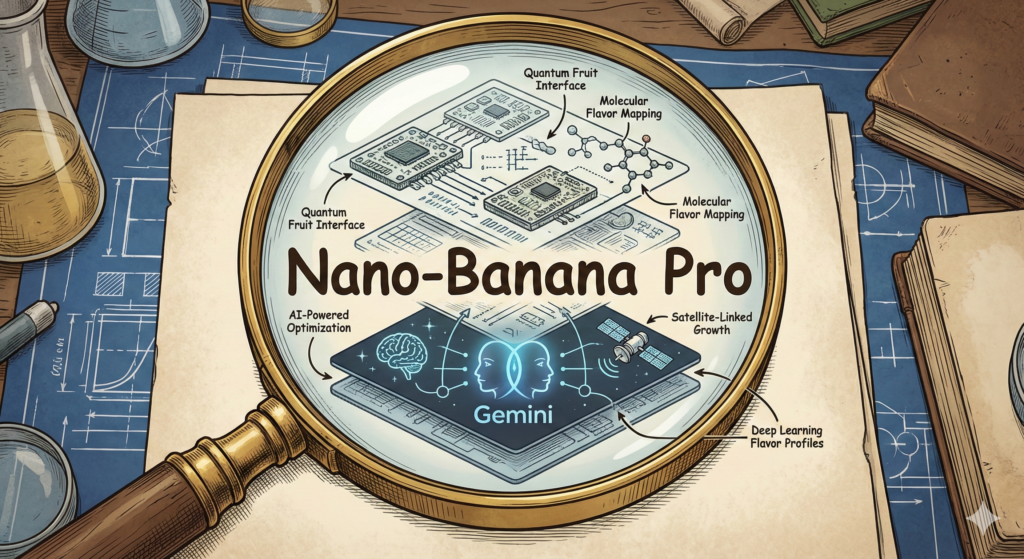
    Why Did They Name It “Nano-Banana Pro”?

    Most tech names sound like license plates. A few letters, a number, maybe “v2,” and everyone moves on. That’s why “Nano-Banana Pro” sticks out. It sounds like a snack, not software, and yet it became a real label people use when talking about a serious image model.

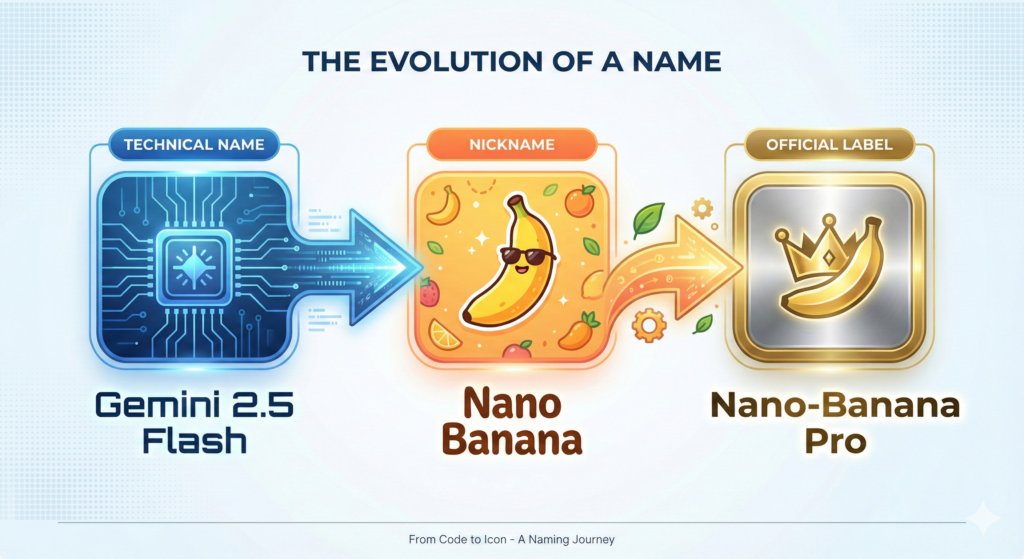
    In simple terms, Nano-Banana Pro is tied to the image model many people first met as “Nano Banana,” a nickname that circulated more widely than the technical name (often referenced as Gemini 2.5 Flash Image in developer conversations). This post explains the Nano Banana meaning, why is Nano Banana called that, and why the name later picked up a “Pro” tag.

    What “Nano-Banana Pro” refers to in plain English

    “Nano Banana” started as a human-friendly name for something that, on paper, reads like a spec sheet. In many technical references, the underlying model is associated with Gemini and its “Flash” family, which is meant to be quick and practical for day-to-day use. For background on the broader Gemini model family, see Gemini’s model overview [https://en.wikipedia.org/wiki/Gemini_(language_model)].

    So where does “Nano-Banana Pro” fit?

    • “Nano Banana” is the sticky nickname, the one people remember and repeat.
    • “Pro” usually signals a higher-tier option, like a more capable version, a premium mode inside an app, or a label that helps separate “the one everyone memes” from “the one teams build on.”

    The label also matches how people actually use these tools. The popular use cases are not abstract. They are practical, visual tasks that are easy to show in a screenshot:

    Image edits that don’t fall apart: Small changes like swapping a background, adjusting lighting, or changing an outfit without rewriting the whole scene.

    Consistent characters: Keeping the same person or mascot recognizable across multiple images, instead of getting a “new face” every time.

    Remixing photos: Turning a real photo into a poster, a comic style frame, or a cleaner restoration-like look.

    Readable text in images: Adding signs, labels, and short headlines that look intentional, not like scrambled letters.

    “Pro” fits because it signals expectation. People read it as “the version meant for heavier use,” even if the exact feature list depends on where it’s offered.

    Nano Banana meaning, “nano” plus “banana,” and why it sounds memorable

    At face value, the Nano Banana meaning is almost comically simple: nano suggests something tiny, lightweight, or fast, and banana is… a banana. It is silly on purpose.

    That silliness is the whole point. A name like “Gemini 2.5 Flash Image” is accurate, but it’s hard to repeat in a group chat. “Nano Banana” is short, rhythmic, and weird enough to stand out. It also avoids a common problem in AI naming: confusion. Many models sound the same, but nobody mixes up “Nano Banana” with anything else.

    It functions like a bright sticker on a plain box. The sticker does not explain everything inside, but people remember it.

    Why is Nano Banana called that, the short answer before the deeper story

    The short version is that “Nano Banana” began as a rushed codename used for blind testing, then it escaped into public talk because people liked both the results and the name. It wasn’t designed as a polished marketing brand first. The full story is more personal than most folks expect.

    The real origin story, a 2:30 a.m. codename made for LMArena

    The clearest explanation comes from Google itself. In Google’s account of the name’s origin, the codename was picked under pressure, late at night, because the team needed something to label a model for a public evaluation setting. That setting is often described as side-by-side testing, where models appear under hidden identities so users judge outputs without bias. In that kind of environment, a codename is a practical necessity, not a branding exercise.

    Google tells the story in How Nano Banana got its name [https://blog.google/products-and-platforms/products/gemini/how-nano-banana-got-its-name/]. The key point is simple: the name was born from the need to move fast, not from a long naming workshop.

    That timing mattered. The model’s performance started getting attention, and the name acted like a handle people could grab. When a model shows up in a testing arena and produces surprisingly good images, the community needs a quick label to compare notes. A catchy codename makes that easy.

    This is also where the “Pro” add-on makes sense later. Once a nickname becomes the common word people use, it’s hard to replace it with something bland. Over time, product naming tends to bend toward what users already say out loud.

    A mashup of personal nicknames, “Nano” plus “Naina Banana”

    The most human part of the story is that “Nano Banana” was not pulled from a random-word generator. It grew out of personal nicknames connected to Product Manager Naina Raisinghani, as Google describes in its write-up.

    Friends called her “Naina Banana,” and “Nano” was used as shorthand tied to her height and her love of computers. Put those together in a late-night sprint, and “Nano Banana” appears. It sounds like a joke because, in a way, it was. It just happened to be a joke that shipped.

    That’s also why the name feels oddly warm compared to standard AI labels. It has an inside-story vibe, like a scribble on a whiteboard that never got erased.

    Why “Nano” didn’t feel totally random for a “Flash” style model

    Even with the personal origin, “nano” also reads like it belongs in a technical family. “Nano” has long been used in tech to suggest smaller scale or lighter footprint, whether or not the model is literally tiny. For a “Flash” style model, which is framed around speed and practicality, “Nano” feels like a natural fit. It hints at quickness and efficiency, even if it started as a nickname first.

    So the name worked on two levels at once: personal and plausible. That combination is rare, and it helps explain why it stuck.

    How a placeholder name turned into the brand people actually use

    Viral names usually need two ingredients: something worth sharing, and a label that makes sharing effortless. “Nano Banana” had both.

    First, people were impressed by the outputs they could show immediately. Image models spread through examples, not through spec sheets. A single before-and-after edit or a consistent character across scenes tells the story faster than paragraphs ever could.

    Second, the name did the marketing work by itself. “Nano Banana” is easy to type, easy to remember, and funny without trying too hard. That makes it travel. A long technical name tends to get shortened anyway, and this one arrived pre-shortened.

    Coverage from January 2026 continued to amplify the story, including a recap of how the name was chosen and how widely it circulated after launch. PCMag’s reporting is one example, in here’s how the Nano Banana AI model got its name [https://au.pcmag.com/ai/115383/heres-how-googles-nano-banana-ai-model-got-its-name].

    Once a nickname becomes the default term, teams face a choice: fight it, or adopt it. Adoption often wins.

    The model’s edits got attention, the name made it easy to spread

    There is a simple pattern behind many tech nicknames. If the thing works, people talk about it. If the name is fun, more people join the conversation.

    In this case, users needed a quick label for comparisons, prompts, and shared results. “Nano Banana” became the shorthand for a specific “look” and behavior people recognized, even when the official references used more formal model names.

    That’s why the question “Why is Nano Banana called that” keeps coming up. The name sounds like a meme, but it points to a real tool people were actively using and discussing.

    “Pro” is the signal that it’s not just a meme anymore

    Adding “Pro” changes the tone. It tells users and buyers that this is meant to be taken seriously, even if the core name is playful.

    In product naming, “Pro” usually communicates one or more of these ideas:

    A higher tier: More capability, more control, or fewer limits than a base mode.

    A clearer lane: A way to separate casual use from creator or developer use.

    A stable label: Something that can become a line of products over time, not a one-off nickname.

    So “Nano-Banana Pro” reads like a bridge between two worlds: the internet’s favorite nickname, and a naming system that can live on pricing pages and in app menus.

    An infographic showing a clear flow from 'Technical Name (Gemini 2.5 Flash)' to 'Nano Banana (Nickname)' to 'Nano-Banana Pro (Official Label)', using playful yet professional graphics.

    Conclusion

    Nano-Banana Pro has a strange name for a straightforward reason. It started as a rushed codename for public testing, it came from personal nicknames, and it also happened to match the “fast and practical” feel people associate with Flash-style models. Once the model impressed users, the name spread because it was easy to repeat.

    The Nano Banana meaning is simple: small, fast energy plus a silly banana hook. And that answers the main question of why it’s called that. In AI, a name people remember can matter almost as much as the benchmarks, because memory is what turns a tool into a habit.

    FAQ:


    What exactly does “Nano-Banana Pro” refer to?

    Nano-Banana Pro is the human-friendly and widely recognized nickname for a specific, serious image model, technically associated with the Gemini 2.5 Flash family. It’s designed for quick and practical day-to-day use in image generation.

    Why was the name “Nano Banana” chosen initially?

    The name ‘Nano Banana’ emerged as a more accessible and memorable alternative to the complex technical specifications of the underlying AI model. It helped make the model relatable and easier to discuss among a broader audience.

    What does the ‘Pro’ addition signify in ‘Nano-Banana Pro’?

    The ‘Pro’ tag typically indicates an enhanced, professional, or more advanced version of the original ‘Nano Banana’ concept. It denotes improvements, specific features, or a refined iteration within the model’s development.

    Is Nano-Banana Pro related to Google’s Gemini AI?

    Yes, Nano-Banana Pro is directly tied to the Gemini model family, specifically within its ‘Flash’ series. This series is characterized by its efficiency and practicality for various image-related tasks.

  • Creative Writing Prompts to Overcome Writer’s Block Forever

    Creative Writing Prompts to Overcome Writer’s Block Forever

    You stare at the blank page, the cursor taps its tiny foot. Your coffee cools as your ideas hide. The right words feel close, then vanish. It is lonely and loud at the same time.

    Writer’s block feels like a stalled engine. You know how to drive, but nothing moves. Doubt slips in, then pressure, then silence. Many writers stop here, not because they lack talent, but because starting feels heavy.

    Prompts fix that first inch. A clear nudge gives you a scene, a voice, a choice. You get traction, then momentum, then a page that fills on its own. Small wins stack, and your mind warms up.

    In 2025, the best creative writing prompts do two things at once. They push personal growth, asking your character to face a fear, a regret, or a hard truth. They also spark world-building, asking you to place that struggle inside a surprising setting, like a city lit by new light or a village where weather never changes. Emotion meets place, and your draft comes alive.

    You will also see short, focused exercises that force clarity. Try an 81-word scene that starts with a single charged word. Or freewrite in your hero’s voice for five minutes, no edits. Some writers even use AI to toss fresh angles, then rewrite in their own style.

    You are not stuck, you are paused. With the right prompt, you can move again. Below, you will find a list of fresh prompts, rooted in personal growth and playful worlds, plus simple tips to use them daily. Use them to break the block now, then to keep it gone for good.

    Fresh Creative Writing Prompts to Ignite Your Stories

    Close-up of hands writing in a journal with a pencil on a seated lap. Photo by ROMAN ODINTSOV

    When your mind stalls, prompts give you a place to stand. Start with a strong seed, then grow the scene. For more ideas after this section, bookmark this generous list of 500 writing prompts by Written Word Media.

    Conflict Prompts for Tense Tales

    Conflict hooks the heart fast. It gives your character a pressure point, which drives plot without heavy setup.

    Try these:

    • A hidden truth: A character finds a family letter that proves they are adopted.
    • A split choice: They must choose between two loves, one safe, one wild.
    • A moral knot: Their best friend begs for an alibi they cannot give.

    These spark stakes and emotion at once. You write forward because the clock already ticks.

    Setting Prompts to Build New Worlds

    Fresh places unlock detail and tone. A vivid setting feeds your senses, then story follows.

    Start here:

    • Time for sale: A city where minutes are currency at corner kiosks.
    • No gravity: A world of tethered homes, where falling is a daily risk.
    • Endless dusk: A town stuck at twilight, crime hides in long shadows.

    Pick one rule, then list what people wear, eat, and fear. Details multiply fast.

    Personal Story Prompts from Your Life

    Real feelings cut through noise. Use your life, then bend it into fiction.

    Try:

    • Shifted lens: Rewrite a childhood memory from your sibling’s view.
    • Small courage: The day you spoke up in class and your hands shook.
    • Fear faced: The first time you drove again after a wreck.

    Authenticity makes scenes easy to write and hard to fake.

    Freewriting Prompts to Flow Freely

    Freewriting helps you dodge your inner critic. Set a timer for five minutes, no stops, no edits.

    Prompts:

    • Visit the one place you dream about, and narrate what you touch.
    • Describe your first true joy, using all five senses.
    • Write in your hero’s voice about a bad morning.

    Keep your pen moving. Flow beats perfection.

    Word Association Prompts for Surprise Twists

    Random words force new links, which jumpstart plot turns and images.

    Try this set:

    • Write a story using cloud, piano, butterfly.
    • Make each word repeat in a new role: object, metaphor, clue.
    • End with one word changed in meaning.

    You will spot connections you did not plan. For more ways to use prompts with intent, see this guide on using prompts to unstick writer’s block.

    Pick one prompt now. Set a short timer. Start the scene before your courage cools.

    Smart Tips to Use Prompts and Write Without Limits

    A person journaling in a cozy room with a cup of coffee. Warm and inviting atmosphere. Photo by Letícia Alvares

    Prompts turn pressure into play when you use them with intention. Treat them like gym reps for your voice. Keep it light, keep it fast, and let the page catch you.

    • Mix types: Rotate conflict, setting, and personal memory prompts. Variety keeps your brain curious and your prose fresh. For routine building ideas, see these simple strategies for a daily writing habit.
    • Set timers: Work in tight bursts. Try 5, 10, or 15 minutes. Short windows lower fear and raise focus.
    • Experiment: Switch point of view, tense, or format. Turn a scene into a list. Write dialogue only. Change gives you new angles fast.
    • Have fun: Bring play back. Swap genres for a day. Write a thriller as a poem. Joy beats grind every time.
    • Combine ideas: Merge two prompts into one scene. Add one odd detail. A single twist can open a whole story.

    Keep the wins visible. A cheap calendar and a marker will do. Mark every day you write, even for five minutes. A chain of Xs feels good and keeps you honest. If you want weekly variety, grab a quick boost from this set of short timed prompts.

    Build a Habit That Sticks

    Tie prompts to a cue you already love. Coffee, a morning walk, or the quiet right after dinner. Your brain links the cue to the writing, and starting gets easy.

    Try this simple routine:

    1. Pour coffee, open your journal, set a 10-minute timer.
    2. Pick one prompt and start mid-scene, not at the beginning.
    3. Underline one sentence you like. Log the date and word count.

    Take the journal on walks. Speak a line into your phone, then write it later. Track progress in the margins. Circle strong verbs. Star brave choices. Over time, you will see growth on the page and in your voice.

    Start today. Pick one prompt, set a tiny timer, and write one honest line.

    Conclusion

    Prompts move you past the hard start. A sharp scene seed, a short timer, and a steady routine turn doubt into words. Mix conflict, setting, and personal memory, then keep your hand moving. You train your voice, build pages, and end the stop‑start cycle.

    One true story to keep close. John Steinbeck often felt blocked, then he wrote as if he was talking to one person. That small shift calmed the noise and freed his style. The same spirit lives in a daily page, a five minute sprint, or a single bold line. Habits carry you when mood fades.

    Use what you learned here to keep the engine warm. Pair a prompt with a timer, end in the middle of a sentence, and show up again tomorrow. Read a page, take a short walk, and return with fresh eyes. The blank page loses power when you arrive with a plan.

    Pick one prompt today and write for ten minutes. Save one sentence you like. Do it again tomorrow. Creativity waits for no one, it meets the writer who starts.

    FAQ:
    What is writer’s block and why does it happen?

    Writer’s block is a period of inability to produce new writing. It often stems from fear of failure, perfectionism, lack of inspiration, mental fatigue, or the pressure of a blank page. Prompts help bypass these mental hurdles by providing a clear starting point.

    How can creative writing prompts help overcome writer’s block?

    Prompts provide a structured ‘nudge’ that reduces the intimidation of a blank page. They spark imagination, offer specific scenarios, characters, or themes, and can gently guide writers into a flow state, making the creative process less daunting and more enjoyable.

    How often should I use writing prompts to maintain momentum and prevent future blocks?

    Consistency is key. Aim for short, focused writing sessions daily (e.g., 15-30 minutes) using prompts. Even small wins accumulate, training your brain to generate ideas regularly. This habit-building approach helps maintain creative momentum and keeps writer’s block at bay for good.

    What kind of prompts are most effective for personal growth and world-building?

    Effective prompts for personal growth ask characters to confront fears, regrets, or hard truths, pushing emotional boundaries. For world-building, look for prompts that place these struggles within surprising or unique settings, blending character development with immersive environments, like ‘a city lit by new light’ or ‘a village where weather never changes.’

  • Create Viral Videos with AI: Prompt Hacks That Actually Work

    Create Viral Videos with AI: Prompt Hacks That Actually Work

    What if anyone could make fun, shareable videos that blow up online, using simple AI tools? You can. Today’s apps can write the script, build the visuals, add a voice, and slap on captions in minutes. No studio, no fancy gear, just your idea and a smart prompt.

    AI makes video creation fast because it handles the heavy lifting. Type what you want, pick a style, and get a ready-to-post clip. New tools even offer hooks, pacing, and subtitles by default, so beginners can move from idea to upload in one session.

    The real cheat code is in your prompts. Think of prompt hacks as secret instructions that tell the AI exactly what vibe, timing, and visuals to produce. Ask for a strong hook, keep it short, set a clear mood, and call out the format for TikTok, Reels, or Shorts.

    In this post, you’ll get the exact prompts and tweaks that boost watch time and shares. You’ll see which tools are fastest for quick wins, which give you the best look, and how to guide them with simple, repeatable scripts. By the end, you’ll have plug-and-play prompts, time-saving tips, and a posting plan that helps your next video hit. Ready to try one today?

    Pick the Best AI Tools to Build Your Videos Quickly

    You do not need a studio to post scroll-stopping clips. These AI tools speed up scripting, visuals, voice, and edits, so you can publish more often with a tighter look. Use them to test hooks fast, keep your style consistent, and stack more wins per week.

    InVideo AI: Turn Ideas into Full Videos in Minutes

    InVideo AI turns a prompt into a ready-to-share video with script, stock shots, captions, and music. You also get huge stock media, team comments, and simple customization for colors, fonts, and layouts. It shines for social clips that hit hard in the first three seconds.

    • Quick win: paste your hook, set length to 20–30 seconds, and pick vertical.
    • Try the AI generator to auto build shorts from text with subtitles and B-roll. See the tool here: InVideo AI video generator.
    • For more formats and presets, check the InVideo video maker page.

    Canva: Easy Edits for Eye-Catching Social Posts

    Canva is ideal for mixing video with bold graphics, captions, and stickers. The template library is huge, and the AI tools can resize, remove backgrounds, and suggest layouts that fit TikTok, Reels, and Shorts. That polish earns more saves and shares.

    • Quick win: start with a trending Reels template, swap in your clips, then add punchy text on beat.
    • Use the Canva AI Video Editor to auto-cut dead space and add music that matches the pace.

    AI Studios: Add Human-Like Avatars to Your Clips

    AI Studios by DeepBrain AI gives you human-like avatars with natural text-to-speech in many languages. Pick a template for a product pitch, quick ad, or explainer, then type your script. Personal touches like names, on-screen captions, and brand colors make it feel real.

    • Quick win: open with an avatar greeting, then cut to product shots with captions and a call to action in the last five seconds.

    Google Veo and Runway: Pro Videos from Simple Prompts

    Use Google Veo for crisp, cinematic clips from text prompts, then polish inside Runway. Veo helps with motion, lighting, and style. Runway adds timeline edits, inpainting, upscaling, and text-to-video that is great for variations.

    • Quick win: prompt Veo for a 5-second hook shot, then finish the 20-second piece in Runway.
    • Fast viral ideas: before-and-after reveals, listicles with B-roll, meme remixes with bold captions, or quick duets that stitch a reaction.

    Use These Prompt Hacks to Make AI Videos Pop

    You do not need long scripts to keep people watching. Strong prompts set the tone, pick the best shots, and time the beats. Short-form viewers stick around when the opening hits, the story flows, and the visuals feel tight. Data backs it up. Nearly 6 in 10 short videos get watched for 41 to 80 percent of their length, so your first seconds and pacing matter a lot. See more in these short-form video statistics. Also, TikTok’s monthly time spent is massive, which means a great hook can spread fast. Check the latest attention span stats across platforms.

    Hook Viewers Right Away with Strong Openings

    Smartphone displaying a captivating short-form video generated by artificial intelligence, with social media engagement icons

    Your opening should do one of three things: share a surprising stat, crack a quick joke, or ask a simple question. That primes the viewer to wait for the payoff.

    • Keep it to one sentence.
    • Add a visual cue in the first second.
    • Promise a result the viewer wants.

    Example prompt for InVideo AI: Produce a high-impact, 20-second vertical video specifically for Instagram Reels, designed to educate quickly. Opening Hook: Immediately display on-screen text: "You’re losing 70% of views in 3 seconds." Visual Transition: Instantly cut to rapid B-roll footage of individuals scrolling on mobile devices. Narrative & Solution: Feature a witty narrator introducing the solution: "Let’s fix that in 3 steps." Audio & Visual Style: Employ bold, highly legible captions, sharp, punchy sound effects, and an energetic pop music track at 120 BPM to maintain engagement. Concluding Message: End with a prominent title card clearly stating the key takeaway: "Hook, Pace, Payoff." Mandatory: Enable auto-captions.

    Tell Stories That Keep People Watching

    Viewers stay for tension and payoff. Ask the AI for a simple arc: setup, problem, solution, result. Add emotion words to guide tone.

    • Use time boxes: 5s setup, 10s middle, 5s payoff.
    • Call out the feeling for each beat, like surprise, relief, or pride.

    Example prompt for Runway: Craft a high-impact 25-second social media video concept, designed with a bright and modern aesthetic, showcasing a creator's journey from a common trend mishap to mastery. Opening (0-5s, Engage Curiosity): The creator attempts a popular, visually appealing trend but encounters an immediate, relatable setback or humorous blunder. Mid-Section (5-15s, Build Tension/Solution): Present three distinct, rapid-fire visual demonstrations of corrective actions or expert tips, utilizing quick cuts and informative on-screen graphics/overlays to highlight the solutions. Climax (15-25s, Deliver Relief/Impact): A compelling before-and-after split-screen reveals the significant, polished transformation, emphasizing the successful outcome. Production Style: Maintain subtle, organic camera motion. Utilize warm, inviting lighting throughout. Feature a confident, instructional voiceover. Implement dynamic, verb-triggered kinetic typography for captions.

    Boost Appeal with Smart Visuals and Sounds

    Write what you want to see and hear. Name colors, angles, textures, and music mood. Ask for seamless stock, not random clips.

    • Use 1 color family and 1 font for brand recall.
    • Call out sound hits that match on-screen actions.

    Example prompt for Canva: Produce a dynamic 30-second vertical video designed for social media Reels, showcasing hands-on professional work. Integrate your logo prominently. Feature three distinct stock clips depicting detailed, hands-on work, complemented by concise, bold text overlays that highlight key messages. Adhere to an electric blue and white color palette, using Montserrat font for all text. Implement energetic swipe transitions synchronized precisely with the beat of a modern hip-hop track featuring light bass. Position captions mid-screen, utilizing white text with a black shadow for optimal readability. Conclude the video with your custom voiceover delivering the tagline. Ensure the final export includes burned-in captions and is formatted with safe margins suitable for Instagram Reels.

    Turn Your AI Videos into Viral Hits with Smart Strategies

    Close-up view of a robotic arm equipped with a video camera, showcasing modern technology. Photo by Pavel Danilyuk

    You do not need luck to go viral. You need smart timing, clear prompts, and a push for comments and shares. Post short tests first, follow trends with your twist, and keep a steady schedule. Then use AI to read the room fast and adjust.

    • Stand out with a fresh angle: remix a trend with your brand voice or a quick demo.
    • Post at peak times: reach more people when your audience is active.
    • Spark comments: end with a question or a tag prompt.
    • Stay consistent: train the algorithm with steady, quality posts.

    Time Your Posts for Maximum Reach

    Timing is a multiplier. Aim for when your viewers are scrolling, not when you have free time. Use your analytics to spot spikes. If you are new, start with industry ranges, then tune by audience data. See broad posting windows in this guide on the best times to post by platform.

    Use AI to scan trends and plan fast:

    • Ask a chatbot to summarize top sounds and topics in your niche today.
    • Pull your last 10 posts, then have AI flag the top hour blocks and common traits.
    • Draft a weekly posting plan with 2 to 3 time slots per platform.

    Try: Review my last 20 Shorts. List the top 3 days and top 3 posting hours that drove the most watch time and new viewers. Suggest a 2-week schedule with A/B times.

    Post short clips first, like 8 to 15 seconds, to test your hook and topic before you build a longer cut.

    Get Shares by Encouraging Interaction

    Views spread when people respond. Tell them what to do, in a way that fits your story. Add the nudge in the last 3 to 5 seconds while the payoff is fresh. For more ideas on CTAs that get replies, check this guide to creating engaging social content.

    Ways to prompt action:

    • Ask a choice: “Team A or B?”
    • Invite tags: “Tag a friend who needs this.”
    • Prompt saves: “Save this for your next shoot.”
    • Open a loop: “Part 2 tomorrow, comment ‘Part 2’ if you want it.”

    AI prompt examples to add CTAs naturally:

    • Craft a friendly outro (max 12 words) including one question and one clear call-to-action.
    • Generate two distinct, non-salesy concluding lines for a piece of informational content, each designed to genuinely invite reader comments and foster thoughtful discussion. Focus on open-ended questions or invitations that encourage personal reflection or sharing of experiences.
    • Craft a concise and impactful social media caption for a [TYPE OF POST, e.g., 'new product launch', 'event announcement', 'blog promotion']. The caption should feature an attention-grabbing opening line, a single, unambiguous call-to-action (e.g., 'Shop Now', 'Learn More', 'Register Today'), and exactly three specific, low-competition hashtags relevant to [INDUSTRY/THEME]. Ensure the output clearly delineates the hook, CTA, and hashtags.

    These steps, plus strong prompts, help your clips earn watch time, spark comments, and grow fast.

    An abstract representation of an AI brain, with data streams flowing into a visual representation of a short, engaging video clip

    Conclusion

    You have the pieces you need. Tools like InVideo AI, Canva, AI Studios, Google Veo, and Runway make the build simple, prompts shape the hook and pacing, and smart timing and CTAs push shares. Short, clear, and punchy wins more watch time, then your posting plan compounds results.

    Pick one tool and one prompt hack, and try it today. Start with a 15 to 30 second test, add bold captions, and close with a clean ask. Post, review the numbers, then tweak the hook or beat timing on the next cut.

    There is real joy in watching a clip take off, comment by comment, share by share. That rush is closer than you think.

    Drop your first AI video in the comments. Tell us the prompt you used and what you would change next time.

    FAQ:
    What kind of AI tools can help me make viral videos?

    AI tools range from script generators (like ChatGPT), video creators (like InVideo, Descript, RunwayML), voiceover artists, and subtitle generators. Many platforms now integrate these features for an all-in-one solution, simplifying the video creation process.

    How do AI prompts make my videos go viral?

    Smart AI prompts act as blueprints, guiding the AI to generate content with specific viral elements: strong hooks, fast pacing, trending styles, and optimized formats for platforms like TikTok or Reels. They ensure consistency and relevance to current trends.

    Do I need technical skills to create AI-powered viral videos?

    No, that’s the beauty of it! Modern AI video tools are designed for ease of use, often with intuitive interfaces. If you can type a clear, descriptive prompt, you can create a video. The focus is on your idea and the prompt, not complex editing software.

    What’s the ‘real cheat code’ mentioned for AI video creation?

    The ‘real cheat code’ lies in mastering your prompts. By using specific instructions for vibe, timing, visuals, hooks, and desired platform formats (TikTok, Reels, Shorts), you can direct the AI to produce content highly optimized for virality.

  • Free ChatGPT Prompt Packs: Templates for Success (2026)

    Free ChatGPT Prompt Packs: Templates for Success (2026)

    ChatGPT can speed up almost any daily task, from drafting emails to planning campaigns, but it needs clear prompts to shine. When you start with a blank box, results vary. With the right template, you get focused, repeatable output that saves real time.

    That is where free prompt packs help. They are ready-made templates for writing, marketing, and business that tell ChatGPT what role to take, what data to use, and what format to return. You fill in a few details, then get consistent results without guesswork.

    Think of them like checklists for AI. A blog outline becomes a clean structure with headings. A product launch turns into emails, social posts, and ad copy that align.

    Here is a quick story. Mia, a solo marketer, used a free launch pack to map a 7-day email series, a social calendar, and a landing page brief. She finished in one afternoon, and said it saved her three hours she used to spend rewriting and fixing tone.

    In 2025, these packs matter for both beginners and pros. Starters get a clear path to ask better questions. Power users get role-specific templates for sales, SEO, customer support, and planning that they can tweak and stack.

    You will see prompts that handle outlines, briefs, reports, and scripts, plus checklists for research and QA. Many include fields for audience, brand voice, and goal, so you keep control of the output. Use them as is, or adjust and save your own set.

    Up next, the top free prompt packs for writing, marketing, and business, plus simple tips to customize them for your workflow.

    Why Free ChatGPT Prompt Packs Boost Your Success

    Free prompt packs take the guesswork out of AI. You get proven templates that guide ChatGPT to produce consistent, on-brand output without endless trial and error. In 2025, when your calendar is packed, that means faster drafts, fewer rewrites, and more time for real work. Bloggers lock in SEO structure. Marketers spin up campaigns. Founders get plans and summaries that read clean and clear.

    Save Time and Cut Frustration

    You no longer start from scratch. Prompt packs ship with tested templates, so you skip the messy part of figuring out what to ask. Vague prompts lead to vague results. Clear templates produce clear output.

    Try this simple shift:

    • Instead of: “Write emails for my product launch.”
    • Use a pack’s sequence prompt: Act as a lifecycle email strategist. Create a 5-part launch sequence for [product], targeting [audience]. Use [brand voice], include subject lines and preview text, and add one CTA per email.

    Result, you get a tight series with structure, tone, and calls to action, ready to paste into your ESP. Busy week? You can go from idea to draft in minutes. That means your Monday planning block now fits emails, a landing page outline, and a social caption set without stress.

    If you want real-world inspiration for campaign prompts, check a curated list like Best 25 ChatGPT Prompts for Marketing in 2025.

    Get Tailored Results for Your Goals

    Good packs cover niches, from writing and marketing to sales, self-improvement, and operations. They help you match outputs to your audience, product, and tone.

    • Role-play prompts: Make ChatGPT act like an SEO strategist, email copywriter, or project manager. You get expert-level structure with your inputs layered in.
    • Audience alignment: Set persona, pain points, and benefits, then keep that thread across blogs, emails, and ads.
    • Customization: Swap in your brand voice, format, and length. Save a “house style” version with your rules for readability, grade level, and banned phrases.

    Example wins:

    • A blogger uses an SEO brief prompt to map keywords, headings, FAQs, and internal links, then drafts faster with fewer edits. For more prompt ideas to adapt, see this large reference list: 500+ Best Prompts for ChatGPT (Ultimate List for 2025).
    • A marketer plugs in an email sequence prompt to generate hooks, angles, and subject line tests that match the brand and campaign goal.

    You get consistent output, faster iterations, and templates you can refine over time. That is how small daily wins stack into big results.

    Top Free Prompt Packs to Grab in 2025

    If you want quick wins, start with proven packs and tweak them to fit your style. Most of these are free, updated often, and easy to remix. I also like LivePlan’s business starters for planning and TechPoint’s 300 for productivity, both handy for day-to-day work.

    GitHub’s Awesome Collection for All Users

    The classic GitHub list is open source, broad, and battle tested. You get prompts for many AI models, not just ChatGPT, and the community ships edits often. Beginners can fork it, add their own prompts, and build a personal library over time. Check the main repo here: f/awesome-chatgpt-prompts.

    What you will find:

    • Roles and formats for writing, coding, research, and study
    • Community contributions, so fresh ideas show up weekly
    • Easy customization, just copy, adapt, and save

    RightBlogger’s Prompts for Creative Writing

    RightBlogger shares 25 free prompts built for writers who want clean drafts fast. You get blogging, copy, and fiction templates with SEO intent baked in. The set helps you nail topic focus, headings, and search-friendly language that ranks.

    Highlights:

    • Blog outlines and briefs that map headers, FAQs, and internal links
    • Copy prompts for hooks, intros, CTAs, and edits
    • Fiction starters to spark plots, scenes, and dialogue

    Grab them here: 25 Best ChatGPT Prompts for Writing.

    GodOfPrompt’s Massive Library of 500+

    This giant pack covers almost every topic you can name. It shines with expert simulations, like acting as a senior copywriter, interviewer, strategist, or editor. Use it to draft faster, pressure test ideas, or prepare interviews and surveys.

    Why it works:

    • Huge variety, easy to scan
    • Role prompts that structure output like a pro
    • Strong starting points for repeatable workflows

    Team-GPT’s Marketing Essentials

    Marketers get 25 prompts ready for SEO, social, and email. Use them to plan content, build calendars, and ship campaigns with less back-and-forth. The set fits daily tasks, from keyword maps to subject line tests.

    What you get:

    • SEO prompts for briefs, outlines, and on-page fixes
    • Social prompts for hooks, formats, and captions
    • Email prompts for sequences, angles, and A/B tests

    Pick one today, run it with your brand voice, and save your best version.

    Simple Steps to Use Prompt Packs Effectively

    Prompt packs work best when you treat them like starting points, not final scripts. Pick a pack that fits your task, add the right context, then test and tweak until the output matches your brand. In 2025, clear inputs, examples, and guardrails produce stronger results with fewer edits.

    Here is a simple flow that keeps you fast and accurate:

    1. Choose a pack aligned to your goal.
    2. Add details about audience, tone, and format.
    3. Include examples and rules that show what good looks like.
    4. Run a draft, then refine with follow-ups.
    5. Combine prompts when the task has multiple parts.

    You can skim official advice on clarity and iteration here: Prompt engineering best practices for ChatGPT.

    Customize Prompts to Fit Your Style

    Generic prompts give generic results. Add your voice, audience, and formatting rules so the model writes like you.

    • Audience: Who is this for, and what do they care about?
    • Tone: Friendly, concise, confident, witty, or serious.
    • Format: Word count, headings, bullets, CTA, and any banned phrases.
    • Context: Product, goal, source notes, or key facts.
    • Example: Paste a short sample that shows the style you want.

    Try this structure:

    • Role: Act as a [role].
    • Task: Create [deliverable] for [audience] to [goal].
    • Voice: [tone], avoid [banned items].
    • Format: [length], [sections], [CTA].
    • Example: “Here is a sample paragraph I like: […]”

    For deeper control, set standing rules in your chat settings. See this guide on making instructions stick: Best Custom Instructions for ChatGPT.

    Review and Refine Every Output

    Never publish a first pass. Check facts, tone, and structure. AI can sound smooth yet miss details.

    • Scan for errors: Names, dates, data, claims, and links.
    • Fix bland spots: Ask for stronger verbs, sharper hooks, or tighter focus.
    • Iterate: Use follow-ups like, “Tighten to 120 words,” or “Add two examples.”
    • Combine prompts: Brief, outline, draft, then edit. One step per prompt keeps quality high.

    Quick example, blog idea to draft:

    1. Use an “idea generator” prompt for 10 topic ideas.
    2. Pick one and run an “SEO outline” prompt with H2s and FAQs.
    3. Feed the outline into a “draft” prompt with your voice and length.
    4. Edit for accuracy and clarity. Add sources where needed.

    Keep a small library of your best versions. Use them daily, and your output gets faster, cleaner, and more on-brand.

    Conclusion

    Free prompt packs turn a blank chat into a working system. You get proven templates, clear roles, and repeatable formats that cut draft time, reduce rewrites, and keep your voice steady across blogs, emails, and briefs. That is the simple edge in 2025, speed with quality you can trust.

    Start small today. Pick one pack from the list above, drop in your audience, voice, and goal, then run a single task like an SEO outline or a 5-part email sequence. Save the best version, test it on your next task, and build a tiny library you reuse every week.

    If you want momentum, stack two prompts for multi-step work. Outline, then draft. Brief, then edit. The gains add up fast, and you keep control of tone and structure at every step.

    Grab one free pack now and experiment for 15 minutes. Share your first win in the comments, or subscribe for more practical AI tips and new prompt packs as they drop. Your next draft can be faster, cleaner, and on-brand, and you can get there today.

    FAQ Section
    What are free ChatGPT prompt packs?

    Free ChatGPT prompt packs are collections of pre-written templates designed to guide ChatGPT, ensuring specific, consistent, and high-quality outputs for various tasks like writing, marketing, and business operations.

    How do prompt packs save time?

    By providing ready-made structures and instructions, they eliminate the guesswork of starting with a blank prompt, leading to focused results faster and reducing the need for extensive rewriting or editing.

    Can I customize these free prompt templates?

    Yes, most free prompt packs are designed to be highly customizable. You can adjust fields for audience, brand voice, and specific goals, or even create and save your own modified versions for future use.

    Who benefits most from using ChatGPT prompt packs?

    Both beginners and experienced users benefit significantly. Beginners get a clear path to better AI interaction and consistent results, while pros can streamline role-specific tasks, enhance output consistency, and scale their AI usage efficiently.

  • Best AI Prompt Sharing Platforms for Team Learning

    Best AI Prompt Sharing Platforms for Team Learning

    What changed when tools like ChatGPT moved into daily work? Teams now learn, test, and improve ideas together, faster than before.

    AI prompt sharing platforms make that possible. They are simple online spaces where people post prompts, remix them, and record what works. Think shared libraries, with versions, notes, and examples that anyone on the team can use.

    These platforms matter for collaborative learning. They help teams build shared skills, spark new angles, and keep a steady quality bar. They cut repeat work, speed up onboarding, and make results easier to reproduce. The best ones support comments, ratings, and quick reuse across tools.

    In 2025, more teams use AI every day, so prompt sharing is rising fast. You will see tighter team features, better search, and clearer guidance built in. The goal is simple, capture what works and spread it across the group.

    This guide shows you where to start and what to pick. We will cover FlowGPT and PromptHero for open libraries and community learning, Team-GPT and PromptDrive for structured team workflows, and AI Parabellum for skill building. We will also note when PromptBase makes sense if you need ready-made prompts.

    Why AI Prompt Sharing Platforms Boost Team Learning

    Teams grow faster when they can see how others think. Prompt sharing platforms turn individual experiments into a shared playbook. Beginners learn by reusing proven prompts, while experts refine and annotate them for the next person. The result is less guesswork, more repeatable wins, and a shared language for working with AI.

    Team collaborating on robotics prompts and testing outputs
    Photo by Pavel Danilyuk

    A design team can post an image-generation prompt, track versions, and explain why a small change improved lighting or style. Others apply it to different tools and models, compare results, and post feedback. Over time, the library becomes a shared R&D lab. Teams that invest in this habit cut duplicate work and lift quality together. Early data supports the trend, as shared prompt libraries reduce rework and speed onboarding, according to this overview on why every team needs shared prompt libraries.

    Key Features to Look for in Prompt Sharing Tools

    Look for features that turn one-off ideas into steady team practices:

    • Community forums: Open threads for clarifying intent, sharing edge cases, and posting examples. This creates context, not just text.
    • Shared workspaces: Real-time edits, comments, and approvals keep prompts clean and current for the whole team.
    • Version control: Track what changed, why it changed, and who changed it. Roll back when needed.
    • Model integrations: One-click runs with ChatGPT or Claude lower friction and improve adoption.
    • Free tiers: Let small teams test the workflow before scaling.
    • Tags and search: Make it easy to find prompts by task, audience, tone, or model.
    • Guardrails: Templates, prompt checklists, and usage notes reduce risky outputs.

    Teams benefit most when these features align with daily workflows. For broader collaboration context, see this guide to AI collaboration tools that scale with workflows.

    How These Platforms Save Time and Reduce Errors

    Reusing tested prompts cuts setup time and reduces guesswork. Group reviews catch weak instructions and risky phrasing before they spread. That means better outputs with fewer rewrites.

    Example: a marketing team needs product launch copy. A shared prompt includes audience, tone, claims to avoid, and a CTA checklist. A teammate flags vague legal language, adds a disclaimer rule, and links approved brand terms. The team runs the latest version and gets clean, on-brand drafts in minutes instead of hours. No messy rewrites, no off-voice copy.

    This cycle turns every project into a lesson. People see what worked, why it worked, and how to apply it. Over time, teams build shared standards, learn faster, and produce consistent AI results.

    Top AI Prompt Sharing Platforms for Teams in 2025

    The right prompt sharing platform helps teams learn faster, align on standards, and reuse what works. Here are five strong picks for 2025, each with a different focus, from open community libraries to enterprise-grade testing.

    Young woman presenting on digital evolution concepts like AI and big data in a seminar.
    Photo by Mikael Blomkvist

    PromptHero: Build Connections and Share Prompts Easily

    PromptHero feels like a social network for prompt engineers. It hosts millions of prompts across text and image models, with profiles, comments, and saved collections. A built-in job board helps specialists find work, and pro tools offer analytics and profile boosts for creators. Explore the library and community on the PromptHero official site.

    • Pros: Strong community focus, rich discovery, career support through jobs and profiles.
    • Cons: Advanced analytics and pro perks cost extra.
    • Collaboration: Teams benefit from open discussions, ratings, and easy sharing of tested prompts.

    How it helps teams in 2025: new hires can browse high-quality prompts by model and task, then adapt them with comments from peers. Analytics help track what gets traction inside your org. It is a simple way to build a shared language, learn from experts, and keep morale high through visible wins.

    FlowGPT: Free Access to a Huge Prompt Library

    FlowGPT is a community-driven repository with real-time updates and no fees. It is ideal for rapid discovery across use cases like writing, coding, search, and agents. The feed moves fast, so you can spot new patterns and test them the same day. Start browsing on the FlowGPT official site.

    • Pros: Free access, large and diverse prompt collection, fast updates.
    • Cons: Fewer advanced team tools, lighter governance.
    • Collaboration: Open sharing and quick contributions make it easy to swap ideas and examples.

    Fit for small teams: the zero-cost model supports group learning sprints, hack days, and weekly prompt swaps. Teams can favorite prompts, track what works, and spin up a shared doc to collect tweaks. You get speed and variety without budget friction.

    PromptDrive: Organize and Iterate Prompts in One Workspace

    PromptDrive centralizes prompts for multi-model work. Teams connect prompts to ChatGPT, Claude, and Gemini, then organize them by project, tag, or workflow. Versioning keeps a clean history of what changed and why. Sharing is simple, so people can test and refine prompts inside the same space.

    • Pros: Multi-model support, structured organization, quick sharing and reuse.
    • Cons: Some limits by model or provider tier may apply.
    • Collaboration: Shared spaces let teammates comment, propose edits, and record outcomes.

    The value is in iteration. Teams can run A/B tests, log results, and standardize best prompts across models. This reduces drift, keeps your library current, and helps people learn from small changes. It is a strong fit for groups that care about repeatable results and fast feedback loops.

    Team-GPT: Create Consistent Prompts for Group Use

    Team-GPT focuses on structure and consistency. A shared workspace and prompt builder help teams define clear patterns, with fields for goals, constraints, tone, and examples. Templates reduce guesswork, so outputs look and feel the same across projects.

    • Pros: Saves time with templates, produces uniform results across the team.
    • Cons: Ties your workflow to the platform’s builder and rules.
    • Collaboration: Centralized knowledge sharing keeps prompts aligned with standards.

    This is ideal for teams that need consistency at scale. Product, marketing, and support can pull from a single, approved library. The prompt builder reduces errors and keeps quality steady. Teams learn by refining templates and documenting why changes improve outputs.

    Humanloop: Secure Testing for Enterprise Teams

    Humanloop supports privacy-first workflows with live testing and evaluation. It is built for teams that need to manage risk while improving prompts. Access controls, audit trails, and dataset management support sensitive work and regulated use cases.

    • Pros: Strong privacy and control, safe for large groups and regulated teams.
    • Cons: Custom pricing can be a barrier for small budgets.
    • Collaboration: Teams test prompts together, share findings, and protect data in the process.

    This is a good fit for professional learning environments. You can compare prompts across models, measure quality, and roll out updates with confidence. The focus on testing builds trust in your library, which makes training and onboarding smoother for new team members.

    Pick the Best Platform to Fit Your Learning Needs

    Your choice should match how your team learns and ships work. Start with team size, the models you use, and your privacy bar. Small groups often favor open libraries for speed. Larger or regulated teams need controls, testing, and audit trails. Free tiers help you try workflows without risk, then you can upgrade when collaboration scales.

    Think in layers. Discovery tools help you find ideas fast. Workspace tools standardize prompts and track changes. Enterprise tools protect data and measure quality. If you want more detail on categories and use cases, skim this overview of prompt platforms used by product teams on DesignWhine.

    Match Platforms to Your Team’s Goals and Budget

    Set a clear goal first. Pick for skill-building, project speed, or strict governance.

    • Small teams: choose FlowGPT for free access and variety. It is ideal for weekly prompt swaps, hack days, and quick wins.
    • Mid-size teams: use Team-GPT or PromptDrive to standardize templates, version prompts, and keep results consistent. For a feature snapshot of builders that support collaboration, see this guide by Team-GPT on AI prompt builders.
    • Enterprises or regulated teams: select Humanloop for privacy, access controls, testing, and audit logs.

    Budget ranges from free community use to pro seats and custom contracts. Free tiers suit early learning sprints and pilots. Pro plans add storage, roles, and integrations. Custom plans add SSO, audit, and support.

    Match tools to your stack. If you use ChatGPT, Claude, and Gemini, favor platforms that support multi-model prompts. If you handle sensitive data, require SOC 2, SSO, and role-based access.

    Start with a 2-week pilot. Run the same prompts in two tools, compare setup time, reuse, and output quality. Pick the one that shortens reviews and cuts rework.

    Tips for smooth collaboration:

    • Write a shared prompt template with goals, tone, and guardrails.
    • Use tags and owners for every prompt.
    • Review monthly, retire stale versions, and document why updates improved results.
    • Track wins in a simple log so new teammates learn fast.

    Conclusion

    Teams learn faster when good prompts are easy to find, reuse, and improve. The picks here cover that range well, from open discovery in FlowGPT and PromptHero to structured work in Team-GPT and PromptDrive, and secure testing in Humanloop. Together, they reduce rework, raise consistency, and turn trial-and-error into a shared playbook.

    Take a simple next step. Sign up for a free account on one platform, run a two-week pilot, and log wins and fixes. Standardize what works, retire what does not, and move it into your team’s workflow.

    Your turn. Share which platform you tried, what improved, and what you will test next in the comments.

    FAQ Section

    Why do teams need AI prompt sharing platforms?

    These platforms enable collaborative learning, standardize prompt quality, reduce redundant work, speed up onboarding for new team members, and improve the reproducibility of AI-generated results across the team.

    What key features should I look for in an AI prompt sharing platform?

    Look for features such as shared libraries, robust version control, rich note-taking capabilities, example usage, commenting and rating systems, quick reuse across different AI tools, and dedicated team-specific workflows.

    Are there free AI prompt sharing platforms suitable for teams?

    Some platforms offer free tiers or community versions with basic functionalities. However, dedicated team-focused solutions with advanced features like private sharing, granular access control, and extensive integrations usually come with a subscription.

    How do AI prompt sharing platforms differ from general file sharing services?

    Unlike general file sharing, these platforms are purpose-built for AI prompts. They offer specialized features like prompt versioning, testing environments, metadata tagging for easy discovery, prompt-specific templates, and direct integrations with popular AI models, which significantly streamline prompt management and iteration.

  • I Ranked Top AI Prompt Generators for Instant Results

    I Ranked Top AI Prompt Generators for Instant Results

    The right prompt can make or break your AI results. A single unclear line can waste time, budget, and ideas. A clear prompt, tuned to your goal, can unlock sharp answers, strong images, and clean code on the first try.

    That is why I use AI prompt generators. These are simple tools that help you write clear, effective prompts for models like ChatGPT, Claude, Midjourney, and Stable Diffusion. They guide tone, context, and structure, then suggest improvements so you get instant, consistent output. You save time, avoid trial and error, and hit publish faster.

    This review focuses on tools that work today, at scale. PromptPerfect stands out for fast, multi‑model optimization and batch prompts. Originality.ai offers a quick prompt builder that sparks ideas and clears writer’s block. Both align with October 2025 trends: cross‑platform support, strong defaults, and smart guardrails that reduce rewrites.

    I wrote this to help busy teams, solo creators, and product folks who want reliable results without fiddling with prompt syntax. I will show where each tool shines, where it falls short, and how to get a strong first draft in seconds. I will also point to safe starter picks, including a resource on top beginner-friendly AI prompt generators, so you can move quickly with confidence.

    You will see how AI prompt generators shape context, add role hints, and lock in style. You will get quick templates for product copy, blog outlines, UX flows, and image prompts. You will learn when to use short prompts, when to use structured formats, and how to test fast.

    If you want my free PDF, email me and I will send “110 ChatGPT productivity pack for content.” I will send it asap, no obligation.

    Key Benefits of Using AI Prompt Generators

    AI prompt generators help me move from vague ideas to clear instructions that models can follow. The payoff shows up in faster drafts, tighter structure, and consistent tone across tasks. Below, I break down the benefits I see every day when I use these tools for content, product, and design work.

    Faster Output With Fewer Rewrites

    Speed matters when I need a strong first draft. AI prompt generators structure intent, audience, tone, and constraints upfront, so I avoid guesswork.

    • Time saved: I cut ideation and setup by minutes per prompt, hours per project.
    • Tighter loops: I get usable output in 1 to 2 iterations instead of 5.

    Example:

    • Input: “Write a product update email.”
    • Optimized prompt: “You are an email copywriter for a B2B SaaS. Write a 150-word product update email for existing customers. Tone is confident and friendly. Include a headline, 3 bullet benefits, and a one-line CTA. Avoid hype. Mention the new analytics dashboard for SMB users.”

    Consistent Voice and Brand Control

    Consistency builds trust. Good generators lock in role, tone, length, and banned phrases, then reuse those patterns.

    • Reusable templates: I save prompts for blog intros, case studies, and release notes.
    • Guardrails: I set must-include details, compliance notes, and style rules.

    If you want more structure for creative work, these top free AI art prompt tools show how prompt patterns shape visual style and quality.

    Higher Quality Responses and Less Noise

    Clear prompts reduce vague output. They also cut hallucinations by forcing sources, scope, and format.

    • Evidence prompts: Ask for citations, quotes, or data ranges.
    • Scope prompts: Define what to ignore and what to prioritize.
    • Format prompts: Require tables, bullets, or sections.

    For a brief overview of benefits like accuracy, relevance, and efficiency, see this summary of features and benefits for 2025.

    Creativity on Demand

    When I feel stuck, prompt generators spark angles I would not try on my own.

    • Pattern prompts: “X but for Y,” “contrarian take,” “5 audience lenses.”
    • Style prompts: “Explain like a PM,” “technical explainer,” “product teardown.”

    For more ideas, this guide covers overcoming writer’s block and creative use cases in an AI Prompt Generator breakdown. I also keep a personal library. If you want it, email me for my free PDF “110 ChatGPT productivity pack for content.”

    You can also explore broader tools and examples in this roundup of 10 AI prompt tools for boosting creativity.

    Cross-Model Results Without Rework

    AI prompt generators adapt structure for different models and media. I can take one prompt and tune it for ChatGPT, Claude, Midjourney, or Stable Diffusion.

    • Structured fields: Audience, goal, constraints, format, tone.
    • Model tags: Add negative prompts for images or function calls for code.
    • Batch prompts: Scale one pattern across dozens of inputs.

    This reduces context loss when switching tools and keeps results aligned.

    Better Collaboration and Handoff

    Clear prompts turn into a shared spec. Teams can review, edit, and reuse them.

    • Traceability: Why the prompt works, what inputs it needs, what to avoid.
    • Versioning: Keep a changelog and note which version delivered the best result.
    • Training: New contributors get consistent outputs on day one.

    Cost Control and Measurable ROI

    Stronger prompts use fewer tokens and fewer model calls. That drops cost over time.

    • Fewer retries: Precise instructions reduce long, drifting chats.
    • Shorter outputs: Set word counts and only request useful sections.
    • Repeatable wins: Templates cut project setup and QA time.

    Quick audit checklist:

    1. Is the goal explicit and measurable?
    2. Does the prompt define audience and tone?
    3. Are must-include details listed?
    4. Is the output format specified?
    5. Are limits set for scope, sources, and length?

    Where This Helps Most

    I get the biggest gains in these workflows:

    • Content: briefs, outlines, headlines, meta descriptions, summaries.
    • Product: release notes, UX microcopy, onboarding flows, FAQs.
    • Research: synthesis, pro and con tables, source questions.
    • Images: style references, negative prompts, variant instructions.

    AI prompt generators make these steps faster, clearer, and more repeatable. When I add simple guardrails and reuse proven patterns, my first draft is often my final draft.

    Best AI Prompt Generators for Instant Prompt Creation in 2025

    When I need results on the first try, I reach for AI prompt generators that turn rough ideas into tight, model-ready instructions. The tools below focus on speed, structure, and cross-model support. They help me ship clean drafts, image prompts, and technical instructions with less trial and error.

    PromptPerfect: Fast Optimization for Multiple AI Tools

    PromptPerfect excels when I need strong prompts in seconds. I can paste a short idea, choose a model, and get a refined prompt that locks in role, tone, and format. The output is clear and ready for ChatGPT, Claude, Midjourney, or Stable Diffusion. For official details and current features, see the product page for PromptPerfect – AI Prompt Generator and Optimizer.

    What stands out:

    • Rapid refinement: It expands vague inputs into complete, structured prompts with constraints.
    • Batch processing: I feed a list of topics or keywords, then export a set of optimized prompts at once.
    • Model-aware tuning: It adds model-specific tags, image negatives, or format rules based on target output.

    Benefits for multi-model work:

    • One pattern, many variants: I set a prompt template once, then generate versions for text, image, or code tools.
    • Lower rework: Fewer rounds with each model since the prompt is tailored upfront.
    • Team speed: Stakeholders can review the optimized prompt text before any model call.

    Example workflow:

    1. Input a short brief, like “Write a 120-word product update for SMB customers.”
    2. Select the target model and tone.
    3. Generate a structured prompt with goals, key points, and a clear format.
    4. Batch apply the same structure to multiple features or audiences.

    If you want a neutral roundup for comparison, this summary of the 10 Best AI Prompt Generators In 2025 offers feature notes across tools.

    Originality.ai: Free Creative Boost for Writers

    Originality.ai offers a simple prompt builder that works without sign-up. I use it when I am stuck and need fresh angles, hooks, or outlines fast. It focuses on unique prompts that reduce repetition, which is ideal for blogs, emails, and social posts. For a helpful overview, see the guide on AI Prompt Generator.

    Why it helps:

    • No account needed: I test ideas instantly and keep moving.
    • Idea variety: It proposes multiple prompt angles to break writer’s block.
    • Clean defaults: The outputs are easy to copy into ChatGPT, Claude, or Gemini.

    Use cases I like:

    • Blog intros with a clear voice and structure.
    • Alternative headlines across tones, such as direct, witty, or analytical.
    • Short social posts that keep brand voice consistent.

    Compatibility:

    • Works well with most text LLMs, and I have used its prompts across ChatGPT and Claude with strong results.

    Taskade: Prompts Tailored for Productivity Tasks

    Taskade connects prompt creation to project structure. I build prompts inside tasks, documents, or workflows, then reuse them where work actually happens. That keeps briefs, context, and outputs in one place. It suits teams that want prompts tied to checklists, due dates, and docs.

    What I like in daily work:

    • Project-specific prompts: Prompts live next to tasks, notes, and status updates, so context never gets lost.
    • Reusable blocks: I save prompt templates for standups, meeting summaries, and sprint reviews.
    • Linked outcomes: Outputs sit in the same workspace, which makes review and revisions fast.

    Practical examples:

    • Meeting summary prompt inside each calendar-linked task.
    • Product requirements prompt template stored in the project wiki.
    • QA checklist prompts that generate test cases from user stories.

    Result:

    • Less copy and paste across tools, fewer missed details, and faster handoffs.

    HIX AI: Precision for Technical and Workflow Needs

    HIX AI shines when I need exact, task-specific instructions, especially for code, data, or structured outputs. I use it to write API call prompts, test case formats, or step-by-step procedures that require strict rules. It reduces ambiguity and keeps model responses inside the lines.

    Strengths I notice:

    • Instruction clarity: It produces prompts with clear roles, inputs, and acceptance criteria.
    • Format control: It standardizes output into JSON, tables, or numbered steps with minimal drift.
    • Developer focus: Great for error messages, log analysis, and code comments that explain tradeoffs.

    Sample patterns:

    • “You are a senior backend engineer. Return a JSON object with fields and validation notes. No extra text.”
    • “Write unit tests for this function with edge cases. Include setup, mocks, and expected outputs.”

    When the work is technical, precision saves tokens and time. Prompts that specify constraints and formats keep LLMs accurate and reduce review cycles.

    Tip: If you want my free PDF “110 ChatGPT productivity pack for content,” email me and I will send it right away.

    Tips to Maximize Your AI Prompt Generator Experience

    Strong prompts save time and reduce rework. I treat AI prompt generators like a spec builder for my tasks. With a few simple habits, I get faster drafts, cleaner structure, and fewer surprises across ChatGPT, Claude, Midjourney, and Stable Diffusion.

    Start With a Clear Intent and Constraints

    Define the job before you hit generate. State the goal, audience, and required sections. Then lock scope and length to cut fluff.

    • Goal: What must the output achieve in one sentence.
    • Audience and tone: Who it is for, plus tone hints like authoritative, friendly, or technical.
    • Format: Bullets, table, JSON, or sections.
    • Limits: Word count, what to exclude, banned phrases.

    Example intent block:

    • Goal: “Summarize a product launch for existing SMB users.”
    • Audience and tone: “Current customers, direct and confident.”
    • Format: “Headline, 3 bullets, 1 CTA line.”
    • Limits: “150 words, avoid buzzwords, no emojis.”

    For a solid primer on prompt structure, I recommend MIT’s guide on Effective Prompts for AI.

    Use Roles, Inputs, and Evidence

    Give the model a role that fits the task. Feed it the right inputs. Ask for source-backed claims when needed.

    • Role: “You are a senior technical writer,” or “You are a product marketer.”
    • Inputs: Paste snippets, user quotes, or feature notes.
    • Evidence: Ask for citations, data ranges, or quotes if accuracy matters.

    Quick template:

    • Role: “You are a B2B copywriter.”
    • Inputs: “Use these 3 features and this customer quote.”
    • Output rules: “Return 2 versions, each under 120 words, with a CTA.”

    Add Few-Shot Examples for Style and Structure

    Examples teach pattern and reduce drift. Include one strong example, then a short instruction to replicate style, not content.

    • One well-formed sample beats five weak ones.
    • Keep examples short to control tokens and cost.
    • Mark variable fields with brackets to encourage reuse.

    Example pattern:

    • “Headline: [Benefit-focused line]
    • Bullets: [3 scannable points]
    • CTA: [One action]”

    A power user tip I like is to build a simple framework first, then generate content from it. This matches ideas in this thread: AI Prompting Tips from a Power User.

    Iterate With Tight Feedback Loops

    Treat each run like a controlled experiment. Change one variable at a time so you can trace the lift.

    • Give direct feedback: “Shorten by 30 percent,” or “Add one proof point.”
    • Freeze the winning parts: “Keep the intro as-is, rework the examples.”
    • Version your prompts: V1, V2, V3 with short notes.

    I keep a simple changelog inside my docs. It makes handoff and review faster.

    Control Format for Reliable Outputs

    AI prompt generators excel when the format is explicit. Use firm output rules so results are easy to scan and compare.

    • Specify structure: “Return a table with columns: Feature, Benefit, Proof.”
    • Use clear markers: “Start with ‘Summary:’ then ‘Action Items:’”
    • For images, include subject, style, camera details, and negative prompts.

    If you focus on visuals, browse these references on Top free AI art prompt tools to sharpen style control.

    Reduce Hallucinations With Scope and Sources

    Narrow the task and ask for boundaries. This reduces fluff and factual errors.

    • Set guardrails: “If unsure, say ‘insufficient data’.”
    • Restrict scope: “Limit answers to the inputs and date range provided.”
    • Require sources for claims and stats.

    When accuracy matters, I paste source snippets and ask for a line-cited summary.

    Use Variables and Templates for Scale

    Turn winning prompts into reusable templates. Add fields for inputs so you can run them in batches.

    • Variables: {{audience}}, {{product}}, {{tone}}, {{word_count}}.
    • Library: Store prompts by task type, like intros, updates, FAQs, or release notes.
    • Batch runs: Feed a CSV or list of inputs and export results.

    I standardize naming so teams can find and reuse the best patterns.

    Match the Model and Modality

    Tune prompts to fit the target model or media. Do not copy the same prompt across text and image without adjustments.

    • Text models: Clarity, role, and stepwise instructions.
    • Image models: Detailed descriptors, lighting, lens, style tags, and negatives.
    • Code tasks: Inputs, acceptance criteria, and output format rules.

    When switching models, keep the intent and structure, then rephrase the tags and constraints.

    Measure Quality and Cost

    Track output quality and token use. Small tweaks pay off at scale.

    • Quality checklist: Goal met, structure followed, tone consistent, no banned phrases.
    • Token aware: Shorten context and examples when possible.
    • Cost control: Set word ceilings, limit variants to two or three, and stop early if output is ready.

    Simple scorecards help compare variants and lock the winner.

    Keep a Personal Style Guide

    Document your voice, format rules, and banned words. Feed it to your generator as a short, reusable block.

    Include:

    • Tone sliders, like concise, confident, and friendly.
    • Must-include brand phrases or disclaimers.
    • Format rules for headings, bullets, and tables.

    As models update, refresh the guide and archive old versions. If you want my free PDF “110 ChatGPT productivity pack for content,” email me and I will send it right away.

    For a broader view on structured prompting in 2025, this overview on prompt engineering essentials is useful for planning advanced workflows.

    Screenshot of Originality.ai's prompt builder generating creative ideas for content.

    Conclusion

    AI prompt generators turn rough ideas into clear, repeatable instructions, which lifts quality and cuts waste. In minutes, I can move from a blank page to structured prompts that fit the task, the model, and the format. The result is faster drafts, fewer rewrites, and more consistent voice across teams.

    PromptPerfect gives me refined prompts tailored for text, image, or code, with batch options that save hours. Originality.ai sparks strong angles on demand, ideal for quick hooks, headlines, and outlines. Taskade keeps prompts tied to work, so briefs, tasks, and outputs stay in one place. HIX AI locks down structure and format for technical work, which reduces drift and speeds reviews. Together, these tools deliver instant gains in clarity and speed.

    Pick one tool and run a simple test today. Take a current task, add intent, audience, and format, then generate a prompt and ship the result. Small wins compound when you reuse the best patterns.

    I am confident you will see better AI interactions once you standardize on a prompt generator. If you want extra momentum, email me and I will send my free PDF “110 ChatGPT productivity pack for content.” I will send it asap, no obligation.

    FAQ Section
    What is an AI prompt generator and why do I need one?

    An AI prompt generator is a tool that helps you write clear, effective prompts for AI models like ChatGPT or Midjourney, saving time and improving output quality by guiding tone, context, and structure. They ensure instant, consistent results and reduce trial and error.

    Which AI prompt generators are best for beginners?

    For beginners, tools like Originality.ai offer quick prompt builders to spark ideas and clear writer’s block. The article also points to safe starter picks and a resource on top beginner-friendly AI prompt generators, making it easy to move quickly with confidence.

    How do AI prompt generators help with different AI models?

    These tools offer cross-platform support, guiding you to create effective prompts tuned for specific models like ChatGPT (text), Midjourney (images), or Stable Diffusion (images). They help shape context, add role hints, and lock in style, ensuring optimal results across various AI applications.

  • ChatGPT Prompt Packs for Social Media Content Mastery (2025)

    ChatGPT Prompt Packs for Social Media Content Mastery (2025)

    Mara schedules posts at midnight, chases trends at dawn, and still sees crickets. The captions feel fine, the visuals look sharp, but comments stay quiet. The clock keeps ticking, and ideas run thin.

    ChatGPT prompt packs fix that. They are ready sets of instructions that guide the AI to write posts, captions, hooks, and content plans fast. You plug in your brand, goals, and audience, then get fresh ideas on demand.

    For Instagram and TikTok, this means scroll-stopping hooks, clean captions, and punchy scripts. You save hours, keep your voice, and spark new angles you would not try alone. Results improve when content stays consistent and on-brand.

    This post breaks down how prompt packs work, what to include, and when to use them. You will see 2025 trends like smart content calendars that pick the best times to post, and AI-generated ad ideas that fit your niche. We will share examples, setup steps, prompts to copy, and a simple plan you can use today.

    What Are ChatGPT Prompt Packs and How Do They Help Your Social Media Game?

    Prompt packs are collections of clear instructions you feed into ChatGPT to get fast, on-brand content ideas. Think of them as recipe cards for captions, hooks, stories, carousels, and even weekly plans. In 2025, they shine when text meets visuals, since you can plan captions, story frames, and image ideas in one go. A small shop owner can line up a week of posts in an hour, then tweak tone and timing to fit the audience.

    A smartphone showing the Midjourney website on its screen against a gray textured surface. Photo by Sanket Mishra

    The Basics of Building Your First Prompt Pack

    Start simple. You do not need a giant library to see results. Build a small set that fits one goal and one audience.

    1. Pick your goal. Examples: more story views, more saves, or sales from DMs.
    2. Define your audience. Say who they are and what they care about.
    3. List 5 to 7 prompts for posts you use often, like Reels, carousels, and stories.
    4. Add voice rules. Mention tone, banned words, and brand phrases.
    5. Plan visuals. Pair each prompt with a simple image or video note.

    Simple example prompt for an Instagram Story:

    • “Write 3 IG Story frames for swap in your business name, teasing a 20% weekend offer. Use one poll sticker, one tip, and one DM nudge. Keep lines under 12 words. Audience: young shoppers in your city. Goal: clicks to bio link.”

    Customize every line. Swap in your niche, city, and product terms. If you sell sneakers, mention drop dates. If you run local events, add timing and location. Start with one goal for one week to build confidence, then expand.

    For extra ideas, scan these prompt libraries and tailor them to your brand: the concise list of social prompts from Digital First AI and the broad 2025 prompt roundup at God Of Prompt.

    Top Benefits for Busy Content Creators

    Prompt packs keep your flow tight and your feed alive. You post more, stress less, and stay on voice.

    • Faster schedules: Batch a week of captions in 30 minutes. Example: a café doubles posting days without overtime.
    • Trend-ready ideas: Add a “trend check” line in your prompts. ChatGPT suggests hooks that fit current sounds or topics.
    • Clear funnel fit: Map prompts to awareness, consideration, and buy. Teaser reel, FAQ carousel, then DM-ready offer.
    • Better audience fit: Use audience notes, like slang and pain points. A student brand cut bounce and grew saves by 2x.
    • Consistent tone: Lock style rules right in the pack. Every post sounds like you, not a template.
    • Less decision fatigue: Open the pack, pick a prompt, post. You feel calm, not rushed, and you enjoy creating again.

    In 2025, packs guide both words and visuals, so your captions, story frames, and image ideas match. That unity lifts reach and makes each post easier to ship.

    Fresh 2025 Trends to Supercharge Your Prompt Packs

    Laptop user typing with digital evolution concept on screen in a modern office environment. Photo by Mikael Blomkvist

    Your prompt packs can do more in 2025. Think longer plans, sharper platform fits, and ads that stop the scroll. Blend evergreen tips with timely moments. Pair text with quick visuals for speed and impact. Want proof it works? See holiday prompts that map to real dates in guides like January 2025 social media holidays.

    Smart Content Calendars for Non-Stop Posting

    Prompts now build 30-day maps that match your products, audience pain points, and sales windows. You save time, post steady, and avoid burnout.

    • Why it works: Fewer daily decisions, more consistent reach, cleaner story arcs.
    • Mix formats: Tips, behind-the-scenes, UGC, promos, FAQs, and live reminders.

    Try: Create a 30-day calendar for a DTC skincare brand targeting acne-prone Gen Z. Include 3 reels per week, 2 carousels, 1 live Q&A, and 2 UGC reposts. Mark soft sells vs hard sells. Align with a mid-month bundle promo. Add alt-text suggestions and best posting times.

    For more templates, explore this prompt list from SocialPilot.

    Platform-Tailored Prompts for Instagram, TikTok, and More

    Right tone, right format, right length. That combo boosts saves, shares, and watch time.

    • TikTok sample: Write a 15-second script with a bold hook and 3 quick cuts for a local coffee shop. Trendy sound, on-screen captions, CTA: “Comment your go-to order.”
    • Instagram sample: Write a carousel caption with a 2-line hook, 3 value tips, and a save-worthy summary for a fitness coach. Include 3 hashtag clusters.
    • Facebook sample: Write a friendly question-led post for a neighborhood bakery. Invite comments, include an event link, and end with a simple poll idea.

    Test, track, and double down on what gets replies and shares.

    Ad Ideas and Visual Boosts That Drive Results

    Use prompts that shape tight hooks, crisp benefits, and clear CTAs. Link them to image tools or avatars for fast visuals.

    • 2025 example: Generate 5 ad variations for a 48-hour spring sale on eco sneakers. Each needs a punchy hook, 2 benefits, social proof, and a “Shop Now” CTA. Suggest a product photo plus a lifestyle shot with alt-text.

    Pair with quick visuals from your editor or stock. Expect higher clicks and leaner cost per sale when the hook and image align.

    Real Examples and Smart Tips to Get Started Today

    You do not need a massive library to see traction. Start with a few high-yield prompts, tuned to your niche, and ship posts that spark replies, saves, and clicks. Use the examples below, then tailor the voice and details to sound like you.

    Prompt Examples That Spark Ideas Fast

    Copy these and post faster. Each shows a raw prompt and a polished output you could use today.

    1. Full 14-Day Calendar, filled for Sunny Sips Coffee
    • Raw prompt: Create a 14-day content calendar for Sunny Sips Coffee in Austin. Goals: more comments and 50 email signups. Mix: 4 Reels, 4 carousels, 4 stories, 2 live reminders. Include hooks, CTAs, and basic alt text.
    • Polished post: Day 3 Reel hook: “This latte art almost failed. Here is how we saved it.” CTA: Comment your go-to order. Alt text: Barista pours heart latte art. Story idea: 2-frame poll, “Cold brew or flat white?” Live reminder: “Friday 5 PM, free tasting. Tap to get a seat.”
    1. Witty Captions for GlowNest Skincare
    • Raw prompt: Write 5 cheeky IG captions for GlowNest Skincare’s acne line. Keep under 120 words. Goal: more saves and replies.
    • Polished post: “Breakouts happen. Panic does not. Save this 3-step fix for your next flare.” CTA: Comment your skin type. Hashtags: #acnesupport #skincaretips
    1. Ad Variations for TrailLite Running Shoes
    • Raw prompt: Write 3 paid social ad captions for TrailLite. Include one pain, two benefits, one proof line, and a clear CTA.
    • Polished post: “Slips on wet paths? TrailLite grips hard. Lighter foam, drier toes. 2,341 five-star reviews. Shop TrailLite today.”
    1. Mini Campaign for CozyCrate Home Goods
    • Raw prompt: Plan a 5-day UGC drive for CozyCrate. Goal: 60 tagged photos. Add daily prompts, an incentive, and comment-focused CTAs.
    • Polished post: Day 1 caption: “Show us your coziest corner. Tag #CozyCrateHome. We pick 5 winners for a $25 gift card.” CTA: Comment your favorite candle scent.

    For extra inspiration, scan these prompt ideas from Team-GPT’s 2025 marketing list.

    Key Tips to Customize and Refine Your Packs

    Keep your pack tight, then improve it weekly.

    • Swap details for relevance: location, product names, slang, and buyer pains.
    • Test voice: short lines, clear verbs, and your brand phrases. No corporate fluff.
    • Blend text with visuals: pair captions with Canva templates, simple color rules, and alt text for clarity.
    • Brand check: tone, banned words, and CTAs that match your funnel.

    Refine in four steps:

    1. Generate: run 3 prompt variations per post.
    2. Edit: trim 20 percent, add one clear hook, one CTA.
    3. Post: schedule at peak times, pin comments when helpful.
    4. Track: watch comments, saves, and link clicks; keep winners, cut duds.

    Tie posts to goals like lead growth or UGC, not vanity metrics. Update prompts when platforms tweak features or caption length. Keep it human. Share small stories, admit lessons, and talk like a person.

    Want a head start? Grab a free starter pack idea: one calendar prompt, one caption prompt, one ad prompt, and one campaign prompt. Mix, post, and measure this week.

    Conclusion

    Mara is not chasing trends anymore. Her prompt pack runs the plan, her feed hums, and comments keep rolling.

    That is the power here. Prompt packs save hours, lock voice, and ride 2025 moves like smart calendars, platform-fit scripts, and lean ad ideas. You get steady posts, sharper hooks, and real results you can track.

    Start now. Take one prompt from this guide, plug in your brand, and publish today. Share a win in your next post, or invite replies and learn in public.

    Keep it simple, keep it human, keep it consistent. Ready to fill your feed with great posts?

    Thanks for reading. Drop your first prompt idea below, and tell us what happens. Easy mastery is closer than it looks.